Gemma Chat: Local AI Coding Agent for Apple Silicon Powered by Gemma 4 via MLX
Gemma Chat is an open-source Electron application that brings fully offline, local-first AI coding to Apple Silicon Macs. Powered by Google’s Gemma 4 running through Apple’s MLX framework, it enables developers to vibe code, build multi-file projects, and chat with an AI assistant without ever sending code or prompts to the cloud. Whether you are on an airplane, in a cabin with no cell signal, or simply privacy-conscious, Gemma Chat delivers a complete AI coding experience that runs entirely on your laptop. With support for four Gemma 4 model variants, a live preview canvas, ten built-in tools, and voice input via in-browser Whisper, this project represents a compelling proof-of-concept for the future of private, local AI-assisted development.
Key Insight: Gemma Chat achieves fully offline vibe coding by combining Google’s Gemma 4 (a ~3 GB open model) with Apple’s MLX framework, delivering local inference performance that rivals cloud-based alternatives while keeping all data on-device.
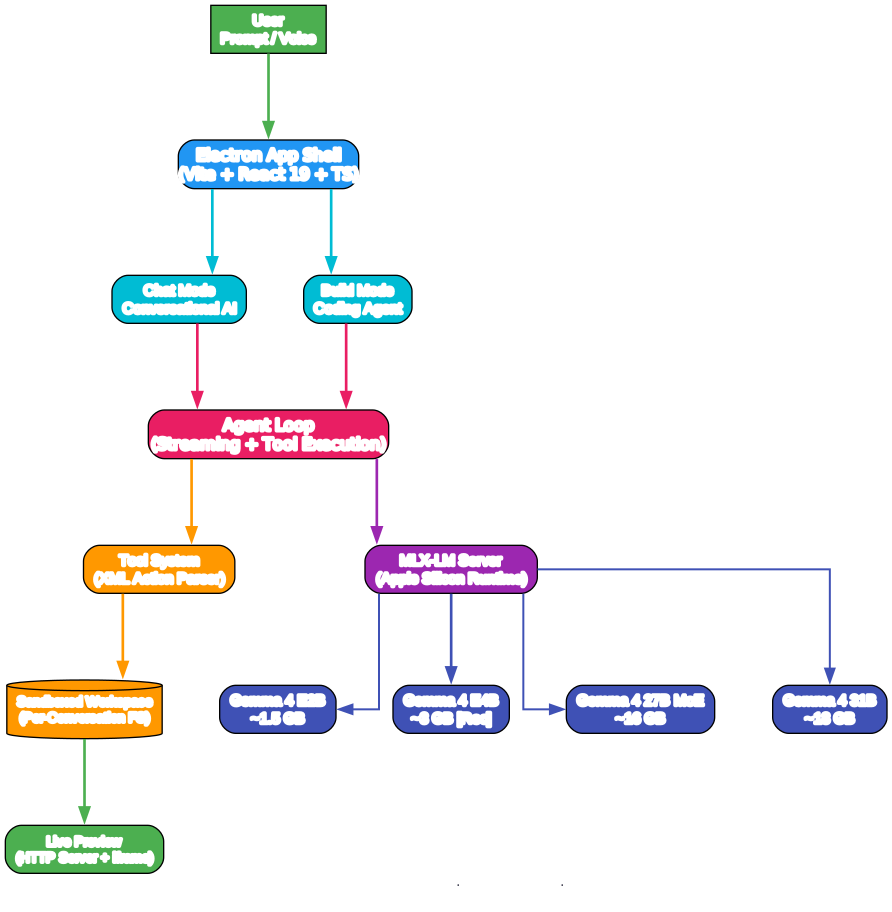
Understanding the Architecture
The architecture diagram above illustrates the layered design of Gemma Chat, which separates concerns across the UI renderer, Electron main process, MLX runtime, workspace layer, and tool ecosystem.
UI Layer (React 19 + Tailwind): The frontend is built with React 19, TypeScript, and Tailwind CSS, rendered inside an Electron window. The Chat.tsx component serves as the main layout and model switcher. The Canvas.tsx component provides the preview, code, and files tabs for Build mode. The Composer.tsx handles text and voice input. The Sidebar.tsx manages the conversation list. The Message.tsx renders chat bubbles, tool cards, and the activity bar. The Setup.tsx component handles first-run onboarding and download progress. These components communicate with the main process through Electron’s IPC bridge, ensuring secure separation between renderer and Node.js capabilities.
Electron Main Process (Node.js): The main process is the orchestration hub. The index.ts file manages the BrowserWindow, IPC handlers, and the agent loop. The mlx.ts module handles MLX-LM virtual environment provisioning, server lifecycle management, and chat streaming via an OpenAI-compatible SSE API on port 11434. The workspace.ts module manages per-conversation sandboxed filesystems and a local HTTP file server for live previews. The tools.ts module defines all ten tools, their XML action parsing, system prompts for both Chat and Build modes, and the tool execution engine.
MLX Runtime (Python): The MLX runtime is the inference engine. On first launch, the app auto-detects Python 3.10-3.13, creates a virtual environment, installs mlx-lm from PyPI, and downloads the selected Gemma 4 model from HuggingFace. The MLX-LM server exposes an OpenAI-compatible chat completions API with streaming SSE responses. The server runs on localhost port 11434 and supports up to 8192 max tokens per generation. Four model variants are available: Gemma 4 E2B (~1.5 GB) for fast Q&A, Gemma 4 E4B (~3 GB, recommended) for speed-capability balance, Gemma 4 27B MoE (~8 GB) for stronger reasoning, and Gemma 4 31B (~18 GB) for maximum quality.
Workspace Layer: Each conversation gets its own sandboxed workspace directory. Files written by the agent are stored here, and a local HTTP server serves them for the live preview iframe. The workspace supports file tree listing, external opening in Finder, and real-time change notifications to the renderer.
Tool Ecosystem (10 Tools): The agent has access to ten tools invoked via XML action blocks. Build-mode tools include write_file, read_file, edit_file, delete_file, list_files, run_bash, and open_preview. Chat-mode tools include web_search (DuckDuckGo), fetch_url, and calc. The XML format was chosen because small models handle XML more reliably than JSON function calling.
External Integrations: DuckDuckGo provides web search results. HuggingFace hosts model weights for download. Apple Silicon’s unified memory and MLX acceleration enable efficient local inference.
Data Flow: A user message enters through the Composer. The main process routes it to the MLX server via SSE streaming. As tokens arrive, the agent loop parses XML action blocks, executes tools, and feeds results back for subsequent turns. In Build mode, write_file actions stream partial content to disk every ~450ms, and the preview iframe reloads in real-time. Up to 40 tool rounds are allowed per message in Build mode, and 6 in Chat mode.
Takeaway: The architecture elegantly separates UI rendering from inference, file I/O, and tool execution, enabling a responsive experience even while the local model is generating code across multiple files and tool rounds.

Understanding the Features
The features diagram shows the six core capabilities of Gemma Chat, each with specific sub-features that make local AI coding practical and powerful.
Build Mode: Build Mode is the flagship feature for vibe coding. The agent generates multi-file projects into a sandboxed workspace, with support for HTML, CSS, JavaScript, and JSON. A live preview canvas updates in real-time as files are written. The system flushes partial file content to disk approximately every 450 milliseconds, and the preview iframe reloads automatically. The agent can produce up to 40 tool rounds per user message, enabling complex multi-step builds. The system prompt enforces modern, polished design by default, with clean typography, generous whitespace, subtle gradients, and dark-mode-friendly styling.
Chat Mode: Chat Mode provides conversational AI with tool use for research and quick tasks. It supports web search via DuckDuckGo, URL fetching with HTML-to-text extraction (truncated to ~8KB), and a calculator for numeric expressions. Up to 6 tool rounds are allowed per message. The system prompt includes the current date, time, and timezone, making the assistant contextually aware.
Model Management: Four Gemma 4 variants are supported and can be hot-swapped on the fly without restarting the app. The E2B variant (~1.5 GB) is ideal for fast Q&A and simple tasks. The E4B variant (~3 GB) offers the recommended balance of speed and capability. The 27B MoE variant (~8 GB) provides stronger reasoning for users with 16+ GB RAM. The 31B variant (~18 GB) delivers maximum quality for users with 32+ GB RAM. Models are downloaded automatically from HuggingFace on first use and cached locally.
Voice Input: Voice input is powered by in-browser Whisper via transformers.js, running entirely in WASM without cloud dependency. Users can click the microphone button in the composer to dictate prompts. The transcription happens locally in the browser, preserving privacy.
Offline-First Design: After the one-time model download, everything runs without internet. No API keys are required. No cloud dependency exists. The app works without Wi-Fi, making it ideal for travel, remote locations, or air-gapped environments. All data stays on the device, providing a privacy-preserving alternative to cloud-based coding agents.
Auto-Provisioning: The app requires zero manual configuration. It auto-detects Python 3.10-3.13, preferring Homebrew installations. It creates a Python virtual environment on first launch. It installs mlx-lm automatically from PyPI. It supports Homebrew Python out of the box. The entire setup process is guided through the Setup.tsx onboarding UI with progress indicators.
Amazing: Gemma Chat’s agent loop can execute up to 40 tool rounds per message in Build mode, enabling the model to iteratively write, read, edit, and preview files until a complete multi-file project is built from a single natural language prompt.
How It Works
Gemma Chat operates through a sophisticated agent loop that bridges local LLM inference with file system operations and real-time UI updates. When a user sends a message in Build mode, the system constructs a conversation history including system prompts, previous messages, and tool results. The conversation is sent to the local MLX-LM server via an OpenAI-compatible streaming API.
As the model generates tokens, the main process parses the stream for XML action blocks. When a complete action is detected, the corresponding tool is executed. For write_file actions, partial content is streamed to disk in real-time, and the workspace change notification triggers a preview iframe reload. After each tool execution, the result is appended to the conversation history, and a new inference request is made for the next turn. This continues until the model stops generating actions or the maximum round limit is reached.
The system prompt for Build mode is carefully engineered to produce high-quality output. It instructs the model to start coding immediately in the first response, never to reply with only a plan, and to emit one action per response followed by a stop. It enforces multi-file structure for non-trivial projects, with separate index.html, style.css, and app.js files. It also includes strict rules about the XML content format, prohibiting markdown code fences inside content tags and requiring immediate file closure.
Important: The app requires macOS on Apple Silicon, Python 3.10-3.13, and Node 20+. It is not compatible with Intel Macs or non-Apple platforms because MLX is Apple Silicon-specific.
Installation
# Clone the repository
git clone https://github.com/ammaarreshi/gemma-chat.git
cd gemma-chat

# Install dependencies
npm install

# Run in development mode
npm run dev
First launch will auto-detect Python, create a venv, install MLX-LM, download the default model (~3 GB), and start the local server. This may take several minutes depending on your internet connection.
Tip: Install Python via Homebrew if you don’t have it:
brew install python@3.13
Building a distributable:
npm run dist
This produces a signed .dmg in dist/ that can be shared directly. Recipients simply drag the app to Applications.
Usage
Build Mode:
- Select a model from the dropdown (E4B recommended for most users).
- Describe what you want to build in the composer, e.g., “A retro calculator app with dark mode.”
- Watch the agent write files character-by-character in the Files tab.
- See the live preview update in the Canvas tab as files are written.
- Ask for changes, and the agent will edit files and update the preview.
Chat Mode:
- Toggle to Chat mode from the layout switcher.
- Enable tools from the settings if you want web search and URL fetching.
- Ask questions, and the agent will use tools when helpful.
- Results are displayed inline in the conversation.
Model Switching:
- Open the model dropdown in the Chat layout.
- Select a different Gemma 4 variant.
- The app stops the current server, downloads the new model if needed, and starts the new server.
- No restart required.
Features
| Feature | Description |
|---|---|
| Build Mode | Coding agent with live preview canvas for multi-file projects |
| Chat Mode | Conversational AI with web search, URL fetch, and calculator tools |
| Model Switching | Hot-swap between 4 Gemma 4 variants without restart |
| Voice Input | Local speech-to-text via in-browser Whisper (transformers.js) |
| Offline-First | Works without internet after initial model download |
| Auto-Provisioning | Python venv + MLX runtime auto-installs on first launch |
| Live Streaming | Partial file writes flushed every ~450ms with real-time preview |
| XML Tool Protocol | Reliable tool invocation format for small models |
| Sandboxed Workspace | Per-conversation isolated filesystem |
| MIT License | Free to use, modify, and distribute |
Conclusion
Gemma Chat is a remarkable demonstration of what is possible when open models, efficient inference frameworks, and thoughtful application design come together. By running Google’s Gemma 4 locally on Apple Silicon via MLX, it proves that fully offline vibe coding is not just a theoretical possibility but a practical reality. The combination of Build mode with live preview, Chat mode with tool use, voice input, and zero-configuration setup makes it accessible to developers who want AI assistance without compromising privacy or connectivity. While it is currently limited to macOS on Apple Silicon, the architecture and design choices provide a blueprint that could inspire similar local-first coding agents across platforms. For developers who value privacy, travel frequently, or simply want to experiment with local LLM inference, Gemma Chat is an essential tool to explore.
Links:
- GitHub Repository: https://github.com/ammaarreshi/gemma-chat
- Gemma by Google DeepMind: https://ai.google.dev/gemma
- MLX by Apple: https://github.com/ml-explore/mlx
- transformers.js by Hugging Face: https://github.com/huggingface/transformers.js

Enjoyed this post? Never miss out on future posts by following us


