Introduction
Modern LLMs can already produce functional web pages from simple prompts. But their output tends to converge on the same aesthetic: Inter font, blue primary buttons, purple-pink gradients, large-radius cards, emoji as icons, and fabricated testimonials. Technically correct, visually generic. The output looks like it was assembled by an enthusiastic junior designer rather than an experienced design director.
Web Design Skill is an open-source AI agent skill that solves this problem. It is a structured system prompt – packaged as a portable SKILL.md file – that injects design taste into the AI’s decision-making process. The result: AI-generated web pages that go from “functional” to “stunning,” with every pixel intentional and every interaction deliberate.
Inspired by the system prompt of Anthropic’s Claude Design product, Web Design Skill extracts and refines those core design principles into a portable skill that works with any AI coding agent – Claude Code, Cursor, GitHub Copilot, and any tool that supports the SKILL.md format. This gives you Claude-Design-level design quality without product lock-in or usage limits.
The Problem: AI Design Convergence
When you ask an LLM to build a web page, the output follows predictable patterns. The AI defaults to a small set of overused choices:
- Inter / Roboto / Arial as the font family – the instant “AI tell”
- Purple-pink-blue gradient backgrounds that scream “generated”
- Left-border accent cards with rounded corners
- Emoji as icon substitutes – rocket, lightning, spark fillers
- Fabricated stats, fake logo walls, and dummy testimonials
- Hardcoded hex color values with no coherent token system
These patterns are technically functional but visually generic. They signal “this was assembled by AI” the moment the page loads. Web Design Skill addresses each of these problems with explicit rules, a structured workflow, and a curated design system that forces the AI to make better choices.
How It Works
Web Design Skill operates through a six-step workflow that guides the AI from understanding requirements to delivering a verified, stunning output. The key innovation is that the skill forces the AI to articulate design decisions before writing code – a discipline that transforms the output quality.
The Six-Step Workflow
1. Understand requirements  ->  Ask only when information is insufficient
2. Gather design context    ->  Code > screenshots; never start from nothing
3. Declare design system    ->  Colors, fonts, spacing, motion -- in Markdown, before code
4. Show v0 draft early      ->  Placeholders + layout + tokens; let the user course-correct
5. Full build               ->  Components, states, motion; pause at key decision points
6. Verify                   ->  Pre-delivery checklist; no console errors, no rogue hues
Step 3 is the critical differentiator. Before writing a single line of CSS, the AI must declare its design system in Markdown: color palette, typography choices, spacing system, border-radius strategy, shadow hierarchy, and motion style. This forces intentional design decisions rather than defaulting to AI cliches.
Step 4 ensures early course-correction. A v0 draft with placeholders and assumptions is more valuable than a polished v1 that took three times as long – if the direction is wrong, the latter has to be scrapped entirely.
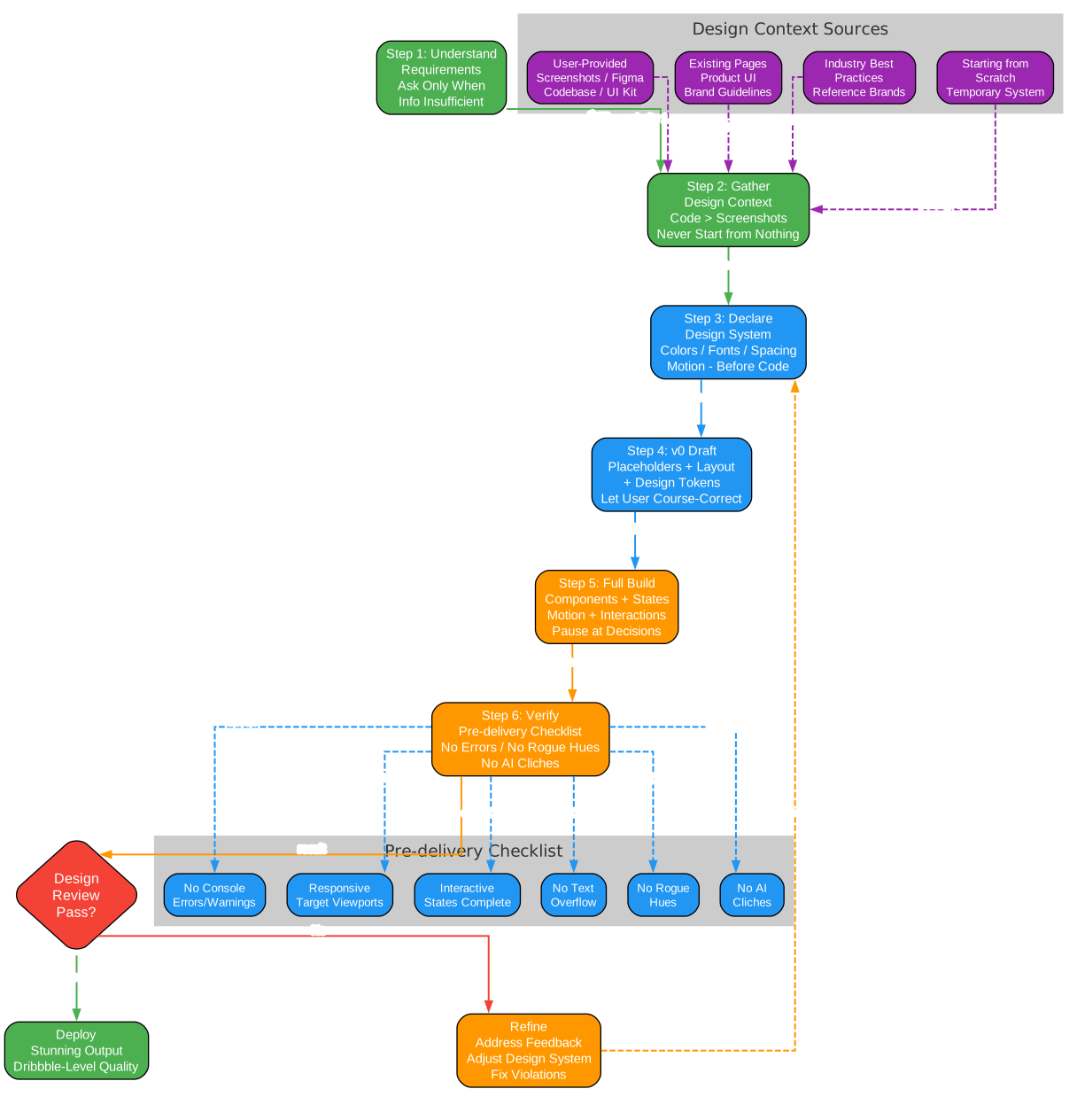
The workflow diagram above illustrates the complete six-step process. Notice the design review decision point: if the review does not pass, the AI loops back to re-declare the design system and refine the output. This iterative loop ensures quality. The design context sources on the left show the priority order: user-provided resources first, then existing pages, industry best practices, and finally starting from scratch as a last resort. The pre-delivery checklist at the bottom covers six verification points: no console errors, responsive viewports, interactive states complete, no text overflow, no rogue hues, and no AI cliches.
Architecture
Web Design Skill is structured as a portable skill directory that any compatible AI agent can automatically detect and load. The architecture spans from the AI agent platform through skill loading, design system prompt injection, and the transformation engine that produces stunning output.
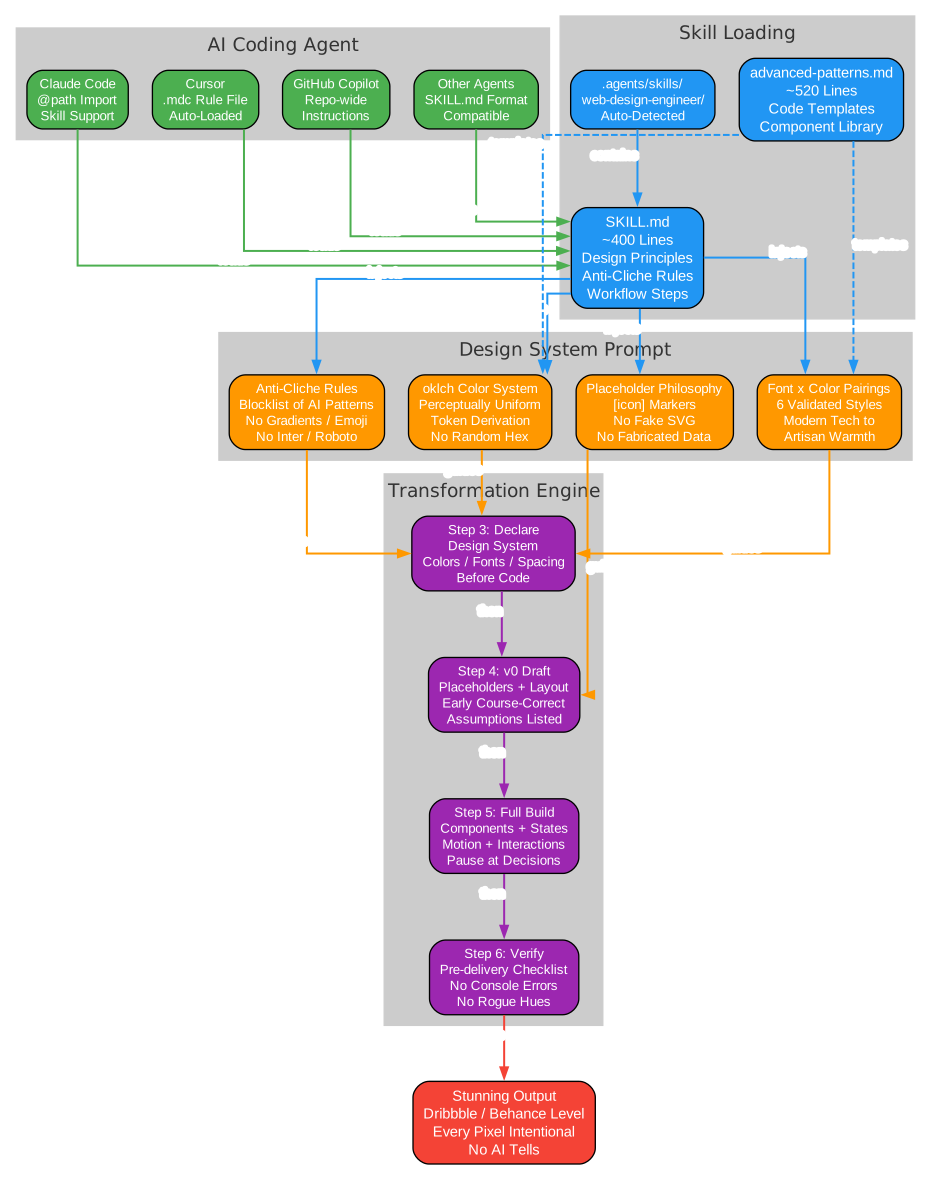
The architecture diagram shows four layers working together. At the top, AI coding agents (Claude Code, Cursor, GitHub Copilot, and others) load the skill via the SKILL.md format. The skill loading layer contains the main SKILL.md file (~400 lines of design principles, anti-cliche rules, and workflow steps) and the advanced-patterns.md reference (~520 lines of code templates and component libraries). The design system prompt layer injects four key modules: anti-cliche rules, the oklch color system, curated font and color pairings, and the placeholder philosophy. Finally, the transformation engine executes the four build steps: declare the design system, produce a v0 draft, execute the full build, and verify against the pre-delivery checklist. Only after all checks pass does the stunning output ship.
File Structure
The skill is organized as a drop-in directory:
your-project/
  .agents/skills/web-design-engineer/
    SKILL.md                          # Main skill file (~400 lines)
    references/
      advanced-patterns.md            # Code template library (~520 lines)
Some tools use .claude/skills/ instead of .agents/skills/. Place the files in whichever directory your tool expects – the content is identical.
The Design System
The design system is the heart of Web Design Skill. It covers five interconnected components that work together to produce cohesive, professional output.
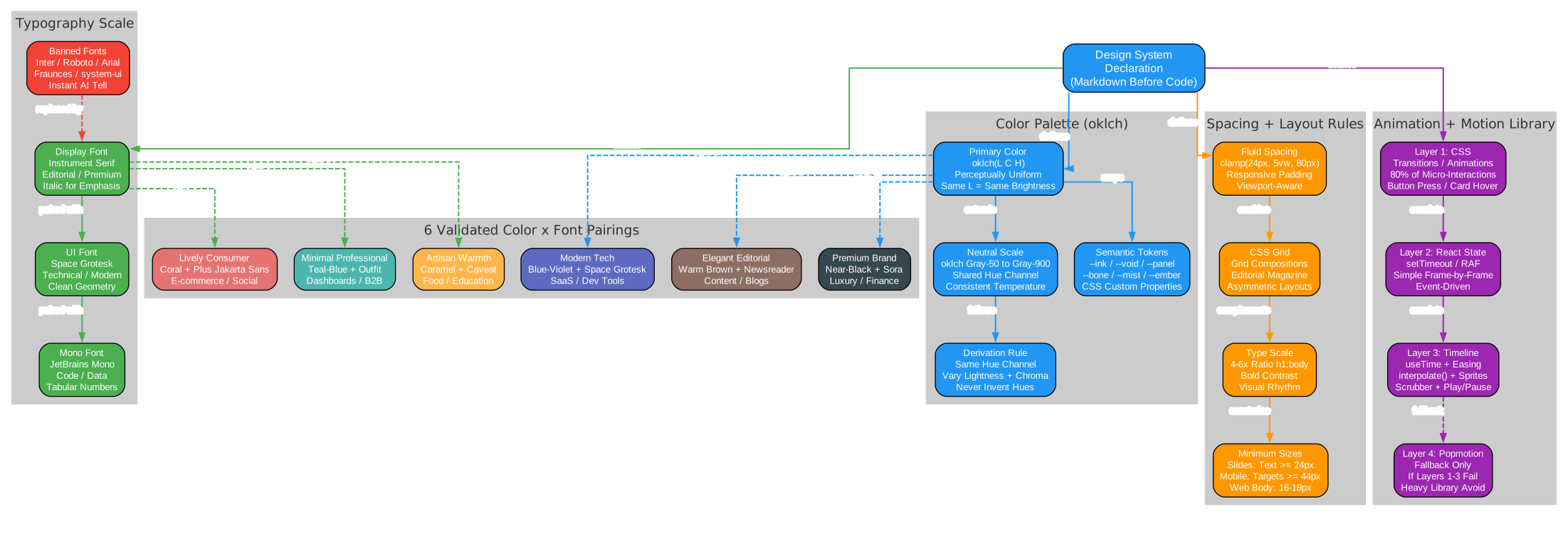
The design system diagram reveals the five pillars of the skill’s design system. The color palette uses oklch for perceptually uniform color derivation – same lightness values actually look the same brightness to the human eye, unlike HSL where yellow at 50% looks much brighter than blue at 50%. The typography scale provides curated font pairings with explicit bans on overused AI fonts. The spacing and layout rules enforce fluid spacing with clamp(), CSS Grid compositions, and bold type-size contrast. The animation library follows a four-layer escalation model: CSS transitions first (covering 80% of needs), then React state, then a custom timeline engine, and finally Popmotion as a last resort. The six validated color-font pairings at the bottom provide ready-made starting points for common use cases, from modern tech (blue-violet + Space Grotesk) to artisan warmth (caramel + Caveat).
oklch Color System
Colors are derived in the perceptually uniform oklch color space. In oklch, the same lightness value produces the same perceived brightness regardless of hue – a critical property that HSL cannot guarantee. The skill defines colors using CSS custom properties:
:root {
  /* oklch-based color system */
  --primary-h: 250;  /* hue */
  --primary: oklch(0.55 0.25 var(--primary-h));
  --primary-light: oklch(0.75 0.15 var(--primary-h));
  --primary-dark: oklch(0.35 0.2 var(--primary-h));

  /* Neutrals */
  --gray-50: oklch(0.98 0.002 250);
  --gray-100: oklch(0.96 0.004 250);
  --gray-900: oklch(0.21 0.014 250);
}
The derivation rule is simple: keep the same hue channel, vary lightness and chroma. Never invent new hues from scratch. This ensures every color in the palette is harmonious by construction.
Curated Font and Color Pairings
When you have no design context, the skill provides six pre-validated starting points:
| Style | Primary Color (oklch) | Font Pairing | Best For |
|---|---|---|---|
| Modern tech | oklch(0.55 0.25 250) blue-violet | Space Grotesk + Inter | SaaS, dev tools |
| Elegant editorial | oklch(0.35 0.10 30) warm brown | Newsreader + Outfit | Content, blogs |
| Premium brand | oklch(0.20 0.02 250) near-black | Sora + Plus Jakarta Sans | Luxury, finance |
| Lively consumer | oklch(0.70 0.20 30) coral | Plus Jakarta Sans + Outfit | E-commerce, social |
| Minimal professional | oklch(0.50 0.15 200) teal-blue | Outfit + Space Grotesk | Dashboards, B2B |
| Artisan warmth | oklch(0.55 0.15 80) caramel | Caveat + Newsreader | Food, education |
These pairings replace the default Inter + #3b82f6 that AI-generated pages universally produce. Once the user provides a brand or design system, the skill drops the table immediately and follows their materials.
Anti-Cliche Rules
The skill explicitly bans these telltale “obviously AI” design patterns:
- Purple-pink-blue gradient backgrounds
- Left-border accent cards with rounded corners
- Drawing complex graphics with SVG (use placeholders instead)
- Cookie-cutter gradient buttons + large-radius card combos
- Overused fonts: Inter, Roboto, Arial, Fraunces, system-ui
- Meaningless stats, numbers, and icon spam (“data slop”)
- Fabricated customer logo walls or fake testimonial counts
- Emoji as icon substitutes or decorative filler
Placeholder Philosophy
When the AI lacks icons, images, or components, a placeholder is more professional than a poorly drawn fake:
- Missing icon -> square + label (e.g.,
[icon]) - Missing avatar -> initial-letter circle with a color fill
- Missing image -> placeholder card with aspect-ratio info
- Missing data -> proactively ask the user; never fabricate
- Missing logo -> brand name in text + a simple geometric shape
A placeholder signals “real material needed here.” A fake signals “I cut corners.”
Before/After: The Transformation
The skill includes demo files that demonstrate the transformation with identical prompts. The difference is dramatic.
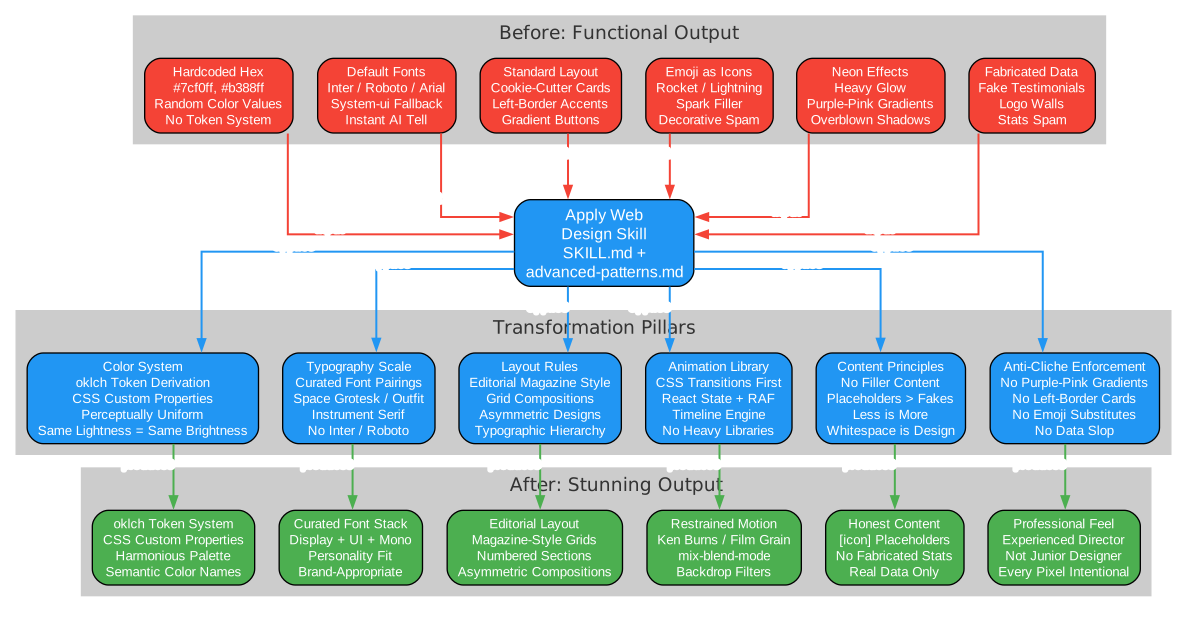
The transformation diagram maps the before-and-after comparison across six dimensions. On the left, the “before” state shows the typical AI output: hardcoded hex values with no token system, default Inter/Roboto fonts, cookie-cutter card layouts, emoji as icon substitutes, heavy neon glow effects, and fabricated data. The skill application in the center processes all six transformation pillars simultaneously: the oklch color system replaces random hex values, curated typography replaces default fonts, editorial layout rules replace standard card grids, the animation library replaces neon effects, content principles eliminate fabricated data, and anti-cliche enforcement removes all AI tells. On the right, the “after” state shows the result: an oklch token system with CSS custom properties, a curated font stack with display + UI + mono fonts, editorial magazine-style layouts, restrained motion with techniques like Ken Burns and mix-blend-mode, honest content with placeholder markers, and the overall feel of an experienced design director rather than a junior designer.
Demo 1: Space Exploration Museum
Prompt: “Build a homepage for a fictional ‘Space Exploration Museum’ – full-screen hero, 4 exhibition sections, a timeline with 6+ milestones, a booking CTA, and a footer. Deep, immersive, cosmic feel.”
| Aspect | Without Skill | With Skill |
|---|---|---|
| Color system | Hardcoded hex values (#7cf0ff, #b388ff) | oklch-based token system with CSS custom properties |
| Typography | Orbitron + Noto Serif SC | Instrument Serif + Space Grotesk + JetBrains Mono |
| Layout | Standard landing-page structure | Editorial magazine-style layout with grid compositions |
| Details | Heavy glow effects, neon gradients | Restrained palette, typographic hierarchy, decorative data elements |
| Overall feel | Enthusiastic junior designer | Experienced design director |
The “without skill” version uses the typical AI approach: neon cyan and purple accents, Orbitron for that “space feel,” and heavy glow effects everywhere. The “with skill” version uses Instrument Serif for editorial elegance, Space Grotesk for technical clarity, and an oklch-based color system with semantic tokens like --ink, --void, --panel, --bone, --mist, and --ember. The result feels like a museum publication, not a sci-fi movie poster.
Demo 2: Photographer Portfolio
Prompt: “Build a homepage for an independent photographer’s portfolio.”
The skill-created version invents a fictional Nordic photographer “Mira Host” with a complete visual identity. The color palette is extremely restrained: paper-warm light (#f2efe8) and ink-dark (#161513) – a two-tone palette that lets the photography speak. Typography uses Instrument Serif for display and Space Grotesk for UI with extensive italic usage. The layout follows a magazine-editorial structure with numbered sections, asymmetric grids, and side rails. Motion is subtle: a slow Ken Burns effect on the hero image (24-second cycle) and a film-grain texture overlay. Navigation uses mix-blend-mode: difference for a masthead that works seamlessly across light and dark sections.
Installation
For Claude Code / Cursor / AI Agents
Copy the skill directory into your project:
# Clone the repository
git clone https://github.com/ConardLi/web-design-skill.git

# Copy the skill directory into your project
cp -r web-design-skill/.agents/skills/web-design-engineer/ \
  your-project/.agents/skills/web-design-engineer/
Your project structure should look like this:
your-project/
  .agents/skills/web-design-engineer/
    SKILL.md                          # Main skill file
    references/
      advanced-patterns.md            # Code templates
The agent will automatically pick up the skill when your request involves visual or interactive front-end work.
Note: Some tools use
.claude/skills/instead of.agents/skills/. Place the files in whichever directory your tool expects. The content is identical.
Usage
Once installed, the skill activates automatically when you request any visual front-end deliverable. No special commands or configuration needed. Just describe what you want:
Build a homepage for a SaaS product with a hero section,
pricing table, and testimonials.
The AI agent will follow the six-step workflow: understand your requirements, gather design context, declare a design system in Markdown before coding, show a v0 draft early, execute the full build, and verify against the pre-delivery checklist.
What It Covers
| Output Type | Examples |
|---|---|
| Web pages and landing pages | Marketing sites, product pages, portfolios |
| Interactive prototypes | Clickable app mockups with device frames |
| Slide decks | HTML presentations (1920x1080, keyboard nav) |
| Data visualizations | Dashboards with Chart.js or D3.js |
| Animations | CSS/JS motion design, timeline-driven demos |
| Design systems | Token exploration, component variants |
Advanced Patterns Reference
The advanced-patterns.md file provides ready-to-use code templates for common UI patterns:
- Responsive Slide Engine – Fixed-size presentations that auto-fit to any viewport
- Device Simulation Frames – iPhone and browser window bezels for prototypes
- Tweaks Panel – Live parameter adjustment panel for real-time design exploration
- Animation Timeline Engine –
useTime+Easing+interpolatefor choreographed motion - Design Canvas – Multi-option comparison layout for presenting variants
- Dark Mode Toggle – Theme provider with system preference detection
- Data Visualization Templates – Chart.js quick start with responsive containers
Key Features
- Anti-cliche checklist – Explicit blocklist of overused AI design patterns that eliminates the “obviously AI” look
- oklch color theory – Perceptually uniform color derivation instead of random hex guessing, ensuring harmonious palettes by construction
- Curated font and color pairings – Six pre-validated starting points that replace the default Inter +
#3b82f6 - Placeholder philosophy – Honest
[icon]markers instead of poorly drawn SVG fakes, signaling professionalism - Structured six-step workflow – From requirements through design system declaration, v0 draft, full build, and verification
- Design system declaration step – Forces the AI to articulate design tokens in natural language before coding
- v0 draft strategy – A concrete methodology for showing work-in-progress early and course-correcting
- Extended anti-cliche list – Additional patterns identified from real-world AI output beyond the original Claude Design prompt
- Advanced pattern library – Ready-to-use code templates for common UI patterns including device frames, slide engines, and animation timelines
- Pre-delivery checklist – Nine-point verification covering console errors, responsive viewports, interactive states, text overflow, rogue hues, AI cliches, filler content, naming, and visual quality
Conclusion
Web Design Skill represents a significant step forward in AI-assisted design. Rather than accepting the generic output that LLMs produce by default, this skill injects design taste and discipline into the generation process. The oklch color system ensures perceptually uniform palettes. The anti-cliche rules eliminate the most obvious AI tells. The structured workflow forces intentional design decisions before code. And the curated pairings provide high-quality starting points that replace the ubiquitous Inter + blue button aesthetic.
The result is AI-generated web pages that look like they were designed by an experienced design director, not assembled by a junior designer following a template. Every pixel is intentional, every interaction is deliberate, and the output meets the bar of “stunning” rather than merely “functional.”
For developers and designers working with AI coding agents, Web Design Skill is a practical tool that bridges the gap between functional code generation and professional-quality visual design. It is open source, portable across agent platforms, and immediately actionable – drop the skill directory into your project and the next web page your AI generates will be noticeably better.
Check out the Web Design Skill repository to get started. Enjoyed this post? Never miss out on future posts by following us 


