Roo Code: AI Dev Team of Agents Right in Your Code Editor
Roo Code is an open-source AI-powered dev team that lives directly inside your VS Code editor, combining multi-mode agent capabilities with 20+ built-in tools and Model Context Protocol (MCP) integration. With over 23,000 GitHub stars and 3 million installs, Roo Code has rapidly become one of the most popular AI coding assistants for developers who want an autonomous coding partner that adapts to their workflow.
Unlike single-purpose AI coding tools, Roo Code provides a team of specialized agents - Code, Architect, Ask, and Debug modes - each designed for a specific development task. Whether you need to write new features, plan system architecture, search for answers, or track down bugs, Roo Code switches modes to match your intent.
Understanding the Architecture
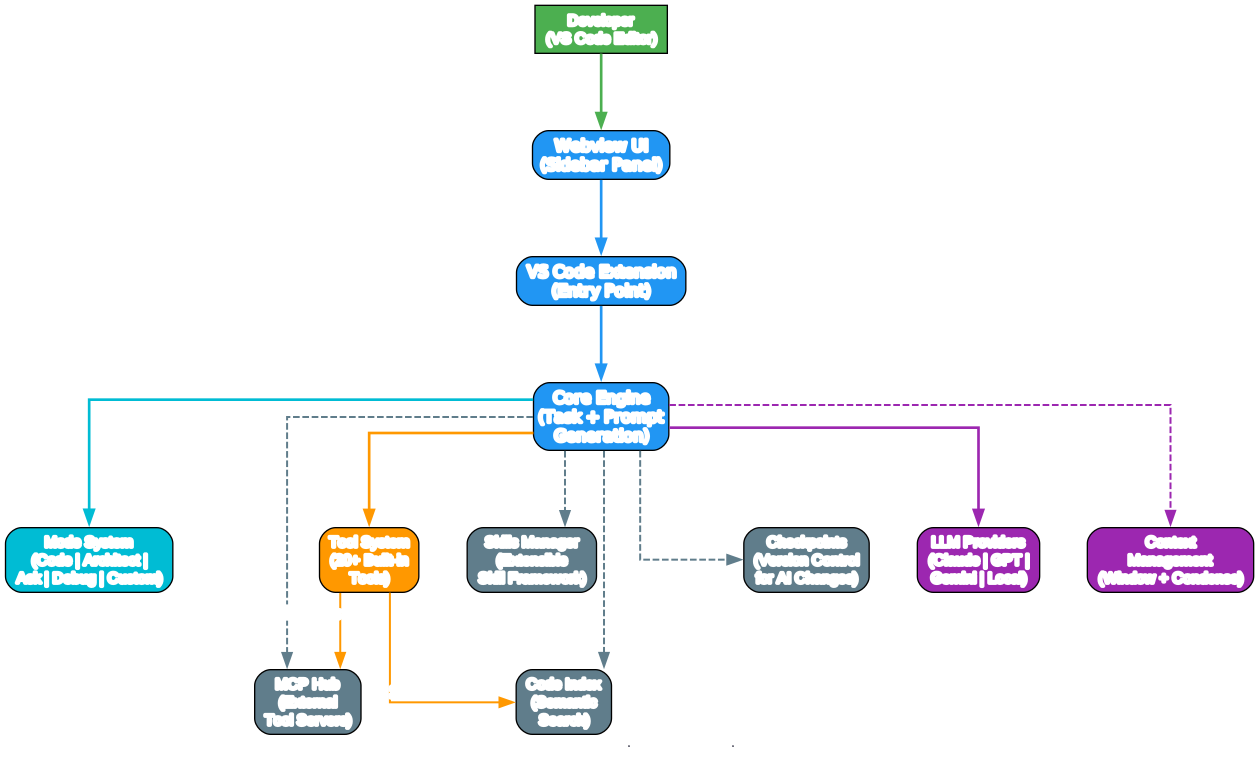
The architecture diagram above illustrates how Roo Code’s multi-layer system connects developers to AI capabilities through a structured pipeline. Let’s break down each component:
Developer Interface Layer The developer interacts with Roo Code through the VS Code sidebar panel (Webview UI). This webview-based interface provides a chat-like experience where you describe tasks in natural language and receive code changes, explanations, and suggestions in return.
Extension and Core Engine The VS Code Extension serves as the entry point, routing all interactions through the Core Engine. This engine is responsible for task management, prompt generation, and orchestrating the entire AI workflow. It coordinates between the mode system, tool system, and various services to deliver coherent multi-step coding assistance.
Mode System Roo Code’s mode system is its defining feature. Each mode has a specialized role definition and set of capabilities:
- Code Mode handles everyday coding tasks - creating files, editing code, running commands
- Architect Mode focuses on planning, system design, and migration strategies
- Ask Mode provides fast answers, explanations, and documentation lookups
- Debug Mode traces issues, adds logging, and isolates root causes
- Custom Modes let you define specialized agents for your team’s unique workflows
Tool System With over 20 built-in tools, Roo Code can read and write files, execute terminal commands, search codebases, apply diffs, and much more. The tool system is extensible through MCP servers, allowing you to connect external tools and data sources.
Services Layer The services layer provides critical infrastructure:
- MCP Hub manages connections to external Model Context Protocol servers
- Skills Manager handles the extensible skill framework
- Code Index provides semantic codebase search using tree-sitter
- Checkpoints offer version control for AI-generated changes, letting you roll back any modification
LLM Providers Roo Code supports multiple LLM providers including Claude, GPT, Gemini, and local models, giving you flexibility in choosing the AI backend that best fits your task and budget.
How Roo Code Modes Work Together
Understanding the Agent Workflow
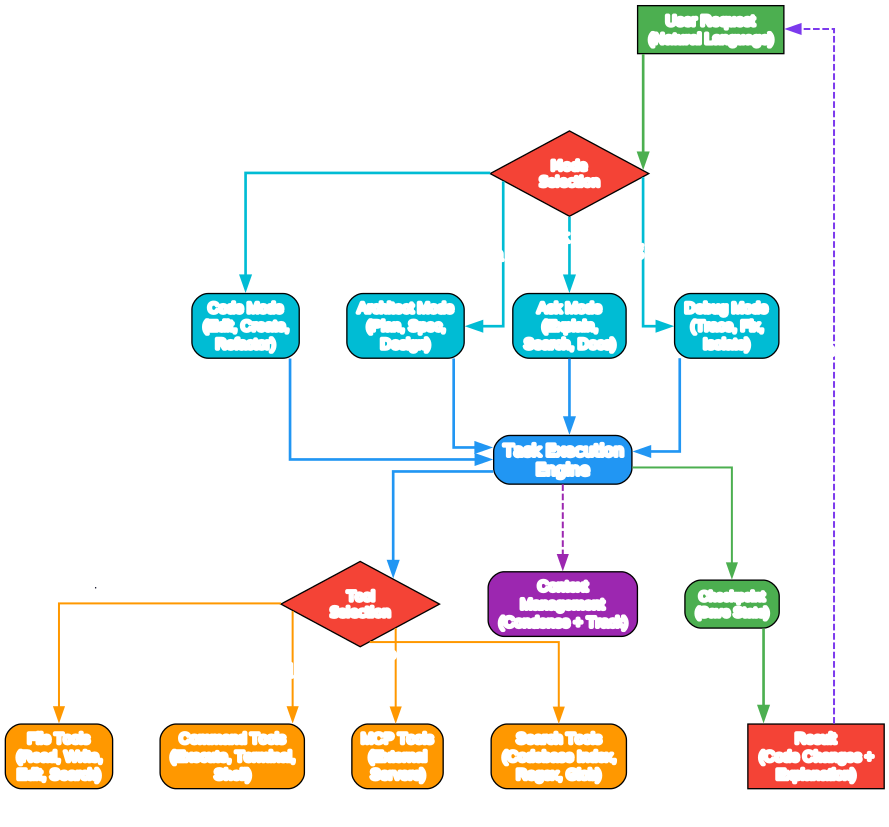
The workflow diagram demonstrates how Roo Code processes a developer request from start to finish. Here is a detailed breakdown:
1. Request Intake and Mode Selection When you type a request, Roo Code first determines which mode is best suited. The mode selection is based on the nature of your task - a coding task routes to Code Mode, an architecture question to Architect Mode, and so on. You can also explicitly switch modes using slash commands or the mode selector.
2. Task Execution Engine Once a mode is selected, the Task Execution Engine takes over. This engine manages the entire lifecycle of your request, from initial prompt construction through tool invocation to final result delivery. It maintains conversation context, tracks which tools have been used, and ensures the AI stays focused on your original goal.
3. Intelligent Tool Selection The engine dynamically selects from available tools based on the task requirements:
- File Tools read, write, edit, and search files across your project
- Command Tools execute terminal commands and capture output
- MCP Tools connect to external servers for extended capabilities like database queries, API calls, or custom workflows
- Search Tools leverage the codebase index for semantic search, regex patterns, and glob-based file discovery
4. Context Management Roo Code includes sophisticated context management with condensing and tracking. As conversations grow long, the system automatically condenses earlier context to stay within the model’s context window while preserving the most relevant information. This ensures the AI maintains coherent understanding even in extended sessions.
5. Checkpoint System Every significant change is saved as a checkpoint. This means you can step back through prior states, compare changes, and roll back if the AI takes an undesired direction. It is like having git for your AI interactions.
6. Iterative Refinement The workflow includes a feedback loop where results feed back into the conversation. You can iterate on the AI’s output, ask for modifications, or switch modes mid-conversation to get a different perspective on the same task.
Key Features
Multi-Mode Agent System
Roo Code’s mode system is what sets it apart from other AI coding assistants. Instead of a single generic AI, you get specialized agents:
| Mode | Purpose | Key Capabilities |
|---|---|---|
| Code | Everyday coding | Create files, edit code, run commands, refactor |
| Architect | System design | Plan migrations, design specs, review architecture |
| Ask | Quick answers | Search codebase, explain code, find documentation |
| Debug | Issue tracking | Trace errors, add logging, isolate root causes |
| Custom | Team-specific | Define your own role, tools, and instructions |
MCP (Model Context Protocol) Integration
MCP is a standardized protocol for connecting AI agents to external tools and data sources. Roo Code’s MCP Hub lets you:
- Connect to database servers for querying live data
- Integrate with project management tools like Jira or Linear
- Access internal APIs and documentation
- Add custom tools specific to your organization
{
  "mcpServers": {
    "postgres": {
      "command": "npx",
      "args": ["-y", "@modelcontextprotocol/server-postgres", "postgresql://localhost/mydb"]
    },
    "github": {
      "command": "npx",
      "args": ["-y", "@modelcontextprotocol/server-github"],
      "env": { "GITHUB_TOKEN": "your-token" }
    }
  }
}
Checkpoint System
Every AI-generated change is automatically saved as a checkpoint. You can:
- Navigate between checkpoints using previous/next controls
- Compare the current state with any previous checkpoint
- Roll back to a prior state with a single click
- Resume work from any checkpoint
Codebase Indexing
Roo Code builds a semantic index of your codebase using tree-sitter, enabling:
- Fast codebase-wide search
- Intelligent file discovery
- Context-aware code understanding
- Symbol and reference lookups
Skills Framework
The Skills Manager provides an extensible framework for adding specialized capabilities:
- Define custom skills with specific instructions
- Share skills across your team
- Load community skills from the marketplace
- Combine skills with modes for powerful workflows
Feature Comparison
Understanding the Comparison
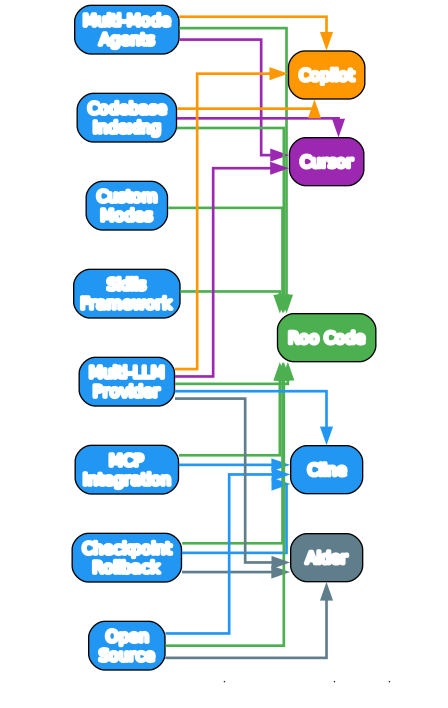
The feature comparison diagram maps Roo Code against four popular AI coding assistants across eight key capabilities. Here is what stands out:
Roo Code’s Unique Strengths Roo Code is the only tool in this comparison that offers all eight features simultaneously. Its combination of multi-mode agents, MCP integration, custom modes, checkpoint rollback, codebase indexing, skills framework, open-source licensing, and multi-LLM provider support creates a uniquely comprehensive development environment.
MCP Integration Advantage While Cline also supports MCP, Roo Code goes further by combining MCP with its mode system and skills framework. This means MCP tools are available contextually - Code Mode might use a database MCP server for data access, while Architect Mode uses it for schema analysis.
Custom Modes Differentiation Custom modes are Roo Code’s most powerful differentiator. No other AI coding assistant lets you define entirely new agent personas with custom instructions, tool access, and group permissions. This makes Roo Code adaptable to any team’s workflow.
Open Source Transparency Both Roo Code and Cline are open source (Apache 2.0), giving teams full visibility into how their code is processed and the ability to self-host or customize the tool.
Installation
From VS Code Marketplace
The easiest way to install Roo Code is through the VS Code Marketplace:
- Open VS Code
- Go to the Extensions view (Ctrl+Shift+X)
- Search for “Roo Code”
- Click Install
From Source
For development or customization, you can build from source:
# Clone the repository
git clone https://github.com/RooCodeInc/Roo-Code.git
cd Roo-Code

# Install dependencies
pnpm install

# Run in development mode (press F5 in VS Code)
# Or build a VSIX package
pnpm vsix
Configuration
After installation, configure your preferred LLM provider:
- Open the Roo Code sidebar in VS Code
- Click the settings icon
- Select your API provider (Claude, OpenAI, Gemini, etc.)
- Enter your API key
- Choose your default mode (Code, Architect, Ask, or Debug)
Usage Examples
Code Mode: Building a Feature
> Create a REST API endpoint for user authentication with JWT tokens.
  Include login, logout, and token refresh endpoints.
Roo Code in Code Mode will:
- Create the route files
- Implement JWT middleware
- Add validation and error handling
- Update the API documentation
- Save checkpoints at each major step
Architect Mode: Planning a Migration
> We need to migrate from MongoDB to PostgreSQL.
  Analyze our current schema and create a migration plan.
Roo Code in Architect Mode will:
- Read your existing MongoDB models
- Analyze relationships and indexes
- Design the PostgreSQL schema
- Create a step-by-step migration plan
- Identify potential risks and mitigation strategies
Debug Mode: Tracking Down a Bug
> The user profile page is loading slowly.
  Find the performance bottleneck and suggest fixes.
Roo Code in Debug Mode will:
- Search for the profile page component
- Analyze database queries and API calls
- Identify N+1 query patterns
- Suggest specific optimizations
- Offer to implement the fixes
Custom Mode: Team-Specific Workflow
You can create custom modes for your team’s specific needs. Create a .roomodes file in your project root:
[
  {
    "slug": "security-reviewer",
    "name": "Security Reviewer",
    "roleDefinition": "You are a security-focused code reviewer. Analyze code for vulnerabilities, suggest fixes, and ensure compliance with OWASP guidelines.",
    "groups": ["read", "search"],
    "customInstructions": "Always check for SQL injection, XSS, CSRF, and authentication issues."
  }
]
The Technology Stack
Roo Code is built with a modern TypeScript stack:
- Extension Host: VS Code Extension API for editor integration
- Webview UI: React-based sidebar panel for the chat interface
- Core Engine: TypeScript module handling task orchestration, prompt generation, and tool dispatch
- Monorepo Structure: pnpm workspaces with Turborepo for build orchestration
- Testing: Vitest for unit and integration tests
- Linting: ESLint with custom configuration packages
The project uses a monorepo structure with packages for core logic, types, IPC, telemetry, and VS Code shims, making it highly modular and maintainable.
Community and Ecosystem
Roo Code has a vibrant community:
- 3 million+ installs on the VS Code Marketplace
- 23,000+ GitHub stars demonstrating strong developer adoption
- Active Discord server for real-time help and discussion
- Reddit community (r/RooCode) for sharing experiences
- YouTube channel with tutorials and feature walkthroughs
- 18+ language translations for global accessibility
The project is transitioning to community-led development, ensuring its continued growth and evolution as an open-source tool.
Troubleshooting
| Issue | Solution |
|---|---|
| Extension not loading | Restart VS Code and check the Output panel for errors |
| API key not accepted | Verify the key is correct and has sufficient credits |
| Slow responses | Try a different LLM provider or reduce context window size |
| MCP server not connecting | Check the server command and arguments in your settings |
| Checkpoints not saving | Ensure git is initialized in your project directory |
| Codebase indexing fails | Run the “Roo Code: Index Codebase” command from the palette |
Conclusion
Roo Code represents a significant evolution in AI-assisted development. By combining multi-mode agents, MCP integration, checkpoint rollback, and an extensible skills framework, it delivers a comprehensive dev team experience directly inside your editor. Whether you are writing code, planning architecture, debugging issues, or building custom workflows, Roo Code adapts to how you work.
The open-source Apache 2.0 license, active community, and growing ecosystem of MCP servers and custom modes make Roo Code a compelling choice for developers and teams looking to integrate AI into their daily workflow. With 3 million installs and counting, it is clear that the developer community sees the value in having an AI dev team that truly lives in your editor.
Links
- GitHub Repository: https://github.com/RooCodeInc/Roo-Code
- Documentation: https://docs.roocode.com
- VS Code Marketplace: https://marketplace.visualstudio.com/items?itemName=RooVeterinaryInc.roo-cline
- Discord Community: https://discord.gg/roocode

Enjoyed this post? Never miss out on future posts by following us


