Introduction
Building production-grade AI applications has always been a wiring problem. You need a language model, a vector store, a retrieval chain, tool-calling logic, memory management, and an API endpoint – and every one of those pieces comes with its own configuration surface, version constraints, and failure modes. Stitching them together in code is tedious, error-prone, and hard to iterate on once the pipeline grows beyond a simple chain. Teams end up with sprawling Python scripts that couple business logic with infrastructure, making it painful to swap out an LLM provider or add a new tool without breaking everything downstream.
Langflow tackles this problem head-on by providing a visual, drag-and-drop framework for composing AI pipelines. Built on top of LangChain and LangGraph, it exposes over 100 pre-built components – from OpenAI and Anthropic LLMs to Chroma and Pinecone vector stores, from document loaders to agent toolkits – as nodes on a React Flow canvas. You connect inputs to outputs, configure properties in side-panels, and hit Run. The result is a working pipeline that can be iterated on in seconds rather than hours, and deployed as a REST API, an OpenAI-compatible endpoint, or an MCP tool server with a single click.
What makes Langflow more than just a pretty UI is its dual-mode execution engine. The full server mode runs a FastAPI backend with authentication, persistence, and a complete management UI, while the lightweight LFX mode strips everything down to a stateless executor that can run any flow from a JSON file with zero infrastructure. This means the same flow you design visually can be deployed as a heavyweight production service or as a lightweight CLI tool, giving teams the flexibility to match their deployment target to their operational requirements.
Architecture Overview
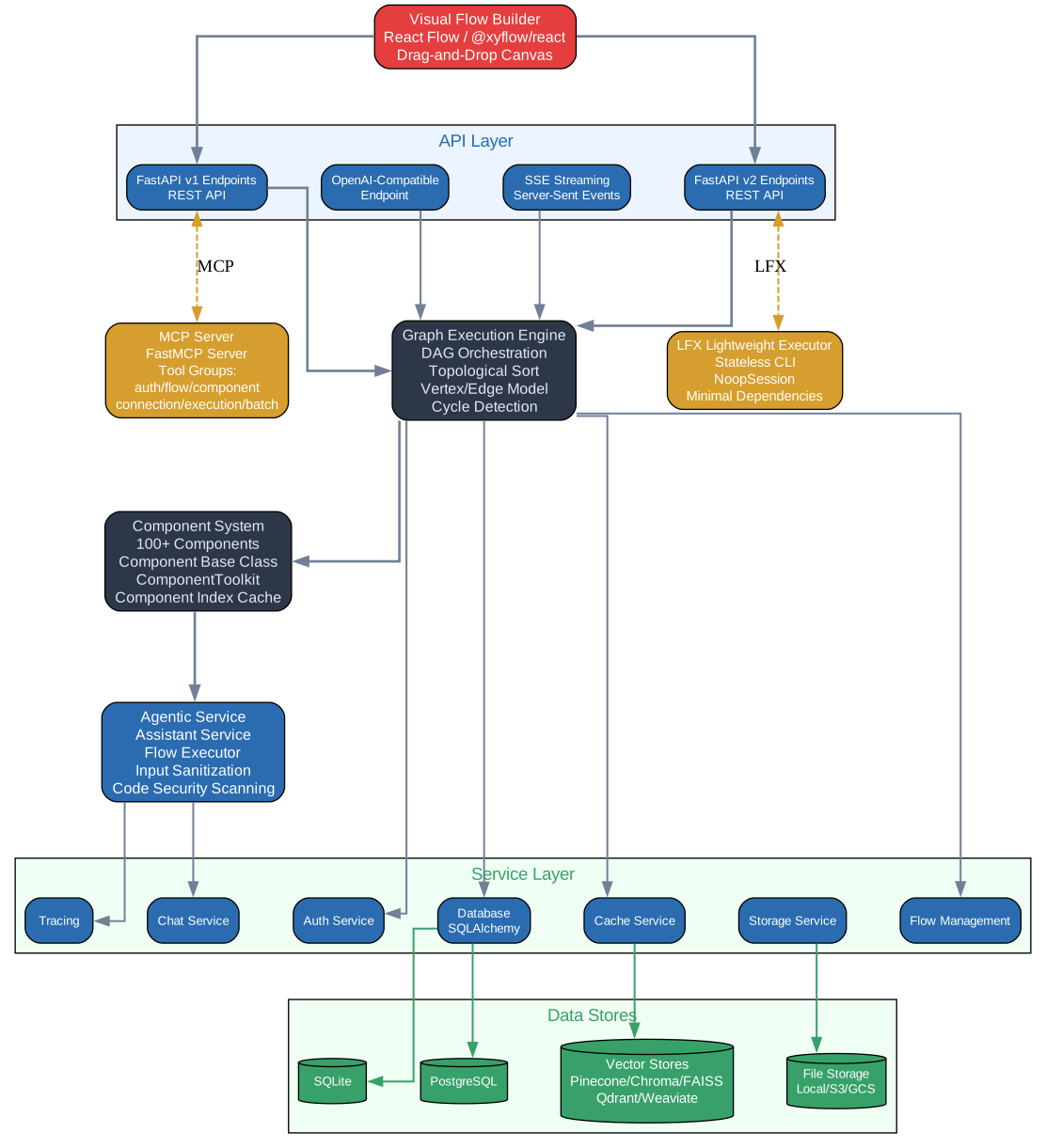
The Langflow architecture is organized into distinct layers that communicate through well-defined interfaces. At the top sits the Visual Flow Builder, a React-based frontend powered by React Flow that renders the drag-and-drop canvas where users compose their pipelines. Each node on the canvas represents a component instance, and edges between nodes define data flow. The frontend serializes the canvas state into a JSON graph specification and sends it to the backend through the API Layer.
The API Layer is built on FastAPI and exposes two versioned surfaces: v1 for stable, production-oriented endpoints and v2 for newer experimental features. Both versions handle flow CRUD operations, component listing, execution requests, and streaming responses. The API layer delegates execution to the Graph Execution Engine, which is the core of Langflow’s runtime.
The Graph Execution Engine takes the JSON graph specification and orchestrates execution as a directed acyclic graph (DAG). It performs topological sorting to determine vertex execution order, detects cycles for loop-handling, and manages the Runnable Vertices Manager that tracks which vertices are ready to execute based on their upstream dependencies. Each vertex is built – meaning its component class is instantiated with the configured parameters and its process method is invoked – and the outputs are resolved along edges to downstream vertices.
The Component System provides the 100+ pre-built building blocks. Each component is a Python class that declares its inputs, outputs, display metadata, and processing logic. Components are organized into categories like Agents, LLMs, Vector Stores, and Tools. The system also includes a Component Index Cache that pre-computes component metadata at startup for fast lookup and autocomplete in the UI.
The Agentic Service layer adds security and orchestration for multi-agent flows. It manages agent lifecycle, tool permissions, and inter-agent communication protocols. Below that, the Service Layer handles business logic like user management, flow versioning, and credential storage. Data Stores include SQLite for metadata, a file system store for flow definitions, and optional connections to external databases for production deployments.
On the lightweight side, the LFX Executor is a stateless, dependency-minimal runtime that can execute any flow from a JSON file without requiring the full server stack. It shares the same graph execution engine but strips away the API server, UI, and persistence layers. This dual execution mode – full server versus LFX stateless – means teams can develop visually in the full environment and then deploy the same flow as a lightweight CLI tool or embedded library.
The MCP Server module exposes any flow as a Model Context Protocol tool server, allowing AI assistants like Claude Desktop to invoke flows as tools. This is a key integration point that turns Langflow from a standalone builder into a composable piece of a larger AI ecosystem.
Component System Deep Dive

Every building block in Langflow derives from the Component base class, which defines the contract that the execution engine relies on. The base class declares several key attributes: display_name and description control how the component appears in the UI sidebar and on the canvas; icon sets the visual identifier; inputs is a list of typed input fields that the engine will populate before execution; outputs declares the output ports that other components can connect to; and the process method contains the actual logic that runs when the vertex is built.
Inputs are strongly typed using field classes like MessageTextInput, IntInput, DropdownInput, and HandleInput. Each input declares a name, a display name for the UI, a data type, and optional constraints like default values or multi-select behavior. Outputs are declared as Output objects that bind a display name to a method on the component class. When another component connects to an output port, the execution engine calls that method and passes the result downstream.
The 100+ built-in components are organized into eight major categories:
- Agents – ReAct, Tool Calling, CrewAI, and custom agent wrappers that orchestrate LLM reasoning loops with tool access
- LLMs – OpenAI, Anthropic, Google, Ollama, Hugging Face, and other model providers with unified chat interfaces
- Vector Stores – Chroma, Pinecone, Weaviate, FAISS, Qdrant, and pgvector for embedding storage and similarity search
- Data Loaders – PDF, CSV, web scrapers, GitHub repo loaders, and document parsers that feed raw data into processing pipelines
- Tools – Search, calculator, code execution, API callers, and the ComponentToolkit that wraps any component as a LangChain Tool
- Memory – Conversation buffer, summary memory, and vector-backed memory for maintaining context across interactions
- Flow Controls – Conditional routing, loops, merge nodes, and sub-flow invocation for building complex control logic
- I/O – Chat input/output, text input/output, file handlers, and notification sinks for interfacing with users and external systems
The ComponentToolkit is a particularly powerful feature. It can wrap any Langflow component as a LangChain Tool, making it available to agents without requiring custom tool code. For example, if you build a RAG retrieval component, you can wrap it as a tool and hand it to a ReAct agent, which will then decide when to call it based on the user’s query. This composability is what makes Langflow’s visual approach genuinely useful – components are not just UI widgets, they are programmable building blocks that can be nested and reused.
The Component Index Cache pre-computes metadata for all registered components at startup. This includes display names, descriptions, input/output schemas, and category assignments. The cache is serialized and loaded by both the full server and the LFX executor, ensuring that component discovery is fast regardless of the deployment mode. Custom components added by users are automatically indexed and become available in the UI sidebar alongside the built-in ones.
Here is an example of creating a custom component:
from lfx.custom.custom_component.component import Component
from lfx.io import MessageTextInput
from lfx.outputs import Output
from lfx.schema.message import Message

class MyComponent(Component):
    display_name = "My Component"
    description = "A custom Langflow component"
    icon = "component-icon"
    inputs = [
        MessageTextInput(name="input_value", display_name="Input")
    ]
    outputs = [
        Output(display_name="Output", name="output", method="process")
    ]

    def process(self) -> Message:
        return Message(text=self.input_value)
The Component base class handles all the registration, serialization, and UI rendering automatically. You only need to declare the metadata, inputs, outputs, and the processing logic. Once placed in the custom_components directory, the component appears in the sidebar and can be dragged onto the canvas like any built-in component.
Flow Execution Pipeline
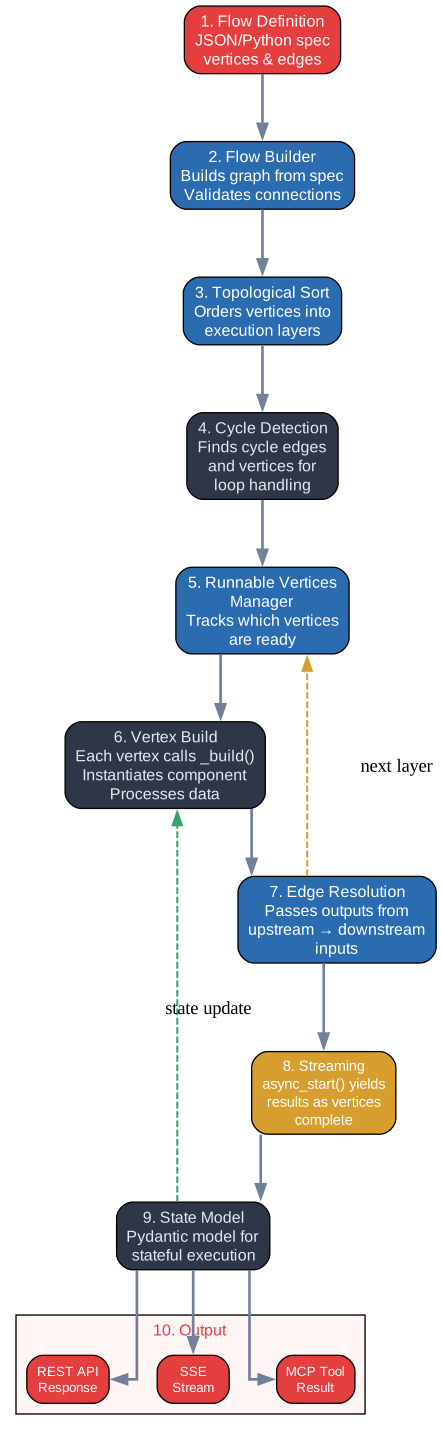
The execution pipeline transforms a visual flow definition into a running computation. It begins with the Flow Definition, which is a JSON (or Python) specification that describes every vertex, its component type and configuration, and every edge that connects output ports to input ports. This specification is what the frontend serializes when you save a flow and what the backend deserializes when you run one.
The Flow Builder takes the raw specification and validates it. It checks that all connections are type-compatible – you cannot connect a string output to a list input, for example. It resolves component references, instantiates the Python classes, and builds an internal graph representation. If the specification references a component that is not installed or a connection that violates type constraints, the builder raises a clear error before execution begins.
Once the graph is built, the Topological Sort algorithm orders the vertices into execution layers. Vertices with no upstream dependencies go into the first layer, vertices that depend only on the first layer go into the second, and so on. This layering ensures that when a vertex is executed, all of its inputs are already available. The sort also performs Cycle Detection – if the graph contains a cycle that is not handled by a loop construct, the engine rejects it rather than entering an infinite loop. For intentional loops (like agentic retry patterns), Langflow uses special loop-handling vertices that break the cycle by gating execution on a condition.
The Runnable Vertices Manager tracks which vertices are ready to execute at any point during the run. A vertex becomes runnable when all of its upstream vertices have completed and their outputs are available. The manager maintains a queue of runnable vertices and dispatches them for execution, either sequentially or in parallel depending on the configuration.
Vertex Build is the moment of truth for each vertex. The engine instantiates the component class with the configured parameters, resolves any dynamic inputs (like references to upstream outputs), and calls the component’s process method. The result is stored in the vertex’s output ports. If the component raises an exception, the engine captures it, marks the vertex as failed, and propagates the error downstream so that dependent vertices also fail gracefully rather than hanging.
Edge Resolution passes outputs from completed vertices to their downstream neighbors. Each edge maps a specific output port on the source vertex to a specific input port on the target vertex. The resolution step copies the data, performing any necessary type coercion. For example, if an LLM component outputs a Message object and the next component expects a plain string, the edge resolver extracts the text content automatically.
Streaming is handled through the async_start method, which yields partial results as they become available. This is critical for chat-style interactions where the user expects to see tokens arriving incrementally rather than waiting for the entire response. The engine uses Python’s async generators to stream results from LLM components through the graph and out to the client via Server-Sent Events (SSE).
The State Model is a Pydantic model that captures the complete execution state – which vertices have been built, what their outputs are, any errors that occurred, and the current position in the topological order. This model can be serialized and persisted, enabling flow resumption after interruptions and providing a detailed audit trail for debugging.
The final Output stage routes results to the appropriate channel: REST API responses for synchronous requests, SSE streams for real-time updates, or MCP tool responses for AI assistant integrations.
Here is an example of running a flow programmatically using the flow-as-code API:
from lfx.graph.flow_builder import builder

flow = builder(
    "chat_input >> llm >> chat_output",
    components={
        "chat_input": {"type": "ChatInput"},
        "llm": {"type": "OpenAI", "model": "gpt-4"},
        "chat_output": {"type": "ChatOutput"},
    }
)
result = await flow.async_start()
The builder function accepts a pipeline expression using the >> operator to define the flow topology, and a components dictionary that maps node names to their types and configurations. This code-first approach is an alternative to the visual builder and is particularly useful for version-controlled, CI/CD-driven workflows where the flow definition lives in a Python file rather than a JSON blob.
Deployment and Integration
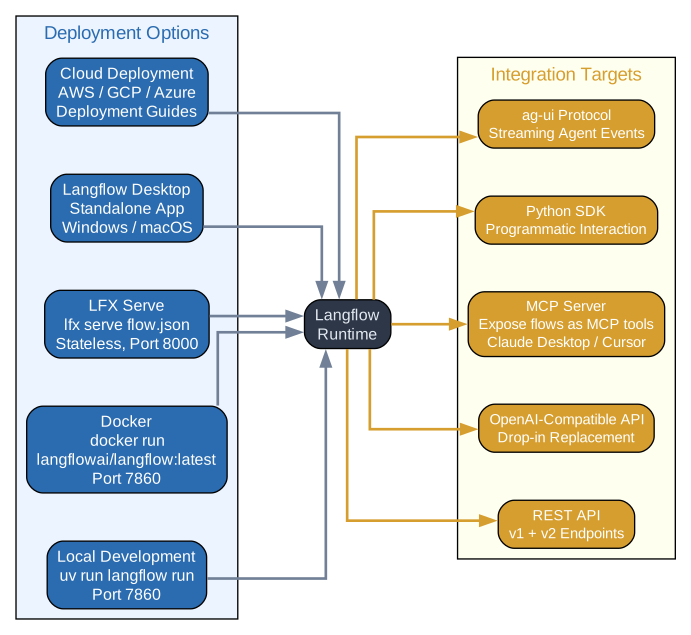
Langflow supports five deployment methods, each targeting a different operational context:
Local Development is the simplest mode. You install Langflow with uv or pip, run langflow run, and get a full development server on port 7860 with the visual builder, API endpoints, and a local SQLite database. This is the recommended starting point for prototyping and testing flows before moving to production infrastructure.
Docker Deployment packages the entire Langflow stack into a container. The official langflowai/langflow image includes the frontend, backend, and all default component dependencies. You can mount volumes for persistent storage, set environment variables for API keys, and expose the port. Docker Compose configurations are available for multi-container setups that separate the Langflow server from external databases and vector stores.
LFX Serve is the lightweight deployment mode. Instead of running the full server, you use the lfx serve command to expose a single flow as an API endpoint. This mode has minimal dependencies and starts in seconds, making it ideal for edge deployments, serverless functions, or embedded scenarios where you only need one flow and do not require the management UI.
Desktop App packages Langflow as a native desktop application for macOS, Windows, and Linux. It bundles the server, frontend, and Python runtime into a single installable package, eliminating the need to manage Python environments or command-line tools. This is the most accessible option for non-technical users who want to build and run AI pipelines locally.
Cloud is the managed hosting option provided by the Langflow team. It handles infrastructure, scaling, and updates, letting teams focus entirely on building flows. Cloud deployments include team collaboration features, shared credential management, and production-grade monitoring.
On the integration side, Langflow exposes five distinct targets:
- REST API – The primary integration surface. Every flow can be invoked via a POST request to
/api/v1/run/{flow_id}with input data in the request body. Responses can be synchronous or streamed via SSE. - OpenAI-Compatible API – Langflow can expose any chat flow as an OpenAI-compatible
/v1/chat/completionsendpoint. This allows any tool or framework that speaks the OpenAI protocol – including LangChain, LlamaIndex, and custom clients – to call the flow as if it were an OpenAI model. - MCP Server – Any flow can be published as a Model Context Protocol tool server. AI assistants like Claude Desktop and Cursor can discover and invoke the flow as a tool, enabling composable AI workflows where Langflow flows become building blocks in larger agent systems.
- Python SDK – The
langflowPython package provides a client SDK for programmatic access to the API. You can list flows, run them, and process results from Python code, making it easy to integrate Langflow into existing data pipelines and automation scripts. - ag-ui Protocol – The Agent-UI protocol enables real-time, bidirectional communication between Langflow agents and frontend applications. This is used for interactive chat experiences where the agent streams responses, requests user input, and updates the UI dynamically.
Quick-start commands for the three most common deployment methods:
# Local development
uv run langflow run

# Docker deployment
docker run -p 7860:7860 langflowai/langflow:latest

# LFX lightweight serve
lfx serve flow.json
Each method uses the same flow definitions and component system, so you can develop locally, test in Docker, and deploy to cloud without changing a single node or edge in your flow.
RAG and Multi-Agent Patterns
Retrieval-Augmented Generation is one of the most common patterns built with Langflow, and the component system makes it straightforward to assemble a production-quality RAG pipeline. The typical flow starts with a Document Loader that ingests files from PDF, CSV, web pages, or GitHub repositories. The documents pass through a Text Splitter that breaks them into chunks sized for the embedding model. An Embeddings component converts each chunk into a vector, which is stored in a Vector Store like Chroma, Pinecone, or Qdrant. At query time, a Retriever component performs similarity search against the vector store, retrieves the top-k relevant chunks, and passes them as context to an LLM component that generates the final answer. The entire pipeline is a linear chain on the canvas, and each component can be swapped independently – switch from OpenAI embeddings to Hugging Face, or from Chroma to Pinecone, by dragging a different component onto the canvas and reconnecting the edges.
Multi-agent orchestration goes beyond simple chains by introducing agents that reason about which tools to call and when. In Langflow, you build this by placing an Agent component on the canvas and connecting it to multiple Tool components. The agent uses its LLM to decide which tool to invoke based on the user’s query, calls the tool, observes the result, and either calls another tool or returns a final answer. You can chain multiple agents together – for example, a research agent that searches the web and a writing agent that synthesizes the findings – by connecting the output of one agent to the input of another. Langflow also integrates with CrewAI, allowing you to define crews of agents with distinct roles, goals, and backstories that collaborate on complex tasks. The CrewAI components in Langflow map directly to CrewAI’s Agent, Task, and Crew abstractions, so you can configure crew behavior visually and deploy it as an API endpoint.
MCP Server Integration
One of Langflow’s most powerful integration features is its ability to expose any flow as an MCP (Model Context Protocol) tool server. When you enable MCP mode for a flow, Langflow automatically generates the tool schema from the flow’s input and output definitions and registers it with the MCP protocol. AI assistants that support MCP – including Claude Desktop and Cursor – can discover the flow, understand its input parameters, and invoke it as a tool within their own reasoning loops.
The MCP server organizes tools into six groups: auth for authentication and session management, flow for listing and retrieving flow definitions, component for querying available components and their schemas, connection for managing credential and API key configurations, execution for running flows and retrieving results, and batch for submitting multiple execution requests in a single call. This grouping gives AI assistants fine-grained access to Langflow’s capabilities while maintaining clear security boundaries. For example, an assistant can list available flows and execute them, but cannot modify flow definitions or access raw credentials without explicit permission.
To use Langflow as an MCP server with Claude Desktop, you add the server configuration to your claude_desktop_config.json file, pointing to the Langflow instance’s MCP endpoint. Once configured, Claude can invoke any published flow as a tool during conversation, enabling workflows where a user asks Claude a question, Claude decides to call a Langflow RAG pipeline to retrieve relevant documents, and then synthesizes an answer using the retrieved context – all without the user needing to know that a separate Langflow service is involved.
Conclusion
Langflow fills a critical gap in the AI development toolchain by making the composition of complex pipelines visual, iterative, and deployable. Its strength lies not in replacing code but in providing a higher-level abstraction that lets teams focus on what their AI application should do rather than how to wire the pieces together. The 100+ component library covers the most common building blocks, the dual execution modes accommodate both prototyping and production, and the MCP integration makes Langflow flows composable within larger AI ecosystems. Whether you are building a simple RAG chatbot, a multi-agent research system, or a production API that serves thousands of requests, Langflow provides a consistent framework from canvas to deployment.
The project is actively maintained by the Langflow AI team and has a growing community of contributors. If you are building AI applications and find yourself spending more time on infrastructure glue than on business logic, Langflow is worth a serious look. The visual builder lowers the barrier to entry for newcomers, while the code-first API and LFX executor ensure that experienced developers retain full control when they need it.
- GitHub Repository: https://github.com/langflow-ai/langflow
- Documentation: https://docs.langflow.org

Enjoyed this post? Never miss out on future posts by following us