Keychron Open Source Keyboard Hardware Design
Keychron has done something rarely seen in the mechanical keyboard industry: they have open-sourced their production-grade hardware design files. The Keychron Keyboards Hardware Design repository contains 135 device models and 734+ design files spanning every product line they manufacture. This is a significant moment for the mechanical keyboard community, where hardware designs are typically guarded closely as proprietary assets. By releasing STEP files, DWG drawings, DXF plate profiles, and PDF reference sheets, Keychron is giving makers, students, and engineers unprecedented access to real production hardware. Whether you want to study how a CNC aluminum case is structured, design a custom switch plate, or 3D print a prototype case for fit testing, these files provide the foundation.
The Hardware Ecosystem
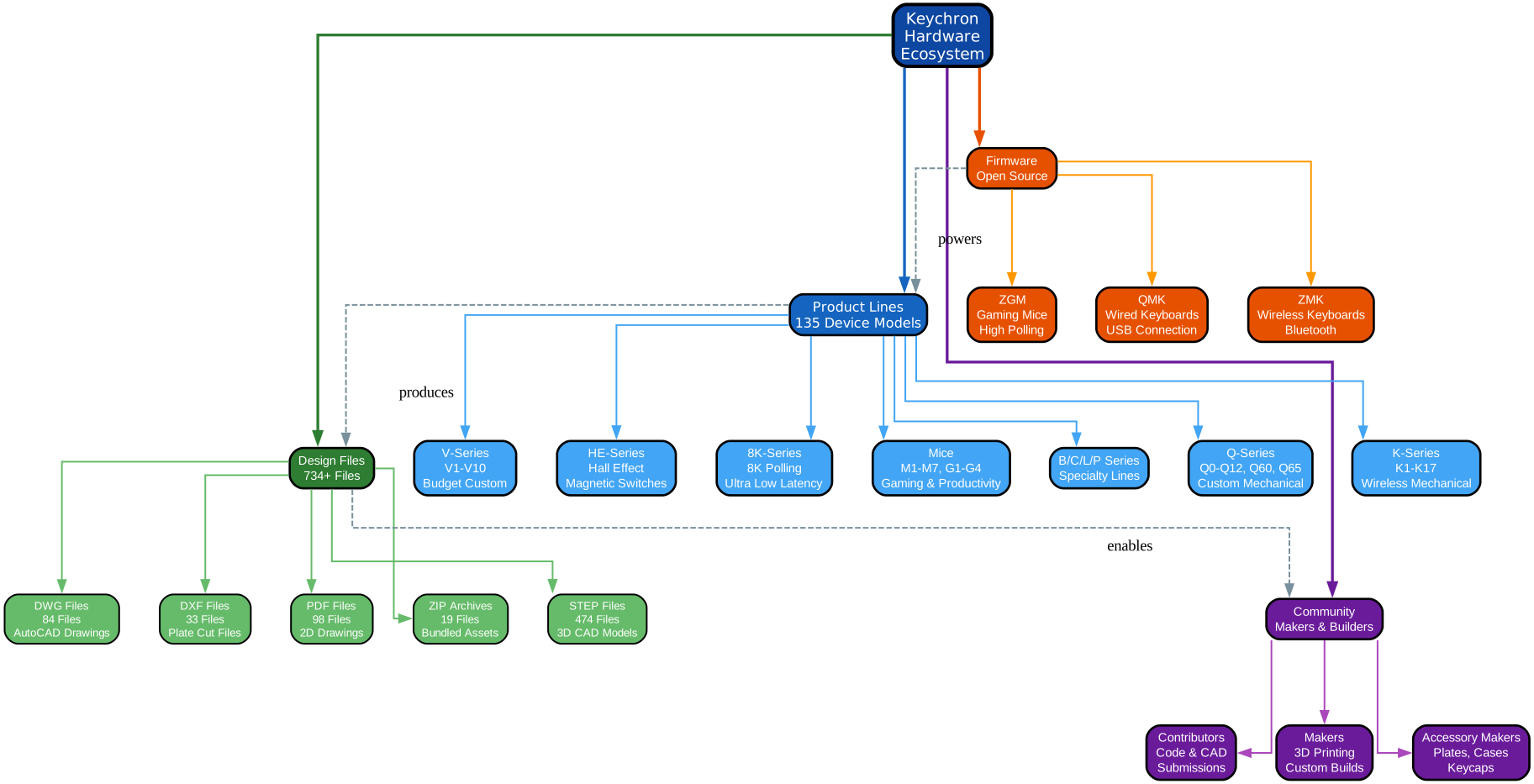
The diagram above illustrates the four pillars of the Keychron hardware ecosystem: product lines, design files, firmware, and community. Together, these pillars form a self-reinforcing loop where product lines produce design files, design files enable community creation, and firmware ties everything together with customizable input processing.
Product Lines span 135 device models across seven major categories. The Q-Series delivers premium custom mechanical keyboards with CNC aluminum cases, covering models Q0 through Q12 plus Q60 and Q65. The K-Series targets wireless mechanical keyboard users with models K1 through K17. The V-Series offers budget-friendly custom keyboards from V1 through V10. The HE-Series introduces hall effect magnetic switches for analog input. The 8K and Ultra 8K Series push polling rates to 8000 Hz for competitive gaming. The B, C, L, and P Series serve specialty niches. Finally, the Mice lineup covers M1 through M7 and G1 through G4 for both productivity and gaming use cases.
Design Files total 734+ individual assets across five formats. STEP files dominate with 474 files totaling over 4 GB of 3D CAD geometry. These are the primary format for inspecting case shells, plate structures, and full keyboard assemblies. DWG files (84 total) provide AutoCAD-compatible 2D engineering drawings. DXF files (33 total) contain flat plate cut profiles essential for CNC and laser fabrication workflows. PDF files (98 total) offer printable 2D reference drawings and documentation. ZIP archives (19 total) bundle related assets for convenient download.
Firmware runs on three open-source platforms. QMK powers all wired keyboards with full key remapping and macro support. ZMK handles wireless and Bluetooth LE keyboards with similar customization capabilities. ZGM drives gaming mice with high polling rate optimization. All three firmware projects are independently maintained and community-driven.
Community roles include contributors who submit code and CAD improvements, makers who 3D print cases and prototype custom builds, and accessory designers who create compatible plates, cases, keycaps, and desk accessories that work with Keychron hardware.
The Design Pipeline
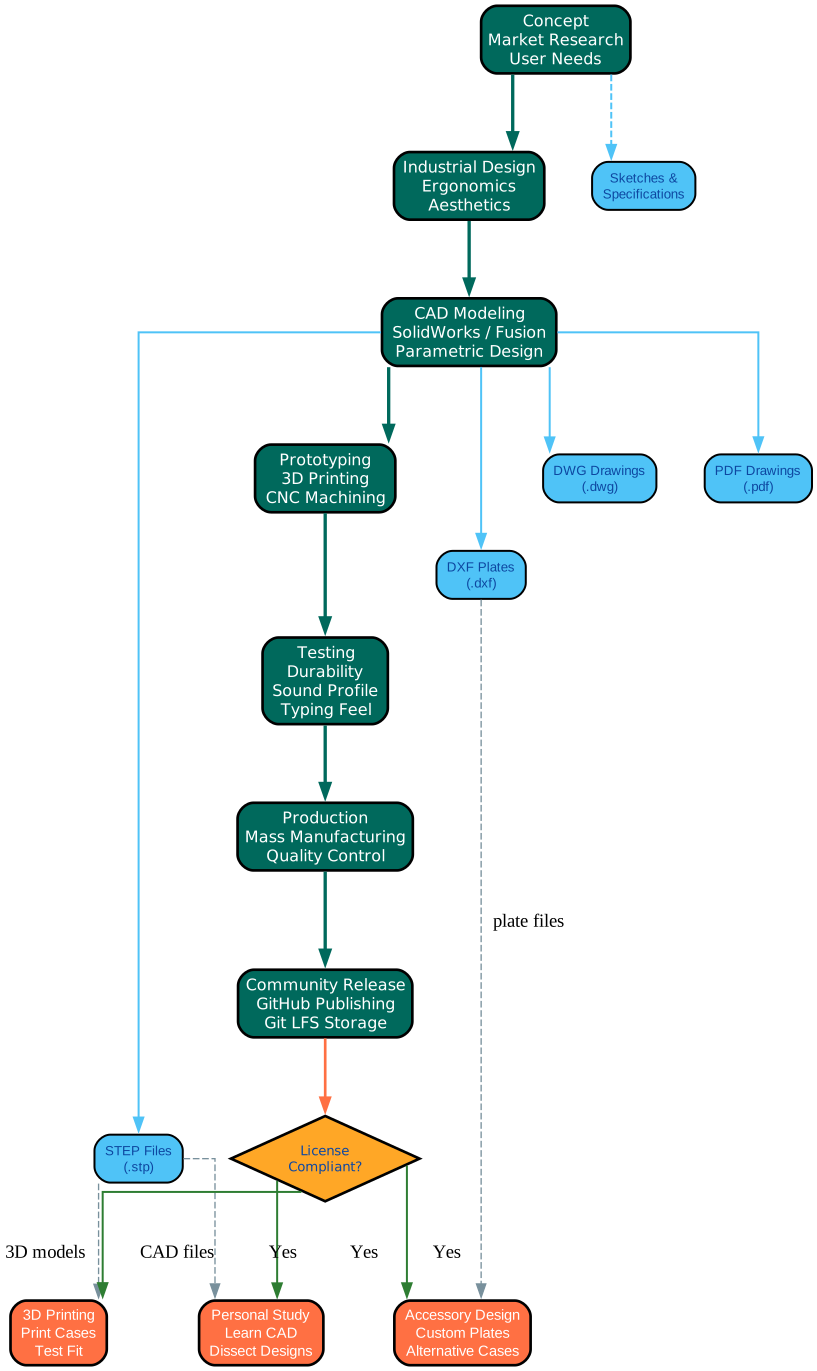
The diagram above traces the complete journey of a Keychron keyboard from initial concept through mass manufacturing and finally to community release on GitHub. Understanding this pipeline reveals how industrial design files are created, validated, and ultimately shared with the public.
Concept Phase: Every keyboard begins with market research and user needs analysis. The design team identifies layout preferences, connectivity requirements, switch compatibility, and target price points. Sketches and specification documents capture the initial vision.
Industrial Design Phase: Ergonomics and aesthetics converge here. The team defines the case profile, key well depth, typing angle, and overall visual language. This phase produces the design intent that guides all downstream CAD work.
CAD Modeling Phase: Using tools like SolidWorks and Fusion 360, the design is translated into parametric 3D models. This is where STEP files are born – the same .stp files that end up in the GitHub repository. Simultaneously, 2D drawings are exported as DWG files for manufacturing reference, DXF files for plate cut profiles, and PDF files for printable documentation. The file naming convention follows the pattern {Model}-{Variant}-{Component}-{Date}.{ext}, making it straightforward to identify exactly which keyboard and component a file represents.
Prototyping Phase: 3D printing and CNC machining produce physical samples. These prototypes validate fit, tolerances, and assembly sequences before committing to production tooling.
Testing Phase: Durability testing, sound profile analysis, and typing feel evaluation ensure the product meets quality standards. Adjustments loop back to CAD modeling if issues are found.
Production Phase: Mass manufacturing begins with quality control checkpoints at every stage. The final production files are the same ones eventually published to GitHub.
Community Release Phase: Files are published to GitHub using Git LFS for large binary storage. At this point, three community paths open up. The personal study path lets anyone dissect real CAD files to learn industrial design. The accessory design path enables custom plates, alternative cases, and compatible add-ons. The 3D printing path allows hobbyists to print cases for fit testing and personal use. A license compliance checkpoint ensures all community use stays within the source-available terms.
Keyboard Models and Series

The diagram above maps the full Keychron model lineup across six tier categories, showing how each series branches into individual models and their available component types. This hierarchy reveals the breadth and depth of the hardware design repository.
Q-Series (Premium Custom Mechanical): The flagship line includes Q0 through Q12, Q60, and Q65. These keyboards feature CNC aluminum cases, gasket mount systems, and hot-swappable PCBs. Variants include Q-Pro (wireless), Q-Max (enhanced wireless), Q-HE (hall effect), Q-HE 8K (hall effect with 8K polling), and Q-Ultra 8K (premium 8K polling). Available components per model include the full 3D model (.stp), top case, bottom case, switch plate, encoder knob, keycap sets, and stabilizers. The Q-Series represents the most complete file coverage in the repository.
K-Series (Wireless Mechanical): Models K1 through K17 cover low-profile and standard height wireless keyboards. Variants include K-Pro, K-Max, K-QMK, and K-HE. The K-Series is the broadest wireless lineup, with 16 Pro models and 14 Max models. Component files typically include case parts, plates, full models, and stabilizers, with select models also offering keycap STEP files.
V-Series (Budget Custom): Models V1 through V10 provide entry-level custom keyboard experiences. Variants include V-Max, V-8K, and V-Ultra 8K. The V-Max series offers the most complete file coverage with case, plate, encoder, full model, stabilizer, and OSA keycap files. The V-8K and V-Ultra 8K series currently have README placeholders prepared for future CAD uploads.
HE-Series (Hall Effect): These keyboards use magnetic hall effect switches that detect precise key position rather than simple actuation. Models span Q1 HE through Q6 HE, Q12 HE, Q16 HE, K2 HE, K4 HE, K6 HE, K8 HE, K10 HE, and P1 HE through P3 HE. The magnetic switches enable features like rapid trigger and adjustable actuation points.
8K-Series and Ultra 8K-Series: These keyboards deliver 8000 Hz polling rates for competitive gaming. The 8K-Series includes Q1 8K, Q2 8K, V1 8K, and V3 8K. The Ultra 8K-Series adds premium features with models like Q1 Ultra 8K, Q3 Ultra 8K, Q5 Ultra 8K, and Q13 Ultra 8K. Many of these folders currently contain README placeholders for progressive disclosure as files are prepared and uploaded.
Mice: The mouse lineup includes M1 through M7 for productivity and G1, G2, and G4 for gaming. Available components include shell parts and full 3D models. The mice use the ZGM firmware platform for high polling rate optimization.
Keycap Profiles: The repository also includes a dedicated Keycap Profiles directory with reference documentation for Cherry, KSA, LSA, MDA, OEM, and OSA profiles. Select keyboard models include actual keycap STEP files, such as the K8 Pro (KSA profile) and K2 HE (Cherry and OSA profiles).
Open Hardware Philosophy
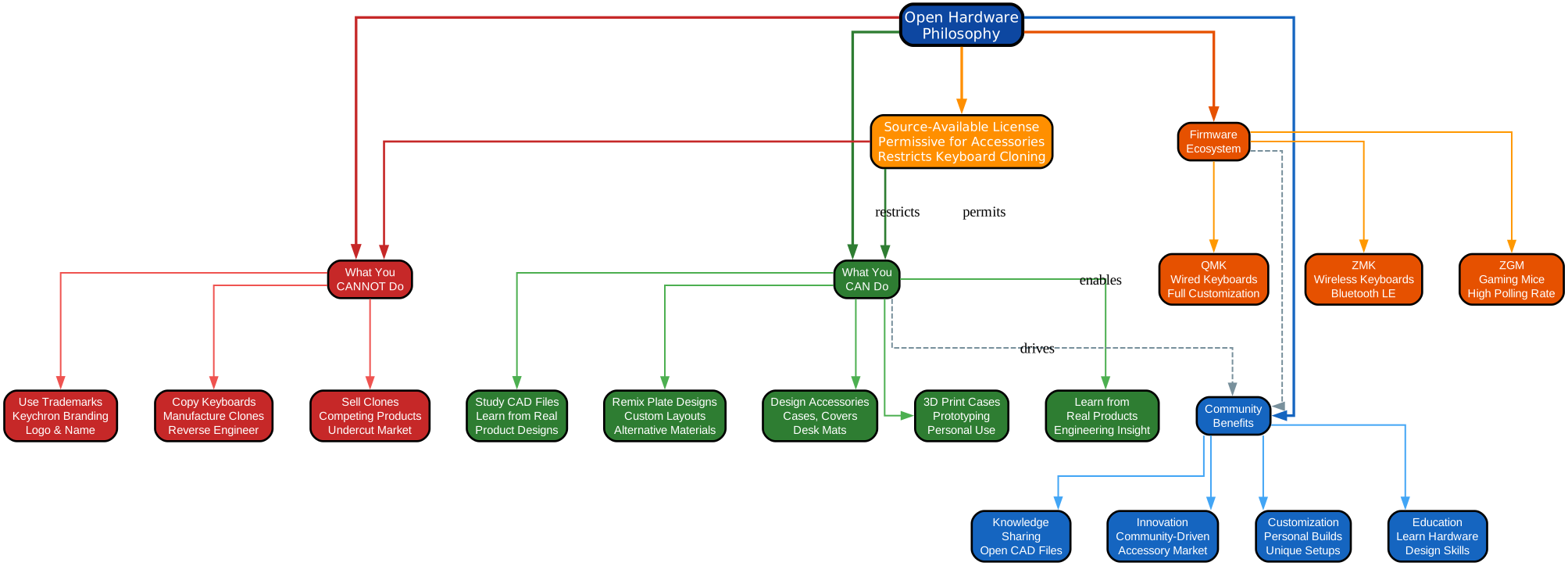
The diagram above breaks down the Keychron source-available license model into what it permits, what it restricts, and the resulting community benefits. This is a nuanced licensing approach that balances openness with business protection, and understanding it is essential before working with the design files.
Source-Available, Not Open Source: The Keychron license is explicitly source-available, which is a distinct category from traditional open source. The files are visible and downloadable, but commercial use is restricted. This distinction matters because it defines the boundary between what the community can freely do and what requires Keychron’s explicit permission.
What You CAN Do:
- Study CAD Files: Open STEP models in FreeCAD, Fusion 360, or SolidWorks to learn how real production keyboards are designed. Examine wall thicknesses, mounting structures, rib patterns, and tolerance strategies.
- Remix Plate Designs: Modify DXF plate files to create custom layouts, alternative switch configurations, or non-standard layouts like ISO variants.
- Design Accessories: Create and sell original compatible accessories such as custom cases, desk mats, wrist rests, and cable organizers. This commercial use is explicitly permitted under Permission 5 of the license.
- 3D Print Cases: Print cases for personal use, fit testing, or prototyping. This falls under personal non-commercial use.
- Learn from Real Products: These are production-level designs, not simplified tutorials. Studying them teaches real decisions around mounting systems, tolerances, and component integration that textbooks rarely cover.
What You CANNOT Do:
- Copy Keyboards Commercially: Manufacturing, selling, or distributing keyboards based on these design files is prohibited. This protects Keychron’s core hardware business.
- Sell Clones: Creating substantially similar products that compete with Keychron keyboards or mice violates the license. The restriction covers both direct copies and derivative designs that replicate the complete product.
- Use Keychron Trademarks: You cannot use Keychron branding, logos, or product names as your own branding. Compatibility statements like “compatible with Keychron Q1” are permitted, but implying official endorsement is not.
Firmware Ecosystem: The hardware files are complemented by three open-source firmware projects. QMK handles wired keyboards with full customization support. ZMK powers wireless and Bluetooth LE keyboards. ZGM drives gaming mice with high polling rate capabilities. All three firmware projects are genuinely open source and can be modified without the commercial restrictions that apply to the hardware files.
Community Benefits: The license structure drives four key benefits. Knowledge sharing makes real CAD files accessible to anyone. Innovation emerges from community-driven accessory markets. Customization enables personal builds and unique setups. Education provides hardware design skills through real-world examples.
Getting Started Guide
If you are ready to explore the Keychron hardware design files, here is how to get started.
Cloning the Repository
The repository uses Git LFS for large binary files, so you must install LFS before cloning:
# Install Git LFS first
git lfs install

# Clone the repository
git clone https://github.com/Keychron/Keychron-Keyboards-Hardware-Design.git

# Navigate to a specific keyboard model
cd Keychron-Keyboards-Hardware-Design/Q-Series/Q3
Without Git LFS installed, the STEP and DWG files will appear as small pointer files rather than the actual design data. The full repository is several gigabytes, so you may want to use a sparse checkout if you only need specific models.
Opening the Files
Once you have the files locally, you need the right software to open them:
- STEP files (.stp): Open in FreeCAD (free), Fusion 360 (free for personal use), SolidWorks, Onshape, or Rhino. These files contain full 3D geometry and are the primary format for inspecting case structures and assemblies.
- DWG files (.dwg): Open in AutoCAD, DraftSight, or LibreCAD for limited workflows. These contain 2D engineering drawings with dimensions and manufacturing references.
- DXF files (.dxf): Open in AutoCAD, LibreCAD, Fusion 360, or SolidWorks. These contain flat plate cut profiles used for CNC and laser fabrication.
- PDF files (.pdf): Open in any modern browser or PDF reader. These provide printable 2D reference drawings and documentation.
Exploring the Repository Structure
The following Python script helps you explore the repository structure and count files by type without downloading the entire repository:
import os
from collections import defaultdict

def scan_keychron_repo(base_path):
    """Scan the Keychron hardware design repo and report file statistics."""
    file_types = defaultdict(int)
    series_models = defaultdict(list)

    for root, dirs, files in os.walk(base_path):
        for f in files:
            ext = os.path.splitext(f)[1].lower()
            file_types[ext] += 1

            # Track models per series
            parts = root.replace(base_path, "").split(os.sep)
            if len(parts) >= 2:
                series = parts[0]
                model = parts[1]
                if model not in series_models[series]:
                    series_models[series].append(model)

    print("== File Type Summary ==")
    for ext, count in sorted(file_types.items(), key=lambda x: -x[1]):
        print(f"  {ext or '(no ext)'}: {count} files")

    print(f"\n== Series Overview ==")
    for series, models in sorted(series_models.items()):
        print(f"  {series}: {len(models)} models")

    total = sum(file_types.values())
    print(f"\nTotal files: {total}")

# Run from the cloned repository root
scan_keychron_repo("Keychron-Keyboards-Hardware-Design")
Using Files for 3D Printing
The repository includes a 3D Printing Guide with practical advice for printing compatible parts. Key recommendations include:
- Always verify dimensions before printing, as unit conversion errors can occur between CAD tools
- Start with plate DXF files, which are flat and easier to print than complex case geometry
- Use the STEP files to inspect how parts fit together before committing to a print
- Keep your work within the license terms: personal use printing is allowed, commercial reproduction of keyboards is not
For more detailed guidance, refer to the File Format Guide and the Getting Started Guide in the repository docs.
Community Impact and Future
The release of Keychron’s hardware design files carries implications that extend well beyond a single company’s product line.
Lowering the Barrier to Entry: Hobbyists, students, and engineers now have access to real STEP and DXF files from production keyboards. Instead of starting from zero, anyone can study how a CNC aluminum case is structured, how mounting systems distribute force, and how tolerances are managed across components. This is particularly valuable for people who lack access to industrial design education or professional CAD mentorship.
Enabling Deeper Customization: With access to case, plate, and component designs, the community can explore hardware modifications that were previously impossible without reverse engineering. Custom plate designs for non-standard layouts, case modifications for alternative materials, and accessory creation for desk setups all become feasible with the source files.
Educational Value: These are production-level designs, not simplified tutorials. Industrial design students can learn from actual decisions around mounting systems, wall thicknesses, rib patterns, and component integration. The gap between academic exercises and real product design is significant, and these files bridge it.
Progressive Disclosure Model: The repository uses a progressive disclosure approach where some folders contain README placeholders for models whose CAD files are not yet ready for publication. This signals that Keychron intends to continue expanding the repository over time. As of April 2026, the Q-Max, Q-Ultra 8K, V-8K, V-Ultra 8K, K-QMK, and Q-HE 8K series have placeholder pages awaiting future uploads. This ongoing commitment suggests the repository will grow substantially in the coming months.
Community-Driven Innovation: The license explicitly permits commercial accessory development, which creates an economic incentive for makers to build compatible products. This could lead to a thriving ecosystem of custom plates, alternative cases, specialized keycap sets, and desk accessories designed to work with Keychron hardware. The community contribution guidelines also invite fixes for dimensional errors, ISO layout plate variants, and documentation improvements.
Trust and Transparency: Sharing internal design files signals confidence in the products and treats users as creators rather than just customers. In an industry where hardware designs are typically closely guarded, this level of openness is unusual and sets a precedent that other keyboard manufacturers may follow.
The Keychron hardware design repository represents a meaningful step toward more open hardware practices in the mechanical keyboard community. Whether you are a seasoned hardware hacker or a curious beginner, these files offer a rare window into how real products are designed and built. Enjoyed this post? Never miss out on future posts by following us