PPT Master: AI Generates Natively Editable PPTX from Any Document
PPT Master is an open-source AI workflow (a “skill”) that works inside AI IDEs like Claude Code, Cursor, VS Code + Copilot, or Codebuddy. Drop in a PDF, DOCX, URL, or Markdown file and get back a natively editable PowerPoint with real shapes, real text boxes, and real charts. Not images. Click anything and edit it.
Why PPT Master?
Most AI presentation tools export images or web screenshots. They look nice but you cannot edit anything. Others produce bare-bones text boxes and bullet lists. And they all want a monthly subscription, upload your files to their servers, and lock you into their platform.
PPT Master is different:
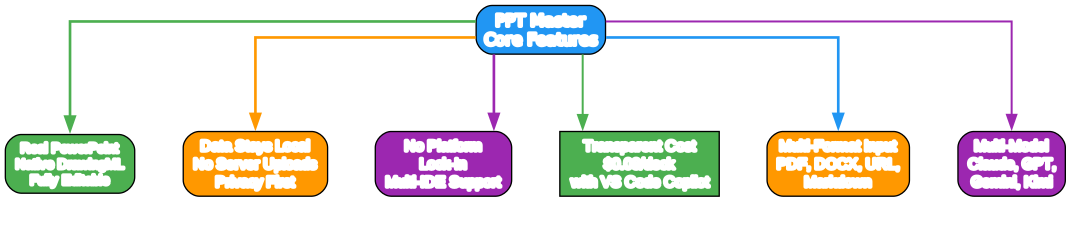
- Real PowerPoint - If a file cannot be opened and edited in PowerPoint, it should not be called a PPT. Every element PPT Master outputs is directly clickable and editable
- Transparent, predictable cost - The tool is free and open source; the only cost is your own AI editor, and you know exactly what you are paying. As low as $0.08/deck with VS Code Copilot
- Data stays local - Your files should not have to be uploaded to someone else’s server just to make a presentation. Apart from AI model communication, the entire pipeline runs on your machine
- No platform lock-in - Your workflow should not be held hostage by any single company. Works with Claude Code, Cursor, VS Code Copilot, and more; supports Claude, GPT, Gemini, Kimi, and other models
How It Works
PPT Master is a workflow that operates inside your AI IDE. You chat with the AI - “make a deck from this PDF” - and it follows the workflow to produce a real editable .pptx on your computer. No coding on your side; the IDE is just where the conversation happens.
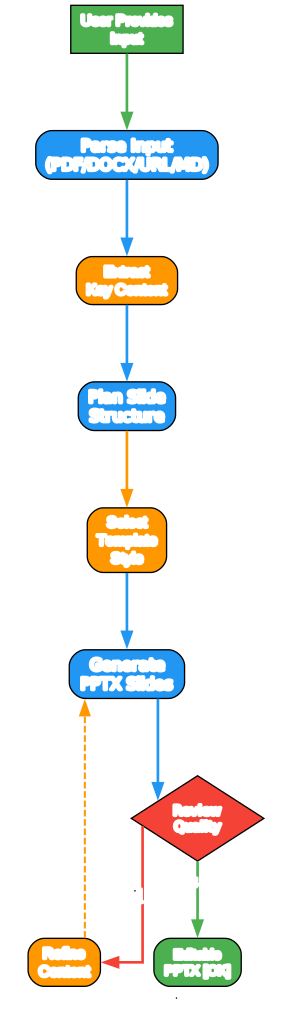
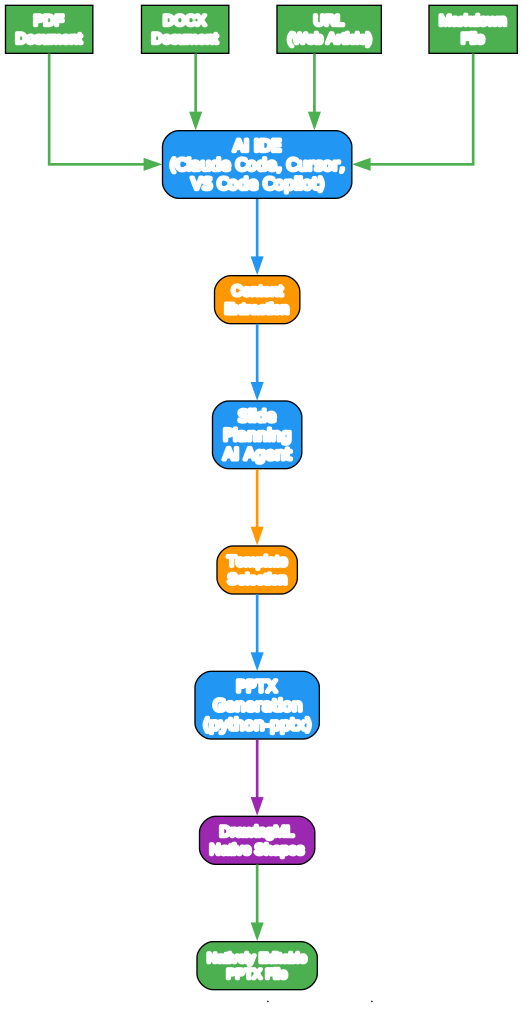
The generation process follows these steps:
- User Provides Input - Drop in a PDF, DOCX, URL, or Markdown file
- Parse Input - The AI IDE reads and parses the source document
- Extract Key Content - Important content, structure, and visuals are identified
- Plan Slide Structure - The AI agent plans the slide layout and content distribution
- Select Template Style - Choose from 6+ professional template styles
- Generate PPTX Slides - python-pptx creates native DrawingML shapes
- Review Quality - Automated quality check ensures all elements are editable
- Output Editable PPTX - A real PowerPoint file you can open and edit
Template Styles
PPT Master includes 6 professionally designed template styles, each tailored for different presentation contexts:
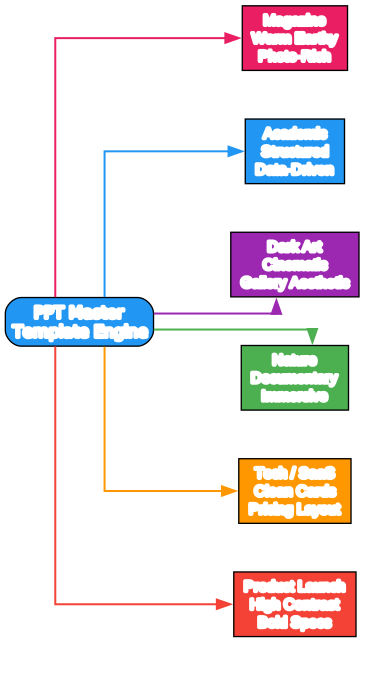
- Magazine - Warm earthy tones, photo-rich layout for storytelling
- Academic - Structured research format, data-driven for scholarly presentations
- Dark Art - Cinematic dark background, gallery aesthetic for creative work
- Nature Documentary - Immersive photography, minimal UI for visual storytelling
- Tech / SaaS - Clean white cards, pricing table layout for product presentations
- Product Launch - High contrast, bold specs highlight for announcements
Key Features
Real PowerPoint Output
Every element PPT Master generates uses native DrawingML - the same format PowerPoint itself uses. This means:
- Every text box is clickable and editable
- Charts use real Excel data that you can modify
- Shapes are vector objects, not rasterized images
- Tables are real PowerPoint tables with cell-level formatting
Multi-Format Input
PPT Master accepts a wide range of input formats:
- PDF - Research papers, reports, whitepapers
- DOCX - Word documents, proposals, briefs
- URL - Web articles, blog posts, documentation pages
- Markdown - README files, technical documentation, notes
Multi-Model Support
Works with the AI model of your choice:
- Claude (Anthropic) - via Claude Code or API
- GPT (OpenAI) - via Cursor or VS Code Copilot
- Gemini (Google) - via supported IDEs
- Kimi and other models
Privacy-First Design
Your documents never leave your machine except for AI model communication. The entire generation pipeline runs locally using python-pptx, with no server uploads required.
Getting Started
First-time setup takes about 15 minutes:
- Install Python and an AI IDE (Claude Code, Cursor, or VS Code + Copilot)
- Clone the PPT Master repository
- Drop in your source material
- Chat with the AI to generate your presentation
Each deck takes approximately 10-20 minutes of back-and-forth with the AI.
Live Examples
PPT Master includes 15 example projects with 229 pages of generated content. View the live demo to see the quality of output across different template styles and input formats.
Links
- GitHub: hugohe3/ppt-master
- Live Demo: hugohe3.github.io/ppt-master
- Examples: github.com/hugohe3/ppt-master/examples
- FAQ: github.com/hugohe3/ppt-master/docs/faq.md
PPT Master is developed by Hugo He and licensed under the MIT License. It is available on GitHub and AtomGit. Enjoyed this post? Never miss out on future posts by following us