Introduction
Vaultwarden (formerly Bitwarden_RS) is an alternative server implementation of the Bitwarden Client API, written in Rust and fully compatible with all official Bitwarden clients. With 59K+ stars on GitHub, it has become the go-to solution for users who want the power of Bitwarden without the resource overhead of the official server, making it perfect for self-hosted deployments on personal servers, home labs, or small organizations.
What is Vaultwarden?
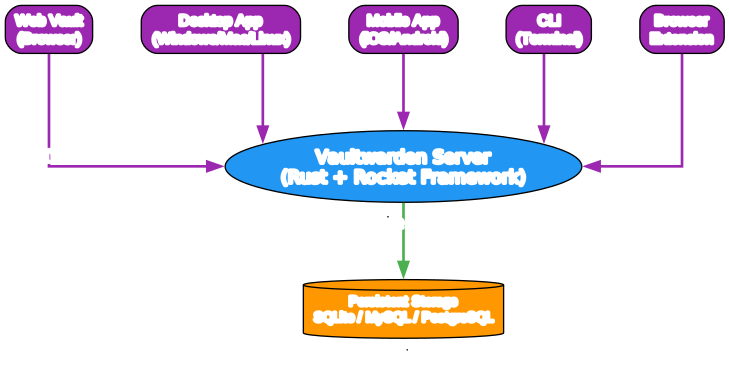
Vaultwarden provides a nearly complete implementation of the Bitwarden Client API, allowing you to use the same familiar clients (web vault, desktop apps, mobile apps, browser extensions, and CLI) while hosting your own password data. Unlike the official Bitwarden server which requires Microsoft SQL Server and significant resources, Vaultwarden is lightweight and can run on minimal hardware.
Key Advantages
| Feature | Vaultwarden | Official Bitwarden |
|---|---|---|
| Language | Rust (memory-safe) | C# / .NET |
| Database | SQLite (default), MySQL, PostgreSQL | Microsoft SQL Server |
| Resource Usage | Minimal (~50MB RAM) | Heavy (GBs of RAM) |
| Deployment | Single binary or Docker container | Complex multi-service setup |
| Self-Hosting Cost | Free | Requires license for some features |
| Client Compatibility | All official clients | All official clients |
Architecture
Vaultwarden is built on the Rocket web framework for Rust and provides a clean, efficient architecture:
- Server Core: Rust-based HTTP API server implementing Bitwarden protocol
- Storage Layer: Flexible database backend (SQLite default, MySQL/PostgreSQL supported)
- Client Compatibility: Works with web vault, desktop, mobile, browser extensions, and CLI
- Security: End-to-end encryption with zero-knowledge architecture
Features Overview
Vaultwarden supports nearly all Bitwarden features, making it a drop-in replacement for most use cases:
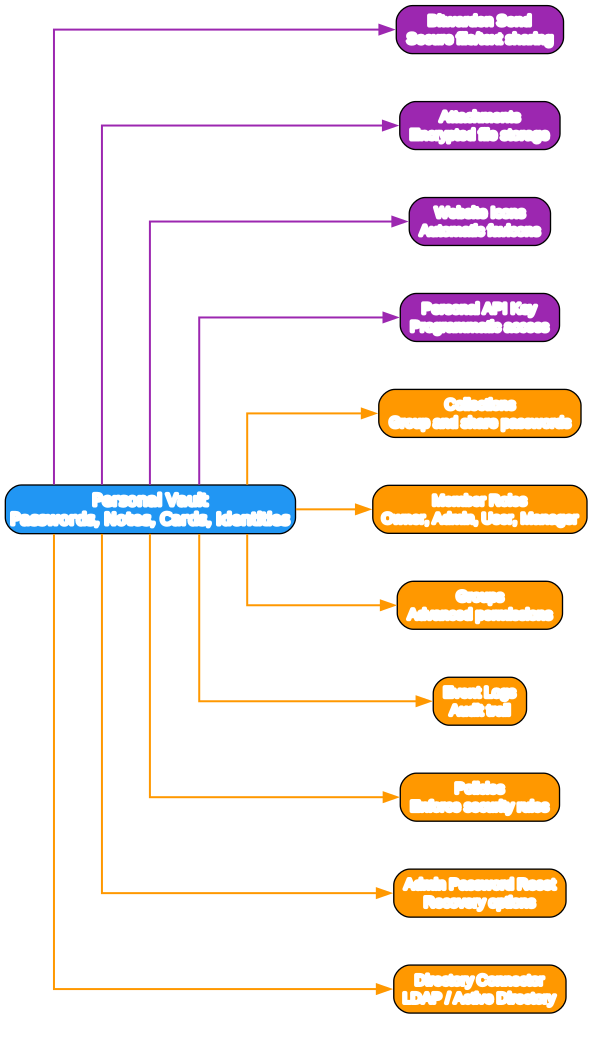
Personal Vault Features
- Password Storage: Securely store passwords, secure notes, credit cards, and identities
- Bitwarden Send: Share encrypted text or files securely with anyone
- Attachments: Store encrypted files alongside your vault items
- Website Icons: Automatically fetch and display website favicons
- Personal API Key: Programmatic access for automation and integrations
Organization Features
- Collections: Group and share passwords within teams
- Member Roles: Granular access control (Owner, Admin, User, Manager)
- Groups: Advanced permission management for large teams
- Event Logs: Audit trail for compliance and security monitoring
- Admin Password Reset: Recovery options for organization members
- Directory Connector: Synchronize users and groups from LDAP/Active Directory
- Policies: Enforce security rules across the organization
Two-Factor Authentication
Vaultwarden supports multiple 2FA methods:
| Method | Description |
|---|---|
| Authenticator App | TOTP-based (Google Authenticator, Authy, etc.) |
| One-time codes via email | |
| FIDO2 WebAuthn | Hardware security keys (YubiKey, Titan, etc.) |
| YubiKey OTP | YubiKey proprietary OTP |
| Duo Security | Enterprise 2FA via Duo |
Security Architecture
Vaultwarden inherits Bitwarden’s strong security model with end-to-end encryption:
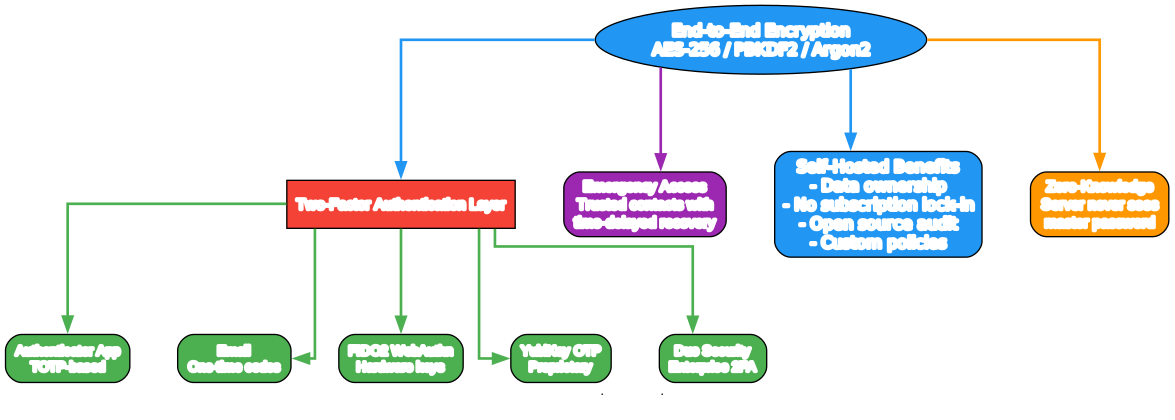
Encryption Standards
- AES-256: Industry-standard symmetric encryption
- PBKDF2: Key derivation for master password hashing
- Argon2: Modern memory-hard password hashing (configurable)
- Zero-Knowledge: Server never sees your master password or decrypted data
Self-Hosted Security Benefits
- Data Ownership: Your passwords never leave your infrastructure
- No Subscription Lock-in: Full control without recurring fees
- Auditability: Open source code you can inspect and verify
- Custom Policies: Enforce your own security rules
- Emergency Access: Trusted contacts can recover access with time delays
Deployment Options
Vaultwarden offers flexible deployment methods to suit any environment:
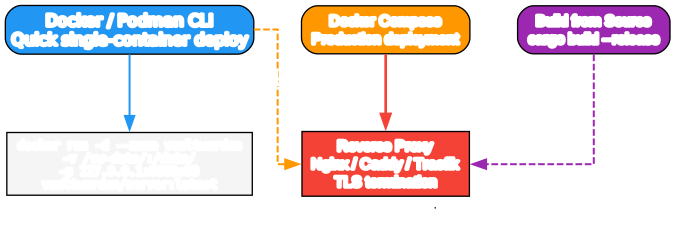
Docker / Podman CLI (Recommended)
The fastest way to get started:
# Pull the latest image
docker pull vaultwarden/server:latest

# Run with persistent storage
docker run --detach --name vaultwarden \
  --env DOMAIN="https://vw.domain.tld" \
  --volume /vw-data/:/data/ \
  --restart unless-stopped \
  --publish 127.0.0.1:8000:80 \
  vaultwarden/server:latest
Docker Compose
For production deployments with easier management:
services:
  vaultwarden:
    image: vaultwarden/server:latest
    container_name: vaultwarden
    restart: unless-stopped
    environment:
      DOMAIN: "https://vw.domain.tld"
    volumes:
      - ./vw-data/:/data/
    ports:
      - 127.0.0.1:8000:80
Build from Source
For custom builds or development:
# Clone the repository
git clone https://github.com/dani-garcia/vaultwarden.git
cd vaultwarden

# Build release binary
cargo build --release

# Binary will be at target/release/vaultwarden
Container Registries
Vaultwarden images are published to multiple registries:
- GitHub Container Registry:
ghcr.io/dani-garcia/vaultwarden - Docker Hub:
vaultwarden/server - Quay.io:
quay.io/vaultwarden/server
Reverse Proxy Setup
While Vaultwarden has built-in TLS support via Rocket, the recommended approach is to use a reverse proxy for HTTPS termination:
Nginx Example
server {
    listen 443 ssl http2;
    server_name vw.domain.tld;

    ssl_certificate /path/to/cert.pem;
    ssl_certificate_key /path/to/key.pem;

    location / {
        proxy_pass http://127.0.0.1:8000;
        proxy_set_header Host $host;
        proxy_set_header X-Real-IP $remote_addr;
        proxy_set_header X-Forwarded-For $proxy_add_x_forwarded_for;
        proxy_set_header X-Forwarded-Proto $scheme;
    }
}
Caddy Example
vw.domain.tld {
    reverse_proxy 127.0.0.1:8000
}
Important: The web vault requires a secure context (HTTPS or localhost) for the Web Crypto API to function properly.
Important Notes
Disclaimer
Vaultwarden is not associated with Bitwarden Inc. It is an independent community project. One of the active maintainers is employed by Bitwarden but contributes on their own time, with contributions reviewed by other maintainers.
Bug Reporting
When using Vaultwarden, please report bugs and suggestions directly to the Vaultwarden project via:
Do not use official Bitwarden support channels for Vaultwarden-specific issues.
Data Backup
Regular backups of your /vw-data/ directory are strongly recommended. The maintainers cannot be held liable for data loss.
Community and Support
Vaultwarden has a vibrant community with multiple support channels:
| Platform | Link |
|---|---|
| Matrix Chat | #vaultwarden:matrix.org |
| GitHub Discussions | vaultwarden/discussions |
| Discourse Forums | vaultwarden.discourse.group |
| Contributors | Graphs |
Conclusion
Vaultwarden offers the perfect balance of security, simplicity, and cost-effectiveness for password management. Whether you are an individual looking to self-host your passwords, a family wanting shared vaults, or a small organization needing team password management, Vaultwarden provides a robust solution without the resource overhead of the official Bitwarden server.
With its Rust-based architecture ensuring memory safety, comprehensive feature parity with official clients, and active community support, Vaultwarden stands as one of the best self-hosted password management solutions available today.
For more details, visit the Vaultwarden GitHub repository. Enjoyed this post? Never miss out on future posts by following us