The Knowledge Fragmentation Problem
Every researcher, developer, and knowledge worker faces the same challenge: information arrives from dozens of sources – websites, GitHub repositories, PDFs, conversations – and scatters across note-taking apps, bookmark folders, and forgotten browser tabs. Traditional tools treat knowledge as static files. You read something, you save it, and then you never find it again when you need it. The promise of a “second brain” remains unfulfilled because the brain does not organize itself.
Andrej Karpathy demonstrated a compelling alternative with his LLM Wiki pattern: give a language model a vault of raw sources and let it synthesize, cross-reference, and maintain a living knowledge base. The insight is simple but powerful – instead of manually curating links and summaries, let the LLM do the heavy lifting of integration, entity extraction, and contradiction detection. claude-obsidian takes this pattern and turns it into a production-grade Claude Code plugin that transforms Obsidian into a self-organizing AI knowledge engine.
Unlike traditional RAG pipelines that retrieve chunks of text and paste them into prompts, claude-obsidian builds a structured, persistent wiki where every source gets integrated and every question pulls from everything previously read. Knowledge compounds. The more you feed the vault, the smarter it becomes.
The Three-Layer Vault Architecture
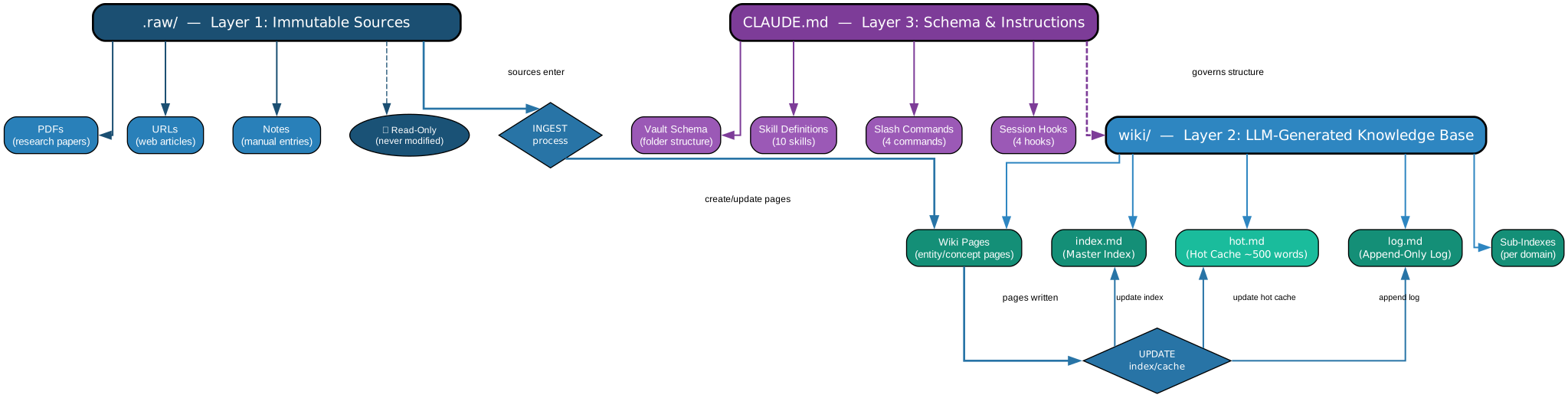
The claude-obsidian vault is organized into three distinct layers, each with a clear responsibility and strict data-flow boundaries. This separation ensures that raw sources remain immutable, generated knowledge stays current, and the system’s behavior remains configurable.
Layer 1: .raw/ – The Immutable Source Archive
The .raw/ directory is the foundation of the vault. Every document you ingest – whether a web page, a GitHub repository README, a PDF, or a local file – lands here first. This layer is strictly read-only for the LLM. Claude never modifies files in .raw/. This immutability guarantees that you can always trace any wiki claim back to its original source. When you run /wiki on a URL, the system fetches the content, stores it in .raw/, and then proceeds to the wiki layer. The manifest system tracks hashes of every raw file, so re-ingesting an unchanged source is a no-op.
Layer 2: wiki/ – The LLM-Generated Knowledge Base
The wiki/ directory is where Claude writes. Every raw source gets synthesized into one or more wiki pages. These pages contain structured knowledge: entity definitions, relationship maps, summaries, and cross-references. Wiki pages link to each other using Obsidian’s [[wikilink]] syntax, creating a navigable graph. When new information contradicts existing wiki content, Claude flags it with a [!contradiction] callout, preserving both perspectives rather than silently overwriting. An index page serves as the entry point, and a hot cache of approximately 500 words keeps the most relevant context immediately available for each session.
Layer 3: CLAUDE.md – The Schema and Instructions
The CLAUDE.md file is the control plane. It defines the wiki schema, the skills available, the hooks that fire on session events, and the overall behavior of the plugin. When you choose a wiki mode (Website, GitHub, Business, Personal, Research, or Book), the scaffold command writes an appropriate CLAUDE.md with tailored instructions. This file is the single source of truth for how the vault operates, and Claude reads it at the start of every session to understand its role and constraints.
Data Flow: Sources to Knowledge
The data flow follows a clear pipeline: sources enter .raw/ via the ingest skill –> wiki pages are created or updated in wiki/ –> the index page is regenerated –> the hot cache is refreshed for session continuity. This pipeline runs automatically when you use /wiki, and it can also run in batch mode for parallel ingestion of multiple sources.
The Ingestion Pipeline
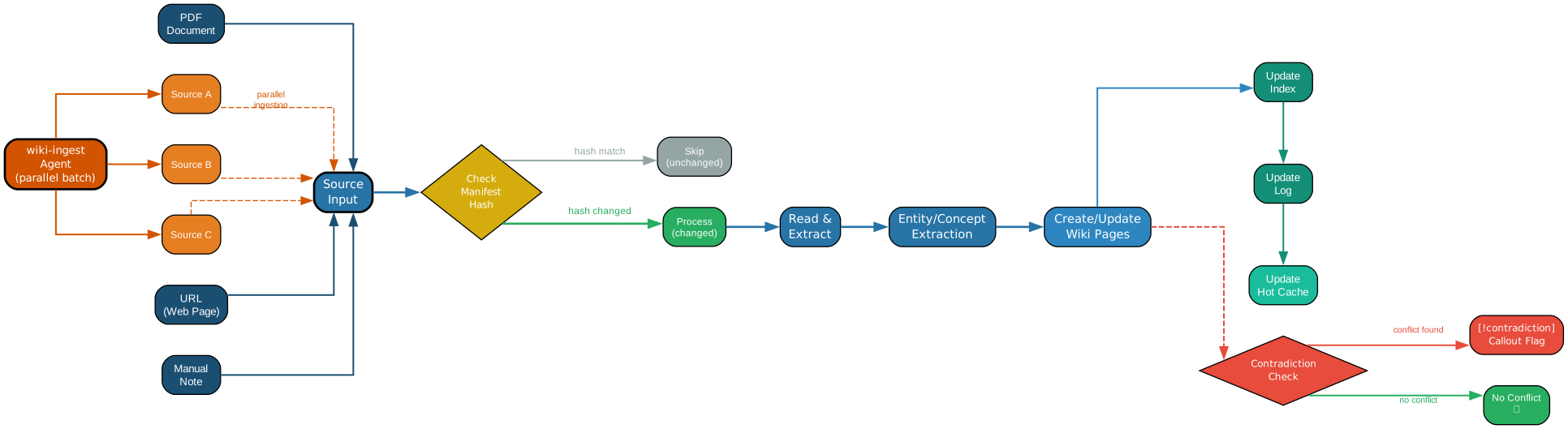
The ingestion pipeline is where claude-obsidian distinguishes itself from simple “save and summarize” tools. It is a multi-stage process that transforms raw content into structured, cross-referenced knowledge.
Delta Tracking and Manifest-Based Hash Checking
Before any ingestion begins, the system checks the manifest – a record of every source that has been processed, along with its content hash. If a source has not changed since the last ingestion, the pipeline skips it entirely. This delta tracking means that re-running /wiki on an entire vault is fast and idempotent. Only new or modified sources trigger the full ingestion pipeline. The manifest lives alongside the wiki and is updated after each successful ingestion.
Entity Extraction and Cross-Referencing
When a new source is ingested, Claude does not simply summarize it. It extracts named entities – people, organizations, concepts, technologies – and creates or updates wiki pages for each one. These entity pages link back to the source and to each other, building a rich graph of interconnected knowledge. For example, ingesting a blog post about transformer architectures might create or update pages for “attention mechanism,” “positional encoding,” and “Vaswani et al.,” each linking to the others and to the original source in .raw/.
Contradiction Flagging
When new information conflicts with existing wiki content, Claude does not silently overwrite. Instead, it inserts a [!contradiction] callout in the wiki page, presenting both the old and new perspectives with citations. This preserves intellectual honesty and lets you decide which interpretation to keep. Contradiction flagging is one of the most powerful features of the LLM Wiki pattern – it turns knowledge conflicts from hidden bugs into visible, actionable signals.
Parallel Batch Ingestion with Multi-Agent Definitions
For large ingestion jobs, claude-obsidian provides a wiki-ingest agent that processes multiple sources in parallel. This agent is defined as a multi-agent specification in CLAUDE.md, and it spawns separate Claude instances for each source, dramatically reducing wall-clock time for batch operations. The agent coordinates file locking and manifest updates to prevent race conditions. Whether you are ingesting a single URL or an entire sitemap, the pipeline adapts its concurrency model accordingly.
Skills, Commands, and Hooks

claude-obsidian ships with 10 skills, 4 slash commands, 2 multi-agent definitions, and 4 session hooks. Together, they form a complete operating system for knowledge management inside Claude Code.
The 10 Skills
| Skill | Purpose |
|---|---|
wiki | Core skill – orchestrates the full wiki lifecycle |
wiki-ingest | Ingests sources into .raw/ and triggers wiki generation |
wiki-query | Queries the wiki using semantic search and cross-references |
wiki-lint | Runs an 8-category health check on the wiki |
save | Saves the current conversation context to the wiki |
autoresearch | Executes a 3-round autonomous research loop |
canvas | Generates visual canvas layouts for wiki content |
defuddle | Extracts clean content from noisy web pages |
obsidian-bases | Creates Obsidian database views from wiki data |
obsidian-markdown | Ensures all output conforms to Obsidian-flavored Markdown |
The wiki skill is the orchestrator. When you invoke it, it reads CLAUDE.md, checks the manifest, ingests any new sources, generates or updates wiki pages, refreshes the index, and updates the hot cache. The wiki-ingest and wiki-query skills handle the read and write paths respectively. The wiki-lint skill validates wiki health across 8 categories: completeness, consistency, cross-references, formatting, metadata, orphan detection, staleness, and contradiction resolution.
The 4 Slash Commands
/wiki https://example.com/article    # Ingest a URL and update the wiki
/save                                # Save current context to the wiki
/autoresearch topic                  # Run 3-round autonomous research
/canvas page-name                    # Generate a visual canvas layout
Each command maps directly to a skill. The /wiki command is the most frequently used – it handles the entire ingest-to-wiki pipeline in one invocation. The /save command captures the current conversation context and writes it as a wiki page, ensuring that no insight is lost between sessions. The /autoresearch command runs a 3-round loop: it queries the wiki, identifies gaps, searches for new sources, ingests them, and repeats twice more to build depth. The /canvas command generates Obsidian canvas JSON for visual exploration of wiki content.
The 2 Multi-Agent Definitions
The wiki-ingest agent and the wiki-lint agent are defined as multi-agent specifications. The ingest agent processes sources in parallel batches, while the lint agent runs all 8 check categories concurrently. Both agents coordinate through the manifest and file system to avoid conflicts.
The 4 Session Hooks
| Hook | Trigger | Action |
|---|---|---|
SessionStart | New session begins | Load hot cache, read CLAUDE.md |
PostCompact | After context compaction | Refresh hot cache from wiki |
PostToolUse | After any tool call | Auto-git-commit if files changed |
Stop | Session ends | Save final state, update manifest |
These hooks ensure that the wiki stays synchronized across sessions. The SessionStart hook loads the hot cache so Claude immediately has context from previous sessions. The PostCompact hook prevents context loss when the conversation gets too long. The PostToolUse hook with auto-git-commit means every change is version-controlled automatically.
Query, Research, and Cross-Project Referencing
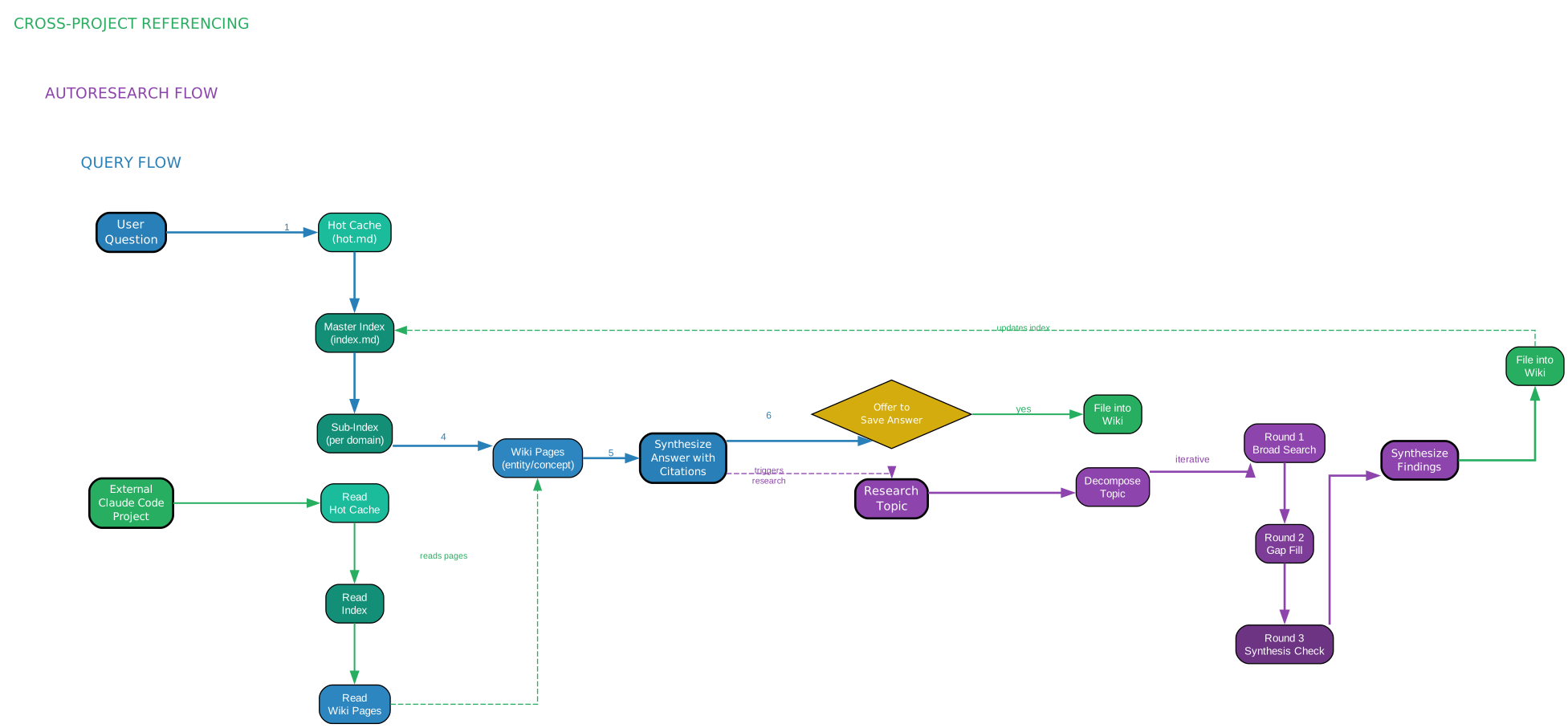
The true power of claude-obsidian emerges when you query the wiki. Unlike traditional search that returns a list of matching documents, the query skill synthesizes an answer from the entire knowledge graph, pulling in relevant entities, cross-references, and even flagged contradictions.
The Query Flow
When you ask a question, the wiki-query skill follows a structured flow. First, it searches the index page for relevant wiki entries. Then, it reads the top-matching wiki pages and their cross-references. Finally, it synthesizes a comprehensive answer that cites specific sources from .raw/. The hot cache ensures that frequently accessed pages are immediately available, reducing the number of file reads needed. The result is an answer that draws on everything you have ever ingested into the vault, not just the top-k chunks that a RAG system would retrieve.
The 3-Round Autoresearch Loop
The /autoresearch command is where claude-obsidian becomes truly autonomous. Given a research topic, it executes three rounds:
- Round 1: Query the existing wiki for what is already known. Identify gaps and open questions. Search for external sources to fill those gaps. Ingest new sources.
- Round 2: Re-query the now-expanded wiki. Identify remaining gaps. Search for more targeted sources. Ingest again.
- Round 3: Final query and synthesis. The wiki now has substantial coverage. Generate a comprehensive research summary with citations.
Each round builds on the previous one, and the wiki grows progressively deeper. After three rounds, you have a well-sourced, cross-referenced research document that would have taken hours to compile manually.
Cross-Project Referencing
claude-obsidian supports cross-project referencing, allowing you to link wiki pages across different vaults. If you maintain separate vaults for different projects (for example, one for machine learning research and one for software architecture), you can reference entities across vaults using a standardized linking convention. This means that a concept learned in one project context becomes available in others, enabling knowledge transfer without manual duplication.
Comparison with Traditional RAG and Other Obsidian AI Plugins
Traditional RAG (Retrieval-Augmented Generation) systems work by embedding documents into a vector store and retrieving the top-k chunks at query time. This approach has three fundamental limitations: (1) it retrieves chunks, not synthesized knowledge; (2) it has no mechanism for contradiction detection; and (3) it starts from scratch every session, with no memory of previous interactions.
claude-obsidian addresses all three. It synthesizes knowledge into structured wiki pages rather than retrieving raw chunks. It flags contradictions explicitly rather than silently preferring one source over another. And it maintains a hot cache and persistent wiki so that every session builds on all previous work.
Compared to other Obsidian AI plugins like Smart Connections and Copilot, claude-obsidian takes a fundamentally different approach. Smart Connections embeds your notes and finds semantically similar ones, but it does not create new knowledge – it only surfaces existing content. Copilot provides a chat interface over your vault, but it does not maintain a persistent knowledge graph or handle contradiction detection. claude-obsidian is the only plugin that actively writes to your vault, maintains a structured wiki, and compounds knowledge over time.
Getting Started
Setting up claude-obsidian is straightforward. First, install Claude Code if you have not already. Then, in your Obsidian vault directory, run the scaffold command:
# Initialize claude-obsidian in your vault
claude-obsidian scaffold
The scaffold command creates the three-layer structure: the .raw/ directory, the wiki/ directory, and the CLAUDE.md configuration file. It prompts you to choose a wiki mode based on your use case:
| Mode | Best For |
|---|---|
| Website/Sitemap | Documenting a website or documentation set |
| GitHub/Repository | Building knowledge from code repositories |
| Business/Project | Managing project knowledge and decisions |
| Personal/Second Brain | General personal knowledge management |
| Research | Academic or technical research |
| Book/Course | Studying a book or online course |
After scaffolding, you can start ingesting content immediately:
# Ingest a single URL
/wiki https://example.com/article

# Ingest a GitHub repository
/wiki https://github.com/owner/repo

# Save current conversation context
/save

# Run autonomous research on a topic
/autoresearch transformer architectures
Each command integrates seamlessly with Obsidian. Wiki pages appear as regular Markdown files with wikilinks, tags, and callouts. You can browse, search, and edit them just like any other note in your vault.
Conclusion
Knowledge compounds – but only if it is connected, cross-referenced, and maintained. claude-obsidian brings the LLM Wiki pattern to Obsidian in a way that is practical, automated, and persistent. With 10 skills, 4 slash commands, multi-agent ingestion, session hooks, and a three-layer architecture that separates sources from knowledge from configuration, it transforms a static note-taking app into a living knowledge engine.
The future of personal knowledge management is not about storing more files – it is about having an AI collaborator that reads everything, connects the dots, flags contradictions, and builds a wiki that gets smarter with every source you add. claude-obsidian makes that future available today, inside the tool you already use. Enjoyed this post? Never miss out on future posts by following us