Awesome Claude Skills: The Ultimate Curated Collection for Claude AI Workflows
Awesome Claude Skills is a comprehensive curated collection of over 70 practical Claude Skills designed to enhance productivity across Claude.ai, Claude Code, and the Claude API. Maintained by Composio, this open-source repository has garnered more than 55,000 stars and serves as the definitive resource for developers and power users looking to customize Claude AI workflows. Whether you need document processing, development automation, business intelligence, or app integrations across 500+ services, this collection provides battle-tested skills that extend Claude’s capabilities far beyond text generation.
Understanding the Ecosystem
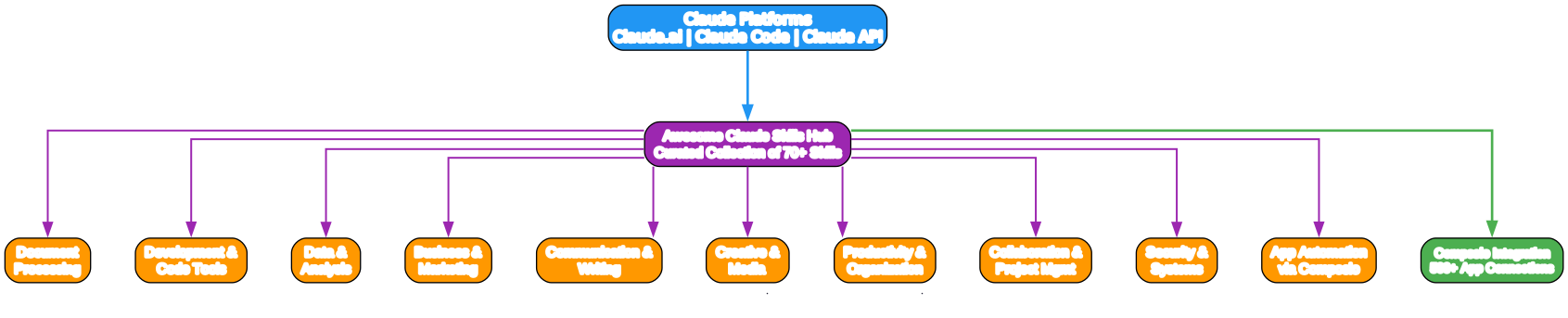
The ecosystem overview diagram illustrates how Awesome Claude Skills functions as a central hub connecting Claude’s three primary platforms to a diverse array of specialized capabilities. At the top, Claude Platforms encompass Claude.ai (the web chat interface), Claude Code (the terminal-based coding agent), and the Claude API (programmatic access). These platforms feed into the Awesome Claude Skills Hub, which acts as a curated registry organizing skills into ten distinct categories.
The ten categories branch downward from the hub: Document Processing handles Word docs, PDFs, spreadsheets, and presentations; Development and Code Tools provide software engineering assistance; Data and Analysis enables CSV summarization and database queries; Business and Marketing covers brand guidelines and competitive analysis; Communication and Writing assists with content creation; Creative and Media generates images and videos; Productivity and Organization manages files and resumes; Collaboration and Project Management integrates with Git and Google Workspace; Security and Systems performs forensics and threat hunting; and App Automation via Composio connects to over 500 external applications.
The Composio Integration node on the right represents the unique differentiator of this collection. While many skills operate within Claude’s native environment, Composio-enabled skills can take real actions in external systems such as sending emails via Gmail, creating GitHub issues, posting Slack messages, and updating CRM records. This transforms Claude from a conversational assistant into an active agent capable of executing workflows across the entire SaaS ecosystem.

Breaking Down the Skill Categories
The category breakdown diagram visualizes how the 70+ skills are organized into ten thematic clusters, each represented as a rounded subgraph with individual skill nodes inside. This organizational structure makes it easy to discover relevant skills based on your use case.
Document Processing includes skills for docx (Word document creation and editing), pdf (text extraction and annotation), pptx (slide generation), xlsx (spreadsheet manipulation), and an EPUB converter for ebook creation. These skills are essential for knowledge workers who need to automate document workflows.
Development and Code Tools is the largest category, featuring artifacts-builder for React and Tailwind CSS components, aws-skills for CDK and serverless architecture, changelog-generator for release notes, MCP Builder for Model Context Protocol servers, Playwright automation for web testing, and git workflow skills for branch management and worktrees. This category transforms Claude Code into a full-stack development partner.
Data and Analysis provides CSV summarization with automatic insights and visualizations, PostgreSQL read-only querying with defense-in-depth security, deep-research via Gemini for market analysis, and root-cause tracing for debugging complex errors. These skills make Claude a capable data analyst and research assistant.
Business and Marketing covers brand guidelines application, competitive ads extraction, domain name brainstorming, internal communications drafting, and lead research with outreach strategies. Startups and marketing teams can leverage these skills to accelerate go-to-market activities.
Communication and Writing includes article extraction, brainstorming facilitation, content research with citations, meeting transcript analysis for behavioral patterns, and Twitter algorithm optimization for engagement. Writers and content creators benefit significantly from this category.
Creative and Media offers canvas design for visual art, image generation via Gemini, image enhancement for screenshots, Slack GIF creation, theme factory for consistent styling, and video downloading. These skills extend Claude into the creative domain.
Productivity and Organization features file organization with duplicate detection, invoice processing for tax preparation, Kaizen continuous improvement methodology, n8n workflow integration, and tailored resume generation. Personal productivity enthusiasts and administrative professionals find these skills invaluable.
Collaboration and Project Management provides git automation, Google Workspace integration (Gmail, Calendar, Docs, Sheets, Slides, Drive), Outline wiki management, and code review implementation planning. Teams using these skills can streamline their collaborative workflows.
Security and Systems includes computer forensics analysis, secure file deletion, metadata extraction, and threat hunting with Sigma rules. Security professionals can augment their toolkit with Claude-powered analysis.
App Automation via Composio is the most extensive category, with pre-built workflow skills for 78 SaaS applications including CRM systems, project management tools, communication platforms, email services, DevOps tools, storage providers, social media, marketing automation, support desks, e-commerce platforms, design tools, and analytics services.

How Skill Workflow and Integration Works
The workflow diagram illustrates the end-to-end process of how Claude Skills are loaded, matched, and executed. The process begins with a User Request entering the system through any of the three Claude platforms. The platform selection step determines whether the user is interacting via Claude.ai, Claude Code, or the API.
Once the platform is identified, skills are loaded from the local configuration directory at ~/.config/claude-code/skills/. Each skill folder contains a SKILL.md file with YAML frontmatter defining the skill’s name, description, and instructions. Claude parses these files and registers the available capabilities.
The skill matching step analyzes the user’s request against the registered skills to determine which ones are relevant. If no match is found, the system can fall back to general capabilities or prompt the user for clarification. When a match is found, the execution engine loads the skill’s instructions and begins the workflow.
During execution, the skill may invoke Composio actions to interact with external applications. For example, a “Send Email” skill would use Composio’s Gmail integration to actually send the message, while a “Create Issue” skill would use the GitHub integration. These external actions are optional and only occur when the skill explicitly requires them.
The final output is either a completed action (such as a sent email or created issue) or a generated result (such as a document, analysis, or code snippet). This workflow pattern makes skills portable across all Claude platforms while maintaining consistent behavior.

The Composio App Automation Ecosystem
The Composio ecosystem diagram showcases the breadth of external application integrations available through the Rube MCP (Model Context Protocol) implementation. At the center, Composio acts as a universal adapter connecting Claude to the broader SaaS landscape.
CRM and Sales integrations include Close, HubSpot, Salesforce, Pipedrive, and Zoho CRM. These enable Claude to manage leads, contacts, opportunities, and pipelines directly from conversational commands.
Project Management covers Asana, Jira, Linear, Monday, Notion, and Trello. Teams can create tasks, update project status, and manage sprints without leaving the Claude interface.
Communication platforms include Discord, Slack, Microsoft Teams, Telegram, and WhatsApp. Claude can send messages, create channels, and manage conversations across these services.
Email integrations support Gmail, Outlook, SendGrid, and Postmark for sending, searching, and organizing emails programmatically.
Code and DevOps connects to GitHub, GitLab, Bitbucket, CircleCI, Datadog, and Vercel. Developers can trigger deployments, review pull requests, and monitor infrastructure through Claude.
Storage providers include Google Drive, Dropbox, Box, and OneDrive for file upload, download, search, and sharing operations.
Social Media integrations cover Twitter, LinkedIn, Instagram, Reddit, YouTube, and TikTok for posting, scheduling, and analytics.
Marketing tools include Mailchimp, Klaviyo, ActiveCampaign, and Brevo for email campaign management.
Support platforms include Zendesk, Freshdesk, and Help Scout for ticket management and customer service automation.
E-commerce integrations support Shopify, Stripe, and Square for product management, payment processing, and order handling.
Design tools include Figma, Canva, Miro, and Webflow for collaborative design and content creation.
Analytics platforms include Google Analytics, Mixpanel, Amplitude, and PostHog for reporting and data analysis.
This ecosystem transforms Claude from a conversational AI into an operational agent capable of executing real business processes across the entire technology stack.
Getting Started with Claude Skills
Using Skills in Claude.ai
To use skills in the web interface:
- Click the skill icon in your chat interface.
- Add skills from the marketplace or upload custom skills.
- Claude automatically activates relevant skills based on your task context.
Using Skills in Claude Code
For terminal-based usage, place skills in the configuration directory:
# Create the skills directory
mkdir -p ~/.config/claude-code/skills/

# Copy a skill into the directory
cp -r skill-name ~/.config/claude-code/skills/

# Verify the skill metadata
head ~/.config/claude-code/skills/skill-name/SKILL.md
Start Claude Code and the skill loads automatically:
claude
The skill activates when your conversation context matches the skill’s trigger conditions.
Using Skills via the Claude API
For programmatic access, use the Skills API:
import anthropic

client = anthropic.Anthropic(api_key="your-api-key")

response = client.messages.create(
    model="claude-3-5-sonnet-20241022",
    skills=["skill-id-here"],
    messages=[{"role": "user", "content": "Your prompt"}]
)
Refer to the Skills API documentation for detailed integration patterns.
Creating Your Own Claude Skills
Skill Structure
Each skill is a folder containing a SKILL.md file with YAML frontmatter:
skill-name/
├── SKILL.md          # Required: Skill instructions and metadata
├── scripts/          # Optional: Helper scripts
├── templates/        # Optional: Document templates
└── resources/        # Optional: Reference files
Basic Skill Template
---
name: my-skill-name
description: A clear description of what this skill does and when to use it.
---

# My Skill Name

Detailed description of the skill's purpose and capabilities.

## When to Use This Skill

- Use case 1
- Use case 2
- Use case 3

## Instructions

[Detailed instructions for Claude on how to execute this skill]

## Examples

[Real-world examples showing the skill in action]
Skill Best Practices
- Focus on specific, repeatable tasks rather than broad capabilities.
- Include clear examples and edge cases in your instructions.
- Write instructions for Claude, not for end users.
- Test across Claude.ai, Claude Code, and the API to ensure portability.
- Document prerequisites and dependencies explicitly.
- Include error handling guidance for robust execution.
Key Features
| Feature | Description |
|---|---|
| 70+ Curated Skills | Battle-tested skills across 10 categories for diverse use cases. |
| Cross-Platform Portability | Skills work consistently across Claude.ai, Claude Code, and the API. |
| 500+ App Integrations | Composio-powered connections to CRM, PM, communication, and DevOps tools. |
| Open Source | Apache 2.0 licensed with community contributions welcome. |
| Easy Installation | Simple directory-based installation for Claude Code users. |
| Skill Creator Tools | Built-in guidance for authoring and publishing custom skills. |
| API Programmatic Access | Load and manage skills programmatically via the Claude API. |
| Community Marketplace | Discover and share skills with the broader Claude community. |
Installation and Setup
Clone the Repository
git clone https://github.com/ComposioHQ/awesome-claude-skills.git
cd awesome-claude-skills
Install the Composio Plugin (Optional)
For app automation capabilities, install the connect-apps plugin:
claude --plugin-dir ./connect-apps-plugin
Run the setup command:
/connect-apps:setup
Paste your API key when prompted. Obtain a free key at dashboard.composio.dev.
Restart Claude Code to activate:
exit
claude
Troubleshooting
| Issue | Solution |
|---|---|
| Skill not loading | Verify the skill is in ~/.config/claude-code/skills/ and contains a valid SKILL.md. |
| Composio actions failing | Check your API key and ensure the target app is connected in the Composio dashboard. |
| Skill not activating | Review the skill’s trigger conditions and ensure your prompt matches the intended use case. |
| Permission errors | Verify file permissions on the skills directory and ensure Claude Code has read access. |
| API rate limits | Implement retry logic and consider caching for frequently used skills. |
Conclusion
Awesome Claude Skills represents the most comprehensive curated collection of Claude capabilities available today. With over 70 skills spanning document processing, development, data analysis, business automation, and creative media, it transforms Claude from a conversational AI into a full-stack productivity partner. The Composio integration layer adds 500+ app connections, enabling Claude to take real actions across the SaaS ecosystem.
Whether you are a developer looking to streamline coding workflows, a marketer automating content creation, or a business user integrating Claude with your existing tools, this collection provides the building blocks for powerful AI-driven automation. The open-source nature and active community ensure continuous growth and improvement.
Start exploring today by cloning the repository, installing your first skill, and discovering how Claude Skills can revolutionize your daily workflows.
Links
- GitHub Repository
- Composio Dashboard
- Composio Toolkits
- Claude Skills Overview
- Skills User Guide
- Creating Custom Skills
- Skills API Documentation
- Anthropic Skills Repository
- Claude Community
- Skills Marketplace

Enjoyed this post? Never miss out on future posts by following us


