Introduction
AI coding agent sandbox orchestration has become essential infrastructure for teams running autonomous code generation at scale. When AI agents modify your codebase, they can introduce breaking changes, install conflicting dependencies, or execute arbitrary commands that compromise your development environment. Without proper isolation, a single rogue agent run can corrupt hours of work or introduce security vulnerabilities into your project.
Sandcastle, created by Matt Pocock (the mind behind Total TypeScript), addresses this problem head-on. With over 5,200 stars on GitHub, Sandcastle is a TypeScript library that orchestrates AI coding agents inside isolated sandbox environments, managing git worktrees, branch strategies, prompt delivery, and result collection through a single sandcastle.run() call. It supports Claude Code, OpenAI Codex, Pi, Cursor, OpenCode, and GitHub Copilot out of the box, and its provider-agnostic architecture means you can add your own sandbox provider or agent with minimal effort.
This post covers Sandcastle’s architecture, sandbox providers, branch strategies, prompt system, session capture, lifecycle hooks, and real-world use cases. By the end, you will understand how to safely run AI coding agents in production with full isolation and control.
What is Sandcastle?
Sandcastle is a TypeScript library for orchestrating AI coding agents in isolated sandboxes. The core idea is simple: AI agents should never touch your working directory directly. Instead, Sandcastle creates isolated environments where agents can work freely, then merges the results back on your terms.
The workflow follows three steps. First, you invoke an agent with sandcastle.run(), specifying which agent to use, which sandbox to run it in, and what prompt to send. Second, Sandcastle handles the entire sandboxing lifecycle, creating a git worktree, spinning up a container, running the agent, and collecting commits. Third, the commits merge back to your repository according to your chosen branch strategy.
The library ships with built-in sandbox providers for Docker, Podman, and Vercel, plus a custom provider API that lets you integrate any isolation technology. It supports six agent providers: Claude Code, OpenAI Codex, Pi, Cursor, OpenCode, and GitHub Copilot. The design philosophy is that agents should be treated as untrusted code that needs containment, not as trusted collaborators with direct filesystem access.
Sandcastle uses the await using pattern for automatic resource cleanup, ensuring that containers and worktrees are always properly disposed. The library is built on Effect, a functional programming library for TypeScript, which provides composable error handling and robust resource management throughout the agent lifecycle.
Architecture Deep Dive

This architecture diagram illustrates Sandcastle’s three-layer design. The host layer manages git worktrees and configuration. The orchestrator layer handles prompt preprocessing, agent invocation, iteration management, and result collection using Effect for composable error handling. The sandbox provider layer abstracts isolation boundaries, with bind-mount providers (Docker, Podman) mounting host directories and isolated providers (Vercel, Daytona) using git bundle sync. Agent providers translate Sandcastle’s API into CLI commands for each supported AI coding tool. The diagram shows how run() coordinates all three layers: resolving prompts on the host, creating a sandboxed environment, invoking the agent, collecting commits, and merging results back.
Core API Surface
Sandcastle exposes four primary functions, each designed for a different orchestration pattern:
-
run()- One-shot agent invocation with automatic sandbox lifecycle. You call it with a prompt, agent, and sandbox configuration, and it handles everything from worktree creation to cleanup. This is the most common entry point. -
createSandbox()- Creates a reusable sandbox for multi-run workflows. Instead of spinning up a new container for each agent call, you can reuse the same sandbox across multiple invocations, which is useful for implement-then-review pipelines. -
createWorktree()- Independent worktree lifecycle management. This gives you fine-grained control over when worktrees are created and destroyed, separate from the sandbox lifecycle. -
interactive()- Launches interactive agent sessions where you can converse with the agent in real time, similar to running Claude Code directly in your terminal but inside a sandboxed environment.
Sandbox Provider Architecture
Sandcastle distinguishes between two types of sandbox providers:
Bind-mount providers (Docker, Podman) mount the host directory directly into the container. Changes made inside the container are immediately visible on the host filesystem. This approach is fast and works well for local development, but it means the host and sandbox share the same filesystem.
Isolated providers (Vercel, Daytona) run in a completely separate filesystem. Files are synced in before the agent runs and synced out after completion using git bundle format. This provides true isolation but requires explicit file transfer.
The no-sandbox provider runs the agent directly on the host, which is useful for CI/CD environments that are already containerized or when you trust the agent completely.
Custom providers can be built using createBindMountSandboxProvider() or createIsolatedSandboxProvider(), each implementing a handle contract with exec, close, copyFileIn, copyFileOut, copyIn, and worktreePath methods.
Branch Strategies
Sandcastle offers three branch strategies that control how agent changes integrate with your repository:
-
Head (
{ type: "head" }) - The agent writes directly to your working directory with no worktree or branch indirection. This is the fastest option but provides no isolation from the agent’s changes. -
Merge-to-head (
{ type: "merge-to-head" }) - Sandcastle creates a temporary branch in a git worktree, lets the agent work in isolation, then merges changes back to HEAD and cleans up the temporary branch. This is the safest default for automation and CI pipelines. -
Branch (
{ type: "branch", branch: "agent/fix-42" }) - Creates an explicitly named branch in a worktree. The agent’s commits stay on that branch, making it ideal for PR-based workflows where you want to review changes before merging.
Orchestrator Pattern
The orchestrator uses Effect’s composable error handling to manage the entire agent lifecycle. Each step in the process, from prompt resolution to cleanup, is modeled as an Effect that can be composed, retried, or aborted. The WorktreeManager handles git worktree creation, reuse, pruning, and cleanup, ensuring that worktrees are always properly disposed even when errors occur.
Sandbox Providers in Detail
Docker Provider
The Docker provider is the most common choice for local development. It creates a container with your project directory bind-mounted inside, giving the agent full access to your codebase while keeping it isolated from the host system. Configuration options include custom image names, additional mounts, environment variables, network settings, user groups, device passthrough, CPU limits, and SELinux labels for systems running SELinux.
import { docker } from "@ai-hero/sandcastle/sandboxes/docker";

const sandbox = docker({
  imageName: "my-project-sandbox",
  mounts: [{ source: "/data", target: "/data" }],
  env: { NODE_ENV: "test" },
});
Podman Provider
Podman offers a rootless alternative to Docker, which is important for security-conscious environments. It supports --userns=keep-id for user namespace mapping and SELinux labels. The API mirrors Docker’s, making it a drop-in replacement for teams that prefer rootless container execution.
Vercel Provider
The Vercel provider uses Firecracker microVMs through @vercel/sandbox, providing cloud-based isolation with a completely separate filesystem. Files are synced in via git bundle before the agent starts and synced out after completion. This is ideal for teams that want cloud-based sandboxing without managing local container infrastructure.
Daytona Provider
Daytona provides cloud development environment integration, offering another option for teams that need remote sandboxing. Like the Vercel provider, it uses the isolated provider pattern with explicit file synchronization.
No-sandbox Provider
The no-sandbox provider runs the agent directly on the host machine. This is useful in CI/CD environments where the build runner is already containerized, or when you need maximum speed and trust the agent’s behavior. You opt in explicitly with noSandbox().
Custom Provider API
For teams with specialized isolation needs, Sandcastle provides two factory functions for building custom providers:
import { createBindMountSandboxProvider } from "@ai-hero/sandcastle";

const myProvider = createBindMountSandboxProvider({
  async create(options) {
    // Start your custom sandbox
    return {
      async exec(command) { /* execute command in sandbox */ },
      async close() { /* tear down sandbox */ },
      async copyFileIn(source, target) { /* copy file into sandbox */ },
      async copyFileOut(source, target) { /* copy file out of sandbox */ },
      async copyIn(source, target) { /* copy directory into sandbox */ },
      worktreePath: "/path/to/repo/inside/sandbox",
    };
  },
});
Both provider types return a sandbox handle from their create() function. The handle exposes: exec (run a command), close (tear down the sandbox), copyFileIn/copyFileOut (move files), and worktreePath (absolute path to repo directory inside sandbox).
Prompt System and Templates
Prompt Resolution
Sandcastle supports two prompt sources. You can provide an inline prompt with prompt: "Fix the login bug" or reference a file with promptFile: ".sandcastle/prompt.md". File-based prompts are resolved relative to the project root and support template substitution.
Dynamic Context with Shell Expressions
One of Sandcastle’s most powerful features is the !`command` syntax for embedding shell expression results directly into prompts. These expressions are evaluated inside the sandbox after hooks complete, which means they have access to installed dependencies and project-specific tooling:
const result = await run({
  agent: claudeCode("claude-opus-4-7"),
  sandbox: docker(),
  prompt: `
    Here is the current test output:
    !\`npm test 2>&1\`

    Fix all failing tests.
  `,
});
Prompt Arguments with Template Substitution
Prompts support template substitution, with built-in variables like and ``. This enables reusable prompt templates that adapt to different branch configurations:
const result = await run({
  agent: claudeCode("claude-opus-4-7"),
  sandbox: docker(),
  promptFile: ".sandcastle/prompt.md",
  promptArgs: {
    SOURCE_BRANCH: "main",
    TARGET_BRANCH: "feature/auth",
  },
});
Completion Signal
Agents can signal early completion by emitting <promise>COMPLETE</promise> in their output. This allows Sandcastle to stop iterating before the maximum number of iterations is reached, saving compute resources when the agent has finished its task.
Structured Output
Sandcastle provides two output extraction mechanisms that work with Zod or any Standard Schema-compatible library:
import { Output } from "@ai-hero/sandcastle";
import { z } from "zod";

const result = await run({
  agent: claudeCode("claude-opus-4-7"),
  sandbox: docker(),
  prompt: "Analyze this code and report issues",
  output: Output.object({
    tag: "ANALYSIS",
    schema: z.object({
      issues: z.array(z.object({
        file: z.string(),
        line: z.number(),
        severity: z.enum(["error", "warning", "info"]),
        message: z.string(),
      })),
      summary: z.string(),
    }),
  }),
});

console.log(result.output); // Fully typed object
Output.object() extracts structured JSON from agent output by looking for a specific tag, then validates it against a Zod schema. Output.string() extracts a tagged string section. This transforms raw agent output into type-safe, validated data structures.
Built-in Templates
Sandcastle includes five workflow templates that scaffold common agent orchestration patterns:
- blank - A bare scaffold for custom workflows, giving you full control over the agent invocation loop.
- simple-loop - Picks and closes GitHub issues one by one, running the agent on each issue sequentially.
- sequential-reviewer - Implements an issue, then runs a separate review pass on each change before moving to the next issue.
- parallel-planner - Analyzes which issues can be worked on in parallel, executes them on separate branches, then merges the results.
- parallel-planner-with-review - Adds per-branch code review to the parallel execution pattern, combining speed with quality assurance.
Each template can be initialized with npx @ai-hero/sandcastle init, which scaffolds the .sandcastle/ directory with the appropriate configuration files, prompt templates, and entry points.
Session Capture and Resume
Sandcastle automatically captures session data for Claude Code and Codex agents, storing session files on the host for replay and inspection. This is invaluable for debugging agent behavior, understanding what the agent did during a run, and resuming interrupted sessions.
The resumeSession option lets you continue a prior conversation in a new sandbox. This is particularly useful when an agent run fails or times out, and you want to pick up where it left off without starting from scratch:
const result = await run({
  agent: claudeCode("claude-opus-4-7"),
  sandbox: docker(),
  promptFile: ".sandcastle/prompt.md",
  resumeSession: previousSessionId,
});
There is also a shorthand: result.resume?.("Continue where you left off") lets you resume the most recent session with a follow-up prompt. Session file paths are automatically rewritten to map sandbox paths to host paths, ensuring seamless continuity across different sandbox instances.
Key Insight: “Sandcastle is provider-agnostic – it ships with built-in providers for Docker, Podman, and Vercel, and you can create your own. Great for parallelizing multiple AFK agents, creating review pipelines, or even just orchestrating your own agents.”
Note that session capture is incompatible with maxIterations > 1 because each iteration creates a new session context. It also requires the host session file to be accessible, which means it works best with bind-mount providers where the host filesystem is available.
Lifecycle Hooks and Configuration
Host Hooks
Sandcastle provides two host-level hooks that execute at different points in the agent lifecycle:
-
onWorktreeReady- Runs aftercopyToWorktreecompletes but before the sandbox starts. This is the right place to modify files in the worktree, install additional dependencies, or set up test data that the agent needs. -
onSandboxReady- Runs after the sandbox container is up and running. This hook has access to the sandbox handle and can execute commands inside the container.
Sandbox Hooks
The onSandboxReady sandbox hook runs inside the container after it starts. It receives sudo support for operations that require elevated privileges, such as installing system packages or modifying configuration files:
const result = await run({
  agent: claudeCode("claude-opus-4-7"),
  sandbox: docker(),
  promptFile: ".sandcastle/prompt.md",
  hooks: {
    onWorktreeReady: async (worktreePath) => {
      // Modify files in the worktree before sandbox starts
      await fs.writeFile(path.join(worktreePath, "test-data.json"), testData);
    },
    onSandboxReady: async (sandbox) => {
      // Run commands inside the sandbox
      await sandbox.exec("apt-get update && apt-get install -y curl");
    },
  },
});
Hook Execution Order
The execution order matters for understanding side effects. First, copyToWorktree copies files into the worktree. Then host.onWorktreeReady runs sequentially. Next, the sandbox container is created. Finally, host.onSandboxReady and sandbox.onSandboxReady run in parallel, which means you should not depend on ordering between them.
Timeouts and Environment
Sandcastle provides configurable timeouts for each step: copyToWorktreeMs, gitSetupMs, commitCollectionMs, and mergeToHostMs. Environment variables are resolved from three sources with merge rules: .sandcastle/.env file, process.env, and provider-specific environment, with later sources overriding earlier ones.
Logging can be directed to a file or stdout, and the onAgentStreamEvent callback provides real-time observability into agent behavior, enabling live dashboards and progress tracking.
Real-World Use Cases
CI/CD Integration
Run Sandcastle in your CI pipeline to have agents automatically fix lint errors, resolve test failures, or implement features from issue descriptions. The structured output feature validates agent results against a schema before merging, ensuring that only well-formed changes make it into your codebase:
const result = await run({
  agent: claudeCode("claude-opus-4-7"),
  sandbox: docker(),
  prompt: "Fix all TypeScript errors in the project",
  output: Output.object({
    tag: "FIX_RESULT",
    schema: z.object({
      filesChanged: z.array(z.string()),
      errorsRemaining: z.number(),
    }),
  }),
  branchStrategy: { type: "merge-to-head" },
});
Parallel Issue Processing
The parallel-planner template processes multiple GitHub issues simultaneously. It analyzes which issues can be worked on independently, creates separate branches for each, runs agents in parallel, and merges the results. This can reduce a backlog of 20 issues to a few hours of processing time.
Implement-then-Review Pattern
The sequential-reviewer template implements an issue, then runs a separate review pass on each change. This two-phase approach catches bugs and style violations before they reach the main branch, combining the speed of AI implementation with the quality assurance of AI review.
Custom Provider Integration
Teams running Kubernetes, cloud VMs, or specialized container runtimes can build custom sandbox providers using the createBindMountSandboxProvider() and createIsolatedSandboxProvider() factory functions. The handle contract is straightforward: implement exec, close, copyFileIn, copyFileOut, copyIn, and worktreePath, and Sandcastle handles the rest.
Multi-Agent Workflows
Create reusable sandboxes with createSandbox() for implement-then-review pipelines. The implementer agent writes code, then the reviewer agent evaluates it in the same sandbox, providing a tight feedback loop without the overhead of spinning up new containers for each iteration.
Interactive Exploration
The interactive() function launches an interactive agent session for codebase exploration before committing to an AFK (away-from-keyboard) run. This lets you understand the codebase context, ask clarifying questions, and refine your prompt before running the agent unattended.
Takeaway: “From your point of view, you just configure
branchStrategy: { type: 'branch', branch: 'foo' }onrun(), and get a commit on branchfooonce it’s complete. All 100% local.”
Abort and Recovery
Cancel running agents with AbortSignal, and Sandcastle will gracefully shut down the sandbox. When a run fails, worktrees are preserved for manual inspection, so you never lose the agent’s work even when something goes wrong.
Getting Started
Installation
# Install Sandcastle as a dev dependency
npm install --save-dev @ai-hero/sandcastle

# Initialize the .sandcastle directory (interactive setup)
npx @ai-hero/sandcastle init

# Configure environment variables
cp .sandcastle/.env.example .sandcastle/.env
# Edit .sandcastle/.env with your ANTHROPIC_API_KEY

# Build the Docker image
sandcastle docker build-image

# Run the agent
npx tsx .sandcastle/main.ts
Programmatic API
import { run, claudeCode } from "@ai-hero/sandcastle";
import { docker } from "@ai-hero/sandcastle/sandboxes/docker";

const result = await run({
  agent: claudeCode("claude-opus-4-7"),
  sandbox: docker(),
  promptFile: ".sandcastle/prompt.md",
});

console.log(result.iterations.length);
console.log(result.commits);
console.log(result.branch);
The run() function returns a result object containing all iterations, commits, branch information, and any structured output. For multi-run workflows, use createSandbox() to reuse containers, and createWorktree() for independent worktree management.
Docker Configuration
Customize the .sandcastle/Dockerfile to include your project’s dependencies:
FROM node:20-slim

# Install project dependencies
RUN apt-get update && apt-get install -y git

# Set up working directory
WORKDIR /app
Then build the image with sandcastle docker build-image. The Docker provider automatically handles UID/GID alignment, SELinux labels, and mount configuration.
Amazing: “Sandcastle uses a
SandboxProviderto create isolated environments. Thesandboxoption onrun(),interactive(), andcreateSandbox()accepts any provider, includingnoSandbox()– opt in to running the agent directly on the host when container isolation is undesired.”
Comparison and Conclusion
Sandcastle fills a critical gap in the AI coding agent ecosystem. Running agents directly on your machine provides no isolation, no branch management, and no structured output extraction. Other agent orchestration tools tend to be tightly coupled to a single agent or sandbox technology. Sandcastle’s provider-agnostic design means you can switch between Docker, Podman, Vercel, or custom providers without changing your workflow code.
The branch strategy system provides a clean abstraction over git worktree management that would be complex and error-prone to implement manually. The prompt system with shell expression expansion and template substitution enables dynamic, context-aware prompts. The structured output feature with Zod validation transforms raw agent output into type-safe data structures.
At version 0.6.5, Sandcastle is pre-1.0 but demonstrates mature engineering practices with 17 Architecture Decision Records, comprehensive test coverage, and active development. The MIT license and open-source community make it accessible for teams of all sizes.
Important: “Both provider types return a sandbox handle from their
create()function. The handle exposes:exec(run a command),close(tear down the sandbox),copyFileIn/copyFileOut(move files), andworktreePath(absolute path to repo directory inside sandbox).”
If you are running AI coding agents in any capacity, Sandcastle provides the isolation, control, and observability you need to do it safely and at scale. Check out the GitHub repository to get started.
Branch Strategies in Detail
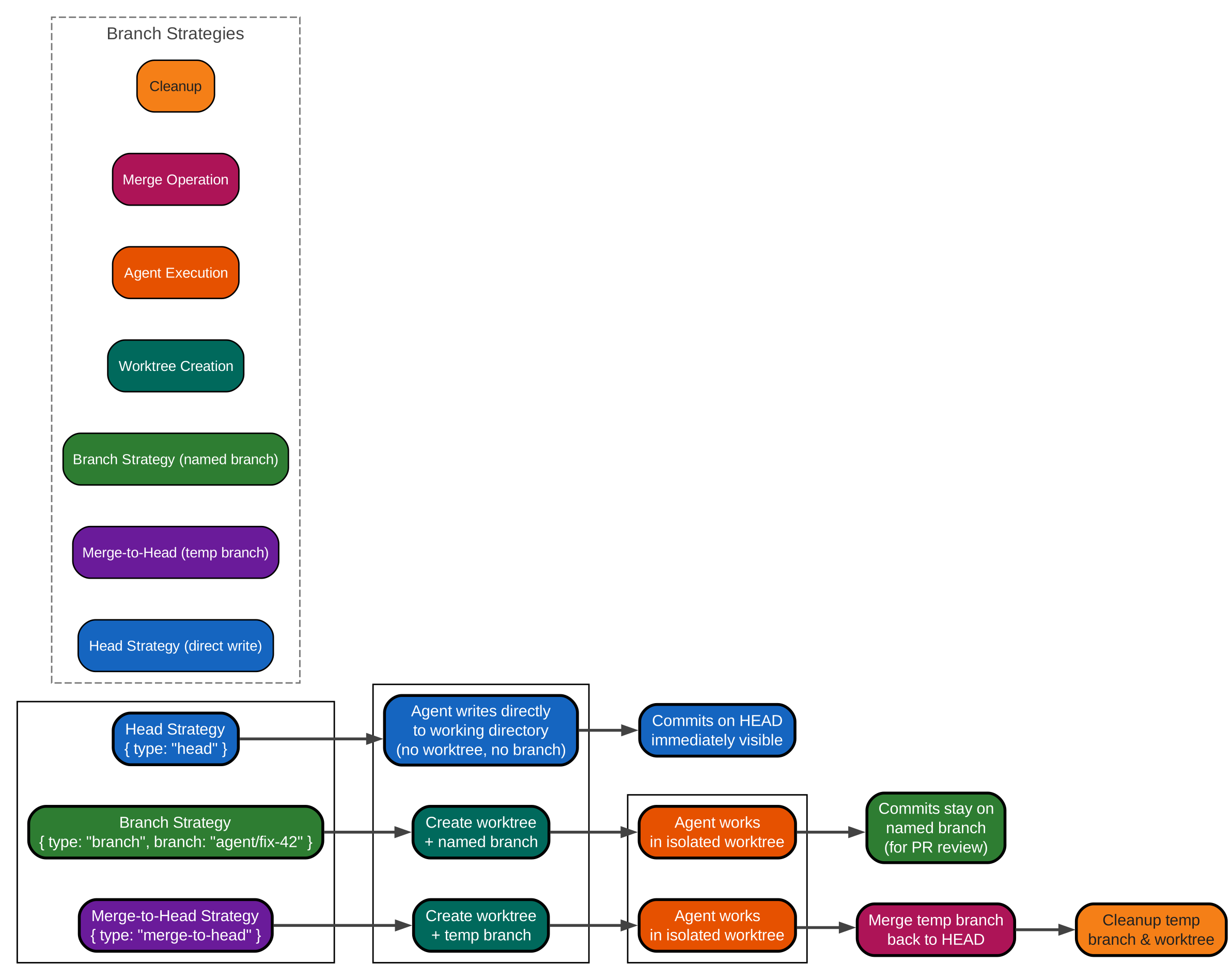
This workflow diagram compares Sandcastle’s three branch strategies. The head strategy is the simplest – the agent writes directly to the host’s working directory with no isolation or branch overhead, making it ideal for fast local development. The merge-to-head strategy creates a temporary branch in a git worktree, lets the agent work in isolation, then merges changes back to HEAD and cleans up – this is the safest default for automation and CI. The branch strategy creates an explicitly named branch in a worktree, leaving the agent’s commits on that branch for review or PR creation. Each strategy maps to different use cases: head for development speed, merge-to-head for safe automation, and branch for PR-based workflows. Bind-mount providers default to the head strategy since they share the host filesystem, while isolated providers default to merge-to-head since they need to sync changes back.
Agent Execution Workflow
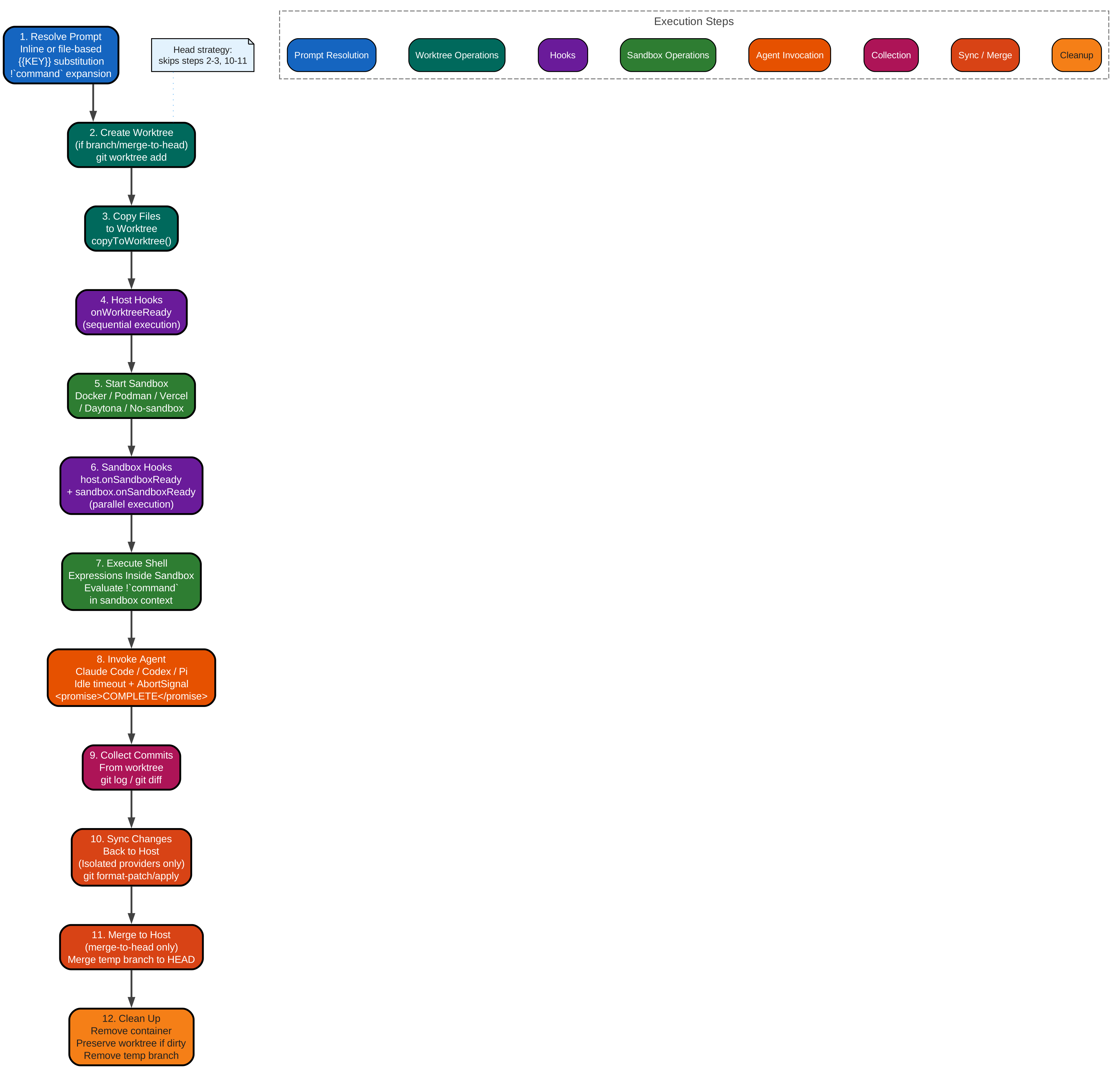
This sequence diagram shows the complete lifecycle of a Sandcastle Enjoyed this post? Never miss out on future posts by following us run() invocation. The process begins with prompt resolution, where inline strings or template files are processed through argument substitution () and shell expression expansion (`!`command). For non-head strategies, a git worktree is created and files are copied into it. Host hooks run sequentially before the sandbox starts, then host and sandbox hooks run in parallel after startup. Shell expressions in the prompt are evaluated inside the sandbox where they can access installed dependencies. The agent is then invoked with idle timeout monitoring and optional abort signal handling. After the agent completes, commits are collected from the worktree. For isolated providers, changes are synced back to the host via git format-patch/apply. The merge-to-head strategy merges the temp branch back to HEAD. Finally, cleanup removes the container and worktree, preserving it if there are uncommitted changes. The head strategy skips steps 2-3 (worktree creation and file copying) and steps 10-11 (sync and merge), since the agent works directly on the host filesystem.