OpenCode: The Open Source Coding Agent with 148K+ Stars
OpenCode is an open-source AI coding agent that has rapidly gained over 148,000 GitHub stars, making it one of the most popular developer tools in the AI-assisted programming space. Built by the creators of terminal.shop and designed by neovim users, OpenCode delivers a terminal-first experience that rivals proprietary alternatives like Claude Code and Cursor while remaining completely open source and provider-agnostic.
Unlike closed-source solutions that lock you into specific AI providers, OpenCode supports more than 20 large language model providers out of the box, including Anthropic Claude, OpenAI GPT-4o, Google Gemini, Groq, Mistral, and local models through Ollama and LM Studio. This flexibility ensures you can always use the best model for your workflow without vendor lock-in.
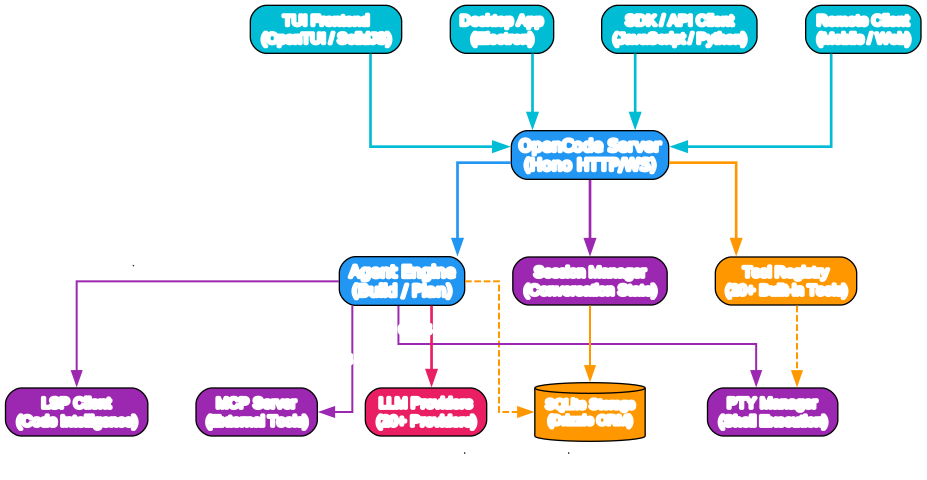
Understanding the OpenCode Architecture
The architecture diagram above illustrates the modular, client-server design that powers OpenCode. Let’s break down each component and understand how they work together to create a seamless coding agent experience.
Client Layer: Multiple Interfaces for Every Workflow
OpenCode is built around a client-server architecture that separates the user interface from the core agent logic. This design choice enables multiple client types to interact with the same backend:
-
TUI Frontend (OpenTUI / SolidJS): The primary terminal user interface built with OpenTUI and SolidJS. This is where most users interact with OpenCode, enjoying a neovim-inspired keyboard-driven experience that feels natural to terminal power users.
-
Desktop App (Electron): A cross-platform desktop application available for macOS (both Apple Silicon and Intel), Windows, and Linux. The desktop app wraps the web UI components and provides native system integration.
-
SDK / API Client: JavaScript and Python SDKs allow programmatic access to OpenCode’s capabilities, enabling integration into custom workflows and third-party tools.
-
Remote Client (Mobile / Web): Because the TUI is just one possible client, OpenCode can run on your development machine while you drive it remotely from a mobile app or web browser.
Server Layer: Hono HTTP/WebSocket Backend
The OpenCode Server, built with the Hono framework, handles HTTP and WebSocket connections from all client types. It serves as the central hub that routes requests to the appropriate core modules and manages real-time communication between the user and the AI agent.
Core Modules: The Brain of the Agent
-
Agent Engine: The heart of OpenCode, responsible for orchestrating the build and plan agents. It manages conversation flow, decides when to invoke tools, and coordinates multi-step tasks.
-
Session Manager: Maintains conversation state, handles session compaction to manage context window limits, and enables session resumption across client reconnections.
-
Tool Registry: A comprehensive collection of more than 20 built-in tools that the agent can invoke, including file operations, shell execution, code search, and web fetching.
Infrastructure Layer: Supporting Services
-
LSP Client (Code Intelligence): Out-of-the-box Language Server Protocol support provides diagnostics, hover information, go-to-definition, and other IDE-like features directly in the terminal.
-
MCP Server (External Tools): Implements the Model Context Protocol, allowing OpenCode to connect to external tool servers for extended capabilities.
-
PTY Manager (Shell Execution): Manages pseudo-terminal sessions for safe and controlled shell command execution.
-
SQLite Storage (Drizzle ORM): Persistent storage for sessions, configuration, and agent state using Drizzle ORM for type-safe database operations.
Provider Layer: LLM Agnosticism
The provider layer connects to more than 20 LLM providers through the Vercel AI SDK and custom adapters. This includes major cloud providers, specialized AI services, and local model runners.
How OpenCode Works: The Agent Workflow
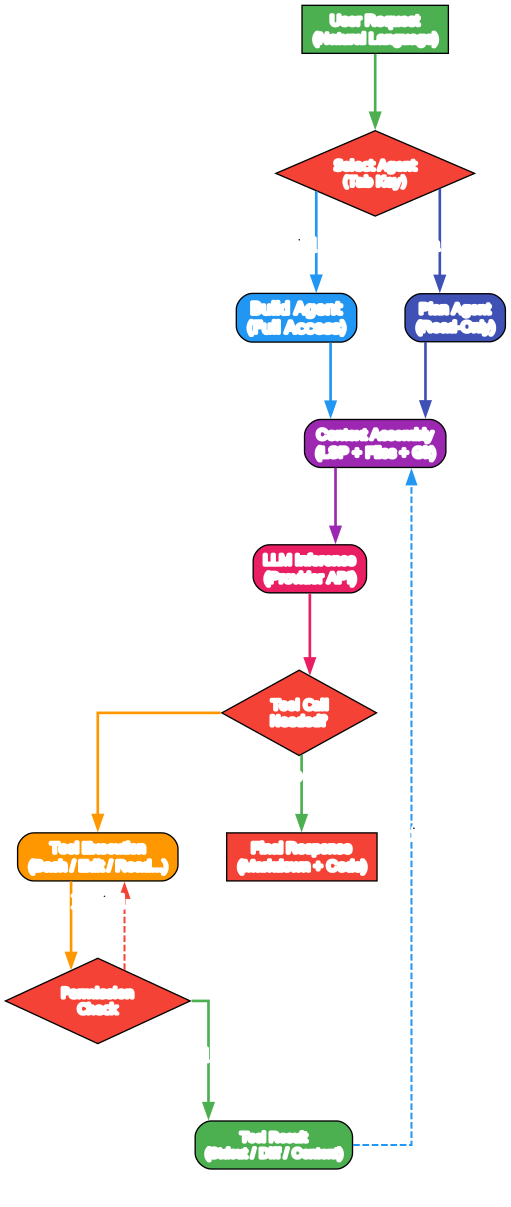
Understanding the Agent Workflow
The agent workflow diagram demonstrates how OpenCode processes user requests from initial input to final response. This loop-based architecture enables iterative refinement and complex multi-step task completion.
Step 1: User Request and Agent Selection
When you type a request into OpenCode, the system first presents an agent selection interface. You can switch between agents using the Tab key:
-
Build Agent: The default agent with full access to file editing, shell execution, and tool invocation. This is the workhorse for active development tasks.
-
Plan Agent: A read-only agent designed for analysis and code exploration. It denies file edits by default and asks permission before running bash commands, making it ideal for understanding unfamiliar codebases or planning changes before executing them.
Step 2: Context Assembly
Before sending anything to the language model, OpenCode assembles a rich context that includes:
-
LSP Information: Current file diagnostics, symbol definitions, and type information from connected language servers.
-
File Contents: Relevant files from the project, determined through intelligent retrieval based on the user’s query.
-
Git State: Repository status, recent diffs, and commit history to provide version control context.
-
Session History: Previous messages and tool results from the current conversation to maintain continuity.
Step 3: LLM Inference
The assembled context is sent to the selected LLM provider through the AI SDK. OpenCode supports streaming responses, so you see the agent’s reasoning in real time rather than waiting for complete generation.
Step 4: Tool Decision and Execution
The LLM can decide to invoke tools to accomplish tasks. When a tool call is needed:
- The agent selects the appropriate tool from the registry (more than 20 built-in tools).
- For sensitive operations like file writes or shell commands, a permission check may occur.
- If approved, the tool executes and returns results.
- Tool results feed back into the context for the next iteration.
Step 5: Iteration and Final Response
This process loops until the agent determines no further tools are needed. The final response, formatted in Markdown with syntax-highlighted code blocks, is presented to the user. Each code block includes a copy-to-clipboard button for convenience.
Key Features and Capabilities
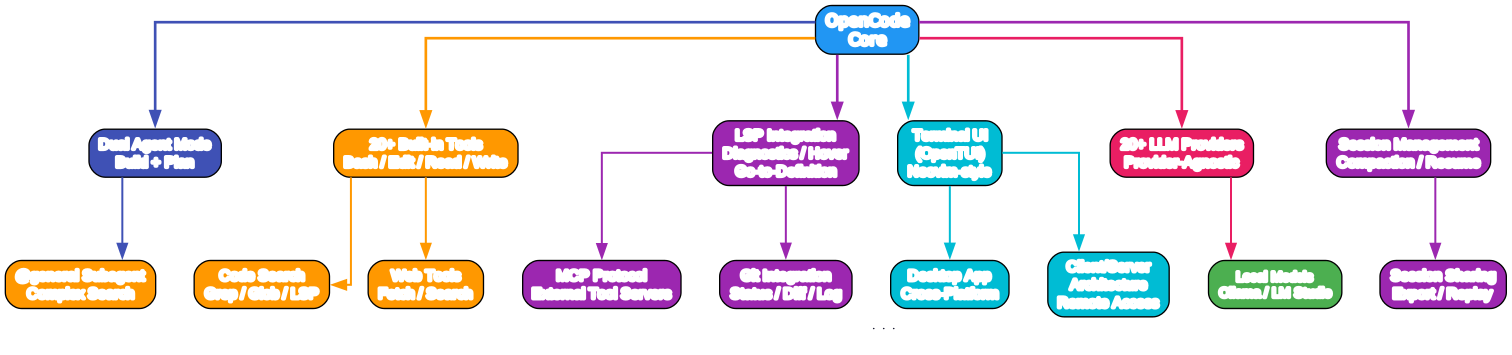
Understanding the Feature Set
The features diagram organizes OpenCode’s capabilities into logical categories. Let’s explore each area in detail.
Dual Agent Mode: Build and Plan
OpenCode’s dual agent system is a standout feature that separates exploratory work from destructive operations:
-
Build Agent: Full-access mode for writing code, refactoring, running tests, and deploying. It can edit files, execute shell commands, and invoke any available tool.
-
Plan Agent: Read-only mode for safe exploration. It analyzes code, explains architectures, and suggests changes without modifying anything. This is perfect for onboarding to new projects or reviewing code before making changes.
-
General Subagent: A specialized subagent for complex searches and multi-step research tasks, invoked internally using
@generalin messages.
Comprehensive Tool Ecosystem
OpenCode includes more than 20 built-in tools covering:
- File Operations: Read, write, edit, and search files with intelligent context awareness.
- Shell Execution: Run bash commands with safety prompts for destructive operations.
- Code Search: Grep, glob, and LSP-based symbol search across the codebase.
- Web Tools: Fetch web pages and search the internet for documentation and examples.
- Git Integration: Status, diff, log, and commit operations directly from the agent.
LSP and IDE Integration
Out-of-the-box Language Server Protocol support means OpenCode understands your code at a deep level:
- Real-time diagnostics and error highlighting
- Hover information for types and documentation
- Go-to-definition and find-references
- Code completion suggestions
This LSP integration works with any language server you have installed, from TypeScript and Python to Rust and Go.
MCP Protocol Support
The Model Context Protocol enables OpenCode to connect to external tool servers, extending its capabilities beyond the built-in toolset. This open protocol allows third-party developers to create specialized tools that integrate seamlessly with the agent.
Provider Agnosticism
With support for more than 20 LLM providers, OpenCode ensures you’re never locked into a single vendor:
- Cloud Providers: Anthropic, OpenAI, Google, Azure, AWS Bedrock, Cohere, Mistral, Groq, Perplexity, Together AI, and more.
- Local Models: Ollama and LM Studio for privacy-conscious development or offline work.
- Custom Endpoints: OpenAI-compatible endpoints for self-hosted or enterprise models.
Session Management
OpenCode handles long-running conversations with sophisticated session management:
- Session Compaction: Automatically manages context window limits by intelligently summarizing older conversation history.
- Session Resumption: Reconnect to previous sessions without losing context.
- Session Sharing: Export and share sessions with teammates for collaborative debugging or code review.
Ecosystem and Integrations
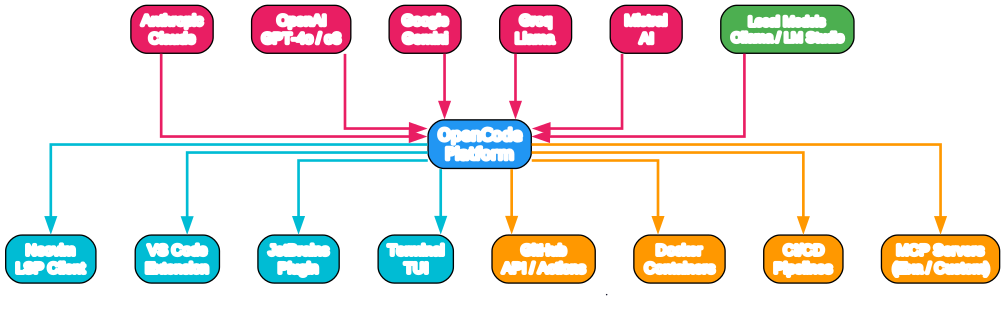
Understanding the Ecosystem
The ecosystem diagram shows how OpenCode connects to the broader development landscape. Its open architecture enables integration with virtually every part of the modern development stack.
LLM Provider Integrations
OpenCode connects to all major AI providers through standardized adapters:
- Anthropic Claude: Full support for Claude 3.5 Sonnet, Claude 3 Opus, and future models.
- OpenAI: GPT-4o, GPT-4 Turbo, and o3 model families.
- Google Gemini: Gemini 1.5 Pro and Flash models.
- Groq: Ultra-fast inference for Llama and Mixtral models.
- Local Models: Ollama and LM Studio for completely private, on-device AI coding.
IDE and Editor Integrations
While OpenCode’s TUI is powerful, it also integrates with traditional editors:
- Neovim: Native LSP client support for seamless integration with neovim workflows.
- VS Code: Extension support for users who prefer a graphical interface.
- JetBrains: Plugin available for IntelliJ IDEA, PyCharm, and other JetBrains IDEs.
- Terminal: The primary TUI interface works in any modern terminal emulator.
Development Tool Integrations
- GitHub: API and Actions integration for repository management and CI/CD workflows.
- Docker: Container support for isolated development environments.
- CI/CD Pipelines: Integration with GitHub Actions, GitLab CI, and other automation platforms.
- MCP Servers: Extensible tool ecosystem through the Model Context Protocol.
Installation
OpenCode offers multiple installation methods to suit every platform and preference.
Quick Install (Recommended)
# One-line installer
curl -fsSL https://opencode.ai/install | bash
Package Managers
# npm / bun / pnpm / yarn
npm i -g opencode-ai@latest

# Windows (Scoop)
scoop install opencode

# Windows (Chocolatey)
choco install opencode

# macOS and Linux (Homebrew - recommended, always up to date)
brew install anomalyco/tap/opencode

# macOS and Linux (Official brew formula)
brew install opencode

# Arch Linux
sudo pacman -S opencode
paru -S opencode-bin

# Any OS (mise)
mise use -g opencode

# Nix
nix run nixpkgs#opencode
Desktop Application
Download the desktop app directly from the releases page or opencode.ai/download.
| Platform | Download |
|---|---|
| macOS (Apple Silicon) | opencode-desktop-darwin-aarch64.dmg |
| macOS (Intel) | opencode-desktop-darwin-x64.dmg |
| Windows | opencode-desktop-windows-x64.exe |
| Linux | .deb, .rpm, or AppImage |
# macOS (Homebrew)
brew install --cask opencode-desktop

# Windows (Scoop)
scoop bucket add extras
scoop install extras/opencode-desktop
Installation Directory
The install script respects the following priority order:
$OPENCODE_INSTALL_DIR- Custom installation directory$XDG_BIN_DIR- XDG Base Directory Specification compliant path$HOME/bin- Standard user binary directory$HOME/.opencode/bin- Default fallback
# Custom installation examples
OPENCODE_INSTALL_DIR=/usr/local/bin curl -fsSL https://opencode.ai/install | bash
XDG_BIN_DIR=$HOME/.local/bin curl -fsSL https://opencode.ai/install | bash
Usage
Starting OpenCode
# Start in current directory
opencode

# Start in specific directory
opencode /path/to/project

# Start with specific agent
opencode --agent plan
Basic Commands
Once inside OpenCode, you can:
# Switch between build and plan agents
Press Tab

# Invoke the general subagent for complex searches
@general search for all TODO comments in the codebase

# Ask the agent to explain code
Explain how the authentication middleware works

# Request code changes
Refactor the user service to use dependency injection

# Run tests
Run the test suite and fix any failing tests
Configuration
OpenCode stores configuration in ~/.config/opencode/ following the XDG Base Directory Specification. Key configuration files include:
config.json: General settings including default agent, provider selection, and UI preferences.providers/: Provider-specific configuration files for API keys and model selection.sessions/: Saved conversation sessions.
OpenCode vs Claude Code vs Cursor
| Feature | OpenCode | Claude Code | Cursor |
|---|---|---|---|
| License | MIT (Open Source) | Proprietary | Proprietary |
| Provider Lock-in | None (20+ providers) | Anthropic only | Multiple |
| Self-Hosted | Yes | No | No |
| Terminal UI | Native (OpenTUI) | Limited | None |
| LSP Support | Built-in | Limited | Full IDE |
| Desktop App | Yes (Electron) | No | Yes |
| Client/Server | Yes | No | No |
| Local Models | Yes (Ollama, LM Studio) | No | Limited |
| Price | Free | $20/month | $20/month |
Key Advantages of OpenCode:
-
100% Open Source: The entire codebase is available on GitHub under the MIT license. You can audit, modify, and contribute to every part of the system.
-
Provider Agnostic: While Claude Code requires an Anthropic subscription and Cursor has its own model hosting, OpenCode works with any provider. As models evolve and pricing changes, you can switch providers without changing tools.
-
Terminal-First Design: Built by neovim users for terminal power users, OpenCode pushes the limits of what’s possible in a text-based interface.
-
Client/Server Architecture: Run the agent on a powerful remote server while controlling it from a lightweight client. This enables workflows like coding on a tablet connected to a cloud development environment.
-
Out-of-the-Box LSP: Unlike other terminal-based agents, OpenCode includes full Language Server Protocol support, providing IDE-level code intelligence without leaving the terminal.
Troubleshooting
Common Issues
Issue: opencode command not found after installation.
Solution: Ensure the installation directory is in your PATH:
export PATH="$HOME/.opencode/bin:$PATH"
Add this to your shell profile (~/.bashrc, ~/.zshrc, etc.) for persistence.
Issue: Permission denied when running shell commands.
Solution: OpenCode’s plan agent requires explicit permission for bash commands. Switch to the build agent with Tab, or approve the permission prompt when using plan agent.
Issue: LLM provider API errors.
Solution: Verify your API key is configured correctly:
# Check provider configuration
cat ~/.config/opencode/providers/openai.json

# Ensure the API key is set
export OPENAI_API_KEY="your-key-here"
Issue: LSP features not working.
Solution: Ensure the appropriate language server is installed and available in your PATH. OpenCode uses the standard LSP client protocol, so any compatible language server should work.
Conclusion
OpenCode represents a significant shift in the AI coding agent landscape. With 148,000+ GitHub stars, it has proven that developers want open, flexible, and powerful alternatives to proprietary tools. Its combination of provider agnosticism, terminal-first design, and client-server architecture makes it uniquely positioned for developers who value control and customization.
Whether you’re looking for a free alternative to Claude Code, want to run AI coding assistance on local models for privacy, or need a tool that integrates seamlessly with your terminal-centric workflow, OpenCode delivers. The active community, comprehensive documentation, and rapid development pace ensure it will continue to evolve alongside the fast-moving AI landscape.
Links

Enjoyed this post? Never miss out on future posts by following us


