Career-Ops: The AI-Powered Job Search Command Center That Landed a Head of AI Role
If you are job searching in 2026, you already know the landscape is brutal. Hundreds of listings across dozens of portals. Every application requires a tailored CV. Every offer needs careful evaluation across salary, culture, growth potential, and role fit. Most people track everything in a spreadsheet and spend hours customizing resumes that disappear into ATS black holes.
Career-Ops is an open-source, AI-powered job search system that turns any AI coding CLI into a full command center. Created by Santiago (santifer), it has rapidly gained over 36,000 GitHub stars since its April 2026 release. The system was built by someone who used it to evaluate 740+ job listings, generate 100+ personalized CVs, and ultimately land a Head of Applied AI role.
The core philosophy is simple but powerful: companies use AI to filter candidates. Career-Ops gives candidates AI to choose companies. It is not a spray-and-pray tool – it is a precision filter that helps you find the few offers worth your time out of hundreds. The system strongly recommends against applying to anything scoring below 4.0/5.
The Auto-Pipeline
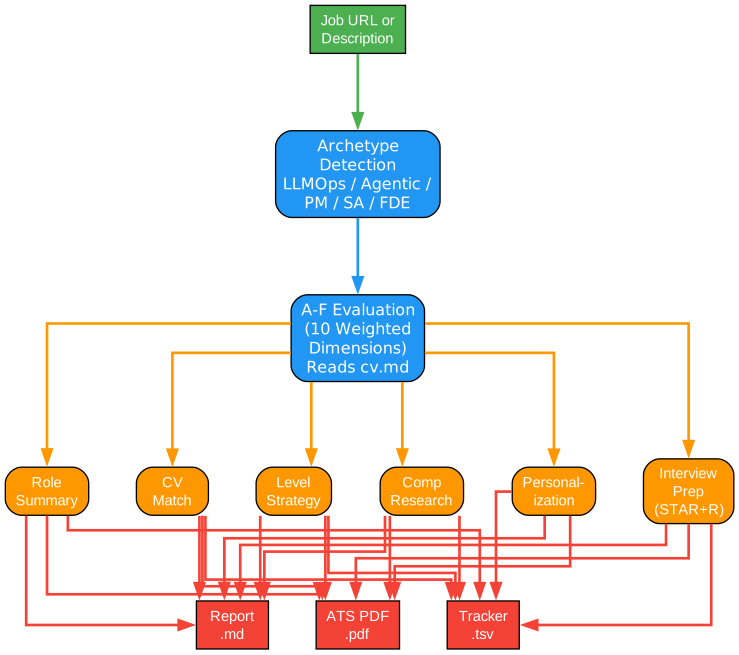
Career-Ops’s flagship feature is the auto-pipeline. Paste a job URL or description, and the system runs a complete evaluation pipeline automatically.
Understanding the Auto-Pipeline
The pipeline diagram shows the complete flow from job URL to three output artifacts. Here is a detailed walkthrough:
Input: Job URL or Description
You start by pasting a job URL or description directly into your AI coding assistant. Career-Ops auto-detects the input and runs the full pipeline without any additional commands. You can also use the explicit /career-ops command with a pasted job description for more control.
Archetype Detection
The first stage classifies the role into one of six archetypes: LLMOps, Agentic, PM (Product Manager), SA (Solution Architect), FDE (Forward Deployed Engineer), or Transformation. This classification drives the entire evaluation – each archetype has different scoring weights, different level strategies, and different interview preparation approaches. A PM role is evaluated on completely different dimensions than an LLMOps role.
A-F Evaluation (10 Weighted Dimensions)
The core of the system is a structured A-F scoring system across 10 weighted dimensions. The AI reads your cv.md file and reasons about the match between your experience and the job description. This is not keyword matching – it is genuine reasoning about fit, gaps, and strategy. The evaluation produces six blocks of output:
Role Summary – A concise overview of what the role actually involves, cutting through the marketing language that job descriptions often use.
CV Match – A detailed analysis of how your experience aligns with the role requirements, identifying both strengths and gaps.
Level Strategy – Guidance on what level to target (senior, staff, principal) and how to position yourself for that level.
Comp Research – Salary benchmarking for the role, company, and location, including geographic discount considerations.
Personalization – Specific adjustments to make to your CV and cover letter for this particular application.
Interview Prep (STAR+R) – Structured interview preparation using the STAR+Reflection framework, drawing from your accumulated story bank.
Three Outputs
Every evaluation produces three artifacts: a markdown report (.md) with the full analysis, an ATS-optimized PDF (.pdf) with your tailored CV, and a tracker entry (.tsv) that logs the application in your pipeline. All three are generated automatically from a single input.
14 Skill Modes
Career-Ops is not just a single command – it is a complete command center with 14 specialized skill modes.
Understanding the Skill Modes
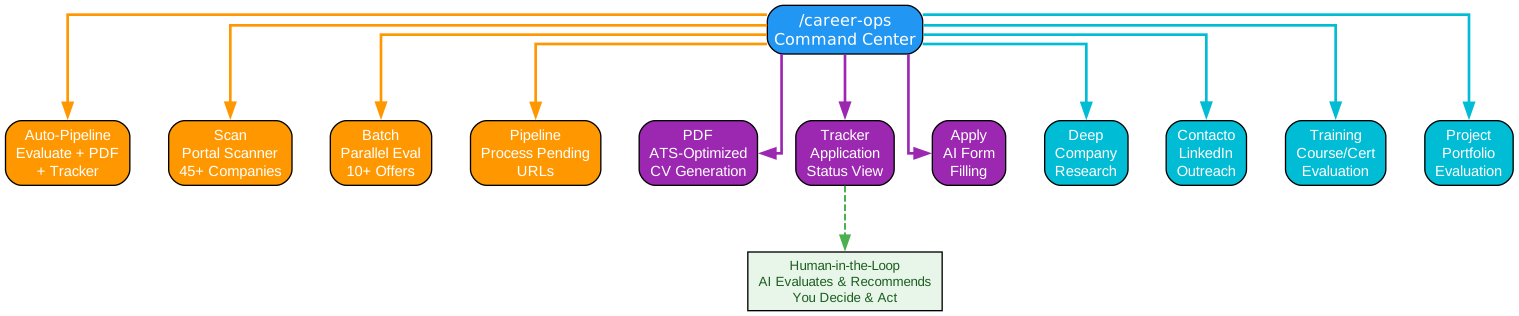
The skill modes diagram shows all 14 commands organized into three categories. Here is a detailed breakdown:
Core Pipeline Modes (Orange)
These four modes handle the primary job search workflow. The Auto-Pipeline mode is the flagship: paste a job description and get evaluation + PDF + tracker entry in one shot. The Scan mode runs the portal scanner across 45+ pre-configured companies and 19 search queries. The Batch mode evaluates 10+ offers in parallel using claude -p workers. The Pipeline mode processes pending URLs that you have collected but not yet evaluated.
Output Modes (Purple)
These three modes handle the tangible outputs of your job search. The PDF mode generates ATS-optimized CVs with Space Grotesk and DM Sans typography, keyword-injected for the specific job description. The Tracker mode shows your application status across all opportunities with integrity checks and deduplication. The Apply mode uses AI to fill application forms, saving you from manually entering the same information dozens of times.
Research Modes (Cyan)
These four modes handle the intelligence and networking side of your job search. The Deep mode performs deep company research – financials, culture, recent news, tech stack. The Contacto mode generates LinkedIn outreach messages tailored to specific recruiters or hiring managers. The Training mode evaluates whether a course or certification is worth your time and money for a target role. The Project mode evaluates whether a portfolio project would strengthen your application for a specific type of role.
Human-in-the-Loop
The dashed arrow from the Tracker mode to the “Human-in-the-Loop” box is a critical design principle. Career-Ops evaluates and recommends, but you decide and act. The system never submits an application on your behalf. You always have the final call. This is not automation that replaces your judgment – it is augmentation that amplifies it.
Portal Scanner
One of Career-Ops’s most powerful features is the portal scanner, which automatically scans job boards and company career pages for new listings.
Understanding the Portal Scanner
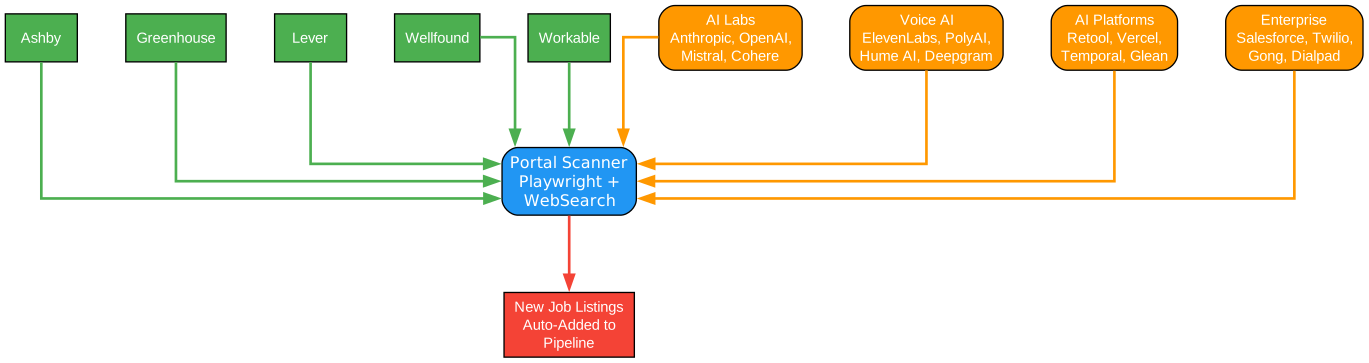
The portal scanner diagram shows how Career-Ops discovers new job opportunities across multiple sources. Here is a detailed breakdown:
Job Boards (Green, Top)
The scanner searches five major job boards: Ashby, Greenhouse, Lever, Wellfound, and Workable. These boards host career pages for thousands of companies, so a single scan can discover dozens of relevant listings. The scanner uses Playwright browser automation to navigate these portals and extract job listings.
Company Categories (Orange, Sides)
Career-Ops comes pre-configured with 45+ companies organized into categories. AI Labs include Anthropic, OpenAI, Mistral, Cohere, LangChain, and Pinecone. Voice AI includes ElevenLabs, PolyAI, Parloa, Hume AI, Deepgram, Vapi, and Bland AI. AI Platforms include Retool, Airtable, Vercel, Temporal, Glean, and Arize AI. Enterprise includes Salesforce, Twilio, Gong, and Dialpad. You can customize portals.yml to add any company you want.
Scanner Engine (Blue, Center)
The scanner uses Playwright for browser automation and WebSearch for discovering new listings. It navigates career pages, extracts job descriptions, and adds them to your pipeline automatically. The 19 pre-configured search queries cover common AI/ML role patterns across the supported job boards.
Output (Red, Bottom)
New job listings are automatically added to your pipeline, ready for evaluation. You can then run batch evaluation to process them all in parallel, or evaluate them one at a time with the auto-pipeline.
Tech Stack and Integrations
Career-Ops is built on a modern, practical tech stack designed for real-world job searching.
Understanding the Tech Stack
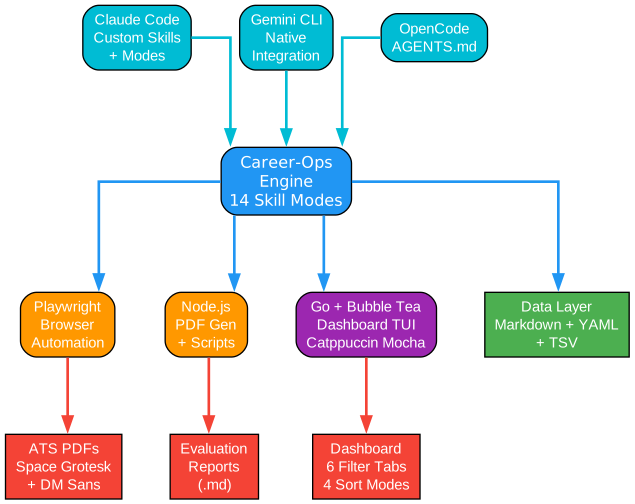
The tech stack diagram shows the three-layer architecture from AI agents to outputs. Here is a detailed breakdown:
Agent Layer (Cyan, Top)
Career-Ops supports three AI coding CLIs. Claude Code is the primary integration with custom skills and 14 evaluation modes. Gemini CLI has native integration with all 15 slash commands available through .gemini/commands/*.toml. OpenCode uses AGENTS.md for its integration. All three agents access the same evaluation logic defined in modes/*.md.
Engine Layer (Blue, Center)
The Career-Ops engine is the core that processes evaluations, generates PDFs, and manages the pipeline. It connects to four technical components: Playwright for browser automation (scanning portals and generating PDFs), Node.js for PDF generation and utility scripts, Go with Bubble Tea for the terminal dashboard TUI (using the Catppuccin Mocha theme), and a data layer built on Markdown tables, YAML configuration, and TSV batch files.
Output Layer (Red, Bottom)
The system produces three types of output. ATS-optimized PDFs use Space Grotesk and DM Sans typography with keyword injection for applicant tracking systems. Evaluation reports are generated as markdown files with the full A-F analysis. The Go dashboard provides a terminal UI with 6 filter tabs, 4 sort modes, grouped/flat view, lazy-loaded previews, and inline status changes.
Getting Started
# 1. Clone and install
git clone https://github.com/santifer/career-ops.git
cd career-ops && npm install
npx playwright install chromium   # Required for PDF generation

# 2. Check setup
npm run doctor                     # Validates all prerequisites

# 3. Configure
cp config/profile.example.yml config/profile.yml  # Edit with your details
cp templates/portals.example.yml portals.yml       # Customize companies

# 4. Add your CV
# Create cv.md in the project root with your CV in markdown

# 5. Personalize with Claude
claude   # Open Claude Code in this directory

# Then ask Claude to adapt the system to you:
# "Change the archetypes to backend engineering roles"
# "Add these 5 companies to portals.yml"
# "Update my profile with this CV I'm pasting"

# 6. Start using
# Paste a job URL or run /career-ops
The system is designed to be customized by Claude itself. Modes, archetypes, scoring weights, negotiation scripts – just ask Claude to change them. It reads the same files it uses, so it knows exactly what to edit.
Interview Story Bank
One of Career-Ops’s most innovative features is the Interview Story Bank. As you evaluate more offers, the system accumulates STAR+Reflection stories – 5-10 master stories that can answer any behavioral question. Instead of preparing separate answers for “tell me about a time you led a team” and “describe a situation where you had to make a difficult decision,” you build a bank of versatile stories that the system maps to specific interview questions for each role.
Negotiation Scripts
Career-Ops includes salary negotiation frameworks, geographic discount pushback scripts, and competing offer leverage strategies. These are not generic templates – they are tailored to your specific evaluations, your current comp, and the specific company’s compensation structure.
Dashboard TUI
The built-in Go terminal dashboard lets you browse your pipeline visually:
cd dashboard
go build -o career-dashboard .
./career-dashboard --path ..
Features include 6 filter tabs, 4 sort modes, grouped/flat view, lazy-loaded previews, and inline status changes. The Catppuccin Mocha theme makes it easy on the eyes during long job search sessions.
Privacy
Career-Ops is a local, open-source tool – not a hosted service. Your CV, contact info, and personal data stay on your machine and are sent directly to the AI provider you choose (Anthropic, Google, etc.). The project does not collect, store, or have access to any of your data. No telemetry, no tracking, no analytics.
Why This Matters
The job search process has not fundamentally changed in decades. You find listings, tailor your resume, apply, and wait. Career-Ops reimagines this process for the AI age. Instead of manually tracking applications in a spreadsheet, you get an AI-powered pipeline that evaluates fit, generates tailored documents, scans for opportunities, and tracks everything in a single source of truth.
The results speak for themselves: 740+ job listings evaluated, 100+ personalized CVs generated, and one Head of Applied AI role landed. The creator built it for his own job search, and it worked.
Check out the Career-Ops GitHub repository to get started. Enjoyed this post? Never miss out on future posts by following us 


