Google Design.md: Visual Identity Specification for Coding Agents
Introduction
As AI coding agents become increasingly capable of generating entire user interfaces from natural language prompts, a critical gap has emerged: how do you consistently communicate a brand’s visual identity to a machine? Traditional design systems live in Figma files, style guides, and scattered documentation – formats that agents cannot natively parse or reason about. Google’s design.md project addresses this problem head-on with an elegant solution: a standardized plain-text format called DESIGN.md that gives coding agents a persistent, structured understanding of a design system.
The repository, hosted at google-labs-code/design.md, has garnered over 3,000 stars and provides both a format specification and a full-featured CLI tool. The DESIGN.md format combines machine-readable design tokens (YAML front matter) with human-readable design rationale (Markdown prose). Tokens give agents exact values – hex colors, font sizes, spacing units – while prose tells them why those values exist and how to apply them. This dual-layer approach ensures that an agent reading a DESIGN.md file will produce a UI with the correct deep ink headlines, warm limestone backgrounds, and precisely styled call-to-action buttons, all while understanding the design philosophy behind those choices.
The project is built in TypeScript and published as the @google/design.md npm package. It includes a CLI with four commands – lint, diff, export, and spec – along with a programmatic API for integration into custom toolchains. The linter enforces eight rules covering everything from broken token references to WCAG contrast ratio compliance. The export system converts DESIGN.md tokens into Tailwind CSS theme configurations and W3C DTCG standard token files, making it a bridge between design intent and code output.
How It Works
A DESIGN.md file has two distinct layers that work together to communicate visual identity. The first layer is the YAML front matter, delimited by --- fences at the top of the file. This contains machine-readable design tokens organized into five categories: colors, typography, rounded, spacing, and components. Each token has a specific type and format – colors use #hex notation in sRGB, dimensions use number-plus-unit strings like 48px or 1.5rem, and token references use the {path.to.token} syntax for cross-referencing values.
The second layer is the Markdown body, organized into ## sections that provide human-readable design rationale. These sections follow a canonical order: Overview, Colors, Typography, Layout, Elevation and Depth, Shapes, Components, and Do’s and Don’ts. While sections can be omitted if not relevant, those present must appear in the specified sequence. The prose sections explain the why behind the tokens – for example, why a particular accent color was chosen, or how elevation should be achieved through tonal layers rather than heavy shadows.
Here is a minimal DESIGN.md example:
---
name: Heritage
colors:
  primary: "#1A1C1E"
  secondary: "#6C7278"
  tertiary: "#B8422E"
  neutral: "#F7F5F2"
typography:
  h1:
    fontFamily: Public Sans
    fontSize: 3rem
  body-md:
    fontFamily: Public Sans
    fontSize: 1rem
  label-caps:
    fontFamily: Space Grotesk
    fontSize: 0.75rem
rounded:
  sm: 4px
  md: 8px
spacing:
  sm: 8px
  md: 16px
---

## Overview

Architectural Minimalism meets Journalistic Gravitas. The UI evokes a
premium matte finish -- a high-end broadsheet or contemporary gallery.

## Colors

The palette is rooted in high-contrast neutrals and a single accent color.

- **Primary (#1A1C1E):** Deep ink for headlines and core text.
- **Secondary (#6C7278):** Sophisticated slate for borders, captions, metadata.
- **Tertiary (#B8422E):** "Boston Clay" -- the sole driver for interaction.
- **Neutral (#F7F5F2):** Warm limestone foundation, softer than pure white.
An agent that reads this file will produce a UI with deep ink headlines in Public Sans, a warm limestone background, and Boston Clay call-to-action buttons. The tokens provide the exact values; the prose provides the context for applying them correctly.
Architecture
The DESIGN.md CLI is built as a monorepo with a single package: @google/design.md. The architecture follows a pipeline pattern where a DESIGN.md file flows through parsing, modeling, linting, and export stages. Each stage is implemented as a pure-function handler that transforms data without side effects, making the system testable and composable.
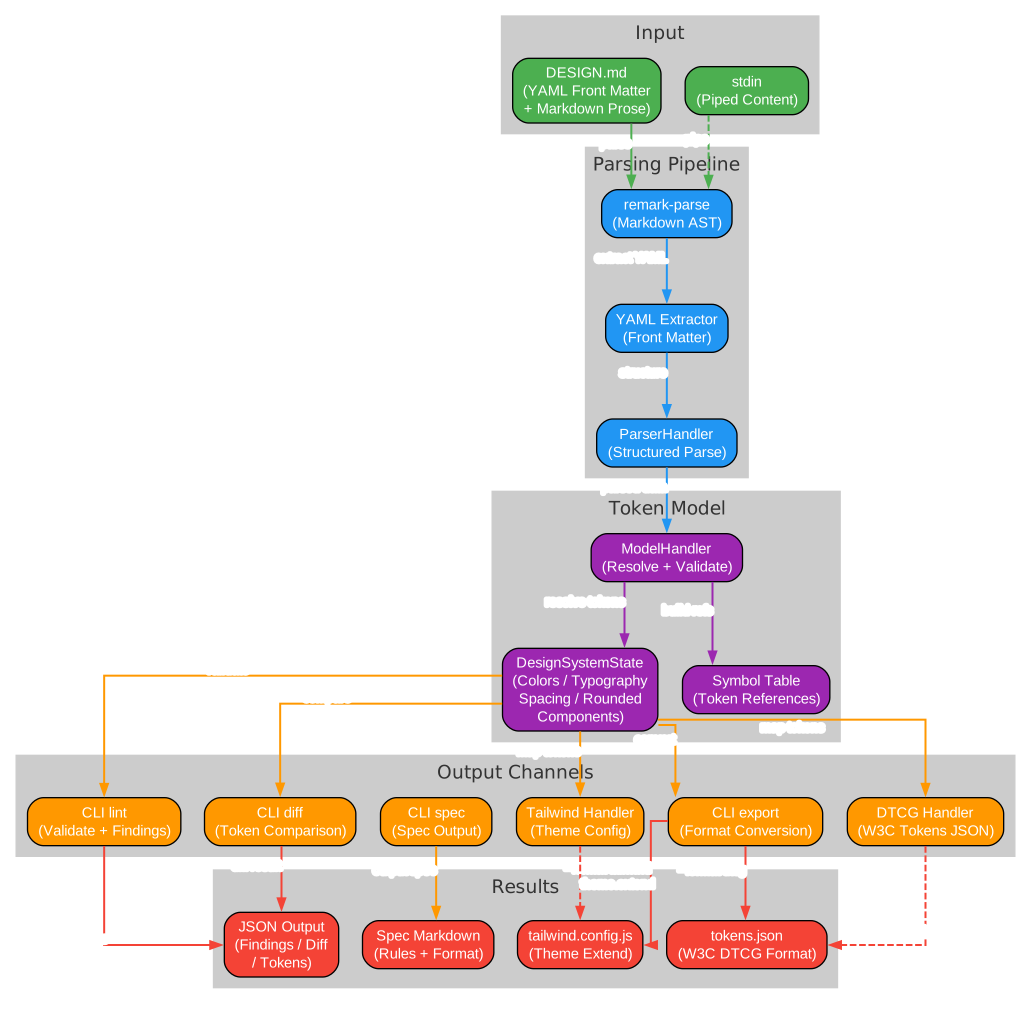
The architecture diagram above illustrates the complete data flow through the DESIGN.md system. Starting from the left, the input layer accepts either a DESIGN.md file directly or content piped through stdin. The parsing pipeline uses remark-parse to build a Markdown AST, then extracts the YAML front matter and structures it through the ParserHandler. This parsed data flows into the model layer, where the ModelHandler resolves all token references, builds the symbol table, and produces a DesignSystemState object containing fully resolved colors, typography, spacing, rounded, and component definitions.
From the model layer, the data branches into multiple output channels. The CLI lint command runs the linter against the design state, producing structured JSON findings with severity levels. The diff command compares two design states to detect token-level and prose regressions. The export command converts the design state into either a Tailwind CSS theme configuration or a W3C DTCG tokens.json file. The spec command outputs the format specification itself, useful for injecting spec context into agent prompts. Each output channel produces its own result format – JSON for lint and diff, theme configs for Tailwind, and standard token files for DTCG.
The key architectural insight is that the DesignSystemState serves as the central data structure that all downstream consumers operate on. This means that once tokens are parsed and resolved, any number of output handlers can be attached without re-parsing the source file. The TailwindEmitterHandler and DtcgEmitterHandler are pure functions that map the design state to their respective output formats, making it straightforward to add new export targets in the future.
Linter Rules
The linter is the heart of the DESIGN.md validation system. It runs eight rules against a parsed DESIGN.md, each producing findings at a fixed severity level. The rules are designed to catch both structural errors that would break agent consumption and quality issues that would degrade the design system’s effectiveness.
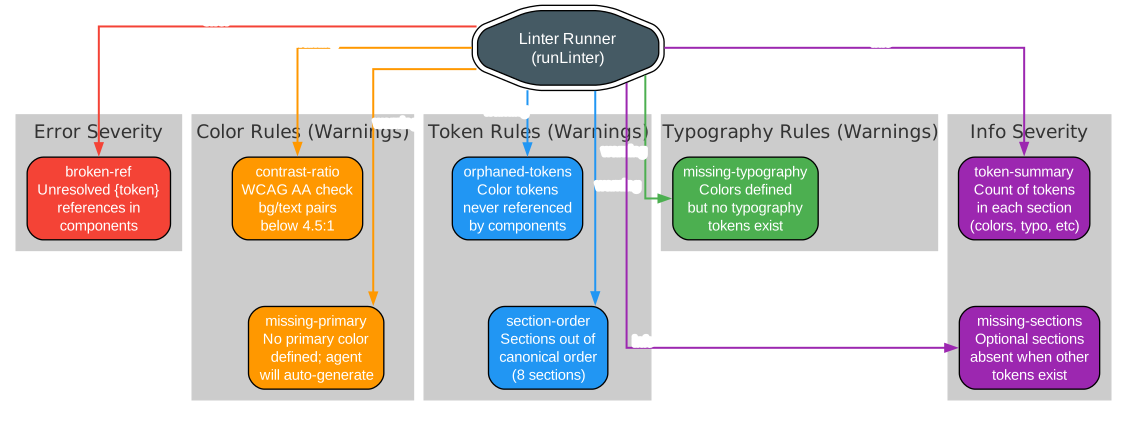
The linter rules diagram above shows how the eight rules are organized by severity and category. At the error level, the broken-ref rule checks that all token references (expressed as {path.to.token}) actually resolve to defined tokens. If a component references {colors.accent} but no accent color exists, the linter flags this as an error. This is critical because unresolved references would cause agents to produce broken or inconsistent UI output.
At the warning level, five rules cover different quality concerns. The contrast-ratio rule checks that component backgroundColor/textColor pairs meet the WCAG AA minimum of 4.5:1, ensuring accessibility compliance. The missing-primary rule warns when colors are defined but no primary color exists, since agents will auto-generate key colors in this case, reducing the designer’s control over the palette. The orphaned-tokens rule identifies color tokens that are defined but never referenced by any component, which may indicate unused or forgotten design decisions. The section-order rule enforces the canonical section ordering (Overview, Colors, Typography, Layout, Elevation, Shapes, Components, Do’s and Don’ts). The missing-typography rule warns when colors exist but no typography tokens are defined, since agents would fall back to default fonts.
At the info level, two rules provide summary information. The token-summary rule counts how many tokens are defined in each section, giving a quick overview of the design system’s scope. The missing-sections rule reports when optional sections like spacing or rounded are absent while other tokens exist, suggesting that the design system may be incomplete.
The linter is also available as a programmatic API:
import { lint } from '@google/design.md/linter';

const report = lint(markdownString);

console.log(report.findings);       // Finding[]
console.log(report.summary);        // { errors, warnings, info }
console.log(report.designSystem);   // Parsed DesignSystemState
This API allows custom toolchains to integrate DESIGN.md validation into their workflows, whether as a pre-commit hook, a CI pipeline step, or an agent’s self-check before generating UI code.
DTCG Conformance
One of the most significant aspects of the DESIGN.md specification is its alignment with the W3C Design Tokens Community Group (DTCG) standard. The DTCG format, documented at designtokens.org, defines a standard JSON structure for design tokens that can be consumed by tools like Figma, Style Dictionary, and other design token processors. The DESIGN.md export --format dtcg command converts DESIGN.md tokens into this standard format.
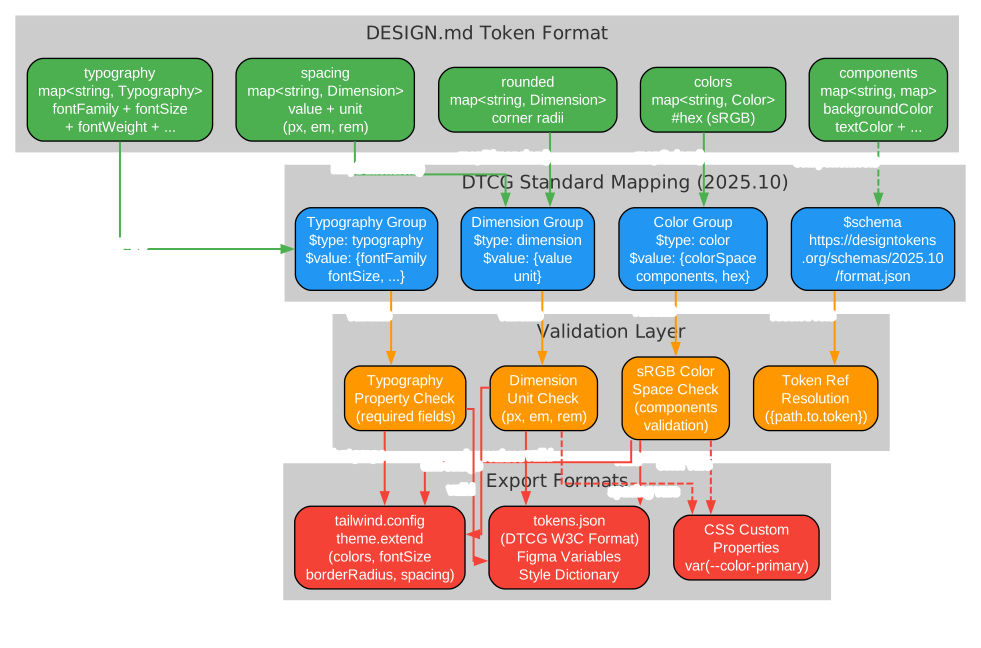
The DTCG conformance diagram above illustrates the mapping process from DESIGN.md’s YAML token format to the W3C DTCG standard. Starting from the left, the five DESIGN.md token categories – colors, typography, spacing, rounded, and components – each have their own internal representation. The DtcgEmitterHandler maps each category to the corresponding DTCG group structure.
For colors, the handler converts each DESIGN.md color (stored as #hex in sRGB) into a DTCG color token with $type: color and a $value object containing colorSpace: "srgb", components (RGB values normalized to 0-1), and the original hex value. This ensures compatibility with tools that expect the DTCG color structure while preserving the hex representation for human readability.
For dimensions (spacing and rounded), the handler maps each value to a DTCG dimension token with $type: dimension and a $value object containing the numeric value and string unit. For example, a DESIGN.md spacing of 16px becomes { $type: "dimension", $value: { value: 16, unit: "px" } }.
For typography, the handler creates a DTCG typography token with $type: typography and a $value object containing fontFamily, fontSize (as a dimension), fontWeight, letterSpacing, and lineHeight. The DTCG standard treats lineHeight as a unitless multiplier of fontSize, so the handler converts from DESIGN.md’s dimension format accordingly.
The validation layer ensures that all exported tokens conform to the DTCG schema at https://www.designtokens.org/schemas/2025.10/format.json. This includes sRGB color space validation, dimension unit checking, typography property validation, and token reference resolution. The result is a tokens.json file that can be directly consumed by any DTCG-compatible tool, creating a seamless bridge between DESIGN.md’s human-friendly format and the broader design token ecosystem.
Installation
The DESIGN.md CLI is distributed as an npm package under the @google/design.md name. You can install it globally or run it directly with npx:
# Run directly without installing
npx @google/design.md lint DESIGN.md

# Or install globally
npm install -g @google/design.md
design.md lint DESIGN.md
The package requires Node.js and is built with TypeScript, targeting the Node.js runtime. It uses remark for Markdown parsing, yaml for front matter extraction, and zod for schema validation. The CLI framework is citty, a lightweight command-line argument parser.
For programmatic use, you can install it as a dependency:
npm install @google/design.md
Then import the linter API in your TypeScript or JavaScript project:
import { lint } from '@google/design.md/linter';

const report = lint(designMdContent);
Usage
Lint Command
Validate a DESIGN.md file for structural correctness, catching broken token references, checking WCAG contrast ratios, and surfacing structural findings:
npx @google/design.md lint DESIGN.md
Output is structured JSON by default:
{
  "findings": [
    {
      "severity": "warning",
      "path": "components.button-primary",
      "message": "textColor (#ffffff) on backgroundColor (#1A1C1E) has contrast ratio 15.42:1 -- passes WCAG AA."
    }
  ],
  "summary": { "errors": 0, "warnings": 1, "info": 1 }
}
You can also pipe content via stdin:
cat DESIGN.md | npx @google/design.md lint -
The exit code is 1 if errors are found, 0 otherwise, making it suitable for CI pipelines.
Diff Command
Compare two versions of a design system to detect token-level and prose regressions:
npx @google/design.md diff DESIGN.md DESIGN-v2.md
Output shows added, removed, and modified tokens:
{
  "tokens": {
    "colors": { "added": ["accent"], "removed": [], "modified": ["tertiary"] },
    "typography": { "added": [], "removed": [], "modified": [] }
  },
  "regression": false
}
The exit code is 1 if regressions are detected (more errors or warnings in the “after” file).
Export Command
Export DESIGN.md tokens to other formats:
# Export to Tailwind CSS theme configuration
npx @google/design.md export --format tailwind DESIGN.md > tailwind.theme.json

# Export to W3C DTCG tokens.json
npx @google/design.md export --format dtcg DESIGN.md > tokens.json
The Tailwind export generates a theme.extend configuration object with mapped colors, font families, font sizes, border radii, and spacing values. The DTCG export produces a standard tokens.json file compatible with Figma variables, Style Dictionary, and other W3C-compliant tools.
Spec Command
Output the DESIGN.md format specification, useful for injecting spec context into agent prompts:
# Full specification
npx @google/design.md spec

# Specification with linting rules table
npx @google/design.md spec --rules

# Only the linting rules table (JSON format)
npx @google/design.md spec --rules-only --format json
Features
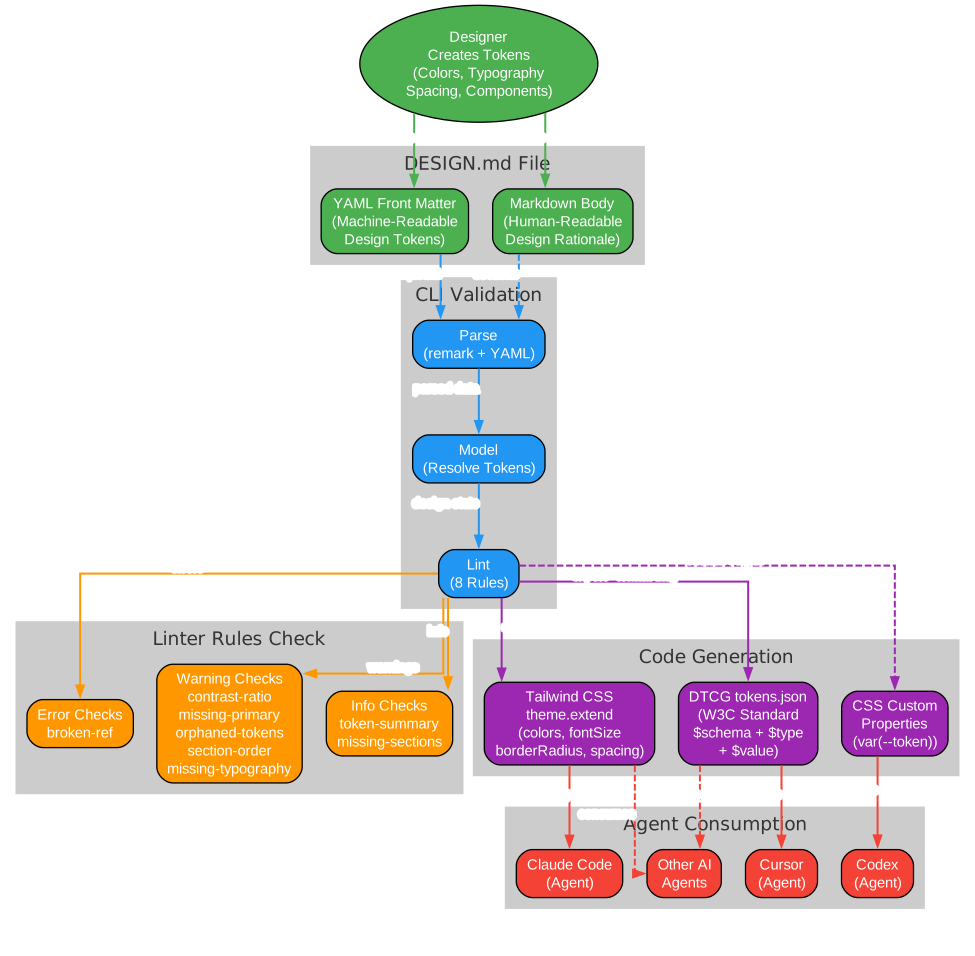
The workflow diagram above shows the complete lifecycle of a DESIGN.md file, from initial creation through validation to agent consumption. A designer creates tokens defining colors, typography, spacing, and components, then writes the design rationale in Markdown prose. The DESIGN.md file enters the CLI validation pipeline, where it is parsed using remark and YAML extraction, modeled to resolve all token references, and linted against the eight validation rules. If the file passes validation, the export commands generate code-ready outputs: Tailwind CSS theme configurations for web projects, DTCG tokens.json for design tool interoperability, and CSS custom properties for framework-agnostic usage. Finally, AI coding agents like Claude Code, Cursor, and Codex consume these outputs to generate UI code that faithfully represents the design system.
Key features of the DESIGN.md system include:
Dual-Layer Format – The combination of YAML front matter (machine-readable tokens) and Markdown prose (human-readable rationale) ensures that both agents and humans can understand and maintain the design system. Tokens provide exact values; prose provides context.
Eight Lint Rules – The linter covers structural correctness (broken-ref), accessibility (contrast-ratio), design quality (missing-primary, orphaned-tokens, missing-typography), ordering (section-order), and completeness (token-summary, missing-sections). Each rule has a fixed severity level for consistent reporting.
DTCG Interoperability – The export system produces W3C DTCG standard token files, enabling seamless integration with Figma variables, Style Dictionary, and the broader design token ecosystem. This bridges the gap between DESIGN.md’s human-friendly format and existing design tool workflows.
Tailwind CSS Integration – The Tailwind export handler maps DESIGN.md tokens directly to theme.extend configuration objects, including colors, font families, font sizes with line height and letter spacing metadata, border radii, and spacing values. This means a single DESIGN.md file can drive an entire Tailwind project’s theme.
Programmatic API – Beyond the CLI, the linter and exporters are available as a TypeScript library. The lint() function returns a LintReport with the resolved design system, findings, summary, and Tailwind configuration. Custom lint rules can be composed using the LintRule interface.
Component Token System – Components map names to groups of sub-token properties (backgroundColor, textColor, typography, rounded, padding, size, height, width). Variants for hover, active, and pressed states are expressed as separate component entries with related key names, giving agents precise styling instructions for every interaction state.
Graceful Consumer Behavior – The specification defines clear behavior for unknown content: unknown section headings are preserved, unknown color and typography token names are accepted if values are valid, unknown component properties are accepted with a warning, and duplicate section headings cause an error. This makes the format extensible while maintaining strictness where it matters.
Conclusion
Google’s DESIGN.md specification represents a significant step forward in the intersection of design systems and AI coding agents. By providing a standardized, plain-text format that both humans and machines can understand, it solves the fundamental problem of communicating visual identity to code-generating AI. The dual-layer approach – machine-readable tokens in YAML front matter paired with human-readable rationale in Markdown prose – ensures that agents receive not just the what of a design system but the why, enabling them to make informed decisions when specific tokens are not defined.
The CLI tool, with its lint, diff, export, and spec commands, provides a complete validation and conversion pipeline. The eight linter rules catch errors ranging from broken references to WCAG contrast failures, while the export system bridges DESIGN.md to both the Tailwind CSS ecosystem and the W3C DTCG standard. The programmatic API makes it straightforward to integrate DESIGN.md validation into any custom toolchain.
As the format matures beyond its current alpha status, DESIGN.md has the potential to become the de facto standard for design-to-agent communication. Its alignment with the W3C DTCG standard ensures interoperability with existing design tools, while its plain-text format keeps it accessible and version-control friendly. For teams working with AI coding agents, DESIGN.md offers a structured path to consistent, on-brand UI generation across design sessions and between different AI tools.
The project is open source under the Apache 2.0 license and actively developed by Google Labs. With over 3,000 stars on GitHub, it has already attracted significant interest from the design and AI development communities. Whether you are building design systems for AI agents or looking for a structured way to document your visual identity, DESIGN.md is a project worth watching and adopting. Enjoyed this post? Never miss out on future posts by following us 


