wterm: A High-Performance Web Terminal Emulator Built with Zig and WASM
wterm (pronounced “dub-term”) is a terminal emulator for the web that renders directly to the DOM, giving you native text selection, copy/paste, browser find, and accessibility out of the box. Built by Vercel Labs, its core is written in Zig and compiled to a ~12 KB WASM binary for near-native performance. With framework integrations for React, Vue, and vanilla JavaScript, wterm makes embedding a full-featured terminal in any web application remarkably straightforward.
Understanding the Architecture
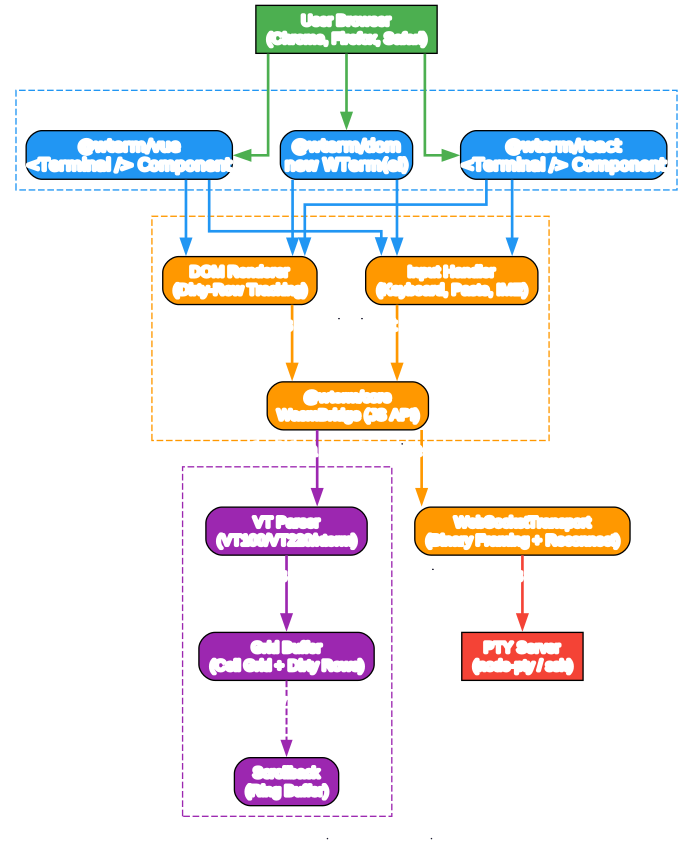
The architecture diagram above illustrates how wterm layers its components from the user’s browser down to the PTY server. Let us break down each layer and its role:
Frontend Layer (Browser)
wterm provides three integration paths that map directly to popular JavaScript frameworks:
- @wterm/react - A
<Terminal />component with auseTerminalhook for React 18/19 applications. This is the most feature-rich integration, offering imperative handles and TypeScript support. - @wterm/vue - A
<Terminal />component for Vue 3 with template ref API and composable support. Auto-echo mode works whenonDatais omitted. - @wterm/dom - The vanilla JavaScript API via
new WTerm(el). This is the foundation that the framework wrappers build upon, and it works with zero framework dependencies.
Core Engine
The core engine bridges the frontend to the WASM binary:
- DOM Renderer - Uses dirty-row tracking so only touched rows are re-rendered each frame via
requestAnimationFrame. This avoids full-screen repaints and keeps rendering efficient even at high output rates. - Input Handler - Manages keyboard events, clipboard paste (with bracketed paste mode security), and IME composition for CJK input. It translates browser key events into proper VT escape sequences.
- WasmBridge - The JavaScript API layer that loads the WASM binary (either from a URL or from an inline base64 string) and exposes methods like
writeString(),getCell(),getCursor(), andresize().
Zig/WASM Core (~12 KB)
The performance-critical parsing and state management happens in Zig, compiled to WASM:
- VT Parser - Handles VT100, VT220, and xterm escape sequences. This is where CSI, OSC, and SGR sequences are parsed and applied to the grid.
- Grid Buffer - Maintains the cell grid with dirty-row tracking. Each cell stores a Unicode codepoint, foreground color, background color, and style flags (bold, italic, underline, etc.).
- Scrollback - A configurable ring buffer that stores lines scrolled off the visible grid, enabling scrollback history navigation.
Transport Layer
The WebSocketTransport handles binary-framed communication with a PTY backend, with automatic reconnection and exponential backoff. It supports both text and binary WebSocket frames for efficient data transfer.
Terminal I/O Pipeline
Understanding the Data Flow
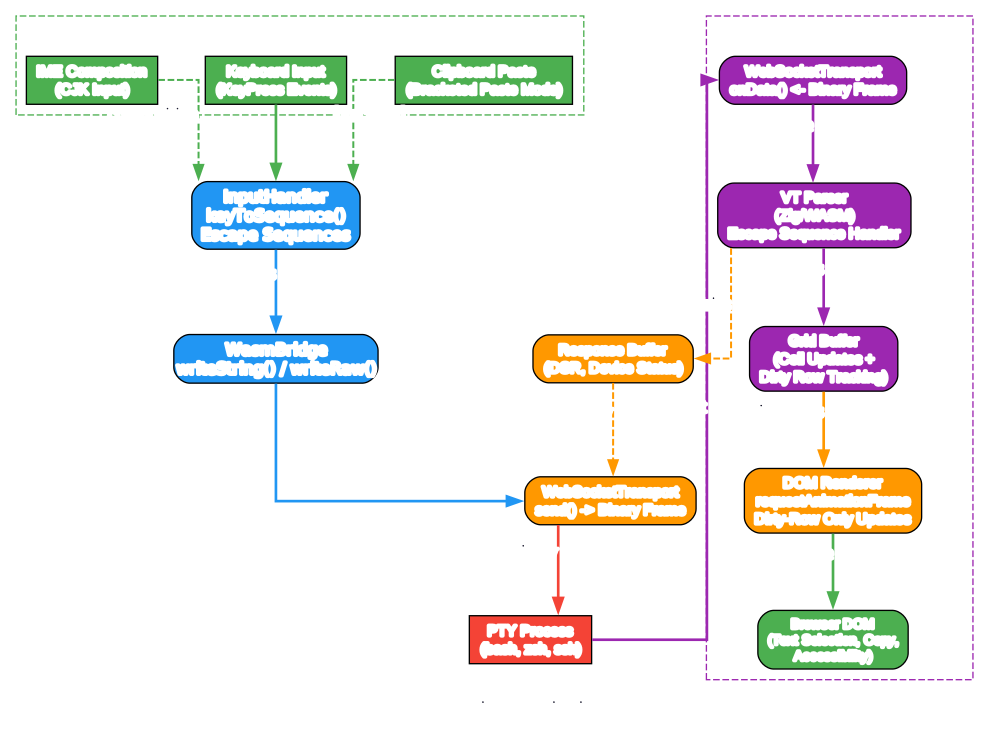
The pipeline diagram above shows how data flows through wterm in both directions. Here is a detailed breakdown:
Input Pipeline (User to Shell)
When a user types in the terminal, the flow is:
-
Keyboard Input - Browser
keydownevents are captured by theInputHandler. Special keys (arrows, function keys, modifiers) are translated into their VT escape sequence equivalents using thekeyToSequence()method. -
Clipboard Paste - When pasting, the
InputHandlerchecks if bracketed paste mode is active. If so, it wraps the pasted content in\x1b[200~and\x1b[201~delimiters. Critically, it strips any ESC bytes from pasted content to prevent escape sequence injection attacks. -
IME Composition - For CJK input methods, the handler tracks composition start/end events and only sends the final composed text, avoiding intermediate keystrokes.
-
WasmBridge writeString/writeRaw - The escape sequences are written into the WASM memory buffer and processed by the VT parser.
-
WebSocketTransport send() - If connected to a remote PTY, the data is sent as binary frames over WebSocket.
Output Pipeline (Shell to Screen)
When the shell produces output:
-
WebSocketTransport onData() - Receives binary frames from the PTY server and passes them to the WasmBridge.
-
VT Parser (Zig/WASM) - Parses the incoming byte stream, identifying escape sequences and applying them to the grid. This includes cursor movement, color changes, screen clearing, and alternate screen buffer switching.
-
Grid Buffer + Dirty Rows - The parser updates cells in the grid and marks affected rows as dirty. Only dirty rows need to be re-rendered.
-
DOM Renderer - On each
requestAnimationFramecallback, the renderer iterates through dirty rows, reads cell data from the WASM bridge, and updates only the DOM elements that changed. This batched approach ensures smooth 60fps rendering. -
Browser DOM - The final output appears as standard DOM elements, enabling native text selection, browser find, and screen reader accessibility.
Response Buffer
The VT parser also handles device status requests (DSR) and similar host-to-application queries. Responses are buffered and sent back through the WebSocket transport, completing the communication loop.
Key Features and Capabilities

Understanding the Feature Set
The features diagram above illustrates the breadth of capabilities wterm offers. Let us explore each category:
Performance Features
-
Zig + WASM Core (~12 KB) - The terminal parser and grid management are written in Zig and compiled to WASM. The resulting binary is approximately 12 KB in release builds, making it one of the smallest terminal cores available. Zig provides deterministic memory layout and no hidden allocations, which translates to predictable performance.
-
Dirty-Row Tracking - Instead of re-rendering the entire terminal on every update, wterm tracks which rows have changed and only updates those. This is especially important for commands like
toporhtopthat update only a few lines at a time. -
requestAnimationFrame Batching - All DOM updates are batched into a single
requestAnimationFramecallback, preventing layout thrashing and ensuring smooth 60fps rendering even under heavy output.
Rendering Features
-
DOM Rendering - Unlike canvas-based terminals (such as xterm.js), wterm renders directly to the DOM. This means native text selection, clipboard operations, browser find (Ctrl+F), and screen reader support all work without any extra configuration.
-
24-Bit Color - Full RGB SGR (Select Graphic Rendition) support means true-color applications render correctly. The 256-color palette and 24-bit colors are all supported.
-
Block Elements - Unicode block characters (U+2580 through U+259F) are rendered using CSS gradients and quadrant compositing instead of font glyphs. This ensures consistent rendering across platforms and fonts.
-
CSS Custom Properties for Themes - Theming is handled entirely through CSS custom properties (
--term-color-0through--term-color-15,--term-fg,--term-bg). Four built-in themes are included: Default, Solarized Dark, Monokai, and Light.
Terminal Features
-
Alternate Screen Buffer - Applications like
vim,less,htop, andtopthat switch to an alternate screen buffer work correctly. When these applications exit, the original terminal content is restored. -
Scrollback History - A configurable ring buffer stores lines that scroll off the visible area. Users can scroll back through command history and output.
-
Auto-Resize - Using
ResizeObserver, the terminal automatically adjusts its column and row count when the container is resized, maintaining proper text layout. -
Bracketed Paste - When the shell enables bracketed paste mode, pasted content is wrapped in special delimiters. wterm also strips ESC bytes from pasted content to prevent escape sequence injection attacks.
Framework Integrations
-
@wterm/react - Provides a
<Terminal />component anduseTerminalhook for React 18/19 applications with full TypeScript support. -
@wterm/vue - A
<Terminal />component for Vue 3 with template ref API and composable support. -
@wterm/dom - The vanilla JavaScript API. Just create a
new WTerm(element)and you have a working terminal with zero framework dependencies. -
@wterm/just-bash - An in-browser Bash shell powered by the just-bash WASM runtime. No server required - run a real shell directly in the browser.
-
@wterm/markdown - A streaming markdown-to-ANSI renderer that converts markdown content into styled terminal output, perfect for displaying LLM responses in a terminal.
Installation and Setup
Quick Start with React
npm install @wterm/core @wterm/dom @wterm/react
Then use the Terminal component in your React application:
import { Terminal } from "@wterm/react";
import "@wterm/dom/src/terminal.css";

export default function App() {
  return (
    <div style=>
      <Terminal
        cols={80}
        rows={24}
        cursorBlink={true}
        onData={(data) => {
          // Send data to your WebSocket or PTY backend
          console.log("Terminal input:", data);
        }}
      />
    </div>
  );
}
Quick Start with Vue
npm install @wterm/core @wterm/dom @wterm/vue
<template>
  <div style="height: 100vh">
    <Terminal
      :cols="80"
      :rows="24"
      :cursor-blink="true"
      @data="handleData"
    />
  </div>
</template>

<script setup>
import { Terminal } from "@wterm/vue";
import "@wterm/dom/src/terminal.css";

const handleData = (data) => {
  console.log("Terminal input:", data);
};
</script>
Quick Start with Vanilla JavaScript
npm install @wterm/core @wterm/dom
import { WTerm } from "@wterm/dom";
import "@wterm/dom/src/terminal.css";

const element = document.getElementById("terminal");
const term = new WTerm(element, {
  cols: 80,
  rows: 24,
  cursorBlink: true,
  onData: (data) => {
    console.log("Terminal input:", data);
  },
});

await term.init();
Connecting to a WebSocket PTY Server
wterm includes a built-in WebSocketTransport class for connecting to remote PTY servers:
import { WTerm, WebSocketTransport } from "@wterm/dom";
import "@wterm/dom/src/terminal.css";

const element = document.getElementById("terminal");
const transport = new WebSocketTransport({
  url: "ws://localhost:8080",
  reconnect: true,
  maxReconnectDelay: 30000,
});

const term = new WTerm(element, {
  onData: (data) => transport.send(data),
  onTitle: (title) => (document.title = title),
});

await term.init();
transport.connect();
In-Browser Bash with just-bash
For a terminal experience that requires no server at all, use the @wterm/just-bash package:
import { WTerm } from "@wterm/dom";
import { BashShell } from "@wterm/just-bash";
import "@wterm/dom/src/terminal.css";

const element = document.getElementById("terminal");
const term = new WTerm(element, { cursorBlink: true });
await term.init();

const shell = new BashShell(term.bridge);
This runs a real Bash shell entirely in the browser using WASM, with no backend server required.
How It Works: The Zig/WASM Core
The heart of wterm is its Zig-based terminal emulator compiled to WASM. Here is what makes it special:
Compact Binary Size
The entire VT parser, grid buffer, scrollback, and cursor management compile to approximately 12 KB of WASM. This is achieved through Zig’s deterministic memory layout and lack of runtime overhead. The WASM binary can be loaded from a URL or inlined as a base64 string directly in the JavaScript bundle, eliminating the need for separate file serving.
Cell-Based Grid
The terminal state is stored as a grid of cells, where each cell contains:
| Field | Size | Description |
|---|---|---|
char | 4 bytes (uint32) | Unicode codepoint |
fg | 2 bytes (uint16) | Foreground color index |
bg | 2 bytes (uint16) | Background color index |
flags | 1 byte (uint8) | Style flags (bold, italic, etc.) |
This compact 12-byte cell structure allows the entire grid to live in WASM linear memory, accessible via DataView from JavaScript.
Dirty-Row Optimization
The WASM core maintains a dirty-row bitmap. When the VT parser modifies a row, it marks that row as dirty. The JavaScript renderer only reads and updates dirty rows, skipping unchanged rows entirely. This optimization is critical for applications like top that update only a few lines per second.
Comparison with xterm.js
| Feature | wterm | xterm.js |
|---|---|---|
| Rendering | DOM | Canvas |
| Core Language | Zig/WASM | TypeScript |
| Binary Size | ~12 KB WASM | ~200 KB JS |
| Text Selection | Native browser | Custom implementation |
| Accessibility | Native screen reader | Limited |
| Browser Find | Native Ctrl+F | Custom search addon |
| Themes | CSS custom properties | JS theme objects |
| Framework Support | React, Vue, Vanilla | React (community) |
| In-Browser Shell | @wterm/just-bash | No equivalent |
| Markdown Rendering | @wterm/markdown | No equivalent |
The key architectural difference is DOM rendering versus canvas rendering. DOM rendering gives wterm native browser features for free (text selection, find, accessibility), while canvas rendering requires xterm.js to reimplement these features from scratch.
Building from Source
If you want to contribute or customize wterm, you can build from source:
Prerequisites
Build Steps
# Clone the repository
git clone https://github.com/vercel-labs/wterm.git
cd wterm

# Install dependencies
pnpm install

# Build the WASM binary (debug build)
zig build

# Build the WASM binary (release, optimized for size)
zig build -Doptimize=ReleaseSmall

# Build all TypeScript packages
pnpm build

# Run Zig tests
zig build test
Running Examples
wterm includes several example applications:
# Vanilla JS demo (static file server)
cd web && python3 -m http.server 8000

# Next.js example with WebSocket PTY
cp web/wterm.wasm examples/nextjs/public/
pnpm --filter nextjs dev

# Vite example (minimal vanilla TypeScript)
cd examples/vite && pnpm install && pnpm dev

# Vue example
cd examples/vue && pnpm install && pnpm dev
Advanced Configuration
Terminal Options
The WTerm constructor accepts these options:
| Option | Type | Default | Description |
|---|---|---|---|
cols | number | 80 | Number of columns |
rows | number | 24 | Number of rows |
wasmUrl | string | undefined | URL to load WASM binary from (defaults to inline) |
autoResize | boolean | true | Enable ResizeObserver-based auto-resize |
cursorBlink | boolean | false | Enable cursor blinking |
debug | boolean | false | Enable debug mode with introspection |
onData | function | null | Callback for terminal output data |
onTitle | function | null | Callback for OSC title changes |
onResize | function | null | Callback for terminal resize events |
WebSocketTransport Options
| Option | Type | Default | Description |
|---|---|---|---|
url | string | null | WebSocket server URL |
reconnect | boolean | true | Enable automatic reconnection |
maxReconnectDelay | number | 30000 | Maximum reconnection delay in ms |
onData | function | null | Callback for received data |
onOpen | function | null | Callback when connection opens |
onClose | function | null | Callback when connection closes |
onError | function | null | Callback on connection error |
Theming
wterm uses CSS custom properties for theming. Override these variables to create custom themes:
.wterm {
  --term-fg: #d4d4d4;
  --term-bg: #1e1e1e;
  --term-color-0: #000000;
  --term-color-1: #cd3131;
  --term-color-2: #0dbc79;
  --term-color-3: #e5e510;
  --term-color-4: #2472c8;
  --term-color-5: #bc3fbc;
  --term-color-6: #11a8cd;
  --term-color-7: #e5e5e5;
  --term-color-8: #666666;
  --term-color-9: #f14c4c;
  --term-color-10: #23d18b;
  --term-color-11: #f5f543;
  --term-color-12: #3b8eea;
  --term-color-13: #d670d6;
  --term-color-14: #29d8f6;
  --term-color-15: #ffffff;
}
Troubleshooting
WASM Binary Not Loading
If you see errors about the WASM binary failing to load, ensure the file is served with the correct MIME type (application/wasm). Alternatively, use the inline base64 approach which embeds the WASM directly in the JavaScript bundle:
// No wasmUrl needed - uses inline base64 by default
const term = new WTerm(element);
await term.init();
Terminal Height Issues
wterm calculates terminal height based on rows * rowHeight. If the terminal appears too tall or too short, check that the --term-row-height CSS variable is being set correctly. The terminal auto-measures row height on initialization.
Keyboard Input Not Working
Ensure the terminal element has focus. wterm uses a hidden textarea for input capture, and clicking on the terminal area will focus it. If you have custom focus management, call term.focus() explicitly.
Scrollback Not Appearing
Scrollback requires the terminal to have a fixed height with overflow: auto. If the container is set to height: auto, the terminal will expand to fit all content and scrollback will not be visible.
Conclusion
wterm represents a fresh approach to web-based terminal emulation. By leveraging Zig and WASM for the performance-critical core and DOM rendering for native browser integration, it achieves a compelling balance of speed, accessibility, and developer experience. The ~12 KB WASM binary, dirty-row tracking, and framework-agnostic architecture make it an excellent choice for embedding terminal functionality in modern web applications.
With packages for React, Vue, vanilla JavaScript, in-browser Bash, and markdown rendering, wterm covers the full spectrum of terminal use cases - from simple command output display to full interactive shell sessions. The zero-boilerplate API (just <Terminal /> or new WTerm(el)) makes getting started effortless, while the WasmBridge and WebSocketTransport APIs provide the flexibility needed for production deployments.
Links
- GitHub Repository: https://github.com/vercel-labs/wterm
- Documentation: https://wterm.dev
- npm Packages: @wterm/core, @wterm/dom, @wterm/react, @wterm/vue, @wterm/just-bash, @wterm/markdown
- License: Apache-2.0

Enjoyed this post? Never miss out on future posts by following us


