Open CoDesign: Open-Source Claude Design Alternative with Multi-Model Support
Open CoDesign (also written “Open Codesign” or misspelled “Open Codesing”; the repo token is opencodesign) is the open-source Claude Design alternative that turns natural-language prompts into polished design artifacts – locally, with whichever model you already pay for. Built as an MIT-licensed Electron desktop app, it supports 20+ LLM providers through a bring-your-own-key (BYOK) architecture, ships with twelve built-in design skill modules, and imports your existing Claude Code or Codex configuration in a single click. Whether you are prototyping a landing page, building a dashboard, or generating a slide deck, Open CoDesign gives you the speed of AI-native design tools without subscription lock-in, cloud-only workflows, or being forced onto a single provider.
What Is Open CoDesign?
Open CoDesign is a desktop application that transforms text prompts into interactive HTML prototypes, PDF documents, PPTX slide decks, ZIP packages, and Markdown exports. Unlike Claude Design (which is web-only and locked to Anthropic’s models), Open CoDesign runs on your laptop, stores everything locally in SQLite, and connects to any LLM provider you choose – from Anthropic Claude and OpenAI GPT to Google Gemini, DeepSeek, local Ollama, OpenRouter, and any OpenAI-compatible relay.
The project has quickly gained traction on GitHub with over 2,400 stars, attracting designers and developers who want AI-powered design generation without vendor lock-in.
Understanding the Architecture
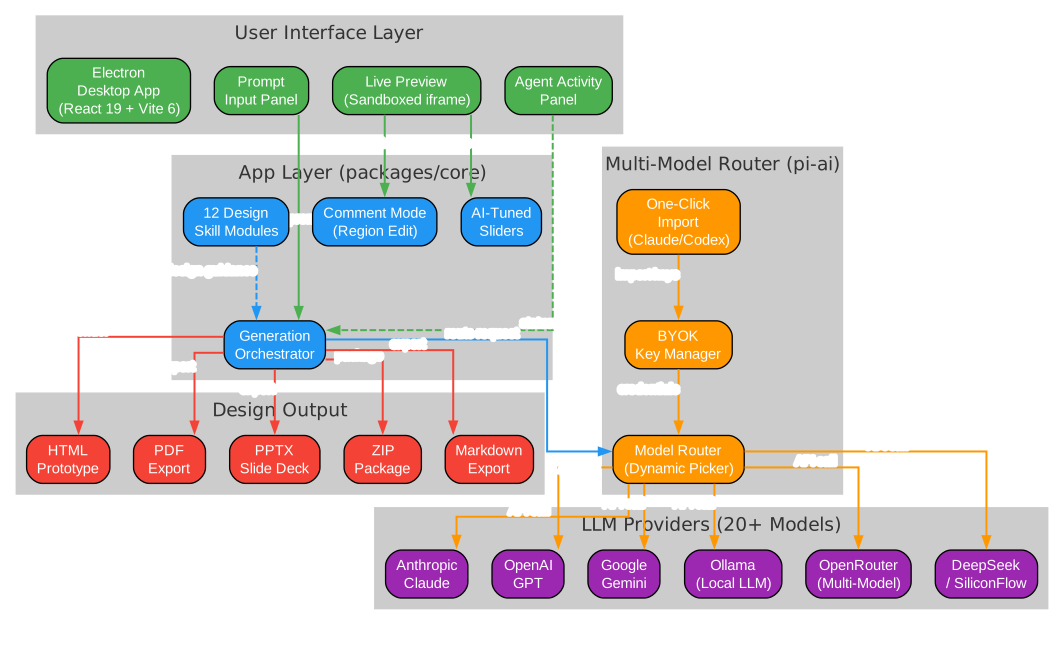
The architecture diagram above illustrates how Open CoDesign’s components interact across five distinct layers:
User Interface Layer – The Electron desktop app (built with React 19 and Vite 6) provides four primary interaction surfaces: the prompt input panel for natural-language design requests, the live preview panel that renders generated artifacts in a sandboxed iframe, the agent activity panel that streams tool calls and progress in real time, and the comment mode interface for targeted element-level feedback.
App Layer (packages/core) – The generation orchestrator sits at the heart of the system, coordinating between twelve built-in design skill modules (covering slide decks, dashboards, landing pages, SVG charts, glassmorphism, editorial typography, heroes, pricing, footers, chat UIs, data tables, and calendars), the comment mode region editor, and the AI-tuned sliders that surface adjustable parameters like color, spacing, and typography.
Multi-Model Router (pi-ai) – The model router dynamically selects from 20+ available models using a real-time provider catalogue rather than a hardcoded shortlist. The BYOK key manager stores credentials in ~/.config/open-codesign/config.toml with file mode 0600, matching the security conventions of Claude Code, Codex, and the gh CLI. The one-click import feature reads your existing Claude Code or Codex configuration and populates all provider settings automatically.
LLM Providers – Open CoDesign supports Anthropic Claude, OpenAI GPT, Google Gemini, local Ollama models, OpenRouter, SiliconFlow, DeepSeek, and any OpenAI-compatible relay endpoint. Keyless (IP-allowlisted) proxies are also supported for enterprise deployments.
Design Output – Generated artifacts can be exported in five formats: HTML with inlined CSS, PDF via local Chrome, PPTX slide decks, ZIP packages, and Markdown. Each format preserves full editability, unlike the limited exports from closed-source alternatives.
Key Features
Bring Your Own Key (BYOK)
Open CoDesign’s BYOK model means you never pay a middleman. Paste your API key from any supported provider and start generating. Credentials stay on your machine in ~/.config/open-codesign/config.toml with file mode 0600 – the same security convention used by Claude Code, Codex, and the GitHub CLI. Nothing leaves your machine unless your chosen model provider requires it.
Supported providers include:
- Anthropic (
sk-ant-...) – Claude 3.5 Sonnet, Claude 3 Opus, and more - OpenAI (
sk-...) – GPT-4o, GPT-4 Turbo, and the full model catalogue - Google Gemini – Gemini Pro, Gemini Ultra
- DeepSeek – DeepSeek V3, DeepSeek Coder
- Ollama – Run models locally with zero cloud dependency
- OpenRouter – Access hundreds of models through a single API
- SiliconFlow – Chinese-market LLM provider
- Any OpenAI-compatible relay – Custom endpoints, self-hosted proxies
One-Click Import from Claude Code and Codex
Already using Claude Code or Codex? Open CoDesign reads your existing provider configuration, model preferences, and API keys in a single click. No copy-paste, no re-entering settings. This import pipeline supports the standard configuration file locations that Claude Code and Codex use, detecting provider entries, model selections, and authentication tokens automatically.
Understanding the Workflow Pipeline
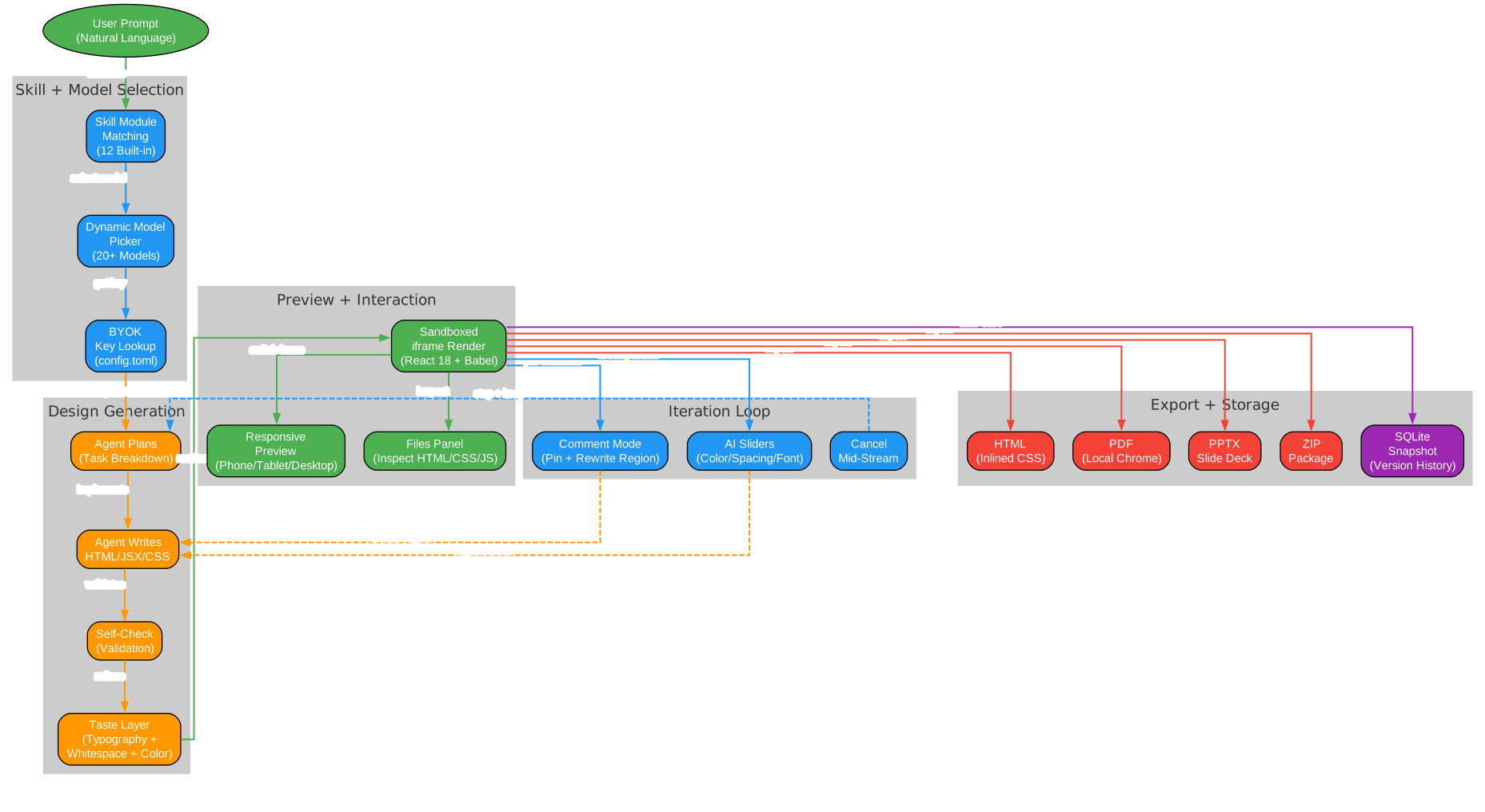
The workflow pipeline diagram shows the complete journey from prompt to polished artifact:
Phase 1: User Input – The process begins with a natural-language prompt describing the desired design. Users can choose from fifteen built-in demos (landing page, dashboard, pitch slide, pricing, mobile app, chat UI, event calendar, blog article, receipt/invoice, portfolio, settings panel, and more) or describe their own vision from scratch.
Phase 2: Skill and Model Selection – The skill module matching engine analyzes the prompt to determine which of the twelve built-in design skill modules are relevant. The dynamic model picker then selects the best available model from your configured providers, while the BYOK key lookup retrieves the appropriate credentials from the local config file.
Phase 3: Design Generation – The agent plans the task breakdown, writes HTML/JSX/CSS code, validates the output through a self-check step, and applies the taste layer – a built-in design sensibility that steers the model toward considered typography, purposeful whitespace, and meaningful color choices. This taste layer is what separates Open CoDesign from generic AI tools that produce generic output.
Phase 4: Preview and Interaction – The generated artifact renders in a sandboxed iframe using vendored React 18 and Babel on-device. Users can switch between phone, tablet, and desktop responsive frames, inspect the multi-file artifact (HTML, CSS, JS) in the files panel, and see per-generation token counts in the sidebar.
Phase 5: Iteration Loop – Comment mode lets you click any element in the preview, drop a pin, leave a note, and let the model rewrite only that region. AI-tuned sliders surface the parameters worth tweaking (color, spacing, font) so you can refine without another full prompt. Generation can be cancelled mid-stream without losing prior turns.
Phase 6: Export and Storage – Artifacts export to HTML (inlined CSS), PDF (local Chrome), PPTX slide decks, or ZIP packages. Every design is automatically saved to local SQLite with version snapshots, enabling instant switching between recent iterations.
Built-In Design Skills
Generic AI tools tend to produce generic output. Open CoDesign ships with twelve built-in design skill modules that bring higher-quality design behavior to whichever model you choose:
| Skill Module | Purpose |
|---|---|
| Slide Decks | Presentation layouts with title slides, content slides, and closing slides |
| Dashboards | Data-rich interfaces with charts, KPIs, and navigation |
| Landing Pages | Hero sections, feature grids, CTAs, and footer patterns |
| SVG Charts | Data visualization with bar, line, pie, and area charts |
| Glassmorphism | Frosted-glass UI patterns with backdrop blur effects |
| Editorial Typography | Magazine-style text layouts with refined type scales |
| Heroes | Full-width hero sections with gradient overlays and CTAs |
| Pricing | Tiered pricing tables with feature comparison |
| Footers | Multi-column footer layouts with links and social icons |
| Chat UIs | Message bubbles, input areas, and conversation threads |
| Data Tables | Sortable, filterable tables with pagination |
| Calendars | Event calendars with date grids and event cards |
Every skill is available in every generation. Before the model writes a line of CSS, it selects the skills that fit the brief and reasons through layout intent, design-system coherence, and contrast.
Comment Mode and AI Sliders
Two features set Open CoDesign apart from simple prompt-to-HTML tools:
Comment Mode – Click any element in the live preview, drop a pin, and type your feedback. The model rewrites only that region of the design, preserving everything else. This targeted editing approach is far more efficient than regenerating an entire page from scratch.
AI-Tuned Sliders – After generation, the model surfaces the parameters worth tweaking: color values, spacing units, font sizes, and more. Adjust these sliders to refine the design without writing another prompt. The sliders are generated dynamically based on the specific design, not hardcoded.
Version History and Local Storage
Every design iteration is saved locally in SQLite with instant switching between recent versions. The last five designs keep their preview iframes alive, so switching between the Hub and Workspace views stays zero-delay. This local-first approach means your design history never leaves your machine – no cloud sync, no server-side storage, no privacy concerns.
Monorepo Architecture
Understanding the Monorepo Structure
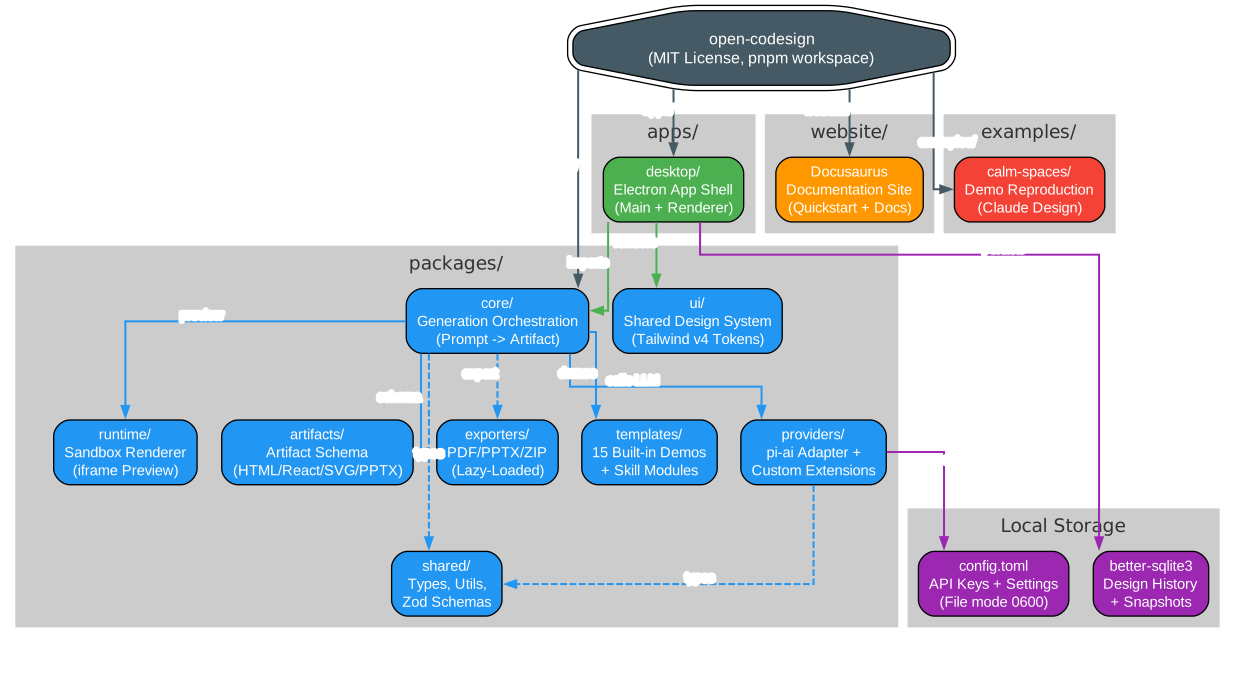
Open CoDesign is organized as a pnpm workspace with Turborepo orchestration, following a clean monorepo architecture that separates concerns across well-defined packages:
apps/desktop – The Electron application shell containing the main process and renderer. This is the entry point that users interact with, built with React 19, Vite 6, and Tailwind v4. The desktop app manages window lifecycle, IPC communication, and native file operations.
packages/core – The generation orchestration engine that transforms prompts into artifacts. This package implements the agent planning, skill module selection, taste layer, and the overall prompt-to-artifact pipeline. It is the brain of the application.
packages/providers – The pi-ai adapter layer plus custom provider extensions. All LLM calls route through this package, ensuring that app code never imports provider SDKs directly. If pi-ai lacks a feature, it is added here as a thin extension.
packages/runtime – The sandbox renderer that executes generated HTML/JSX in an isolated iframe. It uses vendored React 18 and Babel for on-device transpilation, with import maps for dependency resolution.
packages/ui – The shared design system built on Tailwind v4 tokens and Radix UI primitives. All UI components use these tokens – no hard-coded colors, fonts, or spacing in app code.
packages/artifacts – The artifact schema definitions for HTML, React, SVG, and PPTX output formats. Every artifact type carries a schemaVersion field for forward-compatible migrations.
packages/exporters – Lazy-loaded PDF, PPTX, and ZIP exporters. Heavy export functionality is only loaded when first used, keeping the initial app startup fast.
packages/templates – The fifteen built-in demo prompts and twelve design skill modules that provide ready-to-edit starting points for common design briefs.
packages/shared – Shared types, utility functions, and Zod schemas used across all packages.
Local Storage – Design history lives in better-sqlite3 for fast queries and version snapshots. Configuration (API keys, settings) is stored in config.toml with file mode 0600, matching the security conventions of Claude Code and the gh CLI.
Feature Comparison

Understanding the Feature Comparison
The feature comparison diagram illustrates how Open CoDesign stacks up against three major closed-source alternatives: Claude Design, v0 by Vercel, and Lovable.
Open Source (MIT License) – Open CoDesign is the only tool in this comparison that is fully open source under the MIT license. This means you can fork it, modify it, self-host it, and even use it commercially without restrictions. Claude Design, v0, and Lovable are all closed-source proprietary products.
Desktop Native (Electron) – Open CoDesign runs as a native desktop application on macOS, Windows, and Linux. This provides better performance, offline capability, and native file system access compared to web-only tools like Claude Design and v0.
BYOK (Any Provider) – The bring-your-own-key model supports 20+ models across Anthropic, OpenAI, Google, DeepSeek, Ollama, OpenRouter, and custom endpoints. Claude Design locks you into Anthropic only, v0 restricts you to GPT-4o, and Lovable offers limited BYOK.
Local-First (Fully Offline) – All design data, history, and configuration stay on your device. No cloud processing, no server-side storage. Claude Design, v0, and Lovable all require cloud connectivity.
Multi-Model (20+ Models) – The dynamic model picker exposes the real model catalogue from each provider, not a hardcoded shortlist. This gives you access to the latest models as soon as they are available.
Version History (SQLite Snapshots) – Every design iteration is saved locally with instant switching between versions. None of the closed-source alternatives offer local version history.
Data Privacy (On-Device) – Your designs, prompts, and API keys never leave your machine. Cloud-only alternatives process everything on their servers.
Editable Export (5 Formats) – HTML with inlined CSS, PDF via local Chrome, PPTX slide decks, ZIP packages, and Markdown. Closed-source alternatives offer limited or non-editable exports.
Free (Token Cost Only) – The application itself is free. You only pay for the LLM API tokens you consume. Claude Design, v0, and Lovable all require paid subscriptions on top of API costs.
Installation
Quick Install
Open CoDesign can be installed in under 90 seconds with one of these methods:
Windows (winget):
winget install OpenCoworkAI.OpenCoDesign
macOS (Homebrew):
brew install --cask opencoworkai/tap/open-codesign
Linux (AppImage):
Download the latest AppImage from GitHub Releases and make it executable:
chmod +x open-codesign-*-x64.AppImage
./open-codesign-*-x64.AppImage
Alternative package managers:
# Windows (Scoop)
scoop bucket add opencoworkai https://github.com/OpenCoworkAI/scoop-bucket
scoop install open-codesign
Building from Source
For verified builds or development contributions:
git clone https://github.com/OpenCoworkAI/open-codesign.git
cd open-codesign

# Install dependencies (requires Node 22+ and pnpm)
pnpm install

# Start development mode
pnpm dev

# Run tests
pnpm test

# Type check
pnpm typecheck

# Lint
pnpm lint
First Launch Setup
On first launch, Open CoDesign opens the Settings page where you paste your API key:
- Select your provider (Anthropic, OpenAI, Google, Ollama, etc.)
- Paste your API key
- Start generating – pick from fifteen built-in demos or describe your own design
If you already use Claude Code or Codex, click the one-click import button to automatically populate all settings.
Usage Examples
Generate a Landing Page
Type a natural-language prompt and watch the agent plan, write, self-check, and ship a polished landing page:
Create a modern SaaS landing page for a project management tool
called "TaskFlow" with a hero section, feature grid, pricing table,
and footer. Use a blue and white color scheme.
The agent will:
- Select relevant skill modules (landing page, heroes, pricing, footers)
- Plan the layout and component structure
- Write the HTML, CSS, and JavaScript
- Self-check for design quality and consistency
- Apply the taste layer for typography, whitespace, and color
- Render the result in the sandboxed preview
Iterate with Comment Mode
Click any element in the preview, drop a pin, and type feedback:
Make the hero heading larger and change the CTA button to orange
The model rewrites only that region, preserving everything else.
Refine with AI Sliders
After generation, the model surfaces adjustable parameters. Drag sliders to tweak:
- Primary and accent colors
- Font sizes and weights
- Spacing and padding values
- Border radius and shadow depth
Export Your Design
Choose from five export formats:
- HTML – Self-contained with inlined CSS, ready to deploy
- PDF – Generated via local Chrome, no cloud service needed
- PPTX – Native PowerPoint slide deck format
- ZIP – Complete package with separate HTML, CSS, and JS files
- Markdown – Structured text export for documentation
Technology Stack
Open CoDesign is built on a modern, battle-tested stack:
| Component | Technology |
|---|---|
| Desktop Shell | Electron |
| UI Framework | React 19 + Vite 6 |
| Styling | Tailwind v4 + CSS Variables |
| State Management | Zustand |
| UI Components | Radix UI primitives + custom shadcn-style wrappers |
| Icons | lucide-react |
| Model Layer | @mariozechner/pi-ai (multi-provider abstraction) |
| Storage | better-sqlite3 (design history) + TOML (config) |
| Build | Turborepo + pnpm workspaces |
| Linting | Biome (replaces ESLint + Prettier) |
| Testing | Vitest (unit) + Playwright (E2E) |
| Package Managers | winget, Homebrew, Scoop (with Flathub and Snap planned) |
Roadmap
Open CoDesign is currently at v0.1.3 with rapid development. The roadmap includes:
v0.1.x (Current) – Provider and API config polish, structured logging, diagnostics export, smoother one-click import.
v0.2 (Next) – Filesystem support for reading and writing real project directories, broader import paths for existing assets and project context.
v0.3+ – Cost transparency with pre-generation estimates and weekly budgets, version snapshots with side-by-side diff, three-style parallel exploration, codebase-to-design-system token extraction.
v0.5 – Code signing (Apple ID + Authenticode) and opt-in auto-update.
Community and Contributing
Open CoDesign has an active community on GitHub Discussions with categories for Show and Tell, Q&A, and Ideas. The project welcomes contributions – read CONTRIBUTING.md for guidelines including DCO sign-off, Biome linting, and Vitest testing requirements.
The project is licensed under MIT – fork it, ship it, sell it. Third-party notices are preserved in the NOTICE file.
Links
- GitHub Repository: https://github.com/OpenCoworkAI/open-codesign
- Documentation: https://opencoworkai.github.io/open-codesign/
- Releases: https://github.com/OpenCoworkAI/open-codesign/releases
Related guides
If you found Open CoDesign useful, these open-source AI tooling guides go deeper on adjacent parts of the stack:
- GBrain: Self-Wiring Knowledge Graph Memory Layer for AI Agents — give your AI agent a persistent, self-wiring knowledge graph so it stops forgetting between sessions.
- Hermes Web UI: Open-Source LLM Chat Dashboard for the Hermes Agent — a web dashboard for managing multi-platform AI chat agents in one place.
- Free Claude Code: Use Claude Code CLI for Free — route Claude Code’s API calls to NVIDIA NIM, OpenRouter, DeepSeek, or local models with no Anthropic API key.
- Kronos: Open-Source Foundation Model for Financial Market Forecasting — an open-source foundation model (Kronos-base, Kronos-small) for K-line / OHLCV market forecasting.

Enjoyed this post? Never miss out on future posts by following us


