CodeGraph: Pre-Indexed Code Knowledge Graph for AI Coding Agents
CodeGraph is a pre-indexed code knowledge graph that supercharges AI coding agents like Claude Code, Cursor, Codex CLI, and opencode with semantic code intelligence. Instead of agents spending dozens of tool calls scanning files with grep, glob, and Read, CodeGraph provides instant access to symbol relationships, call graphs, and code structure through a local SQLite database. The result: 94% fewer tool calls and 77% faster exploration across real-world codebases.
The Problem: Wasteful Code Exploration
When Claude Code explores an unfamiliar codebase, it spawns Explore agents that scan files using grep, glob, and Read tool calls. Each tool call consumes tokens and time. For a large project like VS Code, answering a single architecture question can require 52 tool calls and 1 minute 37 seconds of exploration time.
The core issue is that AI agents lack structural knowledge of the codebase. They must discover file layouts, trace function calls, and map class relationships from scratch every time. This repetitive discovery process wastes context window capacity and slows down every coding task.
Key Insight: CodeGraph benchmarks show that on the VS Code codebase (4,002 files, 59,377 nodes), an Explore agent answered the same architecture question with just 3 tool calls and 17 seconds – a 94% reduction in tool calls and 82% faster completion.
How CodeGraph Works
CodeGraph builds a semantic knowledge graph of your codebase using tree-sitter AST parsing, stores it in a local SQLite database with FTS5 full-text search, and exposes it to AI agents through an MCP server with 8 specialized tools.
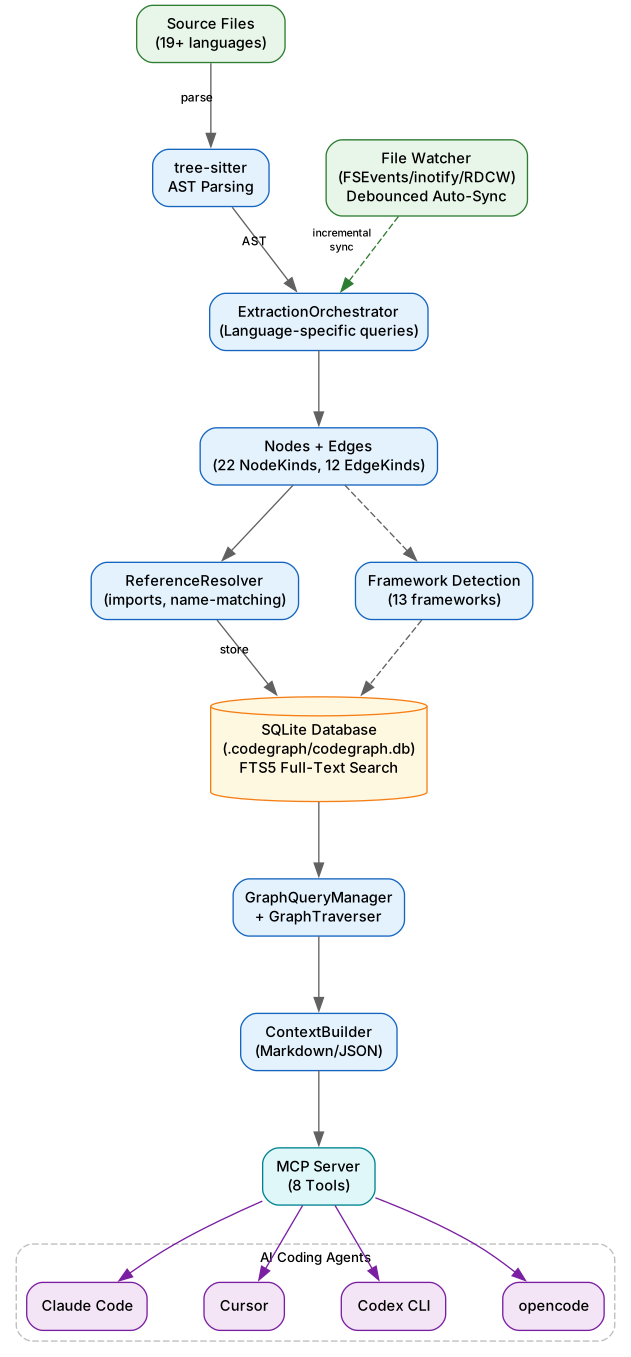
Understanding the Architecture
The architecture follows a layered pipeline design where source code flows through extraction, resolution, storage, and query layers before reaching AI agents via the MCP server.
Layer 1: ExtractionOrchestrator
The extraction layer uses tree-sitter to parse source code into Abstract Syntax Trees (ASTs). Language-specific queries then extract nodes (functions, classes, methods, imports) and edges (calls, imports, extends, implements) from the AST. CodeGraph supports 22 NodeKinds (file, module, class, struct, interface, trait, protocol, function, method, property, field, variable, constant, enum, enum_member, type_alias, namespace, parameter, import, export, route, component) and 12 EdgeKinds (contains, calls, imports, exports, extends, implements, references, type_of, returns, instantiates, overrides, decorates).
Layer 2: ReferenceResolver
After extraction, the resolution layer connects the dots: function calls link to their definitions, imports resolve to source files, class inheritance chains are established, and framework-specific patterns are detected. The resolver handles import resolution with path-alias support (tsconfig paths, Cargo workspace member globs) and name matching across modules.
Layer 3: Framework Detection
CodeGraph recognizes web-framework routing files and emits route nodes linked by references edges to their handler classes or functions. This means querying callers of a view/controller surfaces the URL pattern that binds it. Supported frameworks include Django, Flask, FastAPI, Express, Laravel, Rails, Spring, Gin, Axum, ASP.NET, Vapor, React Router, and SvelteKit.
Layer 4: SQLite Storage
Everything goes into a local SQLite database (.codegraph/codegraph.db) with FTS5 full-text search. The database uses better-sqlite3 (native) when available and transparently falls back to node-sqlite3-wasm for environments without native bindings. No data ever leaves your machine.
Layer 5: Auto-Sync
The MCP server watches your project using native OS file events (FSEvents on macOS, inotify on Linux, ReadDirectoryChangesW on Windows). Changes are debounced with a 2-second quiet window, filtered to source files only, and incrementally synced. The graph stays fresh as you code with zero configuration.
Takeaway: With just
npx @colbymchenry/codegraphandcodegraph init -i, your AI agents gain instant structural knowledge of your entire codebase – no manual configuration, no API keys, no external services.
Benchmark Results
Tested across 6 real-world codebases comparing Claude Code’s Explore agent with and without CodeGraph:
| Codebase | With CodeGraph | Without CodeGraph | Improvement |
|---|---|---|---|
| VS Code (TypeScript) | 3 calls, 17s | 52 calls, 1m 37s | 94% fewer, 82% faster |
| Excalidraw (TypeScript) | 3 calls, 29s | 47 calls, 1m 45s | 94% fewer, 72% faster |
| Claude Code (Python+Rust) | 3 calls, 39s | 40 calls, 1m 8s | 93% fewer, 43% faster |
| Claude Code (Java) | 1 call, 19s | 26 calls, 1m 22s | 96% fewer, 77% faster |
| Alamofire (Swift) | 3 calls, 22s | 32 calls, 1m 39s | 91% fewer, 78% faster |
| Swift Compiler (Swift/C++) | 6 calls, 35s | 37 calls, 2m 8s | 84% fewer, 73% faster |
Amazing: The Swift Compiler benchmark tested the largest codebase (25,874 files, 272,898 nodes) – CodeGraph indexed it in under 4 minutes and the agent answered a complex cross-cutting question with 6 explore calls and zero file reads in 35 seconds.
Key observations from the benchmarks:
- With CodeGraph, agents never fell back to reading files – they trusted the graph results completely
- Without CodeGraph, agents spent most time on discovery (find, ls, grep) before reading relevant code
- Cross-language queries (Python+Rust) worked seamlessly – graph traversal found connections across language boundaries
- The Alamofire benchmark traced a 9-step call chain from
Session.request()toURLSession.dataTask()in a single explore call
MCP Tools
When running as an MCP server, CodeGraph exposes 8 tools to AI coding agents:
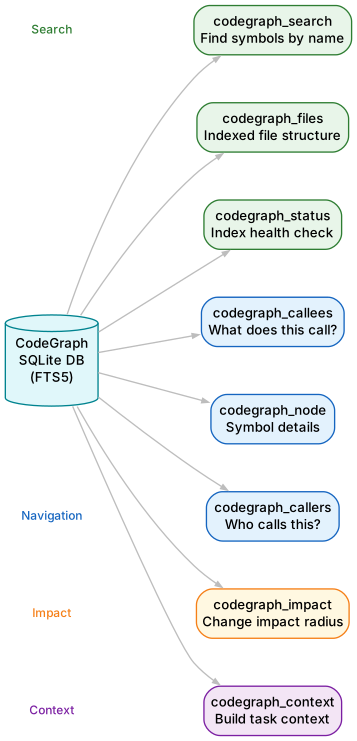
Understanding the MCP Tools
CodeGraph’s 8 MCP tools are organized into four categories: Search, Navigation, Impact Analysis, and Context Building. Each tool queries the local SQLite knowledge graph and returns structured results instantly.
Search Tools
| Tool | Purpose |
|---|---|
codegraph_search | Find symbols by name across the entire codebase using FTS5 full-text search |
codegraph_files | Get indexed file structure – faster than filesystem scanning |
codegraph_status | Check index health, statistics, and which SQLite backend is active |
Navigation Tools
| Tool | Purpose |
|---|---|
codegraph_callers | Find what calls a function – trace incoming call chains |
codegraph_callees | Find what a function calls – trace outgoing call chains |
codegraph_node | Get details about a specific symbol, optionally with source code |
Impact Analysis
| Tool | Purpose |
|---|---|
codegraph_impact | Analyze what code is affected by changing a symbol – essential before refactoring |
Context Building
| Tool | Purpose |
|---|---|
codegraph_context | Build relevant code context for a task – returns entry points, related symbols, and code snippets in one call |
The codegraph_context tool is the most powerful. It combines search, navigation, and code retrieval into a single call that returns everything an agent needs to understand a code area. This is what replaces the 40-50 tool calls that agents normally make during exploration.
Important: The main Claude Code session should only use lightweight tools (search, callers, callees, impact, node) for targeted lookups. For exploration questions, always spawn an Explore agent that uses
codegraph_contextas its primary tool – this prevents large code sections from filling up the main session context.
Supported Languages
CodeGraph supports 19+ languages through tree-sitter grammar parsing:
| Category | Languages |
|---|---|
| Web/Scripting | TypeScript, JavaScript, Python, Ruby, PHP, Dart, Svelte, Liquid |
| Systems | Go, Rust, C, C++ |
| JVM | Java, Kotlin |
| Apple | Swift |
| .NET | C# |
| Other | Pascal/Delphi |
Framework-aware route detection works across 13 frameworks: Django, Flask, FastAPI, Express, Laravel, Rails, Spring, Gin, chi, gorilla/mux, Axum, actix, Rocket, ASP.NET, Vapor, React Router, and SvelteKit.
Installation
Quick Install (Recommended)
npx @colbymchenry/codegraph
The interactive installer will:
- Ask which agent(s) to configure – auto-detects installed ones from Claude Code, Cursor, Codex CLI, opencode
- Prompt to install
codegraphon your PATH (so agents can launch the MCP server) - Ask whether configs apply to all your projects or just this one
- Write each chosen agent’s MCP server config + instructions file (e.g.,
CLAUDE.md,.cursor/rules/codegraph.mdc,~/.codex/AGENTS.md) - Set up auto-allow permissions when Claude Code is one of the targets
- Initialize your current project (local installs only)
Non-Interactive Install (CI/Scripting)
# Auto-detect agents, install global
codegraph install --yes

# Explicit target list
codegraph install --target=cursor,claude --yes

# Detected agents, project-local
codegraph install --target=auto --location=local

# Print config snippet without writing files
codegraph install --print-config codex
| Flag | Values | Default |
|---|---|---|
--target | auto, all, none, or csv (claude,cursor,...) | prompt |
--location | global, local | prompt |
--yes | (boolean) | prompt every step |
--no-permissions | (boolean) skip Claude auto-allow list | permissions on |
--print-config <id> | dump snippet for one agent and exit | – |
Initialize Projects
cd your-project
codegraph init -i
This builds the per-project knowledge graph index. It also wires up any project-local agent surfaces (e.g., Cursor’s .cursor/rules/codegraph.mdc) so a single global codegraph install works in every project you open.
Restart Your Agent
Restart your agent (Claude Code / Cursor / Codex CLI / opencode) for the MCP server to load. Your agent will use CodeGraph tools automatically when a .codegraph/ directory exists.
CLI Reference
codegraph                         # Run interactive installer
codegraph install                 # Run installer (explicit)
codegraph init [path]             # Initialize in a project (--index to also index)
codegraph uninit [path]           # Remove CodeGraph from a project (--force to skip prompt)
codegraph index [path]            # Full index (--force to re-index, --quiet for less output)
codegraph sync [path]             # Incremental update
codegraph status [path]           # Show statistics
codegraph query <search>          # Search symbols (--kind, --limit, --json)
codegraph files [path]            # Show file structure (--format, --filter, --max-depth, --json)
codegraph context <task>          # Build context for AI (--format, --max-nodes)
codegraph affected [files...]     # Find test files affected by changes
codegraph serve --mcp             # Start MCP server
Affected Files for CI
The codegraph affected command traces import dependencies transitively to find which test files are affected by changed source files:
# Pass files as arguments
codegraph affected src/utils.ts src/api.ts

# Pipe from git diff
git diff --name-only | codegraph affected --stdin

# Custom test file pattern
codegraph affected src/auth.ts --filter "e2e/*"
| Option | Description | Default |
|---|---|---|
--stdin | Read file list from stdin | false |
-d, --depth <n> | Max dependency traversal depth | 5 |
-f, --filter <glob> | Custom glob to identify test files | auto-detect |
-j, --json | Output as JSON | false |
-q, --quiet | Output file paths only | false |
CI/hook example:
#!/usr/bin/env bash
AFFECTED=$(git diff --name-only HEAD | codegraph affected --stdin --quiet)
if [ -n "$AFFECTED" ]; then
  npx vitest run $AFFECTED
fi
Library Usage
CodeGraph can also be used as a TypeScript library:
import CodeGraph from '@colbymchenry/codegraph';

const cg = await CodeGraph.init('/path/to/project');
// Or: const cg = await CodeGraph.open('/path/to/project');

await cg.indexAll({
  onProgress: (p) => console.log(`${p.phase}: ${p.current}/${p.total}`)
});

const results = cg.searchNodes('UserService');
const callers = await cg.getCallers('UserService.login');
const impact = await cg.getImpactRadius('UserService.login');
const context = await cg.buildContext('implement user authentication');

await cg.watch();  // Auto-sync on file changes
await cg.close();
Key Features Summary
| Feature | Description |
|---|---|
| Smart Context Building | One tool call returns entry points, related symbols, and code snippets |
| Full-Text Search | Find code by name instantly across your entire codebase, powered by FTS5 |
| Impact Analysis | Trace callers, callees, and the full impact radius of any symbol |
| Always Fresh | File watcher uses native OS events with debounced auto-sync |
| 19+ Languages | TypeScript, JavaScript, Python, Go, Rust, Java, C#, PHP, Ruby, C, C++, Swift, Kotlin, Dart, Svelte, Liquid, Pascal/Delphi |
| Framework-aware Routes | Recognizes web-framework routing files and links URL patterns to handlers across 13 frameworks |
| 100% Local | No data leaves your machine. No API keys. No external services. SQLite database only |
| Multi-Agent Support | Works with Claude Code, Cursor, Codex CLI, and opencode |
Troubleshooting
| Issue | Solution |
|---|---|
| MCP server not loading | Restart your agent after running the installer. Check that codegraph is on your PATH. |
| Index not updating | Run codegraph status to check index health. Use codegraph sync for manual sync or codegraph index --force for a full re-index. |
| Cursor working directory issue | The installer injects --path into Cursor’s MCP args to handle Cursor’s cwd quirk. Re-run the installer if you moved your project. |
| Node version error | CodeGraph requires Node.js 18+ and blocks Node 25.x. Check your Node version with node --version. |
| WASM fallback slow | If better-sqlite3 native binding is unavailable, CodeGraph falls back to node-sqlite3-wasm which is slower. Install build tools for native compilation. |
Conclusion
CodeGraph solves a fundamental problem in AI-assisted coding: the wasteful exploration loop. By pre-indexing codebases into a semantic knowledge graph with tree-sitter, it gives AI agents instant structural understanding that replaces dozens of file-scanning tool calls with a single graph query. The benchmarks speak for themselves – 94% fewer tool calls and 77% faster exploration across real-world codebases like VS Code, Excalidraw, and the Swift Compiler. With 19+ language support, 13 framework-aware route detectors, 100% local processing, and automatic file watching, CodeGraph is a zero-configuration productivity multiplier for any developer using AI coding agents.
Repository: https://github.com/colbymchenry/codegraph
License: MIT Enjoyed this post? Never miss out on future posts by following us 


