Claude Code Plugins Official: The Definitive Directory of 100+ Extensions for AI Coding
Anthropic’s claude-plugins-official repository is the official marketplace for Claude Code extensions — a curated directory of 100+ high-quality plugins developed by Anthropic, 50+ enterprise partners, and the community. From LSP servers for 12 programming languages to MCP integrations with GitHub, Firebase, and Playwright, this directory transforms Claude Code from a coding assistant into a full-stack development platform.
The Plugin Ecosystem at a Glance

The directory is organized into two main categories:
- Internal Plugins — Developed and maintained by Anthropic’s team, covering development tools, productivity, code quality, LSP servers, and specialized domains
- External Plugins — Third-party plugins from enterprise partners (AWS, Azure, Adobe, MongoDB, etc.) and community contributors
Plugin Structure: Five Extension Points
Every Claude Code plugin can leverage five distinct extension mechanisms:
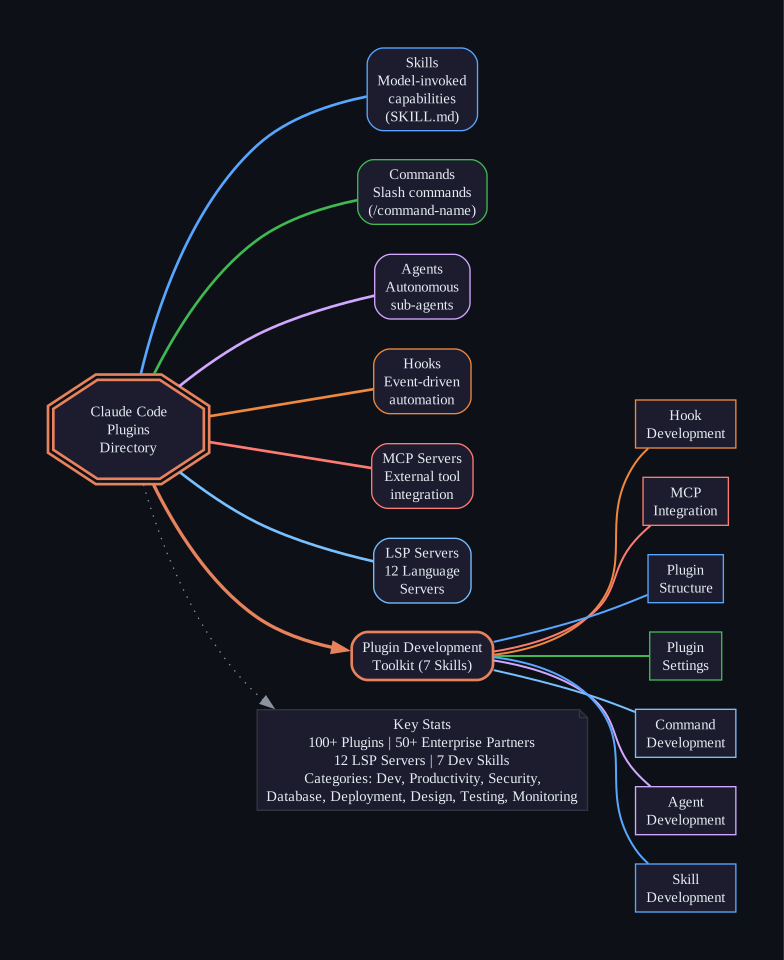
1. Skills (skills/)
Skills are the primary extension format. Each skill lives in a SKILL.md file with YAML frontmatter:
---
name: skill-name
description: Trigger conditions for this skill
version: 1.0.0
---
Skills come in two flavors:
- Model-invoked — Activated automatically by task context (e.g., “this skill should be used when working with React components”)
- User-invoked — Triggered via slash commands like
/skill-name [args]
2. Commands (commands/)
Slash commands provide user-facing workflows. The legacy commands/*.md format still works, but the skills/<name>/SKILL.md layout is preferred for new plugins.
3. Agents (agents/)
Autonomous sub-agents that Claude can delegate tasks to. Each agent has a YAML frontmatter block defining its name, description, model, color, and allowed tools. The plugin-dev toolkit includes an AI-assisted agent creation workflow.
4. Hooks (hooks/)
Event-driven automation that fires on specific events:
PreToolUse/PostToolUse— Validate or react to tool callsSessionStart/SessionEnd— Initialize or clean up sessionsStop/SubagentStop— Control agent terminationUserPromptSubmit— Intercept user inputPreCompact— Control context compressionNotification— Send alerts
5. MCP Servers (.mcp.json)
Model Context Protocol servers connect Claude to external services:
{
  "server-name": {
    "type": "http",
    "url": "https://mcp.example.com/api"
  }
}
Supported server types include stdio (local), SSE (hosted/OAuth), HTTP (REST), and WebSocket (real-time).
Installation
Plugins install directly from the marketplace:
# Install by name
/plugin install {plugin-name}@claude-plugins-official

# Or browse interactively
/plugin > Discover
⚠️ Important: Make sure you trust a plugin before installing. Anthropic does not control what MCP servers, files, or other software are included in plugins.
Internal Plugins: Anthropic’s First-Party Extensions
Development Tools
| Plugin | Description |
|---|---|
| plugin-dev | 7-skill toolkit for building plugins (hooks, MCP, commands, agents, skills, structure, settings) |
| feature-dev | Comprehensive feature development workflow with exploration, architecture, and review agents |
| mcp-server-dev | Skills for designing and building MCP servers with deployment models and auth patterns |
| code-modernization | Structured workflow for modernizing legacy codebases (COBOL, Java/C++, monoliths) |
| agent-sdk-dev | Development kit for the Claude Agent SDK |
Productivity
| Plugin | Description |
|---|---|
| code-review | Automated PR review with 4 parallel agents and confidence-based scoring (threshold: 80) |
| commit-commands | Git commit workflows: commit, push, and PR creation |
| claude-code-setup | Analyze codebases and recommend tailored automations (hooks, skills, MCP, subagents) |
| claude-md-management | Tools to maintain and improve CLAUDE.md files |
| pr-review-toolkit | 6 specialized review agents (code reviewer, simplifier, comment analyzer, test analyzer, silent failure hunter, type design analyzer) |
| code-simplifier | Agent that simplifies code for clarity while preserving functionality |
| hookify | Create custom hooks from conversation patterns or explicit instructions |
| ralph-loop | Interactive self-referential AI loops implementing the Ralph Wiggum technique |
LSP Servers (12 Languages)
| Language | Server | File Extensions |
|---|---|---|
| C/C++ | clangd | .c, .h, .cpp, .cc, .hpp |
| C# | csharp-ls | .cs |
| Go | gopls | .go |
| Java | Eclipse JDT.LS | .java |
| Kotlin | kotlin-lsp | .kt, .kts |
| Lua | lua-language-server | .lua |
| PHP | Intelephense | .php |
| Python | Pyright | .py, .pyi |
| Ruby | ruby-lsp | .rb |
| Rust | rust-analyzer | .rs |
| Swift | swift-lsp | .swift |
| TypeScript | typescript-lsp | .ts, .tsx |
Specialized
| Plugin | Description |
|---|---|
| math-olympiad | Solve competition math (IMO, Putnam, USAMO) with adversarial verification |
| playground | Interactive HTML playgrounds with templates for design, data exploration, and document critique |
| frontend-design | Create distinctive, production-grade frontend interfaces avoiding generic AI aesthetics |
| explanatory-output-style | Adds educational insights about implementation choices |
| learning-output-style | Interactive learning mode requesting meaningful code contributions at decision points |
| security-guidance | Security best practices and vulnerability prevention |
| session-report | Session activity reporting and analytics |
External Plugins: Enterprise & Community
Major Enterprise Partners
The marketplace features plugins from 50+ companies spanning every category:
Cloud & Infrastructure:
- AWS (6 plugins: agents, amplify, core, data analytics, serverless, dev toolkit)
- Azure (Azure skills, Cosmos DB, Dataverse)
- Google Cloud (AlloyDB, Cloud SQL, Firebase, Data Agent Kit)
- Cloudflare (Workers, Durable Objects, Agents SDK)
Databases:
- MongoDB, ClickHouse, CockroachDB, Redis, Prisma, Neon, PlanetScale, Pinecone, Qdrant, DuckDB
Developer Tools:
- GitHub, GitLab, Postman, Buildkite, Expo, Figma, Netlify, Railway, Vercel
Security:
- 42Crunch (API security), Auth0, CrowdStrike, JFrog, NightVision, Aikido
Productivity:
- Notion, Linear, Asana, Airtable, Box, Intercom, PagerDuty, Miro
Monitoring:
- Datadog, PostHog, Logfire (Pydantic), Dash0, Fullstory
Design:
- Adobe Creative Cloud, Figma, Cloudinary, HeyGen HyperFrames
Communication:
- Discord, iMessage, Telegram, Resend
Community-Managed Plugins
External plugins tagged community-managed are contributed by the community and meet quality/security standards for inclusion. Submit new plugins via the plugin directory submission form.
Building Your Own Plugin
The plugin-dev plugin provides a comprehensive 8-phase guided workflow:
/plugin-dev:create-plugin [optional description]
Phase 1: Discovery — Understand plugin purpose and requirements Phase 2: Component Planning — Determine needed skills, commands, agents, hooks, MCP Phase 3: Detailed Design — Specify each component and resolve ambiguities Phase 4: Structure Creation — Set up directories and manifest Phase 5: Component Implementation — Create each component using AI-assisted agents Phase 6: Validation — Run plugin-validator and component-specific checks Phase 7: Testing — Verify plugin works in Claude Code Phase 8: Documentation — Finalize README and prepare for distribution
Minimal Plugin Example
my-plugin/
├── .claude-plugin/
│   └── plugin.json      # Plugin metadata (required)
├── .mcp.json            # MCP server configuration (optional)
├── commands/            # Slash commands (optional)
├── agents/              # Agent definitions (optional)
├── skills/              # Skill definitions (optional)
└── README.md            # Documentation
Plugin Manifest (plugin.json)
{
  "name": "my-plugin",
  "description": "What this plugin does",
  "version": "1.0.0",
  "author": {
    "name": "Your Name"
  },
  "category": "development"
}
Code Review Plugin: Deep Dive
The code-review plugin demonstrates the power of multi-agent architecture:
- Check if review is needed — Skip closed, draft, trivial, or already-reviewed PRs
- Gather CLAUDE.md guidelines — Load repository-specific coding standards
- Summarize PR changes — Understand what changed and why
- Launch 4 parallel agents:
- Agents #1 & #2: Audit for CLAUDE.md compliance (redundancy for reliability)
- Agent #3: Scan for obvious bugs in changes
- Agent #4: Analyze git blame/history for context-based issues
- Score each issue 0-100 for confidence level
- Filter below threshold 80 — Only high-confidence issues are posted
- Post review comment with direct code links
This confidence-based scoring system dramatically reduces false positives compared to traditional linting approaches.
Progressive Disclosure Pattern
All plugin-dev skills follow a three-level disclosure system:
- Metadata (always loaded) — Concise descriptions with strong triggers
- Core SKILL.md (when triggered) — Essential API reference (~1,500-2,000 words)
- References/Examples (as needed) — Detailed guides, patterns, and working code
This keeps Claude Code’s context focused while providing deep knowledge when needed — a critical design pattern for building effective AI coding tools.
Key Takeaways
- 100+ plugins from Anthropic and 50+ enterprise partners
- Five extension points: Skills, Commands, Agents, Hooks, MCP Servers
- 12 LSP servers for language intelligence in C++, C#, Go, Java, Kotlin, Lua, PHP, Python, Ruby, Rust, Swift, TypeScript
- Plugin-dev toolkit with 7 skills and guided 8-phase creation workflow
- Confidence-based code review with 4 parallel agents and 80+ threshold
- Progressive disclosure pattern keeps context lean while enabling deep knowledge
- Enterprise-grade integrations with AWS, Azure, GCP, MongoDB, GitHub, and more
Getting Started
# Browse available plugins
/plugin > Discover

# Install a specific plugin
/plugin install code-review@claude-plugins-official

# Install the development toolkit
/plugin install plugin-dev@claude-plugins-official

# Create your own plugin
/plugin-dev:create-plugin A plugin for managing database migrations
The Claude Code Plugins Directory represents a paradigm shift in AI coding tools — from monolithic assistants to extensible platforms where every developer and company can contribute specialized capabilities. Whether you need language intelligence, enterprise integrations, or custom workflows, the plugin ecosystem has you covered.
Links
- Repository: anthropics/claude-plugins-official
- Documentation: code.claude.com/docs/en/plugins
- Submit a Plugin: clau.de/plugin-directory-submission

Enjoyed this post? Never miss out on future posts by following us


