What Is OpenClaude-Portable?
OpenClaude-Portable is an open-source portable AI coding agent that lets you run a full-featured Claude Code experience from a USB drive or any directory – without installing anything on the host machine. With 616 stars on GitHub, it has quickly become the go-to solution for developers who need their AI coding environment to travel with them.
The project bundles Node.js v22.14.0 and GitPortable v2.54.0 automatically, supports 9 different AI providers (including fully offline options like Ollama and LM Studio), and includes a built-in Local Speed Proxy that trims system prompts by up to 90% for dramatically faster local model responses.
Key Insight: OpenClaude-Portable is not just a wrapper around Claude Code. It is a complete portable development environment that auto-downloads its runtime, manages 9 AI provider configurations, includes a web dashboard with agent mode, and keeps all your data in a single
data/folder that works across Windows, Linux, and macOS.
Architecture Overview
OpenClaude-Portable follows a layered architecture that handles everything from runtime setup to AI provider communication:
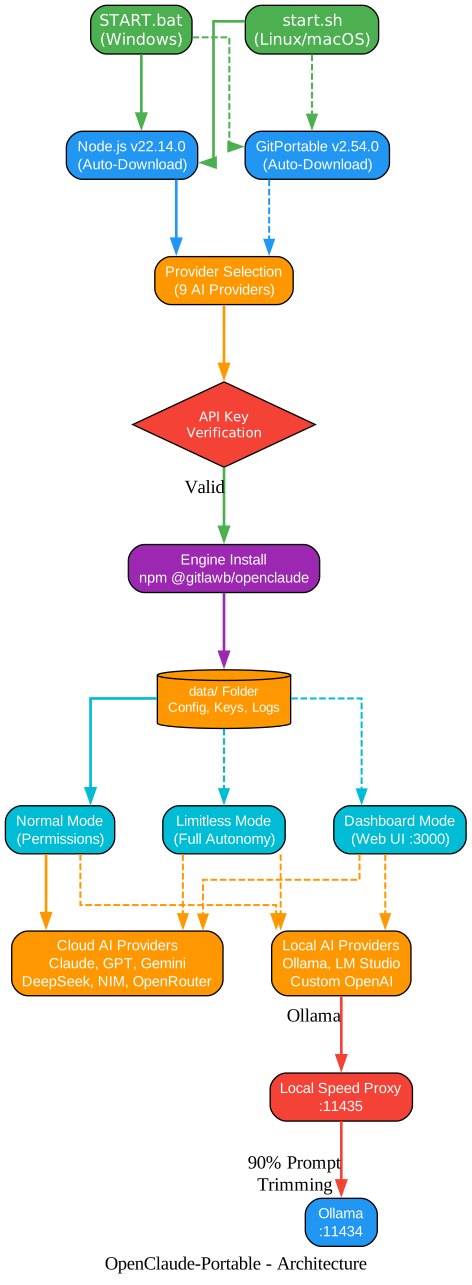
The architecture flows from the entry points (START.bat on Windows, start.sh on Linux/macOS) through runtime auto-download (Node.js and GitPortable), provider selection with API key verification, engine installation, and finally into one of three launch modes. For Ollama users, the Local Speed Proxy sits between the agent and Ollama, trimming system prompts to slash first-token latency.
Key Features
OpenClaude-Portable packs an impressive set of capabilities into a portable package:

9 AI Providers
OpenClaude-Portable supports more AI providers than most dedicated AI tools:
- Cloud Providers: Anthropic Claude, OpenAI GPT, Google Gemini, DeepSeek, NVIDIA NIM, OpenRouter
- Local Providers: Ollama (fully offline), LM Studio, Custom OpenAI-compatible APIs
Each provider has its own setup flow with API key verification. The project stores all configuration in the portable data/ folder, so switching between providers is seamless.
Zero Footprint
This is the core promise of OpenClaude-Portable. Everything – configuration, API keys, session logs, chat history – stays in the data/ folder within the application directory. No registry entries. No system files modified. No data left on the host machine.
Unplug the USB drive, and there is zero trace that you ever ran an AI coding agent on that machine. This makes it ideal for shared workstations, secure environments, or developers who simply do not want to pollute their system with yet another tool installation.
Local Speed Proxy
One of the most innovative features is the Local Speed Proxy (tools/local-proxy.js). When using Ollama for local AI, the proxy intercepts requests on port 11435 and forwards them to Ollama on port 11434 – but not before trimming the system prompt from approximately 10,000 tokens down to roughly 300 tokens (a 90% reduction).
The impact is dramatic:
| Metric | Without Proxy | With Proxy |
|---|---|---|
| System prompt tokens | ~10,000 | ~300 |
| First-token latency | 60-120 seconds | 5-20 seconds |
| Reduction | - | 90% |
The proxy runs silently, logging to data/proxy.log without cluttering your terminal. It only activates for Ollama requests, so cloud provider traffic passes through unaffected.
Web Dashboard
OpenClaude-Portable includes a full web-based dashboard accessible at localhost:3000. The dashboard provides:
- ChatGPT-Style UI: A familiar chat interface with dark and light themes
- Agent Mode: Toggle agent mode to let the AI use 5 tools –
write_file,read_file,list_directory,execute_command, andsearch_files - Approval System: Write operations require explicit approval before execution, keeping you in control
- Thinking Visualization: See the AI’s reasoning process in real-time
- Setup Wizard: A 4-step guided setup for first-time users
- System Info: View runtime details, storage usage, and session logs
The dashboard server (dashboard/server.mjs) handles streaming chat for OpenAI, Anthropic, and Gemini providers, with SSE-based real-time updates for a responsive experience.
Cross-Platform
The shared data/ folder works across all three major platforms:
- Windows:
START.bathandles everything from Node.js download to provider setup - Linux:
start.shwith platform detection for x64 and ARM64 - macOS: Same
start.shwith Darwin-specific handling
You can start a session on Windows at the office, save your work to the USB drive, and continue on your Mac at home – all configuration, API keys, and chat history travel with you.
Auto-Management
OpenClaude-Portable takes care of its own infrastructure:
- Bundled Runtime: Node.js v22.14.0 and GitPortable v2.54.0 are downloaded and configured automatically on first run
- Daily Auto-Update: The engine checks for updates once per day (cached to avoid repeated checks)
- Session Resume: Pick up where you left off with session resume capability
Getting Started
Prerequisites
- Windows 10+, Linux (x64/ARM64), or macOS (x64/ARM64)
- Internet connection for first-time setup and cloud AI providers
- For offline use: Ollama installed separately
Windows Setup
REM 1. Clone or download the repository
git clone https://github.com/techjarves/OpenClaude-Portable.git

REM 2. Navigate to the directory
cd OpenClaude-Portable

REM 3. Run the launcher
START.bat
Linux / macOS Setup
# 1. Clone or download the repository
git clone https://github.com/techjarves/OpenClaude-Portable.git

# 2. Navigate to the directory
cd OpenClaude-Portable

# 3. Make the script executable
chmod +x start.sh

# 4. Run the launcher
./start.sh
First Run Experience
On first launch, OpenClaude-Portable will:
- Download Node.js (v22.14.0) automatically if not found
- Download GitPortable (v2.54.0) automatically if not found
- Present the provider selection menu with 9 options
- Verify your API key for the selected provider
- Install the OpenClaude engine via npm
- Save your settings to
data/settings.json - Launch in your chosen mode
Main Menu Options
After initial setup, the main menu offers these modes:
| Option | Description |
|---|---|
| Normal Mode | Standard Claude Code with permission prompts |
| Limitless Mode | Full autonomy with --dangerously-skip-permissions |
| Dashboard Mode | Web UI at localhost:3000 |
| Change Provider | Switch between the 9 supported providers |
| Setup Offline Models | Configure Ollama for fully offline use |
The Local Speed Proxy in Action
The speed proxy is one of OpenClaude-Portable’s most clever features. Here is how it works under the hood:
// tools/local-proxy.js - Core trimming logic
function trimSystemPrompt(content) {
  const MAX_CHARS = 1200; // ~300 tokens
  if (content.length <= MAX_CHARS) return content;
  // Keep first 800 chars (core instructions)
  // Keep last 400 chars (safety/role reminders)
  // Replace middle with "[System prompt trimmed for speed]"
  const head = content.substring(0, 800);
  const tail = content.substring(content.length - 400);
  return head + "\n\n[System prompt trimmed for speed]\n\n" + tail;
}
The proxy intercepts the chat completion request, finds the system message in the messages array, trims it if it exceeds 1,200 characters, and forwards the optimized request to Ollama. This reduces the tokens Ollama must process before generating its first response, cutting latency from minutes to seconds.
The Web Dashboard Deep Dive
The dashboard is built as a single-page application with a Node.js backend:
Frontend (dashboard/index.html):
- Dark and light theme with CSS custom properties
- Sidebar with chat history management
- 4-step setup wizard for new users
- System info page showing runtime, storage, and session details
- Actions page with quick-launch buttons
- Updates page for engine management
Backend (dashboard/server.mjs):
- Config management for all 9 providers
- Model fetching and listing for each provider
- API key verification endpoints
- Ollama server management (start/stop/status)
- Chat history CRUD operations
- Agent system with 5 tools and approval workflow
- Streaming chat support for OpenAI, Anthropic, and Gemini APIs
- SSE-based real-time event streaming
Project Structure
OpenClaude-Portable/
  START.bat              # Windows entry point
  start.sh              # Linux/macOS entry point
  data/                 # All user data (portable)
    settings.json       # Provider and API key config
    proxy.log           # Speed proxy logs
  dashboard/
    index.html          # Web UI (single-page app)
    server.mjs          # Dashboard backend server
  tools/
    local-proxy.js      # Speed proxy for Ollama
    install-openclaude-engine.ps1  # Engine installer
    Change_Provider.bat  # Quick provider switch (Windows)
    change_provider.sh   # Quick provider switch (Linux/macOS)
    Open_Dashboard.bat   # Dashboard launcher (Windows)
    open_dashboard.sh    # Dashboard launcher (Linux/macOS)
    Setup_Local_Models.bat    # Ollama setup (Windows)
    setup_local_models.ps1   # Ollama setup (PowerShell)
    setup_local_models.sh    # Ollama setup (Linux/macOS)
Security and Privacy
OpenClaude-Portable takes a privacy-first approach:
- No data leaves the
data/folder – all config, keys, and logs stay portable - No registry modifications on Windows
- No system files created or modified
- API keys stored locally in
data/settings.json(never sent to third parties) - Speed proxy runs locally on localhost only
- Dashboard binds to localhost only (not exposed to network)
For maximum security, store the entire OpenClaude-Portable directory on an encrypted USB drive.
LM Studio Setup
LM Studio provides a GUI-based local AI experience:
- Install and run LM Studio
- Download a model (e.g., Qwen2.5-Coder-7B)
- Start the LM Studio local server (default:
localhost:1234) - In OpenClaude-Portable, select “LM Studio” as your provider
- The default endpoint is pre-configured – just start coding
Custom OpenAI-Compatible Provider
For self-hosted or alternative AI services that expose an OpenAI-compatible API:
- Select “Custom OpenAI-Compatible” from the provider menu
- Enter your custom API endpoint URL
- Enter your API key
- Enter the model name
- OpenClaude-Portable will use the standard OpenAI chat completion format against your endpoint
When to Use OpenClaude-Portable
OpenClaude-Portable shines in these scenarios:
- Shared workstations where you cannot install software permanently
- Secure environments that prohibit software installation
- Multi-machine workflows where you need the same AI setup across devices
- Offline development using Ollama or LM Studio without internet
- Trying multiple AI providers without installing separate tools for each
- USB drive deployment for a truly portable AI coding environment
Comparison with Standard Claude Code
| Feature | Claude Code | OpenClaude-Portable |
|---|---|---|
| Installation | npm install -g | None (auto-downloads runtime) |
| AI Providers | Anthropic only | 9 providers |
| Portability | System-wide install | USB drive portable |
| Offline Use | No | Yes (Ollama, LM Studio) |
| Speed Proxy | No | Yes (90% prompt trimming) |
| Web Dashboard | No | Yes (localhost:3000) |
| Cross-platform data | No | Yes (shared data/ folder) |
| Zero Footprint | No | Yes |
Troubleshooting
| Issue | Solution |
|---|---|
| Node.js download fails | Check internet connection; manual download to node/ directory |
| API key not accepted | Verify key at provider’s console; check for trailing spaces |
| Ollama not responding | Ensure Ollama is running: ollama serve |
| Slow Ollama responses | Enable the Local Speed Proxy (auto-starts with Ollama provider) |
| Dashboard not loading | Check if port 3000 is in use; restart dashboard |
| Git operations fail | Ensure GitPortable downloaded correctly; check gitportable/ directory |
Conclusion
OpenClaude-Portable solves a real problem for developers who need their AI coding environment to be as mobile as they are. By bundling the runtime, supporting 9 AI providers, adding a speed proxy for local models, and including a full web dashboard – all while maintaining zero footprint – it delivers a complete portable AI development experience that works from any directory on any major operating system.
Whether you are coding on a shared machine, working offline with Ollama, or simply want your AI tools to travel with you on a USB drive, OpenClaude-Portable provides a polished, well-engineered solution that respects your privacy and your workflow.
Repository: github.com/techjarves/OpenClaude-Portable License: MIT Stars: 616+ Enjoyed this post? Never miss out on future posts by following us 


