Dexter: Autonomous Financial Research Agent with Persistent Memory and WhatsApp Gateway
Dexter is an autonomous financial research agent that thinks, plans, and learns as it works, performing deep financial analysis using task planning, self-reflection, and real-time market data. Think Claude Code, but built specifically for financial research. Unlike simple retrieval tools that fetch data on demand, Dexter decomposes complex financial queries into structured research steps, executes them autonomously, validates its own work, and iterates until it produces a confident, data-backed answer.
Built in TypeScript with the Bun runtime, Dexter supports eight LLM providers, persistent SQLite-backed memory with hybrid search, a WhatsApp gateway for mobile research, and a skills system for extensible workflows like DCF valuation. With over 23,000 GitHub stars and growing at 400+ stars per day, Dexter has quickly become one of the most popular open-source financial AI agents available.
What is Dexter
Dexter takes complex financial questions and turns them into clear, step-by-step research plans. It runs those tasks using live market data, checks its own work, and refines the results until it has a confident, data-backed answer. The agent operates in a terminal window and provides a rich interactive UI built with the Ink React-based terminal rendering framework.
How Dexter differs from ai-hedge-fund: While ai-hedge-fund focuses on simulating a hedge fund with multiple specialized agents (one for Warren Buffett, one for Michael Burry, etc.) that each produce a separate signal, Dexter is a single unified agent that performs deep, iterative research. Dexter does not simulate investment personalities. Instead, it embodies a consistent research philosophy rooted in Buffett and Munger principles via its SOUL.md identity layer, and it uses persistent memory, self-validation loops, and a 3-tier context management system to conduct thorough, multi-step financial analysis that goes far beyond single-pass signal generation.
Architecture Overview

Understanding the Architecture
The architecture diagram above illustrates the major subsystems of Dexter and how they interact to deliver autonomous financial research. Let us break down each component:
Core Agent Loop The heart of Dexter is the agent loop, which orchestrates the entire research workflow. A user query enters the system, gets combined with the system prompt (which includes SOUL.md identity, memory context, and tool descriptions), and is sent to the LLM. The LLM responds with either a direct answer or tool calls. Tool calls are executed concurrently where safe, results are collected and injected back into the conversation, and the loop iterates. This continues for up to 10 iterations or until the LLM produces a final answer without tool calls.
Context Management (3-Tier) Dexter employs a sophisticated 3-tier context management system to handle the inevitable growth of conversation history during deep research sessions. The first tier, Microcompact, performs lightweight per-turn trimming of old ToolMessage content. The second tier, LLM Compaction, uses a fast model to summarize accumulated tool results into a structured 9-section summary. The third tier, Truncation, is a last-resort fallback that removes the oldest conversation rounds. This tiered approach ensures Dexter can conduct long research sessions without hitting context window limits.
Persistent Memory The memory subsystem is built on SQLite with a hybrid search engine that combines vector similarity search (70% weight) with FTS5 keyword search (30% weight). Results are re-ranked using Maximal Marginal Relevance (MMR) with a lambda of 0.7 to ensure diversity, and temporal decay with a 30-day half-life ensures recent information scores higher. The memory system also includes an embedding cache to avoid redundant API calls.
WhatsApp Gateway Dexter can be accessed through WhatsApp via the Baileys library, enabling always-on financial research from a mobile device. The gateway supports both direct messages and group chats with @-mention activation.
Scratchpad Every query generates an append-only JSONL audit trail in .dexter/scratchpad/, recording the initial query, all tool calls with arguments and results, and the agent’s thinking steps. This provides full traceability and debugging capability.
Important: Dexter’s SOUL.md identity layer embeds the investing philosophy of Warren Buffett and Charlie Munger directly into the system prompt. Principles like “price is what you pay, value is what you get,” margin of safety, and “invert, always invert” shape every research response the agent produces.
Agent Loop
Understanding the Agent Loop
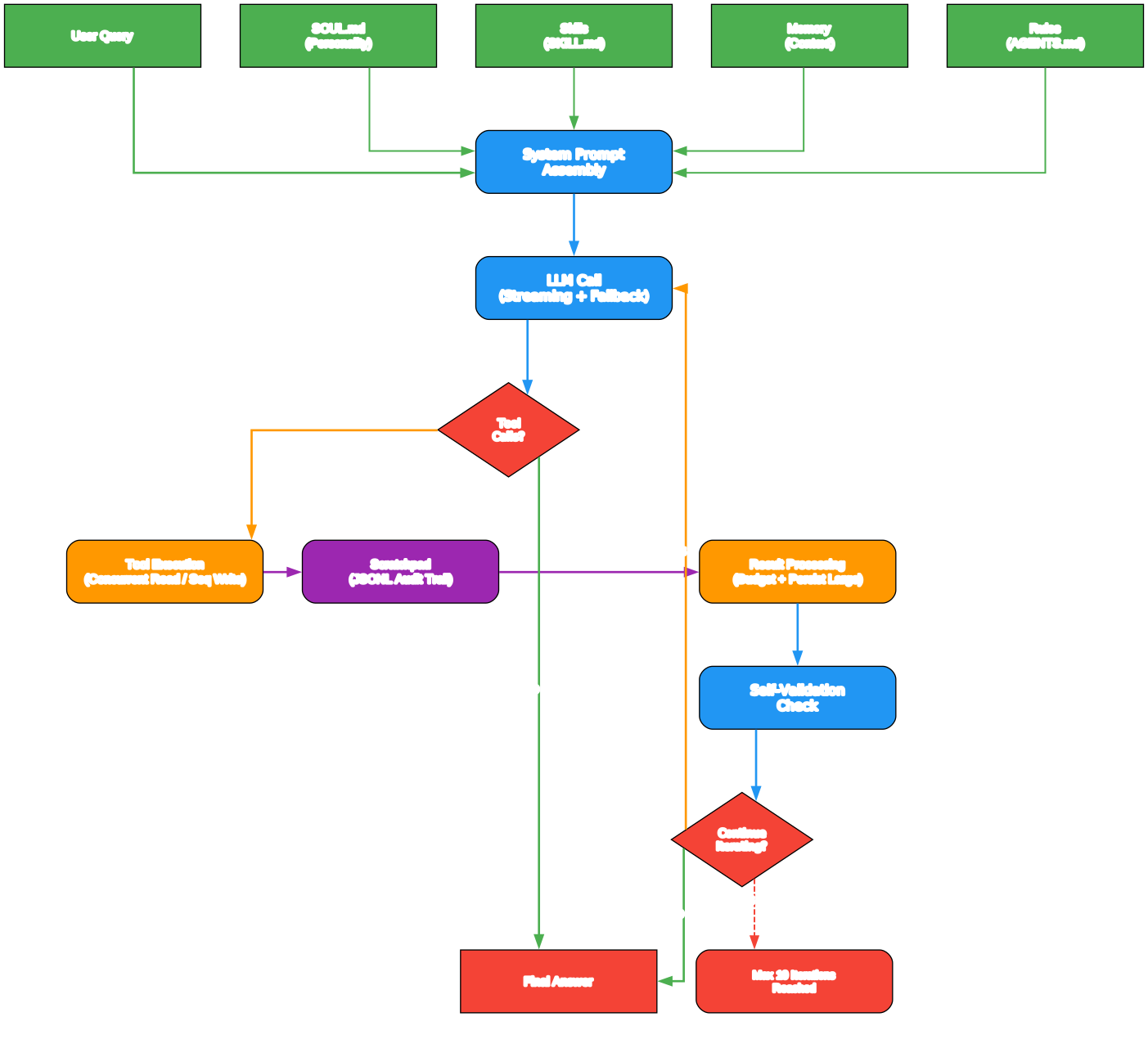
The agent loop diagram shows the detailed execution flow within a single Dexter research session. Here is how each stage works:
1. Query Intake and System Prompt Assembly When a user submits a query, Dexter assembles the full system prompt by combining the SOUL.md identity document, rules from AGENTS.md, available memory context, and compact tool descriptions. This assembled prompt gives the LLM everything it needs to understand its role, available tools, and any relevant prior knowledge.
2. LLM Call with Streaming Dexter calls the configured LLM with streaming enabled, yielding real-time progress events as chunks arrive. The streaming infrastructure detects whether chunks contain text responses, thinking content, or tool-use directives, and emits appropriate UI events. If streaming fails (some providers lack full streaming support), Dexter falls back to a blocking invoke call.
3. Tool Execution with Concurrency When the LLM returns tool calls, Dexter’s tool executor determines which calls can run concurrently. Read-only tools like get_financials, get_market_data, read_filings, and web_search are marked as concurrency-safe and execute in parallel. Write tools like write_file and edit_file require user approval and run sequentially. Tool results are collected and re-ordered to match the original tool_calls sequence, ensuring the LLM receives results in the expected order.
4. Result Processing Large tool results that exceed the size cap are persisted to disk and replaced with a preview plus a file path reference. A per-turn budget enforcement mechanism caps the total size of all tool results in a single round. This prevents any single tool from consuming the entire context window.
5. Self-Validation and Iteration After tool results are injected, the loop checks whether the LLM’s next response contains tool calls (continue researching) or a direct answer (research complete). The scratchpad tracks tool call counts per tool (default limit: 3 calls per tool per query) and detects query similarity using Jaccard word overlap at a 0.7 threshold, issuing warnings when the agent appears to be retrying the same query.
6. Message Queue Drain While the agent is working, the user may send follow-up messages. These are queued and drained at the end of each iteration, merged into a single HumanMessage, and appended to the conversation. This enables a natural conversational flow even during long research sessions.
Key Insight: Dexter’s 3-tier context management preserves numerical data even during compaction. The LLM compaction prompt explicitly instructs the summarizer to include a “Numerical Data” section that captures all key numbers – prices, revenue figures, margins, ratios, growth rates, and estimates. This means financial precision survives context reduction.
Memory System
Understanding the Memory System
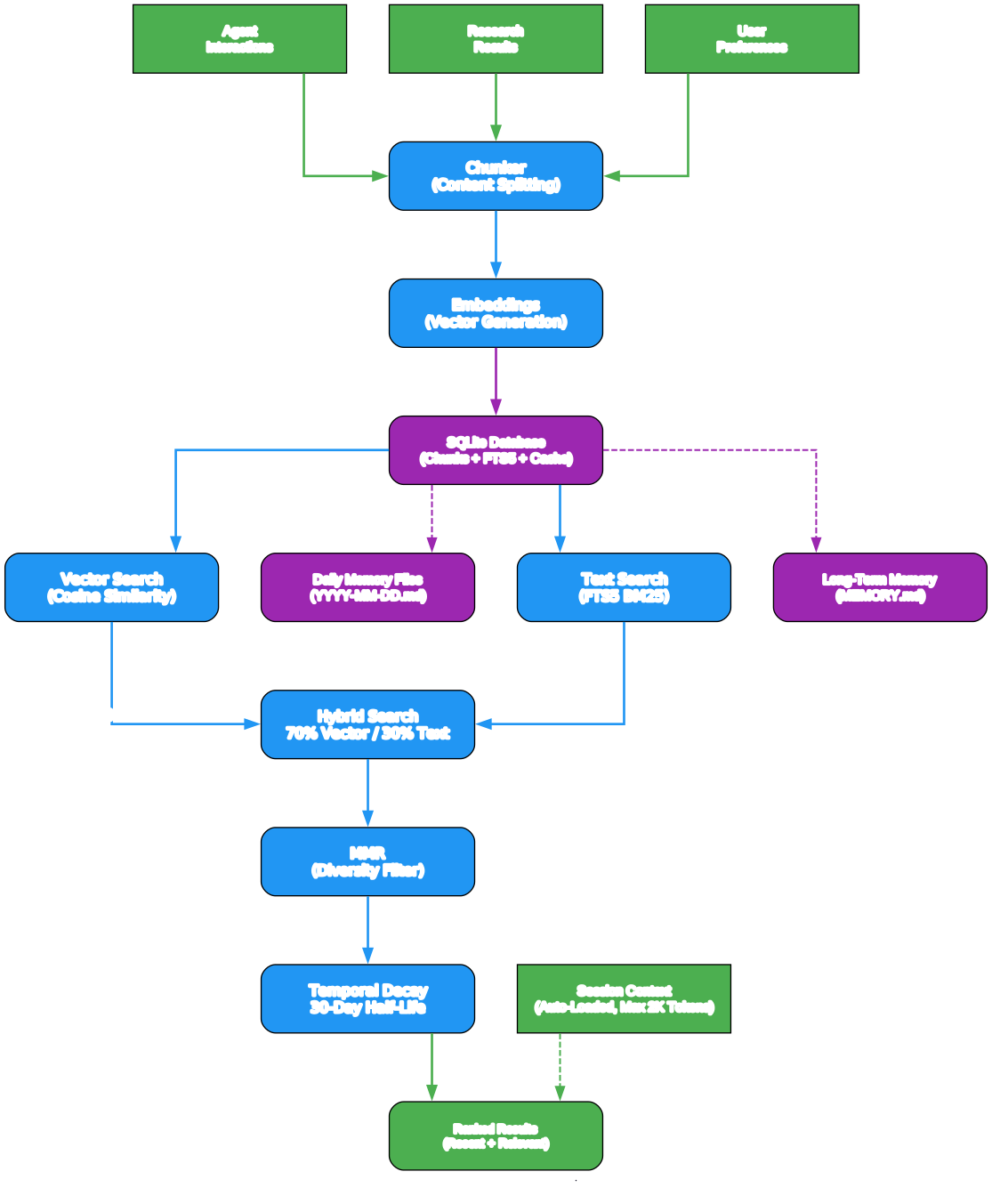
The memory system diagram illustrates how Dexter stores, indexes, and retrieves knowledge across sessions. This is what transforms Dexter from a stateless chatbot into a learning research agent.
SQLite Storage with Dual Indexing All memory chunks are stored in a SQLite database with two indexing strategies working in parallel. The chunks table stores the content, file path, line range, content hash, embedding vector (as a BLOB), and metadata. The chunks_fts virtual table provides FTS5 full-text search with BM25 ranking. This dual approach ensures both semantic and lexical queries return relevant results.
Hybrid Search Pipeline When a memory search query arrives, Dexter runs two search paths simultaneously:
- Vector search: The query is embedded using the configured embedding provider, then cosine similarity is computed against all stored embeddings. This catches semantically related content even when exact keywords differ.
- Keyword search: The query is tokenized and matched against the FTS5 index using AND-combined quoted tokens. This provides precise lexical matching with BM25 ranking.
The results from both paths are merged using a weighted combination (70% vector, 30% text by default). When only one path returns results (e.g., no embedding client configured), the available path receives full weight so scores are not artificially suppressed.
MMR Re-Ranking for Diversity After the weighted merge, Maximal Marginal Relevance (MMR) re-ranking is applied with a lambda of 0.7. MMR iteratively selects results that balance relevance with diversity by computing: lambda * relevance - (1 - lambda) * max_similarity_to_selected. This prevents the top results from being slight variations of the same information, which is especially important in financial research where you want diverse perspectives on a company or sector.
Temporal Decay A temporal decay function with a 30-day half-life is applied after MMR re-ranking. Recent memories receive a boost while older memories gradually fade. The MEMORY.md file is treated as evergreen content that does not decay, ensuring core preferences and persistent facts always score highly.
Embedding Cache An embedding_cache table stores previously computed embeddings keyed by content hash, provider, and model. This avoids redundant API calls when the same content is re-indexed or when the embedding model has not changed.
Takeaway: With the WhatsApp gateway, Dexter becomes an always-on financial research companion. You can ask questions from your phone while commuting, in a meeting, or away from your desk, and get deep, data-backed analysis delivered directly to your WhatsApp chat.
Context Management
Understanding Context Management
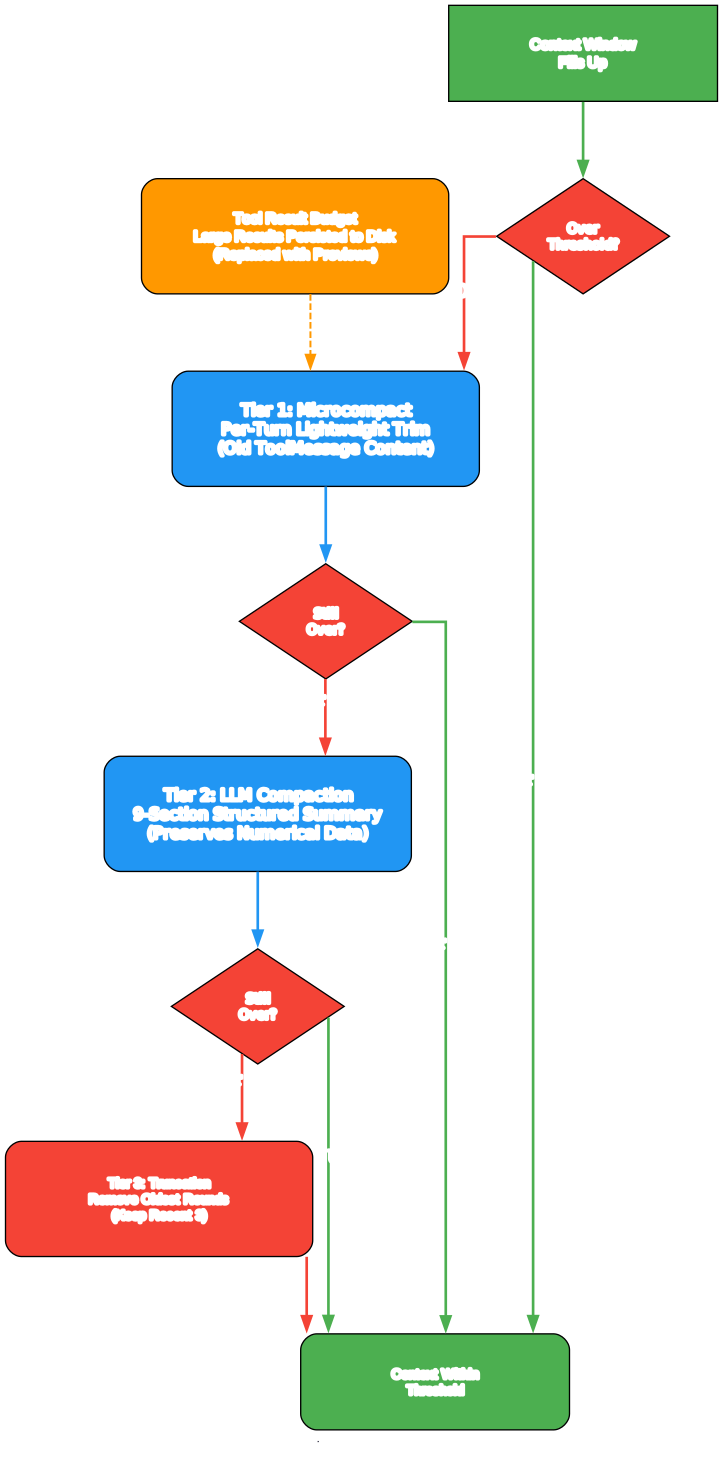
The context management diagram shows the 3-tier system that keeps Dexter running smoothly during long research sessions without losing critical information.
Tier 1: Microcompact (Per-Turn Lightweight Trimming) Microcompact runs before every LLM call and performs lightweight trimming of old ToolMessage content. It targets read-only tool results (tools like get_financials, get_market_data, read_filings, web_fetch, web_search, and others) and replaces their content with a cleared marker: [Old tool result content cleared]. Two triggers activate microcompact:
- Count trigger: When more than 8 compactable ToolMessages exist, the oldest ones are cleared, keeping the 4 most recent.
- Token trigger: When total compactable ToolMessage content exceeds 80,000 estimated tokens, the same clearing logic applies.
Microcompact is fast because it does not call an LLM. It simply replaces old content with a marker, preserving the message structure so the LLM knows a tool was called and a result was obtained, even though the details are no longer in context.
Tier 2: LLM Compaction (Structured Summarization) When the estimated context tokens exceed the model-specific threshold (which varies by provider, from 128K for OpenRouter/Ollama to over 1M for OpenAI/Google/DeepSeek), Dexter triggers LLM compaction. Before compaction, a memory flush runs to persist important tool results to the memory system so they are not lost.
The compaction process calls a fast model (e.g., gpt-4.1 for OpenAI, claude-haiku-4-5 for Anthropic, gemini-3-flash-preview for Google) with a detailed prompt that produces a structured 9-section summary:
- Original Query and Intent
- Key Concepts (tickers, companies, sectors)
- Data Retrieved (tool name, arguments, key results)
- Errors and Retries
- Analysis Progress
- Numerical Data (all key numbers preserved)
- Pending Data Needs
- Current Work State
- Recommended Next Steps
The summary replaces the entire message array except for the SystemMessage, and the agent continues from where it left off. If compaction fails 3 consecutive times, the system falls back to truncation.
Tier 3: Truncation (Last Resort) When compaction is not possible (too few tool results, or consecutive failures), Dexter truncates the oldest conversation rounds, keeping only the 3 most recent rounds. This is a lossy operation but ensures the agent can continue working even in edge cases.
Context Overflow Handling If the LLM API returns a context overflow error, Dexter retries up to 2 times with progressively more aggressive truncation (keeping only 3 rounds). This handles cases where the estimated token count was inaccurate or the provider’s token counting differs from Dexter’s estimates.
Installation
Setting up Dexter requires the Bun runtime and API keys for financial data and LLM access.
Step 1: Install Bun
# macOS/Linux
curl -fsSL https://bun.com/install | bash

# Windows
powershell -c "irm bun.sh/install.ps1|iex"
After installation, restart your terminal and verify:
bun --version
Step 2: Clone and Install Dependencies
git clone https://github.com/virattt/dexter.git
cd dexter
bun install
Step 3: Configure Environment Variables
# Copy the example environment file
cp env.example .env
Edit the .env file with your API keys:
# Required: LLM provider (at least one)
OPENAI_API_KEY=your-openai-api-key
# ANTHROPIC_API_KEY=your-anthropic-api-key
# GOOGLE_API_KEY=your-google-api-key
# XAI_API_KEY=your-xai-api-key
# DEEPSEEK_API_KEY=your-deepseek-api-key
# MOONSHOT_API_KEY=your-moonshot-api-key
# OPENROUTER_API_KEY=your-openrouter-api-key

# Required: Financial data
FINANCIAL_DATASETS_API_KEY=your-financial-datasets-api-key

# Optional: Web search (Exa preferred, Tavily fallback)
# EXASEARCH_API_KEY=your-exa-api-key
# TAVILY_API_KEY=your-tavily-api-key

# Optional: Local LLM via Ollama
# OLLAMA_BASE_URL=http://127.0.0.1:11434
Step 4: Get API Keys
- OpenAI API key: platform.openai.com/api-keys
- Financial Datasets API key: financialdatasets.ai
- Exa API key (optional): exa.ai
Usage
CLI Mode (Interactive Terminal)
Run Dexter in interactive mode:
bun start
Or with watch mode for development:
bun dev
Once running, you can type financial research questions directly into the terminal. Dexter will decompose your query, execute the necessary tool calls, and present a comprehensive answer.
Example queries you can ask:
- “What is Apple’s current P/E ratio and how does it compare to Microsoft?”
- “Analyze Netflix’s revenue growth from 2019 to 2024”
- “Run a DCF valuation on Tesla”
- “What are the latest insider trades for NVIDIA?”
WhatsApp Mode
Chat with Dexter through WhatsApp by linking your phone to the gateway:
# Link your WhatsApp account (scan QR code)
bun run gateway:login

# Start the gateway
bun run gateway
Then open WhatsApp, go to your own chat (message yourself), and ask Dexter a question. The gateway also supports group chats – just @-mention Dexter to trigger a response.
Cron Scheduling
Dexter supports three types of scheduled tasks:
- One-shot: Run once at a specific time (
atschedule) - Interval: Run every N milliseconds/minutes/hours (
everyschedule) - Cron: Run on a standard cron expression (
cronschedule)
Cron jobs are managed through the cron tool within Dexter’s interactive session. A heartbeat monitoring system tracks whether scheduled tasks are running on time.
Evaluation
Dexter includes a 238-question finance evaluation dataset with LangSmith scoring:
# Run on all 238 questions
bun run src/evals/run.ts

# Run on a random sample
bun run src/evals/run.ts --sample 10
Amazing: Dexter ships with a 238-question finance evaluation dataset covering market analysis, trends, financial statements, and more. Each question includes an expert answer, estimated expert time, and a detailed rubric with correctness and contradiction criteria for automated LLM-as-judge scoring via LangSmith.
Debugging
Dexter logs all tool calls to a scratchpad file for debugging and history tracking. Each query creates a new JSONL file in .dexter/scratchpad/:
.dexter/scratchpad/
  2026-01-30-111400_9a8f10723f79.jsonl
  2026-01-30-143022_a1b2c3d4e5f6.jsonl
Each file contains newline-delimited JSON entries tracking:
- init: The original query
- tool_result: Each tool call with arguments, raw result, and LLM summary
- thinking: Agent reasoning steps
Key Features
| Feature | Description |
|---|---|
| Intelligent Task Planning | Decomposes complex financial queries into structured research steps |
| Autonomous Execution | Selects and executes the right tools without human guidance |
| Self-Validation | Checks its own work, iterates until tasks are complete (max 10 iterations) |
| Real-Time Financial Data | Income statements, balance sheets, cash flow, SEC filings, insider trades, earnings, analyst estimates, crypto |
| Multi-Provider LLM | OpenAI, Anthropic, Google, xAI/Grok, DeepSeek, Moonshot, OpenRouter, Ollama |
| Persistent Memory | SQLite-backed hybrid search (70% vector / 30% text), MMR diversity, temporal decay |
| WhatsApp Gateway | Chat with Dexter through WhatsApp (DMs and group chats with @-mention) |
| Skills System | SKILL.md-based extensible workflows (DCF valuation, X/Twitter sentiment) |
| Cron Scheduling | Recurring research tasks with heartbeat monitoring |
| 3-Tier Context Management | Microcompact, LLM Compaction, Truncation |
| Finance Eval Dataset | 238 questions with LangSmith scoring and LLM-as-judge evaluation |
| SOUL.md Identity | Buffett/Munger investing philosophy embedded in system prompt |
| Safety Features | Loop detection, tool call limits (3 per tool), query similarity detection (0.7 Jaccard) |
| Concurrent Tool Execution | Read-only tools execute in parallel for faster research |
| Streaming Responses | Real-time streaming with fallback to blocking invoke |
| Scratchpad Audit Trail | Append-only JSONL log of all tool calls, results, and thinking |
Dexter vs ai-hedge-fund
| Aspect | Dexter | ai-hedge-fund |
|---|---|---|
| Architecture | Single unified agent with iterative research loop | Multiple specialized agents (Buffett, Burry, etc.) |
| Research Depth | Deep, multi-step iterative analysis (up to 10 iterations) | Single-pass signal generation per agent |
| Memory | Persistent SQLite with hybrid search, MMR, temporal decay | No persistent memory between sessions |
| Context Management | 3-tier: Microcompact, LLM Compaction, Truncation | No context management system |
| LLM Providers | 8 providers (OpenAI, Anthropic, Google, xAI, DeepSeek, Moonshot, OpenRouter, Ollama) | Primarily OpenAI |
| Mobile Access | WhatsApp gateway (DMs and group chats) | No mobile interface |
| Skills System | SKILL.md-based extensible workflows (DCF, sentiment) | No skills system |
| Scheduling | Cron with heartbeat monitoring | No scheduling |
| Self-Validation | Iterative with tool call limits and similarity detection | No self-validation loop |
| Identity | SOUL.md with Buffett/Munger philosophy | Agent personas simulate famous investors |
| Evaluation | 238-question dataset with LangSmith scoring | Limited evaluation |
| Language | TypeScript (ESM, strict mode) | Python |
| Runtime | Bun | Python |
Troubleshooting
| Issue | Cause | Solution |
|---|---|---|
| “No tools available” error | Missing API keys | Ensure at least one LLM API key is set in .env (e.g., OPENAI_API_KEY) |
| Financial data tools return errors | Missing Financial Datasets API key | Set FINANCIAL_DATASETS_API_KEY in .env |
| Context overflow errors | Very long research session | Dexter auto-handles this with truncation; if persistent, try a more focused query |
| WhatsApp QR code not scanning | Gateway not properly linked | Run bun run gateway:login again to regenerate the QR code |
| Web search not available | No search API key configured | Set EXASEARCH_API_KEY or TAVILY_API_KEY in .env |
| X/Twitter search not available | No X bearer token configured | Set X_BEARER_TOKEN in .env |
| Bun install fails on Windows | PowerShell execution policy | Run Set-ExecutionPolicy -Scope CurrentUser -ExecutionPolicy RemoteSigned first |
| Slow responses | Using a slow model or provider | Switch to a faster model or use a provider with lower latency |
| Compaction failures | Fast model unavailable or rate-limited | Check your API key for the fast model variant of your chosen provider |
Conclusion
Dexter represents a significant step forward in autonomous financial research agents. Its combination of iterative task planning, self-validation, persistent memory, and multi-provider LLM support creates a research tool that goes far beyond simple data retrieval. The 3-tier context management system enables deep research sessions that can span dozens of tool calls without losing critical numerical data. The WhatsApp gateway brings always-on financial research to your mobile device, while the skills system and cron scheduling provide extensibility for specialized workflows.
The SOUL.md identity layer is particularly noteworthy – by embedding Buffett and Munger’s investing principles directly into the system prompt, Dexter produces analysis that is not just data-rich but philosophically grounded. Whether you are a professional analyst, a retail investor, or a developer building financial tools, Dexter provides a powerful foundation for autonomous financial research.
Links:
- GitHub Repository: github.com/virattt/dexter
- Financial Datasets API: financialdatasets.ai

Enjoyed this post? Never miss out on future posts by following us


