DeepSeek-TUI: Terminal-Native Coding Agent with 1M-Token Context and Recursive Language Model
DeepSeek-TUI is a terminal-native coding agent built around DeepSeek V4’s 1M-token context window and prefix cache capability, distributed as a single binary with no Node.js or Python runtime required for the core experience. Written in Rust and powered by the ratatui framework, it delivers a fast, keyboard-driven interface that gives DeepSeek’s frontier models direct access to your workspace – reading and editing files, running shell commands, searching the web, managing git, and orchestrating sub-agents – all without leaving the terminal. With its unique Recursive Language Model (RLM) system, three operational modes, and a durable task queue, DeepSeek-TUI represents a compelling open-source alternative to browser-based coding agents for developers who live in the terminal.
What is DeepSeek-TUI?
DeepSeek-TUI is an open-source (MIT licensed) coding agent that runs entirely in your terminal. Currently at version 0.8.11, it is built on top of DeepSeek’s V4 models (deepseek-v4-pro and deepseek-v4-flash), both of which support a 1M-token context window. The project is organized as a Rust workspace with 13 crates covering everything from the TUI frontend to the agent loop, configuration, MCP protocol, and secrets management.
The architecture follows a dispatcher pattern: deepseek (the CLI entry point) delegates to deepseek-tui (the companion binary), which drives the ratatui interface, the async engine, and the OpenAI-compatible streaming client. Tool calls route through a typed registry covering shell execution, file operations, git, web, sub-agents, MCP, and RLM, with results streaming back into the conversation transcript.
What sets DeepSeek-TUI apart from other terminal coding agents is its combination of a massive context window, prefix-cache-aware prompt engineering, and the RLM system that fans out parallel reasoning tasks to cheap flash-model children. This means you can load entire codebases into context and have the agent reason about them without running out of space, while the RLM system handles batched analysis tasks at a fraction of the cost.
Key Insight: DeepSeek-TUI’s RLM (Recursive Language Model) system fans out 1 to 16 cheap
deepseek-v4-flashchildren in parallel for batched analysis, enabling the parent agent to decompose complex tasks into parallel sub-problems that are solved simultaneously – a recursive reasoning pattern that dramatically reduces wall-clock time for multi-step investigations.
Architecture Overview
Understanding the Architecture
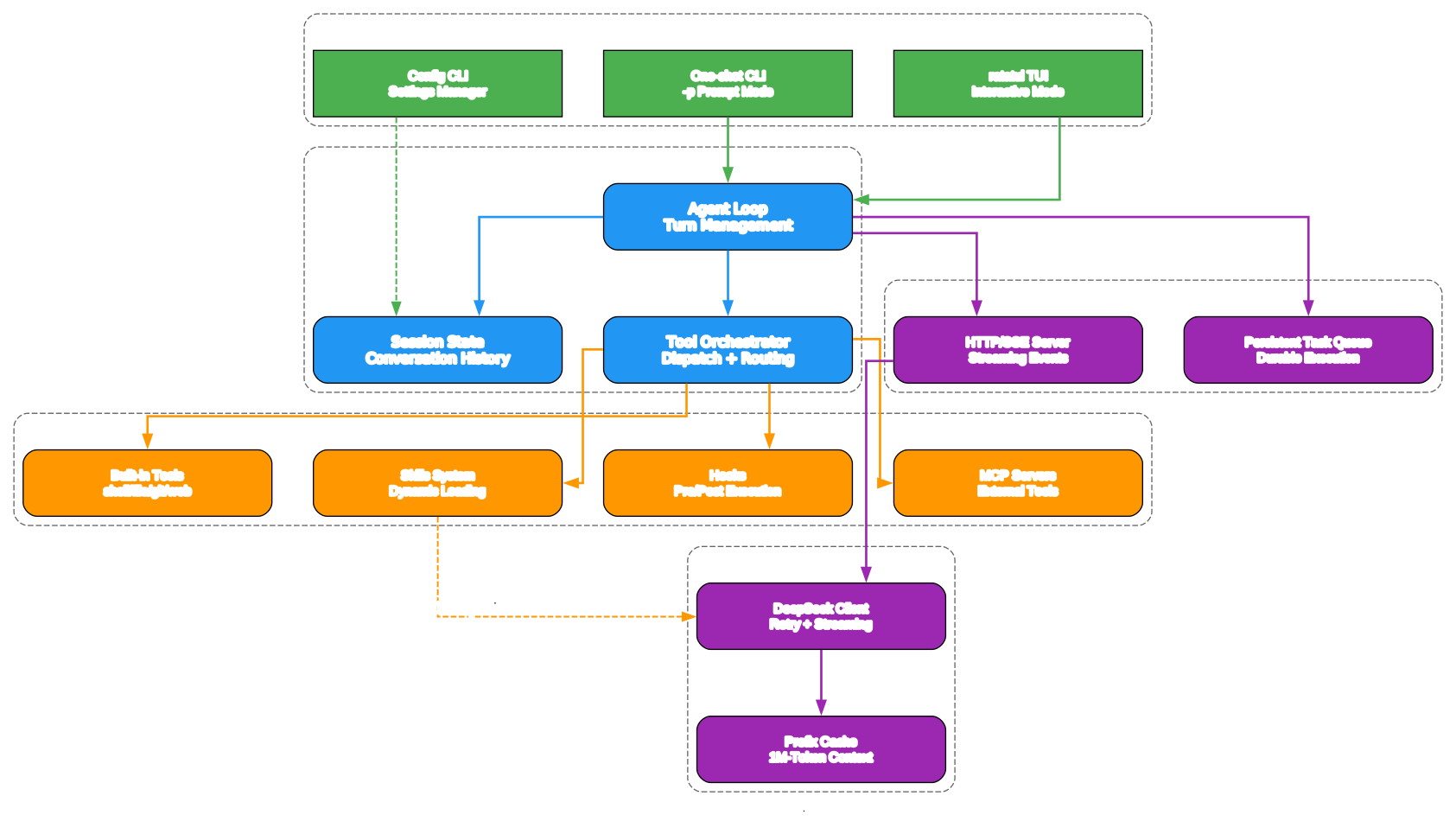
The architecture diagram above illustrates the layered design of DeepSeek-TUI, organized into four distinct tiers that communicate through well-defined interfaces. Let us break down each layer:
User Interface Layer
The top tier comprises three entry points into the system. The primary interface is the ratatui-based TUI, which provides a rich terminal experience with streaming output, approval dialogs, and a command palette. The one-shot mode allows non-interactive usage via the --prompt flag, ideal for scripting and CI/CD integration. The Config/CLI layer handles argument parsing via clap, configuration loading from ~/.deepseek/config.toml, and the onboarding flow for first-time users.
Core Engine Layer
At the heart of DeepSeek-TUI sits the Agent Loop (core/engine.rs), which orchestrates the entire conversation lifecycle. The engine manages session state, turn tracking, and tool orchestration. Each user message triggers a turn that streams the LLM response, parses tool calls, executes them through the registry, and feeds results back into the model. The capacity flow system (capacity_flow.rs) provides guardrails that prevent runaway context growth, while the compaction system intelligently summarizes older messages when the context approaches its limits.
Tool and Extension Layer
The tool and extension layer is where DeepSeek-TUI’s extensibility shines. Built-in tools cover shell execution, file operations, git, web search, and sub-agent spawning. The Skills system allows composable, installable instruction packs from GitHub – no backend service required. Hooks provide pre/post execution lifecycle events for custom automation. MCP (Model Context Protocol) servers extend the tool surface with external capabilities like database access, API integration, or custom workflows.
Runtime API and Task Management
The bottom tier provides the infrastructure for long-running and headless workflows. The HTTP/SSE Runtime API (deepseek serve --http) exposes a full agent interface for programmatic access. The Persistent Task Manager (task_manager.rs) ensures background tasks survive restarts, with durable state stored under ~/.deepseek/tasks/. This enables scheduled automation, long-running code reviews, and batch processing that continues even if the TUI process restarts.
RLM: Recursive Language Model System
Understanding the RLM System
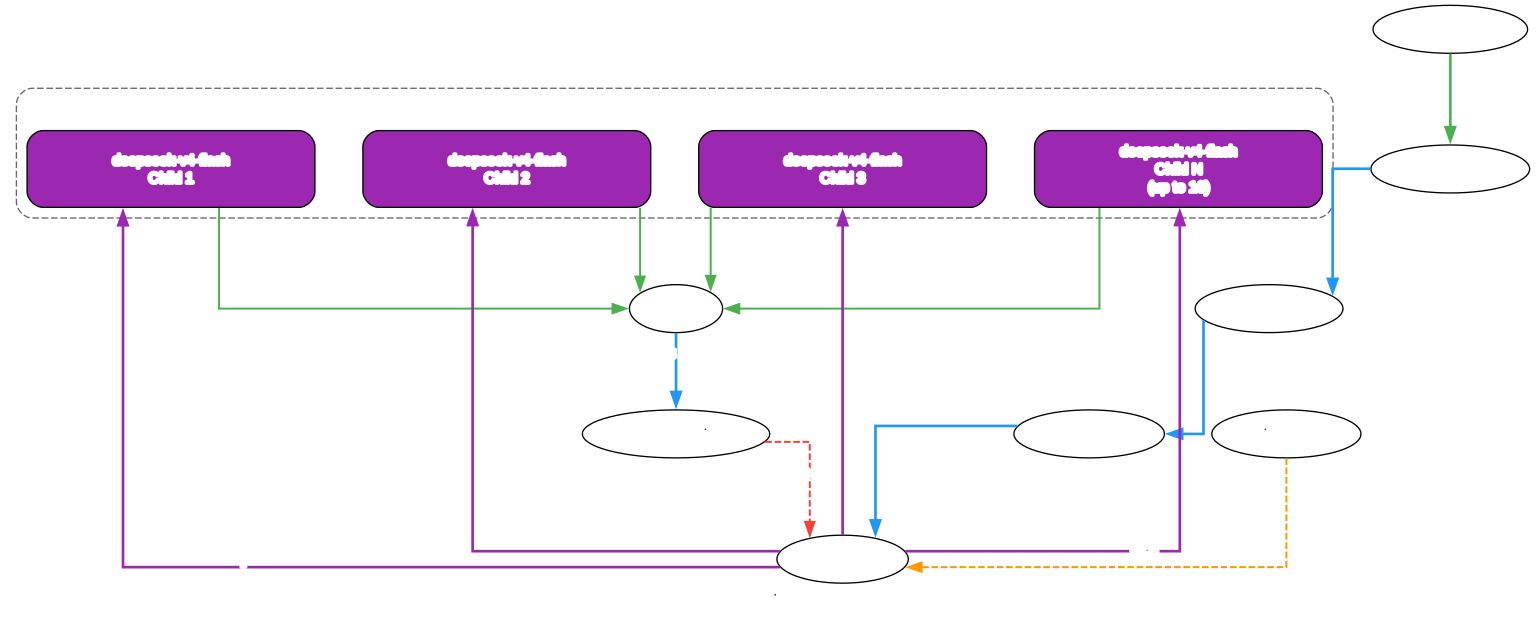
The RLM (Recursive Language Model) system is one of DeepSeek-TUI’s most distinctive features. Unlike traditional coding agents that send every request through a single model call, the RLM system enables the parent agent to fan out 1 to 16 parallel deepseek-v4-flash children for batched analysis and parallel reasoning. Here is how it works:
Parent Agent Orchestration
When the parent agent encounters a task that can be decomposed – such as analyzing multiple files, searching for patterns across a codebase, or evaluating several hypotheses simultaneously – it invokes the rlm_query tool. This tool constructs structured prompts for each child task and dispatches them in parallel to the deepseek-v4-flash model, which is significantly cheaper than deepseek-v4-pro (input cache miss at $0.14/1M tokens vs. $0.435/1M tokens for Pro).
Parallel Child Execution
Each child query runs independently against the same DeepSeek API, using the flash model for cost efficiency. The children do not share state with each other – they receive focused, scoped prompts that target specific aspects of the parent’s question. This isolation ensures that one child’s failure does not affect others, and the parent can aggregate partial results even if some children time out or produce errors.
Result Aggregation
Once all children complete (or time out), the RLM system collects their responses and presents them to the parent agent as a structured result. The parent then synthesizes these findings into its ongoing reasoning, making decisions about next steps based on the combined evidence. This pattern is particularly powerful for code review, where the agent can analyze different files or modules in parallel, or for investigation tasks where multiple hypotheses need to be evaluated simultaneously.
Cost Efficiency
The RLM system is designed with cost awareness at its core. By routing parallel analysis tasks to the cheaper flash model, the system achieves significant cost savings compared to running the same analysis sequentially through the pro model. The live cost tracking feature shows per-turn and session-level token usage with cache hit/miss breakdown, so you always know exactly what you are spending.
Prefix Cache Optimization
DeepSeek-TUI’s engine is prefix-cache aware. In v0.8.11, the cache-maxing prompt path skips system-prompt reassembly when the stable prefix is unchanged, moves the working-set summary out of the system prompt into per-turn metadata, and anchors the tool array with cache_control: ephemeral. The net effect is fewer prefix rewrites, higher cache-hit rates, and lower cost per turn. Combined with the 500K token compaction floor (automatic compaction refuses below 500K tokens), this ensures that the massive context window is used efficiently.
Takeaway: With DeepSeek V4’s 1M-token context window and prefix-cache-aware prompt engineering, DeepSeek-TUI maintains a 500K token compaction floor and skips system-prompt reassembly when the stable prefix is unchanged – resulting in higher cache-hit rates and lower cost per turn compared to agents that treat every request as a fresh conversation.
Sub-Agent Taxonomy
Understanding the Sub-Agent System
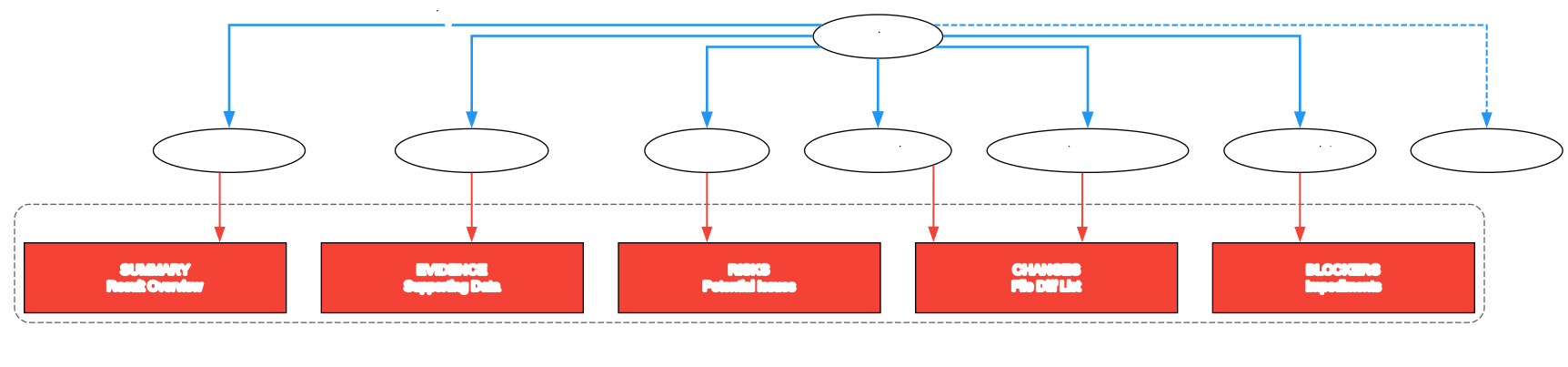
DeepSeek-TUI provides a structured sub-agent system with seven distinct roles, each designed for a specific posture toward the work. Sub-agents are background instances of the agent loop that the parent spawns with a focused task, receiving an agent_id immediately and continuing work while the sub-agent runs to completion. Sub-agents inherit the parent’s tool registry by default and run with CancellationToken::child_token(), so cancelling the parent cancels every descendant.
The Seven Roles
| Role | Stance | Writes? | Runs Shell? | Typical Use |
|---|---|---|---|---|
general | Flexible; do whatever the parent says | Yes | Yes | Default; multi-step tasks |
explore | Read-only; map the relevant code fast | No | Yes (read) | “Find every call site of Foo” |
plan | Analyze and produce a strategy | Minimal | Minimal | “Design the migration; don’t execute” |
review | Read-and-grade with severity scores | No | No | “Audit this PR for bugs” |
implementer | Land a specific change with min edit | Yes | Yes | “Rewrite bar.rs::Foo::bar to do X” |
verifier | Run tests/validation, report outcome | No | Yes (test) | “Run cargo test –workspace, report” |
custom | Explicit narrow tool allowlist | Depends | Depends | Locked-down dispatch with hand-picked tools |
When to Pick Which Role
The general role is the right default when the task is “do this whole thing.” Reach for a more specific role only when the posture matters. The explore role is ideal when the parent needs evidence before deciding what to do next – spawn 2-3 explorers in parallel for independent code regions. The plan role produces artifacts (update_plan rows, checklist_write entries) but does not carry them out. The review role grades existing changes without patching – it describes the fix in the finding so the parent can dispatch an implementer if the verdict is “fix it.” The verifier role provides authoritative pass/fail on test suites, capturing failing assertions and stack traces with fix candidates under RISKS.
Concurrency and Lifecycle
The dispatcher caps concurrent sub-agents at 10 by default (configurable via [subagents].max_concurrent in ~/.deepseek/config.toml, hard ceiling of 20). Each spawn produces a record that progresses through: Pending -> Running -> (Completed | Failed(reason) | Cancelled | Interrupted(reason)). The Interrupted state fires when the manager detects a running agent whose task handle is gone – typically after a process restart. The parent can agent_resume to attempt continuation or treat it as terminal.
Output Contract
Every sub-agent produces a final result string with five sections: SUMMARY (what you did and what happened), CHANGES (files modified with one-line descriptions), EVIDENCE (path:line-range citations and key findings), RISKS (what could go wrong), and BLOCKERS (what stopped you). This structured output ensures the parent agent can programmatically parse and act on sub-agent results.
Amazing: DeepSeek-TUI’s sub-agent taxonomy defines seven distinct roles (general, explore, plan, review, implementer, verifier, custom) – each with a specific stance toward the work, controlled write/shell permissions, and a structured five-section output contract (SUMMARY, CHANGES, EVIDENCE, RISKS, BLOCKERS) that enables the parent agent to programmatically synthesize results from parallel investigations.
Data Flow and Session Management
Understanding the Data Flow
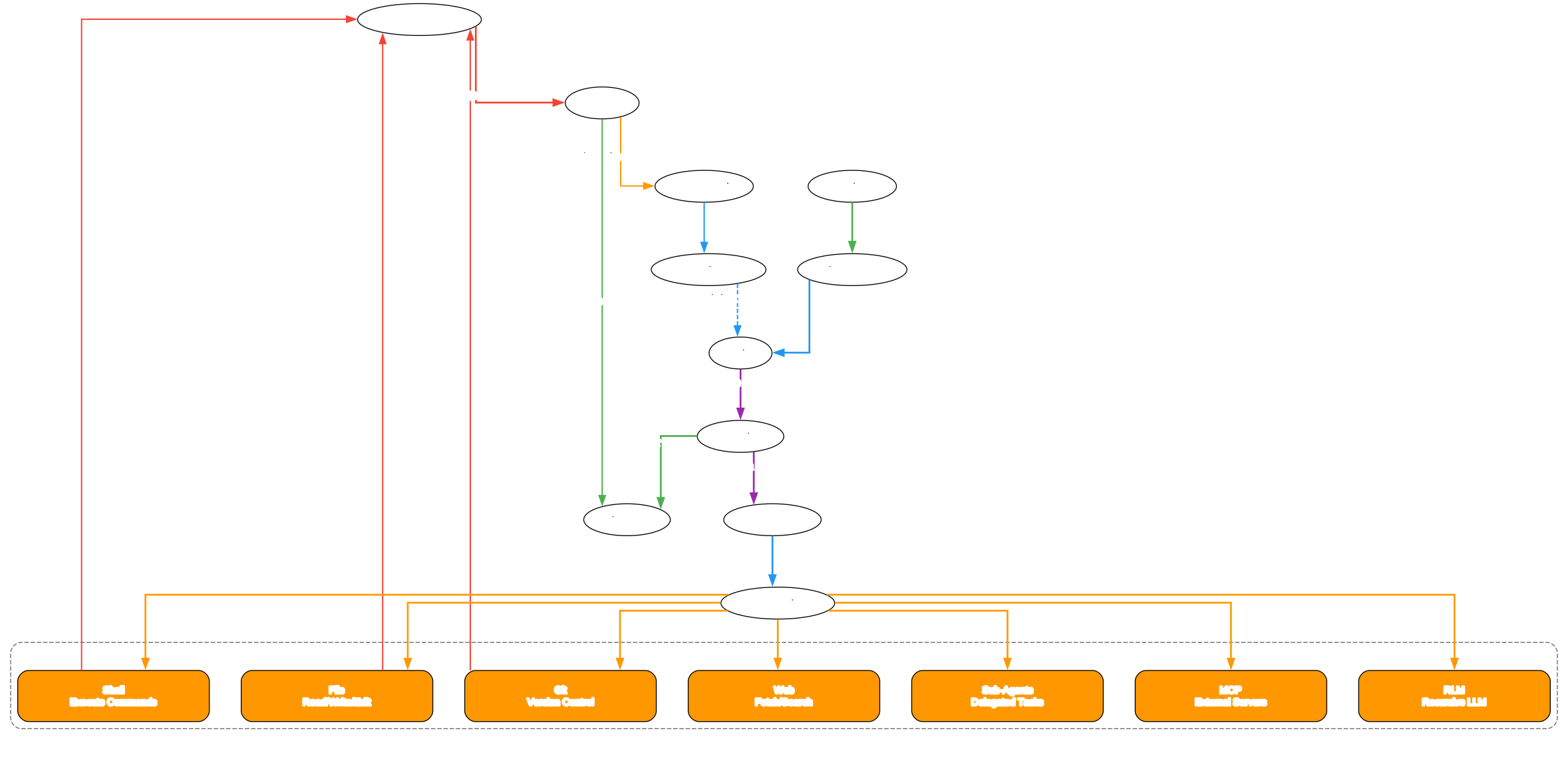
The data flow diagram illustrates how information moves through DeepSeek-TUI during an interactive session, from user input to final response rendering. Understanding this flow is essential for appreciating the engineering decisions that make DeepSeek-TUI reliable and efficient.
Interactive Session Flow
-
User Input: The user types a message in the TUI composer, which supports
@file mentions for context attachment,#quick-add for memory notes, and slash commands for configuration and control. -
Engine Processing: The input is received by
core/engine.rs, which manages the session state, constructs the prompt with prefix-cache optimization, and sends it to the LLM viallm_client.rs. -
Streaming Response: The LLM response streams back through
client.rs, which parses the streaming chunks, extracts tool calls, and renders thinking-mode content in real time. -
Tool Execution: Tool calls are routed through the typed registry. Pre-execution hooks run first, then approval is requested if needed (in Agent mode), the tool executes (possibly sandboxed on macOS), and post-execution hooks run after completion.
-
LSP Diagnostics: If the tool was a file edit operation (
edit_file,apply_patch, orwrite_file) and LSP is enabled, the engine runsrun_post_edit_lsp_hook()to collect diagnostics from rust-analyzer, pyright, gopls, clangd, or typescript-language-server. Before the next API request,flush_pending_lsp_diagnostics()injects any collected errors as a synthetic user message. -
Result Aggregation: Tool results are aggregated and sent back to the LLM for the next reasoning step, creating a tight feedback loop that ensures the model always has the latest diagnostic information.
Crash Recovery and Offline Queue
DeepSeek-TUI implements robust crash recovery through checkpoint snapshots. Before sending user input, the TUI writes a checkpoint to ~/.deepseek/sessions/checkpoints/latest.json. While degraded or offline, new prompts are queued in-memory and mirrored to offline_queue.json. Queue edits are persisted continuously so drafts and queued prompts survive restarts. Successful turn completion clears the active checkpoint and writes a durable session snapshot.
Side-Git Workspace Snapshots
One of DeepSeek-TUI’s most thoughtful features is its side-git workspace rollback system. Agent and YOLO mode turns take pre/post-turn snapshots under ~/.deepseek/snapshots/<project_hash>/<worktree_hash>/.git – completely separate from the user’s own .git repository. The /restore N and revert_turn commands restore file state without touching conversation history or the user’s git history. This means you can experiment freely, knowing that any change can be undone with a single command.
Important: DeepSeek-TUI’s side-git snapshots store pre/post-turn workspace states under a separate
.gitdirectory that never touches your project’s own repository – enabling/restore Nandrevert_turnto undo any change without affecting conversation history or your git commits.
Installation
DeepSeek-TUI offers multiple installation methods to suit different platforms and preferences.
npm (Recommended)
The fastest way to get started is via npm, which downloads the prebuilt binary for your platform:
npm install -g deepseek-tui
deepseek --version
deepseek
For users in China or regions with slow npm access, a mirror is available:
npm install -g deepseek-tui@latest --registry=https://registry.npmmirror.com
Cargo (From Source)
For platforms without prebuilt binaries or for developers who want to build from source:
cargo install deepseek-tui-cli --locked   # provides `deepseek`
cargo install deepseek-tui     --locked   # provides `deepseek-tui`
deepseek --version
Both binaries are required. Building from source requires Rust 1.85+ and works on any Tier-1 Rust target, including musl, riscv64, and FreeBSD.
Docker
DeepSeek-TUI also provides a multi-arch Docker image for containerized deployments. See the project’s Docker documentation for details.
First Launch
On first launch, DeepSeek-TUI prompts for your DeepSeek API key. The key is saved to ~/.deepseek/config.toml and works from any directory without OS credential prompts. You can also set it ahead of time:
deepseek auth set --provider deepseek   # saves to ~/.deepseek/config.toml
export DEEPSEEK_API_KEY="YOUR_KEY"      # env var alternative
deepseek doctor                         # verify setup
Other API Providers
DeepSeek-TUI supports multiple providers beyond DeepSeek’s own API:
# NVIDIA NIM
deepseek auth set --provider nvidia-nim --api-key "YOUR_NVIDIA_API_KEY"
deepseek --provider nvidia-nim

# Fireworks
deepseek auth set --provider fireworks --api-key "YOUR_FIREWORKS_API_KEY"
deepseek --provider fireworks --model deepseek-v4-pro

# Self-hosted SGLang
SGLANG_BASE_URL="http://localhost:30000/v1" deepseek --provider sglang --model deepseek-v4-flash
Usage Guide
Three Operational Modes
DeepSeek-TUI provides three modes that you can cycle through with the Tab key:
| Mode | Behavior | Use Case |
|---|---|---|
| Plan | Read-only investigation. The model explores and proposes a plan using update_plan and checklist_write before making changes. | When you want to think out loud and produce a plan to hand to a human or review later. |
| Agent | Default interactive mode. Multi-step tool use with approval gates. The model outlines work via checklist_write. | Day-to-day coding tasks where you want oversight of tool execution. |
| YOLO | Auto-approve all tools in a trusted workspace. Still maintains plan and checklist for visibility. | When you trust the workspace and want maximum speed. |
Key Keyboard Shortcuts
| Shortcut | Action |
|---|---|
Tab | Cycle mode (Plan -> Agent -> YOLO) or complete / and @ entries |
Shift+Tab | Cycle reasoning effort: off -> high -> max |
Ctrl+K | Command palette |
Ctrl+R | Resume an earlier session |
Ctrl+S | Stash current draft |
@path | Attach file/directory context in composer |
Esc | Cancel / dismiss / back |
F1 | Searchable help overlay |
Reasoning Effort Tiers
Press Shift+Tab to cycle through reasoning-effort levels:
- off: No chain-of-thought streaming. Fastest responses, lowest cost.
- high: Balanced reasoning with visible thinking. Good for most coding tasks.
- max: Maximum reasoning depth. Use for complex architectural decisions or difficult debugging.
Session Management
DeepSeek-TUI supports session save and resume, enabling you to checkpoint long-running sessions and pick up where you left off:
deepseek                              # start a new session
deepseek resume --last                # resume the most recent session
deepseek -c                           # continue the most recent session
deepseek -r <ID>                      # resume a specific session by ID
deepseek sessions                     # list saved sessions
HTTP/SSE Runtime API
For headless agent workflows, DeepSeek-TUI provides an HTTP/SSE server:
deepseek serve --http # start HTTP/SSE API server
This exposes endpoints for creating threads, sending messages, and streaming responses – ideal for CI/CD integration, automated code review, or building custom agent workflows on top of DeepSeek-TUI.
MCP Integration
DeepSeek-TUI supports the Model Context Protocol for extending the tool surface:
deepseek mcp init                     # bootstrap MCP config
deepseek mcp list                     # list configured servers
deepseek mcp validate                 # validate config and connectivity
deepseek mcp add <name> --command "<cmd>" --arg "<arg>"   # add stdio server
deepseek mcp add <name> --url "http://localhost:3000/mcp" # add HTTP server
Inside the TUI, /mcp opens a compact manager showing each configured server, its enabled/disabled state, transport, connection errors, and discovered tools.
Skills System
DeepSeek-TUI includes a composable skills system for installing instruction packs from GitHub:
/skill install github:<owner>/<repo>  # install a community skill
/skill update                         # update installed skills
/skill list                           # list available skills
/skill <name>                         # activate a skill
Skills are discovered from workspace directories (.agents/skills, skills, .opencode/skills, .claude/skills) and the global ~/.deepseek/skills. Each skill is a directory with a SKILL.md file containing YAML frontmatter and instructions. The agent can auto-select relevant skills via the load_skill tool when your task matches their descriptions.
Key Features
| Feature | Description |
|---|---|
| 1M-token context | DeepSeek V4 models support up to 1M tokens with automatic intelligent compaction and a 500K floor |
| RLM parallel reasoning | Fan out 1-16 cheap flash-model children for batched analysis via rlm_query |
| Thinking-mode streaming | Real-time chain-of-thought visualization as the model reasons through tasks |
| Three operational modes | Plan (read-only), Agent (interactive with approval), YOLO (auto-approved) |
| Sub-agent taxonomy | Seven roles: general, explore, plan, review, implementer, verifier, custom |
| Side-git rollback | Pre/post-turn snapshots with /restore and revert_turn without touching your .git |
| Durable task queue | Background tasks survive restarts with persistent state under ~/.deepseek/tasks/ |
| HTTP/SSE runtime API | deepseek serve --http for headless agent workflows |
| MCP protocol | Connect to Model Context Protocol servers for extended tooling |
| LSP diagnostics | Inline error/warning surfacing after every edit via rust-analyzer, pyright, gopls, clangd, typescript-language-server |
| Skills system | Composable, installable instruction packs from GitHub with no backend service |
| User memory | Persistent note file injected into system prompt for cross-session preferences |
| Localized UI | English, Japanese, Simplified Chinese, Brazilian Portuguese with auto-detection |
| Live cost tracking | Per-turn and session-level token usage and cost estimates with cache hit/miss breakdown |
| Crash recovery | Checkpoint snapshots and offline queue persistence |
| Sandbox support | macOS Seatbelt, Linux Landlock, and Windows sandboxing |
| Multi-provider | DeepSeek, NVIDIA NIM, Fireworks, SGLang, OpenRouter, Novita |
| Prefix-cache aware | Skips system-prompt reassembly when stable prefix is unchanged for cost efficiency |
Troubleshooting
API Key Issues
If you encounter authentication errors:
deepseek doctor                         # check setup and connectivity
deepseek auth set --provider deepseek   # re-save your API key
deepseek auth clear --provider deepseek # remove a saved key
Context Compaction
If the model seems to lose track of earlier conversation:
- The automatic compaction system activates when context fills up, with a 500K token floor
- Use
/compactto manually trigger compaction - Check
deepseek doctor --jsonfor session token usage statistics
npm Installation Failures
v0.8.11 includes retry with exponential backoff, per-attempt timeout, and a stall detector for npm installations. If you still experience issues:
# Use a mirror (China-friendly)
npm install -g deepseek-tui@latest --registry=https://registry.npmmirror.com

# Or install from source
cargo install deepseek-tui-cli --locked
cargo install deepseek-tui --locked
Sub-Agent Concurrency
The default concurrency cap is 10 sub-agents. If you need more:
# ~/.deepseek/config.toml
[subagents]
max_concurrent = 15  # hard ceiling is 20
LSP Diagnostics Not Showing
Ensure the relevant language server is installed and in your PATH:
- Rust:
rust-analyzer - Python:
pyrightorpylsp - Go:
gopls - C/C++:
clangd - TypeScript:
typescript-language-server
Conclusion
DeepSeek-TUI brings a powerful combination of features to the terminal coding agent space: a 1M-token context window with intelligent prefix-cache optimization, a unique RLM system for parallel reasoning, a structured sub-agent taxonomy with seven specialized roles, and robust crash recovery with side-git workspace snapshots. Its Rust foundation delivers a fast, single-binary experience that requires no Node.js or Python runtime for the core agent, while the HTTP/SSE runtime API and MCP protocol support enable integration into larger workflows.
The three operational modes (Plan, Agent, YOLO) give developers fine-grained control over how much autonomy the agent has, and the live cost tracking with cache hit/miss breakdown ensures transparency about spending. Whether you are doing read-only code exploration, interactive development with approval gates, or full-auto YOLO mode on a trusted project, DeepSeek-TUI adapts to your workflow.
Links:
- GitHub Repository: https://github.com/Hmbown/DeepSeek-TUI
- npm Package: https://www.npmjs.com/package/deepseek-tui
- crates.io: https://crates.io/crates/deepseek-tui-cli
- DeepSeek API Keys: https://platform.deepseek.com/api_keys

Enjoyed this post? Never miss out on future posts by following us


