Google Agents CLI: Building and Evaluating AI Agents with Gemini ADK
Google Agents CLI is a command-line tool and skills toolkit that transforms your favorite coding assistant into an expert at building, evaluating, and deploying AI agents on Google Cloud. Built on top of the Agent Development Kit (ADK), it provides a structured workflow from project creation through production deployment, with built-in evaluation and observability at every stage.
Whether you are using Gemini CLI, Claude Code, Codex, or any other coding agent, agents-cli gives it the skills and commands to build enterprise-grade agents on the Gemini Enterprise Agent Platform – so you do not have to learn every CLI and service yourself.
Understanding the Architecture
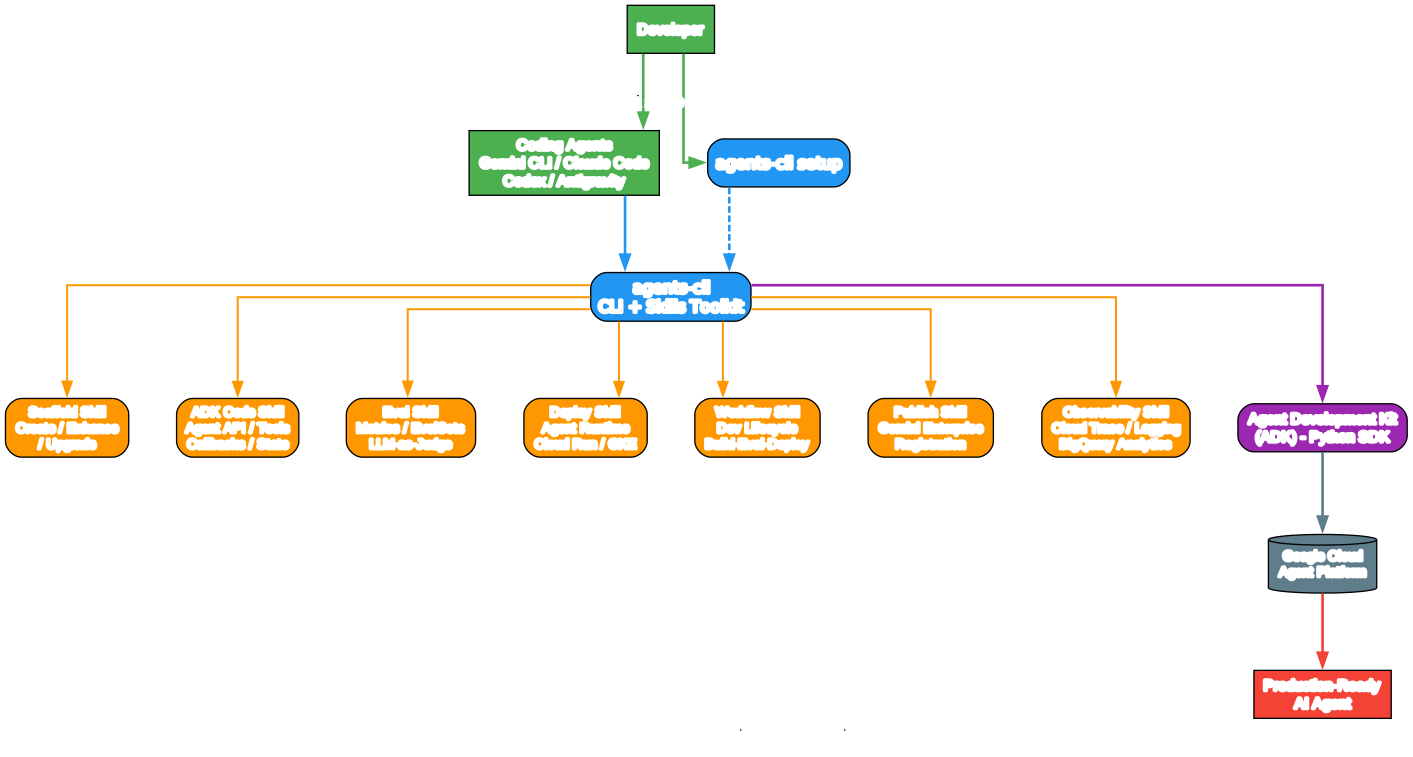
The architecture diagram above illustrates how Google Agents CLI fits into the broader Gemini ADK ecosystem. Let us break down each component:
Developer and Coding Agents Layer At the top, developers interact with coding agents like Gemini CLI, Claude Code, Codex, or Antigravity. These coding agents are the interface through which developers issue commands and receive assistance. The agents-cli setup command installs the skills into these coding agents, making them ADK-aware.
Agents CLI Core The central blue node represents the agents-cli toolkit itself. It serves as the bridge between coding agents and the ADK framework. When you run uvx google-agents-cli setup, it installs seven specialized skills into your coding agent, each covering a distinct phase of the agent development lifecycle.
Seven Specialized Skills The orange nodes represent the seven skills that agents-cli provides. Each skill is a self-contained knowledge module that teaches your coding agent how to handle a specific aspect of ADK development:
- Workflow Skill – The development lifecycle guide covering build-evaluate-deploy phases
- Scaffold Skill – Project creation with
create,enhance, andupgradecommands - ADK Code Skill – The Python API reference for agents, tools, callbacks, and state management
- Eval Skill – Evaluation methodology with metrics, evalsets, and LLM-as-judge scoring
- Deploy Skill – Deployment targets including Agent Runtime, Cloud Run, and GKE
- Publish Skill – Gemini Enterprise registration for making agents discoverable
- Observability Skill – Cloud Trace, logging, and BigQuery Analytics for production monitoring
ADK Framework and Google Cloud Below the skills layer sits the Agent Development Kit (ADK) Python SDK, which provides the programmatic foundation for building agents. The ADK connects to the Google Cloud Agent Platform, which hosts the deployed agents and provides managed infrastructure for scaling, session management, and monitoring.
Production-Ready Agent Output The red output node represents the final product: a production-ready AI agent that has been scaffolded, built, evaluated, deployed, and observed through the complete agents-cli workflow.
Getting Started
Prerequisites
Before installing agents-cli, ensure you have the following prerequisites:
- Python 3.11+ – The CLI requires a modern Python runtime
- uv – The fast Python package installer (install guide)
- Node.js – Required for the skills installation process
Installation
Install agents-cli and set up skills for your coding agent:
uvx google-agents-cli setup
This single command installs the CLI and deploys all seven skills to your coding agent. If you only want the skills without authentication setup:
uvx google-agents-cli setup --skip-auth
Alternatively, you can add just the skills to your coding agent without the full CLI:
npx skills add google/agents-cli
Authentication
Authenticate with Google Cloud or AI Studio:
# Interactive browser-based authentication
agents-cli login --interactive

# Check authentication status
agents-cli login --status
For local development, you can use an AI Studio API key instead of full Google Cloud authentication. This allows you to run Gemini with ADK locally without a cloud project.
CLI Commands
The agents-cli provides a comprehensive set of commands covering the entire agent lifecycle:
Setup and Scaffolding
| Command | Description |
|---|---|
agents-cli setup | Install CLI + skills to coding agents |
agents-cli scaffold <name> | Create a new agent project |
agents-cli scaffold enhance | Add deployment, CI/CD, or RAG to an existing project |
agents-cli scaffold upgrade | Upgrade project to a newer agents-cli version |
Development
| Command | Description |
|---|---|
agents-cli run "prompt" | Run agent with a single prompt (quick smoke test) |
agents-cli playground | Open interactive web-based playground |
agents-cli install | Install project dependencies |
agents-cli lint | Run code quality checks (Ruff) |
agents-cli lint --fix | Auto-fix linting issues |
Evaluation
| Command | Description |
|---|---|
agents-cli eval run | Run agent evaluations |
agents-cli eval run --evalset F | Run a specific evalset |
agents-cli eval run --all | Run all evalsets |
agents-cli eval compare BASE CAND | Compare two eval result files |
Deployment and Publishing
| Command | Description |
|---|---|
agents-cli deploy | Deploy to Google Cloud |
agents-cli publish gemini-enterprise | Register with Gemini Enterprise |
agents-cli infra single-project | Provision single-project infrastructure |
agents-cli infra cicd | Set up CI/CD pipeline |
Data and Info
| Command | Description |
|---|---|
agents-cli infra datastore | Provision datastore infrastructure for RAG |
agents-cli data-ingestion | Run data ingestion pipeline |
agents-cli info | Show project config and CLI version |
agents-cli update | Reinstall skills to all IDEs |
The Development Workflow
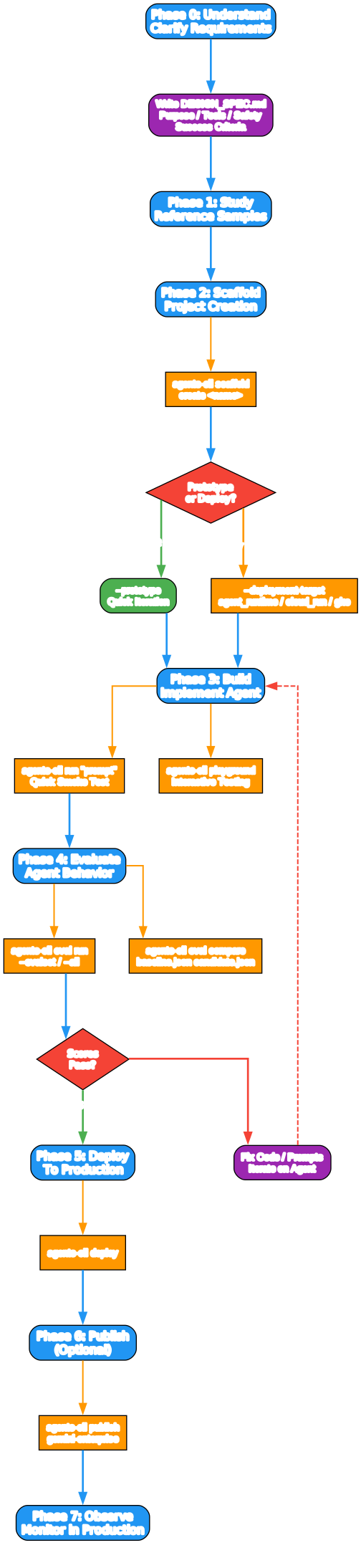
Understanding the Development Workflow
The workflow diagram above shows the complete 8-phase development lifecycle that agents-cli guides you through. Each phase has specific commands and deliverables:
Phase 0: Understand Requirements Before writing any code, the workflow skill enforces a requirements clarification step. You must answer four key questions: What problem will the agent solve? What external APIs or data sources are needed? What safety constraints apply? What is the deployment preference? The output is a DESIGN_SPEC.md that serves as the source of truth throughout development.
Phase 1: Study Reference Samples Google provides reference agent samples for common patterns: scheduled/ambient agents, OAuth-protected agents, RAG agents, deep-search agents, and more. Cloning and studying these samples before scaffolding saves significant development time by reusing proven patterns.
Phase 2: Scaffold the Project The agents-cli scaffold create command generates a complete project structure with all necessary boilerplate. You choose from three templates: adk (standard), adk_a2a (agent-to-agent protocol), or agentic_rag (RAG with data ingestion). The --prototype flag lets you skip deployment scaffolding for quick iteration.
Phase 3: Build and Implement Write agent code in the scaffolded project directory. Use agents-cli run "prompt" for quick smoke tests and agents-cli playground for interactive testing. The ADK Code skill provides the Python API reference for agents, tools, callbacks, and state management.
Phase 4: Evaluate Agent Behavior This is the most critical phase. The eval skill provides a structured methodology for testing agent behavior using evalsets, metrics, and LLM-as-judge scoring. Expect 5-10+ iterations of the eval-fix loop before reaching production quality.
Phase 5: Deploy to Production Once evaluation thresholds are met, deploy with agents-cli deploy. Choose from three deployment targets: Agent Runtime (managed, minimal ops), Cloud Run (container-based, more control), or GKE (full Kubernetes control).
Phase 6: Publish (Optional) Register your deployed agent with Gemini Enterprise using agents-cli publish gemini-enterprise. This makes the agent discoverable and accessible through the Gemini Enterprise platform.
Phase 7: Observe in Production Monitor your deployed agent using Cloud Trace, prompt-response logging, and BigQuery Analytics. The observability skill covers all monitoring and debugging needs.
Project Scaffolding
Creating a new agent project is straightforward with the scaffold command:
# Create a standard ADK agent (prototype mode)
agents-cli scaffold create my-agent --agent adk --prototype

# Create an A2A protocol agent
agents-cli scaffold create my-a2a-agent --agent adk_a2a --deployment-target cloud_run

# Create a RAG agent with vector search
agents-cli scaffold create my-rag-agent --agent agentic_rag --datastore agent_platform_vector_search
Template Options
| Template | Deployment Options | Description |
|---|---|---|
adk | Agent Runtime, Cloud Run, GKE | Standard ADK agent (default) |
adk_a2a | Agent Runtime, Cloud Run, GKE | Agent-to-agent coordination (A2A protocol) |
agentic_rag | Agent Runtime, Cloud Run, GKE | RAG with data ingestion pipeline |
The Prototype-First Pattern
The recommended approach is to start with --prototype to skip CI/CD and Terraform, focus on getting the agent working, then add deployment later:
# Step 1: Create a prototype
agents-cli scaffold create my-agent --agent adk --prototype

# Step 2: Iterate on the agent code...

# Step 3: Add deployment when ready
agents-cli scaffold enhance . --deployment-target agent_runtime
Enhancing Existing Projects
If you already have an ADK agent project, you can add deployment and CI/CD support:
# Add deployment to an existing project
agents-cli scaffold enhance . --deployment-target agent_runtime

# Add CI/CD pipeline (GitHub Actions or Cloud Build)
agents-cli scaffold enhance . --cicd-runner github_actions
Building Agents with ADK
The Agent Development Kit (ADK) provides the Python SDK for building agents. Here is a quick reference for the most common patterns:
Creating an Agent
from google.adk.agents import Agent

root_agent = Agent(
    name="my_agent",
    model="gemini-flash-latest",
    instruction="You are a helpful assistant that helps users find information.",
    tools=[my_tool],
)
Defining a Tool
from google.adk.tools import FunctionTool

def get_weather(city: str) -> dict:
    """Get current weather for a city."""
    return {"city": city, "temp": "22C", "condition": "sunny"}

weather_tool = FunctionTool(func=get_weather)
Using Callbacks for State Initialization
from google.adk.agents.callback_context import CallbackContext

async def initialize_state(callback_context: CallbackContext) -> None:
    state = callback_context.state
    if "history" not in state:
        state["history"] = []

root_agent = Agent(
    name="my_agent",
    model="gemini-flash-latest",
    instruction="...",
    before_agent_callback=initialize_state,
)
The Skills System and Evaluation Pipeline
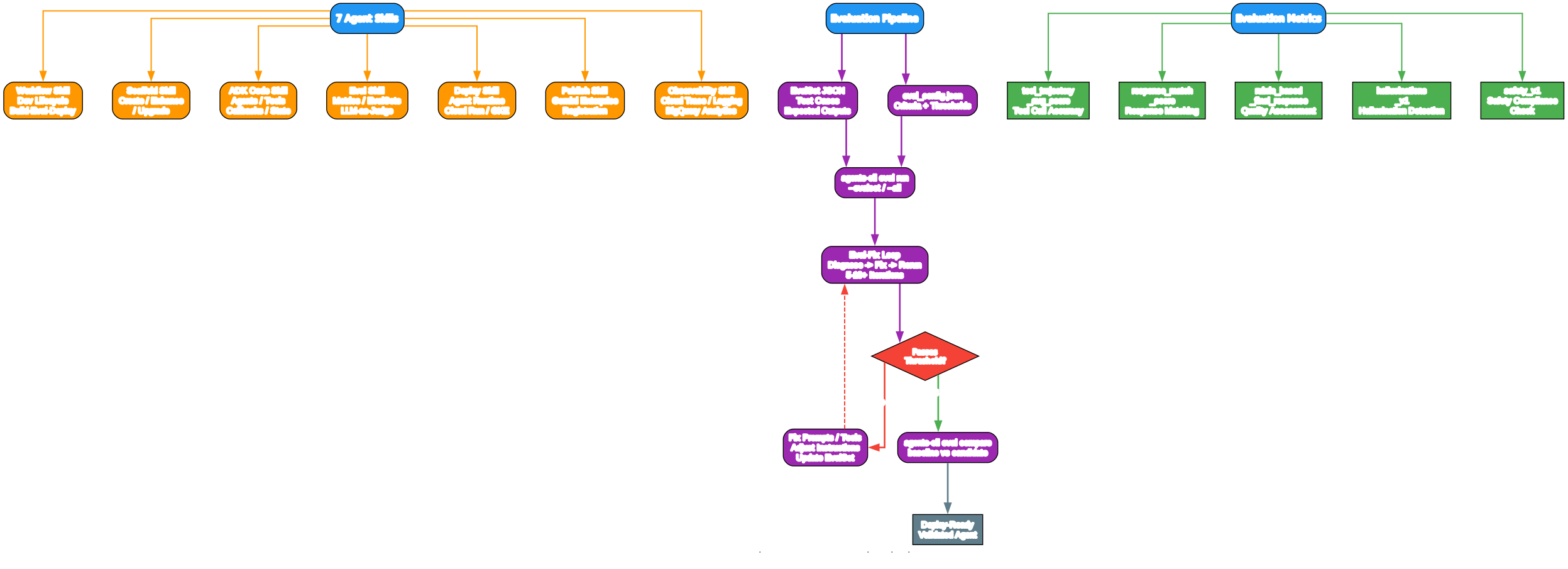
Understanding the Skills and Evaluation System
The diagram above illustrates two key aspects of agents-cli: the seven specialized skills and the evaluation pipeline that validates agent behavior.
The Seven Agent Skills
The skills system is the core innovation of agents-cli. Rather than providing a monolithic tool, Google has decomposed the agent development lifecycle into seven focused skills, each loaded on-demand by your coding agent:
-
Workflow Skill – The entry point that provides the full development lifecycle, coding guidelines, and operational rules. It coordinates the other skills and ensures you follow the correct phase sequence.
-
Scaffold Skill – Handles project creation with
agents-cli scaffold create, enhancement withscaffold enhance, and upgrades withscaffold upgrade. It maps user requirements to CLI flags and template options. -
ADK Code Skill – The Python API reference for writing agent code. Covers agent creation, tool definitions, callbacks, state management, orchestration patterns, and the experimental ADK 2.0 Workflow API.
-
Eval Skill – Provides the evaluation methodology including evalset schema, metrics configuration, LLM-as-judge criteria, and the eval-fix loop. This is the most critical skill for ensuring agent quality.
-
Deploy Skill – Covers deployment targets (Agent Runtime, Cloud Run, GKE), CI/CD pipelines, service accounts, secrets management, and rollback procedures.
-
Publish Skill – Handles Gemini Enterprise registration with ADK and A2A modes, auto-detection from deployment metadata, and interactive/programmatic usage.
-
Observability Skill – Cloud Trace integration, prompt-response logging, BigQuery Agent Analytics, and third-party integrations (AgentOps, Phoenix, MLflow, etc.).
The Evaluation Pipeline
The evaluation pipeline is where agents-cli truly differentiates itself from other agent frameworks. It provides a structured, iterative approach to validating agent behavior:
-
EvalSet JSON – You define test cases with expected inputs, tool trajectories, and expected outputs. Each eval case specifies the conversation, expected tool calls, and expected responses.
-
eval_config.json – You configure evaluation criteria with thresholds. The supported metrics include tool trajectory scoring, response matching, rubric-based quality assessment, hallucination detection, and safety compliance.
-
agents-cli eval run – The CLI runs your agent against the evalsets and scores each case against the configured criteria. Results show which cases pass and which fail, with detailed scoring breakdowns.
- Evaluation Metrics – Five built-in metrics cover different aspects of agent quality:
tool_trajectory_avg_score– Validates that the agent calls the right tools in the right orderresponse_match_score– Checks response content against expected outputsrubric_based_final_response_quality_v1– Uses LLM-as-judge for semantic quality assessmenthallucinations_v1– Detects when the agent makes claims not supported by tool outputsafety_v1– Validates safety compliance
-
The Eval-Fix Loop – When scores fall below thresholds, you diagnose the cause, fix the code or prompts, and rerun. This iterative process typically requires 5-10+ iterations. The key insight: never lower thresholds to make tests pass. Fix the agent, not the test.
- Comparison –
agents-cli eval comparelets you compare baseline and candidate results side by side, making it easy to see whether changes improved or regressed agent behavior.
Evaluation Configuration Example
{
  "criteria": {
    "tool_trajectory_avg_score": {
      "threshold": 1.0,
      "match_type": "IN_ORDER"
    },
    "final_response_match_v2": {
      "threshold": 0.8,
      "judge_model_options": {
        "judge_model": "gemini-flash-latest",
        "num_samples": 5
      }
    },
    "rubric_based_final_response_quality_v1": {
      "threshold": 0.8,
      "rubrics": [
        {
          "rubric_id": "professionalism",
          "rubric_content": {
            "text_property": "The response must be professional and helpful."
          }
        }
      ]
    }
  }
}
EvalSet Schema Example
{
  "eval_set_id": "my_eval_set",
  "name": "My Eval Set",
  "description": "Tests core capabilities",
  "eval_cases": [
    {
      "eval_id": "search_test",
      "conversation": [
        {
          "invocation_id": "inv_1",
          "user_content": {
            "parts": [{"text": "Find a flight to NYC"}]
          },
          "final_response": {
            "role": "model",
            "parts": [{"text": "I found a flight for $500. Want to book?"}]
          },
          "intermediate_data": {
            "tool_uses": [
              {"name": "search_flights", "args": {"destination": "NYC"}}
            ]
          }
        }
      ],
      "session_input": {
        "app_name": "my_app",
        "user_id": "user_1",
        "state": {}
      }
    }
  ]
}
Deployment Targets
agents-cli supports three deployment targets, each with different trade-offs:
| Criteria | Agent Runtime | Cloud Run | GKE |
|---|---|---|---|
| Languages | Python | Python | Python + others |
| Scaling | Managed auto-scaling | Fully configurable | Full Kubernetes |
| Session state | Native persistent sessions | In-memory, Cloud SQL, or Agent Platform | In-memory, Cloud SQL, or Agent Platform |
| Setup complexity | Lower (managed) | Medium | Higher |
| Best for | Minimal ops, managed infra | Custom infra, event-driven | Full Kubernetes control |
Deploying to Agent Runtime
# Deploy to Agent Runtime (managed)
agents-cli deploy

# Deploy with secrets
agents-cli deploy --secrets "API_KEY=my-api-key,DB_PASS=db-password:2"

# Check deployment status
agents-cli deploy --status
Deploying to Cloud Run
# Add Cloud Run deployment to existing project
agents-cli scaffold enhance . --deployment-target cloud_run

# Deploy
agents-cli deploy
Observability
After deployment, agents-cli provides comprehensive observability through multiple tiers:
| Tier | What It Does | Default State |
|---|---|---|
| Cloud Trace | Distributed tracing via OpenTelemetry | Always enabled |
| Prompt-Response Logging | GenAI interactions to GCS and BigQuery | Disabled locally, enabled when deployed |
| BigQuery Agent Analytics | Structured agent events for dashboards | Opt-in (--bq-analytics at scaffold) |
| Third-Party Integrations | AgentOps, Phoenix, MLflow, etc. | Opt-in, per-provider setup |
Frequently Asked Questions
Is agents-cli an alternative to Gemini CLI, Claude Code, or Codex?
No. agents-cli is a tool for coding agents, not a coding agent itself. It provides the CLI commands and skills that make your coding agent better at building, evaluating, and deploying ADK agents on Google Cloud.
How is this different from just using ADK directly?
ADK is an agent framework. agents-cli gives your coding agent the skills and tools to build, evaluate, and deploy ADK agents end-to-end. It handles project scaffolding, evaluation methodology, deployment configuration, and observability setup – things that ADK alone does not provide.
Do I need Google Cloud?
For local development (create, run, eval), no. You can use an AI Studio API key to run Gemini with ADK locally. For deployment and cloud features, yes.
Can I use this with an existing agent project?
Yes. agents-cli scaffold enhance adds deployment and CI/CD to existing projects.
Troubleshooting
| Issue | Solution |
|---|---|
agents-cli command not found | Run uv tool install google-agents-cli or check PATH |
| Model returns 404 | Check GOOGLE_CLOUD_LOCATION – run the model listing command to verify availability |
| Eval scores fluctuate | Set temperature=0 or use rubric-based metrics for deterministic evaluation |
tool_trajectory_avg_score always 0 | Agent may use google_search (model-internal tool) – remove trajectory metric or switch to rubric_based_tool_use_quality_v1 |
| “Session not found” error | Ensure App(name=...) matches the directory name containing your agent |
| Agent Runtime deploy timeout | Deployments take 5-10 minutes; use agents-cli deploy --status to check progress |
| 403 on deploy | Check deployment/terraform/iam.tf for correct service account permissions |
Conclusion
Google Agents CLI represents a significant step forward in AI agent development tooling. By providing a structured workflow with seven specialized skills, it transforms any coding agent into an expert at building, evaluating, and deploying ADK agents on Google Cloud. The eval-fix loop methodology ensures production quality, while the deployment and observability skills handle the operational concerns that often derail agent projects.
The prototype-first pattern, combined with the scaffold-enhance-upgrade workflow, means you can start building quickly and add production infrastructure only when you are ready. Whether you are building a simple assistant or a complex multi-agent system with RAG and A2A protocols, agents-cli provides the scaffolding, evaluation, and deployment tooling to take your agent from idea to production.
Links
- GitHub Repository: https://github.com/google/agents-cli
- Documentation: https://google.github.io/agents-cli/
- ADK Documentation: https://adk.dev
- PyPI Package: https://pypi.org/project/google-agents-cli/

Enjoyed this post? Never miss out on future posts by following us