Guizang PPT Skill: Magazine-Style HTML Presentation Decks for Claude Code
Guizang PPT Skill is a Claude Code skill that generates single-file HTML presentation decks with an editorial magazine aesthetic. Created by Guizang and distilled from real offline talks like “One-Person Company: Organizations Folded by AI,” this skill brings the visual language of Monocle magazine to developer presentations - no build tools, no servers, just open a browser and present.
With 2,785 GitHub stars and growing, guizang-ppt-skill represents a new category of AI-powered design tools: structured skills that encode hard-won design knowledge into a repeatable, quality-controlled workflow. Rather than giving an AI free rein over your slides, this skill enforces a strict design system with 10 proven layouts, 5 curated color themes, and a comprehensive quality checklist that catches every common mistake.
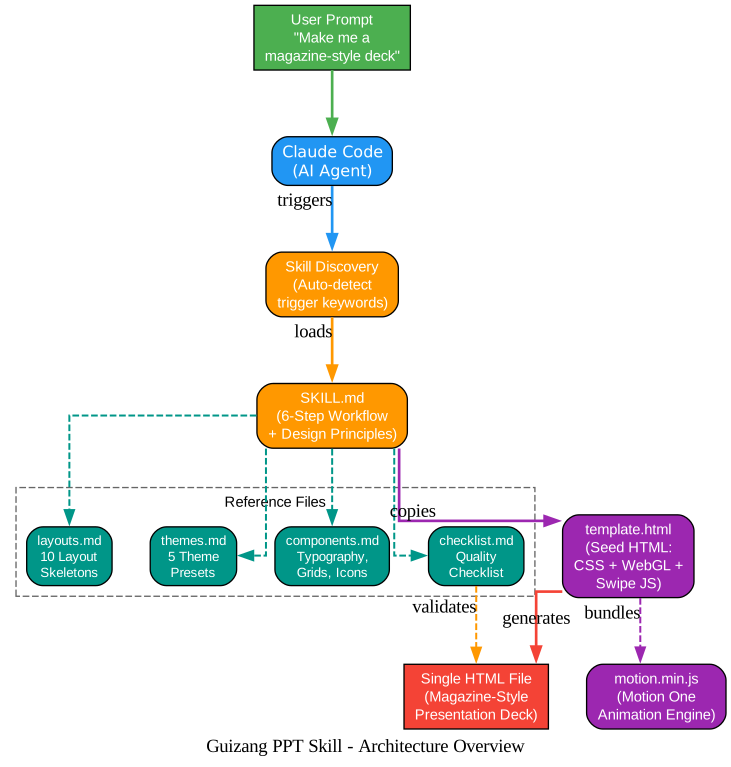
How the Skill Architecture Works
The architecture diagram above illustrates how guizang-ppt-skill integrates with Claude Code as a structured skill. When a user triggers the skill with phrases like “make me a magazine-style deck” or “generate a horizontal swipe deck,” Claude Code automatically discovers and loads the SKILL.md file, which contains a complete 6-step workflow.
Core Components:
1. SKILL.md (The Orchestrator) The main skill file defines the entire workflow from requirements clarification through final delivery. It acts as the brain of the operation, guiding Claude Code through each step with specific rules and constraints. The skill enforces a “measure twice, cut once” philosophy - requiring a 6-question clarification checklist before any slide code is written.
2. Reference Files (The Knowledge Base) Four reference files provide the detailed specifications:
layouts.md- 10 complete layout skeletons with paste-ready HTML code blocksthemes.md- 5 curated color presets with exact CSS variable valuescomponents.md- Typography system, grid classes, icon usage, and animation recipeschecklist.md- Quality checklist with P0/P1/P2/P3 severity levels
3. template.html (The Seed) A complete, runnable HTML file with all CSS, WebGL shaders, swipe navigation, and font CDN links pre-wired. Only the <main id="deck"> section contains placeholder content - everything else is production-ready from the start.
4. motion.min.js (The Animation Engine) A local copy of Motion One (the vanilla version of Framer Motion) at approximately 64KB, providing offline-capable entrance animations with CDN fallback.
The 10 Layout Templates and 5 Theme Presets

Understanding the Layout System
The layout system is the backbone of guizang-ppt-skill’s design quality. Rather than starting from a blank canvas, you pick from 10 battle-tested layout skeletons, each designed for a specific content purpose. This constraint-driven approach eliminates the most common design mistakes while ensuring visual consistency across your entire deck.
Hero Layouts (High-Impact, Full-Page)
| Layout | Purpose | Theme Default | Key Feature |
|---|---|---|---|
| 1. Hero Cover | Opening page | hero dark | WebGL background visible, h-hero at 10vw |
| 2. Act Divider | Chapter opener | hero light / hero dark alternating | Minimal kicker + title + one-line lead |
| 7. Hero Question | Suspense page | hero dark | Multi-line <span> reveal with line-by-line animation |
Content Layouts (Information-Dense)
| Layout | Purpose | Theme Default | Key Feature |
|---|---|---|---|
| 3. Big Numbers | Data showcase | light | 3x2 or 4x2 stat-card grid with serif numbers |
| 4. Quote + Image | Story/contrast | light / dark alternating | 7:5 grid split, left text right image |
| 5. Image Grid | Multi-image compare | light | Fixed height:26vh grid, no aspect-ratio |
| 6. Pipeline | Workflow steps | light | Step-by-step reveal with data-animate="pipeline" |
| 8. Big Quote | Serif takeaway | dark preferred | Line-by-line reveal with data-animate="quote" |
| 9. Before/After | Comparison | light | Directional animation left/right with data-animate="directional" |
| 10. Image + Text | Dense content | light / dark alternating | 8:4 grid, long-form text with side image |
The 5 Curated Theme Presets
One of the most distinctive design decisions in guizang-ppt-skill is the refusal to allow custom hex values. The skill enforces a strict “pick from 5 presets” rule, protecting the aesthetic integrity of each deck. Each theme defines 6 CSS custom properties (--ink, --ink-rgb, --paper, --paper-rgb, --paper-tint, --ink-tint) that cascade through every component.
| Theme | Ink / Paper | Best For | Visual Character |
|---|---|---|---|
| Ink Classic | #0a0a0b / #f1efea | General default, commercial launches | Pure ink black on warm parchment, Monocle magazine feel |
| Indigo Porcelain | #0a1f3d / #f1f3f5 | Tech, research, AI, technical keynotes | Deep indigo on porcelain white, academic journal calm |
| Forest Ink | #1a2e1f / #f5f1e8 | Nature, sustainability, culture, non-fiction | Forest green on ivory, National Geographic warmth |
| Kraft Paper | #2a1e13 / #eedfc7 | Nostalgic, humanist, literary, indie zines | Dark brown on kraft, old notebook warmth |
| Dune | #1f1a14 / #f0e6d2 | Art, design, creative, gallery | Charcoal on sand, desert twilight restraint |
Switching themes requires replacing only 6 lines in the :root CSS block - every other style flows through var(--...) references.
The 6-Step Presentation Generation Pipeline
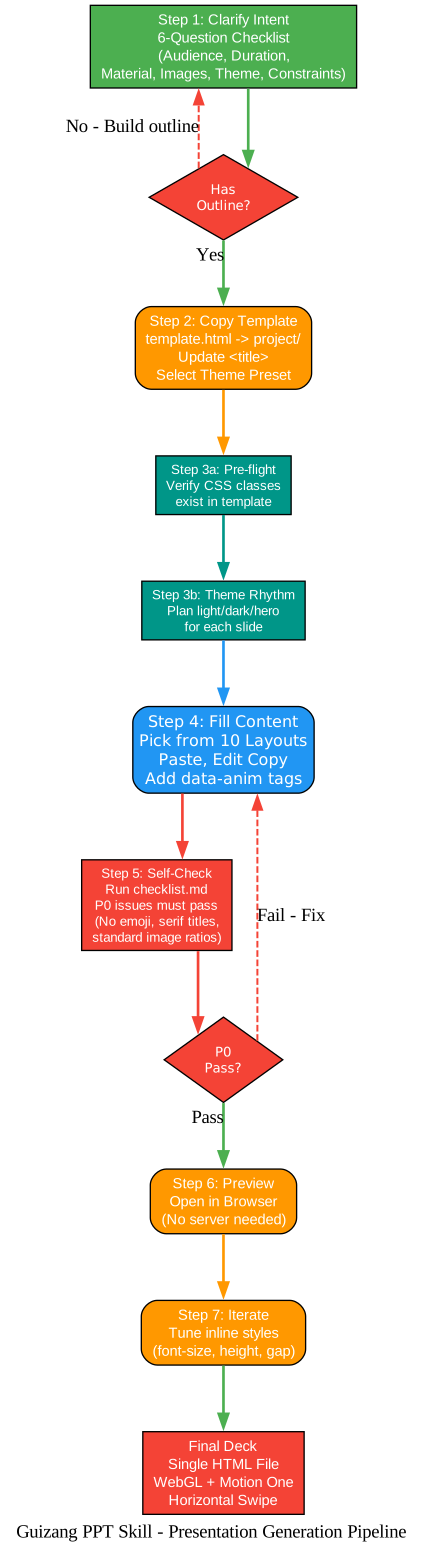
Understanding the Generation Pipeline
The pipeline diagram above shows the complete workflow from initial user prompt to final HTML deck. What makes this skill different from typical AI-generated presentations is the structured, quality-controlled process that mirrors how a professional designer would work.
Step 1: Clarify Intent (The 6-Question Checklist)
Before writing a single line of HTML, the skill requires alignment on 6 critical questions:
- Audience and setting - Industry internal? Commercial launch? Demo day? Private salon?
- Duration - 15 minutes equals approximately 10 pages, 30 minutes equals 20 pages
- Source material - Existing documents, data, old presentations, or article links
- Images - What images exist and where are they stored
- Theme choice - Which of the 5 presets fits the content
- Hard constraints - Must-include data, forbidden content
This upfront investment prevents the most expensive mistake in presentation design: building the wrong structure. The skill uses a “narrative arc” template (Hook, Context, Core, Shift, Takeaway) to organize content before any visual work begins.
Step 2: Copy Template and Select Theme
The template.html file is copied to the project directory, and the <title> placeholder is replaced. The chosen theme’s 6 CSS variables replace the defaults in the :root block. This takes seconds but establishes the entire visual foundation.
Step 3: Pre-flight Checks and Content Fill
This is where the skill’s quality control shines. Two mandatory pre-flight checks must pass before any slide code is written:
- CSS class verification - Every class name used in layouts.md must exist in template.html’s
<style>block. Missing classes cause cascading style failures (serif titles becoming sans-serif, data cards collapsing, pipelines merging into one line). - Theme rhythm planning - Each page must be assigned
light,dark,hero light, orhero dark. The skill enforces hard rules: no more than 3 consecutive pages of the same theme, decks over 8 pages must have at least onehero darkand onehero light, and purelightdecks are forbidden.
Step 4: Self-Check Against the Quality Checklist
The checklist.md file contains every pitfall discovered during real iterations, organized by severity:
- P0 (Must pass): No emoji as icons, images only crop from bottom, serif fonts for titles, standard image ratios only, no
align-self:endon images - P1 (Should pass): Hero and non-hero pages alternate, big-number pages and dense pages alternate, consistent terminology
- P2 (Nice to have): WebGL mask opacity tuning, light hero shader constraints, image alignment
- P3 (Operational): Relative image paths, hardcoded page numbers, preserved navigation logic
Step 5: Browser Preview
Open the single HTML file directly in any browser. No server, no build step, no dependencies beyond the CDN-loaded fonts and icons (with offline fallback for Motion One animations).
Step 6: Iterate with Inline Styles
The template’s CSS is highly parameterized. 90% of adjustments are inline style changes: font-size:Xvw, height:Yvh, gap:Zvh. This makes iteration fast and non-destructive.
WebGL Fluid Backgrounds and Motion One Animations
The WebGL System
The template includes two WebGL canvas elements (#bg-dark and #bg-light) that render fluid/contour/dispersion shader backgrounds. The JavaScript navigation system interpolates between these two shaders based on the current slide’s theme class:
hero darkpages: WebGL background is highly visible with only 12-15% mask overlayhero lightpages: WebGL background subtly visible through 16-20% mask- Regular
light/darkpages: WebGL nearly invisible with 92-95% mask overlay
This creates a breathing rhythm where the fluid background emerges during dramatic moments (chapter openings, key questions, closing statements) and recedes during information-dense content pages.
The Motion One Animation System
Five animation recipes are built into the template, each triggered by data attributes:
| Recipe | Trigger | Behavior | Best For |
|---|---|---|---|
cascade (default) | No attribute needed | Elements fade in sequentially, 75ms stagger | Most content pages (Layouts 3, 4, 5, 10) |
hero | .hero class auto-triggers | Slower, more ceremonial stagger, 160ms per step | Hero pages (Layouts 1, 2, 7) |
quote | data-animate="quote" | Lines reveal one by one, 550ms stagger | Big quote pages (Layout 8) |
directional | data-animate="directional" | Left column slides in, divider, right column slides in | Before/After comparisons (Layout 9) |
pipeline | data-animate="pipeline" | Steps start at 15% opacity, light up one by one on arrow key press | Workflow demonstrations (Layout 6) |
The animation system has a built-in degradation path: if both the local motion.min.js and the jsDelivr CDN fail, all data-anim elements are forced to opacity:1, ensuring content is always readable even without animations.
Typography: The Three-Tier Font System
The skill enforces a strict three-tier typography hierarchy that is fundamental to its magazine aesthetic:
| Tier | Font Family | Role | Usage |
|---|---|---|---|
| Serif (Titles) | Noto Serif SC + Playfair Display + Source Serif | Visual emphasis | Headlines, key quotes, large numbers |
| Sans-serif (Body) | Noto Sans SC + Inter | Information density | Body text, descriptions, pipeline step names |
| Monospace (Metadata) | IBM Plex Mono + JetBrains Mono | Decorative rhythm | Kickers, meta labels, page numbers, chrome/foot |
This hierarchy creates the visual tension that makes editorial design compelling: large serif headlines pull the eye, compact sans-serif body text delivers information efficiently, and monospace metadata adds typographic rhythm at the edges.
Installation and Usage
Option 1: One-Line Install (Recommended)
npx skills add https://github.com/op7418/guizang-ppt-skill --skill guizang-ppt-skill
Option 2: Manual Git Clone
git clone https://github.com/op7418/guizang-ppt-skill.git ~/.claude/skills/guizang-ppt-skill
Option 3: Ask an AI Agent
Paste this instruction to Claude Code, Cursor, or any AI agent with shell access:
Install the guizang-ppt-skill Claude Code skill for me:
1. Make sure ~/.claude/skills/ exists (create if not)
2. Run: git clone https://github.com/op7418/guizang-ppt-skill.git ~/.claude/skills/guizang-ppt-skill
3. Verify: ls ~/.claude/skills/guizang-ppt-skill/ should show SKILL.md, assets/, references/
Triggering the Skill
Once installed, Claude Code auto-detects the skill. Use trigger phrases like:
- “Make me a magazine-style deck”
- “Generate a horizontal swipe deck”
- “Editorial magazine style presentation”
- “Electronic ink slides for my talk”
Creating Your First Deck
After triggering the skill, Claude Code will walk you through the 6-step workflow. Here is an example of the HTML structure for a Hero Cover page:
<section class="slide hero dark">
  <div class="chrome">
    <div>A Talk - 2026.04.22</div>
    <div>Vol.01</div>
  </div>
  <div class="frame" style="display:grid; gap:4vh; align-content:center; min-height:80vh">
    <div class="kicker" data-anim>Private Salon - Li Jigang</div>
    <h1 class="h-hero" data-anim>One-Person Company</h1>
    <h2 class="h-sub" data-anim>Organizations Folded by AI</h2>
    <p class="lead" style="max-width:60vw" data-anim>
      One AI creator - in 64 days produced 110K lines of code,
      across 9 platforms, with barely any lifestyle change.
    </p>
    <div class="meta-row" data-anim>
      <span>Guizang</span><span>-</span><span>Independent Creator / CodePilot Author</span>
    </div>
  </div>
  <div class="foot">
    <div>A talk about AI, organizations, and individuals</div>
    <div>- 2026 -</div>
  </div>
</section>
And a Big Numbers data page:
<section class="slide light">
  <div class="chrome">
    <div>Past 64 Days - Dev</div>
    <div>Act I / Dev - 02 / 25</div>
  </div>
  <div class="frame" style="padding-top:6vh">
    <div class="kicker" data-anim>What one person did.</div>
    <h2 class="h-xl" data-anim>Past 64 Days</h2>
    <p class="lead" style="margin-bottom:5vh" data-anim>From 0 to open source CodePilot.</p>
    <div class="grid-6" style="margin-top:6vh">
      <div class="stat-card" data-anim>
        <div class="stat-label">Duration</div>
        <div class="stat-nb">64 <span class="stat-unit">days</span></div>
        <div class="stat-note">From zero to now</div>
      </div>
      <div class="stat-card" data-anim>
        <div class="stat-label">Lines of Code</div>
        <div class="stat-nb">110K+</div>
        <div class="stat-note">Written line by line</div>
      </div>
    </div>
  </div>
</section>
Core Design Principles
The skill is built on 6 design principles distilled from 5 rounds of real presentation iterations:
-
Restraint over flash - WebGL backgrounds only bleed through on hero pages. On content pages, the mask is 92-95% opaque. The fluid effect is a seasoning, not the main course.
-
Structure over decoration - No shadows, no floating cards, no padding boxes. Information hierarchy comes from type size, typeface contrast, and grid whitespace. This is the Monocle approach: let the typography do the work.
-
Three-tier type hierarchy - Maximum serif for headlines, medium sans-serif for body, small monospace for metadata. Each tier has a specific job, and mixing them up is the fastest way to destroy the aesthetic.
-
Images are first-class citizens - Images only crop from the bottom (via
object-position: top center). The top and sides stay intact. Grid images use fixedheight:Nvhinstead ofaspect-ratioto prevent container breakage. -
Rhythm lives on hero pages - Hero and non-hero pages must alternate. No more than 3 consecutive pages of the same theme. Every 3-4 pages should have a hero page (cover, act divider, question, or big quote) to give the audience’s eyes a rest.
-
Consistent terminology - Skills stays as Skills, never mixed with Chinese translations. Terms are consistent across the entire deck.
The Quality Checklist: Learning from Real Mistakes
The checklist.md file is perhaps the most valuable part of the skill. It documents every pitfall encountered during real presentation iterations, organized by severity:
P0 (Must Fix - Will Break the Deck):
- Using emoji instead of Lucide icons destroys the magazine aesthetic
- Images with
aspect-ratioinstead of fixedheight:Nvhbreak grid layouts - Missing CSS classes (from skipping the pre-flight check) cause total style collapse
- Chinese titles over 5 characters with
h-heroat 10vw create single-character line wraps - Using
align-self:endon images causes them to stack at the page bottom
P1 (Should Fix - Hurts the Rhythm):
- Consecutive hero pages cause visual fatigue
- All-light decks feel flat and lifeless
- Inconsistent terminology (switching between English and Chinese for the same term)
P2 (Nice to Have - Polish):
- WebGL mask opacity tuning for different page types
- Light hero pages need shader constraints (no strong center points)
- Image micro-rounded-corners (4px maximum, never 8px or it looks like a mobile app)
Theme Rhythm: The Secret to Visual Flow
One of the most sophisticated aspects of the skill is its theme rhythm system. Each page must be explicitly tagged with one of four theme classes:
| Theme Class | WebGL Visibility | Use For |
|---|---|---|
hero dark | High (12-15% mask) | Opening covers, dramatic questions, closing statements |
hero light | Medium (16-20% mask) | Chapter dividers, transitional moments |
light | Minimal (92-95% mask) | Data pages, image grids, pipelines |
dark | Minimal (92-95% mask) | Story pages, big quotes, contrast moments |
The skill enforces these hard rules:
- No more than 3 consecutive pages of the same theme
- Decks over 8 pages must have at least one
hero darkand onehero light - Pure
lightdecks are forbidden - there must bedarkcontent pages for visual breathing room
An 8-page rhythm template is provided as a starting point:
| Page | Theme | Layout | Purpose |
|---|---|---|---|
| 1 | hero dark | Cover | Opening |
| 2 | light | Big Numbers | Data impact |
| 3 | dark | Quote + Image | Story/contrast |
| 4 | light | Pipeline | Process flow |
| 5 | hero light | Act Divider | Breathing room |
| 6 | dark | Quote + Image or Big Quote | Depth |
| 7 | hero dark | Hero Question | Suspense |
| 8 | light | Big Quote / Closing | Resolution |
Navigation and Interaction
The template includes a complete horizontal swipe navigation system:
- Keyboard: Left/Right arrow keys for page navigation
- Mouse wheel: Scroll to advance/go back
- Touch: Swipe left/right on mobile devices
- Bottom dots: Click to jump to any page
- ESC key: Opens an index view of all slides
- Pipeline pages: Arrow keys or spacebar advance through steps one at a time
All navigation JavaScript is pre-wired in the template - no configuration needed.
File Structure
guizang-ppt-skill/
  SKILL.md              <- Main skill file: workflow, principles, common mistakes
  README.md             <- Chinese README
  README.en.md          <- English README
  assets/
    template.html       <- Complete runnable seed HTML (CSS + WebGL + swipe JS)
    motion.min.js       <- Motion One local copy (offline fallback, ~64KB)
  references/
    components.md       <- Component catalog (type, color, grid, icons, callout, stat, pipeline)
    layouts.md          <- 10 layout skeletons (paste-ready, with animation markers)
    themes.md           <- 5 theme presets (pick one, no custom hex allowed)
    checklist.md        <- Quality checklist (P0/P1/P2/P3 severity tiers)
When to Use (and When Not To)
Great for:
- Offline talks and industry keynotes
- Private salons and demo days
- AI product launches with strong personal voice
- Presentations where you want “done in one pass, no slide tool needed”
Not ideal for:
- Data-heavy tables and complex charts (use traditional PPT tools)
- Training courseware (information density is intentionally low)
- Multi-user collaborative editing (it generates static HTML)
Links
- GitHub Repository: https://github.com/op7418/guizang-ppt-skill
- Author: Guizang (op7418) on X/Twitter
- License: MIT License
Conclusion
Guizang PPT Skill represents a thoughtful approach to AI-assisted design: instead of giving an AI unlimited creative freedom, it encodes hard-won design knowledge into a structured skill with strict constraints. The result is presentations that look like they came from a professional editorial designer, not a generic AI template generator.
The 10 layout templates, 5 curated themes, WebGL fluid backgrounds, Motion One animations, and comprehensive quality checklist work together as an integrated system. Each piece reinforces the others - the theme rhythm system ensures visual breathing room, the typography hierarchy creates information density without clutter, and the animation recipes add ceremony without distraction.
For developers and creators who present at conferences, demo days, or private events, guizang-ppt-skill offers a compelling alternative to both traditional slide tools and unconstrained AI generation. The constraint-driven approach produces consistently beautiful results while the single-file HTML output means zero deployment complexity. Enjoyed this post? Never miss out on future posts by following us 


