Introduction
InferSim is a lightweight, AI-powered circuit simulation framework developed by Alibaba’s Alimama AI Infra Team and Future Living Lab. While traditional circuit simulation tools like SPICE rely on numerical solvers for analog circuit analysis, InferSim takes a fundamentally different approach: it simulates the inference performance of Large Language Models (LLMs) on GPU hardware. In the context of AI-powered circuit simulation, InferSim bridges the gap between model architecture design and deployment planning by calculating critical metrics such as TTFT (Time To First Token), TPOT (Time Per Output Token), and TGS (Tokens per GPU per Second) without requiring actual hardware execution.
Written in pure Python with zero third-party dependencies, InferSim leverages computation complexity analysis (FLOPs), GPU hardware specifications (FLOPS, memory bandwidth), and benchmark-driven Model FLOPs Utilization (MFU) data to produce highly accurate performance estimates. The simulator has demonstrated remarkable accuracy, achieving within 15% of actual measured throughput on models like DeepSeek-V3, Qwen3-30B-A3B, and Qwen3-8B across H20 and H800 GPU platforms.
What is InferSim?
InferSim is an LLM inference performance simulator that answers a critical question in AI infrastructure: “How will this model perform on this hardware configuration?” Rather than running expensive benchmarks on actual GPUs, InferSim uses analytical modeling to predict:
- TTFT - Time To First Token during the prefill phase
- TPOT - Time Per Output Token during the decode phase
- TGS - Tokens per GPU per Second, the key throughput metric
The simulator supports a wide range of model architectures including MHA/GQA attention (used by Qwen models), MLA attention (used by DeepSeek-V3), and hybrid linear attention with GDN (Gated Delta Network) layers. It handles MoE (Mixture of Experts) models, dense FFN models, and models with shared experts, making it applicable to virtually all modern LLM architectures.
Architecture
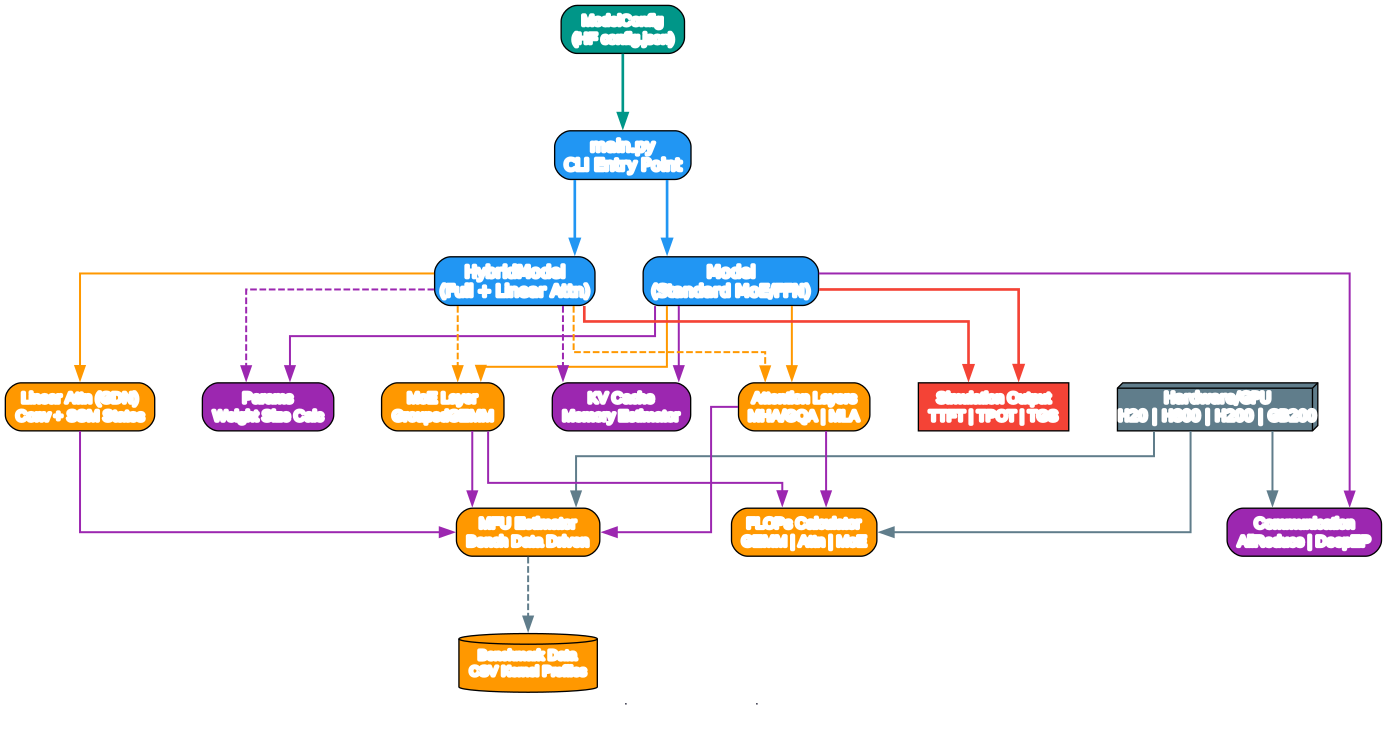
The architecture diagram above illustrates the modular design of InferSim. At the top level, the main.py entry point accepts a HuggingFace model configuration JSON and CLI arguments, then dispatches to either a standard Model or HybridModel class depending on whether the architecture uses linear attention layers.
The ModelConfig class parses the HuggingFace configuration JSON and extracts all relevant architectural parameters: attention type (MHA/GQA or MLA), MoE configuration (number of routed experts, shared experts, experts per token), and layer dimensions. For hybrid models, it also detects the presence of linear attention layers through the full_attention_interval parameter.
The core simulation modules form a clean dependency graph. The flops module computes per-token per-layer GFLOPs for attention cores, MoE/FFN operations, and other projections. The mfu module looks up benchmark-driven MFU values from CSV data files, matching against batch size, sequence length, and hardware configuration. The params module calculates weight sizes for attention and expert parameters, while the kvcache module estimates KV cache memory requirements. The comm module handles inter-GPU communication estimation using NVLink and RDMA bandwidth parameters.
The layer implementations – attn.py for MHA/MLA, moe.py for MoE, and linear_attn.py for GDN – each combine FLOPs calculations with MFU lookups to produce latency estimates. The hardware/gpu.py module provides GPU specifications for H20, H800, H200, and GB200, including FP16/FP8 TFLOPS, memory capacity, memory bandwidth, and NVLink/RDMA bandwidth.
How It Works
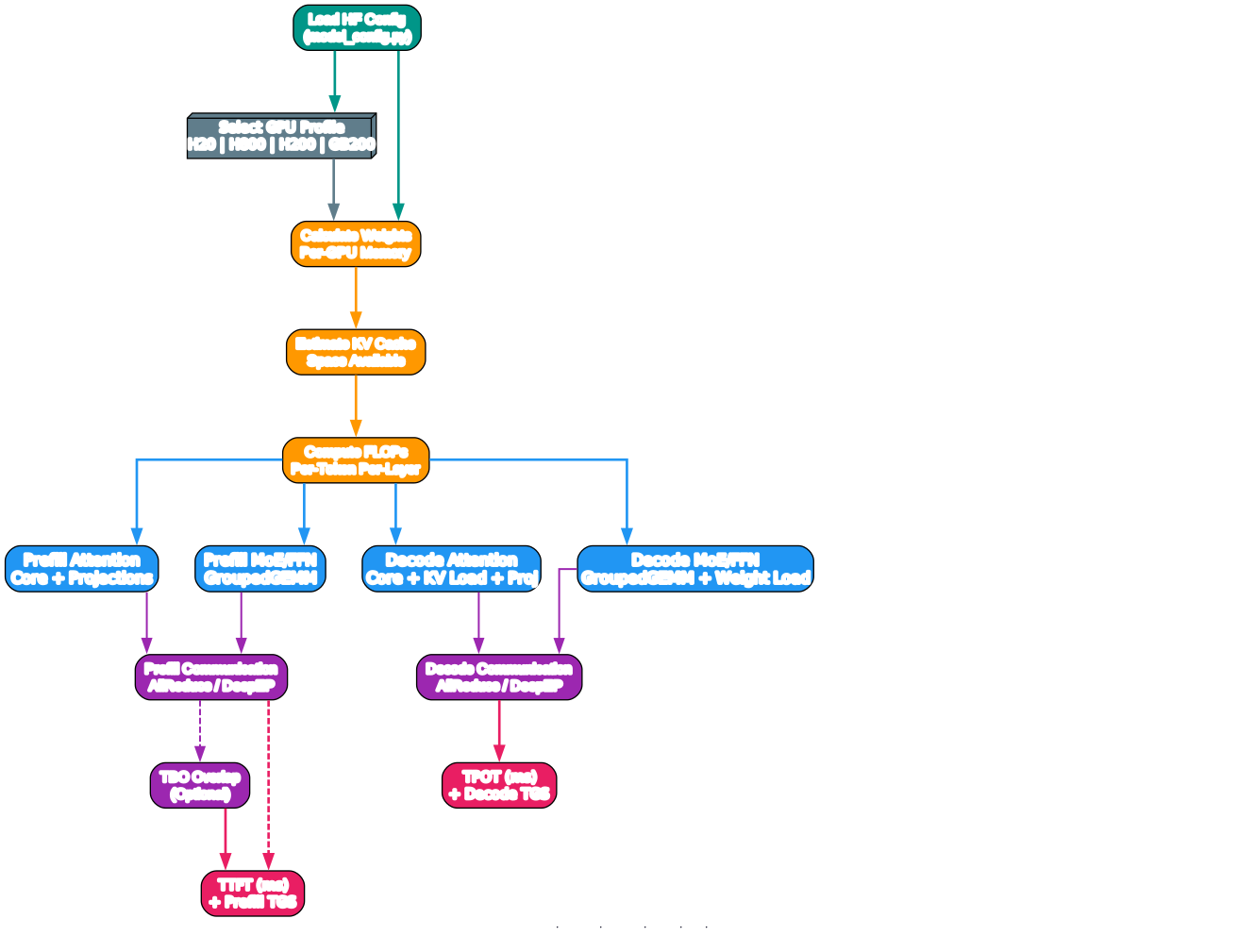
The simulation pipeline diagram above shows the four-phase process that InferSim follows to produce performance estimates.
Phase 1: Setup begins with loading the HuggingFace model configuration and selecting a GPU profile. The configuration file specifies the model architecture – number of layers, hidden dimensions, attention heads, expert counts, and other parameters. The GPU profile provides hardware specifications including peak FLOPS, memory capacity, and bandwidth numbers.
Phase 2: Model Analysis calculates three critical quantities. First, it determines the per-GPU parameter memory footprint, accounting for attention weights, expert weights, and whether FP8 quantization is used. Second, it estimates the available KV cache space by subtracting parameter memory and runtime overhead (approximately 20GB reserved) from total GPU memory. Third, it computes per-token per-layer GFLOPs for attention core operations, MoE/FFN computations, and other projections.
Phase 3: Prefill Simulation models the time-to-first-token computation. For each layer, it calculates the attention core latency (using MFU from benchmark data), the attention projection latency (QKV and output projections), and the MoE/FFN latency (including expert weight loading time). Communication overhead is estimated based on the parallelism strategy – AllReduce for standard tensor parallelism, or DeepEP dispatch/combine for expert parallelism. If Two-Batch Overlap (TBO) is enabled, the simulator accounts for overlapping computation and communication.
Phase 4: Decode Simulation follows a similar pattern but with decode-specific MFU values and batch size considerations. The decode phase is typically memory-bandwidth bound, so the simulator takes the maximum of compute time and memory loading time for each operation. The final TPOT is computed by summing all per-layer latencies and adding a small scheduler overhead (5ms).
Data Flow
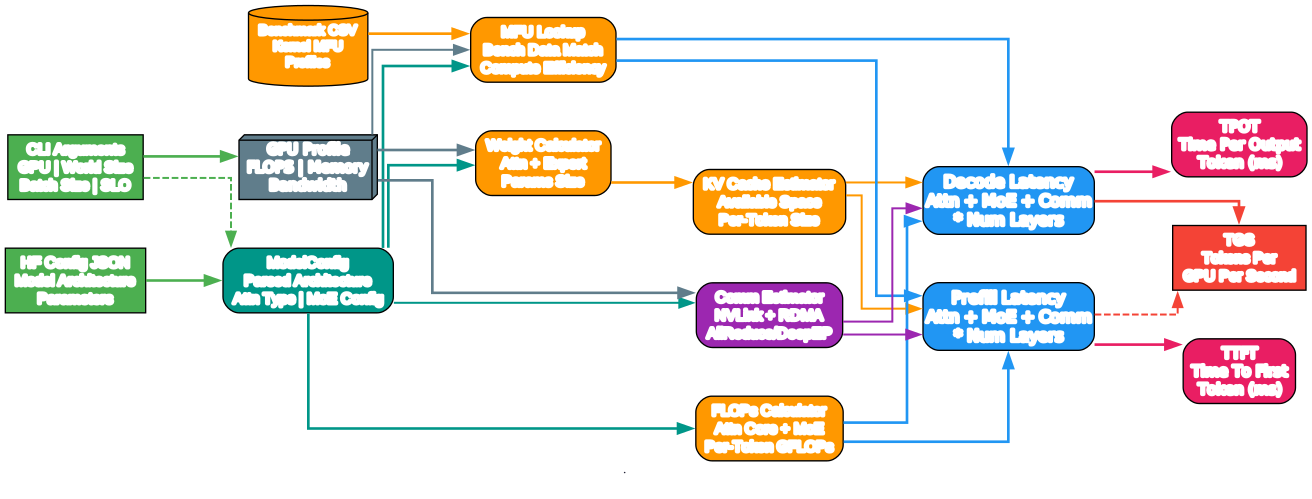
The data flow diagram illustrates how inputs are transformed into the three key output metrics. On the left side, three input sources feed into the simulation: the HuggingFace configuration JSON (model architecture), CLI arguments (hardware and deployment parameters), and benchmark CSV data (kernel MFU profiles).
The ModelConfig parser transforms the raw JSON into structured architecture parameters, while the GPU profile provides hardware specifications. These feed into five computation modules:
- Weight Calculator – Determines per-GPU parameter sizes for attention and expert weights
- KV Cache Estimator – Calculates available memory and per-token cache requirements
- FLOPs Calculator – Computes per-token GFLOPs for attention, MoE, and other operations
- MFU Lookup – Matches benchmark data against the model configuration to find compute efficiency values
- Communication Estimator – Estimates NVLink and RDMA transfer times for multi-GPU deployments
These computation modules feed into two parallel latency computation paths: prefill latency and decode latency. Each path combines attention time, MoE time, and communication time, multiplied by the number of hidden layers. The prefill path produces TTFT and prefill TGS, while the decode path produces TPOT and decode TGS.
Supported Features

The features diagram provides a comprehensive overview of InferSim’s capabilities organized into five categories.
Attention Mechanisms: InferSim supports three attention types. MHA/GQA (Multi-Head Attention / Grouped Query Attention) is the standard attention mechanism used by most LLMs, benchmarked on FlashInfer and FlashAttention-3. MLA (Multi-head Latent Attention) is the low-rank attention architecture used by DeepSeek models, benchmarked on FlashMLA with KV absorption optimization. Linear Attention (GDN) is the newest addition, supporting Gated Delta Network layers with convolution and SSM state tracking, used in hybrid models like Qwen3.5.
Compute Kernels: The simulator models two primary kernel types. GEMM (General Matrix Multiply) handles dense projections and is benchmarked on DeepGEMM with both FP8 and FP16 support. GroupedGEMM handles MoE expert computations with variable batch sizes per expert, also benchmarked on DeepGEMM.
Parallelism: Three parallelism strategies are supported. DP Attention uses data parallelism for attention layers. EP MoE uses expert parallelism for MoE layers. DeepEP provides efficient dispatch and combine operations with both normal mode (for prefill) and low-latency mode (for decode).
Optimizations: Three key optimizations can be toggled. FP8 GEMM doubles compute throughput by using 8-bit floating point. FP8 KV Cache reduces memory consumption by 50% for KV storage. Two-Batch Overlap (TBO) overlaps computation and communication for improved throughput.
GPU Support: Four NVIDIA GPU platforms are supported with detailed specifications: H20 (96GB, 148 TF FP16), H800 (80GB, 989 TF FP16), H200 (141GB, 989 TF FP16), and GB200 (192GB, 2500 TF FP16).
Installation
InferSim requires no third-party dependencies – it uses only Python standard library modules. To get started:
# Clone the repository
git clone https://github.com/alibaba/InferSim.git
cd InferSim

# No installation needed - just run directly
python3 main.py --help
Since InferSim is pure Python with no external dependencies, there is no pip install step or requirements.txt file. Simply clone and run.
Usage
Basic Simulation
To simulate a model’s inference performance, you need a HuggingFace configuration JSON file and a target GPU type:
# Simulate Qwen3-30B-A3B decode on 4x H20 GPUs
python3 main.py \
    --config-path hf_configs/qwen3-30B-A3B_config.json \
    --device-type H20 \
    --world-size 4 \
    --decode-only
Prefill Simulation
To simulate the prefill (time-to-first-token) phase:
# Simulate DeepSeek-V3 prefill on 8x H800 GPUs
python3 main.py \
    --config-path hf_configs/deepseek_v3_config.json \
    --device-type H800 \
    --world-size 8 \
    --prefill-only
Full Simulation with FP8
To run a complete simulation with FP8 quantization for both GEMM and KV cache:
python3 main.py \
    --config-path hf_configs/qwen3-30B-A3B_config.json \
    --device-type H20 \
    --world-size 4 \
    --use-fp8-gemm \
    --use-fp8-kv
DeepEP with Two-Batch Overlap
For multi-node deployments with expert parallelism:
python3 main.py \
    --config-path hf_configs/deepseek_v3_config.json \
    --device-type H800 \
    --world-size 8 \
    --num-nodes 2 \
    --enable-deepep \
    --enable-tbo
Understanding the Output
When you run a simulation, InferSim produces a detailed breakdown:
================== Simulator Result ===================
Device type:                             H20
World size:                              4
Attn type:                               MHA/GQA
Use FP8 GEMM:                            0
Use FP8 KV:                              0
------------------Model Weights-------------------
One attn params size (MB):               36.00
One expert params size (MB):             9.00
Per GPU params size (GB):                15.19
---------------------KV Cache---------------------
KV cache space (GB):                     60.81
Input seq len:                           4096
Output seq len:                          2048
Target decode batchsize:                 100
Target per-token KV cache size (KB):     103.79
Current per-token KV cache size (KB):    96.00
----------------------FLOPs-----------------------
Num hidden layers:                       48
Per-token per-layer attn core (GFLOPs):  0.08
Per-token per-layer MoE/FFN (GFLOPs):    0.08
Per-token per-layer others (GFLOPs):      0.04
Per-token attn core (GFLOPs):            4.03
Per-token MoE (GFLOPs):                  3.62
Per-token others (GFLOPs):               1.81
Per-token total (GFLOPs):                9.46
---------------------Decoding---------------------
Attn core MFU:                           0.15
Attn core latency (us):                  361.77
KV loading latency (us):                 298.02
QKV_proj latency (us):                   31.03
O_proj latency (us):                     16.95
Routed experts/FFN MFU:                  0.18
Routed experts/FFN latency (us):          269.28
Experts loading latency (us):            85.83
Comm before MoE/FFN (us):                4.24
Comm after MoE/FFN (us):                  4.24
TPOT (ms):                               38.00
Throughput (TGS):                        2632
Each section provides actionable insights. The Model Weights section shows memory allocation per GPU. The KV Cache section validates that the model fits within available memory. The FLOPs section breaks down computational requirements. The Decoding section reveals per-operation latencies and identifies bottlenecks – in this example, attention core latency (361.77us) dominates over MoE computation (269.28us), indicating the decode phase is memory-bandwidth bound.
Key Features in Detail
Model-Sys Co-Design
InferSim excels at model-system co-design, allowing researchers to predict how architectural changes affect inference performance before building or training models. By modifying parameters in the HuggingFace config JSON, you can explore trade-offs between model quality and serving cost. For example, increasing the number of experts per token improves model quality but increases MoE latency, while reducing KV cache rank decreases memory usage but may impact attention quality.
Performance Bottleneck Analysis
The simulator identifies whether each phase is compute-bound or memory-bound. During decode, the max(attn_core_time, kv_load_time) comparison reveals whether attention is limited by compute throughput or memory bandwidth. Similarly, the max(routed_experts_latency, moe_load_time) comparison shows whether MoE is compute-bound or weight-loading-bound. This analysis guides optimization efforts toward the actual bottleneck.
Benchmark-Driven MFU
Unlike simple roofline models, InferSim uses real kernel benchmark data stored in CSV files under bench_data/. These profiles capture the actual MFU achieved by state-of-the-art kernels like FlashInfer, FlashAttention-3, FlashMLA, and DeepGEMM on specific GPU configurations. This approach produces significantly more accurate estimates than theoretical peak calculations.
Hybrid Model Support
For models that combine full attention layers with linear attention layers (like Qwen3.5), InferSim provides the HybridModel class. This class separately computes latency for full attention layers (using KV cache) and linear attention layers (using SSM state tracking), then combines them based on the layer count ratio specified by full_attention_interval.
Troubleshooting
Warning: Benchmark Data Not Found
If you see warnings like Warning: bench_data/mha/decode/H20/32-4-128.csv not exists, InferSim falls back to default MFU values. To improve accuracy, you can contribute benchmark data by running the kernel benchmarks in kernel_benchmark/ and appending results to the appropriate CSV files.
Error: Need Smaller KV Cache
If the output shows !Error: need smaller kvcache, the model’s KV cache requirements exceed available GPU memory. Solutions include:
- Using
--use-fp8-kvto halve KV cache size - Increasing
--world-sizeto distribute the model across more GPUs - Reducing
--target-tgsto decrease batch size and KV cache demand
Error: TPOT Greater Than SLO
If !Error: TPOT > SLO, need smaller GFLOPs to speedup, the model cannot meet the target latency. Consider:
- Using
--use-fp8-gemmto double compute throughput - Increasing
--world-sizefor more parallelism - Reducing model size or expert count in the configuration
Adding New GPU Support
To add support for a new GPU, create a new GPU dataclass instance in hardware/gpu.py with the following parameters:
new_gpu = GPU(
    fp16_tflops=...,    # FP16 peak TFLOPS
    fp8_tflops=...,     # FP8 peak TFLOPS
    mfu=...,             # Default MFU (0.0-1.0)
    mem=...,             # Memory in GB
    mem_bw=...,          # Memory bandwidth in GB/s
    nvlink_bw=...,       # NVLink bandwidth in GB/s (unidirectional)
    rdma_bw=...,         # RDMA bandwidth in GB/s (unidirectional)
)
gpu_map["NEW_GPU"] = new_gpu
Simulation Accuracy
InferSim has been validated against real-world inference measurements:
| Model | GPU | Prefill TGS (Actual) | Prefill TGS (Sim) | Decode TGS (Actual) | Decode TGS (Sim) |
|---|---|---|---|---|---|
| DeepSeek-V3 | H800 | 7839 | 9034 | 2324 | 2675 |
| Qwen3-30B-A3B | H20 | 16594 | 17350 | 2749 | 2632 |
| Qwen3-8B | H20 | 15061 | 16328 | 2682 | 2581 |
The simulation accuracy is within 15% for prefill and 10% for decode, making InferSim a reliable tool for capacity planning and architecture exploration.
Conclusion
InferSim represents a significant contribution to the AI infrastructure tooling ecosystem. By providing a lightweight, dependency-free simulator that accurately predicts LLM inference performance, it enables researchers and engineers to make informed decisions about model architecture and deployment configurations without expensive hardware testing. The support for modern architectures like MLA, hybrid linear attention, and DeepEP parallelism makes it particularly relevant for next-generation LLM design.
The project’s pure Python implementation and zero-dependency philosophy make it accessible to anyone working in LLM inference optimization. Whether you are designing a new MoE architecture, planning GPU procurement, or optimizing an existing deployment, InferSim provides the analytical framework to predict performance before committing resources. Enjoyed this post? Never miss out on future posts by following us