LLMs From Scratch: Build a GPT Model Step by Step in PyTorch
If you want to build a large language model from scratch and truly understand how systems like ChatGPT work under the hood, the rasbt/LLMs-from-scratch repository is the definitive hands-on resource. Created by Sebastian Raschka as the official companion to his Manning book Build a Large Language Model (From Scratch), this repository guides you through every layer of the stack – from raw text tokenization to multi-head attention, from GPT architecture implementation to pretraining and instruction finetuning – all written in clear, educational PyTorch code. With over 93,000 stars on GitHub, it has become one of the most popular educational repositories for understanding LLM internals.
The repository does not just wrap existing libraries; it implements each component from the ground up. You write the attention mechanism yourself. You construct the transformer blocks yourself. You run the training loop yourself. This approach ensures that every mathematical operation and architectural decision is transparent and modifiable, making it an invaluable learning tool for researchers, engineers, and anyone who wants to move beyond treating LLMs as black boxes.
What Are LLMs From Scratch?
LLMs-from-scratch is the official code repository for the Manning book Build a Large Language Model (From Scratch) by Sebastian Raschka. The repository provides a complete, step-by-step implementation of a GPT-like large language model using only PyTorch and basic Python libraries. No external LLM frameworks are required.
The project is organized into seven main chapters that mirror the book’s structure, plus extensive bonus material covering advanced topics like Grouped-Query Attention (GQA), Multi-Head Latent Attention (MLA), Sliding Window Attention (SWA), Mixture-of-Experts (MoE), and implementations of real-world architectures including Llama 3.2, Qwen3, Gemma 3, Olmo 3, and more.
Each chapter includes Jupyter notebooks for interactive exploration, standalone Python scripts for quick reference, and exercise solutions for self-assessment. The code is tested across Linux, Windows, and macOS, and the repository includes a comprehensive troubleshooting guide.
Key Insight: With 93,748 stars and counting, LLMs-from-scratch is one of the most-starred educational repositories on GitHub, demonstrating the massive demand for transparent, from-first-principles LLM education. The repository has been tested across all major platforms with continuous integration workflows.
Architecture Overview
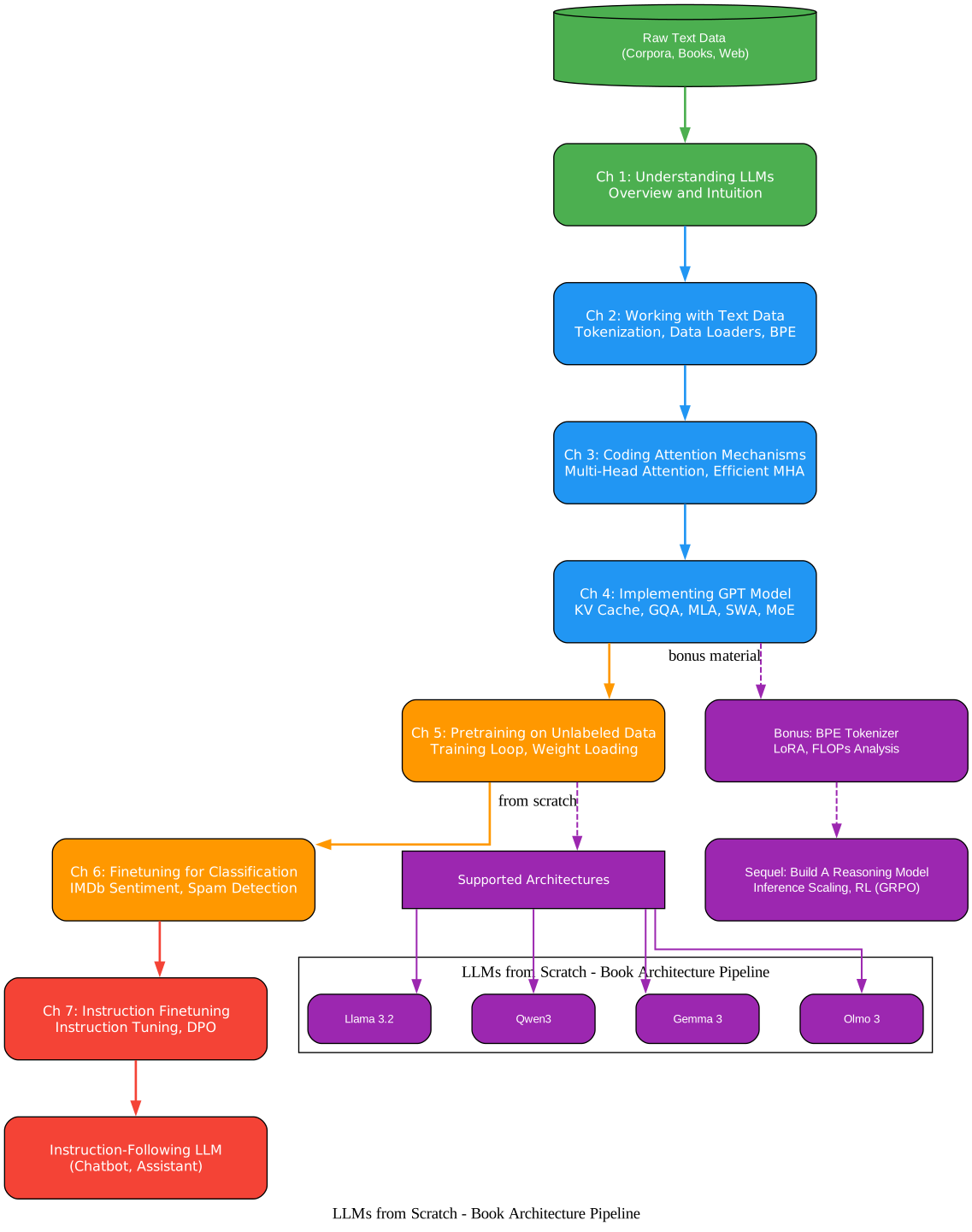
Understanding the Architecture Pipeline
The architecture diagram above illustrates the end-to-end pipeline for building a large language model from scratch, as presented in the LLMs-from-scratch repository. This pipeline is divided into distinct stages, each corresponding to a chapter in the book and a module in the codebase.
Stage 1: Text Data Processing (Chapter 2)
The pipeline begins with raw text data, which must be converted into a numerical format that neural networks can process. This stage covers tokenization using Byte Pair Encoding (BPE), specifically the tiktoken library that implements the GPT-2 tokenizer. The text is split into tokens, each mapped to an integer ID, and then organized into input-target pairs using a sliding window approach. The GPTDatasetV1 class handles this transformation, creating overlapping sequences where each input chunk is paired with a target chunk shifted by one position. This sliding window strategy ensures the model learns to predict the next token given any context window.
Stage 2: Attention Mechanisms (Chapter 3)
The tokenized embeddings then pass through the attention mechanism, which is the core innovation behind transformer models. The repository implements multi-head attention from scratch, showing how queries, keys, and values are projected, how scaled dot-product attention computes relevance scores, and how causal masking prevents the model from attending to future tokens. The bonus material includes efficient attention implementations that compare different approaches for speed and memory usage.
Stage 3: GPT Model Construction (Chapter 4)
The attention layers are assembled into complete transformer blocks, which are then stacked to form the full GPT model. This stage covers the entire architecture: token embeddings, positional embeddings, transformer blocks with layer normalization and residual connections, and the final output projection. The bonus material extends this with KV cache for faster inference, Grouped-Query Attention (GQA) for memory efficiency, Multi-Head Latent Attention (MLA) from DeepSeek, Sliding Window Attention (SWA) from Mistral, and Mixture-of-Experts (MoE) routing.
Stage 4: Pretraining (Chapter 5)
The assembled model is pretrained on unlabeled text data using a next-token prediction objective. This stage covers the training loop, learning rate scheduling, gradient clipping, and loss computation. The bonus material includes implementations that load real pretrained weights and convert the GPT architecture to Llama 3.2, Qwen3, Gemma 3, and Olmo 3 formats, enabling you to work with production-scale models.
Stage 5: Finetuning (Chapters 6 and 7)
The pretrained model is then finetuned for specific tasks. Chapter 6 covers classification finetuning (IMDb sentiment analysis, spam detection), while Chapter 7 covers instruction finetuning (teaching the model to follow instructions) and Direct Preference Optimization (DPO) for alignment. These stages transform a general-purpose language model into a task-specific or instruction-following assistant.
The GPT Model Architecture
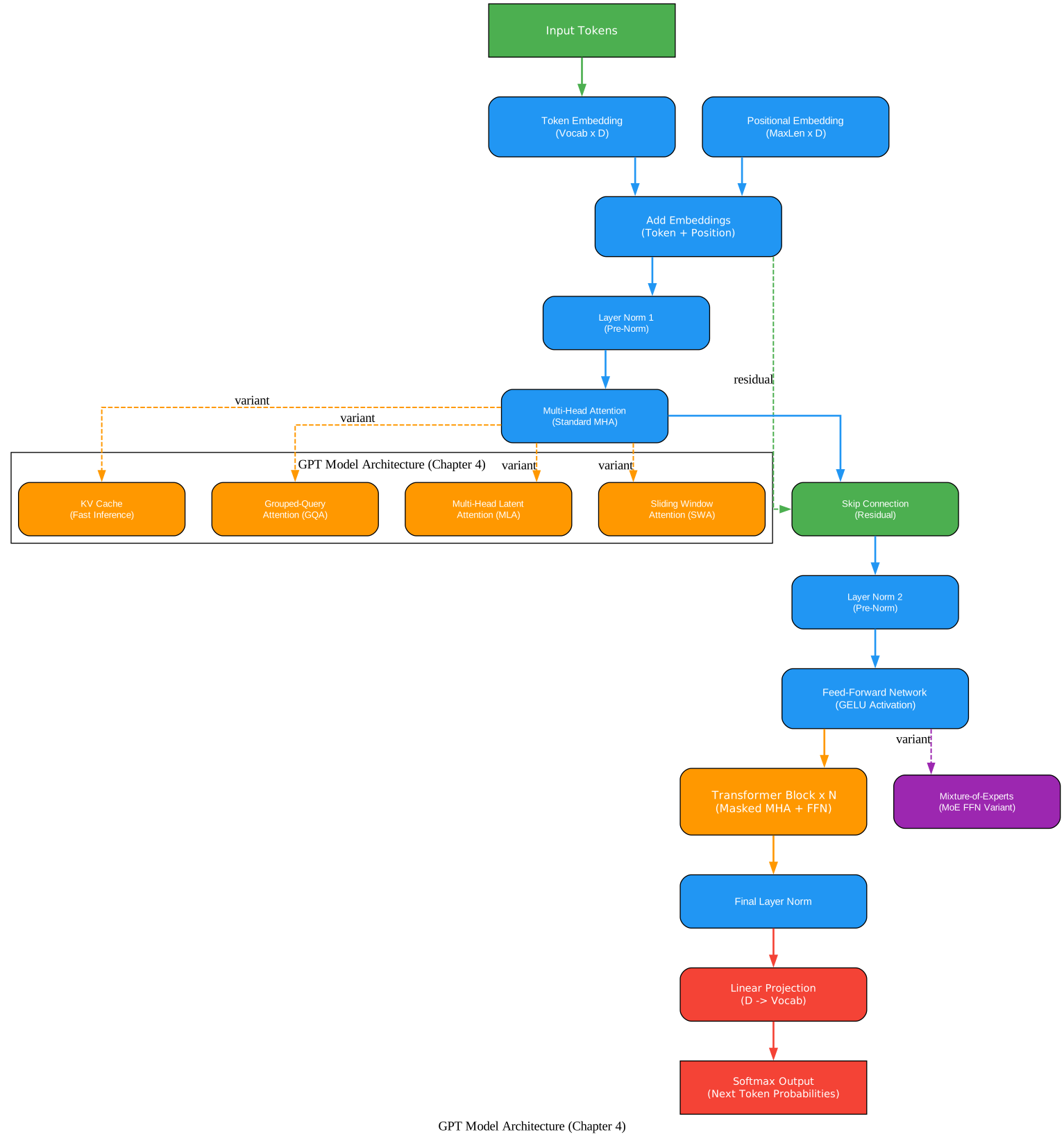
Understanding the GPT Model Architecture
The GPT model architecture diagram above shows the internal structure of the transformer-based language model implemented in Chapter 4. This architecture follows the original GPT-2 design with several modern enhancements covered in the bonus material.
Token and Positional Embeddings
The model begins with two embedding layers. The token embedding layer maps each token ID from the vocabulary (50,257 tokens for GPT-2) to a dense vector of dimension 768 (for the small model) or 1,024 (for larger variants). The positional embedding layer adds position information to each token, allowing the model to distinguish between tokens at different positions in the sequence. These two embeddings are summed element-wise to produce the input representation for the transformer blocks.
Transformer Blocks
Each transformer block consists of two sub-layers with residual connections. The first sub-layer is the multi-head attention mechanism, which computes attention across all positions in the sequence. The MultiHeadAttention class in the repository implements this with separate linear projections for queries, keys, and values, followed by scaled dot-product attention with causal masking. The mask ensures that each position can only attend to itself and preceding positions, which is essential for autoregressive generation.
The second sub-layer is a position-wise feed-forward network (FFN) with GELU activation. This network expands the representation dimension by a factor of 4 (from 768 to 3,072 in the base model) and then projects it back down, allowing the model to learn complex nonlinear transformations. Layer normalization is applied before each sub-layer (pre-norm formulation), and residual connections add the input of each sub-layer to its output, stabilizing gradient flow during training.
Output Projection
After the final transformer block, a layer normalization step is applied, followed by a linear projection that maps the hidden dimension back to the vocabulary size. This produces logits for each token in the vocabulary at each position, from which the next token is selected during generation. The implementation uses weight tying between the token embedding and the output projection, reducing the total parameter count.
Model Configuration
The GPT_CONFIG_124M dictionary in the code specifies the architecture hyperparameters: vocabulary size, context length, embedding dimension, number of heads, number of layers, and dropout rate. This configuration-driven approach makes it easy to experiment with different model sizes and architectural choices.
GPT_CONFIG_124M = {
    "vocab_size": 50257,    # Vocabulary size
    "context_length": 256,  # Context length (shortened for training)
    "emb_dim": 768,         # Embedding dimension
    "n_heads": 12,          # Number of attention heads
    "n_layers": 12,         # Number of transformer blocks
    "drop_rate": 0.1,       # Dropout rate
    "qkv_bias": False       # Query-Key-Value bias
}
Amazing: The GPT-2 small model implemented in this repository has 124 million parameters, yet the entire architecture fits in under 300 lines of PyTorch code. The
MultiHeadAttentionclass alone demonstrates how the attention mechanism – the heart of every modern LLM – can be implemented in roughly 30 lines, making one of the most impactful innovations in AI accessible to anyone with basic Python knowledge.
The Training Pipeline
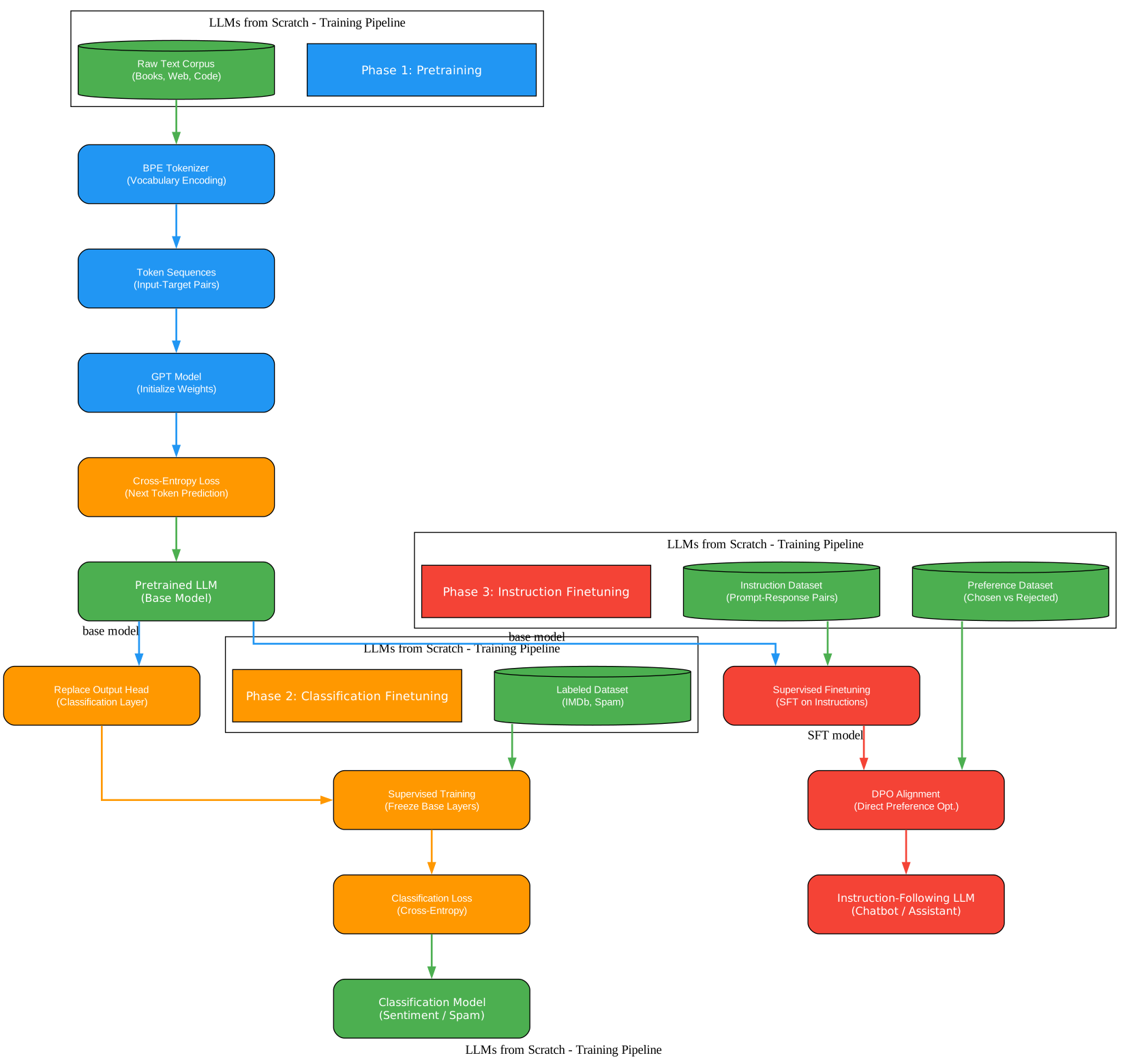
Understanding the Training Pipeline
The training pipeline diagram above illustrates the three-phase approach to developing a large language model, from initial pretraining through task-specific finetuning. Each phase builds upon the previous one, progressively refining the model’s capabilities.
Phase 1: Pretraining on Unlabeled Data
Pretraining is the most computationally expensive phase, where the model learns the fundamental patterns of language by predicting the next token in a sequence. The repository implements this using the train_model_simple function, which iterates over the training data for a specified number of epochs, computing the cross-entropy loss between predicted and actual next tokens.
The training loop includes several practical features: learning rate warmup followed by cosine decay scheduling, gradient clipping to prevent exploding gradients, and periodic evaluation on a validation set to monitor for overfitting. The calc_loss_batch function computes the loss for a single batch, while calc_loss_loader aggregates losses across an entire data loader.
def calc_loss_batch(input_batch, target_batch, model, device):
    input_batch, target_batch = input_batch.to(device), target_batch.to(device)
    logits = model(input_batch)
    loss = torch.nn.functional.cross_entropy(
        logits.flatten(0, 1), target_batch.flatten()
    )
    return loss
The pretraining phase also covers loading pretrained weights from OpenAI’s GPT-2 model, allowing you to skip the expensive pretraining step and start from a well-initialized model. The gpt_download.py script handles downloading and converting the weights, while load_weights_into_gpt maps them to the custom architecture.
Phase 2: Finetuning for Classification
Once the model has been pretrained, it can be finetuned for specific downstream tasks. Chapter 6 demonstrates this with two classification tasks: IMDb sentiment analysis (binary classification) and spam detection. The classification head replaces the language model’s output layer with a linear projection to the number of classes, and only the final transformer block and output layer are typically unfrozen for finetuning.
The gpt_class_finetune.py script shows how to modify the pretrained model for classification, freeze most layers to prevent catastrophic forgetting, and train on a labeled dataset. The approach achieves strong performance even with limited training data, demonstrating the transfer learning power of pretrained language models.
Phase 3: Instruction Finetuning and Alignment
The final phase transforms the model into an instruction-following assistant. Chapter 7 covers instruction finetuning, where the model is trained on prompt-response pairs formatted with special delimiters. The InstructionDataset class formats each example with ### Instruction: and ### Response: markers, and a custom collate function handles variable-length sequences with padding and masking.
Beyond basic instruction tuning, the repository also implements Direct Preference Optimization (DPO), a technique for aligning model outputs with human preferences without requiring a separate reward model. DPO trains the model to prefer chosen responses over rejected ones using a simple logistic loss, making alignment more accessible than traditional reinforcement learning from human feedback (RLHF).
Takeaway: The three-phase training pipeline – pretraining, classification finetuning, and instruction finetuning – mirrors exactly how production LLMs like GPT-4 and Llama are developed. By implementing each phase from scratch, you gain an intuitive understanding of why each step matters and how the model’s behavior changes at each stage.
Advanced Features
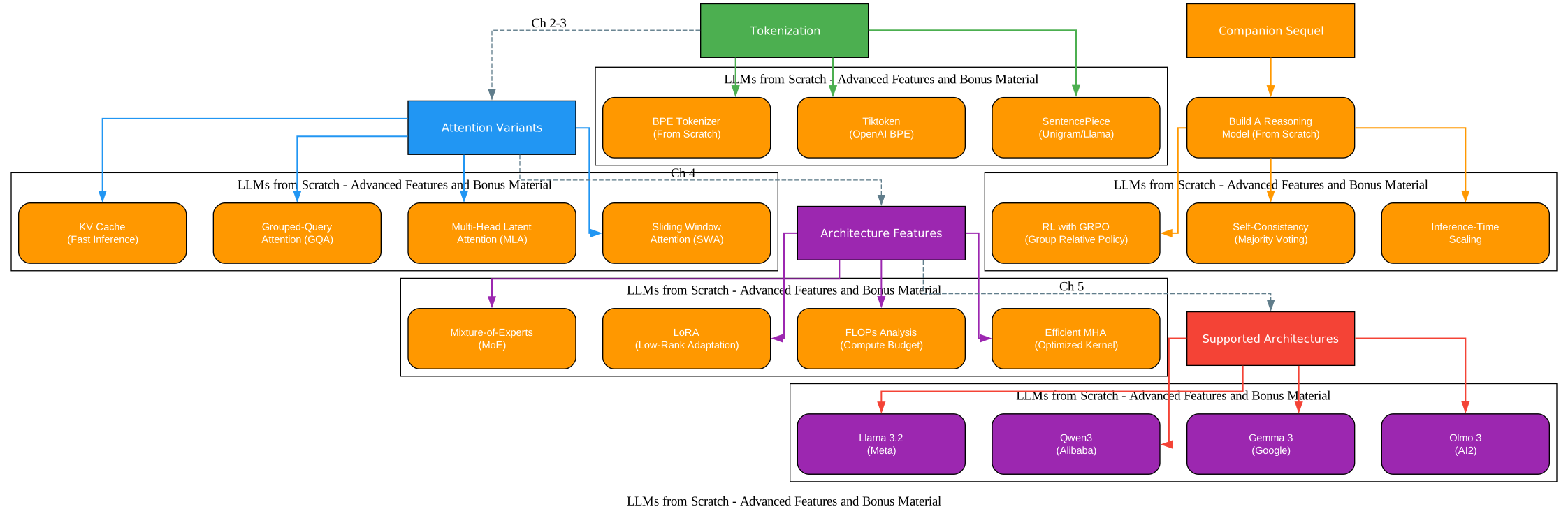
Understanding the Advanced Features
The advanced features diagram above showcases the extensive bonus material available in the repository, covering cutting-edge techniques and architectures that go well beyond the core book content. These materials represent the frontier of LLM research and engineering, implemented in the same clear, educational style.
KV Cache for Faster Inference
The KV cache implementation in ch04/03_kv-cache/ demonstrates how to cache key and value projections during autoregressive generation, avoiding redundant recomputation. Without KV caching, each new token requires recomputing attention over all previous positions, resulting in O(n^2) complexity. With KV caching, only the new key and value vectors are computed, reducing the per-step cost to O(n). The repository provides both a basic implementation (gpt_with_kv_cache.py) and an optimized version (gpt_with_kv_cache_optimized.py) that minimizes memory allocations.
Grouped-Query Attention (GQA)
GQA, implemented in ch04/04_gqa/, reduces the memory cost of the KV cache by sharing key and value heads across multiple query heads. Instead of storing separate key and value projections for each attention head, GQA groups queries that share the same key-value pair. This technique, used in Llama 2 and later models, can reduce KV cache memory by 4-8x with minimal quality degradation. The repository includes a memory estimator that quantifies these savings across different model configurations.
Multi-Head Latent Attention (MLA)
MLA, from DeepSeek-V2 and implemented in ch04/05_mla/, takes a different approach to reducing attention memory. Instead of grouping queries, MLA compresses the key and value representations into a lower-dimensional latent space using learned projections. This allows the model to store compressed KV pairs in the cache and decompress them on the fly, achieving even greater memory savings than GQA while maintaining model quality.
Sliding Window Attention (SWA)
SWA, implemented in ch04/06_swa/, restricts each attention head to a fixed-size window of recent tokens rather than attending to the entire sequence. This reduces the quadratic complexity of attention to linear with respect to the window size, enabling efficient processing of very long sequences. SWA is a key component of the Mistral architecture and is particularly useful for tasks requiring long context windows.
Mixture-of-Experts (MoE)
The MoE implementation in ch04/07_moe/ replaces the dense feed-forward network in each transformer block with a sparse mixture of expert networks. A gating router selects the top-k experts for each token, activating only a fraction of the total parameters per forward pass. This allows the model to scale to much larger parameter counts without proportionally increasing compute cost. The repository includes memory estimation tools that compare dense and MoE configurations.
Real-World Architecture Implementations
Perhaps the most impressive bonus material is the collection of from-scratch implementations of production LLM architectures. The repository provides standalone notebooks that implement Llama 3.2, Qwen3 (both dense and MoE variants), Gemma 3, Olmo 3, Tiny Aya, Qwen3.5, and Gemma 4 (E2B and E4B variants). Each implementation follows the same educational style as the main chapters, making it possible to understand exactly how these production models differ from the base GPT architecture.
LoRA and Parameter-Efficient Finetuning
Appendix E covers Low-Rank Adaptation (LoRA), a technique for finetuning large models by injecting trainable low-rank matrices into each transformer layer. Instead of updating all model parameters, LoRA freezes the pretrained weights and only trains the injected matrices, reducing the number of trainable parameters by orders of magnitude while maintaining comparable performance.
Important: The bonus material in this repository is not just supplementary – it covers techniques that are actively used in state-of-the-art production models. GQA is used in Llama 3, MLA is used in DeepSeek-V2/V3, SWA is used in Mistral, and MoE is used in Mixtral and Qwen3. Understanding these techniques from their implementations here gives you direct insight into how the most capable models in the world are built.
Installation and Setup
Setting up the LLMs-from-scratch environment is straightforward. The repository supports multiple installation methods to accommodate different preferences.
Option 1: pip Installation
# Clone the repository
git clone https://github.com/rasbt/LLMs-from-scratch.git

# Navigate into the project directory
cd LLMs-from-scratch

# Install dependencies
pip install -r requirements.txt
Option 2: pixi Installation (Recommended for Reproducibility)
# Clone the repository
git clone https://github.com/rasbt/LLMs-from-scratch.git

# Navigate into the project directory
cd LLMs-from-scratch

# Install using pixi (handles environment isolation automatically)
pixi install
Option 3: uv Installation
# Clone the repository
git clone https://github.com/rasbt/LLMs-from-scratch.git

# Navigate into the project directory
cd LLMs-from-scratch

# Install using uv
uv pip install -r requirements.txt
Core Dependencies
The key dependencies are:
| Package | Minimum Version | Purpose |
|---|---|---|
torch | 2.2.2 | Core deep learning framework |
tiktoken | 0.5.1 | BPE tokenizer (GPT-2 compatible) |
numpy | 1.26 | Numerical computing |
matplotlib | 3.7.1 | Visualization and plotting |
jupyterlab | 4.0 | Interactive notebook environment |
pandas | 2.2.1 | Data manipulation (finetuning chapters) |
tensorflow | 2.16.2 | Weight loading (GPT-2 download utility) |
tqdm | 4.66.1 | Progress bars during training |
Python 3.10 or later is required (up to 3.13 supported). The code automatically uses CUDA GPUs when available and falls back to CPU otherwise.
Usage Examples
Tokenizing Text and Creating a DataLoader
The first step in working with the LLM is tokenizing raw text and creating a data loader for training. The GPTDatasetV1 class handles sliding-window tokenization:
import tiktoken
from torch.utils.data import DataLoader

tokenizer = tiktoken.get_encoding("gpt2")

# Create a dataloader with a sliding window
dataloader = create_dataloader_v1(
    raw_text, batch_size=4, max_length=256,
    stride=128, shuffle=True, drop_last=True
)

# Iterate over batches
for input_batch, target_batch in dataloader:
    print("Input shape:", input_batch.shape)
    print("Target shape:", target_batch.shape)
    break
Building the GPT Model
The GPTModel class assembles all components into a complete transformer architecture:
import torch
import torch.nn as nn

GPT_CONFIG_124M = {
    "vocab_size": 50257,
    "context_length": 256,
    "emb_dim": 768,
    "n_heads": 12,
    "n_layers": 12,
    "drop_rate": 0.1,
    "qkv_bias": False
}

model = GPTModel(GPT_CONFIG_124M)
total_params = sum(p.numel() for p in model.parameters())
print(f"Total parameters: {total_params:,}")
# Output: Total parameters: 124,412,160
Generating Text
After training or loading pretrained weights, you can generate text with the model:
def generate_text_simple(model, idx, max_new_tokens, context_size):
    for _ in range(max_new_tokens):
        idx_cond = idx[:, -context_size:]
        with torch.no_grad():
            logits = model(idx_cond)
        logits = logits[:, -1, :]
        probas = torch.softmax(logits, dim=-1)
        idx_next = torch.argmax(probas, dim=-1, keepdim=True)
        idx = torch.cat((idx, idx_next), dim=1)
    return idx

# Generate text from a prompt
token_ids = generate_text_simple(
    model=model,
    idx=text_to_token_ids("Hello, I am", tokenizer),
    max_new_tokens=50,
    context_size=GPT_CONFIG_124M["context_length"]
)
print(token_ids_to_text(token_ids, tokenizer))
Instruction Finetuning
The InstructionDataset class formats training data for instruction tuning:
class InstructionDataset(Dataset):
    def __init__(self, data, tokenizer):
        self.data = data
        self.encoded_texts = []
        for entry in data:
            instruction_plus_input = format_input(entry)
            response_text = f"\n\n### Response:\n{entry['output']}"
            full_text = instruction_plus_input + response_text
            self.encoded_texts.append(
                tokenizer.encode(full_text)
            )

    def __getitem__(self, index):
        return self.encoded_texts[index]

    def __len__(self):
        return len(self.data)
Key Features
| Feature | Description |
|---|---|
| Step-by-step GPT implementation | Build a complete GPT model from scratch with every component explained |
| Multi-head attention from scratch | Implement and understand the core attention mechanism in detail |
| BPE tokenizer implementation | Learn Byte Pair Encoding tokenization from the ground up |
| Pretraining pipeline | Full training loop with learning rate scheduling, gradient clipping, and evaluation |
| Classification finetuning | Finetune for IMDb sentiment analysis and spam detection |
| Instruction finetuning | Train the model to follow instructions with formatted prompt-response pairs |
| Direct Preference Optimization (DPO) | Align model outputs with human preferences without a separate reward model |
| KV Cache | Optimize inference by caching key-value projections across generation steps |
| Grouped-Query Attention (GQA) | Reduce KV cache memory by sharing key-value heads across query groups |
| Multi-Head Latent Attention (MLA) | Compress key-value representations into a latent space for memory efficiency |
| Sliding Window Attention (SWA) | Enable efficient long-context processing with fixed-size attention windows |
| Mixture-of-Experts (MoE) | Scale model capacity by routing tokens through specialized expert networks |
| LoRA finetuning | Parameter-efficient finetuning with low-rank adaptation matrices |
| Real architecture implementations | Llama 3.2, Qwen3, Gemma 3, Olmo 3, Tiny Aya, Qwen3.5, Gemma 4 from scratch |
| 17+ hour companion video course | Video walkthrough of every chapter by the author |
| Cross-platform CI | Tested on Linux, Windows, and macOS with automated CI workflows |
| Exercise solutions | Complete solutions for all chapter exercises |
Troubleshooting
Notebook Images Not Loading
The Jupyter notebooks reference images hosted on sebastianraschka.com. If images do not render:
- Open an image URL directly in your browser to test connectivity
- Check if a VPN, proxy, or firewall is blocking external image requests
- Try opening the notebooks on a different network or device
- If images fail on all devices, file an issue on the GitHub repository
Apple Silicon (MPS) Issues
On Apple Silicon Macs, the MPS (Metal Performance Shaders) backend may produce unstable results during training:
- If you see diverging losses, sharp loss spikes, or poor generated text, switch to CPU mode
- For faster training with consistent results, use CUDA on an NVIDIA GPU or a cloud GPU instance
- If you experiment with MPS, validate results carefully against CPU baselines
- CUDA-specific options like
pin_memory=Trueandtorch.compilerequire separate guards on MPS
PyTorch Version Compatibility
The repository requires PyTorch 2.2.2 or later. On Intel macOS, the maximum supported version is PyTorch 2.5.x. If you encounter version conflicts:
# Install a compatible PyTorch version
pip install torch>=2.2.2

# For Intel macOS specifically
pip install torch>=2.2.2,<2.6
Memory Errors During Training
If you encounter out-of-memory errors during pretraining or finetuning:
- Reduce the batch size in the data loader configuration
- Shorten the context length in the model configuration
- Use gradient accumulation to simulate larger batch sizes
- Enable mixed precision training with
torch.cuda.amp - Consider using the smaller GPT-2 configuration for initial experiments
TensorFlow Import Errors
The gpt_download.py utility uses TensorFlow for loading GPT-2 weights. If TensorFlow fails to install:
- Ensure you have a compatible Python version (3.10-3.12 recommended)
- On macOS, use
pip install tensorflow>=2.16.2for Intel Macs orpip install tensorflow>=2.18.0for Apple Silicon - Alternatively, manually download the GPT-2 weights and load them without TensorFlow
Conclusion
The rasbt/LLMs-from-scratch repository is the most comprehensive educational resource for understanding how large language models work at every level. By implementing each component – from tokenization to attention to the full training pipeline – in clear, well-documented PyTorch code, it removes the mystery behind systems like ChatGPT and empowers you to build, modify, and extend your own language models.
Whether you are a researcher exploring new architectures, an engineer optimizing inference, or a student learning deep learning fundamentals, this repository provides the foundation you need. The bonus material on GQA, MLA, SWA, MoE, and real-world architectures like Llama 3.2 and Qwen3 ensures that the knowledge stays relevant as the field continues to evolve.
Links:
- GitHub Repository: https://github.com/rasbt/LLMs-from-scratch
- Manning Book Page: https://www.manning.com/books/build-a-large-language-model-from-scratch
- Companion Video Course: https://www.manning.com/livevideo/master-and-build-large-language-models
- Companion Sequel (Reasoning From Scratch): https://github.com/rasbt/reasoning-from-scratch

Enjoyed this post? Never miss out on future posts by following us


