GitHub Spec Kit: Spec-Driven Development Toolkit with 97K Stars
GitHub Spec Kit is an open-source toolkit that flips the traditional software development paradigm on its head. Instead of writing code first and documenting later, Spec Kit makes specifications the source of truth, generating working implementations from structured requirements. With 97,000 stars on GitHub and support for 30+ AI coding agents, Spec Kit is rapidly becoming the standard for spec-driven development (SDD).
Key Insight: Spec-Driven Development inverts the power structure of software development - specifications don’t serve code, code serves specifications. The PRD isn’t a guide for implementation; it’s the source that generates implementation.
What is Spec-Driven Development?
Spec-Driven Development (SDD) is a methodology that emphasizes creating clear, executable specifications before writing any code. In traditional development, specifications are scaffolding that gets discarded once coding begins. SDD changes this fundamentally: specifications become the primary artifact, and code becomes the expression of those specifications in a particular language and framework.
The core idea is that AI can understand and implement complex specifications, but raw AI generation without structure produces chaos. SDD provides that structure through specifications that are precise, complete, and unambiguous enough to generate working systems.
Three trends make SDD necessary now:
- AI capabilities have reached a threshold where natural language specifications can reliably generate working code
- Software complexity continues to grow exponentially, making manual alignment with original intent increasingly difficult
- Pace of change accelerates - pivots are no longer exceptional but expected, and SDD transforms requirement changes from obstacles into normal workflow
Understanding the SDD Workflow
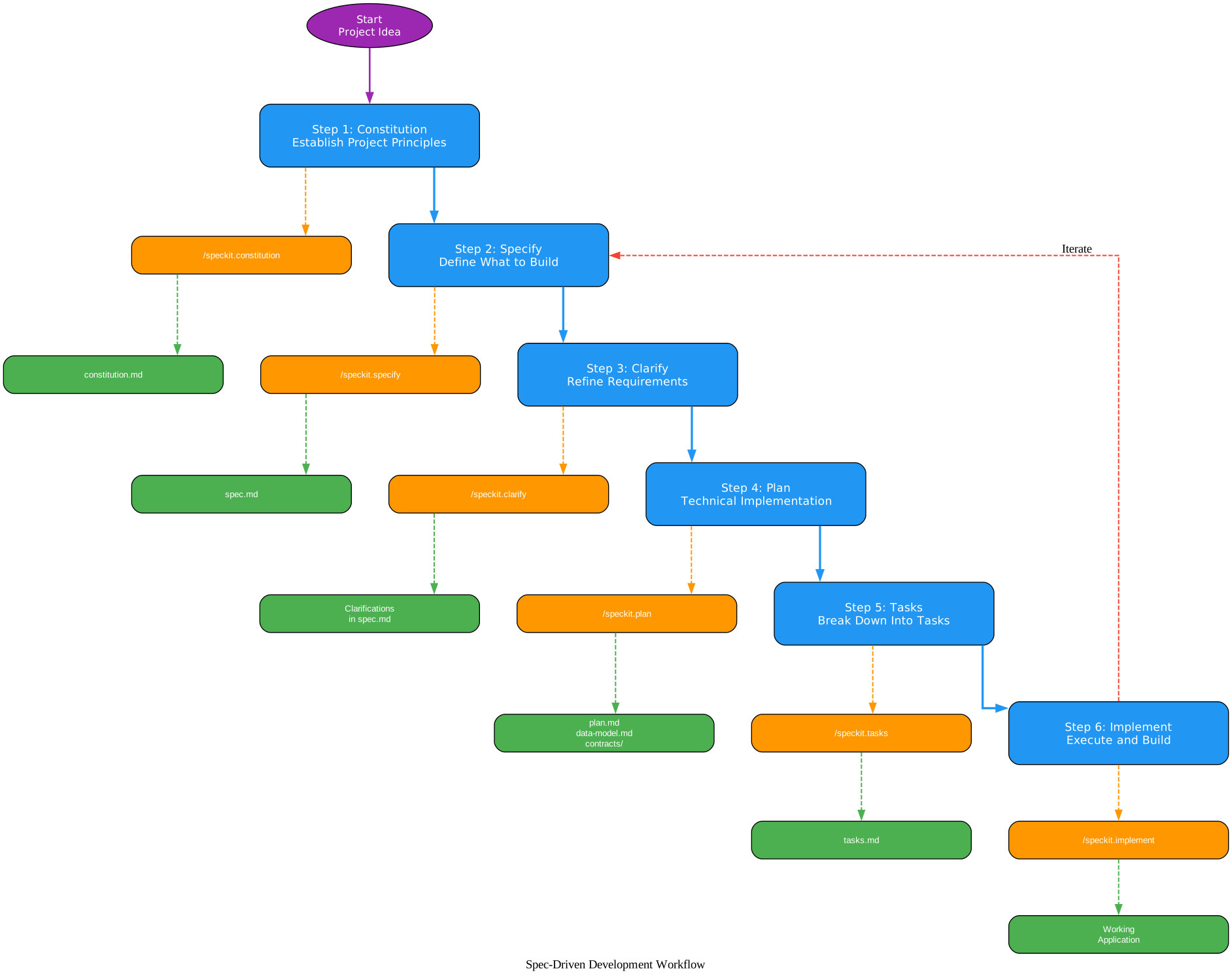
The SDD workflow diagram above illustrates the six-step process that transforms a project idea into a working application. Let’s break down each component:
Step 1: Constitution - Establish project principles using /speckit.constitution. This creates a constitution.md file that defines governance for code quality, testing standards, user experience consistency, and performance requirements. These principles guide all subsequent development phases.
Step 2: Specify - Define what you want to build using /speckit.specify. Focus on the what and why, not the tech stack. This creates a spec.md file with user stories and functional requirements.
Step 3: Clarify - Refine requirements using /speckit.clarify. This structured clarification workflow asks targeted questions to fill gaps in the specification before planning begins, reducing rework downstream.
Step 4: Plan - Create a technical implementation plan using /speckit.plan. Now you specify the tech stack and architecture. This generates plan.md, data-model.md, contracts/, and research.md.
Step 5: Tasks - Break down the plan into actionable tasks using /speckit.tasks. This creates a tasks.md file with dependency management, parallel execution markers, and checkpoint validation.
Step 6: Implement - Execute all tasks using /speckit.implement. The coding agent validates prerequisites, parses the task breakdown, and executes tasks in the correct order.
The red dashed “Iterate” arrow from Step 6 back to Step 2 represents the feedback loop - when production metrics and incidents inform specification evolution, you cycle back to refine and regenerate.
Takeaway: With just
specify init, your project gains a complete SDD framework - constitution, specification templates, planning workflows, and task breakdowns - all integrated with your preferred AI coding agent.
Getting Started with Specify CLI
The Specify CLI is the command-line interface that bootstraps projects with the Spec Kit framework. It sets up directory structures, templates, and AI agent integrations.
Installation
Install Specify CLI using uv (recommended) or pipx:
# Install a specific stable release (recommended)
uv tool install specify-cli --from git+https://github.com/github/spec-kit.git@v0.8.9

# Or install latest from main
uv tool install specify-cli --from git+https://github.com/spec-kit.git

# Alternative: using pipx
pipx install git+https://github.com/github/spec-kit.git@v0.8.9
Verify the installation:
specify version
Initialize a Project
Create a new project or initialize in an existing directory:
# Create new project
specify init my-project

# Initialize in existing project with a specific agent
specify init . --integration copilot
specify init --here --integration claude
specify init . --integration codex --integration-options="--skills"
The CLI supports 30+ AI coding agent integrations including Claude Code, GitHub Copilot, Codex CLI, Gemini CLI, Cursor, Windsurf, Kiro CLI, and many more.
Check Prerequisites
specify check
This verifies that your chosen AI coding agent is properly installed and configured.
The Specify Slash Commands
After running specify init, your AI coding agent gains access to structured slash commands:
Core Commands
| Command | Agent Skill | Description |
|---|---|---|
/speckit.constitution | speckit-constitution | Create or update project governing principles |
/speckit.specify | speckit-specify | Define what you want to build (requirements and user stories) |
/speckit.plan | speckit-plan | Create technical implementation plans |
/speckit.tasks | speckit-tasks | Generate actionable task lists |
/speckit.taskstoissues | speckit-taskstoissues | Convert tasks into GitHub issues |
/speckit.implement | speckit-implement | Execute all tasks to build the feature |
Optional Commands
| Command | Agent Skill | Description |
|---|---|---|
/speckit.clarify | speckit-clarify | Clarify underspecified areas (recommended before /speckit.plan) |
/speckit.analyze | speckit-analyze | Cross-artifact consistency and coverage analysis |
/speckit.checklist | speckit-checklist | Generate custom quality checklists |
30+ AI Agent Integrations

Understanding the Extension Ecosystem
The extension ecosystem diagram above shows how Spec Kit Core (the Specify CLI) connects to four categories of integrations:
CLI Agents (Orange) - Command-line AI coding tools that integrate directly with Spec Kit’s slash commands. These include Claude Code, Codex CLI, Gemini CLI, Qwen CLI, Kiro CLI, and OpenCode. Each receives the full set of Spec Kit commands as slash commands in their terminal interface.
IDE Agents (Green) - Integrated development environment assistants that work within your editor. GitHub Copilot, Cursor, Windsurf, Trae, Tabnine, and Roo Code all integrate with Spec Kit, bringing structured development workflows directly into the coding environment.
Extensions (Purple) - Community-contributed extensions that add new capabilities beyond the core SDD workflow. The 60+ extensions cover categories like process orchestration, code review, security auditing, Jira integration, and multi-agent quality assurance. These are installed via specify extension add <name>.
Presets (Cyan) - Customization layers that change how Spec Kit works without adding new capabilities. Presets override templates and commands to enforce organizational standards, domain-specific terminology, or compliance requirements. Install via specify preset add <name>.
Amazing: With 60+ community extensions and 30+ AI agent integrations, Spec Kit has built one of the largest ecosystems in the AI coding space - all centered around the principle that specifications should drive development.
The Template Priority System
Understanding Template Resolution
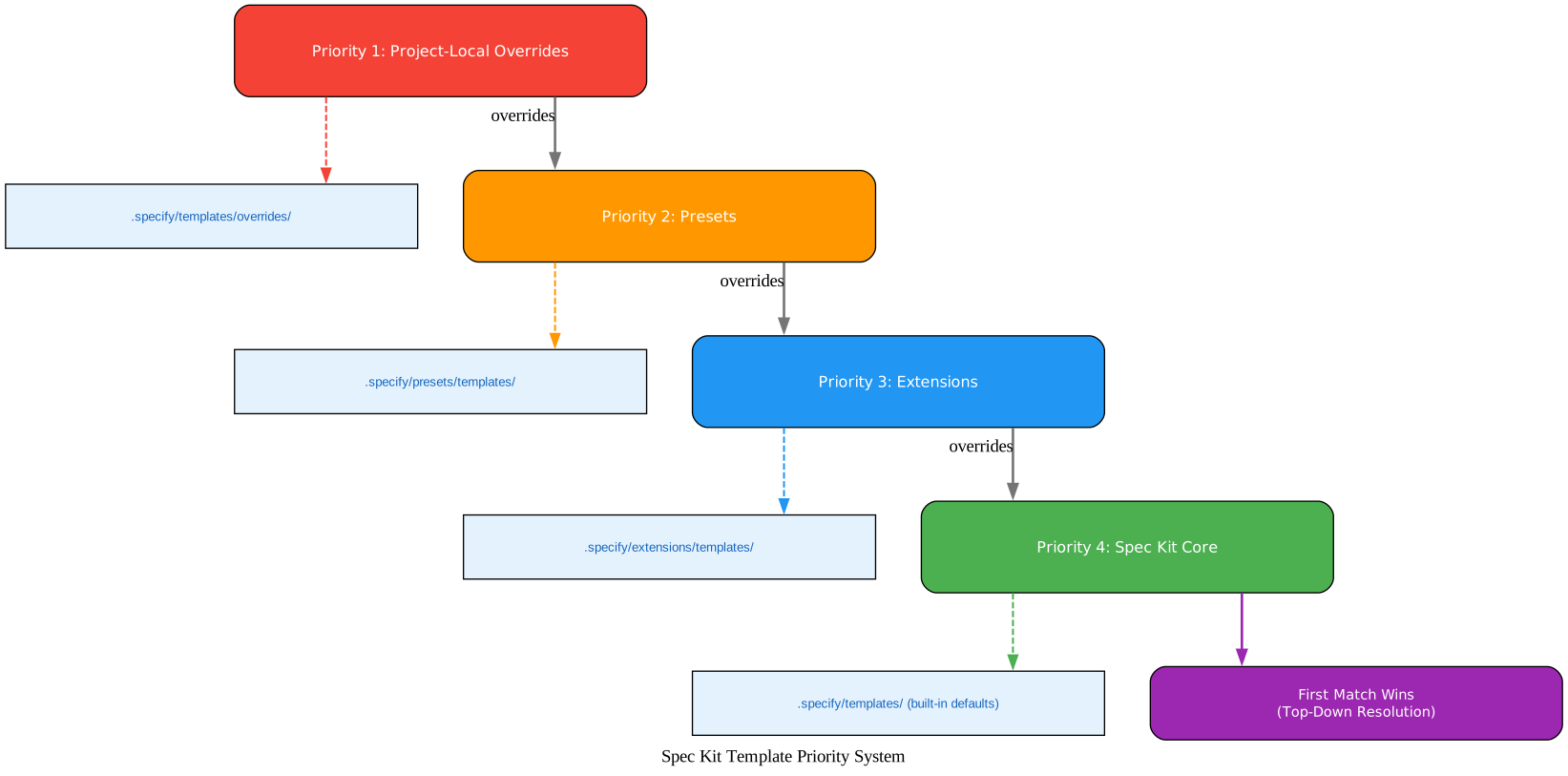
The template priority system diagram above illustrates how Spec Kit resolves template conflicts using a top-down resolution strategy. When a command needs a template, Spec Kit walks the priority stack from highest to lowest:
Priority 1: Project-Local Overrides (.specify/templates/overrides/) - The highest priority layer allows one-off adjustments for a single project without creating a full preset. If a project-local override exists for a template, it wins over everything else.
Priority 2: Presets (.specify/presets/templates/) - Presets customize how Spec Kit works by overriding core and extension templates. Multiple presets can be stacked with priority ordering, and when a preset is removed, the next-highest-priority version is automatically restored.
Priority 3: Extensions (.specify/extensions/templates/) - Extensions introduce new commands and templates. They expand what Spec Kit can do, adding capabilities like Jira integration, security review, or V-Model test traceability.
Priority 4: Spec Kit Core (.specify/templates/) - The built-in defaults provide the standard SDD workflow templates for constitution, specification, plan, and tasks.
The “First Match Wins” principle means that when Spec Kit needs a template, it checks each layer from top to bottom and uses the first match it finds. This gives teams fine-grained control over customization without modifying the core toolkit.
Community Extensions
Spec Kit has a thriving community with 60+ extensions covering every aspect of the development lifecycle. Here are some notable categories:
Process Extensions
| Extension | Purpose |
|---|---|
| Agent Assign | Assign specialized Claude Code agents to spec-kit tasks |
| AIDE | 7-step workflow for building projects from scratch with AI |
| Brownfield Bootstrap | Auto-discover architecture for existing codebases |
| Bugfix Workflow | Structured bugfix workflow with spec tracing |
| Fleet Orchestrator | Full feature lifecycle with human-in-the-loop gates |
| MAQA | Multi-agent QA with parallel worktree-based implementation |
Integration Extensions
| Extension | Purpose |
|---|---|
| Jira Integration | Create Epics, Stories, and Issues from spec-kit specifications |
| Azure DevOps | Sync user stories and tasks to Azure DevOps work items |
| GitHub Issues | Generate spec artifacts from GitHub Issues with bidirectional sync |
| Confluence | Create documentation summarizing specifications and planning |
Quality Extensions
| Extension | Purpose |
|---|---|
| Security Review | Full-project secure-by-design security audits |
| Verify | Post-implementation quality gate validating code against specs |
| Review | Comprehensive code review with specialized agents |
| Ripple | Detect side effects that tests cannot catch |
| Spec Validate | Comprehension validation and approval state for artifacts |
Visibility Extensions
| Extension | Purpose |
|---|---|
| Project Health Check | Diagnose project health across structure, agents, and features |
| Cost Tracker | Track real LLM dollar cost across SDD workflows |
| Spec Diagram | Auto-generate Mermaid diagrams of workflow state and progress |
| What-if Analysis | Preview downstream impact of requirement changes |
Development Phases
Spec Kit supports three distinct development phases:
| Phase | Focus | Key Activities |
|---|---|---|
| 0-to-1 Development (Greenfield) | Generate from scratch | Start with high-level requirements, generate specifications, plan implementation, build production-ready applications |
| Creative Exploration | Parallel implementations | Explore diverse solutions, support multiple tech stacks, experiment with UX patterns |
| Iterative Enhancement (Brownfield) | Brownfield modernization | Add features iteratively, modernize legacy systems, adapt processes |
Installation and Quick Start
Prerequisites
- Linux, macOS, or Windows
- A supported AI coding agent (Claude Code, Copilot, Codex CLI, etc.)
- Python 3.11+
uvpackage manager (recommended) orpipx- Git
Quick Start
# 1. Install Specify CLI
uv tool install specify-cli --from git+https://github.com/github/spec-kit.git@v0.8.9

# 2. Create a new project
specify init my-app

# 3. Enter the project and launch your coding agent
cd my-app
claude  # or copilot, codex, etc.

# 4. Establish project principles
/speckit.constitution Create principles focused on code quality, testing, and performance

# 5. Define what to build
/speckit.specify Build a task management app with Kanban boards and team collaboration

# 6. Clarify requirements
/speckit.clarify

# 7. Create technical plan
/speckit.plan Use React with TypeScript, PostgreSQL, and REST APIs

# 8. Generate task breakdown
/speckit.tasks

# 9. Implement
/speckit.implement
Enterprise and Air-Gapped Installation
For environments that block access to PyPI or GitHub, Spec Kit supports enterprise installation using pip download to create portable, OS-specific wheel bundles on a connected machine. This enables deployment in air-gapped environments common in financial services, healthcare, and government sectors.
The Specify CLI also bundles core assets (templates, scripts, and workflows) directly into the wheel, so specify init works without network access.
Troubleshooting
Git Credential Manager on Linux
If you encounter Git authentication issues on Linux:
# Download and install Git Credential Manager
wget https://github.com/git-ecosystem/git-credential-manager/releases/download/v2.6.1/gcm-linux_amd64.2.6.1.deb
sudo dpkg -i gcm-linux_amd64.2.6.1.deb
git config --global credential.helper manager
rm gcm-linux_amd64.2.6.1.deb
Agent Not Found
If specify check reports a missing agent, use --ignore-agent-tools to proceed:
specify init my-project --integration copilot --ignore-agent-tools
Important: Spec Kit’s template priority system means you can customize every aspect of the workflow without forking. Project-local overrides let you make one-off adjustments, while presets enable organization-wide standards enforcement.
Conclusion
GitHub Spec Kit represents a paradigm shift in how we build software with AI. By making specifications the source of truth and code the generated output, SDD eliminates the gap between intent and implementation. The 6-step workflow (Constitution, Specify, Clarify, Plan, Tasks, Implement) provides structure without rigidity, and the 60+ community extensions ensure that the toolkit adapts to your team’s specific needs.
With 97,000 stars, 30+ AI agent integrations, and a thriving community, Spec Kit is positioned to become the standard framework for spec-driven development. Whether you are building greenfield projects, exploring creative alternatives, or modernizing legacy systems, Spec Kit provides the scaffolding to turn specifications into working software.
Links
- GitHub Repository: https://github.com/github/spec-kit
- Documentation: https://github.github.io/spec-kit/
- Community Extensions: https://speckit-community.github.io/extensions/

Enjoyed this post? Never miss out on future posts by following us


