What Is Crush?
Crush is an open-source, terminal-based agentic coding tool from the Charmbracelet team – the same developers behind Bubble Tea, Lip Gloss, and Glamour. Written in Go and boasting over 23,000 GitHub stars, Crush brings the power of large language models directly into your terminal with a beautiful, interactive user interface. It is designed to be your coding companion: reading, writing, and executing code while you maintain full control.
Agentic coding represents a paradigm shift in how developers interact with AI. Rather than copy-pasting snippets from a web chat, an agentic coding tool operates within your project context, understands your codebase through LSP integration, and takes actions on your behalf with your permission. Crush embodies this philosophy with a terminal-first approach that feels native to any developer workflow.
The tool supports a wide range of LLM providers – from Anthropic and OpenAI to Google Gemini, Amazon Bedrock, Groq, Cerebras, and even local models via Ollama and LM Studio. You can switch models mid-session without losing context, making it one of the most flexible agentic coding tools available.
Key Features
- Multi-Model Support: Choose from Anthropic, OpenAI, Google Gemini, Amazon Bedrock, Groq, Cerebras, OpenRouter, and many more providers. Add custom providers via OpenAI- or Anthropic-compatible APIs.
- Mid-Session Model Switching: Change LLMs during a session while preserving context – no restarts required.
- Session-Based Workflow: Maintain multiple work sessions and contexts per project, all persisted in SQLite.
- LSP-Enhanced Context: Crush uses Language Server Protocols for additional code intelligence, just like your IDE does.
- MCP Extensibility: Add capabilities via Model Context Protocol servers using HTTP, stdio, or SSE transports.
- Agent Skills: Support for the Agent Skills open standard (SKILL.md files) for extending agent capabilities with reusable skill packages.
- Hooks System: Define shell commands that run before tool execution for policy enforcement, input rewriting, and context injection.
- Cross-Platform: First-class support on macOS, Linux, Windows (PowerShell and WSL), Android, FreeBSD, OpenBSD, and NetBSD.
- Charm Ecosystem: Built on Bubble Tea v2, Lip Gloss v2, and Glamour v2 for a polished terminal experience.
- Desktop Notifications: Get notified when a tool call requires permission or when the agent finishes its turn.
Architecture Overview
Crush follows a layered architecture that separates concerns cleanly. At the top sits the Bubble Tea v2 TUI, which provides the interactive terminal interface. Below that, the Coordinator manages named agents – primarily the Coder agent for code generation and the Task agent for sub-task delegation. The Fantasy library provides the LLM provider abstraction, handling protocol differences between Anthropic, OpenAI, Gemini, and other providers.
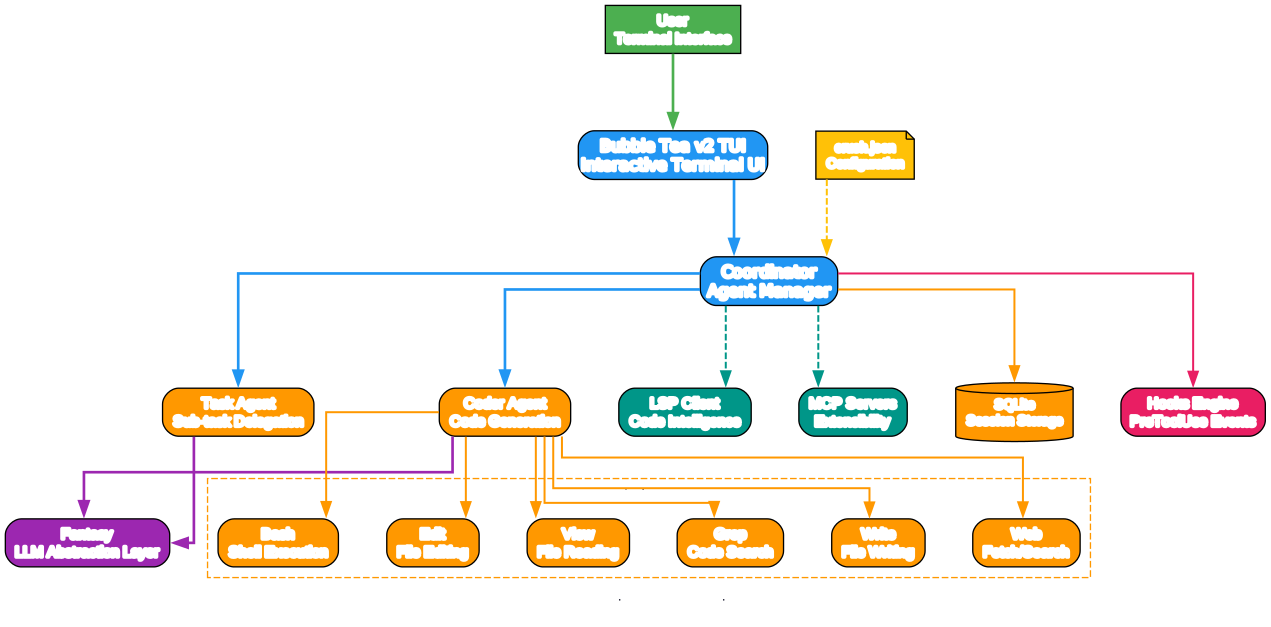
The architecture diagram above illustrates how Crush wires together its core components. The user interacts through the Bubble Tea TUI, which communicates with the Coordinator. The Coordinator dispatches work to agents, which in turn call the Fantasy abstraction layer to communicate with LLM providers. Built-in tools like Bash, Edit, View, Grep, Write, and Web Fetch/Search give the agent direct access to your development environment. LSP integration provides code intelligence, while MCP servers enable extensibility. The Hooks engine runs user-defined shell commands before tool execution, giving you deterministic control over agent behavior. All session data is persisted in SQLite via sqlc-generated queries.
Core Components
| Component | Purpose |
|---|---|
| Bubble Tea v2 TUI | Interactive terminal user interface |
| Coordinator | Manages named agents (coder, task) |
| Fantasy | LLM provider abstraction layer |
| Catwalk | Community-supported model registry with auto-updates |
| Hooks Engine | PreToolUse shell command execution |
| LSP Client | Language Server Protocol integration for code intelligence |
| MCP Client | Model Context Protocol server integration |
| Skills System | SKILL.md-based agent skill discovery and loading |
| SQLite + sqlc | Session persistence and data storage |
| Cobra CLI | Command-line interface framework |
Agentic Coding Workflow
Understanding how Crush processes a request helps you appreciate its design. When you type a prompt, Crush does not simply forward it to an LLM. Instead, it assembles context from multiple sources – your AGENTS.md file, LSP diagnostics, and discovered skills – before dispatching to the appropriate agent.
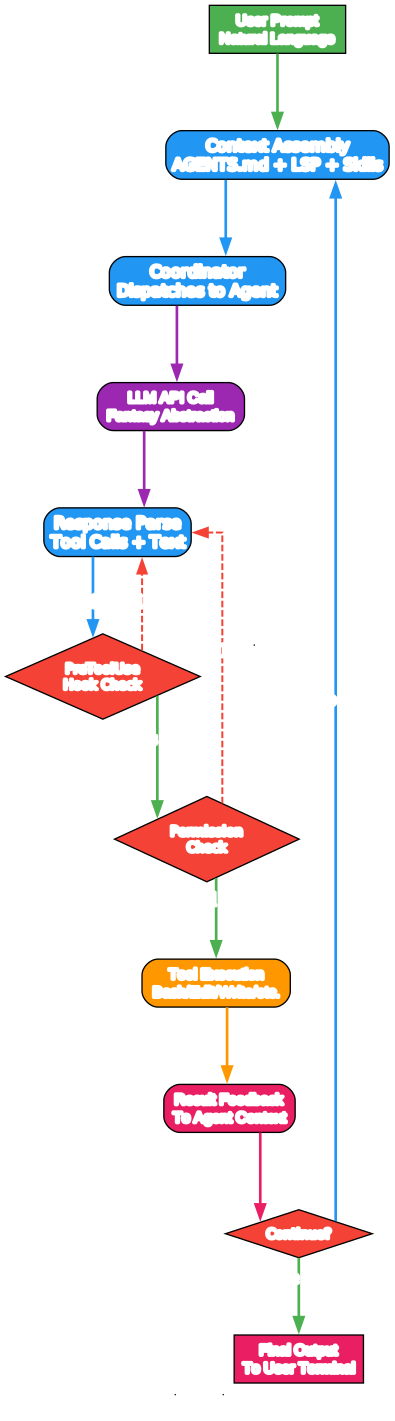
The workflow diagram above shows the complete agentic coding loop. It begins when you enter a natural language prompt. Crush assembles context from AGENTS.md, LSP data, and skill files, then dispatches to the Coordinator. The Coordinator sends the request to the LLM via the Fantasy abstraction layer. When the LLM responds with tool calls, Crush first runs any matching PreToolUse hooks. If a hook blocks the call, the agent receives the error and can try an alternative. If hooks pass, the permission check runs – you can approve or deny each tool call. Once approved, the tool executes (Bash, Edit, Write, etc.), and the result feeds back into the agent context. The loop continues until the agent determines the task is complete, at which point the final output is displayed in your terminal.
This loop-based architecture is what makes agentic coding powerful. The agent can iteratively refine its approach, try different solutions, and respond to errors – all while keeping you in the loop through the permission system.
The Hook System
Crush’s hook system deserves special attention. Hooks are user-defined shell scripts that fire before tool execution. They provide deterministic control over an agent’s behavior, which is critical for production use. You can:
- Block dangerous commands: Prevent
rm -rf /orgit push -f - Rewrite tool input: Transform commands before execution (e.g., replace
nodewithdeno) - Inject context: Add reminders like “run gofumpt after editing Go files”
- Auto-approve safe tools: Skip permission prompts for read-only operations
- Log tool calls: Audit every action the agent takes
Hooks are Claude Code-compatible, so existing Claude Code hooks work with Crush unchanged. The system supports parallel execution with deterministic result composition based on config order.
The Charm Ecosystem
One of Crush’s distinguishing features is that it is built on the Charm ecosystem – a collection of battle-tested Go libraries for building beautiful terminal applications. This is not just a CLI wrapper around an API; it is a native terminal application with the same polish as the tools that made Charm famous.

The ecosystem diagram shows how Crush integrates with each Charm library and external dependency. Bubble Tea v2 provides the TUI framework, Lip Gloss v2 handles terminal styling, Glamour v2 renders Markdown in the terminal, and Fang v2 powers the CLI framework. On the core dependency side, Fantasy provides the LLM abstraction layer, Catwalk manages the model registry with auto-updates, and VCR handles session replay. The infrastructure layer includes SQLite with sqlc for persistence, Cobra for CLI commands, the MCP Go SDK for protocol communication, and go-git for Git integration. The extensibility layer covers Agent Skills, Hooks, and LSP integration.
Why the Charm Ecosystem Matters
The Charm libraries are not just dependencies – they represent years of expertise in building terminal applications. Bubble Tea alone powers over 25,000 applications, from leading open source projects to business-critical infrastructure. When you use Crush, you benefit from:
- Battle-tested rendering: The TUI handles terminal quirks across platforms, from resize events to alternate screen buffers.
- Consistent styling: Lip Gloss ensures that colors, borders, and layouts look great in any terminal that supports them.
- Rich Markdown: Glamour renders Markdown with syntax highlighting, tables, and proper formatting – not just plain text.
- Accessibility: The Charm team prioritizes terminal compatibility, ensuring Crush works everywhere from xterm to Windows Terminal to Android Termux.
Multi-Provider LLM Support
Crush’s most compelling feature for many developers is its broad LLM provider support. Rather than being locked into a single provider, you can choose from over 15 providers and switch between them mid-session.
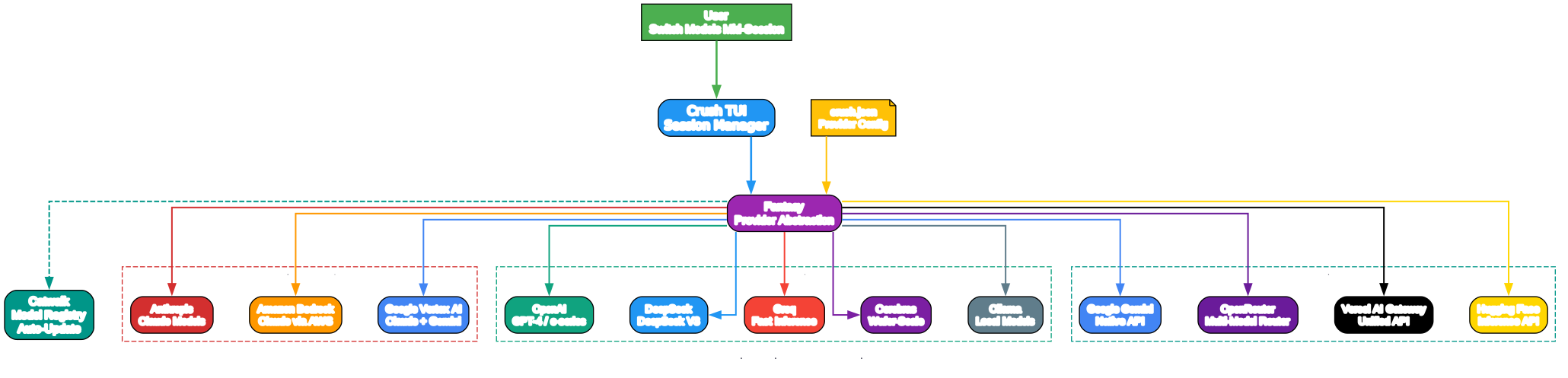
The multi-provider diagram illustrates how Crush’s Fantasy abstraction layer sits between the TUI and the various LLM providers. The Catwalk model registry automatically updates when new providers and models become available, so you always have access to the latest options. Configuration is managed through crush.json, where you can define custom providers with OpenAI-compatible or Anthropic-compatible APIs.
Supported Providers
| Provider | Type | Environment Variable |
|---|---|---|
| Anthropic | Native | ANTHROPIC_API_KEY |
| OpenAI | Native | OPENAI_API_KEY |
| Google Gemini | Native | GEMINI_API_KEY |
| Amazon Bedrock | Native | AWS_ACCESS_KEY_ID + AWS_SECRET_ACCESS_KEY |
| Google Vertex AI | Native | VERTEXAI_PROJECT + VERTEXAI_LOCATION |
| Azure OpenAI | Native | AZURE_OPENAI_API_ENDPOINT + AZURE_OPENAI_API_KEY |
| Groq | OpenAI-compatible | GROQ_API_KEY |
| Cerebras | OpenAI-compatible | CEREBRAS_API_KEY |
| OpenRouter | OpenAI-compatible | OPENROUTER_API_KEY |
| DeepSeek | OpenAI-compatible | DEEPSEEK_API_KEY |
| Vercel AI Gateway | OpenAI-compatible | VERCEL_API_KEY |
| Hugging Face | OpenAI-compatible | HF_TOKEN |
| Ollama (local) | OpenAI-compatible | Config-based |
| LM Studio (local) | OpenAI-compatible | Config-based |
Custom Provider Configuration
Adding a custom provider is straightforward. For OpenAI-compatible APIs like DeepSeek:
{
  "$schema": "https://charm.land/crush.json",
  "providers": {
    "deepseek": {
      "type": "openai-compat",
      "base_url": "https://api.deepseek.com/v1",
      "api_key": "$DEEPSEEK_API_KEY",
      "models": [
        {
          "id": "deepseek-chat",
          "name": "Deepseek V3",
          "cost_per_1m_in": 0.27,
          "cost_per_1m_out": 1.1,
          "context_window": 64000,
          "default_max_tokens": 5000
        }
      ]
    }
  }
}
For Anthropic-compatible APIs:
{
  "$schema": "https://charm.land/crush.json",
  "providers": {
    "custom-anthropic": {
      "type": "anthropic",
      "base_url": "https://api.anthropic.com/v1",
      "api_key": "$ANTHROPIC_API_KEY",
      "models": [
        {
          "id": "claude-sonnet-4-20250514",
          "name": "Claude Sonnet 4",
          "context_window": 200000,
          "default_max_tokens": 50000,
          "can_reason": true,
          "supports_attachments": true
        }
      ]
    }
  }
}
Installation
Crush is available through multiple package managers, making it easy to install on any platform.
macOS and Linux
# Homebrew (macOS and Linux)
brew install charmbracelet/tap/crush

# NPM
npm install -g @charmland/crush

# Arch Linux
yay -S crush-bin

# Nix
nix run github:numtide/nix-ai-tools#crush
Debian/Ubuntu
sudo mkdir -p /etc/apt/keyrings
curl -fsSL https://repo.charm.sh/apt/gpg.key | sudo gpg --dearmor -o /etc/apt/keyrings/charm.gpg
echo "deb [signed-by=/etc/apt/keyrings/charm.gpg] https://repo.charm.sh/apt/ * *" | sudo tee /etc/apt/sources.list.d/charm.list
sudo apt update && sudo apt install crush
Fedora/RHEL
echo '[charm]
name=Charm
baseurl=https://repo.charm.sh/yum/
enabled=1
gpgcheck=1
gpgkey=https://repo.charm.sh/yum/gpg.key' | sudo tee /etc/yum.repos.d/charm.repo
sudo yum install crush
Windows
# Winget
winget install charmbracelet.crush

# Scoop
scoop bucket add charm https://github.com/charmbracelet/scoop-bucket.git
scoop install crush
Go Install
go install github.com/charmbracelet/crush@latest
FreeBSD
pkg install crush
Getting Started
The quickest way to get started is to set an API key for your preferred provider and launch Crush. You will be prompted to enter your key if it is not already configured.
# Set your API key
export ANTHROPIC_API_KEY="your-key-here"

# Launch Crush
crush
Crush will initialize your project, analyze the codebase, and create an AGENTS.md context file that helps it work more effectively in future sessions. You can customize this file with project-specific instructions, build commands, and code conventions.
Configuration Priority
Crush loads configuration from three locations, in priority order:
.crush.json(project-local, highest priority)crush.json(project-local)$HOME/.config/crush/crush.json(global)
This layered approach lets you define global defaults while overriding them per-project as needed.
LSP Configuration
Enable LSP integration for richer code context:
{
  "$schema": "https://charm.land/crush.json",
  "lsp": {
    "go": {
      "command": "gopls",
      "env": {
        "GOTOOLCHAIN": "go1.24.5"
      }
    },
    "typescript": {
      "command": "typescript-language-server",
      "args": ["--stdio"]
    },
    "nix": {
      "command": "nil"
    }
  }
}
MCP Server Configuration
Add Model Context Protocol servers for extended capabilities:
{
  "$schema": "https://charm.land/crush.json",
  "mcp": {
    "filesystem": {
      "type": "stdio",
      "command": "node",
      "args": ["/path/to/mcp-server.js"],
      "timeout": 120,
      "disabled": false
    },
    "github": {
      "type": "http",
      "url": "https://api.githubcopilot.com/mcp/",
      "timeout": 120,
      "headers": {
        "Authorization": "Bearer $GH_PAT"
      }
    }
  }
}
Hooks Configuration
Define hooks for deterministic control over agent behavior:
{
  "hooks": {
    "PreToolUse": [
      {
        "matcher": "^bash$",
        "command": "./hooks/no-rm-rf.sh",
        "timeout": 10
      }
    ]
  }
}
Agent Skills
Crush supports the Agent Skills open standard for extending capabilities:
# Install example skills from Anthropic
mkdir -p ~/.config/crush/skills
cd ~/.config/crush/skills
git clone https://github.com/anthropics/skills.git _temp
mv _temp/skills/* . && rm -rf _temp
Skills are discovered from multiple paths including $XDG_CONFIG_HOME/agents/skills, $XDG_CONFIG_HOME/crush/skills, and project-local .agents/skills directories.
Comparison: Crush vs Other Agentic Coding Tools
| Feature | Crush | Claude Code | Cursor | GitHub Copilot |
|---|---|---|---|---|
| Type | Terminal CLI | Terminal CLI | Desktop IDE | IDE Extension |
| Language | Go | TypeScript | TypeScript | TypeScript |
| Open Source | FSL-1.1-MIT | No | No | No |
| Multi-Provider | 15+ providers | Anthropic only | Multiple | Multiple |
| Mid-Session Switch | Yes | No | Yes | N/A |
| LSP Integration | Yes | No | Built-in | Built-in |
| MCP Support | Yes (stdio, http, sse) | Yes (stdio) | Yes | Limited |
| Hooks System | Yes (Claude Code compat) | Yes | No | No |
| Agent Skills | Yes (SKILL.md) | Yes | No | No |
| Session Persistence | SQLite | File-based | File-based | N/A |
| Local Models | Yes (Ollama, LM Studio) | No | Yes | No |
| Desktop Notifications | Yes | No | Yes | Yes |
| Terminal UI | Bubble Tea v2 | Ink | Electron | IDE-native |
| Config Format | JSON | TOML | JSON | JSON |
| License | FSL-1.1-MIT | Proprietary | Proprietary | Proprietary |
Crush stands out in several key areas: it is the only fully open-source option in this comparison, it supports the widest range of LLM providers, and it offers mid-session model switching. Its hooks system is Claude Code-compatible, making migration straightforward. The Charm ecosystem foundation gives it a uniquely polished terminal experience.
Troubleshooting
Clipboard Not Working
On Linux and BSD systems, you may need to install additional tools for clipboard support:
| Environment | Required Tool |
|---|---|
| Windows | Native support |
| macOS | Native support |
| Linux/BSD + Wayland | wl-copy and wl-paste |
| Linux/BSD + X11 | xclip or xsel |
API Key Issues
If Crush cannot find your API key, ensure the correct environment variable is set:
# Verify your key is set
echo $ANTHROPIC_API_KEY

# Or set it inline
ANTHROPIC_API_KEY="sk-..." crush
LSP Not Starting
If LSP integration is not working, verify the language server is installed and in your PATH:
# Check if gopls is available
which gopls

# Install if needed
go install golang.org/x/tools/gopls@latest
Debug Mode
Enable debug logging to diagnose issues:
# Run with debug flag
crush --debug

# Or enable in config
# crush.json:
# { "options": { "debug": true, "debug_lsp": true } }
View logs with:
# Last 1000 lines
crush logs

# Last 500 lines
crush logs --tail 500

# Follow in real time
crush logs --follow
Permission Prompts
If you want to skip permission prompts for trusted tools, configure allowed tools:
{
  "$schema": "https://charm.land/crush.json",
  "permissions": {
    "allowed_tools": [
      "view",
      "ls",
      "grep",
      "edit"
    ]
  }
}
Or use the --yolo flag to skip all prompts (use with caution).
Disabling Metrics
Crush collects pseudonymous usage metrics by default. To opt out:
export CRUSH_DISABLE_METRICS=1
Or in config:
{
  "options": {
    "disable_metrics": true
  }
}
Crush also respects the DO_NOT_TRACK convention.
Provider Auto-Updates
Crush automatically checks for the latest providers and models from Catwalk, the open-source Crush provider database. This means new providers and model metadata are automatically available without upgrading Crush itself.
To disable auto-updates:
{
  "$schema": "https://charm.land/crush.json",
  "options": {
    "disable_provider_auto_update": true
  }
}
Or set the environment variable:
export CRUSH_DISABLE_PROVIDER_AUTO_UPDATE=1
To manually update providers:
# Update from Catwalk
crush update-providers

# Update from custom URL
crush update-providers https://example.com/

# Update from local file
crush update-providers /path/to/local-providers.json

# Reset to embedded defaults
crush update-providers embedded
Attribution and Git Integration
Crush adds attribution information to Git commits and pull requests by default. You can customize this behavior:
{
  "$schema": "https://charm.land/crush.json",
  "options": {
    "attribution": {
      "trailer_style": "co-authored-by",
      "generated_with": true
    }
  }
}
Options for trailer_style:
assisted-by: AddsAssisted-by: [Model Name] via Crush <crush@charm.land>(default)co-authored-by: AddsCo-Authored-By: Crush <crush@charm.land>none: No attribution trailer
Conclusion
Crush represents a significant step forward for agentic coding in the terminal. Built by the Charmbracelet team on their proven ecosystem of terminal libraries, it delivers a polished experience that feels native to any developer workflow. With support for over 15 LLM providers, mid-session model switching, LSP integration, MCP extensibility, and a Claude Code-compatible hooks system, Crush is both powerful and flexible.
The open-source FSL-1.1-MIT license means you can inspect, modify, and contribute to the codebase. Whether you are a solo developer looking for an AI coding companion or a team wanting to standardize on a terminal-first agentic coding tool, Crush deserves a close look.
Repository: https://github.com/charmbracelet/crush Enjoyed this post? Never miss out on future posts by following us
Stars: 23,391
License: FSL-1.1-MIT
Language: Go 


