RTK (Rust Token Killer): Reduce LLM Token Consumption by 60-90% with This CLI Proxy
RTK (Rust Token Killer) is a high-performance CLI proxy that reduces LLM token consumption by 60-90% on common development commands. Built as a single Rust binary with zero dependencies, RTK transparently intercepts Bash commands and rewrites them to produce compressed, token-optimized output before the results ever reach your AI coding agent’s context window. With 34,883+ stars and growing rapidly, RTK has become an essential tool for developers who rely on AI coding assistants like Claude Code, GitHub Copilot, Cursor, and Gemini CLI.
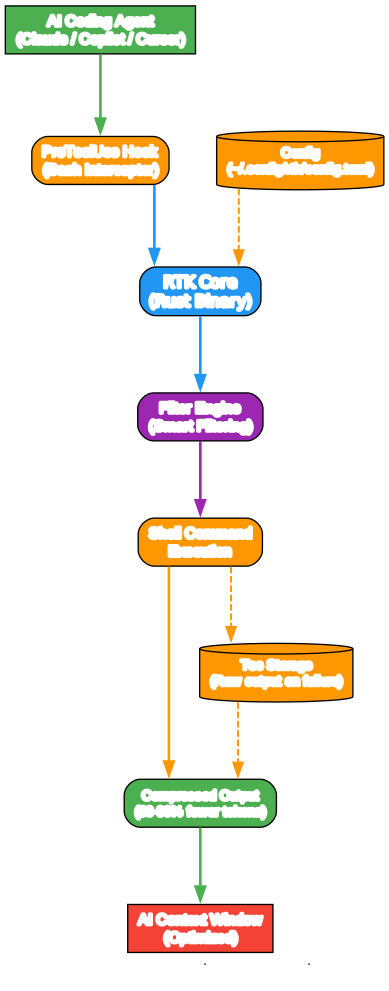
Understanding the RTK Architecture
The architecture diagram above illustrates how RTK sits between your AI coding agent and the shell environment. Let’s break down each component:
Component 1: AI Coding Agent The AI coding agent (such as Claude Code, Copilot, or Cursor) sends Bash tool calls to execute commands like git status, cargo test, or ls. Without RTK, these commands return raw, verbose output that consumes valuable tokens in the AI’s context window.
Component 2: PreToolUse Hook (Bash Interceptor) RTK installs a PreToolUse hook that transparently intercepts Bash commands before they execute. This hook rewrites commands like git status to rtk git status automatically. The AI agent never sees this rewrite - it simply receives the compressed output.
Component 3: RTK Core (Rust Binary) The RTK core is a single Rust binary that processes intercepted commands. It analyzes the command type and applies the appropriate filtering strategy. The binary is designed for speed with less than 10ms overhead per command.
Component 4: Filter Engine The filter engine implements four core strategies: smart filtering (removing noise like comments and whitespace), grouping (aggregating similar items by directory or error type), truncation (keeping relevant context while cutting redundancy), and deduplication (collapsing repeated log lines with counts).
Component 5: Configuration Storage RTK stores user preferences in ~/.config/rtk/config.toml, including excluded commands, tee mode settings, and custom filter rules. This configuration persists across sessions and projects.
Data Flow: When the AI agent issues a Bash command, the PreToolUse hook intercepts it and rewrites it to pass through RTK. RTK’s filter engine processes the raw command output, applies the appropriate compression strategy, and returns a compact result to the AI agent. If a command fails, RTK can save the full unfiltered output to tee storage for later inspection.
How RTK Works: Command Flow Comparison
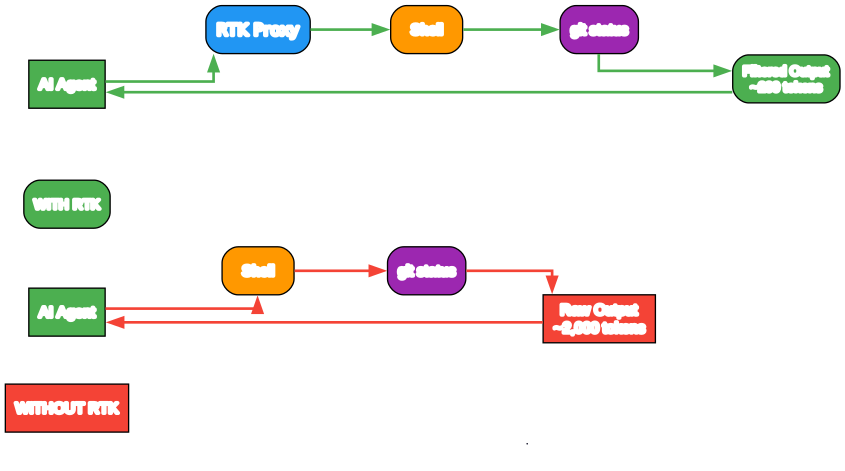
Without RTK: The Token Problem
Without RTK, a simple git status command might return 15 lines of output consuming approximately 2,000 tokens. In a typical 30-minute Claude Code session, developers execute dozens of commands - ls, cat, grep, git diff, cargo test, pytest - each contributing hundreds or thousands of tokens to the context window. Over time, this verbose output fills the context window, forcing the AI to lose earlier conversation history and reducing its effectiveness.
With RTK: Transparent Compression
With RTK installed, the same git status command returns a single line: ok main (approximately 10 tokens). The PreToolUse hook transparently rewrites git status to rtk git status before execution. The AI agent never knows the rewrite happened - it simply receives the compact output. This 80% reduction in tokens per command compounds across an entire coding session, preserving context window space for what matters most: your code and instructions.
Four Core Filtering Strategies
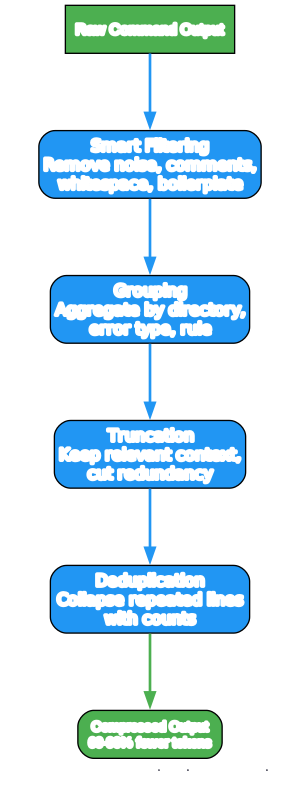
Strategy 1: Smart Filtering
Smart filtering removes noise from command output while preserving essential information. For file listings, it strips permissions, ownership, and timestamps, showing only filenames and sizes. For test output, it removes progress bars, ASCII art, and boilerplate headers. For build logs, it filters out successful compilation messages, keeping only warnings and errors.
Strategy 2: Grouping
Grouping aggregates similar items to reduce repetitive output. Directory listings group files by subdirectory. Error messages group by error type or file. Lint results group by rule rather than listing each violation separately. This strategy is particularly effective for commands like eslint or ruff check that might produce dozens of similar warnings.
Strategy 3: Truncation
Truncation keeps relevant context while cutting redundancy. For file reads, RTK can show only function signatures (with the -l aggressive flag) rather than full implementations. For logs, it keeps the most recent entries and summarizes older ones. For diffs, it shows only changed lines with minimal context.
Strategy 4: Deduplication
Deduplication collapses repeated log lines with counts. When running tests or builds, the same warning might appear hundreds of times. RTK replaces these repeated lines with a single line and a count (e.g., [repeated 47 times]), dramatically reducing token consumption for noisy commands.
Supported AI Coding Tools

RTK supports 12+ AI coding tools through three integration methods:
Hook-Based Integration (Recommended):
- Claude Code: PreToolUse hook for transparent Bash rewriting
- GitHub Copilot: PreToolUse hook with deny-with-suggestion for CLI
- Cursor: preToolUse hook via hooks.json
- Gemini CLI: BeforeTool hook
Config-Based Integration:
- Codex (OpenAI): AGENTS.md + RTK.md instructions
- Windsurf: .windsurfrules (project-scoped)
- Cline / Roo Code: .clinerules (project-scoped)
- Kilo Code: .kilocode/rules/rtk-rules.md
- Google Antigravity: .agents/rules/antigravity-rtk-rules.md
Plugin-Based Integration:
- OpenCode: TypeScript plugin with tool.execute.before hook
- OpenClaw: TypeScript plugin with before_tool_call hook
Token Savings by Command Type
Based on a 30-minute Claude Code session with a medium-sized TypeScript/Rust project:
| Operation | Frequency | Standard Tokens | RTK Tokens | Savings |
|---|---|---|---|---|
ls / tree | 10x | 2,000 | 400 | -80% |
cat / read | 20x | 40,000 | 12,000 | -70% |
grep / rg | 8x | 16,000 | 3,200 | -80% |
git status | 10x | 3,000 | 600 | -80% |
git diff | 5x | 10,000 | 2,500 | -75% |
cargo test / npm test | 5x | 25,000 | 2,500 | -90% |
pytest | 4x | 8,000 | 800 | -90% |
| Total | ~118,000 | ~23,900 | -80% |
Installation
Homebrew (Recommended)
brew install rtk
Quick Install (Linux/macOS)
curl -fsSL https://raw.githubusercontent.com/rtk-ai/rtk/refs/heads/master/install.sh | sh
Cargo
cargo install --git https://github.com/rtk-ai/rtk
Pre-built Binaries
Download from the GitHub releases page:
- macOS:
rtk-x86_64-apple-darwin.tar.gz/rtk-aarch64-apple-darwin.tar.gz - Linux:
rtk-x86_64-unknown-linux-musl.tar.gz/rtk-aarch64-unknown-linux-gnu.tar.gz - Windows:
rtk-x86_64-pc-windows-msvc.zip
Note for Windows users: Extract the zip and place rtk.exe in your PATH. Run from Command Prompt, PowerShell, or Windows Terminal. For full hook support, use WSL.
Quick Start
After installation, initialize RTK for your AI tool:
# Claude Code / Copilot (default)
rtk init -g

# Other supported agents
rtk init -g --gemini            # Gemini CLI
rtk init -g --codex             # Codex (OpenAI)
rtk init --agent cursor         # Cursor
rtk init --agent windsurf       # Windsurf
rtk init --agent cline          # Cline / Roo Code
rtk init --agent kilocode       # Kilo Code
rtk init --agent antigravity    # Google Antigravity
Important: Restart your AI coding tool after initialization.
Usage Examples
File Operations
rtk ls .                        # Token-optimized directory tree
rtk read file.rs                # Smart file reading
rtk read file.rs -l aggressive  # Signatures only
rtk smart file.rs               # 2-line heuristic code summary
rtk find "*.rs" .               # Compact find results
rtk grep "pattern" .            # Grouped search results
Git Operations
rtk git status                  # Compact status
rtk git log -n 10               # One-line commits
rtk git diff                    # Condensed diff
rtk git add                     # Returns "ok"
rtk git commit -m "msg"         # Returns "ok abc1234"
rtk git push                    # Returns "ok main"
Test Runners
rtk pytest                      # Python tests (-90% tokens)
rtk cargo test                  # Cargo tests (-90% tokens)
rtk go test                     # Go tests (NDJSON, -90%)
rtk jest                        # Jest compact (failures only)
rtk vitest                      # Vitest compact (failures only)
rtk test <cmd>                  # Generic test wrapper
Analytics
rtk gain                        # Summary stats
rtk gain --graph                # ASCII graph (last 30 days)
rtk gain --history              # Recent command history
rtk discover                    # Find missed savings opportunities
Configuration
RTK stores configuration in ~/.config/rtk/config.toml:
[hooks]
exclude_commands = ["curl", "playwright"]  # Skip rewrite for these

[tee]
enabled = true          # Save raw output on failure (default: true)
mode = "failures"       # "failures", "always", or "never"
When a command fails, RTK saves the full unfiltered output so the LLM can read it without re-executing:
FAILED: 2/15 tests
[full output: ~/.local/share/rtk/tee/1707753600_cargo_test.log]
Global Flags
-u, --ultra-compact    # ASCII icons, inline format (extra token savings)
-v, --verbose          # Increase verbosity (-v, -vv, -vvv)
Privacy and Telemetry
RTK collects anonymous, aggregate usage metrics once per day, but telemetry is disabled by default and requires explicit opt-in consent during rtk init or via rtk telemetry enable. The collected data includes salted device hashes, RTK version, command counts, tokens saved, and feature usage - never source code, file paths, command arguments, or secrets.
Manage telemetry:
rtk telemetry status     # Check current consent state
rtk telemetry enable     # Give consent
rtk telemetry disable    # Withdraw consent
rtk telemetry forget     # Delete all data and request server-side erasure
Override via environment variable:
export RTK_TELEMETRY_DISABLED=1 # Blocks telemetry regardless of consent
Windows Support
RTK works on Windows with some limitations. The auto-rewrite hook requires a Unix shell, so on native Windows RTK falls back to CLAUDE.md injection mode. For full hook support, use WSL (Windows Subsystem for Linux).
| Feature | WSL | Native Windows |
|---|---|---|
| Filters (cargo, git, etc.) | Full | Full |
| Auto-rewrite hook | Yes | No (CLAUDE.md fallback) |
rtk init -g | Hook mode | CLAUDE.md mode |
rtk gain / analytics | Full | Full |
Troubleshooting
Name collision warning: Another project named “rtk” (Rust Type Kit) exists on crates.io. If rtk gain fails, you have the wrong package. Use cargo install --git instead.
Hook not working: Ensure you restarted your AI coding tool after rtk init -g. Verify with rtk init --show.
Windows exe closes immediately: Do not double-click rtk.exe. Run it from Command Prompt, PowerShell, or Windows Terminal.
Conclusion
RTK (Rust Token Killer) solves one of the most expensive problems in AI-assisted development: wasted tokens on verbose command output. By transparently filtering and compressing command outputs before they reach your AI agent’s context window, RTK preserves 60-90% of tokens for what matters - your code, your instructions, and your conversation history. With support for 12+ AI coding tools, a single Rust binary with zero dependencies, and less than 10ms overhead, RTK is an essential addition to any developer’s AI coding toolkit.
Links
- RTK GitHub Repository
- Official Documentation
- Installation Guide
- Architecture Documentation
- Discord Community
- Homebrew Formula

Enjoyed this post? Never miss out on future posts by following us


