HTML PPT Skill: Studio AgentSkill with 36 Themes, 31 Layouts, and 47 Animations
HTML PPT Skill is a world-class AgentSkill that transforms how AI agents create presentations. With 36 professionally designed themes, 31 page layouts, 47 animations (27 CSS + 20 canvas FX), and a true presenter mode with pixel-perfect previews, this tool produces stunning HTML presentations as pure static files with zero build step. Whether you are building pitch decks, tech-sharing slides, or Xiaohongshu-style image posts, html-ppt-skill delivers senior-designer quality from a single command.
Understanding the Architecture
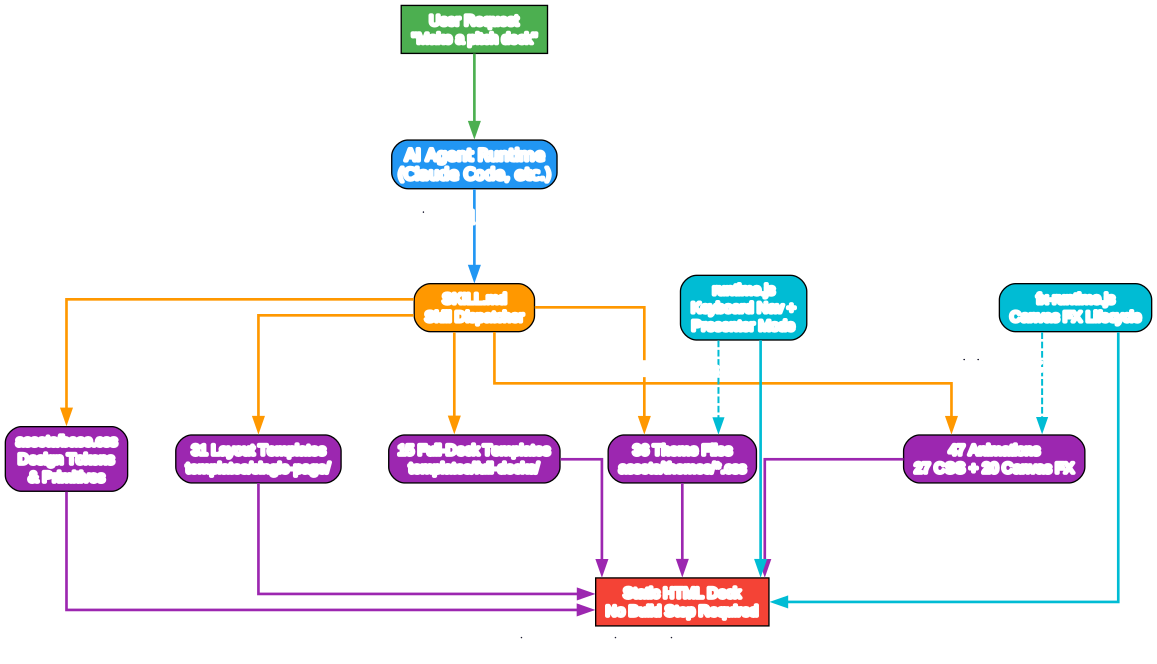
The architecture diagram above illustrates how html-ppt-skill works as an AgentSkill within an AI agent runtime. Let us break down each component:
User Request and Agent Runtime When a user asks for a presentation - whether it is “make a pitch deck” or “create a tech-sharing slideshow” - the AI agent runtime (such as Claude Code) receives the request and dispatches it to the SKILL.md skill dispatcher. This is installed via a single command: npx skills add https://github.com/lewislulu/html-ppt-skill.
Core Asset Layer The skill draws from five core asset categories:
- base.css - The design token system that defines all CSS custom properties (colors, radii, shadows, fonts). Every theme overrides these tokens, ensuring visual consistency across the entire deck.
- 36 Theme Files - Each theme is a pure CSS token override file. Swap one
<link>tag and the entire deck reskins instantly. PressTduring presentation to cycle through themes live. - 31 Layout Templates - Pre-built page types with realistic demo data, from cover pages and KPI grids to architecture diagrams and terminal windows.
- 47 Animations - 27 CSS entry animations (fade-up, zoom-pop, typewriter, etc.) and 20 canvas FX modules (particle-burst, knowledge-graph, neural-net, etc.) that auto-initialize on slide enter.
- 15 Full-Deck Templates - Complete multi-slide decks with scoped CSS, extracted from real-world presentations and scenario scaffolds.
Runtime Engines Two JavaScript runtimes power the interactive experience:
- runtime.js handles keyboard navigation (arrow keys, theme cycling with
T, fullscreen withF, overview withO), presenter mode withS, and slide deep-links via#/NURL fragments. - fx-runtime.js manages the canvas FX lifecycle, automatically initializing
[data-fx]elements when a slide becomes active and cleaning up when it leaves, preventing memory leaks and ensuring smooth transitions.
Output: Static HTML The final output is a single HTML file (plus linked CSS/JS assets) that can be opened in any browser, shared via URL, or deployed to any static hosting. No build tools, no Node.js server, no compilation step required.
36 Themes: From Minimal White to Cyberpunk Neon

Understanding the Theme and Layout System
The diagram above shows how the design token system in base.css serves as the foundation for both themes and layouts. Every theme overrides the same set of CSS custom properties (--bg, --text-1, --accent, --radius, --shadow, --font-sans, etc.), which means any layout will automatically adapt to any theme without manual adjustments.
Theme Categories
The 36 themes are organized into distinct aesthetic families:
| Category | Themes | Best For |
|---|---|---|
| Light & Calm | minimal-white, editorial-serif, soft-pastel, xiaohongshu-white, solarized-light, catppuccin-latte | Internal reports, tech reviews, lifestyle content |
| Bold & Statement | sharp-mono, neo-brutalism, bauhaus, swiss-grid, memphis-pop | Startup pitches, design talks, brand launches |
| Cool & Dark | catppuccin-mocha, dracula, tokyo-night, nord, gruvbox-dark, rose-pine, arctic-cool | Developer presentations, infrastructure talks, long sessions |
| Warm & Vibrant | sunset-warm | Lifestyle, awards, positive-emotion content |
| Effect-Heavy | glassmorphism, aurora, rainbow-gradient, blueprint, terminal-green | Product launches, architecture diagrams, CLI/hacker themes |
| v2 Professional | corporate-clean, pitch-deck-vc, academic-paper, japanese-minimal, engineering-whiteprint | Board meetings, VC pitches, academic conferences, API docs |
| v2 Editorial | magazine-bold, news-broadcast, midcentury, retro-tv | Brand stories, press releases, retro/nostalgic content |
| v2 Dramatic | cyberpunk-neon, vaporwave, y2k-chrome | Hacker culture, music/art, Gen-Z fashion |
How to Apply a Theme
<!-- Hard-code a theme -->
<link rel="stylesheet" id="theme-link" href="../assets/themes/aurora.css">

<!-- Or enable live cycling with T key -->
<body data-themes="minimal-white,aurora,tokyo-night" data-theme-base="../assets/themes/">
Layout Categories
The 31 layouts are organized by purpose:
| Category | Layouts | Purpose |
|---|---|---|
| Openers | cover, toc, section-divider | Deck opening and section transitions |
| Text-Centric | bullets, two-column, three-column, big-quote | Content-heavy slides |
| Numbers & Data | stat-highlight, kpi-grid, table, chart-bar/line/pie/radar | Data visualization |
| Code & Terminal | code, diff, terminal | Technical demonstrations |
| Diagrams & Flows | flow-diagram, arch-diagram, process-steps, mindmap | Architecture and process visualization |
| Plans & Comparisons | timeline, roadmap, gantt, comparison, pros-cons, todo-checklist | Planning and evaluation |
| Visuals | image-hero, image-grid | Image-focused slides |
| Closers | cta, thanks | Call-to-action and closing |
47 Animations: CSS Entry Effects and Canvas FX
Understanding the Animation Pipeline
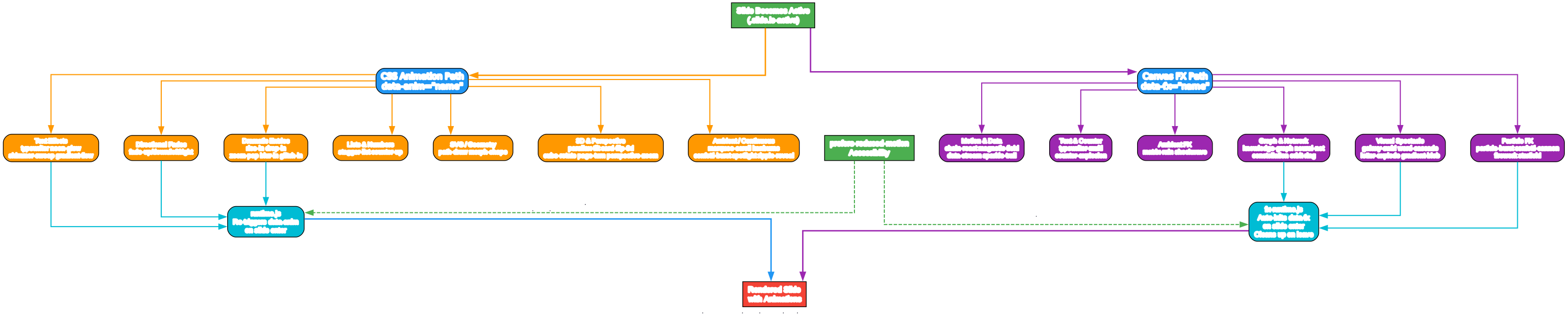
The animation system in html-ppt-skill operates through two distinct pipelines that both trigger when a slide becomes active (.slide.is-active):
CSS Animation Path (27 animations) CSS animations are lightweight entry effects triggered via data-anim="name" attributes. The runtime.js engine re-triggers these animations every time a slide becomes active, ensuring consistent playback during navigation. The seven categories of CSS animations cover every presentation need:
- Directional Fades (fade-up, fade-down, fade-left, fade-right) - Default for paragraph and card entry
- Dramatic Entries (rise-in, drop-in, zoom-pop, blur-in, glitch-in) - Hero headlines, cover reveals
- Text Effects (typewriter, neon-glow, shimmer-sweep, gradient-flow) - Slogans, brand wordmarks
- Lists & Numbers (stagger-list, counter-up) - Sequential reveals, KPI counters
- SVG/Geometry (path-draw, morph-shape) - Diagram animations
- 3D & Perspective (parallax-tilt, card-flip-3d, cube-rotate-3d, page-turn-3d, perspective-zoom) - Product shots, before/after reveals
- Ambient/Continuous (marquee-scroll, kenburns, confetti-burst, spotlight, ripple-reveal) - Background effects, celebration pages
Canvas FX Path (20 effects) Canvas FX are cinematic, continuously running effects powered by real hand-rolled canvas modules. The fx-runtime.js engine manages their lifecycle: initializing when a slide enters view and cleaning up when it leaves. Each FX reads theme colors (--accent, --accent-2, --ok, --warn, --danger) for automatic color adaptation:
- Particle FX - particle-burst, confetti-cannon, firework, starfield
- Graph & Network - knowledge-graph (force-directed physics), neural-net (signal pulses), constellation, orbit-ring
- Visual Spectacle - galaxy-swirl, word-cascade, letter-explode, gradient-blob
- Motion & Data - chain-react, magnetic-field, data-stream, sparkle-trail
- Text & Counter - typewriter-multi, counter-explosion
- Ambient - matrix-rain, shockwave
Accessibility Both animation paths respect prefers-reduced-motion: reduce, automatically disabling all animations for users who have enabled this accessibility setting.
Installation and Quick Start
Installing html-ppt-skill takes a single command:
npx skills add https://github.com/lewislulu/html-ppt-skill
After installation, any AgentSkill-compatible agent can author presentations. Here is how to create your first deck:
# Scaffold a new deck from the base template
./scripts/new-deck.sh my-talk

# Open in browser
open examples/my-talk/index.html
Browse the showcase decks:
# All 36 themes (iframe-isolated)
open templates/theme-showcase.html

# All 31 layouts
open templates/layout-showcase.html

# All 47 animations
open templates/animation-showcase.html

# All 15 full-deck templates
open templates/full-decks-index.html
Render to PNG via headless Chrome:
# Single page
./scripts/render.sh templates/single-page/kpi-grid.html

# Multi-slide deck (8 slides)
./scripts/render.sh examples/my-talk/index.html 8
Using Themes in Your Deck
Each theme is a short CSS file that overrides tokens defined in base.css. To apply a theme:
<!-- Method 1: Hard-code a single theme -->
<link rel="stylesheet" id="theme-link" href="../assets/themes/tokyo-night.css">

<!-- Method 2: Enable live theme cycling with T key -->
<body data-themes="minimal-white,tokyo-night,aurora,pitch-deck-vc"
      data-theme-base="../assets/themes/">
Theme selection guide by audience:
| Audience | Recommended Themes |
|---|---|
| Business / VC pitch | pitch-deck-vc, corporate-clean, swiss-grid |
| Tech sharing / engineering | tokyo-night, dracula, catppuccin-mocha, terminal-green, blueprint |
| Xiaohongshu / lifestyle | xiaohongshu-white, soft-pastel, rainbow-gradient, magazine-bold |
| Academic / report | academic-paper, editorial-serif, minimal-white |
| Edgy / cyber / launch | cyberpunk-neon, vaporwave, y2k-chrome, neo-brutalism |
Using Layouts in Your Deck
Copy <section class="slide">...</section> blocks from templates/single-page/ into your deck HTML and replace the demo data:
<!-- Example: KPI Grid layout -->
<section class="slide" data-title="Key Metrics">
  <p class="kicker">Q4 Results</p>
  <h2 class="h2">Performance Highlights</h2>
  <div class="grid g4">
    <div class="card card-soft">
      <span class="counter" data-to="1248">0</span>
      <p>New Users</p>
    </div>
    <div class="card card-soft">
      <span class="counter" data-to="98">0</span>
      <p>Uptime %</p>
    </div>
    <div class="card card-soft">
      <span class="counter" data-to="2.4">0</span>
      <p>Revenue M</p>
    </div>
    <div class="card card-soft">
      <span class="counter" data-to="340">0</span>
      <p>Active Teams</p>
    </div>
  </div>
</section>
Adding Animations
CSS animations are applied via data-anim attributes:
<!-- Fade up on slide enter -->
<h2 data-anim="fade-up">Welcome to the Future</h2>

<!-- Stagger list items -->
<ul data-anim="stagger-list">
  <li>First point</li>
  <li>Second point</li>
  <li>Third point</li>
</ul>

<!-- Counter animation -->
<span class="counter" data-to="9999">0</span>
Canvas FX require the runtime script and a sized container:
<!-- Include the FX runtime once in your deck -->
<script src="../assets/animations/fx-runtime.js"></script>

<!-- Add a canvas FX to any slide -->
<section class="slide" data-title="Knowledge Graph">
  <div data-fx="knowledge-graph" style="width:100%;height:400px;"></div>
</section>

<!-- Particle burst for celebration -->
<section class="slide" data-title="Launch">
  <div data-fx="particle-burst" style="width:100%;height:360px;"></div>
</section>

<!-- Neural network visualization -->
<section class="slide" data-title="Architecture">
  <div data-fx="neural-net" style="width:100%;height:400px;"></div>
</section>
Presenter Mode: Pixel-Perfect Speaker Experience
Press S on any deck to open a dedicated presenter window with four draggable, resizable magnetic cards:
- CURRENT - Pixel-perfect iframe preview of the current slide
- NEXT - Pixel-perfect iframe preview of the next slide
- SPEAKER SCRIPT - Large-font scrollable speaker notes (150-300 words per slide)
- TIMER - Elapsed time, slide counter, and prev/next/reset buttons
The previews use the same CSS, theme, fonts, and viewport as the audience view because each preview is an actual <iframe> loading the deck HTML with a ?preview=N query param. Navigation syncs between windows via BroadcastChannel with no reload or flicker.
Speaker script best practices:
- Write prompt signals, not lines to read - bold the keywords, separate transition sentences
- Keep 150-300 words per slide for a 2-3 minute per page pace
- Use conversational language, not written prose
<section class="slide" data-title="Product Vision">
  <h2 class="h2">Our Vision for 2026</h2>
  <!-- Audience-facing content -->
</section>

<div class="notes">
  <p><strong>Key message:</strong> We are shifting from reactive to proactive.</p>
  <p>Transition: "So what does this mean for our roadmap?"</p>
</div>
Keyboard Cheat Sheet
<--  -->  Space  PgUp  PgDn  Home  End    navigate
F                                       fullscreen
S                                       open presenter window
N                                       quick notes drawer
R                                       reset timer (in presenter)
O                                       slide overview grid
T                                       cycle themes
A                                       cycle demo animation
#/N in URL                              deep-link to slide N
?preview=N                              preview-only mode
Esc                                     close all overlays
15 Full-Deck Templates
Eight templates are extracted from real-world decks, and seven are scenario scaffolds:
Extracted from real decks:
xhs-white-editorial- Xiaohongshu white editorial stylegraphify-dark-graph- Dark theme with force-directed knowledge graphknowledge-arch-blueprint- Blueprint/architecture diagram stylehermes-cyber-terminal- Terminal cyberpunk aestheticobsidian-claude-gradient- Purple gradient card designtesting-safety-alert- Red/amber alert stylexhs-pastel-card- Soft pastel card layoutdir-key-nav-minimal- Minimal arrow-key navigation
Scenario scaffolds:
pitch-deck- Startup/investor pitchproduct-launch- Product announcementtech-sharing- Technical presentationweekly-report- Team status updatexhs-post- Xiaohongshu 3:4 image postcourse-module- Educational contentpresenter-mode-reveal- Full presenter mode template with speaker scripts
Design Philosophy
html-ppt-skill follows five core design principles:
-
Token-driven design system - All visual decisions live in CSS custom properties. Change one variable, the whole deck reflows tastefully.
-
Iframe isolation for previews - Theme, layout, and full-deck showcases use
<iframe>per slide so each preview is a real, independent render with no CSS leakage. -
Zero build - Pure static HTML/CSS/JS. CDN only for webfonts, highlight.js, and chart.js (optional). No webpack, no npm install, no compilation.
-
Senior-designer defaults - Opinionated type scale, spacing rhythm, gradients, and card treatments. No “Corporate PowerPoint 2006” vibes.
-
Chinese + English first-class - Noto Sans SC and Noto Serif SC are pre-imported, making bilingual decks seamless.
Project Structure
html-ppt-skill/
  ├── SKILL.md                      Agent-facing dispatcher
  ├── references/                   Detailed catalogs
  │   ├── themes.md                 36 themes with when-to-use
  │   ├── layouts.md                31 layout types
  │   ├── animations.md             27 CSS + 20 FX catalog
  │   ├── full-decks.md             15 full-deck templates
  │   └── authoring-guide.md        Full workflow
  ├── assets/
  │   ├── base.css                  Shared tokens + primitives
  │   ├── fonts.css                 Webfont imports
  │   ├── runtime.js                Keyboard + presenter + overview
  │   ├── themes/*.css              36 theme token files
  │   └── animations/
  │       ├── animations.css         27 named CSS animations
  │       ├── fx-runtime.js          Auto-init [data-fx] on slide enter
  │       └── fx/*.js               20 canvas FX modules
  ├── templates/
  │   ├── deck.html                 Minimal starter
  │   ├── theme-showcase.html       36-theme iframe tour
  │   ├── layout-showcase.html      31-layout tour
  │   ├── animation-showcase.html   47-animation tour
  │   ├── full-decks-index.html     15-deck gallery
  │   ├── full-decks/<name>/        15 scoped multi-slide decks
  │   └── single-page/*.html        31 layout files with demo data
  ├── scripts/
  │   ├── new-deck.sh               Scaffold script
  │   └── render.sh                 Headless Chrome to PNG
  └── examples/demo-deck/           Complete working deck
Conclusion
html-ppt-skill represents a paradigm shift in how presentations are created. By combining 36 themes, 31 layouts, 47 animations, and a professional presenter mode into a zero-build static HTML framework, it eliminates the need for PowerPoint, Keynote, or web-based slide builders. The token-driven design system ensures visual consistency, while the AgentSkill integration means AI agents can produce senior-designer-quality decks from a single natural language request.
Whether you are preparing a VC pitch, a tech-sharing session, or a Xiaohongshu image post, html-ppt-skill has a theme and layout combination that fits. The 20 canvas FX modules add cinematic polish that traditional presentation tools simply cannot match, and the presenter mode with pixel-perfect previews ensures you deliver with confidence.
Links:
- GitHub Repository: https://github.com/lewislulu/html-ppt-skill

Enjoyed this post? Never miss out on future posts by following us


