Dograh AI: Open-Source Voice Agent Platform with Drag-and-Drop Workflow Builder
Dograh AI is an open source voice AI platform that gives developers full control over building, deploying, and managing production voice agents. Unlike proprietary alternatives such as Vapi and Retell, Dograh is 100% open source under the BSD 2-Clause license, self-hostable, and designed with a bring-your-own-model philosophy that eliminates vendor lock-in. Whether you need a simple customer service bot or a complex multi-step voice workflow with telephony integration, Dograh provides the infrastructure to make it happen without depending on any single cloud provider.
Founded by Y Combinator alumni, Dograh has reached version 1.32.0 with active development and frequent releases. The platform ships with auto-generated API keys and its own built-in LLM, TTS, and STT stack, meaning you can talk to your first bot without configuring any external API keys. When you are ready to scale, you can plug in your own providers across 11 LLM services, 10 STT engines, 11 TTS systems, and 7 telephony carriers.
Key Insight: Dograh ships with auto-generated API keys and its own LLM / TTS / STT stack – no API keys needed to talk to your first bot. Connect your own keys for LLM, TTS, STT, or Telephony anytime.
Architecture Overview
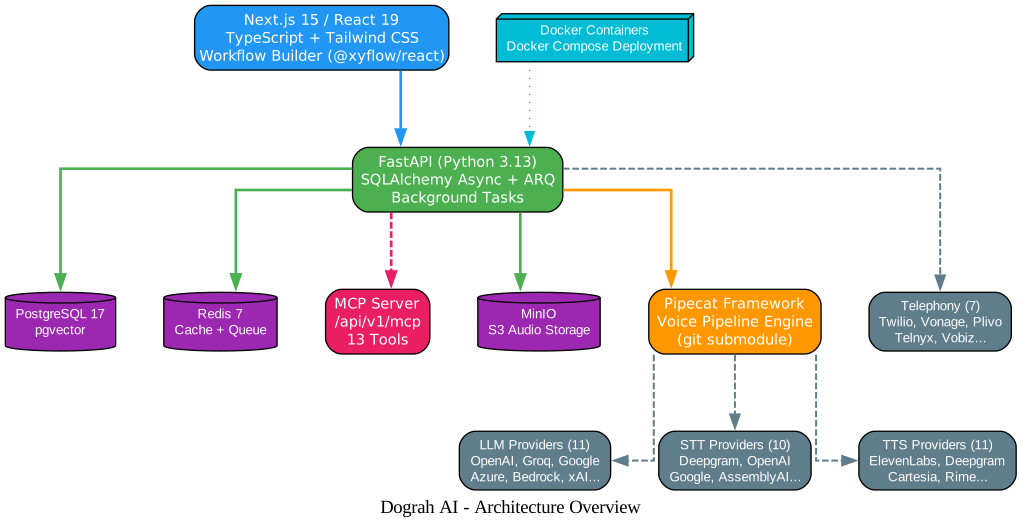
Dograh follows a full-stack architecture with clear separation between the frontend, backend, data layer, and voice pipeline. The entire system is containerized with Docker and deployable with a single docker compose up command.
Understanding the Architecture
The architecture diagram above illustrates the layered design of the Dograh platform. Let us break down each component and its role in the system:
UI Layer: Next.js 15 / React 19
The frontend is built with Next.js 15 running React 19, TypeScript, and Tailwind CSS. The most distinctive UI component is the drag-and-drop workflow builder powered by @xyflow/react, which allows users to visually construct voice agent workflows by placing and connecting typed nodes on a canvas. The UI communicates with the backend through REST API calls and supports real-time updates for call monitoring and metrics dashboards.
API Layer: FastAPI (Python 3.13)
The backend runs on Python 3.13 with FastAPI, using SQLAlchemy in async mode for database operations and ARQ (async Redis queue) for background task management. ARQ handles campaign calls and pipeline runs asynchronously, ensuring the API remains responsive even when processing long-running voice sessions. The API layer also exposes the MCP server endpoint at /api/v1/mcp, enabling AI coding agents to interact with the platform programmatically.
Data Layer: PostgreSQL 17 + Redis 7 + MinIO
The persistence tier uses PostgreSQL 17 with the pgvector extension for vector storage and similarity search. Redis 7 serves dual purposes: as a cache layer for session data and as the message queue backend for ARQ background tasks. MinIO provides S3-compatible object storage in a bucket named “voice-audio” for all audio recordings generated during voice agent sessions.
Voice Pipeline: Pipecat Framework
The Pipecat framework, included as a git submodule, is the engine that drives all voice processing. It provides the transport layer, speech-to-text, language model inference, text-to-speech, and audio processing in a composable pipeline architecture. Pipecat supports both a standard STT-to-LLM-to-TTS pipeline and a realtime speech-to-speech pipeline for models that handle audio natively.
External Integrations
Dograh connects to external LLM providers (11 options including OpenAI, Groq, Google, Azure, and Bedrock), STT providers (10 options including Deepgram, OpenAI, and Google), TTS providers (11 options including ElevenLabs, Deepgram, and Cartesia), and telephony providers (7 options including Twilio, Vonage, and Plivo). All external integrations follow a plugin architecture, making it straightforward to add new providers.
Docker Deployment
The entire stack runs inside Docker containers, with the API container executing as a non-root “dograh” user for security. Docker Compose orchestrates all services, and a single command deploys the complete platform including the TURN server (Coturn) for WebRTC NAT traversal and Nginx as a reverse proxy for remote deployments.
Workflow Graph Engine
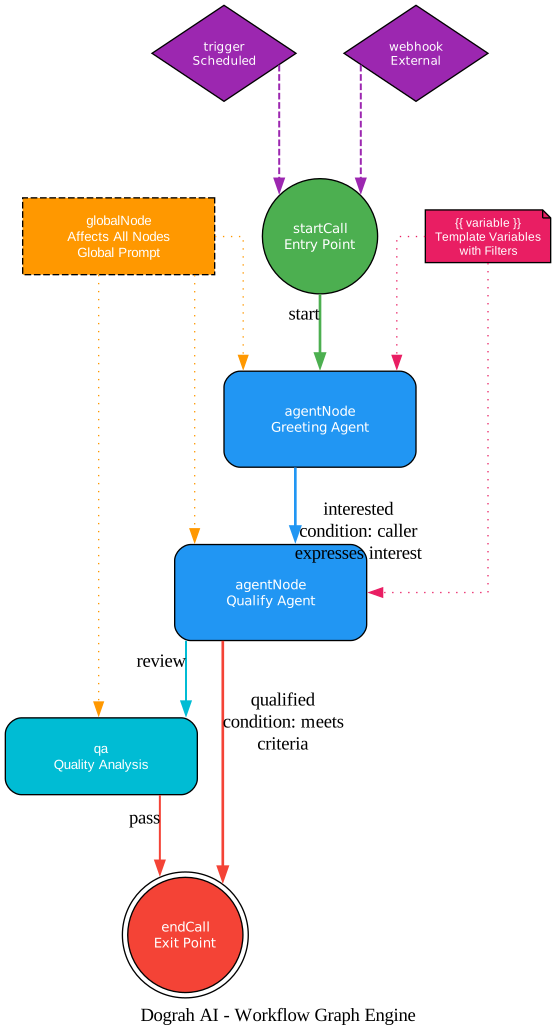
The workflow graph engine is Dograh’s visual programming system for constructing voice agent logic. Instead of writing code to define call flows, users drag and drop typed nodes onto a canvas and connect them with conditional edges. The engine validates the graph structure and extracts template variables from node prompts.
Understanding the Workflow Graph Engine
The workflow graph engine diagram above shows the node types and their relationships within a directed graph. Let us examine each component:
Core Node Types
Dograh defines 7 core node types that form the building blocks of any voice workflow:
- startCall: The entry point of every workflow. This node defines the initial greeting (text or audio), the system prompt for the voice agent, and configuration options like interrupt handling and delayed start. Every valid workflow must have exactly one startCall node.
- agentNode: The primary processing node where the LLM interacts with the caller. Each agentNode has its own prompt, LLM provider configuration, and extraction settings. Multiple agentNodes can be chained together to create multi-step conversations.
- endCall: The terminal node that gracefully terminates the call. It can deliver a final message and trigger post-call actions like recording the conversation or updating a CRM system.
- globalNode: A special overlay node that applies a global prompt or configuration to all other nodes in the workflow. This is useful for setting system-wide behaviors like tone, language preferences, or compliance rules that should persist across all agent nodes.
- trigger: An entry point for scheduled or event-driven workflows. Triggers can initiate calls based on time schedules, allowing proactive outreach campaigns.
- webhook: An entry point for external systems to trigger workflows. Webhooks enable integration with CRM systems, helpdesk platforms, or any HTTP-capable service that needs to initiate a voice agent call.
- qa: A quality analysis node that evaluates conversation quality, providing automated scoring and feedback on agent performance.
Edge Properties
Edges connect nodes and define the transition logic between them. Each edge carries three properties:
- label: A human-readable name for the transition (e.g., “interested”, “qualified”)
- condition: A natural language description of when this edge should be followed (e.g., “caller expresses interest”, “caller meets criteria”). The LLM evaluates these conditions during the conversation to determine which path to take.
- transition_speech: An optional spoken phrase the agent delivers when transitioning to the next node, creating smooth conversational handoffs between agent nodes.
Template Variables
Node prompts support template variables using the syntax with optional filters. For example, inserts the caller’s name if available, or falls back to “Friend” if not. These variables can be populated from webhook payloads, pre-call data fetches, or extraction results from previous nodes. The template engine extracts all variables from the workflow definition at save time, making them available for configuration.
Graph Validation
The engine validates the workflow graph to ensure structural integrity: every workflow must have a startCall node, all agentNodes must be reachable from the start, and end conditions must be defined. Validation happens at save time through the UI and at call time through the SDK, catching configuration errors before they affect live calls.
Voice Pipeline Deep Dive
The voice pipeline is the runtime engine that processes audio during a live call. Dograh uses the Pipecat framework to implement two distinct pipeline architectures: a standard pipeline for maximum provider flexibility and a realtime pipeline for speech-to-speech models.

Understanding the Voice Pipeline
The voice pipeline diagram above illustrates the two parallel processing paths available in Dograh. Let us examine each stage:
Standard Pipeline
The standard pipeline follows the traditional STT-to-LLM-to-TTS pattern, giving developers maximum flexibility in mixing and matching providers:
- Transport Input: Receives audio from the caller via WebRTC or telephony transport.
- STT (Speech-to-Text): Converts the incoming audio stream to text using any of the 10 supported STT providers. Deepgram is a popular choice for its low-latency streaming capabilities.
- Voicemail Detector: Analyzes the transcribed text to detect whether the call has reached a voicemail system. The native Pipecat VoicemailDetector uses a non-blocking TTS gate to avoid wasting LLM tokens on automated answering systems.
- User Aggregator: Collects and buffers user utterances to provide complete conversational context to the LLM, handling cases where the user pauses mid-sentence or speaks in fragments.
- LLM Gate: Controls when and how the LLM is invoked, implementing rate limiting, circuit breaking (50% failure rate threshold over a 2-minute sliding window with minimum 5 calls), and context window management.
- LLM: Processes the aggregated user input through the configured language model (any of 11 providers) to generate a response.
- Callback Processor: Executes any configured callback functions, enabling real-time integration with external systems like CRMs or databases during the conversation.
- Recording Router: Manages audio recording routing, determining which audio streams to capture and where to store them (MinIO S3 bucket).
- TTS (Text-to-Speech): Converts the LLM response back to audio using any of the 11 supported TTS providers.
- Transport Output: Sends the synthesized audio back to the caller.
- Audio Buffer: The AudioBufferProcessor records both input and output audio streams for complete conversation archival.
- Assistant Aggregator: Collects assistant responses for metrics and logging.
- Metrics: Collects performance data including latency, token usage, and call quality indicators.
Realtime Pipeline
The realtime pipeline is designed for speech-to-speech models that handle STT, LLM, and TTS internally, eliminating the need for separate processing stages:
- Transport Input: Same as standard pipeline.
- User Aggregator: Buffers user audio for the realtime model.
- Realtime LLM: Models like OpenAI Realtime, Gemini Live, Gemini Live Vertex, xAI Grok Realtime, and Ultravox process audio input directly and produce audio output, handling speech recognition, language understanding, and speech synthesis in a single model.
- Callback Processor: Same callback integration as the standard pipeline.
- Transport Output: Sends the model’s audio output to the caller.
- Audio Buffer / Assistant Aggregator / Metrics: Same post-processing as the standard pipeline.
Takeaway: The Pipecat pipeline architecture supports two modes: a standard STT to LLM to TTS pipeline for maximum provider flexibility, and a realtime speech-to-speech pipeline for models like OpenAI Realtime and Gemini Live that handle audio natively.
Multi-Provider Integration
One of Dograh’s strongest differentiators is its extensive multi-provider support. The platform uses a service factory pattern that abstracts provider-specific APIs behind common interfaces, allowing developers to swap providers without changing workflow logic.

Understanding the Provider Ecosystem
The provider ecosystem diagram above shows the breadth of integration options available in Dograh. Let us examine each category:
LLM Providers (11)
Dograh supports 11 LLM providers for cost, latency, quality, and compliance flexibility:
- OpenAI: GPT-4o/4o-mini for general conversations
- Groq: LPU-accelerated ultra-low-latency inference
- OpenRouter: Unified API to hundreds of models
- Google / Vertex: Gemini models with enterprise compliance (Vertex)
- Azure / Bedrock: OpenAI on Azure; Amazon managed models
- MiniMax / xAI: Multilingual (MiniMax); Grok with realtime speech (xAI)
- Speaches / Dograh: Open-source speech-to-speech; built-in zero-config LLM
STT Providers (10)
- Deepgram (Flux): Sub-200ms streaming STT
- OpenAI / Google: Whisper transcription; Cloud Speech-to-Text
- Cartesia / Dograh: Real-time streaming; built-in STT
- Sarvam: Hindi, Tamil, Telugu specialist
- Speaches / AssemblyAI / Gladia / Speechmatics: Open-source; speaker diarization; word-level timestamps; enterprise custom vocabulary
TTS Providers (11)
- Deepgram / OpenAI / Google: Aura models; TTS-1/HD; WaveNet voices
- ElevenLabs / Cartesia: Premium voice cloning; ultra-low-latency Sonic
- Dograh / Camb / Speaches: Built-in zero-config; specialized; open-source
- Rime / Sarvam / MiniMax: Custom voices; Indian languages; Chinese TTS
Telephony Providers (7)
The telephony registry uses a plugin architecture for PSTN connectivity:
- Twilio / Vonage / Plivo: Cloud communications APIs
- Telnyx: SIP trunking infrastructure
- Vobiz / Cloudonix: Business VoIP; real-time communications
- ARI: Asterisk REST Interface for on-premise PBX
Important: The telephony provider registry uses a plugin architecture where adding a new provider requires only its own folder plus a single import line – no edits needed outside the provider package.
MCP Server for AI Agent Integration
Dograh exposes a Model Context Protocol (MCP) server at /api/v1/mcp, built on the FastMCP framework. This endpoint enables AI coding agents like Claude Code, Cursor, or GitHub Copilot to create, read, and modify voice workflows programmatically, bridging the gap between AI-assisted development and voice AI deployment.
The MCP server provides 13 tools organized into four categories:
Workflow Management (5 tools)
create_workflow: Create a new voice agent workflow from a definitionget_workflow: Retrieve a specific workflow by IDsave_workflow: Update an existing workflow definitionget_workflow_code: Get the code representation of a workflowlist_workflows: List all workflows in the organization
Node Type Introspection (2 tools)
get_node_type: Get the schema and configuration for a specific node typelist_node_types: List all available node types with their specifications
Knowledge and Search (3 tools)
list_documents: List documents in the knowledge baselist_docs: List available documentation pagesread_doc: Read a specific documentation pagesearch_docs: Search documentation using semantic queries
Operational (3 tools)
list_credentials: List configured API credentialslist_recordings: List voice session recordingslist_tools: List available integration tools
Amazing: Dograh’s MCP server at /api/v1/mcp enables AI coding agents to create, read, and modify voice workflows programmatically – bridging the gap between AI-assisted development and voice AI deployment.
This MCP integration means a developer can describe a voice agent workflow in natural language to their AI coding assistant, and the assistant can use the MCP tools to create the workflow, configure the nodes, and deploy it – all without touching the Dograh UI. This is particularly powerful for teams that want to version-control their voice agent configurations alongside their application code.
SDK and Developer Experience
Dograh provides dual SDKs for programmatic workflow creation, supporting both Python and TypeScript developers with typed workflow builders and validation.
Python SDK
Install the Python SDK from PyPI:
pip install dograh-sdk
The Python SDK offers two approaches to workflow creation. The first uses generated models for type-safe construction:
from dograh_sdk import DograhClient
from dograh_sdk._generated_models import CreateWorkflowRequest

with DograhClient(base_url="http://localhost:8000", api_key="your-api-key") as client:
    workflow = client.create_workflow(
        body=CreateWorkflowRequest(
            name="My SDK-created agent",
            workflow_definition={
                "nodes": [{
                    "id": "1",
                    "type": "startCall",
                    "position": {"x": 271, "y": 4},
                    "data": {
                        "name": "start call",
                        "greeting_type": "text",
                        "prompt": "You are a helpful voice agent. Start by saying Hi.",
                        "allow_interrupt": False,
                        "add_global_prompt": False,
                        "delayed_start": False,
                        "extraction_enabled": False,
                        "pre_call_fetch_enabled": False,
                    },
                }],
                "edges": [],
                "viewport": {"x": 0, "y": 0, "zoom": 1},
            },
        )
    )
    print(f"Created workflow {workflow.id}: {workflow.name!r}")
The second approach uses the typed Workflow builder for a more fluent API:
from dograh_sdk import DograhClient, Workflow

with DograhClient(base_url="http://localhost:8000", api_key="your-api-key") as client:
    wf = Workflow(client=client, name="loan_qual")
    start = wf.add(type="startCall", name="greeting", prompt="You are a loan qualification agent.")
    qualify = wf.add(type="agentNode", name="qualify", prompt="Ask about income and credit score.")
    end = wf.add(type="endCall", name="end", prompt="Thank the caller and end the conversation.")
    wf.edge(start, qualify, label="interested", condition="caller expresses interest")
    wf.edge(qualify, end, label="qualified", condition="caller meets criteria")
    payload = wf.to_json()
The Workflow builder validates node data against the spec catalog at call time, catching configuration errors early. This means you get immediate feedback if a node property is missing or has an invalid value, rather than discovering the issue when the workflow is deployed.
TypeScript SDK
Install the TypeScript SDK from npm:
npm install @dograh/sdk
The TypeScript SDK provides the same typed workflow builder experience with full TypeScript type definitions, enabling IDE autocompletion and compile-time type checking for workflow construction.
Self-Hosting and Deployment
Dograh is designed for Docker-first deployment, making self-hosting straightforward whether you are running locally or on a remote server.
One-Command Self-Host
The fastest way to get Dograh running is with a single Docker Compose command:
curl -o docker-compose.yaml https://raw.githubusercontent.com/dograh-hq/dograh/main/docker-compose.yaml && REGISTRY=ghcr.io/dograh-hq ENABLE_TELEMETRY=true docker compose up --pull always
This command downloads the Docker Compose configuration and starts all services: the FastAPI backend, Next.js frontend, PostgreSQL database, Redis cache, MinIO storage, Coturn TURN server, and Nginx reverse proxy. The REGISTRY=ghcr.io/dograh-hq variable tells Docker to pull pre-built container images from GitHub Container Registry rather than building locally.
Local vs Remote Deployment
For local development, Dograh runs directly on localhost without requiring a TURN server or Nginx. The WebRTC signaling works over localhost connections without NAT traversal.
For remote server deployment, the architecture includes:
- Coturn TURN Server: Handles WebRTC NAT traversal for callers behind firewalls. TURN authentication uses HMAC-SHA1 time-limited credentials via the TURN REST API, providing secure access without long-lived secrets.
- Nginx Reverse Proxy: Terminates TLS and routes traffic to the appropriate backend services. The Nginx configuration is templated and automatically generated during deployment.
- Cloudflared Tunnel: For development purposes, Dograh supports Cloudflared tunnels to expose local services to the internet without configuring port forwarding.
Container Security
The API container runs as a non-root “dograh” user, following Docker security best practices. CORS is configured permissively (wildcard, no credentials) in open-source mode for ease of development, but switches to a strict allowlist in SaaS mode for production security.
Observability
Dograh includes built-in observability through three integrated services:
- Sentry: Error tracking and crash reporting
- PostHog: Product analytics and usage metrics
- Langfuse: LLM tracing for debugging prompt engineering and response quality
Authentication uses JWT tokens with a 720-hour (30-day) default expiry in open-source mode, supporting both Local (email/password) and Stack (SaaS) auth providers.
WebRTC and Telephony
Dograh supports two primary audio transport mechanisms: WebRTC for browser-based calls and telephony for PSTN connectivity.
WebRTC Signaling
The WebRTC implementation uses WebSocket-based signaling with ICE trickling for efficient connection establishment. The signaling flow follows this sequence:
- Client opens a WebSocket connection to the Dograh signaling server
- Client creates an RTCPeerConnection and generates an offer SDP
- Server responds with an answer SDP including ICE candidates
- ICE trickling allows additional candidates to be exchanged after the initial offer/answer
- Once ICE negotiation completes, audio flows directly between client and server (or through TURN if NAT traversal is required)
The TURN server uses HMAC-SHA1 time-limited credentials, generated via the TURN REST API. This approach provides secure, temporary access to the TURN relay without exposing long-lived shared secrets.
Telephony Provider Registry
The telephony integration follows a plugin architecture where each provider is self-contained in its own directory. The registry pattern means that adding a new telephony provider requires only creating its own folder with the provider implementation and adding a single import line to the registry. No modifications are needed outside the provider package.
Each telephony provider implements a common interface that handles:
- Inbound call setup and signaling
- Outbound call initiation
- Call transfer to human agents
- DTMF tone processing
- Call status monitoring and hangup detection
The default concurrency limit is 2 concurrent calls per organization, configurable based on infrastructure capacity. The circuit breaker protects against cascading failures with a 50% failure rate threshold over a 2-minute sliding window, requiring a minimum of 5 calls before activating.
Getting Started
Getting started with Dograh takes just a few minutes. The platform is designed for zero-config startup, meaning you can create and test your first voice bot without any external API keys.
Step 1: Deploy Dograh
Run the one-command deployment:
curl -o docker-compose.yaml https://raw.githubusercontent.com/dograh-hq/dograh/main/docker-compose.yaml && REGISTRY=ghcr.io/dograh-hq ENABLE_TELEMETRY=true docker compose up --pull always
Wait for all containers to start. The UI will be available at http://localhost:3000 and the API at http://localhost:8000.
Step 2: Create Your First Voice Bot
Open the Dograh UI at http://localhost:3000. The platform auto-generates API keys and includes its own LLM, TTS, and STT stack, so you can create a voice bot immediately:
- Click “Create Workflow” to open the drag-and-drop builder
- Drag a startCall node onto the canvas
- Configure the prompt: “You are a helpful assistant. Greet the caller warmly.”
- Drag an endCall node and connect it to the startCall node
- Save the workflow
Step 3: Test the Voice Bot
Use the built-in WebRTC test interface in the Dograh UI to make a test call. Click the “Test Call” button on your workflow, grant microphone access, and start talking to your voice agent.
Step 4: Add Your Own Providers (Optional)
When you are ready to use your own LLM, TTS, or STT providers, navigate to Settings and add your API keys. Dograh supports 11 LLM providers, 10 STT providers, and 11 TTS providers. You can mix and match providers within a single workflow – for example, using Deepgram for STT, OpenAI for the LLM, and ElevenLabs for TTS.
Step 5: Connect Telephony (Optional)
To receive or make phone calls over the PSTN, configure one of the 7 supported telephony providers. Twilio is the most common choice. Add your Twilio credentials in Settings, purchase a phone number, and configure the webhook URL to point to your Dograh instance.
Step 6: Use the SDK for Automation
For programmatic workflow creation, install the SDK and build workflows in code:
pip install dograh-sdk
from dograh_sdk import DograhClient, Workflow

with DograhClient(base_url="http://localhost:8000", api_key="your-api-key") as client:
    wf = Workflow(client=client, name="my_first_agent")
    start = wf.add(type="startCall", name="greeting", prompt="You are a helpful voice agent.")
    end = wf.add(type="endCall", name="end", prompt="Thank the caller and goodbye.")
    wf.edge(start, end, label="done", condition="caller is finished")
    payload = wf.to_json()
Dograh combines the ease of visual workflow building with the power of programmatic SDK access, giving teams the flexibility to choose their preferred approach or combine both. The MCP server integration extends this further by enabling AI coding agents to build and modify voice workflows, making Dograh a compelling choice for teams that want to integrate voice AI into their existing development workflows without vendor lock-in.
Links
- GitHub Repository: https://github.com/dograh-hq/dograh
- Python SDK (PyPI): https://pypi.org/project/dograh-sdk/
- TypeScript SDK (npm): https://www.npmjs.com/package/@dograh/sdk

Enjoyed this post? Never miss out on future posts by following us


