OpenCode: The Open Source AI Coding Agent
The AI coding agent landscape has exploded in the past year, with tools like Claude Code and GitHub Copilot Workspace dominating the conversation. But what if you want a coding agent that is fully open source, works with any LLM provider, and runs entirely in your terminal? Enter OpenCode - an open source AI coding agent that has rapidly gained 148K stars on GitHub, built by the team behind terminal.shop and designed by neovim enthusiasts.
OpenCode is not just another wrapper around an LLM API. It is a complete client/server architecture with a terminal UI frontend, LSP integration, 20+ built-in tools, and support for over 20 LLM providers. This post dives deep into what makes OpenCode unique, how its architecture works, and how you can get started using it today.
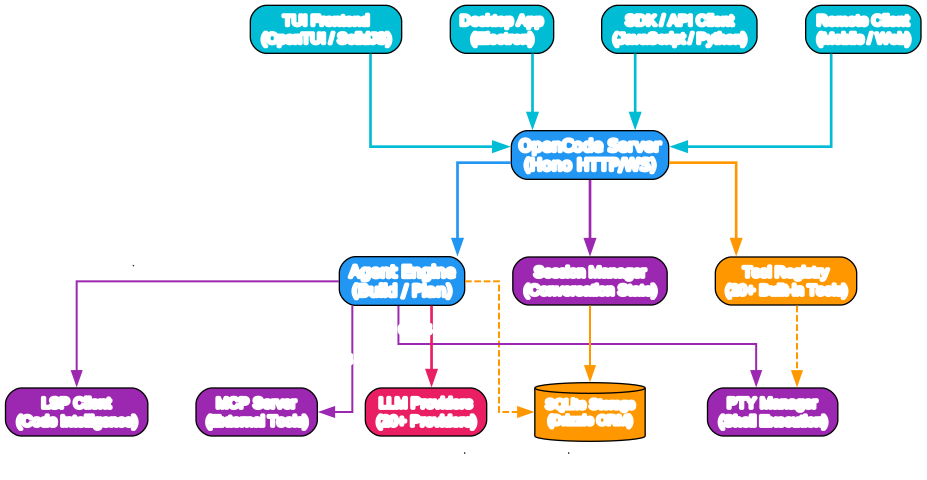
Understanding the Architecture
The architecture diagram above illustrates the layered design that sets OpenCode apart from other coding agents. Let us break down each component:
Client Layer
OpenCode supports multiple client interfaces that all communicate with the same backend server:
- TUI Frontend - The primary interface built with OpenTUI and SolidJS, designed by neovim users for keyboard-driven workflows
- Desktop App - An Electron-based desktop application available for macOS, Windows, and Linux
- SDK / API Client - JavaScript and Python SDKs for programmatic access
- Remote Client - Mobile or web clients that can drive OpenCode remotely thanks to the client/server design
This client diversity is a direct result of the client/server architecture. The TUI is just one possible frontend - you could run OpenCode on a powerful server and control it from your phone, making it uniquely suited for remote development workflows.
Server Layer
At the heart of OpenCode is a Hono-based HTTP/WebSocket server that handles all client communication. The server orchestrates three core modules:
- Agent Engine - Manages the build and plan agents, processes LLM interactions, and coordinates tool execution
- Session Manager - Maintains conversation state, handles compaction for long sessions, and supports session resume and sharing
- Tool Registry - Registers and dispatches the 20+ built-in tools available to agents
Infrastructure Layer
The infrastructure components provide the capabilities that make OpenCode a serious coding tool:
- LSP Client - Integrates with Language Server Protocol for code intelligence (diagnostics, hover info, go-to-definition)
- MCP Server - Supports the Model Context Protocol for connecting external tool servers
- SQLite Storage - Uses Drizzle ORM for persistent storage of sessions, messages, and configuration
- PTY Manager - Manages pseudo-terminal sessions for shell command execution with proper I/O handling
Provider Layer
OpenCode connects to 20+ LLM providers through the Vercel AI SDK, including Anthropic Claude, OpenAI GPT-4o, Google Gemini, Groq, Mistral, and local models via Ollama or LM Studio. This provider-agnostic design means you are never locked into a single vendor.
Dual Agent System
One of OpenCode’s most distinctive features is its dual agent system. You can switch between agents using the Tab key, and each serves a different purpose.
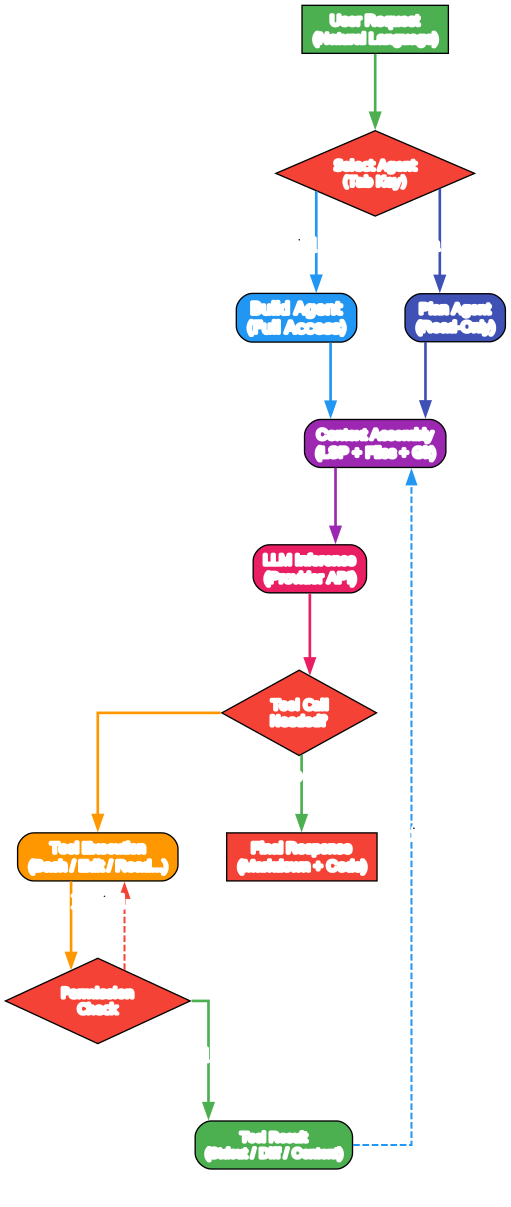
Understanding the Agent Workflow
The workflow diagram shows how OpenCode processes a user request from start to finish. Here is a detailed breakdown:
1. User Request
Everything starts with a natural language request from the user. This could be anything from “fix the TypeScript error in auth.ts” to “refactor the database layer to use connection pooling.”
2. Agent Selection
OpenCode presents two built-in agents that you switch between with the Tab key:
- Build Agent - The default agent with full access to your codebase. It can read, write, and edit files, execute bash commands, and use all available tools. This is your primary agent for development work.
- Plan Agent - A read-only agent designed for analysis and code exploration. It denies file edits by default and asks permission before running bash commands. This is ideal for exploring unfamiliar codebases, understanding architecture, or planning changes before executing them.
Additionally, a @general subagent is available for complex searches and multi-step tasks. It can be invoked using @general in messages and is used internally by the build agent for delegation.
3. Context Assembly
Before calling the LLM, OpenCode assembles a rich context that includes:
- LSP diagnostics and code intelligence data
- Relevant file contents from the project
- Git status and recent changes
- Previous conversation history
- Tool results from prior iterations
This context assembly is what makes OpenCode effective - the LLM receives not just your prompt, but a comprehensive picture of your codebase state.
4. LLM Inference
The assembled context is sent to the configured LLM provider. OpenCode uses the Vercel AI SDK for provider communication, which handles streaming, tool call parsing, and error recovery.
5. Tool Execution Loop
When the LLM decides a tool call is needed, OpenCode enters the tool execution loop:
- The tool call is dispatched to the appropriate tool handler
- A permission check is performed (especially for the plan agent, which restricts write operations)
- If approved, the tool executes and returns results
- The results are fed back into the context for the next LLM iteration
- This loop continues until the LLM produces a final response without tool calls
6. Final Response
The agent delivers a markdown-formatted response that may include code blocks, explanations, and references to files that were modified.
Key Features and Capabilities
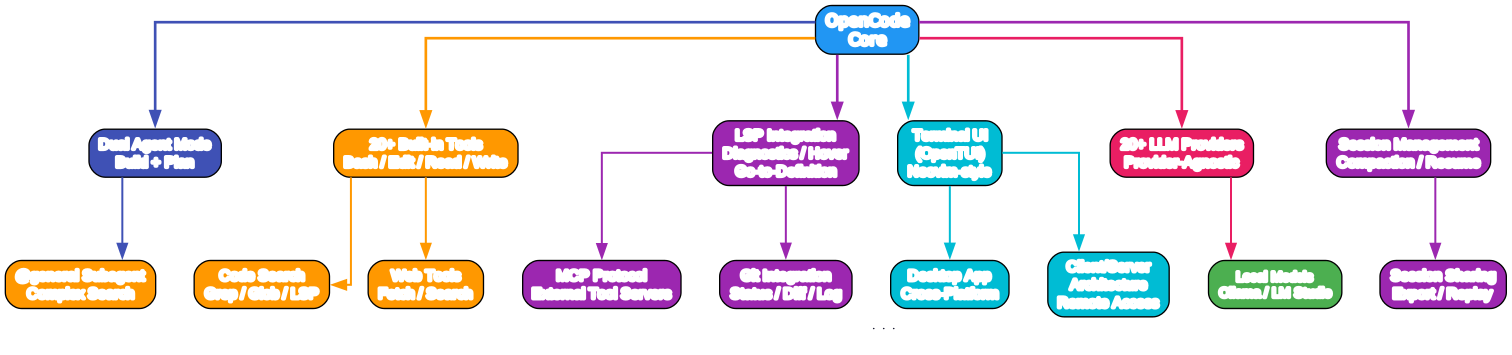
Understanding the Feature Map
The features diagram organizes OpenCode’s capabilities into six major categories. Let us explore each:
Dual Agent Mode
The build/plan agent split is more than just a convenience - it represents a fundamental design philosophy. When you are exploring a new codebase, the plan agent lets you ask questions and get explanations without the risk of accidental modifications. When you are ready to make changes, the build agent gives you full power. The @general subagent handles complex multi-step searches that would overwhelm a single agent turn.
20+ Built-in Tools
OpenCode ships with a comprehensive tool set that covers the full development workflow:
| Tool | Purpose |
|---|---|
bash | Execute shell commands with PTY support |
edit | Make targeted edits to existing files |
write | Create new files or overwrite existing ones |
read | Read file contents with line numbers |
grep | Search file contents with regex patterns |
glob | Find files matching glob patterns |
lsp | Access LSP diagnostics and code intelligence |
codesearch | Semantic code search across the project |
webfetch | Fetch and parse web pages |
websearch | Search the web for information |
task | Manage background tasks |
todo | Track and manage todo items |
question | Ask clarifying questions to the user |
skill | Invoke specialized skill modules |
mcp-exa | Use Exa search via MCP protocol |
apply_patch | Apply unified diff patches |
truncate | Truncate long outputs for context management |
LSP Integration
Unlike most coding agents that treat your code as plain text, OpenCode integrates directly with Language Server Protocol servers. This means the agent can access real-time diagnostics, type information, hover documentation, and go-to-definition data. When the LLM reads a file, it also receives LSP diagnostics for that file, enabling more accurate code modifications.
Terminal UI
The TUI is built with OpenTUI and SolidJS, reflecting the team’s neovim heritage. Key features include:
- Keyboard-driven navigation with vim-style keybindings
- Split-pane layout for code and conversation
- Real-time syntax highlighting
- Session management and history browsing
- Tab switching between build and plan agents
Provider Support
OpenCode supports 20+ LLM providers through the Vercel AI SDK:
- Anthropic (Claude 3.5, Claude 4)
- OpenAI (GPT-4o, o3, o4-mini)
- Google (Gemini 2.5 Pro/Flash)
- Groq (Llama, Mixtral)
- Mistral AI
- Azure OpenAI
- Amazon Bedrock
- Cerebras
- Cohere
- DeepInfra
- Together AI
- xAI (Grok)
- OpenRouter
- Alibaba (Qwen)
- Venice AI
- GitLab AI
- Local models (Ollama, LM Studio)
Session Management
OpenCode provides robust session handling:
- Compaction - Long conversations are automatically compacted to stay within context limits while preserving key information
- Resume - Pick up where you left off across restarts
- Sharing - Export and replay sessions for collaboration
The Ecosystem
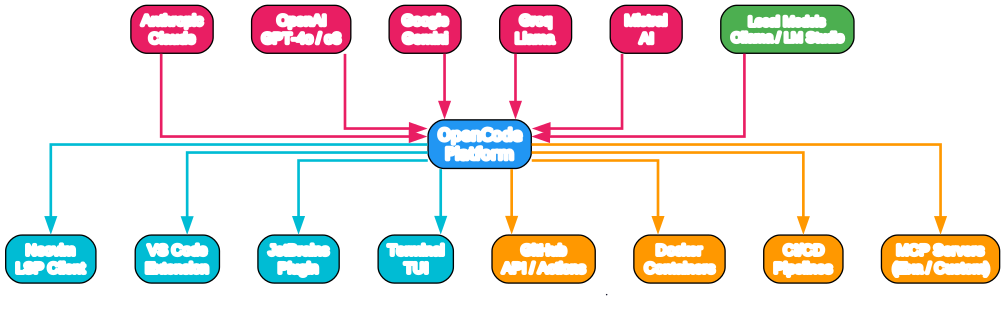
Understanding the Ecosystem
The ecosystem diagram shows how OpenCode connects to the broader development world. The platform sits at the center, bridging three major categories:
LLM Providers (Top)
OpenCode’s provider-agnostic approach means you can switch between models as they evolve. Today’s best model may be different from tomorrow’s, and pricing continues to drop. By not being coupled to any single provider, OpenCode ensures you always have access to the best available model for your task and budget. The recommended models are available through OpenCode Zen, but you are free to use any provider.
IDEs and Editors (Middle)
OpenCode integrates with your existing development environment through multiple pathways:
- Neovim - Direct LSP client integration for the neovim workflow
- VS Code - Extension support for the most popular editor
- JetBrains - Plugin for IntelliJ, PyCharm, and other JetBrains IDEs
- Terminal - The primary TUI interface for keyboard-driven development
External Tools (Bottom)
Through MCP (Model Context Protocol) and direct integrations, OpenCode connects to:
- GitHub API / Actions - Create PRs, manage issues, run CI
- Docker - Container management and deployment
- CI/CD Pipelines - Integration with build and deployment systems
- MCP Servers - Custom tool servers via the Model Context Protocol
Getting Started
Installation
OpenCode offers multiple installation methods:
# Quick install (macOS / Linux)
curl -fsSL https://opencode.ai/install | bash

# npm
npm i -g opencode-ai@latest

# macOS (Homebrew - recommended, always up to date)
brew install anomalyco/tap/opencode

# Windows (Scoop)
scoop install opencode

# Windows (Chocolatey)
choco install opencode

# Arch Linux
sudo pacman -S opencode

# Any OS (mise)
mise use -g opencode

# Nix
nix run nixpkgs#opencode
Desktop App
OpenCode also provides a desktop application for those who prefer a GUI:
# macOS (Homebrew)
brew install --cask opencode-desktop

# Windows (Scoop)
scoop bucket add extras
scoop install extras/opencode-desktop
Download directly from the releases page for your platform.
Configuration
OpenCode uses a .opencode/ directory in your project root for configuration. The key configuration file is .opencode/config.json:
{
  "provider": {
    "anthropic": {
      "apiKey": "your-api-key"
    }
  },
  "model": {
    "id": "claude-sonnet-4-20250514"
  },
  "agent": {
    "build": {
      "tools": ["bash", "edit", "write", "read", "grep", "glob", "lsp"]
    },
    "plan": {
      "tools": ["read", "grep", "glob", "lsp", "question"]
    }
  }
}
For local models, configure Ollama:
{
  "provider": {
    "ollama": {
      "baseURL": "http://localhost:11434"
    }
  },
  "model": {
    "id": "ollama:codellama:34b"
  }
}
Basic Usage
Once installed, navigate to your project directory and launch OpenCode:
cd your-project
opencode
This opens the TUI with the build agent active. Start typing your request:
> Find all TypeScript files that import from './config' and list them
Switch to the plan agent with Tab:
> Analyze the authentication module and suggest improvements
Invoke the general subagent for complex searches:
> @general Find all places where we handle database connection errors
Keybindings
| Key | Action |
|---|---|
Tab | Switch between build and plan agents |
Enter | Send message |
Ctrl+C | Cancel current operation |
Ctrl+L | Clear conversation |
q | Quit OpenCode |
How OpenCode Compares to Claude Code
The OpenCode FAQ directly addresses this comparison. Here are the key differences:
| Aspect | OpenCode | Claude Code |
|---|---|---|
| License | 100% open source (MIT) | Proprietary |
| Provider coupling | None - works with 20+ providers | Anthropic only |
| LSP support | Built-in | Limited |
| UI focus | Terminal-first (TUI) | Terminal |
| Architecture | Client/server | Monolithic |
| Local models | Yes (Ollama, LM Studio) | No |
| Remote access | Yes (mobile/web clients) | No |
The client/server architecture is particularly noteworthy. It enables scenarios that are impossible with monolithic designs - running OpenCode on a powerful cloud server while driving it from a lightweight mobile client, or embedding OpenCode into CI/CD pipelines through the SDK.
Technical Deep Dive: The Tool System
OpenCode’s tool system is built on a registry pattern where each tool defines its schema, permissions, and execution handler. Tools are implemented as TypeScript modules in the packages/opencode/src/tool/ directory.
Each tool follows a consistent pattern:
- Schema Definition - Input/output types defined with Zod
- Description - Natural language description for the LLM
- Execute Handler - The actual implementation
- Permission Level - Whether the tool requires user confirmation
The tool registry (tool/registry.ts) manages tool registration and dispatch. When the LLM produces a tool call, the registry looks up the tool, validates the input against the schema, checks permissions, and executes the handler.
This extensible design means you can add custom tools through the MCP protocol or by writing plugins that register with the tool registry.
Session and Context Management
One of the hardest problems in coding agents is managing context windows effectively. OpenCode tackles this with several strategies:
Compaction - When a conversation grows too long, OpenCode compacts it by summarizing earlier messages while preserving the most recent context. This is handled by session/compaction.ts and ensures the LLM always receives relevant information within its context limit.
Overflow Handling - The session/overflow.ts module manages situations where tool outputs exceed the context window, truncating intelligently while preserving key information.
Instruction System - The session/instruction.ts module manages system prompts and project-specific instructions, ensuring the LLM understands the project context, coding standards, and available tools.
Session Persistence - All session data is stored in SQLite via Drizzle ORM, enabling session resume across restarts and session sharing for collaboration.
Conclusion
OpenCode represents a significant step forward for open source AI coding agents. Its provider-agnostic design, client/server architecture, LSP integration, and dual agent system make it a compelling alternative to proprietary tools. Whether you are a neovim enthusiast who lives in the terminal, a team that needs to share coding sessions, or a developer who wants to use local models for privacy, OpenCode provides the flexibility and power to match your workflow.
With 148K stars on GitHub and an active community on Discord, OpenCode is rapidly evolving. The team’s focus on pushing the limits of what is possible in the terminal, combined with the extensible architecture, suggests that OpenCode will continue to be a major force in the AI coding agent space.
Links
- GitHub Repository: https://github.com/anomalyco/opencode
- Official Website: https://opencode.ai
- Documentation: https://opencode.ai/docs
- npm Package: https://www.npmjs.com/package/opencode-ai

Enjoyed this post? Never miss out on future posts by following us


