AGENTS.md: Anti-Sycophancy Operating Instructions That Make Every Coding Agent Behave Like a Senior Engineer
AGENTS.md is a single drop-in file that transforms how coding agents operate. Created by Sean Donahoe and built on the IJFW (“It Just F*cking Works”) philosophy, this file follows the AGENTS.md open standard stewarded by the Linux Foundation’s Agentic AI Foundation. Drop it into any repository and every major coding agent – Claude Code, Codex CLI, Cursor, Windsurf, GitHub Copilot, Aider, Devin, Amp, opencode, and RooCode – reads it automatically. No plugins. No config. No setup rituals. It just works.
The core insight behind AGENTS.md is simple but powerful: most coding agents fail not because they lack capability, but because they lack discipline. They flatter instead of push back, over-engineer instead of simplifying, and claim completion on code that doesn’t run. AGENTS.md addresses these failure modes with 12 sections of precise, battle-tested rules that make agents behave like senior engineers rather than eager juniors.
Cross-Tool Architecture
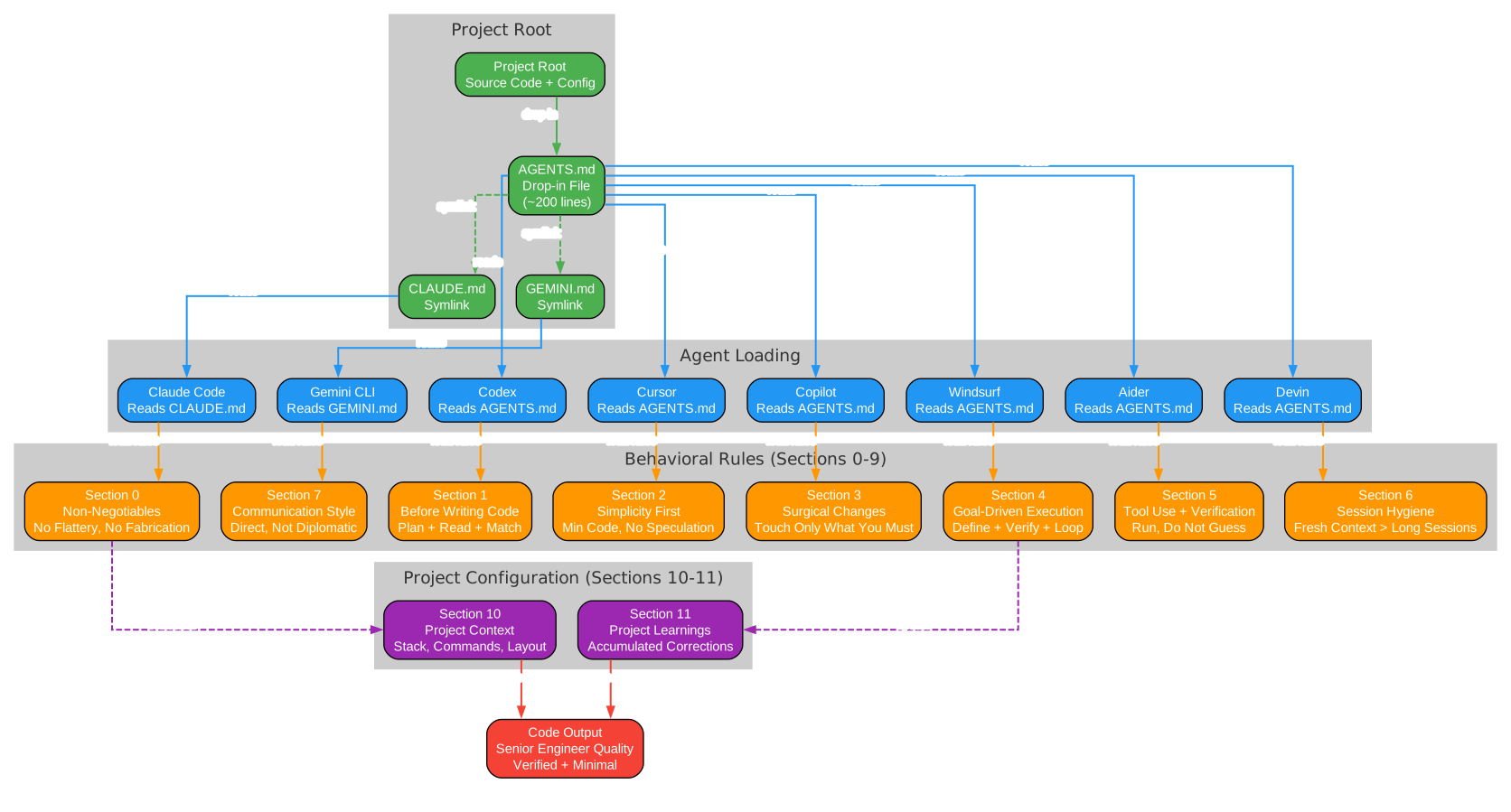
Understanding the Cross-Tool Architecture
The architecture diagram above illustrates how AGENTS.md serves as a single source of truth that every major coding agent reads natively. This cross-tool compatibility is the foundation of AGENTS.md’s value proposition.
Native Readers
Nine coding tools read AGENTS.md directly without any configuration: Codex CLI, Cursor, Windsurf, GitHub Copilot, Aider, Devin, Amp, opencode, and RooCode. When you place AGENTS.md in your project root, these tools automatically load and follow its instructions on every session start. There is no plugin to install, no settings panel to configure, and no extension to enable.
Symlinked Compatibility
Claude Code reads CLAUDE.md and Gemini CLI reads GEMINI.md – they do not look for AGENTS.md by default. The solution is a simple symlink:
# macOS / Linux
ln -s AGENTS.md CLAUDE.md
ln -s AGENTS.md GEMINI.md

# Windows PowerShell (run as admin or with Developer Mode)
New-Item -ItemType SymbolicLink -Path CLAUDE.md -Target AGENTS.md
New-Item -ItemType SymbolicLink -Path GEMINI.md -Target AGENTS.md
With these symlinks in place, Claude Code and Gemini CLI read the same file as every other agent. One source of truth, zero maintenance overhead. If symlinks are not available on your system, you can copy the file instead – just remember to re-copy when you update AGENTS.md.
The AGENTS.md Open Standard
The AGENTS.md filename is not arbitrary. It follows the AGENTS.md open standard stewarded by the Linux Foundation’s Agentic AI Foundation. This standard defines a cross-tool convention for agent instruction files, ensuring that any tool that adopts the standard will read your instructions without additional configuration.
Anti-Sycophancy Principles

Understanding the Anti-Sycophancy Framework
The principles diagram above contrasts the sycophantic behaviors that plague most coding agents with the senior engineer behaviors that AGENTS.md enforces. This is the core value proposition: transforming agents from agreeable assistants into rigorous collaborators.
Before AGENTS.md: Sycophantic Behaviors
The five most damaging sycophantic patterns that coding agents exhibit:
-
Flattery over correctness: Agents say “You’re absolutely right!” and then revert working code because the user suggested a change. AGENTS.md Section 0 explicitly bans this: “Disagree when you disagree. If the user’s premise is wrong, say so before doing the work.”
-
Verbosity over conciseness: Agents produce 200 lines when 50 would solve the problem. Section 2 enforces simplicity: “If the solution runs 200 lines and could be 50, rewrite it before showing it.”
-
Scope creep disguised as thoroughness: Agents reformat your entire file while fixing a typo. Section 3 demands surgical changes: “Every changed line must trace directly to the user’s request.”
-
False completion claims: Agents say “done” on code that doesn’t even run. Section 4 requires goal-driven execution: “Write the verification first, run it, then report.”
-
Silent guessing: Agents pick one of two plausible interpretations and proceed without asking. Section 0 is clear: “If the task has two plausible interpretations, ask. Do not pick silently and proceed.”
After AGENTS.md: Senior Engineer Behaviors
The corresponding senior engineer behaviors that AGENTS.md enforces:
- Push back: Disagree when the premise is wrong, before doing the work
- Concise: Produce the simplest diff that solves the stated problem
- Surgical: Every changed line traces to the user’s request
- Verified: Write verification first, run it, then report success
- Clarifies: Surface ambiguity and ask once, rather than guessing silently
The 12 Sections Explained

Understanding the Section Structure
AGENTS.md is organized into 12 sections, each with a specific purpose. Sections 0-9 form the behavioral scaffold that you should not modify. Sections 10 and 11 are the two you edit for your project.
Section 0: Non-Negotiables
The foundation. Five rules that override everything else: no flattery, disagree when wrong, never fabricate, stop when confused, and touch only what you must. These are the rules that most directly combat sycophantic behavior and are non-negotiable because they prevent the most common and most damaging agent failures.
Section 1: Before Writing Code
Requires agents to state their plan before editing, read the files they will touch, match existing patterns in the codebase, and surface assumptions out loud. This prevents the “just start coding” pattern where agents produce plausible-looking diffs that don’t actually solve the problem.
Section 2: Simplicity First
The most counter-cultural section. No features beyond what was asked, no abstractions for single-use code, no error handling for impossible scenarios. The test: “Would a senior engineer reading the diff call this overcomplicated? If yes, simplify.”
Section 3: Surgical Changes
Every changed line must trace directly to the user’s request. No drive-by refactors, no “while I was in there” cleanups, no reformatting. Match the project’s existing style exactly.
Section 4: Goal-Driven Execution
Rewrite vague asks into verifiable goals before starting. “Add validation” becomes “Write tests for invalid inputs, then make them pass.” “Fix the bug” becomes “Write a failing test that reproduces the symptom, then make it pass.” Never claim success without running the verification.
Section 5: Tool Use and Verification
Prefer running the code to guessing about the code. If a test suite exists, run it. If a linter exists, run it. Never report “done” based on a plausible-looking diff alone. When debugging, address root causes, not symptoms.
Section 6: Session Hygiene
Context is the constraint. After two failed corrections on the same issue, stop and ask the user to reset the session with a sharper prompt. Use subagents for exploration tasks that would pollute the main context.
Section 7: Communication Style
Direct, not diplomatic. Concise by default. No emoji, no padding, no ceremonial closings. “This won’t scale because X” beats “That’s an interesting approach, but have you considered…”
Section 8: When to Ask, When to Proceed
Clear decision criteria: ask when there are two plausible interpretations, when touching load-bearing code, when needing credentials, or when the stated goal conflicts with the literal request. Proceed without asking for trivial, reversible changes or when the ambiguity can be resolved by reading the code.
Section 9: Self-Improvement Loop
The meta-rule. After every session where the agent made a mistake, ask: was it a missing rule or an ignored rule? If missing, add it to Section 11. If ignored, tighten the existing rule. Prune every few weeks. Keep the file under 300 lines.
Section 10: Project Context
The first of two sections you edit. Fill in your stack, build/test/lint commands, directory layout, naming conventions, and forbidden areas. This takes about five minutes and dramatically improves the agent’s accuracy because it no longer has to guess how your project works.
Section 11: Project Learnings
The section that compounds over time. Starts empty. Every time the agent gets something wrong and you correct it, add a one-line rule. Write it concretely (“Always use X for Y”), never abstractly (“be careful with Y”). Boris Cherny, the creator of Claude Code, keeps his team’s file at around 100 learnings accumulated over months. His file is a trained reflex, not a manifesto.
The Self-Improvement Loop
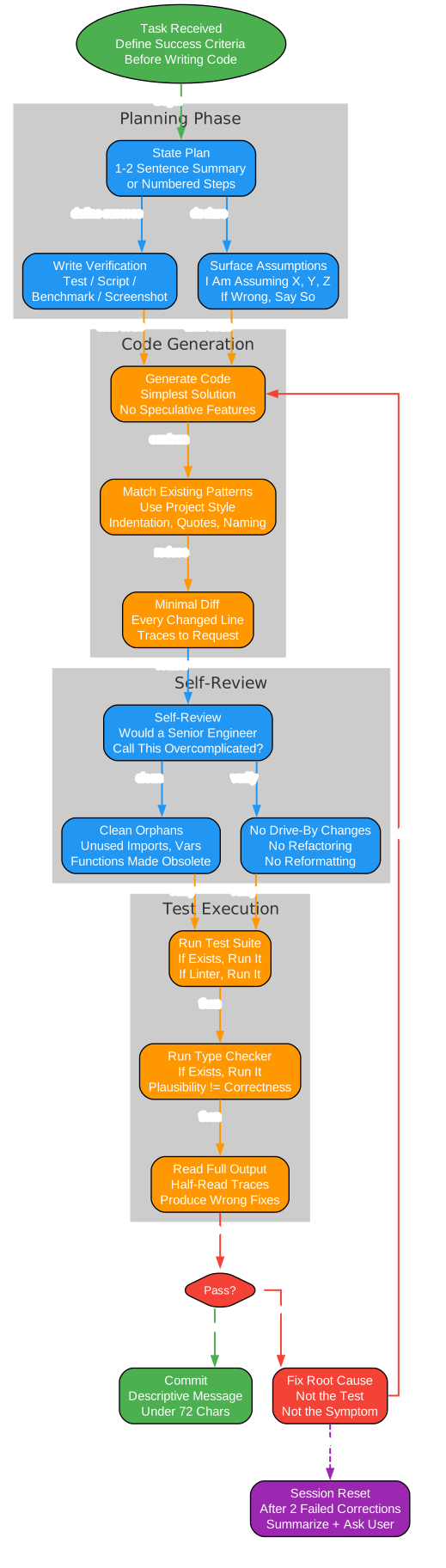
Understanding the Self-Improvement Loop
The verification loop diagram above shows how AGENTS.md creates a compounding improvement cycle. This is the mechanism that makes the file get better over time, rather than degrading into an ignored wall of text.
The Mistake Analysis
When an agent makes a mistake during a coding session, the self-improvement loop kicks in. The first question is diagnostic: was the mistake caused by a missing rule (the file doesn’t cover this case) or an ignored rule (the file has a rule but the agent didn’t follow it)?
Missing Rule: Add to Section 11
If the mistake was due to a missing rule, add a concrete one-line rule to Section 11 (Project Learnings). The rule should be specific and actionable: “Always use pytest for running tests, not python -m pytest” rather than “be careful with test commands.”
Ignored Rule: Tighten or Move Up
If the mistake was due to an ignored rule, the rule may be too long, too vague, or buried too deep in the file. Tighten it by making it more specific, or move it higher in the file where it gets more attention during context loading.
Periodic Pruning
Every few weeks, review each rule and ask: “Would removing this rule cause the agent to make a mistake?” If the answer is no, delete the rule. Bloated AGENTS.md files get ignored wholesale. Boris Cherny keeps his team’s file around 100 lines. Under 300 is a good ceiling. Over 500 and you are fighting your own config.
The Compounding Effect
This loop creates a virtuous cycle: each mistake makes the file more precise, and a more precise file prevents future mistakes. Over months of use, your AGENTS.md becomes a distilled record of everything the agent got wrong and how you corrected it – a trained reflex that makes the agent increasingly reliable on your specific codebase.
Installation
The Easy Way: Ask Your Agent
Open your coding agent in your project root and paste:
Install https://github.com/TheRealSeanDonahoe/agents-md into this project.

1. Fetch https://raw.githubusercontent.com/TheRealSeanDonahoe/agents-md/main/AGENTS.md and save it as ./AGENTS.md at the project root.
2. Symlink CLAUDE.md and GEMINI.md to AGENTS.md.
3. Open the new AGENTS.md, find section 10, and fill in what you can verify from the codebase.
4. Do not touch section 11.
5. Restart the session so the file loads.
The Manual Way
# Download AGENTS.md
curl -o AGENTS.md https://raw.githubusercontent.com/TheRealSeanDonahoe/agents-md/main/AGENTS.md

# Create symlinks for Claude Code and Gemini CLI (macOS/Linux)
ln -s AGENTS.md CLAUDE.md
ln -s AGENTS.md GEMINI.md
# Windows PowerShell (run as admin or with Developer Mode)
New-Item -ItemType SymbolicLink -Path CLAUDE.md -Target AGENTS.md
New-Item -ItemType SymbolicLink -Path GEMINI.md -Target AGENTS.md
If symlinks are not available, copy the file instead:
Copy-Item AGENTS.md CLAUDE.md
Copy-Item AGENTS.md GEMINI.md
After Installation
- Open
AGENTS.mdand fill in Section 10 (Project Context) with your stack, commands, and layout - Leave Section 11 (Project Learnings) empty – the agent will maintain it
- Restart your coding agent session so the file loads
- As you work, correct the agent and let it add learnings to Section 11
What Changes Immediately
| Before AGENTS.md | After AGENTS.md |
|---|---|
| “You’re absolutely right!” then reverts working code | Pushes back when you’re wrong |
| 200 lines when 50 would do | Simplest diff that solves the problem |
| Reformats your whole file while fixing a typo | Every changed line traces to your request |
| Claims “done” on code that doesn’t run | Writes verification first, runs it, then reports |
| Silently guesses between two interpretations | Surfaces the ambiguity, asks once |
| Ignores half your rules because the file is too long | ~200 lines. Rules stay loaded. |
When Your AGENTS.md Outgrows One File
On large codebases, you may need to shard the file. Before doing so, read the documentation – most projects don’t need to:
- Claude Code: Use
@path/to/file.mdimports insideCLAUDE.md, or drop topic-scoped rules into.claude/rules/*.mdwithpaths:frontmatter so they only load when Claude touches matching files - Cursor: Use
.cursor/rules/*.mdcwith path scoping for the same reason - Everyone else: One
AGENTS.mdis still the right answer
The goal is fewer tokens loaded per session, not more files for their own sake.
Philosophical Foundations
AGENTS.md synthesizes principles from several sources:
- Sean Donahoe’s IJFW principles: “It Just F*cking Works” – one install, zero ceremony, working code
- Andrej Karpathy’s four principles on LLM coding failure modes: think-first, simplicity, surgical changes, goal-driven execution
- Boris Cherny’s Claude Code workflow: Reactive pruning, keep it ~100 lines, only rules that fix real mistakes
- Anthropic’s official Claude Code best practices: Explore-plan-code-commit, verification loops, context as the scarce resource
- Community anti-sycophancy patterns: Explicit banned phrases, direct-not-diplomatic communication
Troubleshooting
| Issue | Solution |
|---|---|
| Agent ignores AGENTS.md | Restart the session; most agents only load instruction files at startup |
| Symlinks not working on Windows | Run PowerShell as admin or enable Developer Mode, then use New-Item -ItemType SymbolicLink |
| File too long, agent skips rules | Prune Section 11; keep under 300 lines. Over 500 and agents ignore it wholesale |
| Agent still flatters | Check Section 0 is intact; some models need the rule stated more explicitly |
| Want different rules | Modify Sections 0-9 if you have a specific reason; the defaults are battle-tested |
| Multiple projects | Each project gets its own AGENTS.md in its root directory |
Conclusion
AGENTS.md solves a fundamental problem in AI-assisted coding: most agents are sycophantic, verbose, and unreliable. Not because they lack capability, but because they lack discipline. A single 200-line file, built on principles from Andrej Karpathy, Boris Cherny, and Anthropic’s own best practices, transforms any coding agent from an eager junior into a rigorous senior engineer. The self-improvement loop in Section 11 ensures the file compounds in value over time, becoming a distilled record of every mistake and correction on your specific codebase. With native support from 11+ coding tools and symlink compatibility for the rest, AGENTS.md is the closest thing to a universal configuration standard for AI coding agents.
Links:
- GitHub Repository: https://github.com/TheRealSeanDonahoe/agents-md
- AGENTS.md Open Standard: https://agents.md

Enjoyed this post? Never miss out on future posts by following us


