What is SuperSplat?
SuperSplat is a free and open source 3D Gaussian Splat Editor that runs entirely in the browser, built by PlayCanvas using TypeScript and WebGL. If you have ever worked with 3D Gaussian splatting and needed a way to inspect, edit, optimize, and publish your splat data without installing desktop software, SuperSplat provides a complete web-based solution. The project has gained significant traction with nearly 8,000 stars on GitHub and explosive weekly growth, reflecting the growing demand for accessible neural rendering editing tools.
Gaussian splatting has emerged as one of the most important techniques in neural rendering, enabling real-time radiance field visualization that surpasses traditional NeRF approaches in both quality and speed. However, editing the resulting splat data has historically required custom scripts or proprietary tools. SuperSplat fills this gap by offering a full-featured editor that handles the entire pipeline from import through editing to export and publishing.
Key Insight: SuperSplat is the only browser-based open source editor that provides a complete Gaussian splat editing pipeline, including GPU-accelerated selection, real-time visualization, and multi-format export – all without requiring any desktop installation.
Architecture Overview
SuperSplat is built on a modular architecture centered around an event-driven system that coordinates all editor operations. The core components include the Scene Manager for rendering and state, the Data Processor for GPU-accelerated computation, and a comprehensive Tool Manager that handles all selection and transformation interactions.
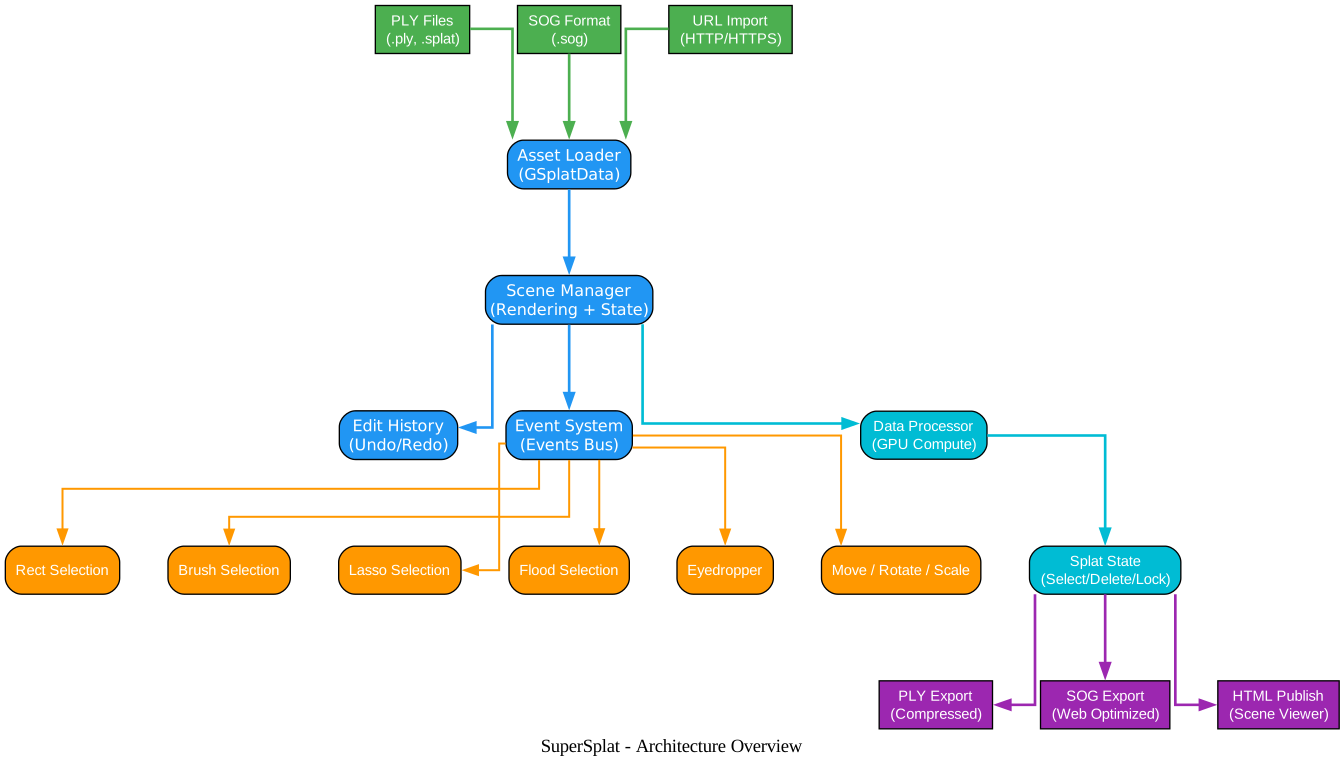
The architecture diagram above illustrates how data flows through the SuperSplat editor. Input files in PLY, SOG, or URL format are ingested by the Asset Loader, which parses them into GSplatData structures. The Scene Manager then takes responsibility for rendering and maintaining state, coordinating with the Edit History system for undo/redo support and the Event System bus that connects all modules. The GPU Data Processor handles intersection tests and position calculations, while the Splat State module tracks per-splat selection, deletion, and lock flags. On the tool side, six selection modes (Rect, Brush, Lasso, Flood, Eyedropper, and Sphere) plus transform tools (Move, Rotate, Scale) all communicate through the event system. Finally, the output pipeline supports PLY export, SOG compressed format, and HTML publishing for self-contained scene viewers.
The event system in editor.ts is particularly noteworthy. Rather than using a traditional MVC pattern, SuperSplat uses a centralized Events object that acts as a publish-subscribe bus. Every operation – from selecting a splat to changing the camera FOV – fires through this system, making the codebase highly decoupled and extensible. The CommandQueue serializes asynchronous GPU operations to ensure that readbacks and mutations remain ordered, preventing race conditions when the user rapidly drags a selection or performs undo during a GPU computation.
Key Features and Components
SuperSplat offers a rich set of features organized into six major categories: selection tools, editing operations, visualization modes, import/export, camera system, and publishing.

The features diagram shows how each category branches into specific capabilities. The Selection Tools category provides six distinct modes: Rect/Box/Sphere for geometric selections, Brush/Lasso/Polygon for freeform drawing, and Flood Fill plus Eyedropper for intelligent selection. The Editing Operations category covers Move, Rotate, and Scale transforms, state management (Select, Delete, Lock), and a full Undo/Redo history. Visualization offers Centers mode for point-cloud style viewing, Rings mode for Gaussian ellipse rendering, and SH Bands 0-3 for view-dependent color inspection. The Import/Export system handles PLY read/write, SOG compressed format, and PLY sequence animation support. The Camera System provides both Orbit and Fly modes with camera pose keyframing. Finally, Publishing enables both self-contained HTML viewers and direct scene publishing to SuperSplat.io.
Selection Tools
The selection system is one of SuperSplat’s most powerful features. Each selection mode uses GPU-accelerated intersection testing for real-time performance, even with millions of splats:
| Selection Mode | Description | Use Case |
|---|---|---|
| Rect Selection | Drag a rectangle to select all splats within | Quick area selection |
| Box Selection | 3D box intersection in the viewport | Volume-based selection |
| Sphere Selection | 3D sphere intersection | Radial selection around a point |
| Brush Selection | Paint-style freehand selection | Organic shape selection |
| Lasso Selection | Draw a freeform lasso path | Irregular boundary selection |
| Polygon Selection | Click to define polygon vertices | Precise polygonal selection |
| Flood Selection | Select connected similar splats | Region growing by similarity |
| Eyedropper | Select splats matching a color | Color-based selection |
The editor.ts file implements all selection operations through the SelectOp class hierarchy, which integrates with the Edit History system for full undo/redo support. The eyedropper selection in particular uses a threshold parameter that allows per-channel absolute difference matching, enabling precise color-based selections across the entire splat dataset.
Editing Operations
SuperSplat supports a comprehensive set of editing operations, all of which are undoable through the Edit History system:
- Move / Rotate / Scale – Transform selected splats using gizmo handles or numeric input
- Delete – Remove selected splats from the scene
- Duplicate – Copy selected splats as a new splat entity
- Separate – Extract selected splats into a separate entity while removing from the original
- Hide / Unhide – Toggle visibility of selected or all splats
- Lock / Unlock – Prevent accidental modification of splats
- Reset – Revert all edits to the original state
The edit-ops.ts module implements these operations using a StateOp base class that manipulates per-splat state bits (selected, deleted, locked) through set, clear, and toggle operations. Each operation records its inverse for undo, and the MultiOp class allows atomic multi-step operations like “separate” (delete from source + add as new entity).
Visualization Modes
SuperSplat provides two primary rendering modes for Gaussian splats:
Centers Mode renders each splat as a colored point, similar to a point cloud. This mode is useful for inspecting the spatial distribution and density of splats without the visual complexity of full Gaussian rendering. The point size is adjustable, and colors can optionally use the Gaussian’s own color rather than the selection state color.
Rings Mode renders each splat as an ellipse (ring) that represents the Gaussian’s covariance. This provides a more accurate visual representation of how each Gaussian contributes to the final image. The ring size is configurable, and an outline mode highlights selected splats with a visible border.
Both modes support spherical harmonic (SH) band visualization from 0 to 3, allowing users to inspect view-dependent color effects at different levels of detail.
Amazing: SuperSplat’s GPU-accelerated selection system can perform intersection tests against millions of Gaussian splats in real time, using custom WebGL shaders for both center-based and ring-based picking. The
DataProcessorclass indata-processor/index.tsmanages a buffer pool for efficient GPU readback, ensuring that rapid drag selections remain responsive.
Editing Workflow
The editing workflow in SuperSplat follows a clear pipeline: import, select, edit, and export. Each step is designed to be intuitive while providing professional-grade control.
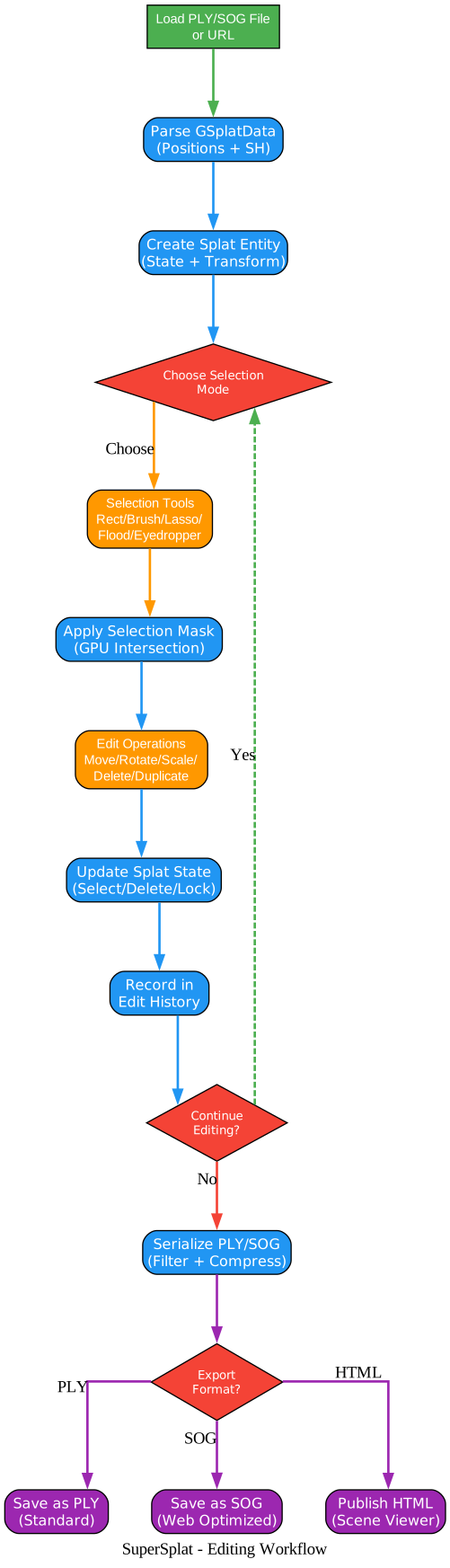
The workflow diagram illustrates the complete editing pipeline. Users start by loading a PLY or SOG file (or providing a URL), which is parsed into GSplatData and wrapped in a Splat entity with state and transform tracking. From there, they choose a selection mode and apply GPU-accelerated masks to identify target splats. Edit operations such as move, rotate, scale, delete, or duplicate are applied, and each change is recorded in the Edit History for undo/redo. If further edits are needed, the loop continues from the selection step. When editing is complete, the serialization pipeline filters and compresses the data before exporting in the chosen format: PLY for standard interchange, SOG for web-optimized delivery, or HTML for a self-contained scene viewer.
Step 1: Import
SuperSplat supports multiple input formats:
- PLY files – The standard Gaussian splat format, supporting both compressed and uncompressed variants
- SOG files – PlayCanvas’s optimized web format with WebP-compressed texture data
- URL loading – Direct import from HTTP/HTTPS URLs, including drag-and-drop support
- File System Access API – Native file picker integration in supported browsers
- PLY Sequences – Animated sequences of PLY files for dynamic splat visualization
The io/read/ module handles all input parsing, using the @playcanvas/splat-transform library for format conversion and validation.
Step 2: Select
After loading, users choose from eight selection modes to identify which splats to edit. The selection system uses GPU-accelerated intersection testing for real-time performance. Selections can be combined using add, remove, or set operations, and the eyedropper tool supports threshold-based color matching for intelligent selection.
Step 3: Edit
Once splats are selected, the full range of editing operations becomes available. All edits are tracked in the Edit History, enabling unlimited undo and redo. The transform tools (Move, Rotate, Scale) support both local and world coordinate spaces, and the gizmo handles provide intuitive direct manipulation.
Step 4: Export
SuperSplat supports three export paths:
- PLY – Standard Gaussian splat format with optional compression and SH band control
- SOG – PlayCanvas’s web-optimized format with GZip compression for fast loading
- HTML – Self-contained scene viewer that can be shared and embedded
The splat-serialize.ts module handles all serialization, including color grading, transform application, and opacity filtering.
Data Processing Pipeline
One of SuperSplat’s most impressive technical achievements is its GPU-accelerated data processing pipeline, which enables real-time interaction with datasets containing millions of Gaussian splats.

The data processing pipeline diagram shows how splat data flows through both GPU and CPU paths. Raw PLY or SOG data is first parsed on the GPU into GSplatData structures. Two key textures are created: the State Texture (tracking per-splat selection, deletion, and lock flags) and the Transform Texture (using a palette-based matrix system for efficient per-splat transforms). The GPU Sort module performs depth-based sorting for correct rendering, feeding into the GPU Renderer that displays splats in either Centers or Rings mode. When the user clicks to select splats, the CPU Intersection module receives pick results from the renderer and generates selection masks that update the State Texture. For export, the CPU Serializer reads the splat data and applies any transforms or filters before writing the output file.
The DataProcessor class manages a buffer pool for GPU readback operations, ensuring that rapid drag selections do not cause memory allocation spikes. The SplatState class maintains a CPU-side mirror of the GPU state texture, with efficient dirty-range tracking that minimizes upload bandwidth by only transferring modified regions.
Takeaway: The dual GPU/CPU architecture is what makes SuperSplat viable as a real-time editor. By keeping the hot path (rendering, sorting, intersection) on the GPU and only falling back to the CPU for serialization and state management, SuperSplat maintains interactive frame rates even with multi-million splat datasets.
Installation and Setup
SuperSplat runs in the browser, so there is nothing to install for end users. Simply visit superspl.at/editor to start editing immediately.
For developers who want to build from source or contribute, follow these steps:
Prerequisites
- Node.js 20.19.0 or later (the
package.jsonspecifies>=20.19.0) - A modern browser with WebGL 2 support (Chrome, Firefox, Edge, or Safari)
Local Development Setup
# Clone the repository
git clone https://github.com/playcanvas/supersplat.git
cd supersplat

# Install dependencies
npm install

# Build and start the development server
npm run develop
Then open your browser and navigate to http://localhost:3000. The development server automatically rebuilds when source files change.
Development Notes
- Disable browser caching during development. In Chrome, enable “Update on reload” and “Bypass for network” in the Application > Service Workers tab
- In Safari, use
Cmd+Option+Eor Develop > Empty Caches - The project uses Rollup for bundling and TypeScript 6.x for type checking
- Linting is available via
npm run lint
Build for Production
# Create a production build
npm run build
The production build outputs to the dist/ directory with optimized and minified assets.
Features Comparison Table
| Feature | SuperSplat | Other Splat Viewers | Desktop Editors |
|---|---|---|---|
| Browser-based | Yes | Varies | No |
| Open Source (MIT) | Yes | Rare | Rare |
| PLY Import/Export | Yes | Limited | Yes |
| SOG Format Support | Yes | No | No |
| GPU-Accelerated Selection | Yes | No | Varies |
| Multiple Selection Modes | 8+ | 1-2 | 3-5 |
| Undo/Redo History | Yes | No | Varies |
| Real-time Editing | Yes | View only | Yes |
| HTML Publishing | Yes | No | No |
| Camera Pose Keyframes | Yes | No | Limited |
| SH Band Visualization | 0-3 | None | Varies |
| Color Grading | Yes | No | Limited |
| Localization (10 languages) | Yes | No | Rare |
| PLY Sequence Animation | Yes | No | No |
Important: SuperSplat’s SOG format support is unique among Gaussian splat editors. SOG uses WebP compression for texture data and GZip for overall file compression, resulting in files that are significantly smaller than standard PLY while maintaining full visual quality. This makes SOG the ideal format for web deployment of Gaussian splat scenes.
Troubleshooting
Common Issues and Solutions
| Issue | Cause | Solution |
|---|---|---|
| Blank screen after loading | WebGL 2 not supported | Use a browser with WebGL 2 support (Chrome, Firefox, Edge) |
| Slow performance with large files | GPU memory pressure | Reduce SH bands to 0-1 in View settings; use SOG format for compressed data |
| Selection not working | Cache or service worker issue | Clear browser cache; disable service worker caching in DevTools |
| File fails to load | Unsupported PLY variant | Ensure the PLY file uses standard Gaussian splat format with x, y, z, scale, rotation properties |
| Export produces empty file | No splats selected for export | Make sure splats are not deleted; check visibility settings |
| Camera controls unresponsive | Fly camera mode active | Press Escape to exit fly mode; switch to orbit mode in toolbar |
| Undo history lost | Page refresh | Edit history is session-based; save your work before refreshing |
Performance Tips
- Reduce SH bands – Setting SH bands to 0 or 1 significantly reduces GPU memory usage and improves frame rates for large datasets
- Use Centers mode for selection – Centers mode is faster than Rings mode for interactive selection operations
- Hide unused splats – Use the Hide feature to reduce the number of rendered splats during editing
- Export to SOG – The SOG format provides better compression and faster loading for web deployment
- Adjust splat size – Reducing the splat point size in Centers mode can improve rendering performance
Localization
SuperSplat supports 10 languages out of the box:
- English (en)
- German (de)
- Spanish (es)
- French (fr)
- Japanese (ja)
- Korean (ko)
- Portuguese Brazil (pt-BR)
- Russian (ru)
- Chinese Simplified (zh-CN)
Adding a new language involves creating a JSON file in static/locales/ and registering the locale in src/ui/localization.ts. The localization system uses i18next for internationalization.
API and Embedding
SuperSplat supports an iframe API for embedding and programmatic control. The iframe-api.ts module exposes editor operations through postMessage, enabling integration with external applications and workflows. This makes it possible to embed SuperSplat in custom web applications and control it programmatically.
Community and Resources
- Live Editor: superspl.at/editor
- User Guide: PlayCanvas Documentation
- GitHub Repository: playcanvas/supersplat
- Discord Community: PlayCanvas Discord
- Forum: PlayCanvas Forum
- Blog: PlayCanvas Blog
Conclusion
SuperSplat represents a significant step forward in making 3D Gaussian splat editing accessible to everyone. By running entirely in the browser with no installation required, it removes the barrier to entry for working with neural radiance field data. The combination of GPU-accelerated selection, comprehensive editing tools, multi-format export, and HTML publishing creates a complete workflow that was previously only available through custom scripts or proprietary software.
Whether you are a researcher exploring Gaussian splatting techniques, a developer building 3D web experiences, or an artist working with neural rendering captures, SuperSplat provides the tools you need to inspect, edit, optimize, and publish your splat data – all from your browser. With its MIT license and active community, it is well-positioned to become the standard tool for Gaussian splat editing in the neural rendering ecosystem. Enjoyed this post? Never miss out on future posts by following us 


