Vidur: Microsoft’s LLM Inference System Simulator
Introduction
Vidur is a high-fidelity LLM inference system simulator developed by Microsoft Research that enables engineers and researchers to study LLM deployment performance without requiring access to expensive GPU hardware. Published at MLSys’24 (paper available at arxiv.org/abs/2405.05465), Vidur addresses a critical gap in the LLM infrastructure space: the ability to predict and optimize inference system behavior before committing resources to physical deployments.
Deploying large language models at scale is expensive and complex. A single misconfigured parameter can lead to wasted GPU hours, poor user experience, or both. Traditional approaches require running actual workloads on real hardware, which is costly and time-consuming. Vidur changes this equation by providing a discrete-event simulation framework that accurately models inference system behavior using only a brief GPU profiling phase. The simulator captures key performance metrics including Time to First Token (TTFT), Time per Output Token (TPOT), request end-to-end latency, and batch size dynamics across different scheduling strategies and hardware configurations.
The project is open source under the MIT license and available on GitHub. It supports multiple scheduling policies including Sarathi, vLLM, Orca, LightLLM, and FasterTransformer, making it possible to compare strategies head-to-head without physical infrastructure. Whether you are a researcher testing new scheduling algorithms or an operations team planning GPU capacity for the next quarter, Vidur provides the analytical foundation to make informed decisions.
How Vidur Works
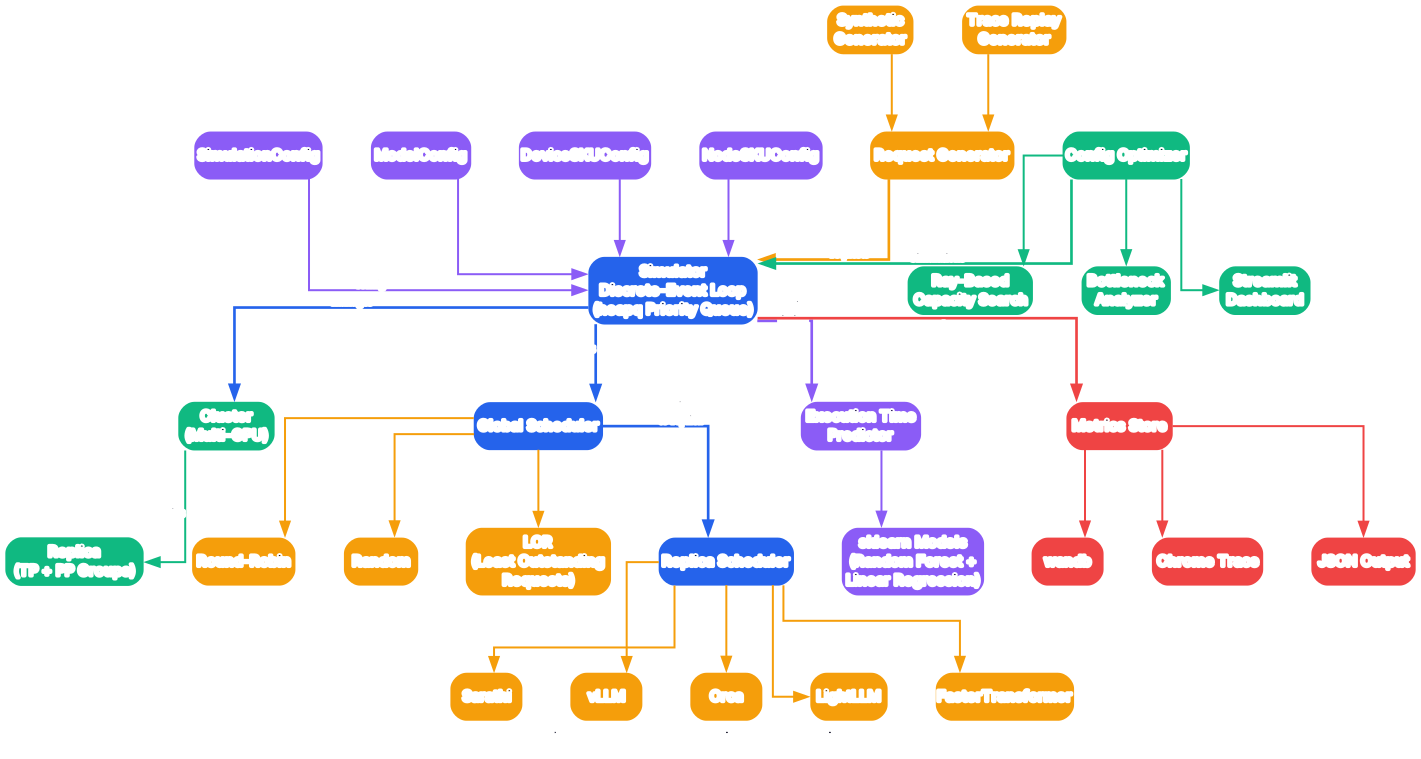
Understanding the Vidur Architecture
Vidur’s architecture is built around a discrete-event simulation engine that models the complete lifecycle of LLM inference requests. At the highest level, the system accepts configuration parameters that define the hardware setup, model choice, scheduling strategy, and workload characteristics, then produces detailed performance metrics and execution traces without ever running the actual model on GPUs.
Simulation Engine Core
The simulation engine uses a priority queue (Python’s heapq) to manage events in chronological order. Each event represents a discrete state change in the system, such as a request arriving, a batch beginning execution, or a token generation step completing. The engine processes events one at a time, advancing the simulation clock to each event’s timestamp. This approach ensures deterministic, reproducible simulations that can be run repeatedly with different parameters to explore the configuration space efficiently.
Request Generator
The request generator creates synthetic or trace-driven workloads that feed into the simulator. Vidur supports multiple request generation strategies: synthetic workloads with configurable inter-arrival distributions (Poisson, constant), and trace-driven workloads that replay real production request patterns from CSV files. The length generator controls both prompt and decode token counts, supporting uniform, zipf, and trace-based distributions. This flexibility allows engineers to model realistic traffic patterns or stress-test specific scenarios.
Replica Model
Each replica in the simulation represents a GPU server running a copy of the model. Replicas are configured with specific GPU types (A100 80GB, H100, A40), tensor parallelism degrees, and pipeline parallelism stages. The replica model tracks memory allocation for KV cache, manages batch composition, and interfaces with the execution time predictor to estimate how long each operation will take. Multiple replicas can be simulated simultaneously to study distributed serving scenarios.
Scheduler Component
The scheduler is the pluggable component that determines how requests are assigned to batches and when batches are executed. Vidur implements several scheduling strategies as separate classes, each with distinct policies for batch formation, preemption, and chunk size management. The Sarathi scheduler, for example, uses chunked prefill to balance TTFT and throughput, while the vLLM scheduler implements continuous batching with preemption based on KV cache pressure. Switching between schedulers requires only a configuration change, enabling direct comparisons.
Execution Time Predictor
Rather than running actual model computations, Vidur uses ML-based predictors trained on a small set of GPU profiling measurements. The predictor takes operation parameters (batch size, sequence lengths, model dimensions) and returns estimated execution times for prefill and decode steps. This is what makes Vidur GPU-free after the initial profiling phase. Random Forest and Linear Regression models are supported, with the former providing higher accuracy for non-linear execution time patterns.
Metrics Collector
Throughout the simulation, a metrics collector aggregates performance data at both the request level and the system level. Request-level metrics include TTFT, TPOT, and end-to-end latency for each individual request. System-level metrics track throughput, GPU utilization, batch size distributions, and KV cache usage over time. All metrics are exported in structured formats for analysis and visualization.
Event-Driven Simulation
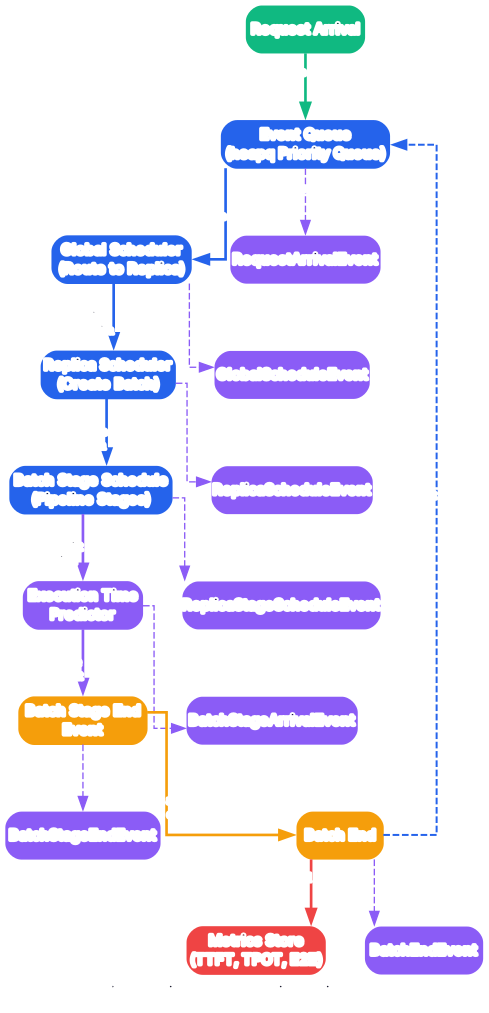
Understanding the Event-Driven Simulation Flow
Vidur’s discrete-event simulation engine is the heart of the system, and understanding its flow is essential to interpreting simulation results correctly. The simulation proceeds through a well-defined sequence of events, each triggering state transitions that model how a real inference system would behave under the specified workload and configuration.
Initialization Phase
The simulation begins by parsing the YAML configuration file that specifies all parameters: model name, GPU type, parallelism settings, scheduler type, request generation strategy, and output options. During initialization, the engine creates the replica objects, instantiates the chosen scheduler, loads the execution time predictor model, and prepares the metrics collector. The request generator is seeded with the specified random seed to ensure reproducibility across runs.
Request Arrival Events
Requests enter the system through arrival events generated by the request interval generator. For Poisson-distributed arrivals, the inter-arrival times follow an exponential distribution parameterized by the target queries-per-second (QPS) rate. Each request carries a prompt length and a decode length, either drawn from the configured length distribution or read from a trace file. When a request arrives, it is placed in the waiting queue maintained by the scheduler, and the next arrival event is scheduled based on the interval distribution.
Scheduling Decisions
At each scheduling opportunity, the scheduler examines the waiting queue and the currently running batch to decide which requests to admit, preempt, or keep running. Different schedulers implement different policies. The Sarathi scheduler uses a chunked prefill approach where new requests are added to the batch in small chunks, preventing long prefill sequences from blocking decode steps. The vLLM scheduler implements continuous batching with preemption, evicting requests when KV cache memory is insufficient. The Orca scheduler uses iteration-level scheduling for fine-grained control. Each scheduling decision produces a batch composition that is passed to the execution time predictor.
Execution Time Estimation
Once the scheduler has formed a batch, the execution time predictor estimates how long the current step will take. For prefill steps, the predictor considers the total number of tokens being processed across all requests in the batch. For decode steps, it considers the batch size and the per-request decode progress. The predicted time is used to schedule a completion event at the appropriate future simulation time. This approach decouples the simulation from actual GPU execution, enabling rapid exploration of many configurations.
Batch Completion and Token Generation
When a batch completion event is processed, the engine checks each request in the batch. If a request has completed all its decode tokens, it is marked as finished and its end-to-end metrics are recorded. If a request still has tokens to generate, it remains in the batch for the next decode step. The scheduler may also use this opportunity to add new requests from the waiting queue or preempt existing ones based on its policy. This cycle continues until all requests have been processed.
Termination and Output
The simulation terminates when all requests have been completed and no more events remain in the priority queue. At this point, the metrics collector produces final summaries including average TTFT, average TPOT, throughput in requests per second, and percentile latency distributions. If Chrome trace export is enabled, a JSON file is generated that can be loaded in Chrome’s trace viewer (chrome://tracing) to visualize the simulation timeline, showing exactly when each request was processed and how batches were composed over time.
ML-Based Execution Time Prediction
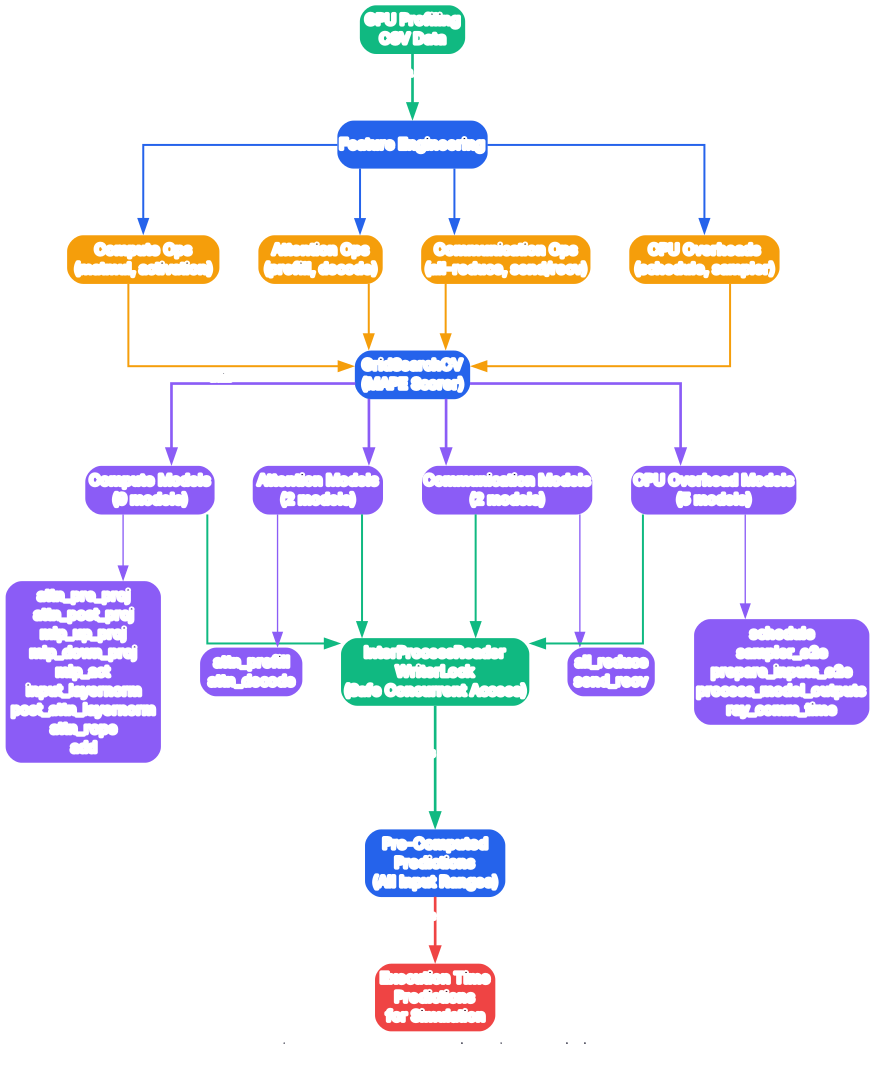
Understanding ML-Based Execution Time Prediction
One of Vidur’s most innovative features is its use of machine learning models to predict GPU execution times, eliminating the need for actual GPU access during simulation runs. This section explains how the prediction pipeline works, from the initial profiling phase through model training to inference-time estimation.
GPU Profiling Phase
Before simulations can run, Vidur requires a one-time profiling phase on the target GPU type. During this phase, the system executes a carefully designed set of microbenchmarks that measure execution times for various combinations of batch sizes, sequence lengths, and model operations. The profiling script runs prefill operations with different prompt lengths and decode operations with different batch sizes, collecting timing data for each configuration. This data is stored as CSV files and typically takes only a few hours on a single GPU. Once collected, the profiling data can be reused for all subsequent simulations targeting that GPU type, meaning you never need to run the profiling again for the same hardware.
Feature Engineering
The profiling measurements are transformed into features for the ML models. For prefill operations, the primary features include the total number of tokens in the batch, the number of sequences being prefilled, and the model’s hidden dimension size. For decode operations, features include the batch size (number of active sequences), the current sequence lengths, and the KV cache memory usage. Vidur also computes derived features such as the ratio of prefill to decode tokens and the memory utilization fraction, which help the models capture non-linear execution time patterns.
Random Forest Predictor
Vidur’s default predictor uses a Random Forest regression model trained on the profiling data. Random Forests are well-suited for this task because they can capture the non-linear relationships between input features and execution times without requiring extensive hyperparameter tuning. The ensemble of decision trees learns to partition the feature space into regions where execution times are approximately constant, producing accurate predictions even for configurations not directly measured during profiling. The model is trained separately for prefill and decode operations, as their execution time characteristics differ significantly.
Linear Regression Predictor
For scenarios where interpretability is preferred over maximum accuracy, Vidur also provides a Linear Regression predictor. This model assumes a linear relationship between input features and execution times, which is a reasonable approximation for decode operations with moderate batch sizes. While less accurate than the Random Forest model for extreme configurations, the Linear Regression predictor offers faster inference and clearer feature importance analysis, making it useful for understanding which parameters most impact performance.
Prediction Accuracy and Validation
Vidur’s creators validated the prediction accuracy by comparing simulated metrics against real GPU measurements. The results show that the simulator achieves high fidelity, with TTFT predictions within 5-10% of actual measurements and throughput predictions within 10-15% for most configurations. This level of accuracy is sufficient for capacity planning decisions and scheduling algorithm comparisons, where relative performance differences matter more than absolute numbers. The validation covers multiple GPU types, model sizes, and scheduling strategies, demonstrating the generalizability of the approach.
Extending the Predictor
The prediction framework is designed to be extensible. Researchers can add new GPU types by running the profiling script on the target hardware and adding the resulting data to the training set. Custom prediction models can be implemented by subclassing the base predictor class and implementing the required interface. This extensibility ensures that Vidur can keep pace with the rapidly evolving GPU and model landscape without requiring changes to the simulation engine itself.
Capacity Planning and Optimization
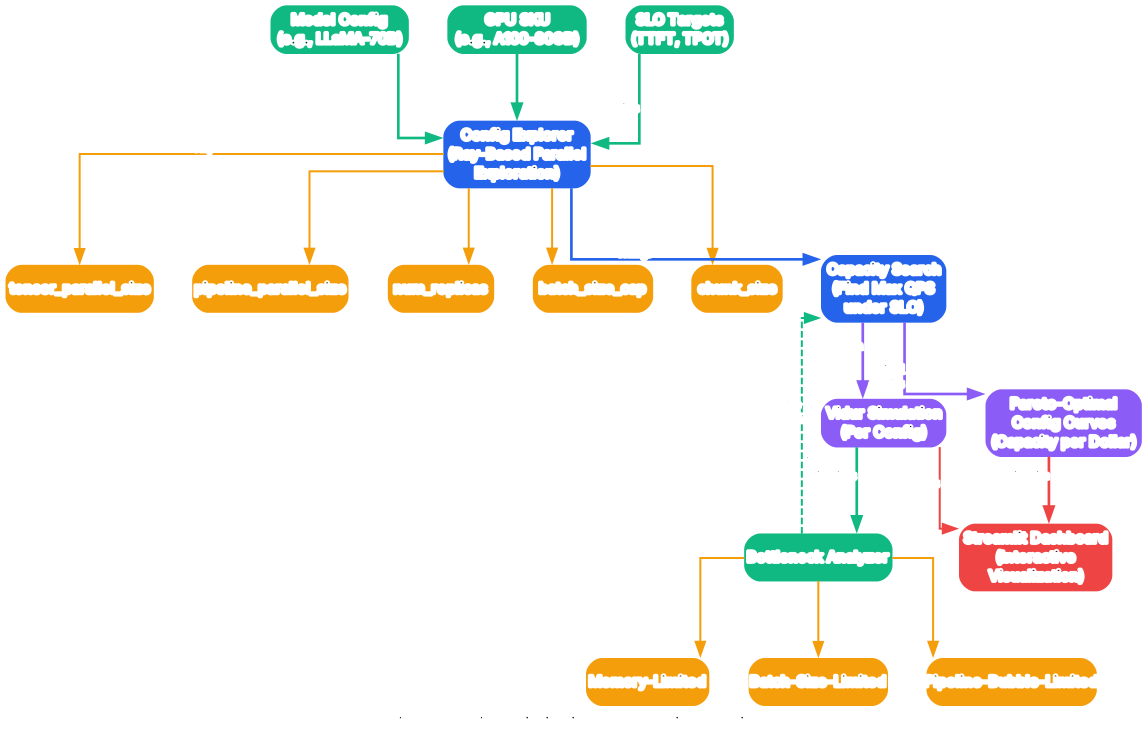
Understanding the Config Optimizer Workflow
Capacity planning is one of the most practical applications of Vidur. The Config Optimizer automates the search for the best deployment configuration by running many simulations in parallel and analyzing the results. This section walks through the optimization workflow and explains how to interpret its output.
Defining the Search Space
The optimization process begins by defining a configuration search space. This includes the GPU types to evaluate (A100 80GB, H100, A40), the tensor parallelism degrees (TP1, TP2, TP4, TP8), the number of pipeline stages, and the number of replicas. For each dimension, you specify the values to explore. The optimizer then generates all valid combinations, filtering out configurations that exceed memory limits or are otherwise infeasible. This combinatorial approach ensures that no viable configuration is overlooked.
Parallel Simulation with Ray
Vidur leverages Ray for distributed simulation execution. Each configuration in the search space is submitted as a Ray task, enabling hundreds of simulations to run concurrently across available CPU cores. This parallelism dramatically reduces the total optimization time compared to sequential execution. A search space of 50 configurations that would take hours to simulate sequentially can be completed in minutes with sufficient parallelism. The Ray integration handles task scheduling, fault tolerance, and result collection transparently.
Bottleneck Analysis
After each simulation completes, the optimizer performs a bottleneck analysis to identify the limiting factor in the configuration. Common bottlenecks include KV cache memory exhaustion (leading to preemption and increased TTFT), compute saturation (GPU utilization near 100% with increasing latency), and communication overhead (in tensor parallel configurations where all-reduce operations dominate). The bottleneck analysis provides actionable insights: if memory is the bottleneck, increasing tensor parallelism or using GPUs with more memory may help; if compute is saturated, adding replicas is the appropriate response.
Pareto-Optimal Configurations
The optimizer produces Pareto curves that show the trade-off between cost and performance. Each point on the curve represents a configuration that achieves the best possible performance for a given cost. Configurations below the Pareto front are dominated (another configuration achieves better performance at lower cost) and can be eliminated from consideration. The Pareto analysis helps decision-makers select configurations that align with their budget and latency requirements. For example, a team with strict latency SLOs might choose a configuration on the right side of the curve (higher cost, lower latency), while a cost-sensitive team might choose a configuration on the left side (lower cost, higher latency).
Streamlit Dashboard
Vidur includes a Streamlit-based dashboard for visualizing optimization results. The dashboard presents interactive charts showing throughput vs. latency, cost vs. performance, and batch size distributions across configurations. Users can filter by GPU type, parallelism degree, and QPS to narrow down the results. The dashboard also displays the Pareto front, making it easy to identify the optimal configurations at a glance. This visual approach to capacity planning is far more intuitive than poring over raw CSV data.
Practical Decision Making
The final output of the Config Optimizer is a ranked list of configurations with their predicted performance metrics and estimated costs. Each configuration includes the GPU type, parallelism settings, number of replicas, predicted TTFT, predicted TPOT, predicted throughput, and cost per thousand tokens. Decision-makers can use this information to select the configuration that best meets their SLO requirements within their budget constraints. The entire process, from defining the search space to producing the ranked list, can be completed in under an hour on a standard workstation.
Supported Models and Hardware
Vidur supports a range of popular LLM architectures and GPU configurations. The following tables summarize the current support matrix.
Supported Models
| Model Family | Specific Models | Parameters | Notes |
|---|---|---|---|
| Llama 2 | Llama-2-7B, Llama-2-13B, Llama-2-70B | 7B - 70B | Most extensively tested |
| Llama 3 | Meta-Llama-3-8B, Meta-Llama-3-70B | 8B - 70B | Latest support |
| CodeLlama | CodeLlama-7B, CodeLlama-13B, CodeLlama-34B, CodeLlama-70B | 7B - 70B | Code generation focused |
| InternLM | InternLM-7B, InternLM-20B | 7B - 20B | Bilingual (EN/ZH) |
| Phi | Phi-2 | 2.7B | Small model variant |
| Qwen | Qwen-7B, Qwen-14B, Qwen-72B | 7B - 72B | Multilingual support |
Supported GPU Configurations
| GPU SKU | Memory | Tensor Parallelism | Pipeline Parallelism | Notes |
|---|---|---|---|---|
| NVIDIA A100 80GB | 80 GB HBM2e | TP1, TP2, TP4, TP8 | PP1, PP2, PP4 | Primary reference GPU |
| NVIDIA H100 | 80 GB HBM3 | TP1, TP2, TP4, TP8 | PP1, PP2, PP4 | Latest generation |
| NVIDIA A40 | 48 GB GDDR6 | TP1, TP2, TP4 | PP1 | Cost-effective option |
Scheduling Strategies
| Scheduler | Key Feature | Best For |
|---|---|---|
| Sarathi | Chunked prefill, balanced TTFT/throughput | General-purpose serving |
| vLLM | Continuous batching, PagedAttention | Memory-constrained scenarios |
| Orca | Iteration-level scheduling | Fine-grained control |
| LightLLM | Token-level scheduling | High-throughput scenarios |
| FasterTransformer | Static batching | Simple deployment patterns |
Installation
Vidur requires Python 3.10 and can be installed using mamba, conda, or a standard venv. Choose the method that best fits your environment.
Using Mamba (Recommended)
# Clone the repository
git clone https://github.com/microsoft/vidur.git
cd vidur

# Create the conda environment from the provided file
mamba env create -p ./env -f ./environment.yml

# Activate the environment
mamba activate ./env

# Install development dependencies (optional)
mamba env update -f environment-dev.yml
Using Conda
# Clone the repository
git clone https://github.com/microsoft/vidur.git
cd vidur

# Create the conda environment
conda env create -p ./env -f ./environment.yml

# Activate the environment
conda activate ./env
Using Venv
# Clone the repository
git clone https://github.com/microsoft/vidur.git
cd vidur

# Create a Python 3.10 virtual environment
python3.10 -m venv .venv

# Activate the environment
source .venv/bin/activate

# Install dependencies
python -m pip install -r requirements.txt
Usage
Running a Basic Simulation
The simplest way to run a simulation is through the command-line interface. The following example simulates a single A100 GPU serving Llama-3-8B with synthetic workload:
python -m vidur.main \
  --replica_config_device a100 \
  --replica_config_model_name meta-llama/Meta-Llama-3-8B \
  --cluster_config_num_replicas 1 \
  --replica_config_tensor_parallel_size 1 \
  --replica_config_num_pipeline_stages 1 \
  --request_generator_config_type synthetic \
  --synthetic_request_generator_config_num_requests 512 \
  --length_generator_config_type trace \
  --trace_request_length_generator_config_max_tokens 16384 \
  --trace_request_length_generator_config_trace_file ./data/processed_traces/splitwise_conv.csv \
  --interval_generator_config_type poisson \
  --poisson_request_interval_generator_config_qps 6.45 \
  --replica_scheduler_config_type sarathi \
  --sarathi_scheduler_config_batch_size_cap 512 \
  --sarathi_scheduler_config_chunk_size 512
Comparing Scheduling Strategies
To compare different schedulers, run separate simulations with the same workload but different scheduler configurations:
# Run with Sarathi scheduler
python -m vidur.main \
  --replica_config_device a100 \
  --replica_config_model_name meta-llama/Meta-Llama-3-8B \
  --cluster_config_num_replicas 1 \
  --replica_config_tensor_parallel_size 1 \
  --request_generator_config_type synthetic \
  --synthetic_request_generator_config_num_requests 512 \
  --replica_scheduler_config_type sarathi \
  --sarathi_scheduler_config_batch_size_cap 512 \
  --sarathi_scheduler_config_chunk_size 512 \
  --output_dir results/sarathi

# Run with vLLM scheduler
python -m vidur.main \
  --replica_config_device a100 \
  --replica_config_model_name meta-llama/Meta-Llama-3-8B \
  --cluster_config_num_replicas 1 \
  --replica_config_tensor_parallel_size 1 \
  --request_generator_config_type synthetic \
  --synthetic_request_generator_config_num_requests 512 \
  --replica_scheduler_config_type vllm \
  --output_dir results/vllm
Running the Config Optimizer
The Config Optimizer searches across multiple configurations to find the best deployment setup:
python -m vidur.config_optimizer \
  --model_name meta-llama/Meta-Llama-3-8B \
  --devices a100 h100 \
  --tensor_parallel_sizes 1 2 4 8 \
  --num_replicas 1 2 4 \
  --target_qps 10 \
  --output_dir optimization_results
Exporting Chrome Traces
For visual debugging and timeline analysis, enable Chrome trace export:
python -m vidur.main \
  --replica_config_device a100 \
  --replica_config_model_name meta-llama/Meta-Llama-3-8B \
  --cluster_config_num_replicas 1 \
  --replica_config_tensor_parallel_size 1 \
  --request_generator_config_type synthetic \
  --synthetic_request_generator_config_num_requests 256 \
  --replica_scheduler_config_type sarathi \
  --output_dir traces \
  --export_chrome_trace True
Open chrome://tracing in Chrome and load the generated JSON file to visualize the simulation timeline, showing batch composition, request scheduling, and execution timing for each simulation step.
Key Features Summary
| Feature | Description | Benefit |
|---|---|---|
| Discrete-Event Simulation | Priority queue-based event processing | Deterministic, reproducible results |
| ML-Based Prediction | Random Forest and Linear Regression models | No GPU required after profiling |
| Multiple Schedulers | Sarathi, vLLM, Orca, LightLLM, FasterTransformer | Compare strategies head-to-head |
| Multi-GPU Support | Tensor and pipeline parallelism | Model distributed serving scenarios |
| Config Optimizer | Ray-based parallel search with Pareto analysis | Find optimal deployment automatically |
| Chrome Trace Export | Timeline visualization in Chrome | Debug scheduling and batch composition |
| Streamlit Dashboard | Interactive visualization of results | Intuitive capacity planning decisions |
| Trace-Driven Workloads | Replay real production traffic patterns | Realistic performance estimation |
| Synthetic Workloads | Configurable Poisson, uniform, zipf distributions | Stress-test specific scenarios |
| Extensible Architecture | Plugin-based schedulers and predictors | Easy to add new strategies and hardware |
Conclusion
Vidur fills a critical gap in the LLM infrastructure toolchain by enabling performance prediction and capacity planning without requiring access to production GPU clusters. Its discrete-event simulation engine, combined with ML-based execution time prediction, delivers accurate estimates of TTFT, TPOT, throughput, and latency distributions across a wide range of models, GPUs, and scheduling strategies.
The Config Optimizer with Pareto analysis transforms what was previously a trial-and-error process into a systematic, data-driven decision. Teams can evaluate dozens of configurations in minutes, identify bottlenecks, and select the deployment setup that best meets their cost and latency requirements. The Chrome trace export and Streamlit dashboard make the results accessible to both engineers and decision-makers.
For researchers, Vidur provides a reproducible testbed for evaluating new scheduling algorithms and optimization techniques like speculative decoding. For operations teams, it offers a reliable way to plan GPU capacity before committing budget. The project is open source under the MIT license and actively maintained by Microsoft Research. Explore the codebase at github.com/microsoft/vidur and read the full research paper at arxiv.org/abs/2405.05465. Enjoyed this post? Never miss out on future posts by following us 


