Introduction
Tolaria is a desktop application for managing markdown knowledge bases that puts AI-first principles at the center of its design. Built with Tauri v2, React 19, and a Rust backend, Tolaria treats plain markdown files as the single source of truth, wraps every vault in git for version control, and provides deep integration with CLI coding agents like Claude Code, Codex, OpenCode, Pi, and Gemini. With 2,493 stars on GitHub and growing, Tolaria has quickly become the go-to tool for developers and knowledge workers who want their notes to be portable, version-controlled, and legible to both humans and AI agents.
System Architecture
Tolaria follows a layered architecture where the filesystem is the single source of truth, a Rust backend handles all file operations through Tauri IPC, and a React frontend provides a four-panel editing experience.
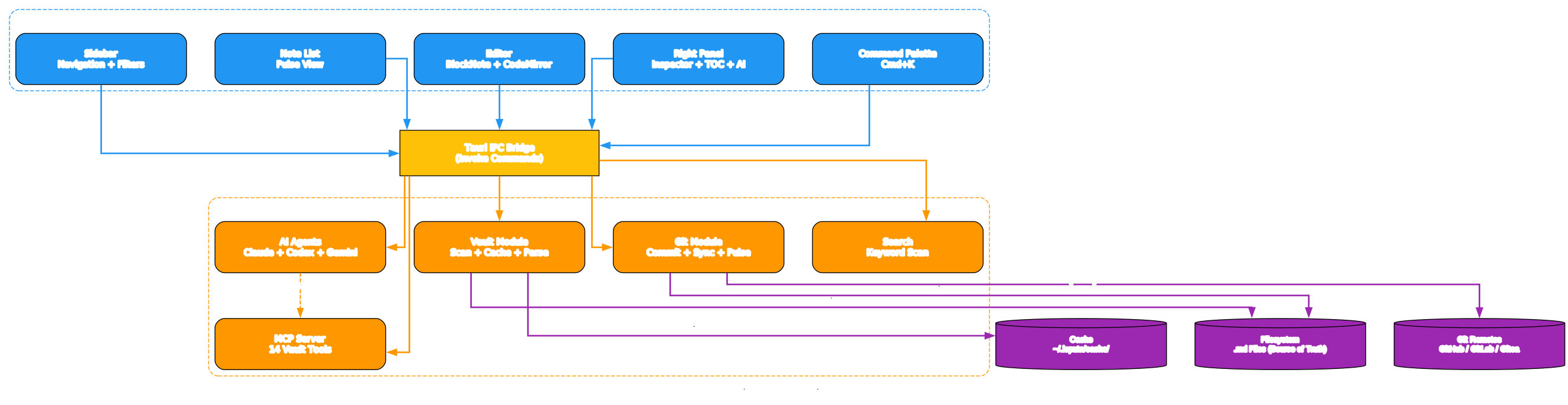
The architecture separates concerns into three distinct layers. The React Frontend contains the Sidebar for navigation and type-based filtering, the Note List with Pulse View for git activity, the Editor powered by BlockNote and CodeMirror, a Right Panel for Inspector, Table of Contents, and AI Agent interactions, and a Command Palette accessible via Cmd+K. All frontend components communicate with the Rust Backend through Tauri’s IPC bridge, which invokes commands for vault scanning, git operations, search, and AI agent streaming. The Rust Backend manages the Vault Module for scanning and caching, the Git Module for commit, sync, and pulse operations, AI Agent adapters for multiple CLI tools, an MCP Server exposing 14 vault tools, and a keyword search engine. External Services include the CLI agents themselves (Claude, Codex, Gemini), the MCP WebSocket bridge, and git remotes on GitHub, GitLab, or Gitea.
The key design principle is disk-first writes: all functions that change vault data write to disk via Tauri IPC before updating React state. If a disk write fails, React state remains consistent with what is actually on disk. The cache layer at ~/.laputa/cache/ is always reconstructible from the filesystem and never contains data that does not exist on disk.
Feature Ecosystem
Tolaria bundles a rich set of features that work together to create a cohesive knowledge management experience.

At the center is the Tolaria Desktop App, which connects to twelve major feature areas. Vault Management supports multiple vaults with git integration and a Getting Started template. The Rich Editor combines BlockNote for visual editing with CodeMirror for raw markdown. Search provides keyword-based scanning with contextual snippets. Git Integration delivers commit, sync, pulse view, and conflict resolution. The AI Agent Panel streams responses from Claude Code, Codex, OpenCode, Pi, and Gemini with tool access. The MCP Server exposes 14 vault tools for AI assistants. The Type System uses conventions as navigation lenses rather than enforcement schemas. Wikilinks enable [[navigation]] between notes. Localization supports i18n with Lara CLI synchronization. Theming offers light and dark modes. Auto-Update provides alpha and stable release channels. Cross-Platform support covers macOS, Windows, and Linux.
Key Insight: Tolaria’s type system is deliberately non-enforcing. Types are “lenses, not schemas” – they help you find and group notes without requiring specific fields or validation. This makes the vault legible to both humans and AI agents without rigid structure.
Data Flow Workflow
Tolaria’s data flow follows a three-representation model where the filesystem always wins.
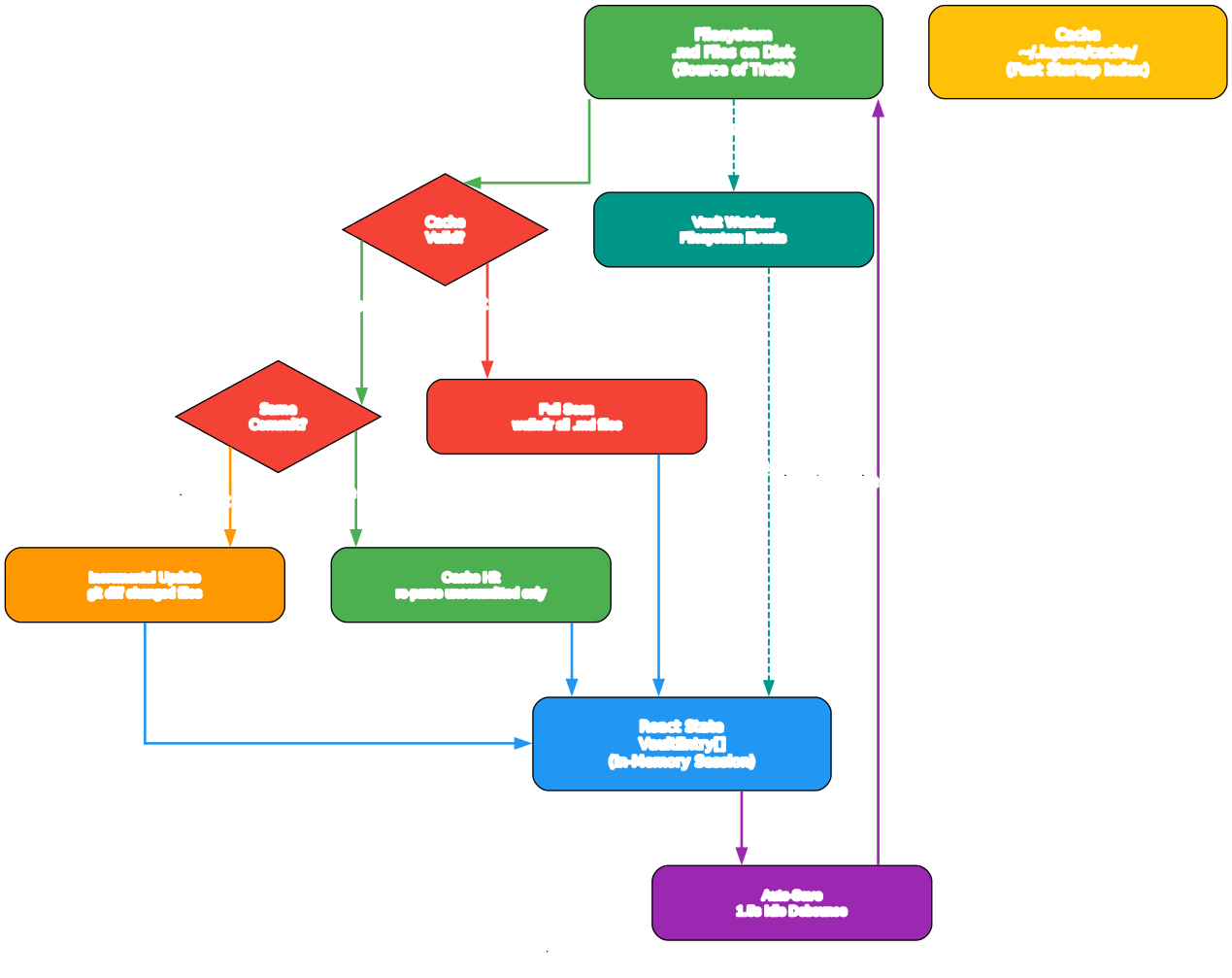
When Tolaria loads a vault, it first checks whether a cache exists and is valid. If the cache is missing or corrupt, a full scan walks all markdown files using walkdir. If the cache exists, Tolaria compares the git HEAD commit hash. When the commit matches, only uncommitted changes are re-parsed. When the commit differs, git diff identifies changed files for selective re-parsing. All three paths converge on the React state as VaultEntry arrays. From there, user edits flow through an auto-save pipeline with a 1.5-second idle debounce. The editor serializes BlockNote blocks back to markdown, restores wikilink syntax, and writes to disk via Tauri IPC before updating React state. External changes from git pulls, AI agent writes, or filesystem watchers route through a shared refresh abstraction that reloads entries, folders, and saved views together while preserving unsaved editor content.
Important: The cache is disposable. The
reload_vaultcommand deletes the cache file before rescanning, guaranteeing fresh data. The cache never contains data that does not exist on the filesystem.
Core Principles and Features
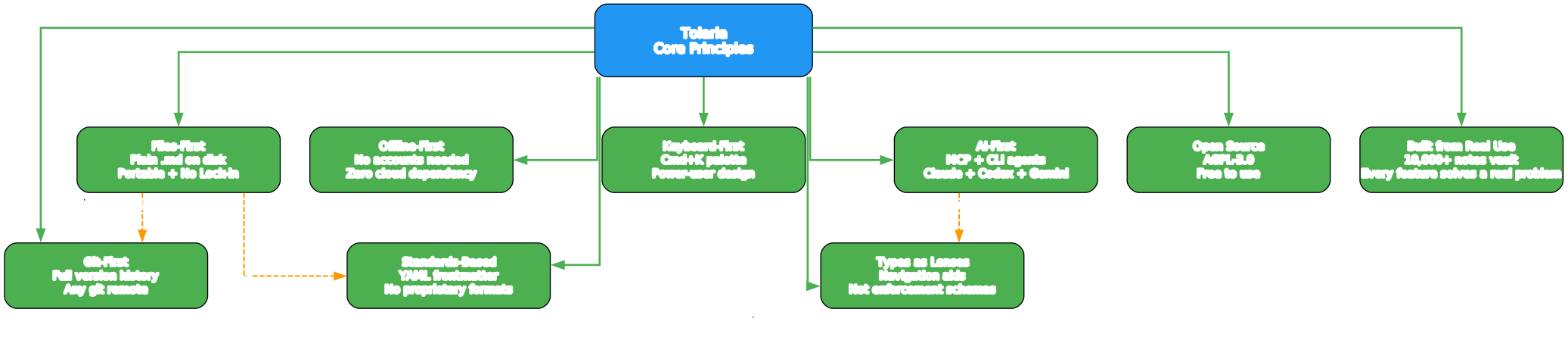
Tolaria is built on nine core principles that shape every design decision:
| Principle | Description |
|---|---|
| Files-First | Notes are plain markdown files. Portable, editable with any tool, no export step needed |
| Git-First | Every vault is a git repository with full version history and any remote |
| Offline-First | No accounts, no subscriptions, no cloud dependencies. Works completely offline |
| AI-First | Built-in support for Claude Code, Codex, OpenCode, Pi, and Gemini CLI agents |
| Keyboard-First | Cmd+K command palette, keyboard shortcuts for all major actions |
| Standards-Based | YAML frontmatter, wikilinks, no proprietary formats |
| Types as Lenses | Types are navigation aids, not enforcement mechanisms |
| Open Source | AGPL-3.0 licensed, free to use and modify |
| Built from Real Use | Created for a personal vault of 10,000+ notes, used daily |
Takeaway: The “convention over configuration” principle directly serves AI readability. The more structure comes from shared conventions rather than per-user custom configurations, the easier it is for an AI agent to understand and navigate the vault correctly without needing bespoke instructions for every setup.
MCP Server Integration
Tolaria includes a built-in MCP (Model Context Protocol) server that exposes 14 vault operations as tools for AI assistants. The server runs on two WebSocket ports: 9710 for the tool bridge (AI clients call vault tools) and 9711 for the UI bridge (frontend receives UI action broadcasts). It also supports stdio transport for Claude Code and Cursor integration.
The 14 available tools include open_note, read_note, create_note, search_notes, append_to_note, edit_note_frontmatter, delete_note, link_notes, list_notes, vault_context, ui_open_note, ui_open_tab, ui_highlight, and ui_set_filter. This means any MCP-compatible AI agent can read, create, search, and modify notes in your vault while you watch the changes happen in real time through the UI bridge.
Amazing: Tolaria’s MCP integration is bidirectional. Not only can AI agents read and write your vault, but the UI bridge also lets agents open notes, switch tabs, highlight elements, and set sidebar filters – all visible in real time on your desktop.
AI Agent Panel
The AI Agent Panel in Tolaria supports five CLI coding agents with normalized streaming, tool action cards, and per-vault permission modes. Safe mode restricts agents to file and search tools only, while Power User mode enables shell access scoped to the active vault. Each agent adapter handles its own authentication outside Tolaria, and the app detects installations across multiple paths including Homebrew, npm, nvm, and Windows Scoop.
The agent event flow normalizes output from all five agents into a unified stream of TextDelta, ThinkingDelta, ToolStart, ToolDone, and Done events. When an agent writes or edits vault files, Tolaria detects the file operations and triggers a vault reload to keep the UI in sync.
Editor and Content Pipeline
Tolaria’s editor uses BlockNote for rich text editing with a custom markdown pipeline. The load path splits frontmatter from the body, preprocesses durable markdown blocks (Mermaid diagrams, tldraw whiteboards), preprocesses wikilinks and math, then parses into BlockNote blocks. The save path reverses this: BlockNote blocks serialize to markdown, durable blocks and wikilinks are restored, and the result is written to disk through Tauri IPC.
The editor supports inline math rendering via KaTeX, Mermaid diagram blocks, tldraw whiteboard embeds, wikilink navigation with [[suggestion menus]], and a raw CodeMirror mode for direct markdown editing. Arrow ligatures (->, <-, <->) are normalized consistently across both editor modes.
Installation
Install Tolaria on macOS via Homebrew:
brew install --cask tolaria
Or download the latest release for macOS, Windows, or Linux from the Tolaria releases page.
For local development:
# Prerequisites: Node.js 20+, pnpm 8+, Rust stable
pnpm install
pnpm dev          # Browser-based mock mode at localhost:5173
pnpm tauri dev     # Native desktop app
Links
- Tolaria GitHub Repository
- Tolaria Architecture Documentation
- Tolaria Abstractions Documentation
- Tolaria Getting Started Guide
- Tolaria Download Page

Enjoyed this post? Never miss out on future posts by following us