n8n-MCP: AI-Powered n8n Workflow Automation with 1,650 Nodes and Diff-Based Updates
n8n-MCP is a Model Context Protocol (MCP) server that provides AI assistants with comprehensive access to n8n node documentation, properties, and operations – bridging n8n’s workflow automation platform with AI models like Claude. Whether you are building complex multi-step workflows, validating node configurations before deployment, or updating existing workflows with minimal token overhead, n8n-MCP delivers the tools and intelligence to make AI-driven workflow automation reliable and efficient.
Built by Romuald Czlonkowski and published as the n8n-mcp npm package (version 2.50.3), this TypeScript-strict project indexes 1,650 n8n nodes (820 core + 830 community, 741 verified) with 99% property coverage and 87% documentation coverage. It ships with 7 Core MCP Tools for node discovery and configuration, 13 n8n Management Tools for workflow CRUD and execution, a multi-level validation pipeline, and a diff-based workflow update engine that saves 80-90% of tokens compared to full workflow replacement.
What is n8n-MCP
n8n-MCP solves a fundamental problem: AI assistants like Claude have no built-in knowledge of n8n’s vast node ecosystem. When you ask an AI to “build a Slack notification workflow,” it needs to know which nodes exist, what properties they require, how to configure credentials, and how to connect them correctly. Without this knowledge, the AI guesses – and guesses lead to broken workflows.
n8n-MCP fills this gap by providing a structured, searchable interface to n8n’s entire node library. It indexes every node’s properties, operations, documentation, and real-world usage patterns, then exposes this data through the Model Context Protocol so AI assistants can query it in real time. The result: AI assistants that build valid, production-ready n8n workflows instead of hallucinated configurations.
Key capabilities include:
- 1,650 n8n nodes indexed with 99% property coverage and 63.6% operation coverage
- 2,352 workflow templates with 99.96% AI metadata coverage for template-first development
- 265 AI-capable tool variants detected with full documentation
- 156 ranked real-world configurations extracted from popular templates
- 7 Core MCP Tools for node discovery, configuration, and validation
- 13 n8n Management Tools for workflow CRUD, execution, credentials, and security audit
- Multi-level validation from minimal field checks to post-deployment verification
- Diff-based workflow updates that save 80-90% tokens vs full replacement
- FTS5 full-text search across all nodes for fast discovery
- Multi-transport support: stdio (Claude Desktop) and HTTP/SSE (remote deployment)
- Multi-IDE support: Claude Code, VS Code, Cursor, Windsurf, Codex, Antigravity
- 5,418 passing tests ensuring reliability
- Security hardening: SSRF protection, regex injection prevention, prototype pollution guards
Takeaway: With 1,650 n8n nodes indexed at 99% property coverage, n8n-MCP gives AI assistants near-complete knowledge of n8n’s entire node ecosystem – far surpassing what any AI model could infer from training data alone.
Architecture Overview
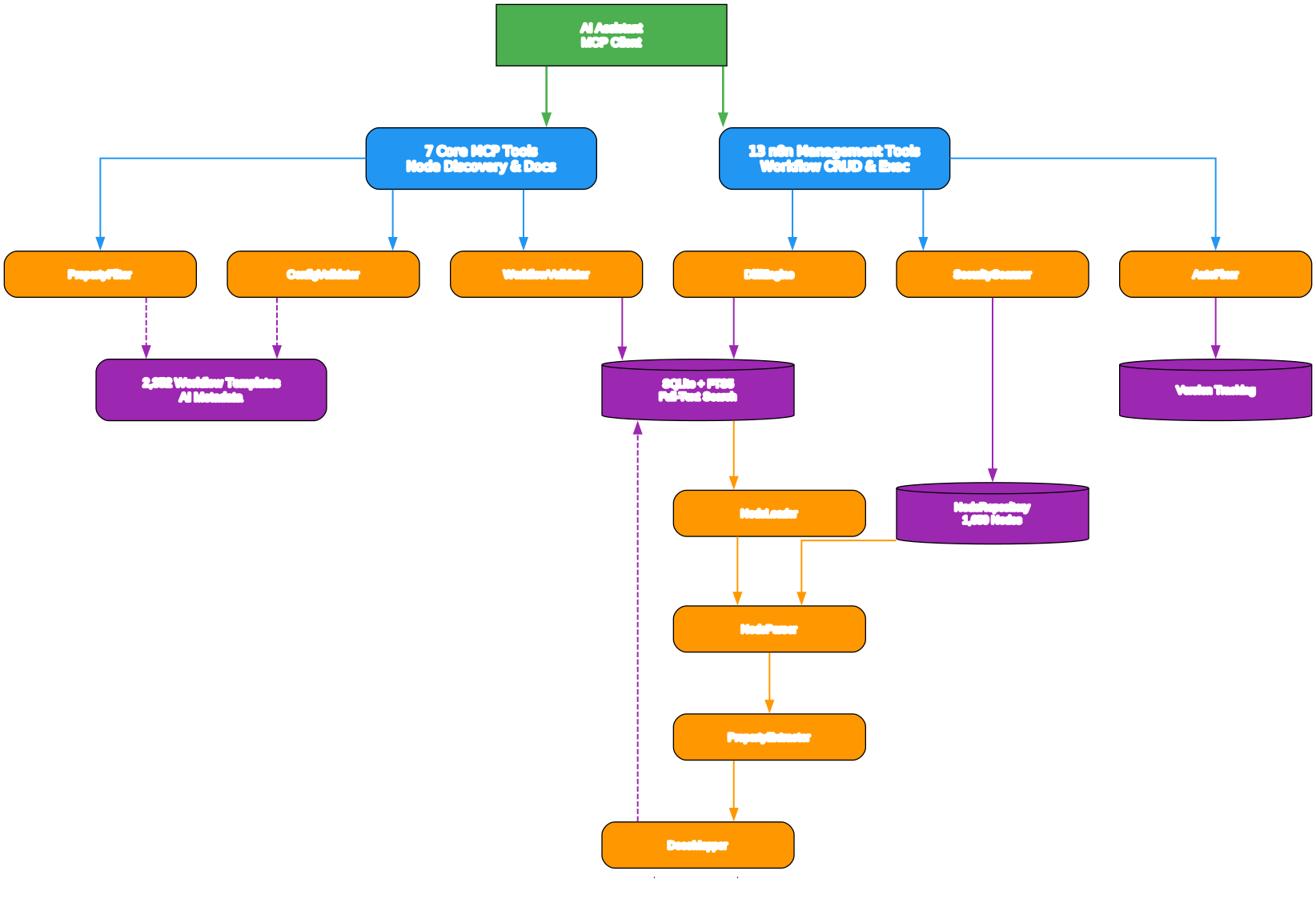
Understanding the Architecture
The architecture diagram above illustrates the five-layer system that powers n8n-MCP, from raw node data ingestion through to AI assistant interaction. Each layer has a distinct responsibility and communicates through well-defined interfaces.
Node Processing Pipeline
The pipeline begins with the NodeLoader, which discovers and loads n8n node definitions from both core packages (n8n-nodes-base, @n8n/n8n-nodes-langchain) and community packages. The NodeParser then extracts structured metadata from each node’s TypeScript definition, including properties, operations, credentials, and version information. The PropertyExtractor processes raw property schemas into simplified, AI-friendly formats – reducing 200+ raw properties down to 10-20 essential ones through the PropertyFilter service. Finally, the DocsMapper maps official n8n documentation to each node, achieving 87% coverage across the node library.
Database Layer
All processed node data is stored in SQLite databases with FTS5 (Full-Text Search 5) virtual tables. The NodeRepository provides the query interface, supporting keyword search, filtered search (by source, category, AI capability), and semantic property queries. Version tracking ensures that when n8n releases new node versions, the database can be incrementally updated without a full rebuild. The template database stores 2,352 workflow templates with AI metadata including complexity ratings, required services, target audiences, and setup time estimates.
Service Layer
The service layer contains the intelligence of n8n-MCP. The PropertyFilter curates essential properties for each node type, dramatically reducing token consumption for AI interactions. The ConfigValidator performs schema-level validation of node configurations. The WorkflowValidator validates complete workflow structures including connections, expressions, and AI-specific node patterns. The DiffEngine applies targeted updates to workflows using atomic operations (addNode, removeNode, updateNode, addConnection, etc.) instead of full workflow replacement. The SecurityScanner detects SSRF vulnerabilities, regex injection patterns, and prototype pollution risks. The AutoFixer automatically repairs common workflow errors.
MCP Server Layer
The MCP Server exposes two tool categories through the Model Context Protocol. The 7 Core Tools (tools_documentation, search_nodes, get_node, validate_node, validate_workflow, search_templates, get_template) provide node discovery and validation without requiring n8n API access. The 13 Management Tools (n8n_create_workflow, n8n_get_workflow, n8n_update_full_workflow, n8n_update_partial_workflow, n8n_delete_workflow, n8n_list_workflows, n8n_validate_workflow, n8n_autofix_workflow, n8n_workflow_versions, n8n_deploy_template, n8n_test_workflow, n8n_executions, n8n_manage_credentials, n8n_audit_instance, n8n_health_check) provide full lifecycle management when connected to an n8n instance.
Transport Layer
n8n-MCP supports two transport modes. The stdio transport is designed for local AI clients like Claude Desktop, where the MCP server runs as a child process and communicates through standard input/output streams. The HTTP/SSE transport supports remote deployment, enabling multiple AI clients to connect to a shared n8n-MCP instance over HTTP with Server-Sent Events for streaming responses. Both transports expose the same tool interface, ensuring feature parity regardless of deployment model.
MCP Tools

Understanding the MCP Tools
The tools diagram above shows the two categories of MCP tools and their relationships to the underlying services. Let us examine each tool in detail.
Core Tools (7 tools – no n8n API required)
These tools work entirely from the local SQLite database and require no connection to an n8n instance:
-
tools_documentation– The entry point for any AI assistant. Returns best practices, usage patterns, and documentation for all available MCP tools. Always call this first to understand what tools are available and how to use them effectively. -
search_nodes– Full-text search across all 1,650 nodes using FTS5. Supports filtering by source (core,community,verified), AI capability, and category. TheincludeExamples: trueflag returns real-world configurations extracted from workflow templates, giving AI assistants concrete examples of how each node is used in production. -
get_node– A multi-mode tool for retrieving detailed node information. In info mode, thedetailparameter controls verbosity:minimalreturns basic metadata (~200 tokens),standardreturns essential properties (default), andfullreturns complete information (~3000-8000 tokens). In docs mode (mode: 'docs'), it returns human-readable markdown documentation. In property search mode (mode: 'search_properties'), it finds specific properties by name. Version modes (mode: 'versions','compare','breaking','migrations') handle node version evolution. -
validate_node– Validates node configurations at two levels.mode: 'minimal'performs a quick required-fields check in under 100ms.mode: 'full'runs comprehensive validation with profiles:minimal(basic),runtime(production-ready),ai-friendly(optimized for AI consumption), andstrict(maximum safety). The full mode also returns auto-fix suggestions for detected errors. -
validate_workflow– Validates complete workflow structures including node connections, expression syntax, AI Agent node patterns, and credential references. This is the critical pre-deployment check that catches structural errors before they reach production. -
search_templates– Searches 2,352 workflow templates using four modes:keyword(text search),by_nodes(find templates using specific node types),by_task(curated templates for common tasks like webhook processing), andby_metadata(filter by complexity, required services, target audience, and setup time). -
get_template– Retrieves complete workflow JSON from templates. Three modes control verbosity:nodes_only(just node configurations),structure(nodes plus connections), andfull(complete workflow with metadata and settings).
n8n Management Tools (13 tools – requires n8n API configuration)
These tools require N8N_API_URL and N8N_API_KEY environment variables to connect to an n8n instance:
- Workflow Management:
n8n_create_workflow,n8n_get_workflow,n8n_update_full_workflow,n8n_update_partial_workflow,n8n_delete_workflow,n8n_list_workflows,n8n_validate_workflow,n8n_autofix_workflow,n8n_workflow_versions,n8n_deploy_template - Execution Management:
n8n_test_workflow,n8n_executions - Credential Management:
n8n_manage_credentials - Security and Audit:
n8n_audit_instance - System:
n8n_health_check
The n8n_update_partial_workflow tool is particularly powerful – it uses the Diff Engine to apply targeted operations (addNode, removeNode, updateNode, addConnection, removeConnection, rewireConnection, cleanStaleConnections, etc.) instead of replacing the entire workflow, saving 80-90% of tokens.
Key Insight: The diff-based workflow update engine applies atomic operations like addNode, updateNode, and addConnection instead of replacing entire workflows. This approach saves 80-90% of tokens compared to full workflow replacement, making it practical for AI assistants to iteratively refine complex workflows within context window limits.
Validation Pipeline
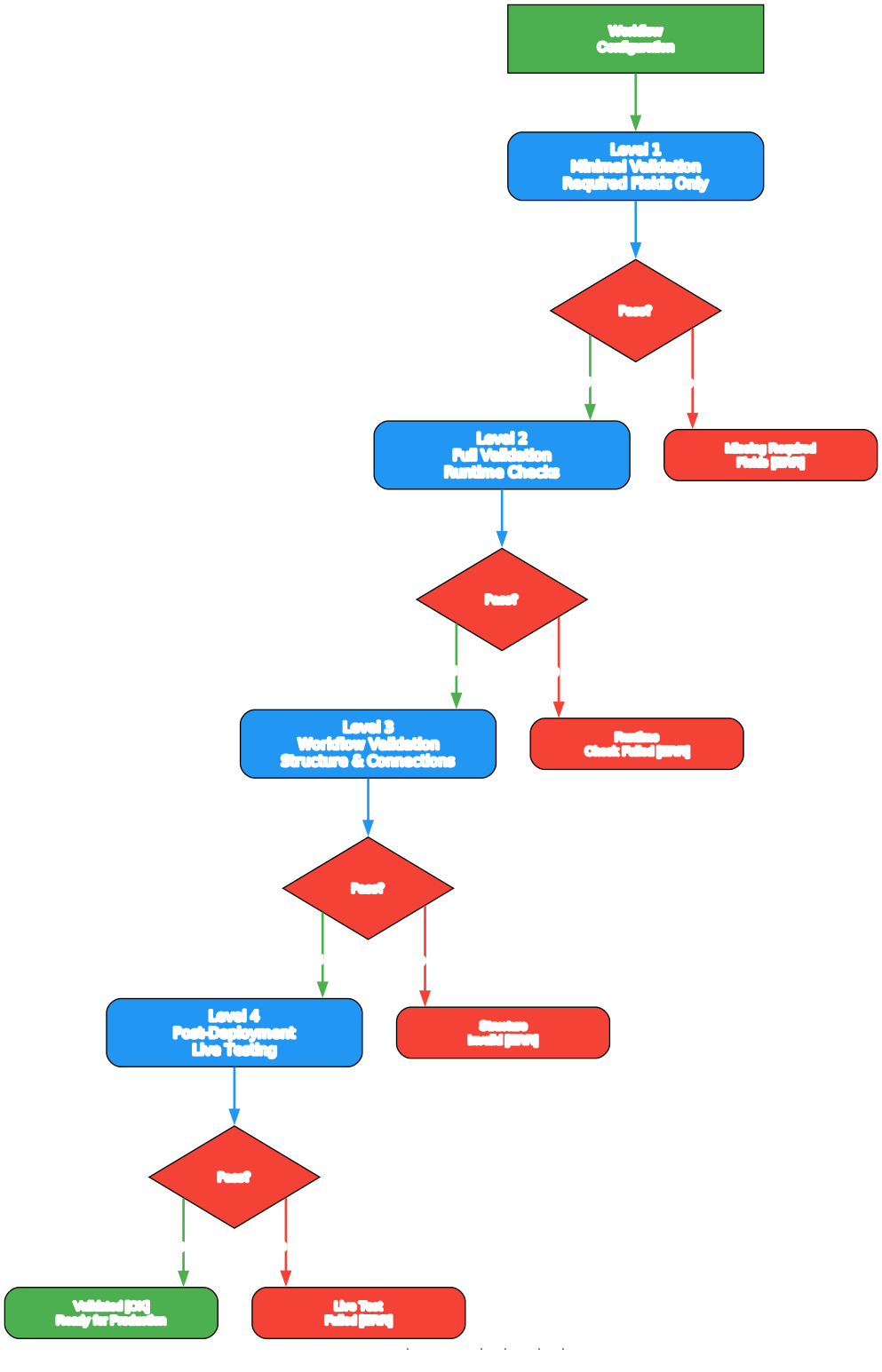
Understanding the Validation Pipeline
The validation diagram above illustrates the four-level validation system that n8n-MCP employs to catch errors at every stage of workflow development. This multi-level approach ensures that issues are detected as early as possible, when they are cheapest to fix.
Level 1: Minimal Validation (Quick Check)
The first level performs a rapid required-fields check using validate_node({mode: 'minimal'}). This runs in under 100ms and verifies that all mandatory properties are present in a node configuration. It is designed to be called before building a workflow, catching the most common errors early. For example, an HTTP Request node without a url parameter would be flagged immediately. This level uses the EnhancedConfigValidator service to check property schemas against the node’s definition.
Level 2: Full Validation (Comprehensive)
The second level runs validate_node({mode: 'full', profile: 'runtime'}) which performs comprehensive validation including type checking, enum value verification, conditional property requirements (showWhen conditions), and credential validation. Four validation profiles are available: minimal (basic type checks), runtime (production-ready validation), ai-friendly (optimized for AI-generated configurations with relaxed defaults), and strict (maximum safety with no tolerance for missing optional fields). The full validation also returns auto-fix suggestions, allowing AI assistants to automatically correct common configuration errors.
Level 3: Workflow Validation (Complete)
The third level validates the complete workflow structure using validate_workflow(). This checks:
- Connection integrity: Every connection references valid source and target nodes, output types match valid connection types (main, error, ai_agent, ai_chain, ai_retriever, ai_reranker, ai_tool, ai_memory, ai_model), and no orphaned connections exist.
- Expression validation: All n8n expressions (
,) are syntactically correct and reference existing nodes and fields. - AI Agent validation: AI Agent nodes have properly connected sub-nodes (language models, memory, tools, retrievers) following n8n’s LangChain connection patterns.
- Condition node structure: IF and Switch nodes have proper output routing with correct branch assignments.
- Trigger validation: Workflow has at least one trigger node and all triggers are properly configured.
Level 4: Post-Deployment Validation
The fourth level runs after a workflow has been deployed to an n8n instance. It uses n8n_validate_workflow({id}) to check the deployed workflow against the n8n instance’s actual state, followed by n8n_autofix_workflow({id}) to automatically repair common deployment errors. This level also monitors execution status with n8n_executions({action: 'list'}) to verify that the workflow runs successfully in production.
Important: The multi-level validation pipeline catches errors at four distinct stages – from quick field checks before building, through comprehensive schema validation, to complete workflow structure validation, and finally post-deployment verification. This prevents broken workflows from ever reaching production.
Diff Engine
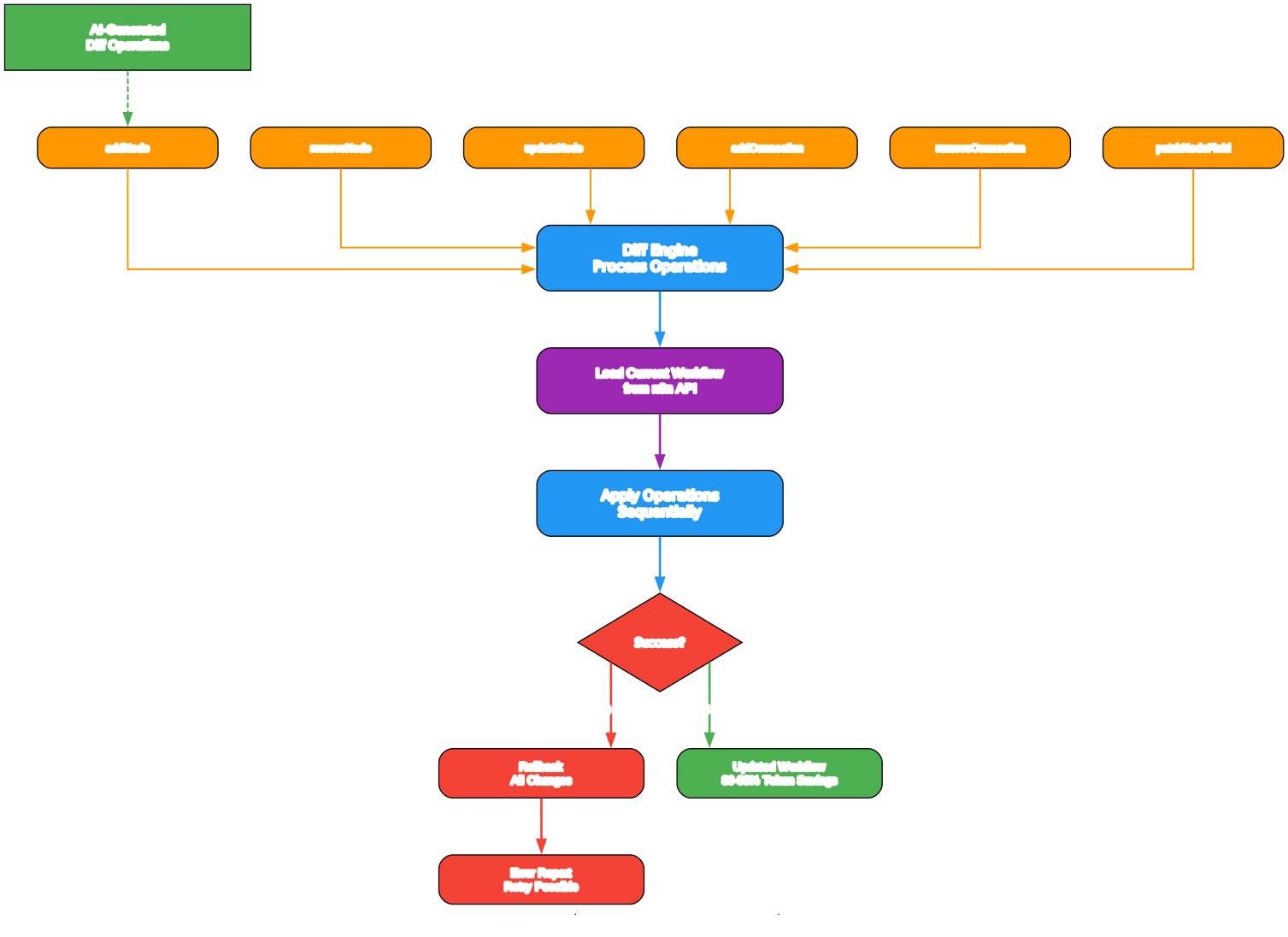
Understanding the Diff Engine
The diff engine diagram above shows how n8n-MCP applies targeted, atomic operations to workflows instead of replacing them entirely. This is the key innovation that makes AI-driven workflow iteration practical within token-limited contexts.
The Problem with Full Replacement
When an AI assistant updates a workflow using n8n_update_full_workflow, it must send the entire workflow JSON – all nodes, all connections, all settings, all credentials. For a complex workflow with 20+ nodes, this can consume 10,000-30,000 tokens just for the workflow payload. In a typical AI context window of 128K tokens, this leaves little room for conversation, reasoning, and other tool calls. Multiple iterations of workflow refinement quickly exhaust the context window.
Atomic Diff Operations
The diff engine solves this by defining 15 atomic operation types that target specific changes:
- Node operations:
addNode,removeNode,updateNode,moveNode,enableNode,disableNode,patchNodeField - Connection operations:
addConnection,removeConnection,rewireConnection,replaceConnections - Metadata operations:
updateSettings,updateName,addTag,removeTag - Lifecycle operations:
activateWorkflow,deactivateWorkflow - Cleanup operations:
cleanStaleConnections,transferWorkflow
Each operation specifies only what changed. For example, to add a Slack notification node to an existing workflow, the AI sends a single addNode operation with the node configuration and an addConnection operation specifying the source and target – typically 200-500 tokens instead of 10,000+ for a full workflow replacement.
Batch Operations
Multiple diff operations can be batched into a single n8n_update_partial_workflow call. This is critical for efficiency – instead of making 5 separate API calls to add a node, connect it, update a parameter, add error handling, and clean stale connections, all 5 operations execute atomically in a single request. The diff engine processes operations in dependency order, ensuring that addNode operations complete before addConnection operations that reference the new node.
Safety Mechanisms
The diff engine includes several safety mechanisms:
- Prototype pollution prevention: The
DANGEROUS_PATH_KEYSset blocks__proto__,constructor, andprototypefrom appearing in any property path, preventing a class of JavaScript security vulnerabilities. - Regex injection detection: The
isUnsafeRegex()function detects nested quantifiers and overlapping alternations that could cause catastrophic backtracking (ReDoS attacks). Patterns like(a+)+or(\w|\d)+are flagged and rejected. - Patch limits: The
PATCH_LIMITSconstant enforces a maximum of 50 patches per operation and a maximum regex pattern length of 500 characters, preventing resource exhaustion. - Field size limits: Regex operations are limited to fields under 512KB to prevent memory issues during pattern matching.
- Validation integration: Every diff operation is validated against the node schema before execution. Invalid configurations are rejected with descriptive error messages.
Transaction Semantics
The diff engine applies operations with transaction-like semantics. If any operation in a batch fails, the engine reports which operation failed and why, but previously applied operations are not rolled back (since n8n’s API does not support transactions). This design choice prioritizes partial progress over all-or-nothing semantics, which is appropriate for AI-driven workflows where the assistant can inspect the result and issue corrective operations.
Amazing: The n8n-MCP template library contains 2,352 workflow templates with 99.96% AI metadata coverage, including complexity ratings, required services, target audiences, and setup time estimates. This means AI assistants can almost always find a relevant template to start from rather than building from scratch.
Installation
n8n-MCP offers three installation paths depending on your deployment needs.
npm Install (Local)
The fastest way to get started locally:
# Install globally for Claude Desktop or other stdio clients
npm install -g n8n-mcp

# Or install locally in your project
npm install n8n-mcp
After installation, configure your MCP client to use the n8n-mcp binary. For Claude Desktop, add this to your claude_desktop_config.json:
{
  "mcpServers": {
    "n8n-mcp": {
      "command": "n8n-mcp",
      "args": [],
      "env": {
        "N8N_API_URL": "http://localhost:5678",
        "N8N_API_KEY": "your-api-key"
      }
    }
  }
}
The N8N_API_URL and N8N_API_KEY are optional – Core Tools work without them, but Management Tools require them to connect to your n8n instance.
Docker Deployment
For production or self-hosted deployments, Docker provides a clean, reproducible environment:
# Pull the official image
docker pull ghcr.io/czlonkowski/n8n-mcp:latest

# Run with stdio transport (for local AI clients)
docker run -i --rm \
  -e N8N_API_URL=http://host.docker.internal:5678 \
  -e N8N_API_KEY=your-api-key \
  ghcr.io/czlonkowski/n8n-mcp:latest

# Run with HTTP/SSE transport (for remote access)
docker run -p 3001:3001 --rm \
  -e MCP_MODE=http \
  -e N8N_API_URL=http://host.docker.internal:5678 \
  -e N8N_API_KEY=your-api-key \
  ghcr.io/czlonkowski/n8n-mcp:latest
The Dockerfile uses a multi-stage build: Stage 1 compiles TypeScript with all dev dependencies, and Stage 2 copies only the compiled output and runtime dependencies to a minimal node:22-alpine image. Build tools (Python, make, g++) are installed for better-sqlite3 native compilation and then removed, keeping the final image small.
Railway One-Click Deploy
For the fastest cloud deployment, Railway provides a one-click deploy button:
- Visit the Railway deployment page at
https://railway.com/deploy/n8n-mcp - Click “Deploy Now”
- Configure environment variables:
N8N_API_URL,N8N_API_KEY,MCP_MODE=http - Railway handles the rest – building, deploying, and providing a public URL
Hosted Dashboard
The simplest option requires no installation at all. The hosted dashboard at https://dashboard.n8n-mcp.com provides:
- Free tier: 100 tool calls per day
- Instant access without infrastructure
- Always up-to-date node database
- API key for connecting any MCP client
Usage Guide
Claude Desktop (stdio)
Claude Desktop uses the stdio transport, where n8n-MCP runs as a child process:
{
  "mcpServers": {
    "n8n-mcp": {
      "command": "npx",
      "args": ["-y", "n8n-mcp"],
      "env": {}
    }
  }
}
Once configured, Claude can directly search nodes, validate configurations, and build workflows using natural language. No n8n API connection is needed for Core Tools.
VS Code with GitHub Copilot
Add n8n-MCP to your VS Code settings (.vscode/mcp.json):
{
  "servers": {
    "n8n-mcp": {
      "command": "npx",
      "args": ["-y", "n8n-mcp"],
      "env": {}
    }
  }
}
Then use GitHub Copilot’s Agent mode in VS Code to interact with n8n-MCP tools directly from the chat interface.
Cursor IDE
Configure n8n-MCP in Cursor’s MCP settings file:
{
  "mcpServers": {
    "n8n-mcp": {
      "command": "npx",
      "args": ["-y", "n8n-mcp"],
      "env": {}
    }
  }
}
Cursor’s project rules can be combined with n8n-MCP for workflow-specific guidance.
HTTP/SSE (Remote Deployment)
For remote or shared deployments, use the HTTP transport:
# Start the HTTP server
MCP_MODE=http n8n-mcp

# Or with Docker
docker run -p 3001:3001 -e MCP_MODE=http ghcr.io/czlonkowski/n8n-mcp:latest
Connect your MCP client to http://localhost:3001/mcp for SSE-based streaming responses. This mode supports multiple concurrent clients connecting to a single n8n-MCP instance.
Recommended Workflow Process
For the best results with any AI assistant, follow this workflow:
- Start: Call
tools_documentation()for best practices - Template Discovery: Search templates first with
search_templates()– 2,352 templates cover most common use cases - Node Discovery: If no template fits, use
search_nodes({query: 'keyword', includeExamples: true}) - Configuration: Get node details with
get_node({nodeType, detail: 'standard', includeExamples: true}) - Validation: Validate with
validate_node({mode: 'minimal'})thenvalidate_node({mode: 'full'}) - Build: Construct the workflow from validated configurations
- Workflow Validation: Run
validate_workflow()on the complete workflow - Deploy: Use
n8n_create_workflow()thenn8n_validate_workflow({id})for post-deployment check
Key Features
| Feature | Details |
|---|---|
| Node Coverage | 1,650 nodes (820 core + 830 community, 741 verified) |
| Property Coverage | 99% with detailed AI-friendly schemas |
| Operation Coverage | 63.6% of available node actions |
| Documentation Coverage | 87% from official n8n docs |
| AI Tool Variants | 265 detected with full documentation |
| Template Library | 2,352 templates with 99.96% AI metadata |
| Real-World Configs | 156 ranked configurations from popular templates |
| Core MCP Tools | 7 tools (search, get, validate, templates) |
| Management Tools | 13 tools (CRUD, execution, credentials, audit) |
| Validation Levels | 4 levels (minimal, full, workflow, post-deployment) |
| Diff Operations | 15 atomic operation types |
| Token Savings | 80-90% vs full workflow replacement |
| Search Engine | FTS5 full-text search across all nodes |
| Transport Modes | stdio (local) + HTTP/SSE (remote) |
| IDE Support | Claude Code, VS Code, Cursor, Windsurf, Codex, Antigravity |
| Deployment | npm, Docker, Railway, hosted dashboard |
| Test Coverage | 5,418 passing tests |
| Security | SSRF protection, regex injection prevention, prototype pollution guards |
| Runtime | Node.js 22, TypeScript strict mode |
| License | MIT |
Troubleshooting
n8n-MCP fails to start
Symptom: The n8n-mcp command exits immediately or shows an error.
Solution: Ensure Node.js 22 or later is installed. n8n-MCP requires Node.js 22 for both the runtime and the better-sqlite3 native module. Check your Node version with node --version. If using npx, ensure npm is updated: npm install -g npm@latest.
Core Tools work but Management Tools return errors
Symptom: search_nodes and get_node work fine, but n8n_create_workflow returns connection errors.
Solution: Management Tools require N8N_API_URL and N8N_API_KEY environment variables. Verify that your n8n instance is running and accessible, and that the API key has the necessary permissions. Test connectivity with n8n_health_check().
Docker container exits immediately
Symptom: The Docker container starts but exits after a few seconds.
Solution: Check that the data/nodes.db file is accessible. If using volume mounts, ensure the database file exists in the mounted directory. For HTTP mode, verify that port 3001 is not already in use. Check container logs with docker logs <container-id>.
Search returns no results
Symptom: search_nodes({query: 'slack'}) returns an empty list.
Solution: The FTS5 database may need to be rebuilt. Run npm run rebuild to regenerate the search index from the node definitions. If using Docker, ensure the data/ directory is properly mounted and contains nodes.db.
Validation reports false positives
Symptom: validate_node reports errors for a configuration that works in n8n.
Solution: The validation profiles have different strictness levels. Try switching from strict to runtime profile: validate_node({nodeType, config, mode: 'full', profile: 'runtime'}). The ai-friendly profile is the most lenient and is designed for AI-generated configurations. If the issue persists, it may indicate a version mismatch between n8n-MCP’s node database and your n8n instance – run npm run rebuild to update.
Diff operations fail with “node not found”
Symptom: n8n_update_partial_workflow with addConnection fails because the target node does not exist.
Solution: Ensure that addNode operations appear before addConnection operations in the same batch. The diff engine processes operations in order, so nodes must be created before they can be connected. Alternatively, use separate calls: first add the node, then add the connection.
Conclusion
n8n-MCP represents a significant step forward in AI-powered workflow automation. By providing AI assistants with structured, searchable access to n8n’s entire node ecosystem – 1,650 nodes with 99% property coverage, 2,352 templates with AI metadata, and a four-level validation pipeline – it transforms AI from a guessing engine into a reliable workflow builder. The diff-based update engine makes iterative workflow refinement practical within token-limited contexts, saving 80-90% of tokens compared to full workflow replacement.
Whether you are a developer automating personal workflows, a team building production n8n pipelines, or an organization deploying AI-assisted workflow management at scale, n8n-MCP provides the tools, validation, and intelligence to make it work reliably.
Links:
- GitHub Repository: https://github.com/czlonkowski/n8n-mcp
- npm Package: https://www.npmjs.com/package/n8n-mcp
- Hosted Dashboard: https://dashboard.n8n-mcp.com
- Docker Image: https://github.com/czlonkowski/n8n-mcp/pkgs/container/n8n-mcp
- Railway Deploy: https://railway.com/deploy/n8n-mcp

Enjoyed this post? Never miss out on future posts by following us


