CUA: Open-Source Infrastructure for Computer-Use Agents
CUA (Computer-Use Agents) is an open-source platform that provides the complete infrastructure for building, benchmarking, and deploying AI agents that can control full desktops. With support for macOS, Linux, Windows, and Android, CUA gives developers a unified API to create sandboxes, run agents, and evaluate their performance across operating systems.
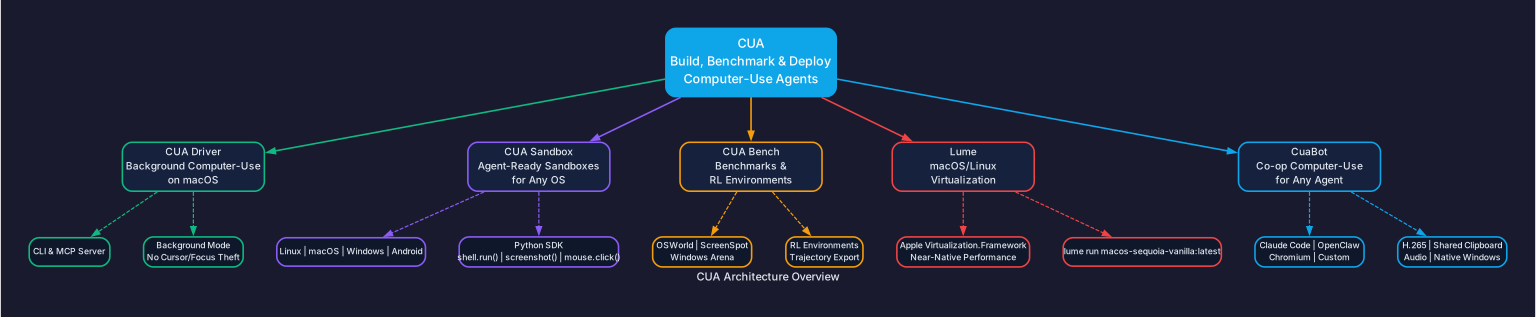
Understanding the CUA Architecture
The CUA platform is organized around five core components, each addressing a different aspect of the computer-use agent lifecycle:
1. CUA Driver – Background Computer-Use on macOS
The CUA Driver enables agents to drive any native macOS application in the background. Unlike traditional automation tools that steal cursor focus and disrupt your workflow, CUA Driver operates invisibly – agents click, type, and verify without taking over the screen. This is critical for production deployments where multiple agents need to run concurrently on the same machine.
The Driver ships with both a CLI and an MCP server, making it compatible with Claude Code, Cursor, and custom agent clients. Every session records a replayable trajectory, enabling debugging, auditing, and reinforcement learning from past interactions.
2. CUA Sandbox – Agent-Ready Sandboxes for Any OS
The Sandbox SDK provides a single Python API to create and control virtual environments across all major operating systems. Whether you need a Linux container for lightweight tasks, a macOS VM for native app testing, or a Windows VM for enterprise workflows, the same Sandbox interface handles them all.
3. CuaBot – Co-op Computer-Use for Any Agent
CuaBot bridges the gap between coding agents and sandboxed environments. Individual windows appear natively on your desktop with H.265 video streaming, shared clipboard, and audio support. It works out of the box with Claude Code, OpenClaw, and Chromium-based workflows.
4. CUA Bench – Benchmarks and RL Environments
CUA Bench provides standardized evaluation datasets (OSWorld, ScreenSpot, Windows Arena) and custom task definitions. Agents are evaluated on accuracy, step count, and time-to-completion. Trajectories can be exported for reinforcement learning fine-tuning.
5. Lume – macOS/Linux Virtualization
Lume leverages Apple’s Virtualization.Framework to create and manage macOS and Linux VMs with near-native performance on Apple Silicon. It provides a Docker-compatible interface through Lumier, making VM management as familiar as container orchestration.
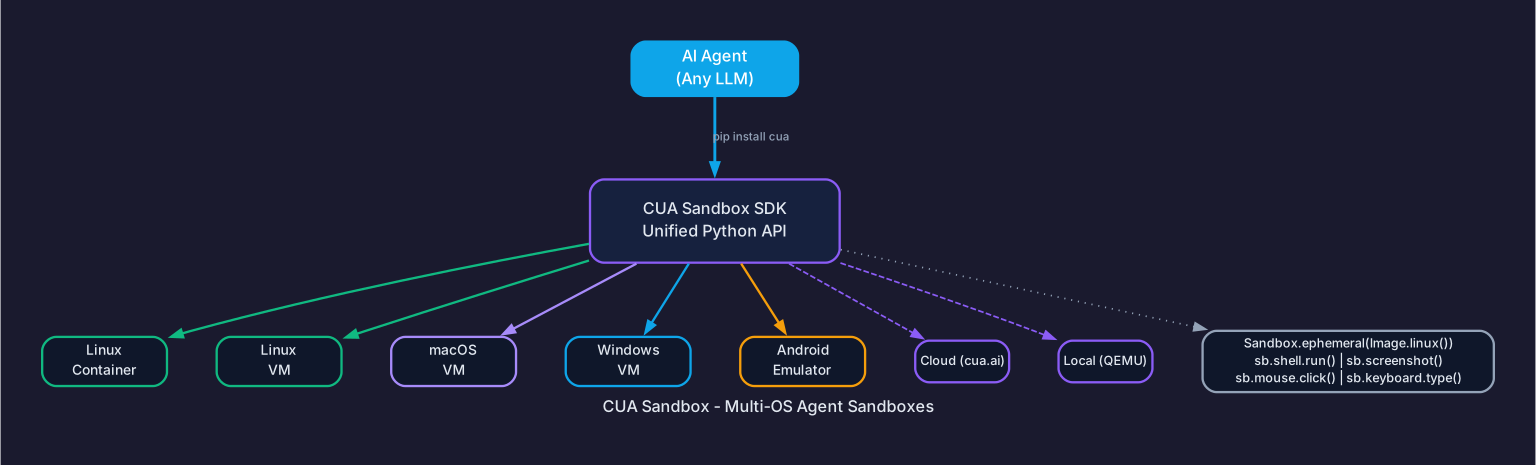
Understanding the Sandbox Multi-OS Architecture
The Sandbox SDK abstracts away the complexity of managing different virtualization backends. Behind the scenes, it routes requests to either the CUA cloud infrastructure or a local QEMU hypervisor, depending on your configuration.
Cloud Mode (cua.ai): For teams that need instant, scalable sandbox environments without managing infrastructure. Spin up Linux containers, Linux VMs, macOS VMs, Windows VMs, or Android emulators on demand.
Local Mode (QEMU): For developers who need full control over their environments. Run any OS locally with hardware-accelerated virtualization, including custom images (.qcow2, .iso) for specialized testing scenarios.
The unified Python API means you write code once and deploy anywhere:
from cua import Sandbox, Image

# Same API regardless of OS or runtime
async with Sandbox.ephemeral(Image.linux()) as sb:   # or .macos() .windows() .android()
    result = await sb.shell.run("echo hello")
    screenshot = await sb.screenshot()
    await sb.mouse.click(100, 200)
    await sb.keyboard.type("Hello from CUA!")
    await sb.mobile.gesture((100, 500), (100, 200))  # multi-touch gestures
This design eliminates the need to maintain separate automation scripts for each operating system. The SDK handles screen capture, mouse and keyboard input, shell command execution, and mobile gestures through a consistent interface.
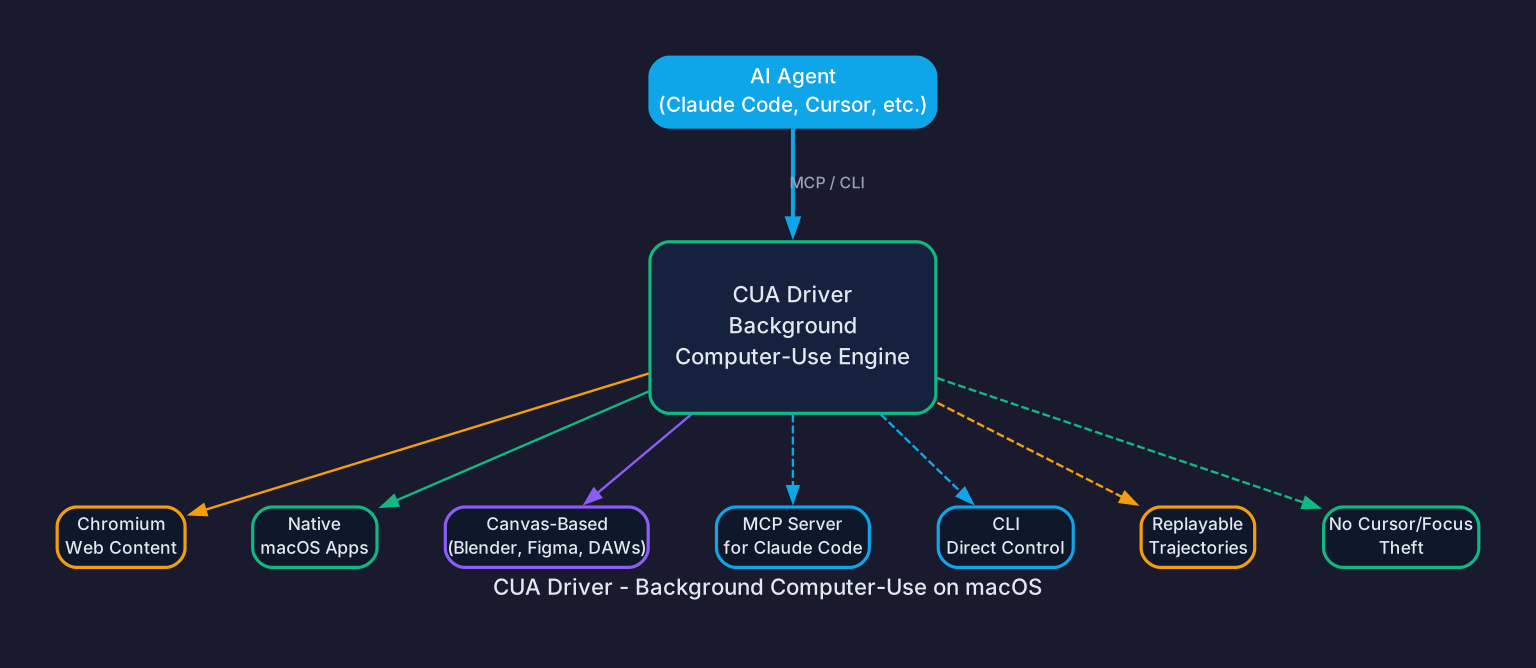
Understanding CUA Driver’s Background Mode
Traditional UI automation tools operate in the foreground – they move the actual cursor, switch window focus, and disrupt whatever the user is doing. CUA Driver takes a fundamentally different approach:
No Cursor/Focus Theft: The Driver interacts with application windows at the accessibility layer and through direct input injection, without bringing windows to the foreground. This means you can continue working while agents operate in the background.
Non-AX Surface Support: Unlike accessibility-only tools, CUA Driver can also interact with non-accessibility surfaces like Chromium web content, canvas-based applications (Blender, Figma, DAWs), and game engines. This is achieved through a combination of accessibility APIs and pixel-level interaction.
MCP Server Integration: The Driver ships as an MCP (Model Context Protocol) server, enabling direct integration with Claude Code and other MCP-compatible agents. This means you can instruct Claude Code to perform desktop tasks through natural language, and the Driver translates those instructions into precise UI interactions.
Replayable Trajectories: Every action sequence is recorded as a trajectory – a structured log of screenshots, actions, and outcomes. These trajectories serve multiple purposes: debugging failed runs, training RL agents, and auditing agent behavior for compliance.
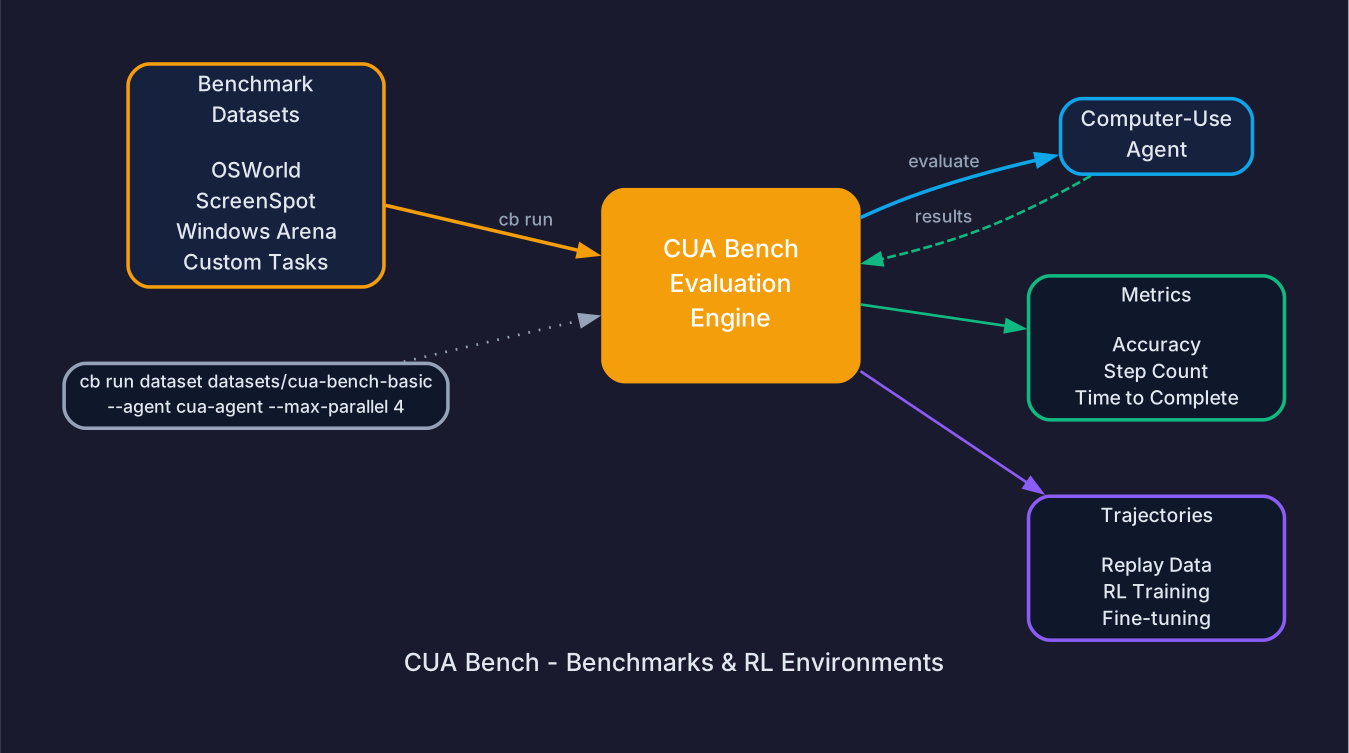
Understanding the CUA Bench Evaluation Pipeline
CUA Bench provides a systematic approach to evaluating computer-use agents:
1. Dataset Selection: Choose from established benchmarks (OSWorld, ScreenSpot, Windows Arena) or define custom task datasets. Each dataset specifies the environment, initial state, goal, and success criteria.
2. Agent Execution: The bench engine runs the specified agent against each task in the dataset, controlling the sandbox environment and collecting interaction data. Parallel execution is supported with --max-parallel to speed up large evaluations.
3. Metric Collection: After each run, CUA Bench computes accuracy (did the agent achieve the goal?), step count (how many actions were needed?), and time-to-completion. These metrics provide a quantitative basis for comparing different agents or prompting strategies.
4. Trajectory Export: Full interaction trajectories can be exported for downstream use – reinforcement learning training, fine-tuning foundation models, or creating demonstration datasets for few-shot prompting.
Installation
CUA Sandbox SDK
pip install cua
CUA Driver (macOS)
/bin/bash -c "$(curl -fsSL https://raw.githubusercontent.com/trycua/cua/main/libs/cua-driver/scripts/install.sh)"
CuaBot
npx cuabot # Setup onboarding
CUA Bench
cd cua-bench
uv tool install -e .
cb image create linux-docker
cb run dataset datasets/cua-bench-basic --agent cua-agent --max-parallel 4
Lume (macOS Virtualization)
/bin/bash -c "$(curl -fsSL https://raw.githubusercontent.com/trycua/cua/main/libs/lume/scripts/install.sh)"
lume run macos-sequoia-vanilla:latest
Usage Examples
Running an Agent in a Sandbox
from cua import Sandbox, Image

async with Sandbox.ephemeral(Image.linux()) as sb:
    # Execute shell commands
    result = await sb.shell.run("uname -a")
    print(result.stdout)

    # Take a screenshot
    screenshot = await sb.screenshot()
    screenshot.save("desktop.png")

    # Click at coordinates
    await sb.mouse.click(100, 200)

    # Type text
    await sb.keyboard.type("Hello from CUA!")

    # Mobile gestures (Android)
    async with Sandbox.ephemeral(Image.android()) as phone:
        await phone.mobile.gesture((100, 500), (100, 200))
Running CuaBot with Agents
# Run Claude Code in a sandbox
cuabot claude

# Run OpenClaw in the sandbox
cuabot openclaw

# Run Chromium for browser automation
cuabot chromium

# Direct control commands
cuabot --screenshot
cuabot --type "hello"
cuabot --click 100 200
Key Features
| Feature | Description |
|---|---|
| Multi-OS Sandboxes | Linux containers, Linux/macOS/Windows/Android VMs via unified API |
| Background Automation | Drive macOS apps without stealing cursor or focus |
| Non-AX Surface Support | Interact with Chromium, canvas apps (Blender, Figma), game engines |
| MCP Server | Direct integration with Claude Code and MCP-compatible agents |
| Replayable Trajectories | Record and replay agent sessions for debugging and RL training |
| Benchmark Suite | OSWorld, ScreenSpot, Windows Arena evaluation datasets |
| Apple Silicon VMs | Near-native macOS/Linux VMs via Lume and Virtualization.Framework |
| Cloud and Local | Run sandboxes on cua.ai cloud or local QEMU |
Troubleshooting
Issue: Sandbox fails to start on macOS
Ensure Virtualization.Framework is available on your Mac (Apple Silicon or T2-based Intel Macs). Check that hypervisor entitlements are enabled:
sysctl kern.hv_support
# Should return: kern.hv_support: 1
Issue: CUA Driver not connecting
Verify the Driver daemon is running:
cua-driver status
If the daemon is not running, restart it:
cua-driver start
Issue: Screenshot returns blank image
Some applications require accessibility permissions. Grant CUA Driver access in System Settings > Privacy & Security > Accessibility.
Issue: QEMU VM performance is slow
Enable hardware acceleration by ensuring KVM (Linux) or Hypervisor.Framework (macOS) is available. On macOS, use Lume for better performance:
lume run macos-sequoia-vanilla:latest
Conclusion
CUA provides the essential infrastructure layer for the emerging computer-use agent ecosystem. By offering unified sandbox APIs, background macOS automation, standardized benchmarks, and Apple Silicon virtualization, CUA eliminates the fragmented tooling that has held back desktop agent development. Whether you are building agents that navigate web applications, testing UI workflows across operating systems, or training RL models on desktop tasks, CUA gives you the building blocks to move from prototype to production.
Links:
- GitHub Repository: https://github.com/trycua/cua
- Documentation: https://cua.ai/docs
- CUA Bench Registry: https://cuabench.ai/registry

Enjoyed this post? Never miss out on future posts by following us


