Graphified: AI Knowledge Graph From Any Codebase
An AI knowledge graph from codebase is the most efficient way to help AI agents understand software architecture without reading thousands of lines of raw source code. Graphified is a single-file, cross-platform CLI tool that transforms any code repository into a structured, queryable graph representation. By converting an entire codebase into a compact knowledge graph, developers and AI agents can navigate complex software systems with 90-95% fewer tokens than traditional file-by-file analysis. Whether you are onboarding new team members, conducting security audits, or enabling AI-assisted code review, Graphified provides an instant, intelligent map of your code’s structure, dependencies, and relationships.
How It Works
Understanding the Architecture
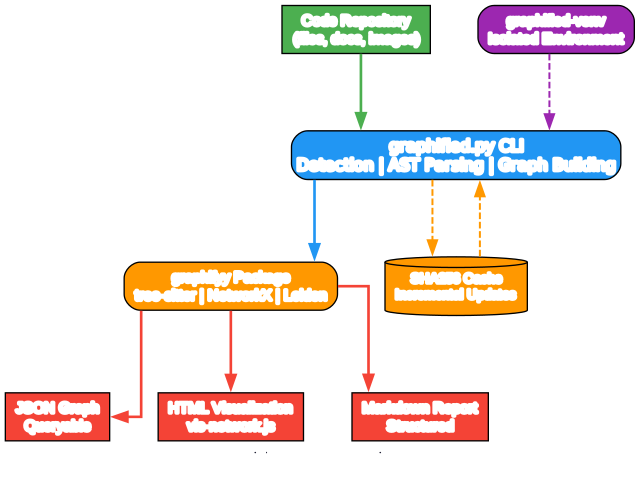
The architecture diagram above illustrates how Graphified processes a codebase from raw source files to a structured knowledge graph. The system operates through a well-defined pipeline that ensures accuracy, efficiency, and portability across platforms.
Component 1: Input Detection Graphified begins by scanning the target directory to identify supported file types. It automatically detects programming languages based on file extensions and selects the appropriate tree-sitter grammar for parsing. This component handles both code files for AST extraction and SKILL.md files for documentation parsing, making the tool versatile for diverse repository structures.
Component 2: AST Extraction At the core of Graphified is tree-sitter, a blazing-fast parser generator that produces concrete syntax trees for source code. The AST extraction component parses each supported file and identifies key structural elements such as functions, classes, methods, imports, and variable definitions. This step captures the semantic relationships within the code that form the foundation of the knowledge graph.
Component 3: Graph Building The extracted AST data is fed into NetworkX, a powerful Python library for graph analysis. NetworkX constructs a directed graph where nodes represent code entities (functions, classes, modules) and edges represent relationships (calls, imports, inheritance, containment). This graph structure enables complex queries and traversal operations that would be impossible with flat file analysis.
Component 4: Community Clustering Graphified applies the Leiden algorithm, a state-of-the-art community detection method, to identify natural groupings within the codebase. This clustering reveals architectural boundaries, module cohesion, and potential refactoring targets. The Leiden algorithm is chosen for its superior resolution and computational efficiency compared to older methods like Louvain.
Component 5: Export Engine The final component serializes the enriched graph into multiple output formats. JSON output enables programmatic querying and integration with other tools. HTML output embeds an interactive vis-network.js visualization for human exploration. Markdown output generates a human-readable report summarizing the codebase structure and statistics.
The Isolated Virtual Environment Graphified creates a dedicated virtual environment named graphified-venv/ to manage its dependencies. This isolation prevents conflicts with the host system’s Python packages and ensures reproducible behavior across different machines. Dependencies are installed dynamically at runtime, eliminating the need for a pre-configured development environment.
SHA256 Cache for Incremental Updates The cache directory stores SHA256 hashes of processed files. On subsequent runs, Graphified compares file hashes to detect changes and only reprocesses modified files. This incremental update mechanism dramatically reduces processing time for large codebases during iterative development.
Why Single-File Architecture Matters By packaging the entire tool into a single Python file (~950 lines), Graphified achieves maximum portability. There are no configuration files, no setup scripts, and no dependency manifests to manage. Users can copy graphified.py to any machine and run it immediately, making it ideal for CI/CD pipelines, containerized environments, and quick ad-hoc analysis.
Key Features

Understanding the Features
The features diagram above highlights the core capabilities that make Graphified a powerful addition to any developer’s toolkit. Each feature is designed to reduce friction and maximize the utility of codebase analysis.
Zero Configuration Philosophy Graphified requires no configuration files, no manual dependency resolution, and no environment setup. Simply download the single Python file and point it at any repository. The tool automatically handles language detection, parser selection, and output generation. This zero-configuration approach removes the typical barriers to adopting new developer tools and enables immediate productivity.
Cross-Platform and Auto-Install Capabilities Graphified runs on Windows, macOS, and Linux without modification. If Python 3.10 or higher is not detected, the tool can automatically install it using the system’s native package manager. On Windows, it attempts winget and falls back to choco. On macOS, it uses brew. On Linux, it supports apt, dnf, pacman, and zypper. This auto-install capability ensures that even developers on fresh machines can use Graphified within minutes.
Incremental Updates via SHA256 Cache The built-in caching system stores SHA256 hashes of all processed files in the cache/ directory. When re-running Graphified on the same repository, only files with changed hashes are reprocessed. This incremental approach can reduce processing time by 80-95% for large codebases between minor edits, making it practical to integrate into continuous integration workflows.
Multiple Output Formats and Their Use Cases Graphified generates three distinct outputs tailored to different consumption patterns. The JSON output is designed for programmatic access, enabling integration with AI agents, custom scripts, and graph databases. The HTML output provides an interactive browser-based visualization powered by vis-network.js, perfect for presentations and manual exploration. The Markdown report offers a concise, human-readable summary of codebase statistics and community structure, ideal for documentation and README files.
Token Efficiency for AI Agents The primary value proposition of Graphified is token reduction. A typical codebase of 50,000+ tokens can be compressed into a knowledge graph of approximately 2,000 tokens. This 90-95% reduction enables AI agents to comprehend entire project architectures within their context windows, unlocking capabilities like cross-file refactoring, architectural review, and intelligent code generation that would otherwise be impossible.
Offline Support and SKILL.md Parsing Graphified operates entirely offline after the initial dependency installation. No API keys, no cloud services, and no network connectivity are required for normal operation. Additionally, the tool includes a specialized parser for SKILL.md files, enabling it to extract structured knowledge from documentation and integrate it with the code graph. This dual-mode parsing makes Graphified equally effective for code-centric and documentation-centric repositories.
Installation Guide
Prerequisites
Graphified requires Python 3.10 or higher. The tool will automatically install Python if it is missing, but manual installation is recommended for faster first-run experience.
Quick Start
The fastest way to get started is to download the single Python file and run it directly:
# Download graphified.py from the repository
# Then run it against any codebase
python graphified.py /path/to/repo
Platform-Specific Python Installation
If Python 3.10+ is not installed and the auto-installer does not work, use the following platform-specific commands:
Windows (winget):
winget install Python.Python.3.12
Windows (Chocolatey):
choco install python312
macOS (Homebrew):
brew install python@3.12
Ubuntu/Debian:
sudo apt-get install python3.12 python3.12-venv
Fedora/RHEL:
sudo dnf install python3.12
Arch Linux:
sudo pacman -S python
openSUSE:
sudo zypper install python312
Important Notes
Graphified has no requirements.txt, pyproject.toml, or setup.py. All dependencies are installed dynamically at runtime into the isolated graphified-venv/ virtual environment. The first run may take a few minutes as tree-sitter, NetworkX, and other dependencies are downloaded and compiled. Subsequent runs are significantly faster.
Usage Examples
Understanding the Workflow
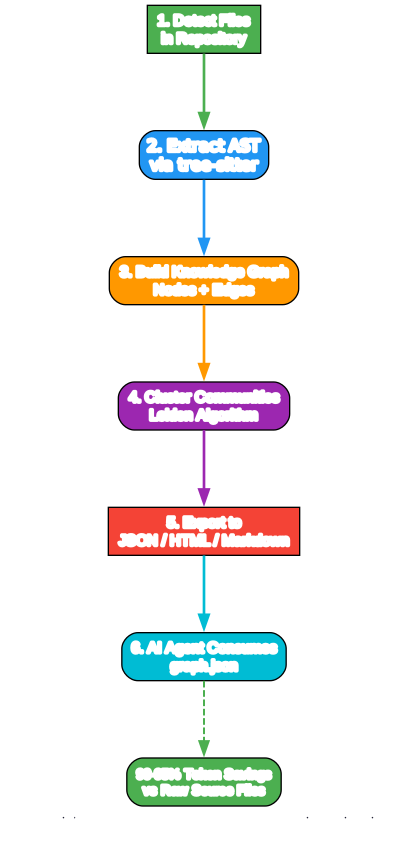
The workflow diagram above demonstrates the typical Graphified usage patterns, from initial execution to AI agent consumption. Understanding these workflows helps developers integrate Graphified into their daily routines and automation pipelines.
Basic Usage Patterns Graphified supports three primary invocation patterns. Running python graphified.py without arguments graphs the current working directory. Running python graphified.py ~/projects/myapp graphs a specific repository path. Adding the --ast-only flag restricts extraction to AST-based code analysis, skipping SKILL.md parsing for faster processing when documentation analysis is not needed.
Output Structure Explanation After execution, Graphified creates a graphify-out/ directory inside the target repository. This directory contains four items: graph.json holds the complete knowledge graph in a queryable format; graph.html provides an interactive visualization that can be opened in any browser; GRAPH_REPORT.md contains a human-readable summary of the codebase structure and statistics; and cache/ stores SHA256 hashes for incremental update tracking.
Incremental Update Workflow The caching mechanism enables efficient iterative analysis. On the first run, all files are parsed and hashed. On subsequent runs, Graphified compares each file’s current hash against the cached hash. Only files with mismatched hashes are reprocessed, while unchanged files are loaded from the previous graph. This workflow makes it practical to run Graphified after every commit without waiting for full reprocessing.
When to Re-Run vs When Structure Is Unchanged Re-run Graphified when you have added, deleted, or modified source files. The tool automatically detects these changes through hash comparison. If no files have changed, Graphified completes almost instantly by loading the cached graph. This behavior makes it safe to run Graphified in pre-commit hooks or file watchers without performance penalties.
AI Agent Consumption Workflow The JSON output is specifically designed for AI agent consumption. Agents can load graph.json and traverse the graph to understand module relationships, identify entry points, trace call chains, and locate relevant code segments. With the 90-95% token reduction, agents can fit entire project architectures into their context windows, enabling sophisticated cross-file reasoning and refactoring suggestions that would be impossible with raw source code ingestion.
Architecture Deep Dive

Understanding the Ecosystem
The ecosystem diagram above shows how Graphified integrates with the broader developer tooling landscape. While Graphified is a standalone tool, its outputs enable powerful workflows across multiple domains.
VSCode Extension Integration The JSON output format is compatible with custom VSCode extensions that can load and visualize the knowledge graph directly within the editor. Developers can navigate from graph nodes to source code definitions, highlight dependencies, and identify architectural boundaries without leaving their IDE. This integration bridges the gap between high-level architecture visualization and low-level code editing.
GraphRAG and Semantic Code Search Graphified outputs can be loaded into graph databases like Neo4j or NetworkX-backed stores to enable GraphRAG (Graph Retrieval-Augmented Generation) workflows. By combining the structural knowledge graph with vector embeddings of code snippets, developers can perform semantic code search that understands both syntactic relationships and conceptual similarity. This approach outperforms traditional text-based code search for complex queries.
CI/CD Pipeline Integration (GitHub Actions Example) Graphified can be integrated into CI/CD pipelines to automatically generate architecture documentation on every pull request. A GitHub Actions workflow can clone the repository, run Graphified, and commit the updated GRAPH_REPORT.md and graph.html to a documentation branch. This ensures that architecture documentation always reflects the current state of the codebase without manual maintenance.
AI Agent Workflows (Claude, GPT, and Others) The primary use case for Graphified is enhancing AI agent capabilities. Agents like Claude, GPT-4, and specialized coding models can ingest the JSON graph to understand project structure before answering questions or generating code. This context enables agents to suggest refactorings that respect architectural boundaries, identify the correct files to modify for a given feature, and explain complex inheritance hierarchies in natural language.
Knowledge Graph Databases The JSON output can be imported into dedicated graph databases such as Neo4j, Amazon Neptune, or ArangoDB. Once stored, the codebase graph can be queried using graph query languages like Cypher or Gremlin. This enables complex analytical queries such as “find all functions that call a deprecated API” or “identify circular dependencies between modules” that would be difficult or impossible with traditional static analysis tools.
Developer Workflow Integration Beyond AI agents, Graphified enhances human developer workflows. The HTML visualization can be shared in architecture review meetings. The Markdown report can be included in onboarding documentation. The JSON graph can power custom dashboards showing codebase health metrics. By providing multiple output formats, Graphified fits naturally into existing documentation, communication, and analysis workflows.
Use Cases
Graphified addresses a wide range of practical challenges in software development and maintenance:
Onboarding New Developers to Large Codebases New team members can explore the interactive HTML visualization to understand project structure without reading hundreds of files. The community clustering reveals natural module boundaries, and the dependency graph shows how components interact. This accelerates onboarding from weeks to days.
AI-Assisted Code Review and Refactoring Before conducting a code review, generate a fresh knowledge graph to understand the impact of proposed changes. AI agents can use the graph to identify all callers of a modified function, detect breaking changes in inheritance hierarchies, and suggest refactoring strategies that preserve architectural integrity.
Documentation Generation from Code Structure The GRAPH_REPORT.md output serves as a living architecture document. It can be committed to version control and updated automatically via CI/CD pipelines. This eliminates the documentation drift problem where architecture diagrams become outdated as the code evolves.
Codebase Migration Planning When migrating from one framework or language to another, Graphified provides a complete map of dependencies and relationships. The graph reveals which modules are tightly coupled, which are isolated, and where the migration should begin. This data-driven approach reduces migration risk and timeline uncertainty.
Security Audit and Dependency Analysis Security teams can use Graphified to identify all code paths that interact with sensitive APIs, external services, or authentication mechanisms. The graph traversal capabilities enable rapid impact analysis when vulnerabilities are discovered, showing exactly which functions and modules are affected by a security issue.
Conclusion
Graphified represents a paradigm shift in how developers and AI agents understand codebases. By transforming raw source files into structured knowledge graphs, it achieves a 90-95% reduction in token consumption while preserving essential architectural information. The single-file design, cross-platform support, and zero-configuration philosophy make it accessible to developers of all skill levels. Whether you are onboarding team members, enabling AI-assisted development, or conducting architectural analysis, Graphified provides an instant, intelligent map of any codebase.
The tool’s support for multiple output formats ensures compatibility with diverse workflows, from interactive browser visualization to programmatic AI agent consumption. The incremental update mechanism and offline operation make it practical for daily use in real development environments. As codebases grow larger and AI agents become more integral to the development process, tools like Graphified will become essential infrastructure for maintaining code understanding at scale.
Links
- GitHub Repository: https://github.com/pyshine-labs/graphified

Enjoyed this post? Never miss out on future posts by following us