Table of Contents
- Table of Contents
- Introduction
- What is GPT-Image-2?
- Why Prompt Engineering Matters
- The Anatomy of a Great GPT-Image-2 Prompt
- Prompt Categories Explored
- Advanced Prompt Techniques
- Getting Started with the API
- Key Takeaways
Introduction
OpenAI’s GPT-Image-2 model has redefined what is possible with AI image generation. From photorealistic portraits to intricate poster designs, the model responds to carefully crafted prompts with stunning fidelity. The Awesome GPT-Image-2 Prompts repository, with over 3,200 stars on GitHub, curates the best prompt patterns discovered by the community. This post breaks down the techniques that make these prompts effective and shows you how to apply them in your own creative workflow.

What is GPT-Image-2?
GPT-Image-2 is OpenAI’s latest image generation model, built to understand natural language descriptions and produce high-quality images that faithfully match the prompt intent. Unlike earlier models, GPT-Image-2 excels at:
- Photorealistic rendering - producing images with realistic skin texture, film grain, and lighting
- Style transfer - applying specific aesthetic filters like Fujifilm, CCD camera, or watercolor
- Multi-image grids - generating 3x3 portrait grids with consistent identity across frames
- Aspect ratio control - supporting 9:16, 1:1, 3:4, 16:9, and other ratios
- Negative prompts - specifying what to exclude from the generated image
- Reference image chaining - using previously generated images as references for consistency
The model handles both English and non-English prompts, making it accessible to creators worldwide. The repository showcases prompts in English, Chinese, Japanese, Korean, Spanish, and other languages.
Why Prompt Engineering Matters
With GPT-Image-2, the quality of your output is directly proportional to the quality of your input. A vague prompt like “a woman in a city” produces a generic result. But a detailed prompt specifying film type, lighting, composition, and mood can produce gallery-quality images.
The difference lies in what the community calls prompt density - the amount of specific, actionable detail packed into each prompt. The best prompts in the repository share common structural patterns that we can learn from and replicate.
The Anatomy of a Great GPT-Image-2 Prompt
Analyzing the top prompts in the collection reveals a consistent six-part framework:
1. Subject and Core Concept
Define who or what is the main focus. Be specific about appearance, pose, and expression:
early 20s Chinese female idol with ultra-realistic delicate refined Chinese features,
seductive almond-shaped fox eyes with natural double eyelids, high nose bridge,
small sharp V-shaped jawline, flawless porcelain skin
2. Style and Aesthetic
Specify the visual treatment - film type, art movement, or design language:
35mm film photography with harsh convenience store fluorescent lighting mixed
with colorful neon signs from outside, authentic film grain, high contrast,
slight color cast, cinematic street editorial style
3. Composition and Framing
Control the camera angle, aspect ratio, and framing:
9:16 vertical, intimate medium shot, body slightly arched,
one leg bent with foot resting against the door frame
4. Lighting and Atmosphere
Describe the light sources, color grading, and mood:
bright cold fluorescent store light from inside mixed with pink and blue neon
glow from outside signs, realistic reflections on glass door,
blurred convenience store interior with shelves and snacks in background
5. Quality and Technical Details
Add resolution, texture, and rendering specifications:
extremely sharp yet soft skin rendering, natural hair strands,
realistic fabric wrinkles and drape on the oversized shirt and mini skirt,
no plastic skin, no digital over-sharpening, no airbrushing
6. Negative Prompts
Specify what to avoid:
Negative Prompts: no extra limbs, no deformed hands, no blur,
no noise, no watermark, no text, no cartoon/anime style
Prompt Categories Explored
The repository organizes prompts into five major categories, each with distinct techniques and approaches.

Portrait and Photography
This is the largest category, featuring techniques for creating photorealistic portraits. Key patterns include:
- Film simulation - Specifying film stocks like Fujifilm Pro 400H, Kodak Portra, or CCD camera aesthetics
- Black mist filter - Adding
soft black mist filter effect, lowered contrast, gentle highlight bloomfor a dreamy idol look - 3x3 grid portraits - Using
9:16 vertical, 3x3 grid (nine frames), same person in all images, consistent facial featuresfor photobook-style outputs - Mirror selfie - Recreating casual phone photography with
mirror selfie with a smartphone, capturing a natural and intimate moment
Example prompt structure for a Korean idol portrait:
9:16 vertical - Korean idol portrait photography, single subject
soft black mist filter effect, lowered contrast, gentle highlight bloom
minimal indoor setting near window, white curtains, clean light-toned background
young Korean female idol, natural minimal makeup, dewy realistic skin texture
outfit: oversized white button-up shirt + short bottoms, slightly loose fit
hair: long dark hair, slightly messy, natural volume, softly flowing
pose: relaxed standing or slight lean, body subtly angled
expression: soft cute smile, slightly playful eyes
camera: close to mid-body framing, eye-level, intimate distance
lighting: diffused natural daylight, soft shadows, gentle light wrapping
mood: cute yet subtly sensual, intimate, everyday softness
quality: ultra-realistic, fine film grain, slight softness at edges
Poster and Illustration
This category covers city promotional posters, movie posters, and artistic illustrations. Standout techniques include:
- S-curve composition - Using
S-shaped flowing compositionfor dynamic poster layouts - Double exposure - Layering
double exposure compositionfor surreal city posters - Ink and watercolor - Specifying
Chinese ink landscape, paper-cut effect, watercolor editorial illustration - Information-dense design - Creating
science encyclopedia infographicwith modular information blocks
A city poster prompt example:
A striking Spring 2026 city poster for Boston with an elegant celebratory mood
and a bold contemporary design. On a clean off-white textured background with
large areas of negative space, a miniature single sculler rows across the lower
right corner of the image on a narrow ribbon of reflective water. The wake from
the oar sweeps upward in a dynamic calligraphic curve, gradually transforming
into the Charles River and then into a dreamlike hand-painted panorama of Boston.
Elegant typography in the lower left reads "SPRING 2026" with a vertical slogan
"BOSTON, A CITY OF RIVER, MEMORY, AND INVENTION", 9:16
Character Design
Character design prompts focus on creating consistent character sheets, anime conversions, and game-style cards:
- Character reference cards -
official character sheet with three-view (front, side, back), expression variations, outfit breakdown, color palette - Anime snapshot conversion -
Show me the attached image as a snapshot from an actual anime - Game character pages - Gal game-style character introduction pages with stats, dialogue, and chibi avatars
UI and Social Media Mockup
This category demonstrates GPT-Image-2’s ability to generate realistic UI designs and social media screenshots:
- Design systems -
Generate a UI design system with glassy visuals and transparencies - Social media feeds - Creating fictional social media pages for historical figures
- Livestream screenshots - Generating realistic Douyin/TikTok livestream screenshots
- Infographic cards -
Science encyclopedia infographic with modular information blocks
Comparison and Community
Community experiments push the boundaries of what GPT-Image-2 can do:
- Historical reimagining - Generating images of historical events
- Product redesigns - Redesigning advertisements and product packaging
- Style mashups - Combining unexpected styles like
Counter-Strike x Terraria screenshot - 360 panoramas - Creating
360 equirectangular panorama images
Advanced Prompt Techniques
Aspect Ratio Control
GPT-Image-2 supports various aspect ratios. Always specify your desired ratio:
9:16 vertical    -- for portraits and phone screens
1:1 square       -- for social media posts
3:4 portrait      -- for editorial photography
16:9 landscape    -- for cinematic scenes
4:5 medium        -- for magazine covers
Film Simulation
One of the most powerful techniques is specifying a film stock or camera type:
35mm film photography          -- classic film look
Fujifilm Pro 400H              -- soft pastel tones
CCD camera aesthetic            -- vintage digital feel
Analog 35mm film                -- grain and color shift
Harsh direct on-camera flash    -- editorial fashion look
Negative Prompts
Negative prompts help exclude unwanted elements. The repository shows several patterns:
Negative Prompts: no extra limbs, no deformed hands, no blur,
no noise, no watermark, no text, no cartoon/anime style

no plastic skin, no digital over-sharpening, no airbrushing,
no blemishes, no moles, no oily skin, no watermark
Multi-Image Grids
For creating consistent multi-image outputs:
9:16 vertical, 3x3 grid (nine frames), same person in all images,
consistent facial features and styling, soft black mist filter effect
Reference Image Chaining
A powerful workflow from the community involves using GPT-Image-2’s analysis capability:
Step 1: "analyze this photo and give me a detailed JSON prompt that recreates it"
Step 2: Use the JSON as a reference prompt for new generations
Step 3: Save generated photos as character references
Step 4: Attach references to future generations for facial consistency
Getting Started with the API
You can use GPT-Image-2 programmatically through the OpenAI API. Here is a basic example:
from openai import OpenAI

client = OpenAI()

response = client.images.generate(
    model="gpt-image-2",
    prompt="""9:16 vertical - Korean idol portrait photography, single subject
    soft black mist filter effect, lowered contrast, gentle highlight bloom
    minimal indoor setting near window, white curtains, clean light-toned background
    young Korean female idol, natural minimal makeup, dewy realistic skin texture
    outfit: oversized white button-up shirt + short bottoms, slightly loose fit
    hair: long dark hair, slightly messy, natural volume, softly flowing
    lighting: diffused natural daylight, soft shadows, gentle light wrapping
    quality: ultra-realistic, fine film grain, slight softness at edges""",
    n=1,
    size="1024x1792"
)

# Save the generated image
image_url = response.data[0].url
print(f"Generated image: {image_url}")
For image editing with a reference:
response = client.images.edit(
    model="gpt-image-2",
    image=open("reference.jpg", "rb"),
    prompt="Generate a portrait in the style of this reference image, but with a different outfit - wearing a red dress instead",
    n=1,
    size="1024x1792"
)
Key Takeaways
-
Prompt density matters - The best results come from detailed, multi-paragraph prompts that specify subject, style, composition, lighting, quality, and exclusions.
-
Film simulation is a game-changer - Specifying film stocks like
Fujifilm Pro 400Hor35mm film photographyadds authentic texture and color grading. -
Aspect ratio is not optional - Always include
9:16 vertical,1:1, or3:4to control the output dimensions. -
Negative prompts prevent common AI artifacts - Use them to exclude unwanted elements like watermarks, extra limbs, or cartoon styles.
-
Reference chaining enables consistency - Analyze existing photos into JSON prompts, then use those as templates for consistent character generation.
-
The community is multilingual - GPT-Image-2 handles Chinese, Japanese, Korean, and other languages well, opening creative possibilities across cultures.
-
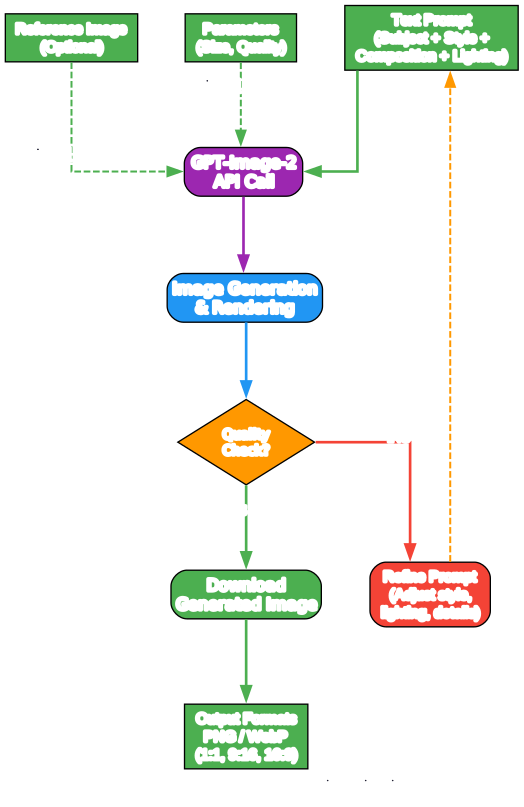
Iterate and refine - The pipeline is: write prompt, generate, evaluate, refine. Each iteration sharpens the output.
The Awesome GPT-Image-2 Prompts repository is an invaluable resource for anyone looking to master AI image generation. With over 100 curated prompt patterns across portraits, posters, character design, UI mockups, and creative experiments, it provides both inspiration and practical templates for your own creative projects.
Star the repository on GitHub to stay updated as new prompts are added regularly by the community. Enjoyed this post? Never miss out on future posts by following us