Compound Engineering Plugin: AI Skills and Agents That Make Each Unit of Work Easier Than the Last
The Compound Engineering Plugin by Every is a multi-platform AI development toolkit that ships 37 skills and 44 specialized agents across 10 coding platforms. Built around the philosophy that each unit of engineering work should make subsequent units easier – not harder – it introduces a compound development loop where brainstorming sharpens plans, plans inform execution, reviews catch patterns, and learnings compound into reusable knowledge for the next cycle.
Key Insight: The Compound Engineering Plugin inverts traditional development debt: instead of each feature adding complexity, each cycle through the loop leaves behind documented learnings that make the next cycle faster. 80% of the effort is in planning and review, 20% in execution.
The Compound Engineering Philosophy
Traditional development accumulates technical debt. Every feature adds complexity, every bug fix leaves behind local knowledge that someone has to rediscover later. The codebase gets larger, the context gets harder to hold, and the next change becomes slower.
Compound engineering inverts this dynamic. The core principle is simple: each unit of engineering work should make subsequent units easier – not harder. This is achieved through a structured loop where:
- Plan thoroughly before writing code with
/ce-brainstormand/ce-plan - Review to catch patterns – not just bugs – with
/ce-code-reviewand/ce-doc-review - Codify knowledge so it is reusable with
/ce-compound - Keep quality high so future changes are easy
The point is not ceremony. The point is leverage. A good brainstorm makes the plan sharper. A good plan makes execution smaller. A good review catches the pattern, not just the bug. A good compound note means the next agent does not have to learn the same lesson from scratch.
Understanding the Architecture
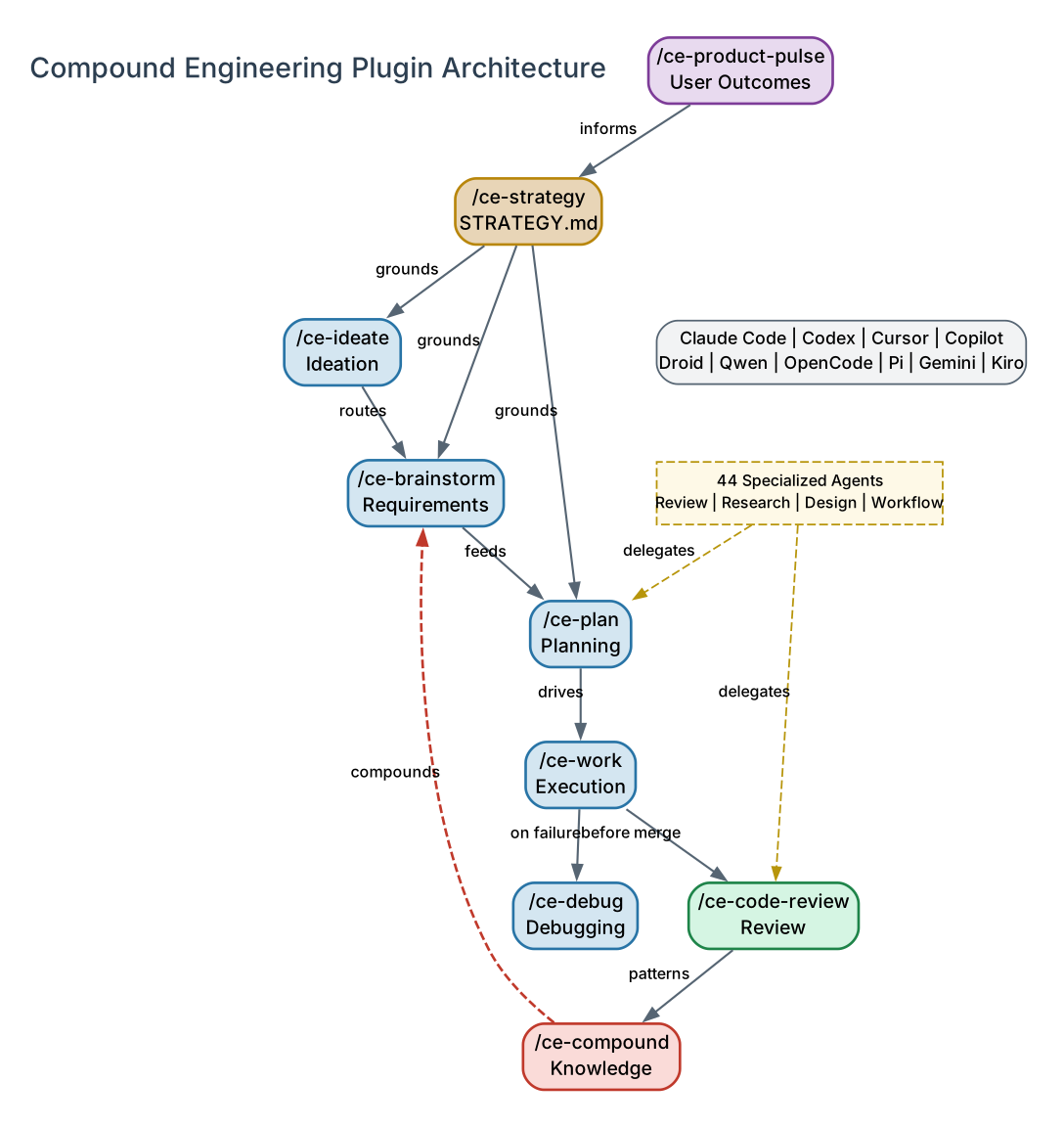
The architecture diagram above illustrates the compound engineering loop and its upstream and downstream components. Let’s break down each element:
Strategy (Upstream Anchor)
/ce-strategy sits upstream of the loop. It captures the product’s target problem, approach, persona, metrics, and tracks as a short durable anchor at STRATEGY.md. When present, ideation, brainstorming, and planning skills read it as grounding, so strategy choices flow naturally into feature conception, prioritization, and specification. This prevents the common failure mode where agents build features that drift from the product’s core direction.
Core Loop: Ideate -> Brainstorm -> Plan -> Work -> Review -> Compound
The core loop is the engine of compound engineering. Each skill feeds the next:
/ce-ideate(optional) – Generate and critically evaluate big-picture ideas before choosing one to brainstorm. Produces a ranked ideation artifact, not requirements or code./ce-brainstorm– Interactive Q&A to think through a feature or problem and write a right-sized requirements document before planning./ce-plan– Turn feature ideas into detailed implementation plans with automatic confidence checking./ce-work– Execute plans with worktrees and task tracking./ce-debug– Systematically reproduce failures, trace root causes, and implement test-first fixes./ce-code-review– Multi-agent code review with tiered persona agents, confidence gating, and dedup pipeline./ce-compound– Document learnings to make future work easier. This is the key differentiator: the loop feeds back into itself.
Product Pulse (Downstream Feedback)
/ce-product-pulse is the read-side companion. It generates a time-windowed report on what users actually experienced and how the product performed (24h, 7d, etc.), saved to docs/pulse-reports/ as a browseable timeline. The next strategy update and the next brainstorm get real signal to anchor to, closing the feedback loop between what was built and what users experienced.
44 Specialized Agents
Skills delegate to specialized subagents. The code review skill, for example, dispatches tiered persona agents (security reviewer, correctness reviewer, performance reviewer, and more) that run in parallel and produce structured findings with confidence scores. These agents are the muscle behind the skills – invoked automatically, not called directly.
Takeaway: The compound loop is not a linear pipeline. Each cycle feeds back: compound learnings inform the next brainstorm, product pulse data grounds the next strategy update, and review patterns become codified knowledge that future agents can reference.
Skills Inventory: 37 Slash Commands
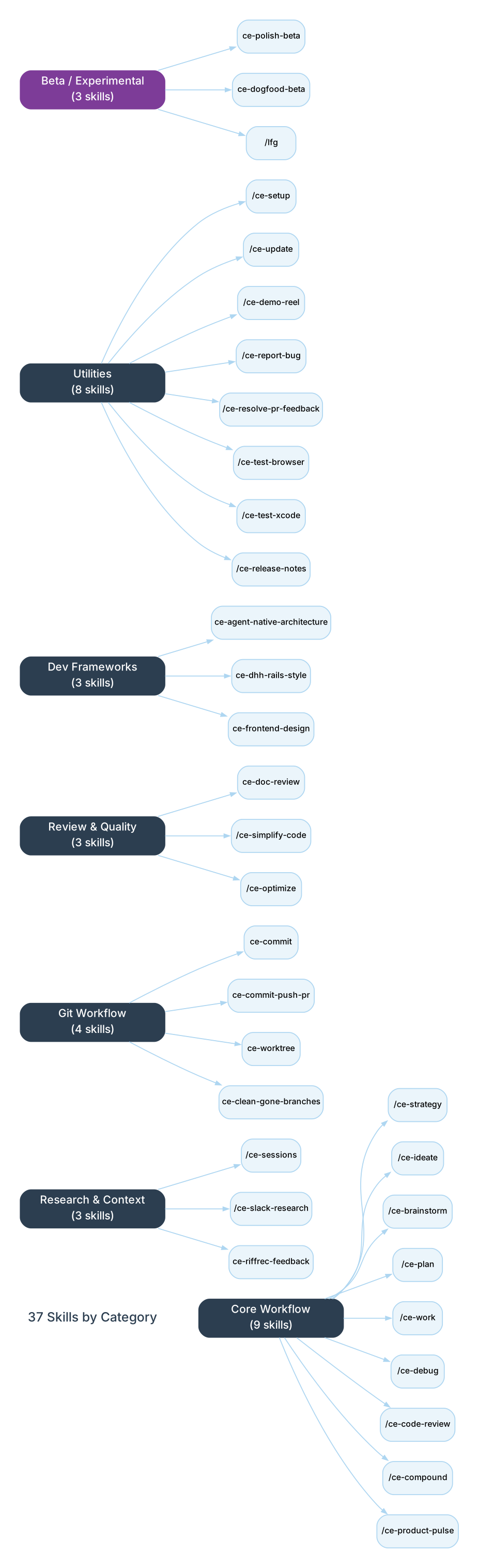
The plugin ships 37 skills organized into seven categories. Each skill is invoked as a slash command and is self-contained with its own SKILL.md, scripts, and reference files.
Understanding the Skills Categories
The skills diagram above shows all 37 skills organized by their functional category. Here is what each category covers:
Core Workflow (9 skills) – The primary loop skills that drive the compound engineering cycle. These are the most frequently used commands and form the backbone of the plugin. /ce-strategy anchors the loop upstream; /ce-product-pulse closes it with user outcome data. The remaining seven skills form the execution cycle from ideation through compounding.
Research and Context (3 skills) – Skills for gathering organizational and historical context. /ce-sessions queries session history across Claude Code, Codex, and Cursor. /ce-slack-research searches Slack for decisions, constraints, and discussion arcs. ce-riffrec-feedback-analysis converts recordings and notes into structured feedback.
Git Workflow (4 skills) – Practical git operations: ce-commit creates value-communicating commit messages, ce-commit-push-pr handles the full commit-push-PR flow, ce-worktree manages git worktrees for parallel development, and ce-clean-gone-branches cleans up stale local branches.
Review and Quality (3 skills) – ce-doc-review reviews documents using parallel persona agents, /ce-simplify-code simplifies recent changes for reuse and efficiency, and /ce-optimize runs iterative optimization loops with parallel experiments and measurement gates.
Development Frameworks (3 skills) – Opinionated coding style skills: ce-agent-native-architecture for building AI agents with prompt-native architecture, ce-dhh-rails-style for Ruby/Rails code in DHH’s 37signals style, and ce-frontend-design for production-grade frontend interfaces.
Utilities (8 skills) – Supporting tools including /ce-setup for environment diagnosis and bootstrapping, /ce-update for version checking and cache fixes, /ce-demo-reel for capturing visual demos, /ce-report-bug for bug reporting, /ce-resolve-pr-feedback for parallel PR feedback resolution, /ce-test-browser and /ce-test-xcode for platform-specific testing, and /ce-release-notes for release summarization.
Beta/Experimental (3 skills) – ce-polish-beta provides human-in-the-loop polish after code review, ce-dogfood-beta performs diff-scoped browser QA, and /lfg runs the full autonomous engineering workflow.
Agents Inventory: 44 Specialized Subagents
Agents are specialized subagents invoked by skills. You typically do not call these directly. They are organized into six functional groups:
Review Agents (20)
| Agent | Specialty |
|---|---|
ce-adversarial-reviewer | Constructs failure scenarios across component boundaries |
ce-agent-native-reviewer | Verifies features are agent-native (action + context parity) |
ce-api-contract-reviewer | Detects breaking API contract changes |
ce-architecture-strategist | Analyzes architectural decisions and compliance |
ce-code-simplicity-reviewer | Final pass for simplicity and minimalism |
ce-correctness-reviewer | Logic errors, edge cases, state bugs |
ce-data-integrity-guardian | Database migrations and data integrity |
ce-data-migration-reviewer | Schema drift, migration safety, deploy-window checks |
ce-deployment-verification-agent | Go/No-Go deployment checklists for risky data changes |
ce-julik-frontend-races-reviewer | JavaScript/Stimulus race condition detection |
ce-maintainability-reviewer | Coupling, complexity, naming, dead code |
ce-pattern-recognition-specialist | Pattern and anti-pattern analysis |
ce-performance-oracle | Performance analysis and optimization |
ce-performance-reviewer | Runtime performance with confidence calibration |
ce-reliability-reviewer | Production reliability and failure modes |
ce-security-reviewer | Exploitable vulnerabilities with confidence calibration |
ce-security-sentinel | Security audits and vulnerability assessments |
ce-swift-ios-reviewer | SwiftUI state, retain cycles, concurrency, Core Data |
ce-testing-reviewer | Test coverage gaps, weak assertions |
ce-project-standards-reviewer | CLAUDE.md and AGENTS.md compliance |
Document Review Agents (7)
| Agent | Specialty |
|---|---|
ce-coherence-reviewer | Internal consistency, contradictions, terminology drift |
ce-design-lens-reviewer | Missing design decisions, interaction states, AI slop risk |
ce-feasibility-reviewer | Whether proposed approaches survive contact with reality |
ce-product-lens-reviewer | Problem framing, scope decisions, goal misalignment |
ce-scope-guardian-reviewer | Unjustified complexity, scope creep, premature abstractions |
ce-security-lens-reviewer | Security gaps at the plan level (auth, data, APIs) |
ce-adversarial-document-reviewer | Challenges premises, surfaces unstated assumptions |
Research Agents (9)
| Agent | Specialty |
|---|---|
ce-best-practices-researcher | External best practices and examples |
ce-framework-docs-researcher | Framework documentation and best practices |
ce-git-history-analyzer | Git history and code evolution |
ce-issue-intelligence-analyst | GitHub issues recurring themes and pain patterns |
ce-learnings-researcher | Institutional learnings for past solutions |
ce-repo-research-analyst | Repository structure and conventions |
ce-session-historian | Prior session context across Claude Code, Codex, Cursor |
ce-slack-researcher | Organizational context from Slack |
ce-web-researcher | Structured external grounding (prior art, market signals) |
Design Agents (3)
| Agent | Specialty |
|---|---|
ce-design-implementation-reviewer | Verify UI implementations match Figma designs |
ce-design-iterator | Iteratively refine UI through systematic iterations |
ce-figma-design-sync | Synchronize web implementations with Figma designs |
Workflow Agents (2)
| Agent | Specialty |
|---|---|
ce-pr-comment-resolver | Address PR comments and implement fixes |
ce-spec-flow-analyzer | Analyze user flows and identify spec gaps |
Docs Agents (1)
| Agent | Specialty |
|---|---|
ce-ankane-readme-writer | READMEs following Ankane-style template for Ruby gems |
Amazing: The code review skill dispatches up to 20 specialized reviewer agents in parallel – from security and correctness to architecture and simplicity – each producing findings with confidence scores. This multi-agent review pipeline catches patterns that a single reviewer would miss.
Multi-Platform Support: 10 Platforms
The Compound Engineering Plugin is authored once for Claude Code and converted for nine additional platforms:
| Platform | Install Method |
|---|---|
| Claude Code | /plugin marketplace add EveryInc/compound-engineering-plugin then /plugin install compound-engineering |
| Cursor | /add-plugin compound-engineering in Agent chat |
| Codex | Marketplace add + TUI install + Bun agent step |
| GitHub Copilot | VS Code command palette or Copilot CLI |
| Factory Droid | droid plugin marketplace add + droid plugin install |
| Qwen Code | qwen extensions install EveryInc/compound-engineering-plugin:compound-engineering |
| OpenCode | bunx @every-env/compound-plugin install compound-engineering --to opencode |
| Pi | bunx @every-env/compound-plugin install compound-engineering --to pi (requires pi-subagents) |
| Gemini CLI | bunx @every-env/compound-plugin install compound-engineering --to gemini |
| Kiro | bunx @every-env/compound-plugin install compound-engineering --to kiro |
The Bun/TypeScript CLI in the src/ directory handles conversion from the Claude Code plugin format to each target platform’s native format. This means the same 37 skills and 44 agents work across all supported platforms.
Installation
Claude Code (Recommended)
The simplest installation path is through the Claude Code plugin marketplace:
# Add the marketplace
/plugin marketplace add EveryInc/compound-engineering-plugin

# Install the plugin
/plugin install compound-engineering
After installing, run /ce-setup in any project. It diagnoses your environment, installs missing tools, and bootstraps project config in one interactive flow.
Cursor
In Cursor Agent chat:
/add-plugin compound-engineering
Or search for “compound engineering” in the plugin marketplace.
Codex
Three steps are required for Codex:
# Step 1: Register the marketplace
codex plugin marketplace add EveryInc/compound-engineering-plugin

# Step 2: Install the agents (Codex plugin spec does not register custom agents yet)
bunx @every-env/compound-plugin install compound-engineering --to codex

# Step 3: Install the plugin through Codex's TUI
# Launch codex, run /plugins, find Compound Engineering, select Install
All three steps are needed. The marketplace registration plus TUI install handles skills; the Bun step adds the review, research, and workflow agents that skills delegate to.
GitHub Copilot
For VS Code Copilot Agent Plugins:
- Run
Chat: Install Plugin from Sourcefrom the VS Code command palette - Use
EveryInc/compound-engineering-pluginfor the repo - Select
compound-engineeringwhen VS Code shows the plugins
OpenCode, Pi, Gemini, and Kiro
Use the Bun installer for converter-backed targets:
# Install to a specific target
bunx @every-env/compound-plugin install compound-engineering --to opencode
bunx @every-env/compound-plugin install compound-engineering --to pi
bunx @every-env/compound-plugin install compound-engineering --to gemini
bunx @every-env/compound-plugin install compound-engineering --to kiro

# Or auto-detect and install to all
bunx @every-env/compound-plugin install compound-engineering --to all
Pi prerequisites: Pi does not ship a native subagent primitive, so the Pi install depends on pi-subagents (required) and recommends pi-ask-user for richer blocking user questions:
pi install npm:pi-subagents    # required
pi install npm:pi-ask-user     # recommended
Usage: The Compound Loop in Practice
Feature Development Cycle
A typical cycle starts by turning a rough idea into a requirements doc, then planning from that doc before handing execution to /ce-work:
/ce-brainstorm "make background job retries safer"
/ce-plan docs/brainstorms/background-job-retry-safety-requirements.md
/ce-work
/ce-code-review
/ce-compound
Bug Investigation Cycle
For a focused bug investigation:
/ce-debug "the checkout webhook sometimes creates duplicate invoices"
/ce-code-review
/ce-compound
Full Strategic Cycle
Starting from product strategy through to user outcome measurement:
/ce-strategy
/ce-ideate
/ce-brainstorm
/ce-plan
/ce-work
/ce-code-review
/ce-compound
/ce-product-pulse
Important: The
/ce-compoundstep is what makes this different from a standard development workflow. Each compound note documents a solved problem so the next agent – or the next human – does not have to learn the same lesson from scratch. Over time, the accumulated learnings create a compounding knowledge base that accelerates every future cycle.
Key Features
| Feature | Description |
|---|---|
| 37 Skills | Slash commands covering the full development lifecycle from strategy to compounding |
| 44 Agents | Specialized subagents for review, research, design, and workflow tasks |
| Multi-Agent Code Review | Up to 20 parallel reviewer agents with confidence gating and dedup |
| Compound Knowledge | Documented learnings that feed back into future cycles |
| Strategy Anchoring | STRATEGY.md grounds ideation, brainstorming, and planning |
| Product Pulse | Time-windowed user outcome reports that inform strategy |
| 10 Platforms | Claude Code, Codex, Cursor, Copilot, Droid, Qwen, OpenCode, Pi, Gemini, Kiro |
| Worktree Support | Parallel development with git worktree management |
| Confidence Gating | Review agents calibrate confidence scores on their findings |
| Bun/TypeScript CLI | Converter that translates Claude Code plugins to other platform formats |
| MIT License | Fully open source |
Troubleshooting
Codex skills work but review delegation fails
Run the agent install step:
bunx @every-env/compound-plugin install compound-engineering --to codex
Native Codex plugin install handles skills. The Bun step installs the custom agents those skills delegate to.
Codex shows stale or duplicate CE skills
Back up old Bun-installed artifacts:
bunx @every-env/compound-plugin cleanup --target codex
Copilot, Droid, or Qwen loads stale CE skills
Back up old Bun-installed artifacts before switching to the native plugin path:
bunx @every-env/compound-plugin cleanup --target copilot
bunx @every-env/compound-plugin cleanup --target droid
bunx @every-env/compound-plugin cleanup --target qwen
Plugin version appears stale in Claude Code
Run the update skill:
/ce-update
This checks the compound-engineering plugin version and fixes stale cache issues.
Conclusion
The Compound Engineering Plugin represents a significant shift in how AI coding agents approach software development. Rather than treating each coding task as an isolated unit of work, it introduces a compound loop where every cycle leaves behind documented knowledge that makes the next cycle faster and more effective.
With 37 skills covering the full development lifecycle, 44 specialized agents providing deep expertise in review, research, and design, and support across 10 major coding platforms, it is one of the most comprehensive AI development toolkits available today. The philosophy of compound engineering – where 80% of effort is in planning and review, and 20% in execution – inverts the traditional dynamic of accumulating technical debt, replacing it with a system that compounds knowledge with every cycle.
For teams and individuals using Claude Code, Codex, Cursor, or any of the supported platforms, the Compound Engineering Plugin offers a structured, repeatable workflow that gets smarter with every use.
Links:
- GitHub Repository: https://github.com/EveryInc/compound-engineering-plugin
- Compound Engineering Blog Post: https://every.to/chain-of-thought/compound-engineering-how-every-codes-with-agents
- The Story Behind Compounding Engineering: https://every.to/source-code/my-ai-had-already-fixed-the-code-before-i-saw-it

Enjoyed this post? Never miss out on future posts by following us


