Introduction
Hermes WebUI is a lightweight, dark-themed web interface for the Hermes Agent that achieves 1:1 functional parity with the Hermes CLI. With over 10,000 stars on GitHub, this community-driven project has carved out a distinctive niche: a full-featured AI agent interface built entirely with vanilla JavaScript, no bundlers, no frameworks, and no build step. The result is a remarkably fast, maintainable, and deployable application that challenges the prevailing assumption that modern web development requires heavy toolchains.
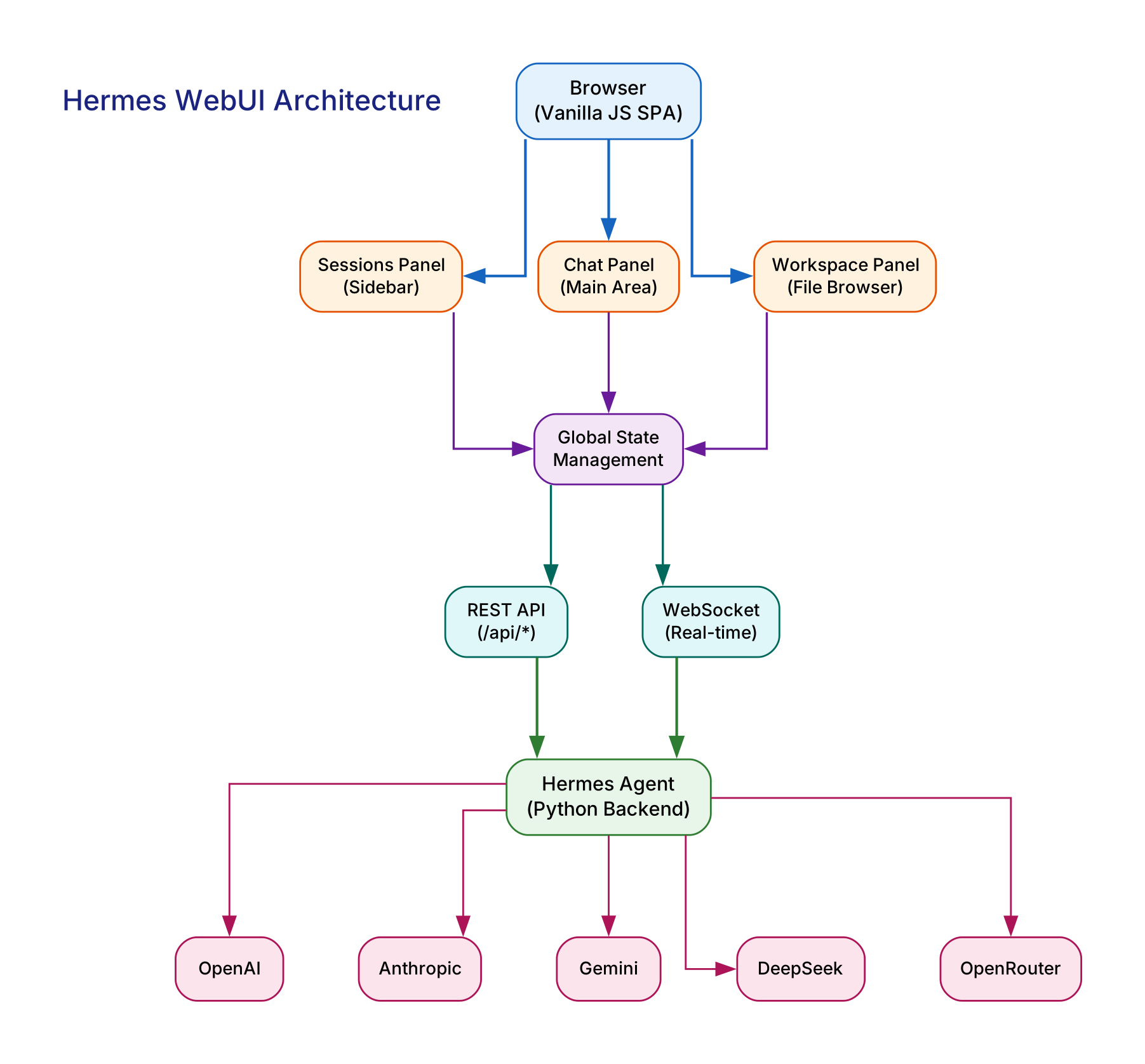
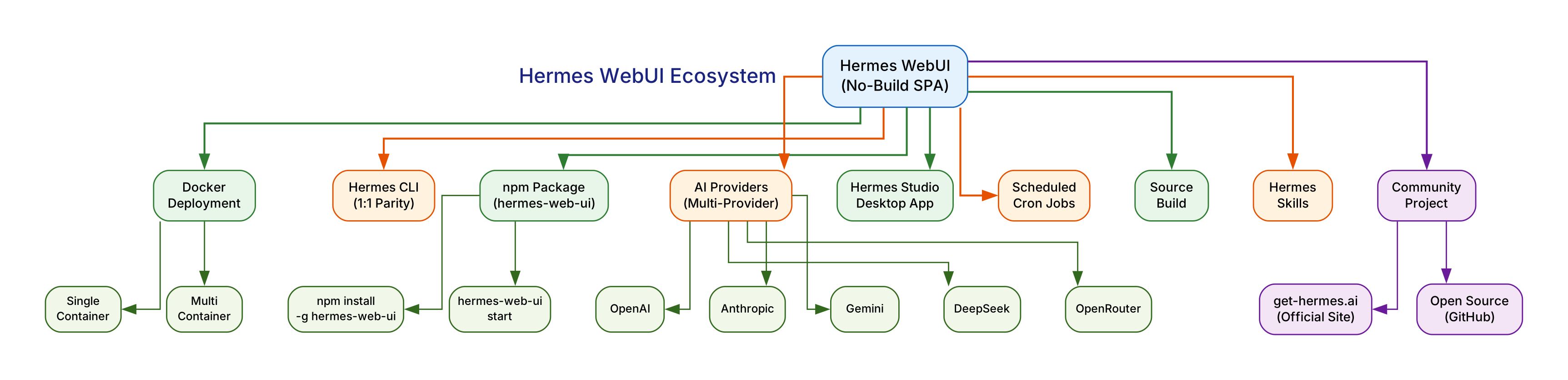
The application presents a three-panel layout – session management, chat interaction, and workspace file browsing – all orchestrated by a Python backend that communicates via REST and WebSocket APIs. This architecture enables real-time streaming responses, persistent conversation memory, and seamless integration with five major AI providers: OpenAI, Anthropic, Gemini, DeepSeek, and OpenRouter.
Architecture: Python Backend Meets Vanilla JS SPA
The Hermes WebUI architecture follows a clean separation between backend and frontend. The Python backend serves as the orchestration layer, handling AI provider communication, session persistence, file system access, and API routing. It exposes both a REST API for CRUD operations and a WebSocket API for real-time streaming of AI responses.
On the frontend, the application is a single-page application built with native browser modules and a robust global state management system. There is no Webpack, no Vite, no React, and no Vue. The JavaScript modules load directly in the browser using ES module imports, and the state management pattern ensures that UI updates propagate predictably across the three panels without a virtual DOM diffing algorithm.
This no-build philosophy delivers several concrete advantages. The deployment artifact is the source code itself – there is no compilation step, no bundle to optimize, and no source maps to debug. When a bug appears in production, the code running in the browser is the same code in the repository. The startup time is near-instantaneous because there are no bundles to parse or hydrate. And the cognitive overhead for contributors is dramatically lower: if you know JavaScript, you can read and modify the codebase without learning a framework-specific API.
Key Insight: The no-build philosophy is not a limitation but a design choice that eliminates an entire class of toolchain complexity. By using native browser modules directly, Hermes WebUI achieves zero build time, zero bundle size optimization concerns, and zero framework migration risk. The code that runs in production is the code that developers edit.
The backend communicates with five AI providers through a unified interface. Each provider – OpenAI, Anthropic, Gemini, DeepSeek, and OpenRouter – implements a common adapter pattern that normalizes request formatting and response streaming. This means adding a new provider requires implementing a single adapter class rather than refactoring the entire communication layer.
Three-Panel Layout: Sessions, Chat, and Workspace
The signature design element of Hermes WebUI is its three-panel layout, which provides simultaneous visibility into session management, active chat, and file browsing. This layout mirrors the workflow of a developer who needs to switch between conversations, reference files, and maintain context across multiple AI interactions.
The left panel handles session management. Each conversation with an AI provider is stored as a session with full message history. Users can create, rename, delete, and switch between sessions without losing context. The session list persists across browser restarts because the backend stores session data on disk.
The center panel is the chat interface. It supports real-time streaming of AI responses, markdown rendering, code syntax highlighting, and voice input. The streaming implementation uses WebSocket connections to deliver tokens as they arrive from the AI provider, creating the characteristic typewriter effect that provides immediate feedback during long responses.
The right panel provides workspace file browsing. Users can navigate the file system, view file contents, and attach files to conversations. This panel integrates directly with the chat interface, allowing users to reference file contents in their prompts without manually copying and pasting.

Feature Set: Beyond Basic Chat
Hermes WebUI extends well beyond a simple chat interface. The feature set includes voice input and output, profile management for switching between AI providers and model configurations, security settings for API key management, theme customization with the signature dark theme, panel layout adjustments, and mobile-responsive design.
The voice feature enables hands-free interaction with the AI agent. Users can dictate prompts and receive spoken responses, making the interface accessible for scenarios where typing is impractical. The voice processing happens client-side using the Web Speech API, keeping the architecture simple and avoiding additional server dependencies.
Profile management allows users to define named configurations that specify an AI provider, model, temperature, and system prompt. Switching between profiles is instantaneous, enabling rapid experimentation with different models and providers without re-entering configuration details each time.
The security model stores API keys locally on the server, never transmitting them to the frontend beyond the initial configuration. The backend acts as a proxy for all AI provider requests, meaning API keys never appear in browser network traffic. This design also enables the backend to add rate limiting, request logging, and usage tracking at the proxy level.
Takeaway: The profile system is a subtle but powerful feature. By encapsulating provider, model, temperature, and system prompt into a named configuration, Hermes WebUI turns model switching from a multi-step configuration process into a single-click operation. This is particularly valuable when comparing responses across providers for the same prompt.
The theme system goes beyond simple color swapping. The dark theme is the default and primary design target, with every UI element optimized for low-light readability. The CSS custom properties architecture makes it straightforward to create alternative themes, and the community has already contributed several theme variants.
Multi-Provider AI Support
One of the most compelling aspects of Hermes WebUI is its unified interface across five major AI providers. The supported providers are:
- OpenAI: GPT-4o, GPT-4 Turbo, GPT-3.5 Turbo, and the o1 reasoning models
- Anthropic: Claude 3.5 Sonnet, Claude 3 Opus, and the Claude model family
- Gemini: Google’s Gemini Pro and Gemini Ultra models
- DeepSeek: DeepSeek Chat and DeepSeek Coder models
- OpenRouter: A routing service that provides access to hundreds of models through a single API key
The adapter pattern used for provider integration means that each provider implements a standardized interface for sending messages and receiving streaming responses. The backend handles the differences in API formats, authentication methods, and streaming protocols, presenting a uniform interface to the frontend.
This multi-provider approach provides several practical benefits. Users can compare model outputs side by side by switching profiles. They can fall back to a different provider if one experiences downtime. And they can optimize cost by routing simple queries to less expensive models while reserving premium models for complex tasks.
The OpenRouter integration is particularly noteworthy because it effectively gives Hermes WebUI access to hundreds of models through a single configuration. Rather than managing API keys for each provider individually, users can configure OpenRouter once and access models from Mistral, Meta, Cohere, and many others through the OpenRouter proxy.
Deployment Options: Docker, npm, and Desktop
Hermes WebUI offers three deployment paths, each optimized for a different use case.
The Docker deployment is the most common for server-based installations. Both single-container and multi-container configurations are available. The single-container setup bundles the Python backend and static frontend into one image, making it ideal for quick deployments. The multi-container setup separates the backend and frontend into distinct containers, enabling independent scaling and updates.
# Single-container Docker deployment
docker run -d -p 8080:8080 \
  -e OPENAI_API_KEY=sk-... \
  -e ANTHROPIC_API_KEY=sk-ant-... \
  hermes-webui:latest

# Multi-container with docker-compose
docker-compose up -d
The npm package provides the fastest path to a local installation. With Node.js installed, the entire application can be running in two commands:
npm install -g hermes-web-ui
hermes-web-ui start
This installs the Python backend, serves the static frontend, and opens the web interface on the local machine. The npm package handles Python dependency installation automatically, making it accessible even to developers who are not familiar with Python packaging.
The desktop application, Hermes Studio Desktop, wraps the web interface in a native window using Electron or a similar framework. This provides the familiar experience of a standalone application with system tray integration, native window controls, and automatic startup configuration.
Ecosystem: CLI, Cron, Skills, and Memory
Hermes WebUI does not exist in isolation. It is part of the Hermes Agent ecosystem, which includes the Hermes CLI, scheduled cron jobs, a skills system, and persistent memory. The WebUI maintains 1:1 functional parity with the CLI, meaning any operation available in the terminal is also available through the web interface.
The cron system enables scheduled execution of AI tasks. Users can define recurring prompts that run at specified intervals, such as daily summaries, periodic code reviews, or scheduled data analysis. The cron configuration is managed through the web interface and executed by the backend.
The skills system provides a plugin architecture for extending the agent’s capabilities. Skills are defined as structured prompts with associated tools, and they can be loaded, configured, and triggered through the web interface. This enables users to build custom workflows without modifying the core application code.
Persistent memory allows the agent to retain information across sessions. Rather than starting each conversation from scratch, the agent can reference previous interactions, user preferences, and accumulated knowledge. The memory system is managed by the backend and persists across server restarts.
Amazing: The 1:1 functional parity between the CLI and WebUI means that the web interface is not a subset or simplified version of the terminal experience. Every CLI command, every cron job, every skill, and every memory operation is available through the browser. This is achieved by having both interfaces share the same backend API, ensuring that feature additions automatically propagate to both access points.
The No-Build Philosophy in Practice
The decision to build Hermes WebUI with vanilla JavaScript and no build step is one of its most distinctive characteristics. In a landscape where React, Next.js, and Vite dominate, this choice stands out as both pragmatic and principled.
The practical benefits are measurable. The application loads faster because there are no bundles to download and parse. Development iteration is faster because there is no compilation step to wait for. Debugging is more direct because the browser devtools show the actual source code. And the dependency tree is dramatically smaller, reducing security vulnerability surface and supply chain risk.
The principled argument is that build tools add complexity without proportional benefit for many applications. A chat interface with three panels, real-time streaming, and file browsing does not require a virtual DOM, server-side rendering, or tree shaking. The native browser APIs for modules, custom elements, and state management are sufficient for this use case, and they are stable, well-documented, and performant.
The global state management system in Hermes WebUI is worth examining in detail. Rather than using a framework-specific state library, the application implements a simple observer pattern where UI components subscribe to state changes and re-render when notified. This pattern is straightforward to understand, easy to debug, and has zero overhead from framework abstraction layers.
// Simplified example of the state management pattern
const state = {
  sessions: [],
  activeSession: null,
  messages: [],
};

const subscribers = new Set();

function setState(update) {
  Object.assign(state, update);
  subscribers.forEach((fn) => fn(state));
}

function subscribe(fn) {
  subscribers.add(fn);
  return () => subscribers.delete(fn);
}
This pattern scales well for the three-panel layout because each panel subscribes only to the state slices it needs. The session panel re-renders when sessions change, the chat panel re-renders when messages change, and the workspace panel re-renders when the file tree changes. There are no unnecessary re-renders because there is no global virtual DOM diffing.
Community and Development
Hermes WebUI is a community project and is not affiliated with Nous Research, the organization behind the Hermes model family. The project is maintained by contributors who use the interface daily and have a direct interest in its reliability and usability.
The development workflow reflects the no-build philosophy. Contributions do not require setting up a build environment, installing a specific version of a bundler, or running a compilation step before testing changes. A contributor can clone the repository, start the Python backend, open the frontend in a browser, and immediately see the effect of their changes. This low barrier to entry has been cited by contributors as a key reason for their participation.
The project accepts contributions through GitHub pull requests and follows a conventional commit format for changelog generation. The issue tracker is active, with community members reporting bugs, requesting features, and sharing custom themes and provider adapters.
Important: Hermes WebUI demonstrates that a well-architected vanilla JavaScript application can deliver a user experience that rivals framework-based alternatives. The no-build philosophy is not about avoiding modern tools for ideological reasons; it is about choosing the simplest approach that fully satisfies the requirements. For an AI agent interface with three panels, real-time streaming, and multi-provider support, vanilla JavaScript with native modules is that simplest approach.
Getting Started
To start using Hermes WebUI, the fastest path is the npm package:
# Install and start with npm
npm install -g hermes-web-ui
hermes-web-ui start
For Docker deployments, the single-container approach is recommended for initial evaluation:
# Docker quick start
docker run -d -p 8080:8080 \
  -e OPENAI_API_KEY=your-key-here \
  hermes-webui:latest
After starting the server, open http://localhost:8080 in your browser. The default dark theme will load immediately. Configure your AI provider API keys in the settings panel, create a profile for each provider you want to use, and start chatting.
The official website at get-hermes.ai provides documentation, theme galleries, and community resources. The source code is available on GitHub under the master branch.
Conclusion
Hermes WebUI represents a compelling alternative to the prevailing trend of increasingly complex web development toolchains. By building a full-featured AI agent interface with vanilla JavaScript, native browser modules, and a Python backend, the project demonstrates that simplicity and capability are not mutually exclusive. The three-panel layout provides efficient workflow management, the multi-provider support enables flexible model selection, and the deployment options accommodate every use case from local development to production server installations.
The no-build philosophy is the project’s most distinctive characteristic and its most practical advantage. It eliminates build configuration, reduces dependency surface, accelerates development iteration, and simplifies debugging. For developers who have grown accustomed to multi-minute build times and inscrutable framework abstractions, Hermes WebUI offers a refreshing return to the fundamentals of web development – where the code you write is the code that runs.
With over 10,000 GitHub stars and an active community, Hermes WebUI has proven that there is substantial demand for lightweight, no-compromise AI agent interfaces. Whether you are evaluating AI providers, building custom agent workflows, or simply prefer a fast and reliable chat interface, Hermes WebUI deserves serious consideration. Enjoyed this post? Never miss out on future posts by following us