Browserbase Skills: Claude Code Web Automation Plugin System
Browserbase Skills is a plugin and skill system for Claude Code that delivers comprehensive web automation capabilities through 13 specialized skills. Whether you need to browse websites, fill forms, solve CAPTCHAs, run adversarial UI tests, or build self-improving browser automation, Browserbase Skills Claude Code web automation provides a unified CLI-driven interface that works identically in both local and remote browser environments. With over 2,185 GitHub stars and 320 stars per day during its trending peak, this project has quickly become the go-to solution for giving AI coding agents real browser control.
Understanding the Architecture
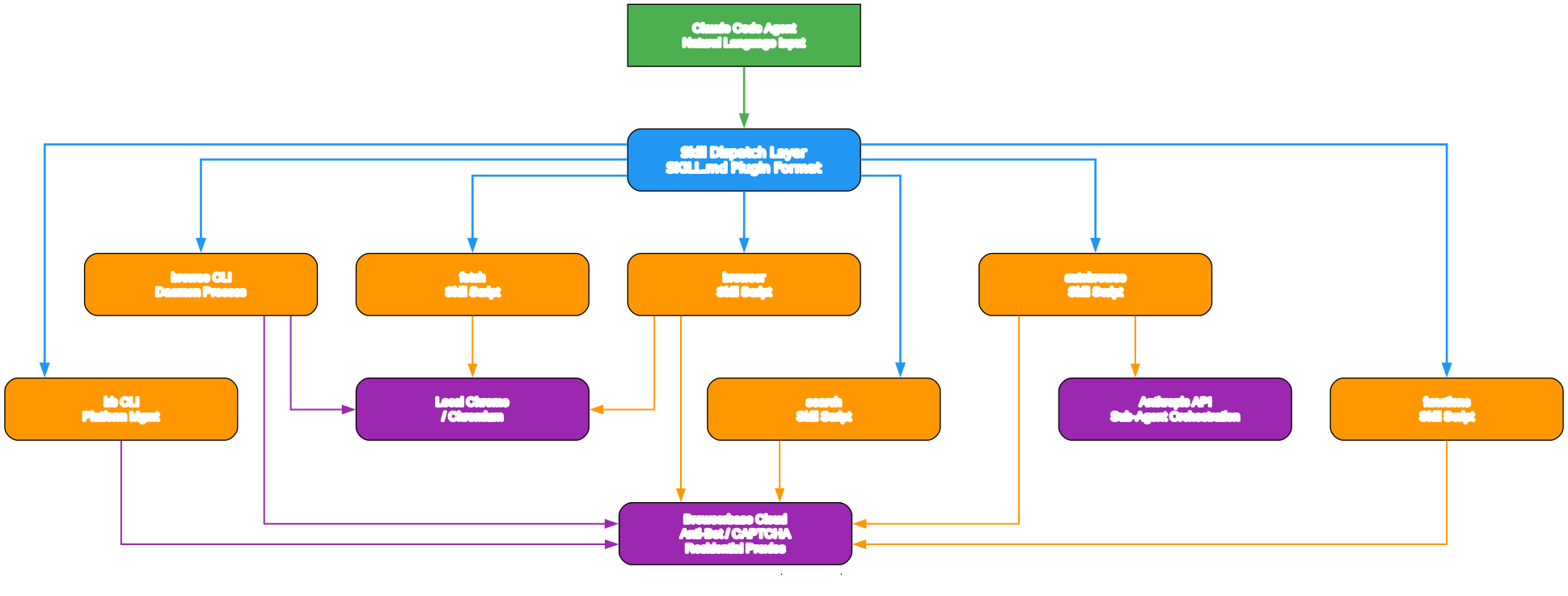
The architecture diagram above illustrates how Browserbase Skills integrates with Claude Code and the Browserbase cloud platform. Let us break down each component and how they interact:
Claude Code Agent At the top of the stack sits Claude Code, the AI coding assistant that serves as the orchestrator. When a user asks Claude to browse a website, test a UI, or extract data, Claude dispatches commands through the skill system rather than attempting raw HTTP requests. This means the agent gets full browser rendering, JavaScript execution, and interactive capabilities that simple fetch operations cannot provide.
Skill Registry and Plugin System The skill registry acts as the central dispatcher. When installed via npx skills add browserbase/skills or the /plugin command in Claude Code, all 13 skills become available as natural language invocations. Each skill has its own SKILL.md file that defines triggers, allowed tools, and compatibility requirements. The registry ensures that Claude knows which skill to activate based on the user’s intent – whether that is browsing, testing, debugging, or researching.
Daemon-Based Browse CLI The browse CLI is the workhorse of the system. It runs as a persistent daemon process that manages browser sessions, handles page navigation, and provides structured output through accessibility tree snapshots. The daemon auto-starts on first command and supports both local Chrome instances and remote Browserbase cloud sessions. Key commands include browse open, browse snapshot, browse click, browse fill, and browse stop.
Browserbase Cloud API For sites with bot detection, CAPTCHAs, or geo-restrictions, the system seamlessly switches to Browserbase’s cloud infrastructure. This provides anti-bot stealth mode with custom Chromium builds, automatic CAPTCHA solving for reCAPTCHA and hCaptcha, residential proxies across 201 countries, and session persistence through cookie contexts. The transition between local and remote is a single command: browse env remote.
Key Insight: Browserbase Skills provides residential proxies in 201 countries with automatic CAPTCHA solving, making it possible for AI agents to access protected websites that would normally block automated browsing.
The 13 Skills: Core and Advanced
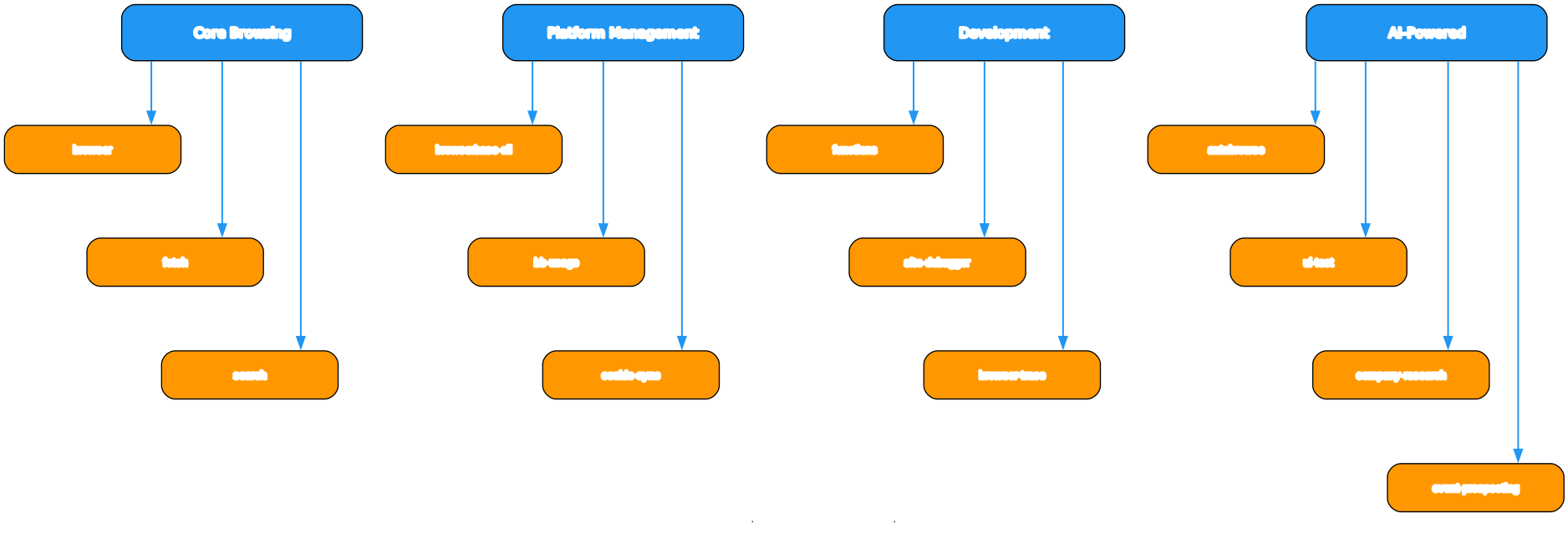
The ecosystem diagram organizes all 13 skills into two tiers. Here is a detailed look at each:
Core Skills (4)
| Skill | Purpose | Key Capability |
|---|---|---|
browser | Web browser automation | Full CLI-driven browsing with accessibility tree snapshots, element interaction, and session management |
fetch | Static page retrieval | Fetch HTML or JSON without a browser session – inspect status codes, headers, and follow redirects |
search | Web search | Return structured search results (titles, URLs, metadata) without launching a browser |
browserbase-cli | Platform management | Use the official bb CLI for Browserbase Functions, sessions, projects, contexts, extensions, and dashboard access |
Advanced Skills (9)
| Skill | Purpose | Key Capability |
|---|---|---|
functions | Serverless deployment | Deploy browser automation to Browserbase cloud as serverless functions using bb functions init |
site-debugger | Automation debugging | Diagnose failing browser automations by analyzing bot detection, selectors, timing, auth, and CAPTCHAs |
browser-trace | Performance tracing | Capture full DevTools-protocol traces (CDP firehose, screenshots, DOM dumps) and bisect them into per-page searchable buckets |
cookie-sync | Authentication transfer | Sync cookies from local Chrome to Browserbase persistent contexts so remote sessions can access authenticated sites |
autobrowse | Self-improving automation | Iterative loop: inner agent browses, outer agent reads traces and improves the strategy until it reliably passes |
ui-test | Adversarial UI testing | AI-powered testing that analyzes git diffs to test changes, or explores the full app to find bugs |
company-research | Business intelligence | Research companies by extracting data from their websites and compiling structured reports |
event-prospecting | Event discovery | Find and extract event information from conference and meetup platforms |
Takeaway: With a single
npx skills add browserbase/skillscommand, Claude Code gains 13 specialized skills covering everything from simple page fetching to self-improving browser automation – no manual configuration needed.
AutoBrowse: The Self-Improving Browser Skill
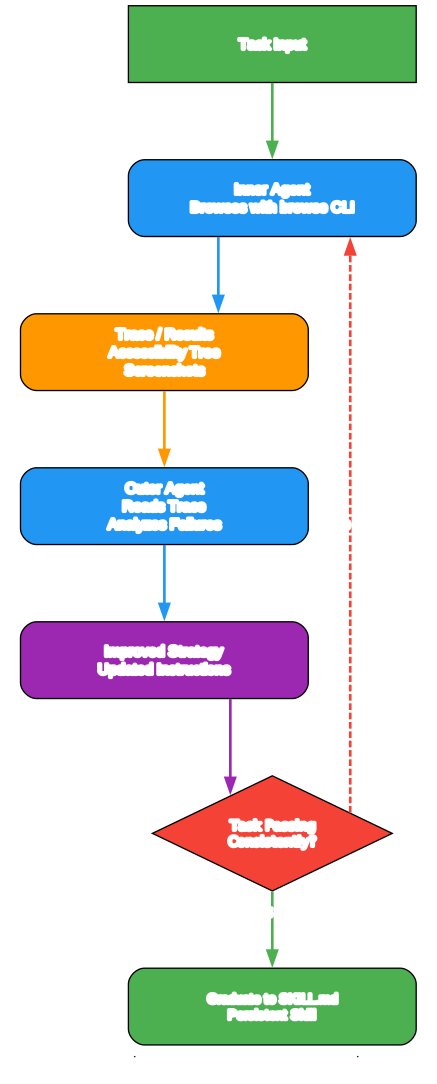
The AutoBrowse skill is the most innovative component of the Browserbase Skills ecosystem. It implements a self-improving loop where an inner agent browses a website and an outer agent reads the execution traces and improves the navigation strategy until it reliably passes.
How the Loop Works
-
Task Definition – The user provides a task (e.g., “book a flight on Google Flights”) or a URL. AutoBrowse creates a task definition in
./autobrowse/tasks/<task>/task.mdthat specifies the URL, inputs, steps, and expected JSON output. -
Inner Agent Execution – The inner agent runs
evaluate.mjswhich launches a browser session, follows the current strategy, and records every action. It writes a full trace to./autobrowse/traces/<task>/latest/including screenshots, accessibility tree snapshots, and a summary with duration, cost, and turn count. -
Trace Analysis – The outer agent reads the trace summary and identifies exactly where things went wrong. It looks for specific failure patterns: elements not found, timing issues, incorrect selectors, or bot detection triggers.
-
Hypothesis Formation – Based on the trace analysis, the outer agent forms a single, testable hypothesis. For example: “After clicking the dropdown, wait 1 second – options animate in before they are clickable” or “Navigate directly to
/pay-invoice/instead of going through the landing page.” -
Strategy Update – The outer agent edits
strategy.mdto incorporate the hypothesis while keeping everything that worked in previous iterations. Good strategies include fast paths (direct URLs), step-by-step workflows with timing notes, site-specific selector knowledge, and failure recovery procedures. -
Iteration and Graduation – The loop runs for a configurable number of iterations (default: 5). If the task passes on 2 or more of the last 3 iterations, the skill graduates and is installed to
~/.claude/skills/<task-name>/SKILL.mdas a permanent, self-contained skill.
Multi-Task Parallel Execution
AutoBrowse also supports running multiple tasks in parallel using sub-agents. Each sub-agent runs the full evaluate-improve loop independently for its assigned task, and the main agent collects results into a structured session report with per-task pass rates, costs, and key learnings.
Important: AutoBrowse’s self-improving loop is a breakthrough in browser automation – the inner agent browses and the outer agent reads traces and improves strategy, creating skills that get better with each iteration until they reliably pass.

Dual Environment: Local and Remote Browser Control
One of the most powerful features of Browserbase Skills is its seamless dual-environment system. The same browse commands work identically whether you are running a local Chrome instance or a remote Browserbase cloud session.
Local Mode
Local mode is the default for development and trusted sites. It offers three variants:
browse env local– Starts a clean, isolated local browser. Best for reproducible testing and localhost development.browse env local --auto-connect– Reuses an already-running debuggable Chrome instance with your existing cookies and login state. Falls back to isolated mode if nothing is available.browse env local <port|url>– Attaches to a specific Chrome DevTools Protocol (CDP) target. Useful for connecting to an already-running browser on a specific port.
Local mode is faster, requires no API key, and is ideal for development, localhost testing, and browsing simple sites like documentation wikis and public APIs.
Remote Mode (Browserbase Cloud)
Remote mode activates Browserbase’s cloud infrastructure with a single command: browse env remote. This provides:
- Anti-bot stealth – Custom Chromium build with anti-fingerprinting that bypasses bot detection systems
- Automatic CAPTCHA solving – Handles reCAPTCHA, hCaptcha, and Turnstile challenges automatically
- Residential proxies – Route traffic through residential IPs in 201 countries with geo-targeting
- Session persistence – Cookies and authentication state persist across sessions via Browserbase contexts
- Cookie sync – The
cookie-syncskill transfers your local Chrome cookies to a Browserbase context, so remote sessions start already authenticated
When to Switch Environments
The system provides clear guidance on when to use each mode:
| Scenario | Recommended Mode | Command |
|---|---|---|
| Localhost development | Local (isolated) | browse env local |
| Reuse local login state | Local (auto-connect) | browse env local --auto-connect |
| Simple browsing (docs, wikis) | Local (isolated) | browse env local |
| Protected sites (CAPTCHAs, bot detection) | Remote | browse env remote |
| Geo-restricted content | Remote | browse env remote |
| Production scraping | Remote | browse env remote |
Important: The dual-environment design means you can develop and test locally with
browse env local, then switch tobrowse env remotefor production work – all with the same commands, no code changes required.
Installation
Installing Browserbase Skills takes just one command. The system supports multiple installation methods depending on your preferred workflow.
Quick Install (All Agents)
npx skills add browserbase/skills
Claude Code Plugin Install
On Claude Code, add the marketplace and install the plugin:
/plugin marketplace add browserbase/skills
Then install the browse plugin:
/plugin install browse@browserbase
Manual Install (Claude Code)
- On Claude Code, type
/plugin - Select option
3. Add marketplace - Enter the marketplace source:
browserbase/skills - Press enter to select the
browseplugin - Hit enter again to
Install now - Restart Claude Code for changes to take effect
Prerequisites
- Node.js 18+ is required for the browse CLI and AutoBrowse
- Chrome/Chromium must be installed for local mode browsing
- Browserbase API key is needed for remote mode (get one at https://browserbase.com/settings)
- ANTHROPIC_API_KEY is required for AutoBrowse’s inner agent
Install the Browse CLI
npm install -g @browserbasehq/browse-cli
Verify Installation
which browse
browse status
Usage Examples
Once installed, you can ask Claude to perform browser tasks using natural language:
- “Go to Hacker News, get the top post comments, and summarize them”
- “QA test http://localhost:3000 and fix any bugs you encounter”
- “Order me a pizza, you’re already signed in on Doordash”
- “Use
bbto list my Browserbase projects and show the output as JSON” - “Initialize a new Browserbase Function with
bb functions initand explain the next commands”
Basic Browser Workflow
# Start with local mode for development
browse env local

# Navigate to a page
browse open https://example.com

# Get the accessibility tree (preferred over screenshots)
browse snapshot

# Click an element by its ref from the snapshot
browse click @0-5

# Fill a form field
browse fill "#email" "user@example.com"

# Get the page title
browse get title

# Stop the browser when done
browse stop
Switching to Remote Mode
# Switch to Browserbase cloud for protected sites
browse env remote

# Open a page with an authenticated context
browse open https://protected-site.com --context-id ctx_abc123 --persist

# Take a snapshot
browse snapshot

# Stop the session
browse stop
Key Features
| Feature | Description |
|---|---|
| 13 Specialized Skills | Complete coverage from basic browsing to self-improving automation |
| Dual Environment | Seamless switching between local Chrome and Browserbase cloud |
| Accessibility-First | Uses accessibility tree snapshots instead of screenshots for faster, more reliable interaction |
| AutoBrowse Loop | Self-improving browser automation that iterates until skills reliably pass |
| Anti-Bot Stealth | Custom Chromium with anti-fingerprinting for bypassing bot detection |
| CAPTCHA Solving | Automatic reCAPTCHA, hCaptcha, and Turnstile solving |
| Residential Proxies | 201 countries with geo-targeting for accessing geo-restricted content |
| Cookie Sync | Transfer local Chrome cookies to Browserbase contexts for authenticated remote sessions |
| UI Testing | Adversarial AI-powered testing that tries to break your application |
| Browser Tracing | Full CDP trace capture with per-page bisection for debugging |
| Serverless Functions | Deploy browser automation to Browserbase cloud as serverless functions |
| Daemon Architecture | Persistent browse CLI daemon that auto-starts and manages sessions |
Troubleshooting
Chrome not found: Install Chrome for your platform:
- macOS or Windows: https://www.google.com/chrome/
- Linux:
sudo apt install google-chrome-stable
Profile refresh: To refresh cookies from your main Chrome profile:
rm -rf .chrome-profile
No active page: Run browse stop, then check browse status. If it still says running, kill the zombie daemon:
pkill -f "browse.*daemon"
Browserbase fails: Verify your API key is set:
echo $BROWSERBASE_API_KEY
Links
- GitHub Repository: https://github.com/browserbase/skills
- Browserbase Website: https://www.browserbase.com

Enjoyed this post? Never miss out on future posts by following us


