Context Mode: Reduce AI Coding Agent Context Window Usage by 98% with Sandbox Tools and Session Continuity
Context Mode is an MCP (Model Context Protocol) server that solves the context window problem for AI coding agents. Every tool call dumps raw data into your context window - a Playwright snapshot costs 56 KB, twenty GitHub issues cost 59 KB, and one access log consumes 45 KB. After 30 minutes, 40% of your context is gone. Context Mode addresses all three sides of this problem: context saving through sandboxed tools (98% reduction), session continuity via SQLite FTS5 indexing, and a “think in code” paradigm that treats the LLM as a code generator rather than a data processor. With 9,886+ stars and adoption across teams at Microsoft, Google, Meta, Amazon, NVIDIA, and Stripe, Context Mode has become an essential tool for developers who rely on AI coding assistants.
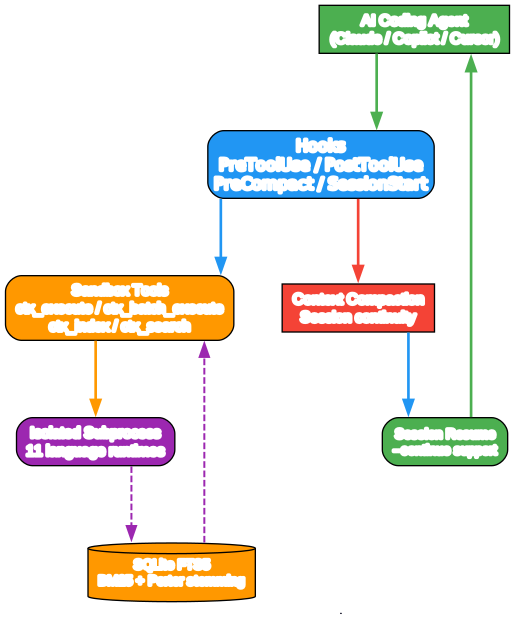
Understanding the Context Mode Architecture
The architecture diagram above illustrates how Context Mode intercepts tool calls and routes them through sandboxed execution. Let’s examine each component:
Component 1: AI Coding Agent The AI coding agent (Claude Code, Copilot, Cursor, etc.) issues tool calls like Read, Bash, WebFetch, and MCP tool invocations. Without Context Mode, these calls return raw, verbose output that floods the context window.
Component 2: Hook System Context Mode registers four types of hooks that intercept tool execution at critical points:
- PreToolUse: Enforces sandbox routing before tool execution
- PostToolUse: Captures events after each tool call
- PreCompact: Builds a snapshot before context compaction
- SessionStart: Restores state after compaction or when resuming with
--continue
Component 3: Sandbox Tools Six sandboxed MCP tools replace raw tool output with compact, processed results:
ctx_execute: Run code in 11 languages, only stdout enters contextctx_batch_execute: Multiple commands in one callctx_execute_file: Process files in sandboxctx_index: Chunk markdown into FTS5 with BM25 rankingctx_search: Query indexed content on-demandctx_fetch_and_index: Fetch URLs, convert to markdown, index with 24h TTL cache
Component 4: Isolated Subprocess Each sandbox call spawns an isolated subprocess with its own process boundary. Scripts cannot access each other’s memory or state. The subprocess runs your code, captures stdout, and only that stdout enters the conversation context.
Component 5: SQLite FTS5 Knowledge Base Indexed content is stored in a per-project SQLite database with FTS5 (Full-Text Search 5) virtual tables. Search uses BM25 ranking with Porter stemming and trigram substring matching. Titles and headings are weighted 5x for navigational queries.
Data Flow: When the AI agent issues a tool call, the PreToolUse hook intercepts it and routes it to the appropriate sandbox tool. The sandbox executes in an isolated subprocess, processes the raw data, and returns only the essential output. PostToolUse hooks capture session events into SQLite. When context compacts, the PreCompact hook builds a priority-tiered XML snapshot. On SessionStart, the snapshot is restored as a Session Guide with 15 categories of context.
The Sandbox: How Raw Data Never Enters Context
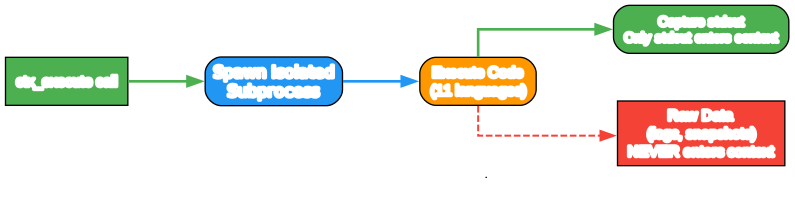
Isolated Execution Model
The sandbox execution model ensures that raw data never enters the AI’s context window:
- Tool Call Interception: When the AI calls
ctx_execute, Context Mode spawns an isolated subprocess - Code Execution: The subprocess runs code in one of 11 supported languages (JavaScript, TypeScript, Python, Shell, Ruby, Go, Rust, PHP, Perl, R, Elixir)
- Stdout Capture: Only stdout from the subprocess enters the conversation context
- Raw Data Isolation: Log files, API responses, snapshots, and other raw data never leave the sandbox
Intent-Driven Filtering
When output exceeds 5 KB and an intent is provided, Context Mode switches to intent-driven filtering:
- The full output is indexed into the knowledge base
- Searches for sections matching your intent
- Returns only relevant matches with searchable vocabulary for follow-up queries
Authenticated CLI Support
Authenticated command-line tools work through credential passthrough. gh, aws, gcloud, kubectl, and docker inherit environment variables and config paths without exposing them to the conversation.
Platform Support Matrix

Context Mode supports 12+ AI coding platforms with varying levels of hook and session continuity support:
Full Support (Hooks + Session Continuity):
- Claude Code: Plugin marketplace install, all 5 hook types, slash commands
- Gemini CLI: One config file, BeforeTool/AfterTool/PreCompress/SessionStart hooks
- VS Code Copilot: PreToolUse/PostToolUse/SessionStart hooks
Partial Support (Hooks without SessionStart):
- Cursor: preToolUse/postToolUse/stop hooks, SessionStart rejected by validator
- OpenCode: TypeScript plugin with tool.execute.before/after, SessionStart pending
- KiloCode: Shares OpenCode plugin architecture
- Codex CLI: Hooks implemented but dispatch not yet active
MCP-Only (No Hooks):
- Antigravity: Manual routing file copy (~60% compliance)
- Zed: Manual AGENTS.md copy (~60% compliance)
- Kiro: preToolUse/postToolUse hooks, no SessionStart
Native Plugin:
- OpenClaw/Pi Agent: Native gateway plugin with full lifecycle hooks
- Pi Coding Agent: Extension with tool_call, tool_result, session_start events
Session Continuity: Surviving Context Compaction
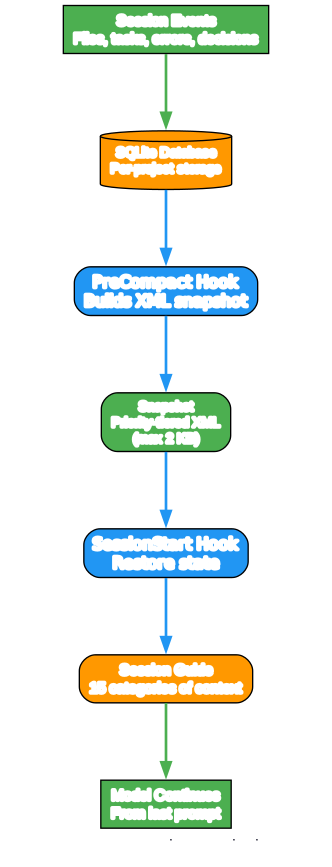
The Compaction Problem
When the context window fills up, the agent compacts the conversation - dropping older messages to make room. Without session tracking, the model forgets which files it was editing, what tasks are in progress, what errors were resolved, and what you last asked for.
How Context Mode Solves It
Context Mode captures every meaningful event during your session and persists them in a per-project SQLite database. When the conversation compacts (or you resume with --continue), your working state is rebuilt automatically.
Event Capture:
- Files: read, edit, write, glob, grep (Critical P1)
- Tasks: create, update, complete (Critical P1)
- Rules: CLAUDE.md / GEMINI.md / AGENTS.md paths and content (Critical P1)
- Decisions: User corrections and preferences (High P2)
- Git: checkout, commit, merge, rebase, stash, push, pull, diff, status (High P2)
- Errors: Tool failures, non-zero exit codes (High P2)
- Environment: cwd changes, venv, nvm, conda, package installs (High P2)
Snapshot Building: When PreCompact fires, Context Mode reads all session events from SQLite, builds a priority-tiered XML snapshot (maximum 2 KB), and stores it in the session_resume table. Lower-priority events are dropped first if the budget is tight.
Session Restoration: When SessionStart fires with source “compact”, Context Mode retrieves the stored snapshot, writes structured events to an auto-indexed FTS5 file, builds a Session Guide with 15 categories, and injects a <session_knowledge> directive into context.
Session Guide Categories
The Session Guide provides a structured narrative with actionable sections:
- Last Request: User’s last prompt for seamless continuation
- Tasks: Checkbox format with completion status
- Key Decisions: User corrections and preferences
- Files Modified: All files touched during the session
- Unresolved Errors: Errors that haven’t been fixed
- Git Operations: checkout, commit, push, status
- Project Rules: CLAUDE.md / GEMINI.md / AGENTS.md paths
- MCP Tools Used: Tool names with call counts
- Subagent Tasks: Delegated work summaries
- Skills Used: Slash commands invoked
- Environment: Working directory, env variables
- Data References: Large data pasted during the session
- Session Intent: Mode classification (implement, investigate, review, discuss)
- User Role: Behavioral directives set during the session
The Knowledge Base: FTS5 + BM25 Search
Indexing Architecture
The ctx_index tool chunks markdown content by headings while keeping code blocks intact, then stores them in a SQLite FTS5 virtual table. The SQLite backend is selected automatically:
- Bun:
bun:sqlitemodule - Linux + Node.js >= 22.13:
node:sqlitemodule - Everything else:
better-sqlite3
Search Ranking
Search uses BM25 (Best Match 25) ranking - a probabilistic relevance algorithm that scores documents based on term frequency, inverse document frequency, and document length normalization. Porter stemming is applied at index time so “running”, “runs”, and “ran” match the same stem.
Reciprocal Rank Fusion (RRF): Search runs two parallel strategies and merges them with RRF:
- Porter stemming: FTS5 MATCH with porter tokenizer
- Trigram substring: FTS5 trigram tokenizer matches partial strings
Proximity Reranking: Multi-term queries get an additional reranking pass. Results where query terms appear close together are boosted.
Fuzzy Correction: Levenshtein distance corrects typos before re-searching. “kuberntes” becomes “kubernetes”, “autentication” becomes “authentication”.
TTL Cache
Indexed content persists in a per-project SQLite database at ~/.context-mode/content/:
- Fresh (<24h): Returns cache hint (0.3 KB) instead of re-fetching
- Stale (>24h): Re-fetches silently
- force: true: Bypasses cache
- 14-day cleanup: Content older than 14 days removed on startup
Benchmarks
| Scenario | Raw | Context | Saved |
|---|---|---|---|
| Playwright snapshot | 56.2 KB | 299 B | 99% |
| GitHub Issues (20) | 58.9 KB | 1.1 KB | 98% |
| Access log (500 requests) | 45.1 KB | 155 B | 100% |
| Context7 React docs | 5.9 KB | 261 B | 96% |
| Analytics CSV (500 rows) | 85.5 KB | 222 B | 100% |
| Git log (153 commits) | 11.6 KB | 107 B | 99% |
| Test output (30 suites) | 6.0 KB | 337 B | 95% |
| Repo research (subagent) | 986 KB | 62 KB | 94% |
Over a full session: 315 KB of raw output becomes 5.4 KB. Session time extends from approximately 30 minutes to approximately 3 hours.
Installation
Claude Code (Recommended)
# Install from plugin marketplace
/plugin marketplace add mksglu/context-mode
/plugin install context-mode@context-mode

# Restart Claude Code
/reload-plugins

# Verify installation
/context-mode:ctx-doctor
Gemini CLI
# Install globally
npm install -g context-mode

# Add to ~/.gemini/settings.json (see docs for full config)
# Restart Gemini CLI
VS Code Copilot
# Install globally
npm install -g context-mode

# Create .vscode/mcp.json and .github/hooks/context-mode.json
# Restart VS Code
Other Platforms
See the GitHub repository for platform-specific installation instructions for Cursor, OpenCode, KiloCode, OpenClaw, Codex CLI, Antigravity, Kiro, Zed, and Pi Coding Agent.
Utility Commands
Inside any AI session, type:
ctx stats       → Context savings, call counts, session report
ctx doctor      → Diagnose runtimes, hooks, FTS5, versions
ctx upgrade     → Update from GitHub, rebuild, reconfigure hooks
ctx purge       → Permanently delete all indexed content
ctx insight     → Personal analytics dashboard (opens local web UI)
From terminal:
context-mode doctor
context-mode upgrade
context-mode insight
Security
Context Mode enforces the same permission rules you already use, extending them to the MCP sandbox. If you block sudo, it’s also blocked inside ctx_execute, ctx_execute_file, and ctx_batch_execute.
Add security rules to .claude/settings.json:
{
  "permissions": {
    "deny": [
      "Bash(sudo *)",
      "Bash(rm -rf /*)",
      "Read(.env)",
      "Read(**/.env*)"
    ],
    "allow": [
      "Bash(git:*)",
      "Bash(npm:*)"
    ]
  }
}
deny always wins over allow. More specific (project-level) rules override global ones.
Privacy
Context Mode operates entirely locally. No telemetry, no cloud sync, no usage tracking, no account required. Your code, prompts, and session data never leave your machine. The SQLite databases live in your home directory and are cleaned up automatically.
Conclusion
Context Mode solves one of the most pressing problems in AI-assisted development: context window exhaustion. By sandboxing tool output, indexing content with FTS5/BM25, and maintaining session continuity across compaction events, it extends typical 30-minute sessions to 3+ hours while preserving 98% of context space. With support for 12+ AI coding platforms and a privacy-first architecture, Context Mode is an essential addition to any developer’s AI toolkit.
Links
- Context Mode GitHub Repository
- NPM Package
- Discord Community
- Benchmark Data
- Platform Support Documentation

Enjoyed this post? Never miss out on future posts by following us


