Every AI coding agent can build a frontend. The problem is that they all build the same frontend: centered hero with a purple gradient, three equal feature cards, Inter font on slate-900, and an em-dash in every headline. Taste Skill, the anti-slop frontend framework for AI agents, exists to break that cycle. With 24,000 GitHub stars and growing at over 2,700 per day, this collection of 13 portable SKILL.md instruction files gives your coding agent the design taste it was never trained on. No runtime code, no npm dependencies to bundle, no build step. Just pure instruction files that teach your agent how to design like a senior frontend engineer instead of a template generator.
The framework addresses a fundamental gap in AI-assisted development. Large language models are excellent at writing syntactically correct code, but they have no aesthetic judgment. They default to the same visual patterns because those patterns dominated their training data. Taste Skill intercepts the agent’s output pipeline before those defaults take hold, replacing them with context-aware design decisions that read the brief, configure the right visual parameters, and enforce a strict quality checklist before anything ships.
Architecture Overview
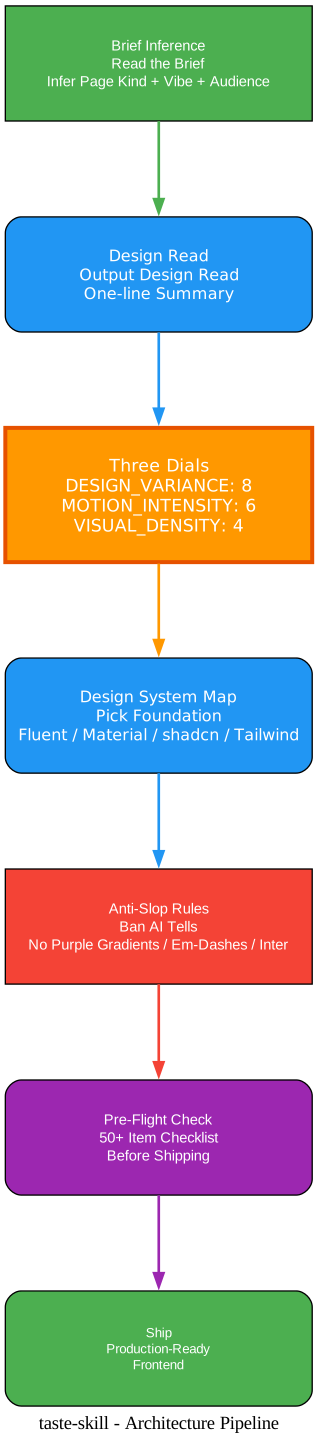
The architecture diagram above illustrates the complete Taste Skill pipeline from brief to shipped output. The process begins with Brief Inference, where the agent reads the user’s request and extracts six critical signals: page kind, vibe words, reference signals, audience, brand assets, and quiet constraints. Rather than jumping straight to code, the agent must first output a one-line “Design Read” that declares its interpretation of the brief. This forces the agent to commit to a design direction before generating any markup, preventing the default-to-generic behavior that plagues unguided AI output.
Once the Design Read is declared, the pipeline moves to the Three Dials configuration. Three numeric parameters (DESIGN_VARIANCE, MOTION_INTENSITY, and VISUAL_DENSITY) are set based on the brief signals, establishing the global variables that gate every subsequent layout, motion, and density decision. The baseline defaults are 8/6/4, but the dial inference table provides specific overrides for different brief types, from minimalist editorial sites to trust-first public-sector services.
With dials configured, the Design System Map step selects the appropriate foundation. If the brief reads as a Microsoft enterprise product, the agent reaches for Fluent UI. If it reads as a UK public service, it uses GOV.UK Frontend. If the brief is an aesthetic direction rather than a formal system, the agent builds with native CSS and Tailwind, honestly labeling what is borrowed inspiration versus official material. The honesty rule prevents the agent from hand-rolling CSS that mimics a design system when the real package exists.
Anti-Slop Rules then apply a comprehensive set of bans and overrides. Em-dashes are completely forbidden. AI-purple gradients are blocked. Centered heroes are avoided when variance is above 4. The premium-consumer beige-and-brass palette is banned as a default. Serif fonts are very discouraged unless the brief explicitly justifies them. These rules target the specific patterns that LLMs default to when they try to “look designed.”
Finally, the Pre-Flight Check runs a 50+ item mechanical checklist before any code is delivered. Every checkbox must pass. If a single item fails, the output is not done. This includes checking button contrast ratios, verifying eyebrow counts do not exceed one per three sections, confirming that bento grids have no empty cells, and ensuring that every animation can be justified in one sentence. The pipeline is strict by design: it is easier to prevent slop than to clean it up after the fact.
The Three-Dial System
At the core of Taste Skill is a configuration mechanism that is deceptively simple but profoundly effective: three numeric dials that control every visual decision the agent makes. These dials are not abstract guidelines. They are global variables that downstream rules reference by exact name, ensuring consistency across the entire output.
DESIGN_VARIANCE (1-10) controls layout experimentation. At level 1, you get perfect symmetry with equal grid columns and centered alignment. At level 10, you get masonry layouts, fractional grid units, and massive empty zones with 20vw left padding. The baseline default is 8, which pushes toward asymmetric, modern layouts by default.
MOTION_INTENSITY (1-10) controls animation depth. At level 1, the page is static with only CSS hover and active states. At level 10, you get full cinematic choreography with GSAP ScrollTrigger, parallax, and scroll-driven animation. The baseline default is 6, which enables fluid CSS transitions and entry animations without requiring heavy JavaScript animation libraries.
VISUAL_DENSITY (1-10) controls information per viewport. At level 1, you get art-gallery spacing with huge section gaps. At level 10, you get cockpit-style dense data with tight paddings and monospace numbers. The baseline default is 4, which favors spacious, breathable layouts appropriate for landing pages and portfolios.
The power of the dial system lies in its inference table. Rather than requiring users to set three numbers manually, the agent infers dial values from the brief signals:
| Signal | VARIANCE | MOTION | DENSITY |
|---|---|---|---|
| “minimalist / clean / calm / editorial / Linear-style” | 5-6 | 3-4 | 2-3 |
| “premium consumer / Apple-y / luxury / brand” | 7-8 | 5-7 | 3-4 |
| “playful / wild / Dribbble / Awwwards / experimental / agency” | 9-10 | 8-10 | 3-4 |
| “landing page / portfolio / marketing site (default)” | 7-9 | 6-8 | 3-5 |
| “trust-first / public-sector / regulated / accessibility-critical” | 3-4 | 2-3 | 4-5 |
| “redesign - preserve” | match existing | +1 | match existing |
| “redesign - overhaul” | +2 | +2 | match existing |
Key Insight: The Three-Dial system solves a fundamental problem in AI-generated design: the model has no internal sense of visual calibration. By externalizing design intent into three numeric parameters that every downstream rule references, Taste Skill creates a closed-loop control system. Change the dials, and the entire output shifts coherently. This is not a style picker. It is a design operating system.
Brief Inference: Read the Room
Section 0 of the Taste Skill SKILL.md is titled “BRIEF INFERENCE” for a reason. It is the first thing the agent reads, and it is the most important step in the entire pipeline. The core insight is simple: most LLM design output is bad because the model jumps to a default aesthetic instead of reading the room.
The agent is instructed to read six signals before touching any code or tweaking any dial. First, the page kind: is this a SaaS landing page, a developer portfolio, a public-sector service, or an editorial blog? Second, the vibe words the user used: “minimalist,” “calm,” “Linear-style,” “Awwwards,” “brutalist,” “premium consumer,” “Apple-y,” “playful,” “serious B2B.” Third, reference signals: URLs the user linked, screenshots they pasted, products they named, brands they are competing with. Fourth, the audience: B2B procurement panel, design-conscious consumer, recruiter scanning a portfolio. The audience picks the aesthetic, not the agent’s taste. Fifth, brand assets that already exist: logo, color, type, photography. Sixth, quiet constraints: accessibility-first audiences, public-sector requirements, regulated industries, trust-first commerce, kids’ products. These constraints override aesthetic preference.
After reading these signals, the agent must output a one-line Design Read before generating anything. Examples from the SKILL.md itself demonstrate the format:
- “Reading this as: B2B SaaS landing for technical buyers, with a Linear-style minimalist language, leaning toward Tailwind utilities + Geist + restrained motion.”
- “Reading this as: solo designer portfolio for hiring managers, with an editorial / kinetic-type language, leaning toward native CSS + scroll-driven animation + custom typography.”
- “Reading this as: redesign of a public-sector service site, with a trust-first language, leaning toward GOV.UK Frontend or USWDS.”
If the brief is ambiguous, the agent asks exactly one clarifying question, never a multi-question dump. If the agent can confidently infer from context, it does not ask at all. It declares the Design Read and proceeds.
The Anti-Default Discipline rule then kicks in: do not default to AI-purple gradients, centered hero over dark mesh, three equal feature cards, generic glassmorphism on everything, infinite-loop micro-animations everywhere, or Inter plus slate-900. These are the LLM defaults. The agent must reach past them deliberately based on the Design Read.
Takeaway: Brief Inference is the single most impactful section in the entire framework. It forces the agent to commit to a design direction before generating code, which eliminates the most common failure mode in AI-generated frontends: the model defaults to its training-data aesthetic and then rationalizes why that aesthetic fits. By requiring an explicit Design Read, Taste Skill makes the agent’s design reasoning legible and auditable.
The 13 Skills Ecosystem

The ecosystem diagram above shows the full scope of Taste Skill’s 13 portable agent skills, organized into two distinct categories. The Implementation Skills cluster on the left contains 10 skills that output code, each targeting a specific design workflow or aesthetic direction. The Image Generation Skills cluster on the right contains 3 skills that output reference images only, designed to work with ChatGPT Images, Codex image mode, or any agent that generates visual assets.
The Implementation Skills are the core of the framework. The primary skill, taste-skill (install name: design-taste-frontend), is the v2 experimental rewrite that contains the full pipeline described in this article: Brief Inference, Three Dials, Design System Map, Anti-Slop Rules, and Pre-Flight Check. It is the safest general default for any landing page, portfolio, or redesign project. The v1 version is preserved for projects that depend on its exact behavior.
The gpt-tasteskill variant is a stricter build optimized for GPT and Codex environments. It enforces higher layout variance, stronger GSAP direction, and more aggressive anti-slop rules. This variant exists because GPT-class models have different default behaviors than Claude-class models, and a one-size-fits-all approach leaves gaps.
The image-to-code-skill implements an image-first pipeline: generate site references, analyze them, then implement the frontend to match. This is particularly powerful when paired with the image generation skills, creating a complete workflow from visual concept to working code.
The redesign-skill is purpose-built for existing projects. Instead of starting from scratch, it audits the current UI first, then fixes layout, spacing, hierarchy, and styling. It includes a preservation protocol that respects existing brand tokens, information architecture, and SEO baseline.
Three aesthetic-direction skills provide specialized visual languages. The soft-skill delivers polished, calm, expensive UI with softer contrast, generous whitespace, premium fonts, and spring motion. The minimalist-skill produces editorial product UI in the Notion/Linear vein with a restrained palette and crisp structure. The brutalist-skill generates hard mechanical language with Swiss type, sharp contrast, and experimental layout.
The output-skill solves a different problem: when the model ships half-finished work with placeholder comments and TODO stubs. It enforces full output with no truncation, addressing the LLM laziness problem that the framework’s research documents in detail.
The stitch-skill provides Google Stitch-compatible rules, including an optional DESIGN.md export format for projects that use Stitch as their design-to-code bridge.
On the image generation side, imagegen-frontend-web produces website comps with strong typography, spacing, and anti-slop art direction. imagegen-frontend-mobile generates mobile screens and flows for iOS, Android, and cross-platform with readable type and coherent sets. The brandkit skill creates brand-kit boards with logo directions, palettes, type specimens, and identity applications across categories.
Amazing: The skill ecosystem is designed around a critical principle: each skill does one job, and you do not need all of them at once. Start with taste-skill for the general default. Add gpt-tasteskill when working in GPT/Codex. Add an aesthetic skill when the visual direction is already chosen. Add output-skill when the agent keeps truncating. Use image generation skills when the deliverable is visual reference material, then pass the results to your coding agent. This modular approach prevents the bloat that comes from loading every rule into every project.
Anti-Slop Rules and AI Tells
Section 9 of the SKILL.md is titled “AI TELLS (Forbidden Patterns)” and it reads like a field guide to everything that makes AI-generated frontends instantly recognizable. These are not style preferences. They are empirically identified patterns that emerged from real production testing of LLM-generated landing pages.
The visual and CSS bans target the most obvious signatures. No neon or outer glows by default; use inner borders or subtle tinted shadows instead. No pure black (#000000); use off-black, zinc-950, or charcoal. No oversaturated accents; desaturate to blend with neutrals. No excessive gradient text for large headers. No custom mouse cursors, which are outdated, accessibility-hostile, and performance-hostile.
The typography bans are more specific and more impactful. Inter is avoided as the default font; the agent is instructed to pick Geist, Outfit, Cabinet Grotesk, or Satoshi first. Serif is very discouraged as the default for any project, with the SKILL.md explicitly calling out that “it feels creative / premium / editorial” is not a valid reason to reach for serif. The two LLM-favorite display serifs, Fraunces and Instrument_Serif, are specifically banned as defaults. When serif is justified, the agent must rotate from a pool of over 30 alternatives and never reuse the same serif across consecutive projects.
The layout bans eliminate the most common AI-generated patterns. The three-column equal feature card row is banned outright; the agent must use 2-column zig-zag, asymmetric grid, scroll-pinned, or horizontal-scroll alternatives. Centered hero sections are avoided when DESIGN_VARIANCE is above 4. The “left big headline plus right small explainer paragraph” split-header pattern is banned as a default.
The content and data bans address what the SKILL.md calls the “Jane Doe Effect.” No generic names like “John Doe” or “Sarah Chan.” No generic avatars using SVG egg or user icons. No fake-perfect numbers like 99.99% or 50%. No startup-slop brand names like “Acme,” “Nexus,” “SmartFlow,” or “Cloudly.” No filler verbs like “Elevate,” “Seamless,” “Unleash,” “Next-Gen,” or “Revolutionize.”
The production-test tells section documents patterns that came out of real LLM-generated landing page tests. Version labels in the hero are banned. Section-numbering eyebrows like “00 / INDEX” or “001 - Capabilities” are banned. The middle-dot separator is rationed to maximum one per line. Decorative colored status dots on every list item are banned. Photo-credit captions as decoration are banned. Decoration text strips at the hero bottom are banned. Scroll cues are banned entirely because, as the SKILL.md states: “If the user has not scrolled yet, they are looking at the hero. They know what scroll is. The bottom of the viewport does not need a label.”
Important: The em-dash ban is the single most violated rule and the single most impactful. The SKILL.md states: “Em-dash is COMPLETELY banned. It is the LLM’s signature stylistic crutch and it is the number one visual Tell in production tests. There is no ‘limited use’ allowance, no ‘natural language frequency’ allowance, no ‘in body copy is fine’ allowance. None.” If the output contains a single em-dash anywhere visible to the user, the output fails the Pre-Flight Check and must be rewritten. This rule is non-negotiable because the agent has historically ignored em-dash limits when phrased as “use sparingly.” The phrasing is binary: zero em-dashes.
Design Workflow
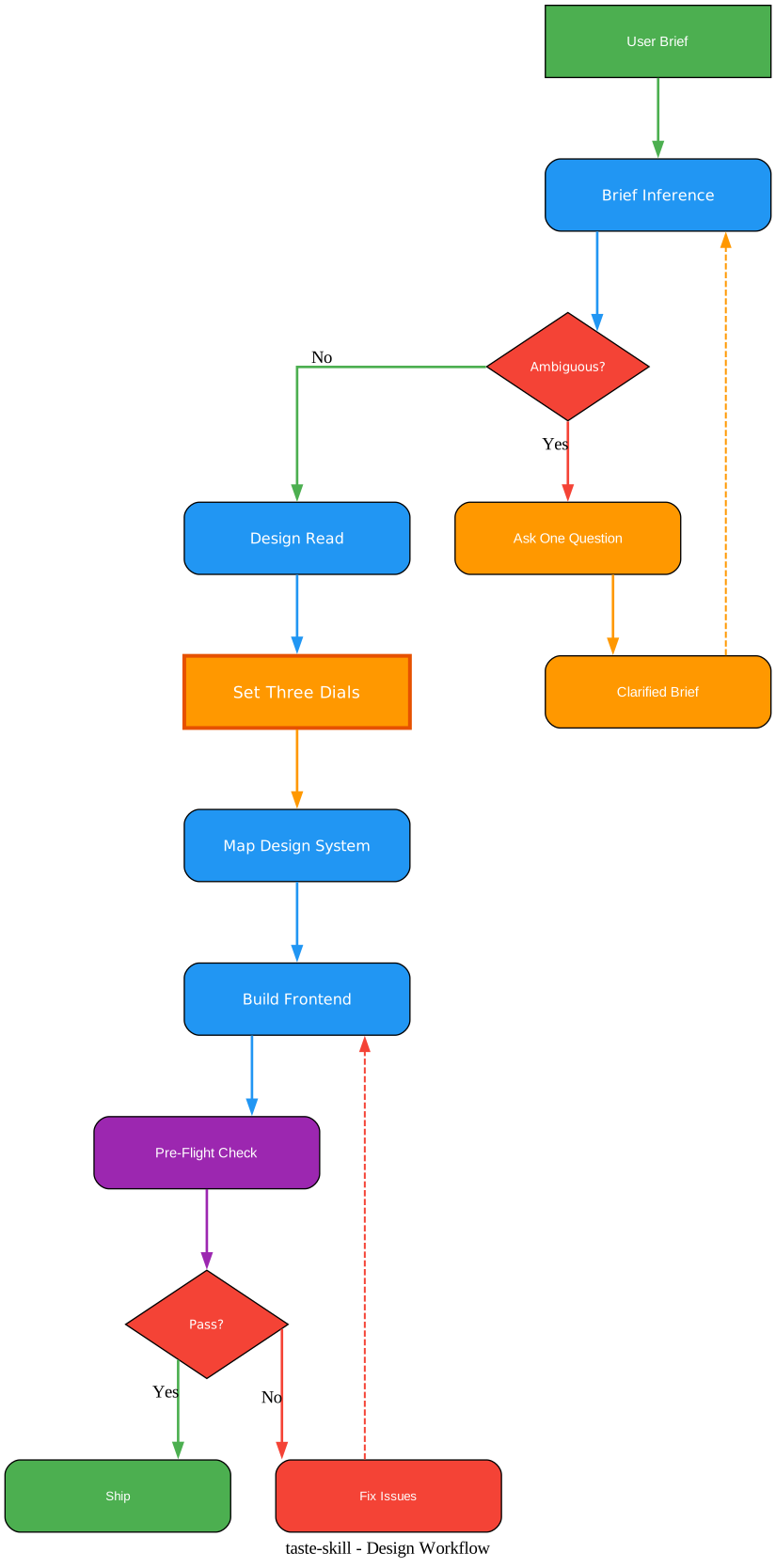
The workflow diagram above traces the design decision process from initial brief through to final output, with two critical decision points that determine the path the agent takes. The first decision point occurs after Brief Inference: is the brief ambiguous? If yes, the agent asks exactly one clarifying question and loops back to re-read the brief with the new information. If no, the agent proceeds to declare the Design Read and configure the Three Dials.
This loop is deliberately constrained. The SKILL.md explicitly forbids multi-question dumps, which are a common failure mode when agents encounter ambiguity. Instead of asking the user five questions about their design preferences, the agent asks one targeted question that resolves the specific ambiguity, then commits to a direction. This prevents the interaction from becoming a design-requirements interview, which defeats the purpose of using an AI agent in the first place.
The second decision point occurs after the Pre-Flight Check: does the output pass? If any checkbox in the 50+ item checklist fails, the agent must fix the specific failure and re-run the check. This creates a quality gate that cannot be bypassed. The checklist is mechanical, not subjective. It counts instances of uppercase tracking to verify eyebrow restraint. It checks that hero headlines fit within two lines. It verifies that no two CTAs share the same intent. It confirms that bento grids have exactly as many cells as there are content items, with no empty cells.
Between these two decision points, the workflow proceeds through the full pipeline: Design Read declaration, Three Dials configuration, Design System Map selection, Anti-Slop Rules enforcement, and code generation. Each step feeds into the next, creating a coherent chain where the design direction established in Brief Inference propagates through every subsequent decision.
The workflow also handles the redesign path differently from the greenfield path. When the agent detects that the brief involves an existing project, it enters audit mode first, documenting the current state before proposing changes. Brand tokens, information architecture, content blocks, patterns to preserve, and patterns to retire are all catalogued. The dial reading of the existing site becomes the starting point, not the baseline defaults. This prevents the common failure mode where an agent redesigns a site by ignoring everything that already works and replacing it with a completely new aesthetic that breaks the brand.
The modernization levers are applied in priority order: typography refresh first (biggest visual lift per unit of risk), then spacing and rhythm, then color recalibration, then motion layer, then hero and key-section recomposition, and finally full block replacement only when the existing block is unsalvageable. This ordered approach means that most redesigns get 70% of the visual improvement at 40% of the risk, because the early levers are high-impact and low-risk.
LLM Laziness Research
Taste Skill includes a dedicated research directory that documents why large language models produce incomplete or generic outputs. This is not theoretical commentary. It is structured analysis drawn from controlled experiments, published studies, and field-tested engineering practices.
Root Causes
Cognitive Shortcuts. Research from late 2024 demonstrated that frontier models exhibit measurable cognitive shortcutting behavior. When a model perceives a task as straightforward or the provided context as excessively long, it reduces its internal computational effort and produces a surface-level summary instead of full multi-step reasoning. This is not a memory failure. The model retains the information but chooses not to process it at full depth. The LazyBench discovery documented this behavior across Gemini Pro and GPT-4o.
Output Limits. Models like Gemini have massive input context windows (up to 2 million tokens) but strictly capped output limits (typically 8,000 tokens). When the model estimates that a complete response would exceed its output budget, it preemptively compresses or summarizes rather than risking an abrupt cutoff. Consumer-facing applications compound this problem with additional software-level truncation: history capping at approximately 32,000 tokens, context pruning to reduce compute costs, and retrieval-based recall that drops earlier instructions.
RLHF and Compute Economics. Reinforcement learning from human feedback creates a systematic brevity bias. The reward model favors concise, safe responses over comprehensive ones. Combined with cost optimization pressures that penalize long outputs (which consume more compute), the model learns to truncate as a default strategy.
Training Data Bias. Placeholder patterns in human-written code propagate into model outputs. When the training data contains thousands of examples of developers writing // TODO: implement later or /* rest of code unchanged */, the model learns these patterns as valid output, not as shortcuts to be avoided.
Remediation Approaches
Parameter Tuning. Adjusting temperature and Top-p can shift the model away from brevity defaults. Low temperature (0.0-0.5) with Top-p of 0.0-0.6 forces the model into a narrow, deterministic execution path that reduces the entropy enabling creative refusals and unnecessary summarization. For Gemini models, the thinking_level parameter provides relative guidance on computational depth, with medium or high settings producing quality scores consistently exceeding 92-95% compared to baseline.
Prompt Engineering. Specific linguistic patterns in the prompt activate different quality distributions in the model’s latent space. Research has documented that phrases like “I will tip you $200 for a perfect solution” produce up to 45% increase in output quality and length, and “Take a deep breath and solve step by step” improves accuracy from 34% to 80% on logic tasks. Explicit syntax binding removes the model’s discretion about output length by requiring mandatory tool execution and evidence blocks. XML-structured prompts compartmentalize system instructions, context, data, and tasks, reducing the confusion that triggers premature truncation.
Architectural Patterns. MCP integration, lazy-loaded skills, and developer platform access bypass consumer middleware entirely. Direct API access provides full context window access without hidden truncation, complete control over generation parameters, and no dynamic throttling based on user tier. The same model that produces truncated outputs through a consumer interface generates complete responses when accessed through direct API endpoints.
Reference Prompts. Ready-to-use prompt templates enforce complete outputs through verification loops, reverse prompting, and self-grading mechanisms that force iterative self-correction.
Installation and Usage
Getting started with Taste Skill takes one command. The npx skills add CLI scans the skills/ folder in the repository, so all 13 skills install the same way:
npx skills add https://github.com/Leonxlnx/taste-skill
This installs every skill in the repository: all 10 implementation skills and all 3 image generation skills. If you only need one specific skill, install it by its install name (the name: field inside the SKILL frontmatter, not the folder name):
npx skills add https://github.com/Leonxlnx/taste-skill --skill "design-taste-frontend"
You can also copy any SKILL.md file directly into your project or paste it into ChatGPT or Codex conversations. The skills are plain Markdown files with YAML frontmatter. No build step, no runtime dependency, no framework lock-in.
The default taste-skill is now v2 (experimental), a substantial rewrite of the original v1. If you already have v1 installed, re-running the install command upgrades you automatically. The install name did not change, so no script updates are needed. If you depend on the exact behavior of v1 and want to pin to it explicitly:
npx skills add https://github.com/Leonxlnx/taste-skill --skill "design-taste-frontend-v1"
Taste Skill works with three major coding agents. With Codex, the skills are loaded automatically via the npx skills add mechanism. With Cursor, you can reference the SKILL.md files in your project context. With Claude Code, the skills integrate through the same CLI installation path. The framework is agnostic: rules target design intent, not a single framework API. React, Vue, Svelte, Next.js, or plain HTML all work.
For image-first workflows, attach or paste the image generation skills (imagegen-frontend-web, imagegen-frontend-mobile, or brandkit) and ask for the frames you need. Then feed the generated renders to your coding agent for implementation. The image-to-code-skill provides a single workflow that both generates references and implements the site in code.
Pre-Flight Check
The Pre-Flight Check is the final gate in the Taste Skill pipeline, and it is the reason the framework produces consistently high-quality output. It is a 50+ item mechanical checklist that runs before any code is delivered. The SKILL.md states in bold: “THIS IS NOT OPTIONAL. Run every box. If any box fails, the output is not done.”
The checklist covers every aspect of the output. Brief inference must be declared with a one-line Design Read. Dial values must be explicit and reasoned from the brief, not silently using baseline defaults. The design system must be chosen from the Section 2 map if applicable, or the aesthetic must be labeled honestly. Zero em-dashes are permitted anywhere on the page. Page theme lock must be confirmed: one theme for the whole page, no section flipping to inverted mode mid-page. Color consistency lock must be verified: one accent color used identically across all sections. Shape consistency lock must be checked: one corner-radius system applied consistently.
Button contrast is checked against WCAG AA standards (4.5:1 for body text, 3:1 for large text). CTA button wrap is verified: no button label wraps to two or more lines at desktop. Form contrast is checked: inputs, placeholders, focus rings, labels all pass WCAG AA against the section background. Serif discipline is enforced: if a serif is used, it must not be Fraunces or Instrument_Serif, and it must be different from the previous project’s serif.
Hero constraints are strict: headline fits in two lines, subtext is 20 words or fewer and four lines or fewer, CTA is visible without scroll, font scale is planned around the image, and top padding does not exceed pt-24 at desktop. Eyebrow count is mechanical: count instances of uppercase tracking micro-labels across all section components, and verify the count does not exceed ceil(sectionCount / 3).
Layout repetition is checked: no two sections share the same layout family, with at least four different families across eight sections. Bento grids are verified for exact cell count: N items means N cells, no empty cells in the middle or at the end. Long lists are checked for the right UI component: no default unordered lists with divide-y for more than five items.
Real images must be used: generation tool first, then Picsum-seed placeholders, then explicit placeholder slots. Div-based fake screenshots are banned. Hand-rolled decorative SVGs are strongly discouraged. Pure-text minimalism is incomplete work. Motion must be motivated: every animation must be justifiable in one sentence (hierarchy, storytelling, feedback, or state transition). Marquee is limited to one per page. Navigation must render on a single line at desktop with height at or below 80px.
The checklist also covers accessibility requirements. Reduced motion must be wrapped for everything with MOTION_INTENSITY above 3. Dark mode tokens must be defined and tested in both modes. Mobile collapse must be explicit for high-variance layouts. Viewport stability must use min-h-[100dvh], never h-screen. useEffect animations must have strict cleanup functions. Empty, loading, and error states must be provided.
Key Insight: The Pre-Flight Check is what separates Taste Skill from a simple style guide. A style guide tells you what good design looks like. The Pre-Flight Check forces you to prove you achieved it. By making the checklist mechanical and binary (pass or fail, no partial credit), the framework eliminates the agent’s tendency to skip quality steps when under output pressure. Every checkbox is a contract. If you cannot honestly tick it, the page is not done.
Conclusion
Taste Skill represents a paradigm shift in how we think about AI-generated frontends. Instead of accepting that AI agents produce generic, template-looking output, the framework provides a structured pipeline that reads the brief, configures the right visual parameters, selects the appropriate design system, enforces anti-slop rules backed by empirical research, and runs a mechanical quality gate before anything ships. The 13 skills cover every workflow from greenfield builds to redesigns, from code output to image generation, from minimalist editorial to brutalist experimental. The Three-Dial system provides a calibration mechanism that no other AI design tool offers. The Pre-Flight Check provides a quality floor that no other framework enforces. And the LLM laziness research provides the empirical foundation that explains why these rules exist in the first place.
With 24,000 stars and growing, the developer community has validated the approach. The framework is MIT-licensed, framework-agnostic, and works with Codex, Cursor, and Claude Code. Whether you are building a SaaS landing page, a designer portfolio, a public-sector service, or a premium consumer brand site, Taste Skill gives your AI agent the design taste it was never trained on.
Check out the Taste Skill GitHub repository to get started, or visit tasteskill.dev for documentation and examples. Enjoyed this post? Never miss out on future posts by following us 


