MCP toolkit for coding agents has evolved from simple text search and replace toward semantic code understanding, but most tools still operate at the line-number level – forcing AI agents to guess at code structure, count lines, and hope their edits land in the right place. Serena, from Oraios AI, changes this entirely: an MCP toolkit that gives AI coding agents IDE-like capabilities through symbol-level operations, supporting 40+ languages via the Language Server Protocol, with persistent cross-session memory, composable tool modes, and interactive debugging – all built on the open Model Context Protocol standard and open source under the MIT license with 23,334 stars on GitHub.
The problem is fundamental. When an AI coding agent wants to rename a class, it typically performs a text search, counts lines, and replaces strings. If the class name appears in comments, strings, or unrelated identifiers, the agent gets false positives. If the class spans hundreds of lines, line-number-based editing becomes fragile. Serena solves this by leveraging the Language Server Protocol – the same technology that powers IntelliSense in VS Code and code navigation in JetBrains IDEs – to give AI agents true semantic understanding of code.
How It Works – Architecture
Serena’s architecture follows a layered design where each component has a clear responsibility. At the top, any MCP-compatible AI client – Claude Code, Codex, VSCode, Cursor, JetBrains, or any future client – sends tool calls through the Model Context Protocol. The SerenaMCPFactory receives these requests, creates the MCP server, registers all tools, and manages the server lifecycle across three transport modes: stdio for CLI integration, SSE for HTTP integration, and Streamable HTTP for production deployments.
The SerenaAgent sits at the center as the main orchestrator. It manages the tool registry, activates and deactivates composable modes, handles project context, manages the dashboard, persists memory across sessions, and delegates to the TaskExecutor for async execution with timeouts. Every tool call passes through SerenaAgent for validation, mode checking, and result formatting.
On the left branch, the Project component handles per-project configuration including project root detection, gitignore specs for file filtering, source file gathering, and .serena/ directory management. On the right branch, the DashboardManager provides a Flask web UI and system tray icon for real-time monitoring of tool usage, language server status, and active sessions.
At the bottom, the LanguageServerManager manages the full lifecycle of LSP server processes – starting, stopping, and restarting them as needed. SolidLSP is Serena’s custom LSP abstraction layer that communicates with language servers via the Language Server Protocol. The language_servers/ directory contains configurations for 40+ languages, enabling consistent symbol-level operations regardless of the programming language.
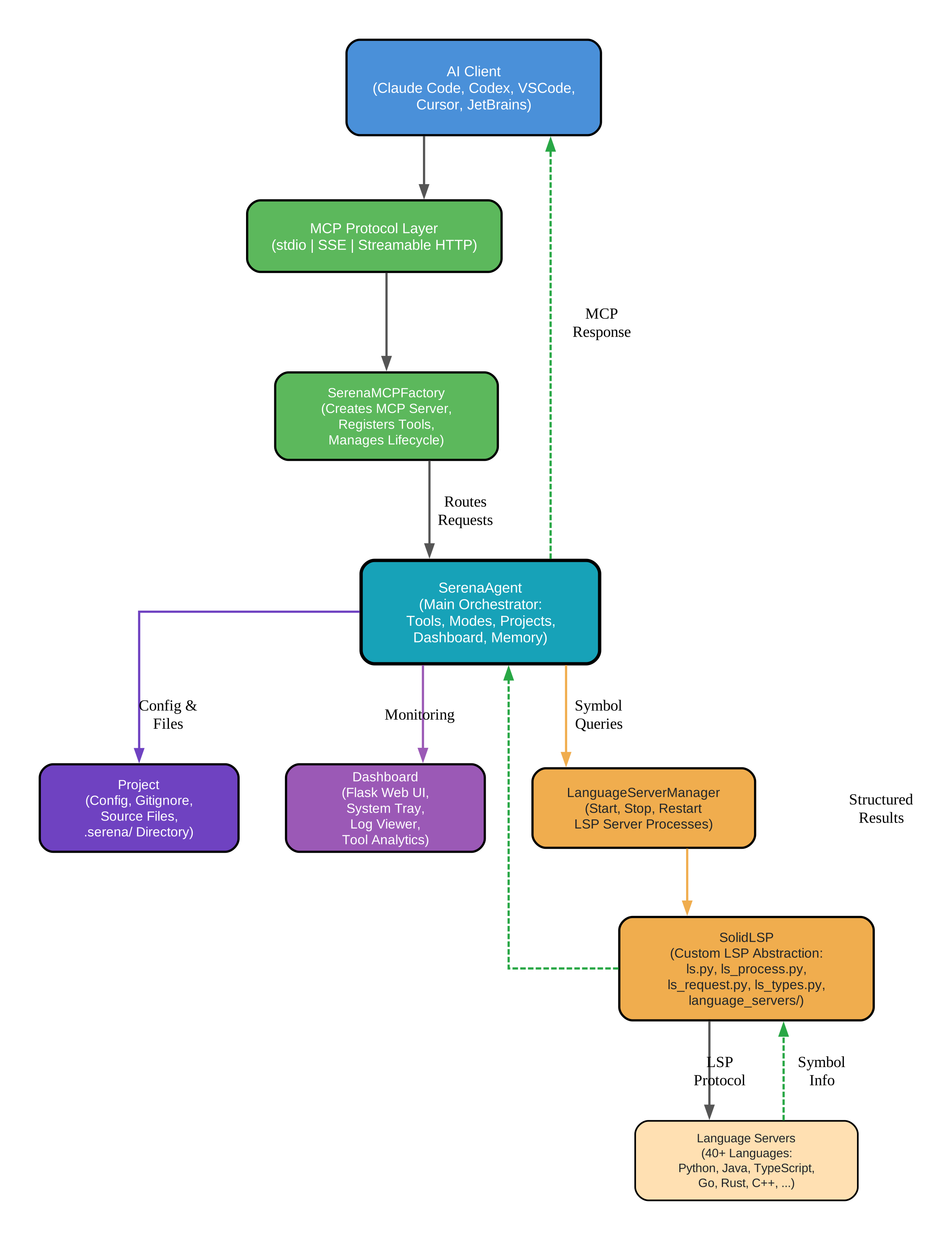
The data flow follows a clear path: AI Client sends an MCP request through the protocol layer, SerenaMCPFactory routes it to SerenaAgent, which validates the request against active modes and project configuration. For symbol-level operations, SerenaAgent delegates to LanguageServerManager, which queries the appropriate LSP server through SolidLSP. The LSP server returns semantic information – symbol definitions, references, implementations, and relationships – which SerenaAgent formats and returns to the AI client as a structured result.
Key Insight: Serena operates at the symbol level via the Language Server Protocol, giving AI agents IDE-like capabilities that go far beyond text search and replace. When an agent calls
find_symbol("UserService"), Serena does not search for the string “UserService” – it queries the LSP server, which understands that UserService is a class, knows its methods and properties, can find every reference across the entire codebase, and can identify all classes that implement or extend it. This semantic understanding is what enables safe refactoring operations likerename_symbol(which renames across every file) andsafe_delete(which only deletes if no references remain).
Installation
Getting started with Serena is straightforward. The recommended installation method uses uv, the fast Python package installer:
# Install with uv (recommended)
uv tool install -p 3.13 serena-agent

# Verify installation
serena --version

# Initialize a project
serena init

# Start the MCP server
serena
After installation, navigate to your project directory and initialize Serena:
# Navigate to your project
cd my-project

# Initialize Serena configuration
serena init

# This creates a .serena/ directory with:
# - Language server settings
# - Tool activation/deactivation config
# - Mode definitions
# - Memory persistence settings
Serena supports three transport modes for different deployment scenarios:
# Start with stdio transport (default, for CLI integration)
serena

# Start with SSE transport (for HTTP integration)
serena --transport sse --port 8080

# Start with streamable HTTP transport
serena --transport streamable-http --port 8080

# Docker installation
docker compose up
Usage – Core Tools
Serena provides a comprehensive set of tools organized into categories: code retrieval, symbolic editing, refactoring, basic utilities, memory, and configuration. Here are the core tools in action.
Code Retrieval tools give agents the ability to navigate code semantically:
# Find a symbol by name with fuzzy matching
# Returns: symbol definition, file path, line range, type
result = find_symbol("UserService")

# Example output:
# UserService (class) at src/services/user_service.py:15-120
# Methods: authenticate, get_profile, update_settings
# Implements: IUserService
# References: 23 usages across 8 files
Symbolic Editing tools operate at the symbol level, not line numbers:
# Replace the entire body of a function or class
# Operates at symbol level, not line numbers
replace_symbol_body(
    symbol="UserService.authenticate",
    new_body="""def authenticate(self, username, password):
    user = self.db.find_user(username)
    if user and user.verify_password(password):
        return self.create_token(user)
    raise AuthenticationError("Invalid credentials")"""
)
Refactoring tools leverage LSP’s semantic understanding for safe, project-wide operations:
# Rename a symbol across the entire codebase safely
# LSP ensures all references are updated
rename_symbol(
    old_name="UserService",
    new_name="AuthService"
)

# Result: All 23 references across 8 files updated
# No manual find-and-replace needed
Key Features
Serena’s feature set is organized into eight categories, each designed from the ground up for AI agent consumption rather than adapted from human-facing interfaces.
Symbol-Level Operations are the foundation. Unlike text-based tools that operate on line numbers, Serena’s tools understand code semantics. find_symbol locates symbols by name with fuzzy matching, replace_symbol_body replaces entire function or class bodies regardless of how many lines they span, and safe_delete only removes a symbol if no references remain. This eliminates the fragility of line-number-based editing that plagues other AI coding tools.
40+ Language Support comes through the Language Server Protocol. Python, Java, TypeScript, JavaScript, Go, Rust, C++, C, C#, Ruby, PHP, Swift, Kotlin, Scala, Dart, Lua, R, Shell, and many more – all without per-language configuration. The SolidLSP abstraction layer provides a consistent interface regardless of which language server is running underneath.
Persistent Cross-Session Memory allows agents to build knowledge over time. store_memory persists insights, retrieve_memory recalls stored knowledge, and list_memories browses all stored memories. Multiple agent instances can share memory, enabling collaborative workflows where one agent’s discoveries benefit future sessions.
Composable Modes provide fine-grained control over agent capabilities. You can activate or deactivate specific tool sets per project, creating modes like “code-retrieval” (read-only) or “editing” (full modification). This is configured through per-project .serena/ directories.
# .serena/config.yaml
project:
  name: my-project
  language: python

modes:
  - name: code-retrieval
    tools:
      - find_symbol
      - symbol_overview
      - find_references
      - find_declarations
      - find_implementations
      - diagnostics

  - name: editing
    tools:
      - replace_symbol_body
      - insert_before
      - insert_after
      - safe_delete

  - name: refactoring
    tools:
      - rename_symbol
      - move_symbol
      - inline_symbol
      - propagate_deletions
MCP Protocol integration makes Serena compatible with any MCP-compatible client out of the box. Three transport modes (stdio, SSE, Streamable HTTP) ensure flexibility for different deployment scenarios.
Interactive Debugging is available through the JetBrains plugin backend (paid), providing breakpoints, step-through execution, and variable inspection.
Dashboard and Monitoring provides a Flask web UI and system tray icon for real-time monitoring of agent activity, tool usage, and language server status.
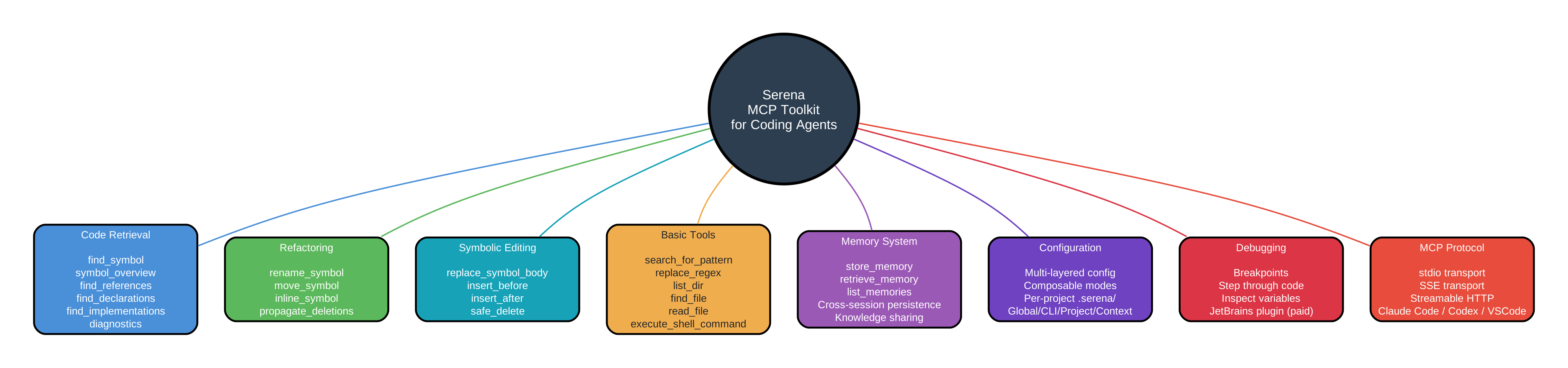
The feature map above shows how Serena’s eight tool categories work together. Code Retrieval (blue) provides the foundation of semantic understanding through LSP. Refactoring (green) and Symbolic Editing (teal) build on that understanding for safe code modifications. Basic Tools (orange) handle lower-level operations. Memory (purple) enables cross-session persistence. Configuration (indigo) manages modes and project settings. Debugging (red) adds interactive capabilities. And MCP Protocol (coral) ties everything together as the open standard that makes all these capabilities accessible to any AI client.
Amazing: Serena supports 40+ programming languages through the Language Server Protocol – Python, Java, TypeScript, JavaScript, Go, Rust, C++, C, C#, Ruby, PHP, Swift, Kotlin, Scala, Dart, Lua, R, Shell, and many more – all without per-language configuration. Combined with persistent cross-session memory that allows agents to build knowledge over time and share context between different agent instances, and composable tool modes that let you activate or deactivate specific tool sets per project, Serena provides a complete IDE experience designed from the ground up for AI agents rather than human developers.
Agent Workflow
Understanding how an AI agent uses Serena in practice clarifies why symbol-level operations matter. Here is the step-by-step flow:
Step 1 – Agent Sends MCP Request: The AI agent (Claude Code, Codex, VSCode, etc.) sends a tool call through the Model Context Protocol. For example, find_symbol("UserService") to locate a class definition. The request is serialized as JSON and transmitted via stdio, SSE, or Streamable HTTP depending on the configured transport.
Step 2 – SerenaMCPFactory Routes Request: The SerenaMCPFactory receives the incoming MCP request, identifies which tool is being called, validates the request parameters, and routes it to the SerenaAgent for processing. The factory handles the full MCP server lifecycle including tool registration, request parsing, and response formatting.
Step 3 – SerenaAgent Activates Tool Mode: The SerenaAgent checks the current project context and active mode configuration. If the requested tool is in an active mode, the request proceeds. If the tool is in a deactivated mode, the request is rejected with a clear error message. This composable mode system allows fine-grained control over what capabilities an agent has in a given project.
Step 4 – LanguageServerManager Queries LSP: For symbol-level operations, the SerenaAgent delegates to the LanguageServerManager, which ensures the appropriate LSP server for the project’s language is running. If the server is not started, it launches it. The LSP server (Python, TypeScript, Go, etc.) processes the semantic query using its deep understanding of the language’s syntax, types, and relationships.
Step 5 – SolidLSP Returns Symbol Info: The SolidLSP abstraction layer translates the LSP server’s response into a structured format that SerenaAgent can use. For find_symbol("UserService"), this includes the symbol’s type (class), its definition location (file path and line range), its methods and properties, all references across the codebase, and any classes that implement or extend it. This is semantic understanding, not text matching.
Step 6 – SerenaAgent Returns Structured Result: The SerenaAgent formats the result for agent consumption and returns it via the MCP protocol. The AI agent receives a clean, structured response with all the information it needs to understand the symbol and make informed decisions about editing, refactoring, or further exploration.
Step 7 – Agent Uses Editing Tools: Armed with semantic understanding, the agent can now perform precise operations like replace_symbol_body to update the UserService implementation, rename_symbol to rename it across the entire codebase, or insert_after to add a new method. These operations are validated by the LSP server, ensuring they maintain code correctness.
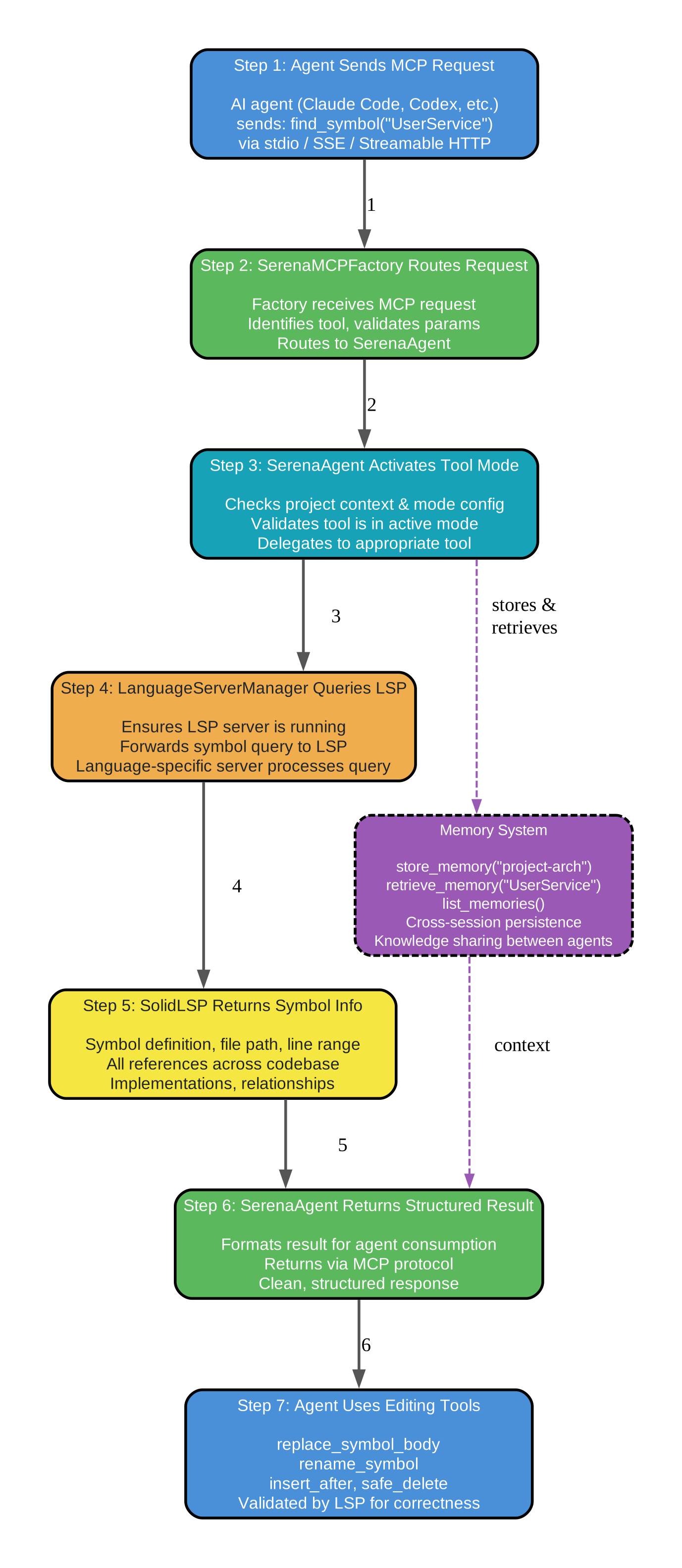
The Memory System (shown in purple on the side) feeds context back across sessions. After completing a task, the agent stores insights: store_memory("UserService handles auth with JWT tokens"). In future sessions, the agent retrieves context: retrieve_memory("UserService") returns stored knowledge. Multiple agent instances share memory, so discoveries by one agent benefit all others.
# Store knowledge for future sessions
store_memory(
    key="project-architecture",
    value="UserService handles authentication, OrderService handles orders. "
          "Both use Repository pattern with dependency injection."
)

# Retrieve stored knowledge in a later session
result = retrieve_memory("project-architecture")

# List all stored memories
memories = list_memories()
Takeaway: The Model Context Protocol makes Serena compatible with any MCP-compatible AI client out of the box – Claude Code, Codex, VSCode with MCP extension, Cursor, JetBrains, and any future client that adopts the open MCP standard. This means the same symbol-level code intelligence, refactoring, and memory capabilities work identically regardless of which AI agent framework you use, and switching clients requires zero code changes.
Conclusion
Serena stands as the most comprehensive MCP toolkit for coding agents available today. By leveraging the Language Server Protocol for symbol-level operations rather than text-based search and replace, it gives AI agents the same semantic understanding of code that human developers get from their IDEs. The combination of 40+ language support, persistent cross-session memory, composable tool modes, and MCP protocol compatibility creates a complete IDE experience designed from the ground up for AI consumption.
The dual-backend model offers flexibility: a free, open-source LSP backend that provides symbol-level code intelligence for 40+ languages, and a paid JetBrains plugin backend that adds interactive debugging with breakpoints, step-through, and variable inspection. This means the core capabilities are accessible to everyone, while teams that need debugging can upgrade.
For deployment, Serena supports Docker for containerized environments:
# Build and run with Docker Compose
docker compose up

# Or build manually
docker build -t serena-agent .
docker run -p 8080:8080 serena-agent

# Configure for production
# Set transport, port, and project paths in compose.yaml
The agent-first design philosophy – where every tool is designed for AI consumption rather than adapted from human-facing interfaces – combined with the MIT license and 23,334 stars on GitHub, makes Serena a compelling choice for any team building AI-powered development workflows.
Important: Serena offers a dual-backend model: a free, open-source LSP backend that provides symbol-level code intelligence for 40+ languages, and a paid JetBrains plugin backend that adds interactive debugging with breakpoints, step-through, and variable inspection. This agent-first design philosophy – where every tool is designed for AI consumption rather than adapted from human-facing interfaces – combined with the MIT license and 23,334 stars on GitHub, makes Serena the most comprehensive MCP toolkit for coding agents available today.
Links:
- GitHub: https://github.com/oraios/serena
- PyPI: https://pypi.org/project/serena-agent/
- MCP Protocol: https://modelcontextprotocol.io/

Enjoyed this post? Never miss out on future posts by following us


