Free Claude Code: Use Claude Code CLI and VSCode for Free with NVIDIA NIM, OpenRouter, and Local Models
Free Claude Code is a lightweight proxy that routes Claude Code’s Anthropic API calls to free or low-cost alternatives including NVIDIA NIM (40 requests per minute free), OpenRouter (hundreds of free and paid models), DeepSeek (direct API), LM Studio (fully local), and llama.cpp (local inference). With 9,833+ stars and growing, this open-source project enables developers to use Claude Code’s powerful CLI and VSCode extension without requiring an Anthropic API key or paid subscription.
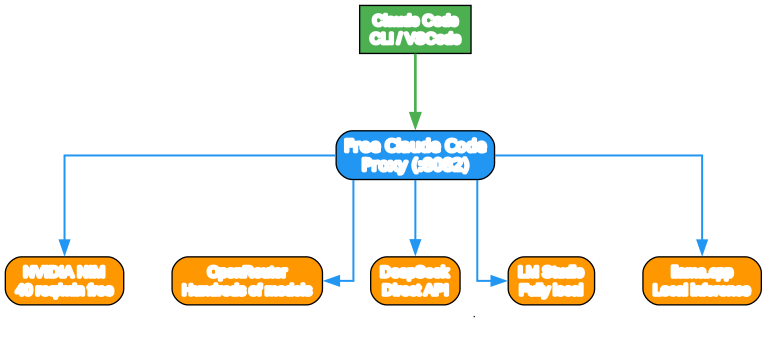
Understanding the Free Claude Code Architecture
The architecture diagram above shows how Free Claude Code acts as a transparent proxy between Claude Code and various LLM providers. Let’s examine each component:
Component 1: Claude Code Client The Claude Code CLI or VSCode extension sends standard Anthropic API requests in Server-Sent Events (SSE) format. The client believes it is communicating directly with Anthropic’s servers, but the requests are intercepted by the proxy.
Component 2: Free Claude Code Proxy The proxy server runs on localhost (default port 8082) and implements Claude-compatible API endpoints including GET /v1/models, POST /v1/messages, POST /v1/messages/count_tokens, plus HEAD and OPTIONS support for common probe endpoints. The proxy handles request detection, model routing, format translation, and response streaming.
Component 3: LLM Providers The proxy supports five provider backends:
- NVIDIA NIM: 40 requests per minute free tier, recommended for daily use
- OpenRouter: Access to hundreds of models including free tiers from various providers
- DeepSeek: Direct API access to DeepSeek chat and reasoner models
- LM Studio: Fully local inference with no API key required
- llama.cpp: Lightweight local inference engine via llama-server
Data Flow: Claude Code sends Anthropic-format requests to the proxy. The proxy detects trivial requests (quota probes, title generation, prefix detection, suggestions, filepath extraction) and responds locally without consuming API quota. Non-trivial requests are routed to the appropriate provider based on model mapping (Opus, Sonnet, Haiku, or fallback). The provider response is translated back to Anthropic format and streamed to Claude Code.
Request Flow: How Requests Are Processed

Step 1: Request Detection
When Claude Code sends a request, the proxy first checks if it is a trivial request that can be handled locally. Five categories of trivial requests are intercepted:
- Quota probes and health checks
- Title generation requests
- Prefix detection requests
- Suggestion mode requests
- Filepath extraction requests
These local responses save API quota and reduce latency for common operations.
Step 2: Model Routing
For non-trivial requests, the proxy determines which model to use based on the request type:
- Opus requests route to MODEL_OPUS
- Sonnet requests route to MODEL_SONNET
- Haiku requests route to MODEL_HAIKU
- Unrecognized models fall back to MODEL
Each model variable uses the format provider_prefix/model/name, allowing different providers for different model tiers.
Step 3: Format Translation
The proxy translates between Anthropic Messages format and OpenAI chat format depending on the provider:
- Native Anthropic providers: LM Studio and llama.cpp use native Anthropic Messages endpoints
- OpenAI-compatible providers: NVIDIA NIM and DeepSeek use shared OpenAI chat translation
- OpenRouter: Supports both formats depending on the selected model
Step 4: Response Streaming
Provider responses are translated back to Anthropic SSE format and streamed to Claude Code in real-time. When ENABLE_THINKING=true, thinking tokens from reasoning_content fields and `
Provider Comparison

NVIDIA NIM (Recommended)
NVIDIA NIM offers a generous free tier with 40 requests per minute, making it ideal for daily development work. Popular models include MiniMax-M2.5, Qwen3.5, GLM-5, Kimi-K2.5, and Step-3.5-Flash. No credit card required for the free tier.
OpenRouter
OpenRouter provides access to hundreds of models from various providers, including free tiers. This is useful when you need model variety or fallback options. Free models include Arcee Trinity, Step-3.5-Flash, DeepSeek-R1, and GPT-OSS-120B.
DeepSeek
DeepSeek offers direct API access to their chat and reasoner models. This is ideal if you specifically want DeepSeek’s capabilities or prefer their pricing model over other providers.
LM Studio (Fully Local)
LM Studio enables completely local inference with no API key required and no rate limits. Load models like LiquidAI LFM2, MiniMax-M2.5, GLM-4.7-Flash, or Qwen3.5 in GGUF format. Best for privacy-sensitive work or offline development.
llama.cpp (Lightweight Local)
llama.cpp provides a lightweight local inference engine via llama-server. Ensure you have a tool-capable GGUF model loaded. This option is ideal for resource-constrained environments or when you want minimal overhead.
Key Features
Zero-Cost Operation
With NVIDIA NIM’s 40 req/min free tier and OpenRouter’s free models, you can use Claude Code for daily development without spending anything. Local options (LM Studio, llama.cpp) require only your own hardware.
Drop-in Replacement
Free Claude Code requires only two environment variables:
ANTHROPIC_BASE_URL: Point to the proxy (e.g.,http://localhost:8082)ANTHROPIC_AUTH_TOKEN: Optional authentication token
No modifications to Claude Code CLI or VSCode extension are needed.
Per-Model Mapping
Route Opus, Sonnet, and Haiku requests to different models and providers. Mix providers freely - for example, use NVIDIA NIM for Opus, OpenRouter for Sonnet, and LM Studio for Haiku.
Thinking Token Support
The proxy parses reasoning_content fields and `
Heuristic Tool Parser
Models that output tool calls as text are automatically parsed into structured tool use, enabling tool-capable models that don’t natively support Anthropic’s tool format.
Smart Rate Limiting
Proactive rolling-window throttling plus reactive 429 exponential backoff with optional concurrency cap (PROVIDER_MAX_CONCURRENCY) prevents rate limit violations.
Subagent Control
Task tool interception forces run_in_background=False, preventing runaway subagents from consuming excessive resources.
Installation and Setup
Prerequisites
- Get an API key for your chosen provider:
- NVIDIA NIM: build.nvidia.com/settings/api-keys
- OpenRouter: openrouter.ai/keys
- DeepSeek: platform.deepseek.com/api_keys
- LM Studio: No API key needed - download from lmstudio.ai
- llama.cpp: No API key needed - run
llama-serverlocally
- Install Claude Code from Anthropic’s repository
Quick Install
# Install uv package manager
pip install uv

# Clone the repository
git clone https://github.com/Alishahryar1/free-claude-code.git
cd free-claude-code

# Copy environment template
cp .env.example .env
Configure Your Provider
Edit .env with your chosen provider:
NVIDIA NIM (recommended):
NVIDIA_NIM_API_KEY="nvapi-your-key-here"
MODEL="nvidia_nim/z-ai/glm4.7"
ENABLE_THINKING=true
OpenRouter:
OPENROUTER_API_KEY="sk-or-your-key-here"
MODEL_OPUS="open_router/deepseek/deepseek-r1-0528:free"
MODEL_SONNET="open_router/openai/gpt-oss-120b:free"
MODEL_HAIKU="open_router/stepfun/step-3.5-flash:free"
MODEL="open_router/stepfun/step-3.5-flash:free"
LM Studio (local):
MODEL_OPUS="lmstudio/unsloth/MiniMax-M2.5-GGUF"
MODEL_SONNET="lmstudio/unsloth/Qwen3.5-35B-A3B-GGUF"
MODEL_HAIKU="lmstudio/unsloth/GLM-4.7-Flash-GGUF"
MODEL="lmstudio/unsloth/GLM-4.7-Flash-GGUF"
Mix providers:
NVIDIA_NIM_API_KEY="nvapi-your-key-here"
OPENROUTER_API_KEY="sk-or-your-key-here"
MODEL_OPUS="nvidia_nim/moonshotai/kimi-k2.5"
MODEL_SONNET="open_router/deepseek/deepseek-r1-0528:free"
MODEL_HAIKU="lmstudio/unsloth/GLM-4.7-Flash-GGUF"
MODEL="nvidia_nim/z-ai/glm4.7"
Run the Proxy
Terminal 1 - Start the proxy server:
uv run uvicorn server:app --host 0.0.0.0 --port 8082
Terminal 2 - Run Claude Code:
PowerShell:
$env:ANTHROPIC_AUTH_TOKEN="freecc"; $env:ANTHROPIC_BASE_URL="http://localhost:8082"; claude
Bash:
ANTHROPIC_AUTH_TOKEN="freecc" ANTHROPIC_BASE_URL="http://localhost:8082" claude
VSCode Extension Setup
- Start the proxy server
- Open VSCode Settings (Ctrl + ,) and search for
claude-code.environmentVariables - Click Edit in settings.json and add:
"claudeCode.environmentVariables": [
  { "name": "ANTHROPIC_BASE_URL", "value": "http://localhost:8082" },
  { "name": "ANTHROPIC_AUTH_TOKEN", "value": "freecc" }
]
- Reload extensions
- If you see the login screen, click Anthropic Console, then authorize. The extension will start working.
Discord and Telegram Bot
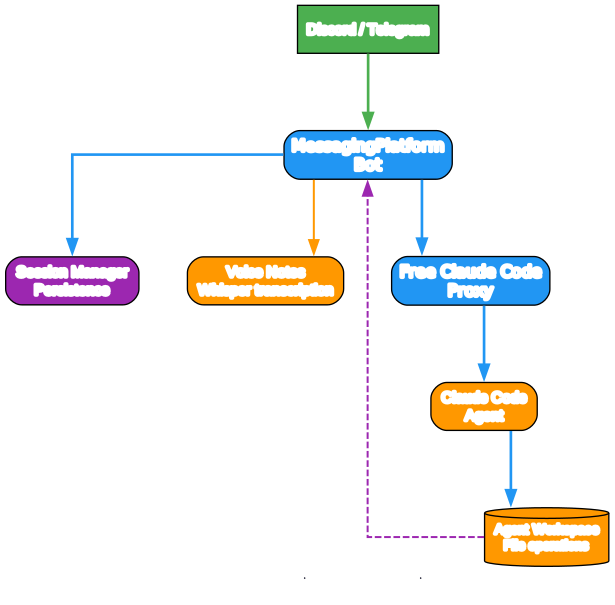
Free Claude Code includes a messaging platform integration that enables remote autonomous coding via Discord or Telegram.
Capabilities
- Tree-based message threading: Reply to a message to fork the conversation
- Session persistence: Sessions survive server restarts
- Live streaming: Real-time thinking tokens, tool calls, and results
- Unlimited concurrent sessions: Controlled by
PROVIDER_MAX_CONCURRENCY - Voice notes: Send voice messages that are transcribed and processed as prompts
- Commands:
/stop(cancel task),/clear(reset sessions),/stats
Discord Setup
- Create a bot at the Discord Developer Portal
- Enable Message Content Intent under Bot settings
- Add to
.env:
MESSAGING_PLATFORM="discord"
DISCORD_BOT_TOKEN="your_discord_bot_token"
ALLOWED_DISCORD_CHANNELS="123456789,987654321"
CLAUDE_WORKSPACE="./agent_workspace"
ALLOWED_DIR="C:/Users/yourname/projects"
- Start the server and invite the bot with OAuth2 URL Generator (scopes:
bot, permissions: Read Messages, Send Messages, Manage Messages, Read Message History)
Voice Notes
Voice messages are transcribed using Hugging Face Whisper (default, free and offline) or NVIDIA NIM. Install voice extras:
# Local Whisper
uv sync --extra voice_local

# NVIDIA NIM voice
uv sync --extra voice
Configuration Reference
Core Variables
| Variable | Description | Default |
|---|---|---|
MODEL | Fallback model (provider/model/name) | nvidia_nim/z-ai/glm4.7 |
MODEL_OPUS | Model for Claude Opus requests | empty (falls back to MODEL) |
MODEL_SONNET | Model for Claude Sonnet requests | empty (falls back to MODEL) |
MODEL_HAIKU | Model for Claude Haiku requests | empty (falls back to MODEL) |
ENABLE_THINKING | Enable reasoning/thinking blocks | true |
Rate Limiting
| Variable | Description | Default |
|---|---|---|
PROVIDER_RATE_LIMIT | Requests per window | 40 |
PROVIDER_RATE_WINDOW | Window in seconds | 60 |
PROVIDER_MAX_CONCURRENCY | Max simultaneous streams | 5 |
Request Optimization (enabled by default)
| Variable | Description |
|---|---|
FAST_PREFIX_DETECTION | Enable fast prefix detection |
ENABLE_NETWORK_PROBE_MOCK | Mock network probe requests |
ENABLE_TITLE_GENERATION_SKIP | Skip title generation |
ENABLE_SUGGESTION_MODE_SKIP | Skip suggestion mode |
ENABLE_FILEPATH_EXTRACTION_MOCK | Mock filepath extraction |
Extending Free Claude Code
Adding a New Provider
Extend OpenAIChatTransport for OpenAI-compatible providers:
from providers.openai_compat import OpenAIChatTransport
from providers.base import ProviderConfig

class MyProvider(OpenAIChatTransport):
    def __init__(self, config: ProviderConfig):
        super().__init__(config, provider_name="MYPROVIDER",
                         base_url="https://api.example.com/v1", api_key=config.api_key)
Adding a Messaging Platform
Extend MessagingPlatform and implement:
start(): Initialize the platform connectionstop(): Clean up resourcessend_message(): Send a message to a channeledit_message(): Edit an existing messageon_message(): Handle incoming messages
Project Structure
free-claude-code/
├── server.py              # Entry point
├── api/                   # FastAPI routes, model routing, optimizations
├── core/                  # Anthropic protocol helpers, SSE, parsers
├── providers/             # Provider registry, transports
├── messaging/             # Discord/Telegram bots, voice, sessions
├── config/                # Settings, logging
├── cli/                   # CLI session management
└── tests/                 # Pytest test suite
Conclusion
Free Claude Code democratizes access to Claude Code’s powerful interface by enabling free and local alternatives to Anthropic’s API. Whether you choose NVIDIA NIM’s generous free tier, OpenRouter’s model variety, DeepSeek’s direct API, or fully local inference with LM Studio or llama.cpp, you can enjoy Claude Code’s agentic coding capabilities without subscription costs. The Discord/Telegram bot integration extends this accessibility to remote and collaborative workflows, making Free Claude Code a versatile addition to any developer’s toolkit.
Links
- Free Claude Code GitHub Repository
- NVIDIA NIM
- OpenRouter Models
- LM Studio
- llama.cpp
- Claude Code Official Repository
Related guides
Once Free Claude Code is routing your API calls for free, these open-source AI tooling guides take the setup further:
- Open CoDesign: Open-Source Claude Design Alternative — turn prompts into polished HTML prototypes, slide decks, and dashboards locally with BYOK multi-model support.
- GBrain: Self-Wiring Knowledge Graph Memory Layer for AI Agents — give your AI agent a persistent memory layer so it stops forgetting between sessions.
- Hermes Web UI: Open-Source LLM Chat Dashboard for the Hermes Agent — manage multi-platform AI chat agents from one web dashboard.
- GhostTrack: OSINT Location Tracking Tool — another open-source intelligence tool in the same AI-agent and OSINT ecosystem.

Enjoyed this post? Never miss out on future posts by following us


