PDF parsing with bounding boxes has long been a challenge for developers who need to preserve spatial layout information – column structures, table alignments, and positional metadata that most parsers discard. LiteParse, from the LlamaIndex team behind the popular LlamaParse cloud service, is a standalone open-source tool built in Rust that solves this problem by delivering character-level text extraction with precise bounding boxes, pluggable OCR, and multi-language bindings, all running locally with zero cloud dependencies.
Published on PyPI, npm, and crates.io under the Apache 2.0 license, LiteParse provides a 6-crate Rust workspace that exposes the same core parsing engine through Python (PyO3), Node.js (napi-rs), WASM (wasm-bindgen), and a CLI (clap v4). Whether you are building RAG pipelines, LLM agent tooling, or document analysis workflows, LiteParse gives you production-grade PDF parsing without requiring API keys or network calls.
How It Works (Architecture)
LiteParse processes documents through a multi-stage pipeline that begins with format detection and ends with structured output. The architecture is organized into six Rust crates that handle different concerns, from low-level PDFium bindings to high-level language bindings.
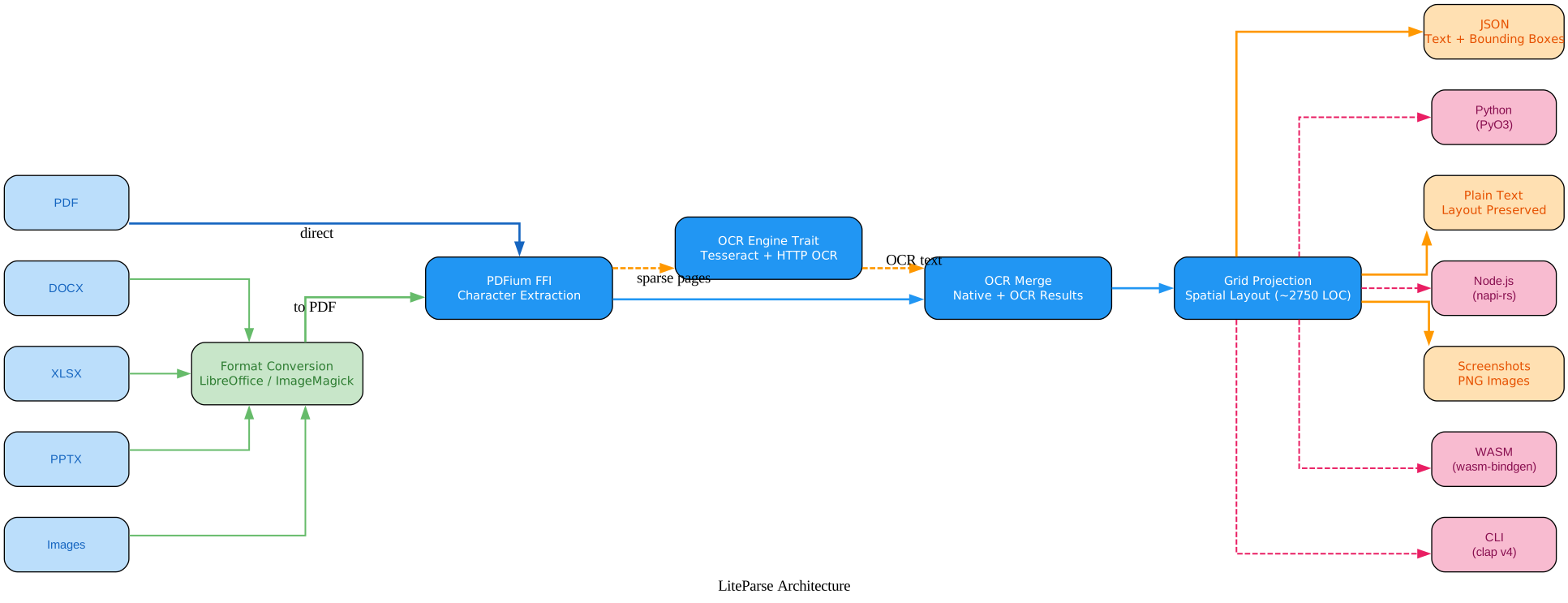
The Input Layer accepts five document formats: PDF files are processed directly by PDFium, while non-PDF formats (DOCX, XLSX, PPTX, and images) are first converted to PDF via LibreOffice or ImageMagick. This conversion is transparent to the user – LiteParse detects the format automatically and routes it through the appropriate converter.
The Conversion Module handles automatic format detection and conversion. DOCX, XLSX, and PPTX files are converted using LibreOffice’s headless mode, while images (PNG, JPEG, TIFF, and others) are converted using ImageMagick. The conversion step is skipped entirely for native PDF files, so there is no overhead when parsing PDFs directly.
The PDFium FFI Layer is the core extraction engine. The pdfium-sys and pdfium crates provide Rust FFI bindings to Google’s PDFium C library – the same PDF engine that powers Google Chrome. PDFium performs character-level text extraction with precise bounding boxes, font metadata, rotation handling, and color information. Each character gets its own bounding box with position (x, y), size (width, height), rotation angle, font name, font size, ascent/descent, weight, fill color, and stroke color.
The OCR Engine Trait defines an async recognize() method that enables pluggable OCR backends. Two implementations are provided: TesseractOcrEngine (bundled, zero-setup) and HttpOcrEngine (pluggable HTTP server). The trait is WASM-compatible, allowing custom engines in browser environments. This design means you can swap OCR backends without modifying the core parsing logic.
The OCR Merge Module intelligently merges native PDF text with OCR results. When a page has sparse native text (typical of scanned documents), OCR fills in the gaps. The merge algorithm handles overlapping regions and uses confidence scoring to resolve conflicts between native and OCR-detected text.
The Grid Projection Algorithm is the crown jewel of LiteParse at approximately 2,750 lines of Rust code. It reconstructs readable plain text from raw character-level bounding boxes by detecting columns, classifying text as flowing or structured, handling multi-column layouts, normalizing rotated text, removing dot leaders, and propagating forward anchors.
The Output Layer produces three formats: JSON with text items and bounding boxes for programmatic access, layout-preserved plain text for human reading, and PNG screenshots for LLM agent visual consumption. The Bindings Layer exposes the same Rust core through four interfaces: Python (PyO3 + maturin), Node.js (napi-rs), WASM (wasm-bindgen), and CLI (clap v4).
Key Insight: LiteParse’s grid projection algorithm spans approximately 2,750 lines of Rust code, implementing anchor-based column detection, flowing versus structured text classification, multi-column layout reconstruction, rotated text normalization, dot leader removal, and forward anchor propagation. This is the core intelligence that transforms raw character-level bounding boxes into readable plain text that preserves the original document’s spatial layout.
Key Features
LiteParse provides a comprehensive set of features for document parsing, each designed to address a specific challenge in extracting structured information from unstructured documents.
| Feature | Description |
|---|---|
| Character-Level Extraction | PDFium extracts text at character granularity with bounding boxes, font metadata, rotation, and color |
| Pluggable OCR | Built-in Tesseract (zero-setup) + HTTP OCR servers (EasyOCR, PaddleOCR) with standardized API |
| Grid Projection | Reconstructs spatial text layout from bounding boxes into readable plain text preserving multi-column layouts |
| Multi-Format Input | Auto-converts DOCX, XLSX, PPTX, and images to PDF via LibreOffice/ImageMagick |
| Screenshot Generation | Renders pages as PNG for LLM agent visual consumption |
| Phrase Search | Search across extracted text items with merged bounding boxes |
| Cross-Platform Bindings | Same Rust core via Python (PyO3), Node.js (napi-rs), WASM (wasm-bindgen), and CLI |

Character-Level Extraction is the foundation of LiteParse’s precision. PDFium extracts every character with its bounding box (x, y, width, height), rotation angle, font name, font size, font height, ascent/descent, weight, fill color, and stroke color. This granularity enables precise spatial analysis – you know exactly where every character sits on the page, which makes it possible to reconstruct columns, tables, and hierarchical layouts.
Pluggable OCR uses the OcrEngine trait with an async recognize() method that allows swapping OCR backends. Tesseract is bundled and works out of the box with zero setup. HTTP OCR servers (EasyOCR, PaddleOCR) can be plugged in via a standardized API specification: POST /ocr with file and language parameters, returning JSON with text, bbox, and confidence scores.
Grid Projection is the algorithm that makes LiteParse special. It takes raw character bounding boxes and reconstructs the visual layout as readable text. It handles multi-column documents, rotated text, flowing paragraphs, margin line numbers, dot leaders (like “….. page 42”), and justified text fixup. The algorithm uses anchor-based column detection and forward anchor propagation to maintain consistent column boundaries across pages.
Multi-Format Input provides automatic conversion of DOCX, XLSX, PPTX, and images to PDF before parsing. LibreOffice handles office documents and ImageMagick handles images. The conversion is transparent – LiteParse detects the file type and routes it through the appropriate converter.
Screenshot Generation renders PDF pages as PNG images at configurable DPI. This is essential for LLM agents that need visual context beyond text extraction – you can feed both the structured text and a visual screenshot to your model for richer understanding.
Phrase Search provides the search_items() function that searches across extracted text items for phrase matches, returning merged bounding boxes that span multiple items. It supports case-insensitive matching, making it easy to locate specific terms in legal contracts, research papers, or financial documents.
Cross-Platform Bindings deliver one Rust core through four interfaces. Python users get pip install liteparse, Node.js users get npm i @llamaindex/liteparse, browser users get WASM, and CLI users get cargo install liteparse or the lit command bundled with any installation.
Zero Cloud Dependencies means everything runs locally. No API keys, no network calls (unless you configure an HTTP OCR server), and no data leaves your machine. This is critical for compliance-sensitive workflows in healthcare, finance, and legal domains.
Amazing: The same Rust core powers four different language bindings – Python via PyO3, Node.js via napi-rs, browser via wasm-bindgen, and a CLI via clap v4 – all published on PyPI, npm, and crates.io. The built-in Tesseract OCR requires zero setup: install the package and OCR just works, with the option to swap in EasyOCR or PaddleOCR through a standardized HTTP API specification.
Installation
Installing LiteParse is straightforward across all supported platforms.
Python
pip install liteparse
Node.js
npm i @llamaindex/liteparse
Rust
# As a library dependency
cargo add liteparse

# Or install the CLI tool
cargo install liteparse
WASM
npm i @llamaindex/liteparse-wasm
Optional Dependencies for Multi-Format Support
For parsing non-PDF formats, install these optional system dependencies:
# For DOCX, XLSX, PPTX conversion
# Install LibreOffice (headless mode is used automatically)

# For image-to-PDF conversion
# Install ImageMagick
Usage
CLI
The lit command provides a full-featured CLI for parsing documents:
# Basic parsing
lit parse document.pdf

# Parse with JSON output
lit parse document.pdf --format json -o output.json

# Parse specific pages
lit parse document.pdf --target-pages "1-5,10,15-20"

# Parse without OCR
lit parse document.pdf --no-ocr

# Parse a remote PDF
curl -sL https://example.com/report.pdf | lit parse -

# Batch parse a directory
lit batch-parse ./input-directory ./output-directory

# Generate screenshots for LLM agents
lit screenshot document.pdf -o ./screenshots
lit screenshot document.pdf --dpi 300 -o ./screenshots
Python API
from liteparse import LiteParse

# Basic parsing
parser = LiteParse()
result = parser.parse("document.pdf")
print(result.text)

# Access structured data with bounding boxes
for page in result.pages:
    print(f"Page {page.page_num}: {len(page.text_items)} text items")
    for item in page.text_items:
        print(f"  '{item.text}' at ({item.x}, {item.y}) "
              f"size {item.width}x{item.height}")
Python Configuration
from liteparse import LiteParse

# Configure OCR and parsing options
parser = LiteParse(
    ocr_enabled=True,              # Enable OCR (default: True)
    ocr_language="eng",            # Tesseract language code
    ocr_server_url=None,           # HTTP OCR server URL (optional)
    max_pages=1000,                # Max pages to parse
    target_pages="1-5,10",        # Specific pages
    dpi=150,                       # Rendering DPI
    preserve_very_small_text=False, # Keep tiny text
    num_workers=4,                 # Concurrent OCR workers
)

result = parser.parse("report.pdf")
Search and Screenshots
from liteparse import LiteParse, search_items

parser = LiteParse()
result = parser.parse("contract.pdf")

# Search for phrases with merged bounding boxes
matches = search_items(
    result.pages[0].text_items,
    "force majeure",
    case_sensitive=False,
)
for match in matches:
    print(f"Found '{match.text}' at ({match.x}, {match.y})")

# Generate screenshots for LLM agents
screenshots = parser.screenshot("document.pdf", page_numbers=[1, 2, 3])
for s in screenshots:
    with open(f"page_{s.page_num}.png", "wb") as f:
        f.write(s.image_bytes)
Parsing from Bytes
from liteparse import LiteParse

parser = LiteParse()

# Parse from raw bytes (useful for web uploads)
with open("document.pdf", "rb") as f:
    result = parser.parse(f.read())
print(result.text)
Node.js
// npm i @llamaindex/liteparse

import { LiteParse } from "@llamaindex/liteparse";

const parser = new LiteParse();
const result = await parser.parse("document.pdf");
console.log(result.text);

// Access bounding boxes
for (const page of result.pages) {
  console.log(`Page ${page.pageNum}: ${page.textItems.length} items`);
}
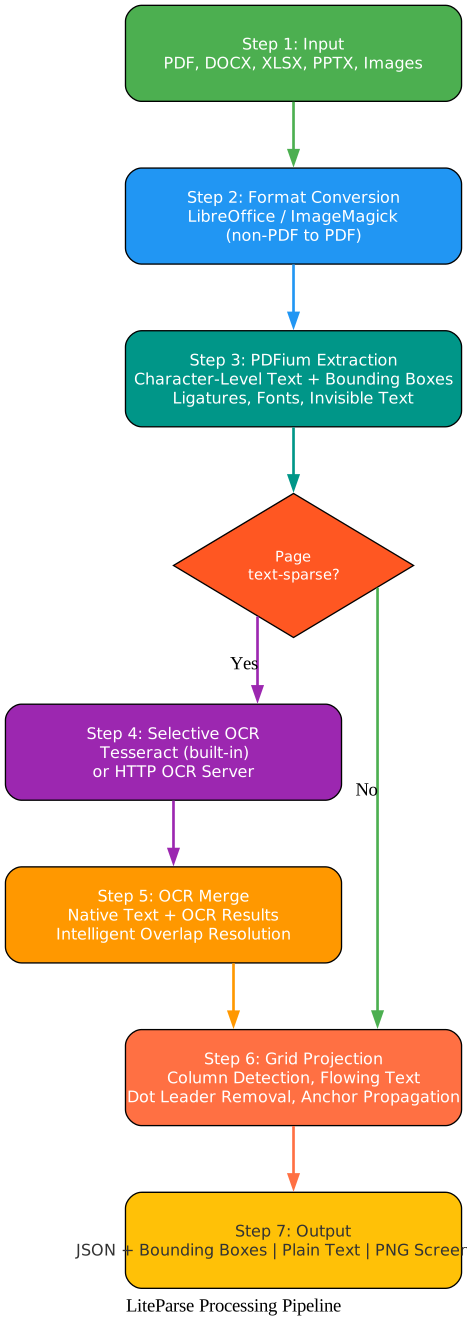
The processing pipeline follows seven well-defined steps. Step 1 (Input) accepts any supported format: PDF, DOCX, XLSX, PPTX, or common image formats. LiteParse detects the format automatically. Step 2 (Format Conversion) converts non-PDF files to PDF using LibreOffice for office documents and ImageMagick for images. This step is skipped for native PDF files. Step 3 (PDFium Extraction) uses Google’s PDFium C library to extract text at the character level, with each character receiving a bounding box containing position, size, rotation, font metadata, and color information. The extraction handles ligatures (expanding “fi” to “f” + “i”), buggy fonts (detecting private-use codepoints), invisible text layers, and dot leader boundaries.
After extraction, a decision point checks whether each page is text-sparse. Pages with sufficient native text skip OCR entirely, saving processing time. Text-sparse pages (scanned documents, image-based PDFs) are routed to Step 4 (Selective OCR), where the default Tesseract engine processes them with zero setup, or an HTTP OCR server (EasyOCR, PaddleOCR, or custom) can be configured. Step 5 (OCR Merge) combines native PDF text and OCR results intelligently, handling overlapping regions and using confidence scores to resolve conflicts. Step 6 (Grid Projection) transforms raw bounding boxes into readable text by detecting column anchors, classifying text as flowing or structured, handling multi-column layouts, normalizing rotated text, removing dot leaders, and propagating forward anchors. Step 7 (Output) produces three formats: JSON with text items and bounding boxes, layout-preserved plain text, and PNG screenshots.
Takeaway: With just
pip install liteparse, you get a complete document parsing pipeline: PDF text extraction with bounding boxes, automatic format conversion for DOCX/XLSX/PPTX/images, built-in OCR, spatial layout reconstruction, and screenshot generation – all running locally without API keys or cloud dependencies. ThelitCLI command is identical across npm, pip, and cargo installations.
OCR System
LiteParse’s OCR system is built around the OcrEngine trait, which defines an async recognize() method. This trait-based architecture enables pluggable OCR backends without modifying the core parsing logic.
Built-in Tesseract
The default OCR engine is Tesseract, bundled directly into the library via the tesseract-rs crate. This means zero setup is required – install the package and OCR works immediately. Tesseract supports over 100 languages and provides good accuracy for most document types.
from liteparse import LiteParse

# Tesseract works out of the box
parser = LiteParse(ocr_enabled=True, ocr_language="eng")
result = parser.parse("scanned-document.pdf")
HTTP OCR Servers
For use cases requiring different OCR engines, LiteParse supports HTTP OCR servers through a standardized API specification. Any server that implements the following endpoint can be used:
- Endpoint: POST
/ocr - Parameters:
file(the document page image),language(language code) - Response: JSON with
text,bbox(bounding box coordinates), andconfidencescores
This enables integration with popular OCR engines like EasyOCR and PaddleOCR:
from liteparse import LiteParse

# Use a custom HTTP OCR server
parser = LiteParse(
    ocr_enabled=True,
    ocr_server_url="http://localhost:8000",  # EasyOCR or PaddleOCR server
)
result = parser.parse("document.pdf")
Selective OCR
LiteParse does not run OCR on every page. After PDFium extraction, pages are analyzed for text density. Pages with sufficient native text skip OCR entirely, which significantly reduces processing time for documents that are mostly text-based with a few scanned pages. Only text-sparse pages (typically scanned images or image-based PDFs) are sent to the OCR engine.
Conclusion
LiteParse fills an important gap in the document processing ecosystem: a fast, lightweight, local PDF parser that preserves spatial layout information through precise bounding boxes. Built in Rust for performance and memory safety, it delivers character-level extraction, pluggable OCR, and multi-column layout reconstruction – all without requiring cloud services or API keys.
The six-crate Rust workspace architecture ensures that the same core parsing engine powers Python, Node.js, WASM, and CLI interfaces, giving developers flexibility in how they integrate document parsing into their workflows. Whether you are building RAG pipelines, LLM agent tooling, or compliance scanning systems, LiteParse provides the foundation for extracting structured information from unstructured documents.
Important: LiteParse is the open-source local counterpart to LlamaParse, LlamaIndex’s cloud-based production document parser. For simple to moderate documents, LiteParse delivers excellent results entirely on your machine. For complex documents with dense tables, multi-column layouts, charts, or handwritten text, LlamaParse handles the hard stuff and provides structured markdown output – making the two tools complementary rather than competing.
Links:
- GitHub: https://github.com/run-llama/liteparse
- PyPI: https://pypi.org/project/liteparse/
- npm: https://www.npmjs.com/package/@llamaindex/liteparse
- Documentation: https://developers.llamaindex.ai/liteparse/
- LlamaParse Cloud: https://cloud.llamaindex.ai
- PDFium: https://pdfium.googlesource.com/pdfium/
- Tesseract OCR: https://github.com/tesseract-ocr/tesseract

Enjoyed this post? Never miss out on future posts by following us


