Introduction
AI chat interfaces have traditionally been limited to producing text responses – markdown, code blocks, and the occasional image link. But what if an AI agent could render fully interactive UI components directly in your application? CopilotKit OpenGenerativeUI is an open source framework that makes this possible, allowing AI agents to produce algorithm visualizations, 3D animations, interactive charts, and functional widgets that render as live HTML and SVG inside a sandboxed iframe. Built on Next.js 16, React 19, CopilotKit v2, and LangGraph, and released under the MIT license, CopilotKit OpenGenerativeUI demonstrates how generative UI can transform the AI chat experience from a text-only exchange into a rich, interactive visual conversation.
What is Generative UI?
Generative UI refers to the capability of AI agents to produce interactive visual components rather than plain text responses. In a traditional chat interface, when you ask an AI to explain binary search, you get a paragraph of text. With generative UI, the same request produces a live, interactive visualization where you can step through the algorithm, watch comparisons happen in real time, and manipulate the data.
CopilotKit OpenGenerativeUI showcases this pattern across multiple domains. The repository includes examples of binary search and BFS vs DFS algorithm visualizations, pie charts and bar charts rendered with Chart.js, 3D scenes built with Three.js, interactive forms and simulations, and SVG diagrams for architecture and flowchart explanations. The framework provides a decision matrix that maps user intent to the appropriate output type: when a user asks about a physical process, the agent produces an illustrative SVG diagram; when they ask about trends over time, it generates a Chart.js line chart; when they request a 3D visualization, it builds a Three.js scene with proper WebGL rendering.
Key Insight: Generative UI lets AI agents render React components directly in the chat. Instead of responding with text, the agent can produce charts, interactive widgets, visualizations, and custom UI – all rendered as live HTML/SVG inside a sandboxed iframe.
Architecture Overview
CopilotKit OpenGenerativeUI is structured as a Turborepo monorepo with three packages. The apps/app directory contains the Next.js 16 frontend built with CopilotKit v2, React 19, and Tailwind CSS 4. The apps/agent directory holds the Python-based LangGraph agent using LangChain Deep Agents and CopilotKitMiddleware. The apps/mcp directory provides an optional standalone MCP (Model Context Protocol) server for external client integration.
The request flow starts at the browser, which connects to the Next.js application. The frontend registers CopilotKit hooks – useAgent() for bidirectional state sync, useComponent() for generative UI, useFrontendTool() for browser-side actions, and useHumanInTheLoop() for interactive prompts. When a user sends a message, it travels through the /api/copilotkit API route to the CopilotKit runtime, which forwards it to the LangGraph agent running on FastAPI at port 8123. The agent processes the request using its skills-based architecture, consulting SKILL.md files loaded on demand via progressive disclosure. State flows bidirectionally between the frontend and agent through CopilotKit’s synchronization layer.
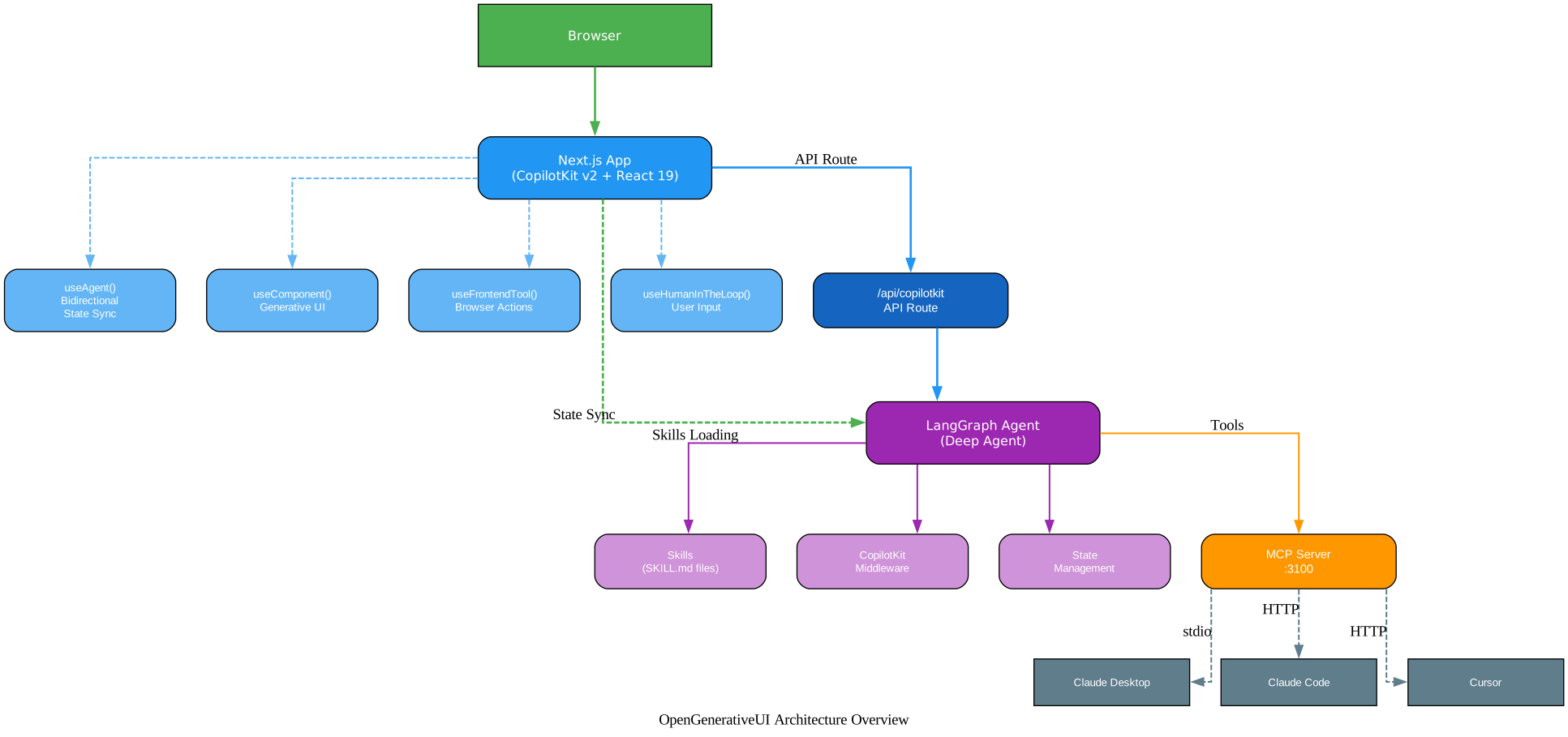
The architecture diagram above illustrates the three-package Turborepo structure. At the top, the Browser node (green) connects to the Next.js App (blue), which contains the four core CopilotKit hooks: useAgent() for bidirectional state sync, useComponent() for generative UI rendering, useFrontendTool() for browser-side actions, and useHumanInTheLoop() for pausing the agent to collect user input. The Next.js App communicates with the LangGraph Agent (purple) through the /api/copilotkit API route, while also maintaining a dashed bidirectional state sync connection. The agent internally manages Skills (SKILL.md files), CopilotKitMiddleware, and State Management. A separate MCP Server (orange) at port 3100 connects to the agent and provides tools to external clients – Claude Desktop via stdio, and Claude Code and Cursor via HTTP – enabling the design system and skill instructions to be used outside the web application.
Core CopilotKit v2 Patterns
CopilotKit v2 introduces five core hooks that form the foundation of generative UI interactions. Each hook serves a distinct purpose in the agent-frontend communication model.
useComponent registers a named React component that the agent can render with parameters. The agent decides when to invoke a component based on its description. For example, the pieChart component accepts a Zod schema with title, description, and data fields, and the agent calls it when the user asks about data proportions. The most powerful component is widgetRenderer, which accepts arbitrary HTML/SVG and renders it in a sandboxed iframe with full interactivity.
useFrontendTool registers a tool that the agent can call but that executes in the browser. The toggleTheme example lets the agent switch between light and dark mode without any backend involvement. The agent sees it as a callable tool, and when invoked, the handler runs directly in the React frontend.
useHumanInTheLoop pauses the agent and renders an interactive component that waits for user input before continuing. The scheduleTime example shows a meeting time picker where the agent proposes time slots, the user selects one, and the agent receives the choice as the tool result. This pattern is essential for any workflow requiring explicit user confirmation or preference.
useRenderTool provides a custom renderer for a specific backend tool. The plan_visualization tool, for instance, renders a PlanCard component while the tool is executing, showing the approach, technology, and key elements before the visualization is built.
useDefaultRenderTool acts as a fallback renderer for any tool without a custom renderer. It receives the tool name, status, and parameters, and can choose to display a generic ToolReasoning component or return an empty element for tools that should be hidden.

The diagram above shows the five hooks arranged around the central useAgent() hub, which provides bidirectional state sync between the frontend and the agent. useComponent (purple) enables the agent to render React components, connecting through the “renders” edge. useFrontendTool (teal) allows the agent to call browser-side actions via the “calls” edge. useHumanInTheLoop (coral/pink) pauses the agent for user input through the “pauses” edge. useRenderTool (amber) customizes tool rendering through the “customizes” edge. useDefaultRenderTool (gray) provides fallback rendering through the “fallback” edge. All hooks are imported from @copilotkit/react-core/v2 and registered together in a custom hook that is called in the page component.
Core Concept: The WidgetRenderer is the most flexible generative UI component. It renders arbitrary HTML/SVG in a sandboxed iframe with automatic light/dark theming, progressive reveal animations, and responsive sizing. The agent writes HTML, and the frontend renders it with full interactivity.
The WidgetRenderer
The WidgetRenderer is the centerpiece of CopilotKit OpenGenerativeUI’s generative UI system. It works by receiving HTML content from the agent and rendering it inside a sandboxed iframe that comes pre-loaded with a complete design system. When the agent decides to produce a visual response, it calls the widgetRenderer component with title, description, and html parameters. The frontend then assembles a complete HTML document by injecting six layers of design system support around the agent’s HTML.
Layer 1: Import Maps provides ES module resolution for Three.js, GSAP, D3, and Chart.js via esm.sh CDN. The agent can use <script type="module"> with bare import specifiers like import * as THREE from "three" and the browser resolves them automatically.
Layer 2: Content Security Policy sets strict CSP headers that allow scripts from trusted CDNs (cdnjs, esm.sh, jsdelivr, unpkg) while blocking unauthorized external resources. This ensures the sandboxed environment remains secure.
Layer 3: Theme CSS Variables injects over 30 CSS custom properties for automatic light/dark mode theming. Variables like --color-text-primary, --color-background-secondary, and --border-radius-md ensure that agent-generated content matches the host application’s visual style without any manual configuration.
Layer 4: SVG Pre-built Classes provides nine semantic color sets (.c-purple, .c-teal, .c-coral, .c-pink, .c-gray, .c-blue, .c-green, .c-amber, .c-red) with automatic dark mode variants. Each class applies coordinated fill, stroke, and text colors to SVG elements.
Layer 5: Form Element Styles pre-styles all standard HTML form elements – buttons, text inputs, number inputs, textareas, selects, range sliders, checkboxes, and radio buttons – to match the design system. Elements use CSS variables for theming and include hover, focus, and active states.
Layer 6: Bridge JS provides the communication layer between the iframe and the parent window. The sendPrompt() function lets widget content send chat messages back to the agent. The openLink() function opens external URLs safely. An Idiomorph-based DOM diffing system handles streaming content updates without full re-renders, preserving interactive state. A ResizeObserver with postMessage bridge automatically reports content height changes to the parent for seamless auto-sizing.
The streaming experience is carefully engineered. When the agent begins producing HTML, a loading indicator appears with rotating phrases like “Sketching pixels” and “Wiring up nodes.” Content is streamed into the iframe via postMessage, and Idiomorph diffs the incoming HTML against the existing DOM, adding new elements with staggered fade-in animations. This means partial content appears progressively as the agent generates it, rather than waiting for the complete response.
Skills-Based Agent Architecture
The agent backend uses LangChain Deep Agents’ create_deep_agent() function, which provides built-in planning (write_todos), filesystem tools, and sub-agent support. What makes OpenGenerativeUI’s agent unique is its skills-based architecture. Instead of injecting all visualization instructions into the system prompt at once, skills are defined as SKILL.md files in apps/agent/skills/ and loaded on demand via progressive disclosure.
The repository includes three skills. The advanced-visualization skill covers UI mockups, dashboards, Chart.js configurations, and generative art. The master-playbook skill defines response philosophy, decision trees, and narration patterns. The svg-diagrams skill provides SVG generation rules, component patterns, and diagram type guidelines. When the agent encounters a request that requires visualization, it consults the relevant skill document rather than relying on a monolithic system prompt.
The agent follows a mandatory visualization workflow for any visual response. First, it acknowledges the request with one or two sentences of plain text. Then it plans by calling the plan_visualization tool with the approach, technology choice, and key elements. Next, it builds the visualization by calling the appropriate tool (widgetRenderer, pieChart, or barChart). Finally, it narrates the result with two or three sentences walking through what was built. This structured workflow ensures consistent quality and prevents the agent from skipping the planning step.
Architecture: Progressive disclosure means the agent loads only the skill documents it needs for the current request. Instead of a bloated system prompt with all visualization rules, the deep agent architecture loads
advanced-visualization/SKILL.mdwhen the user asks about dashboards, andsvg-diagrams/SKILL.mdwhen they request a flowchart. This keeps the context window focused and reduces token costs.
MCP Server Integration
The repository includes a standalone Model Context Protocol server in apps/mcp/ that exposes the design system, skill instructions, and an HTML document assembler to any MCP-compatible client. This means the generative UI capabilities are not limited to the web application – they can be used directly in Claude Desktop, Claude Code, and Cursor.
The MCP server provides three categories of functionality. Resources include skills://list for browsing available skill names and skills://{name} for reading individual skill documents. Prompts offer pre-composed templates for building interactive HTML widgets, generating SVG diagrams, and creating advanced visualizations. Tools include the assemble_document tool, which wraps an HTML fragment with the full design system – CSS variables, SVG classes, form styles, and bridge JS – returning an iframe-ready document.
For Claude Desktop integration, you configure the MCP server using stdio transport by adding it to claude_desktop_config.json. For Claude Code and Cursor, you start the HTTP server with make dev-mcp (port 3100) and add the URL to .mcp.json. The CopilotKit frontend can also connect to the MCP server by setting the MCP_SERVER_URL environment variable, which the API route automatically picks up.
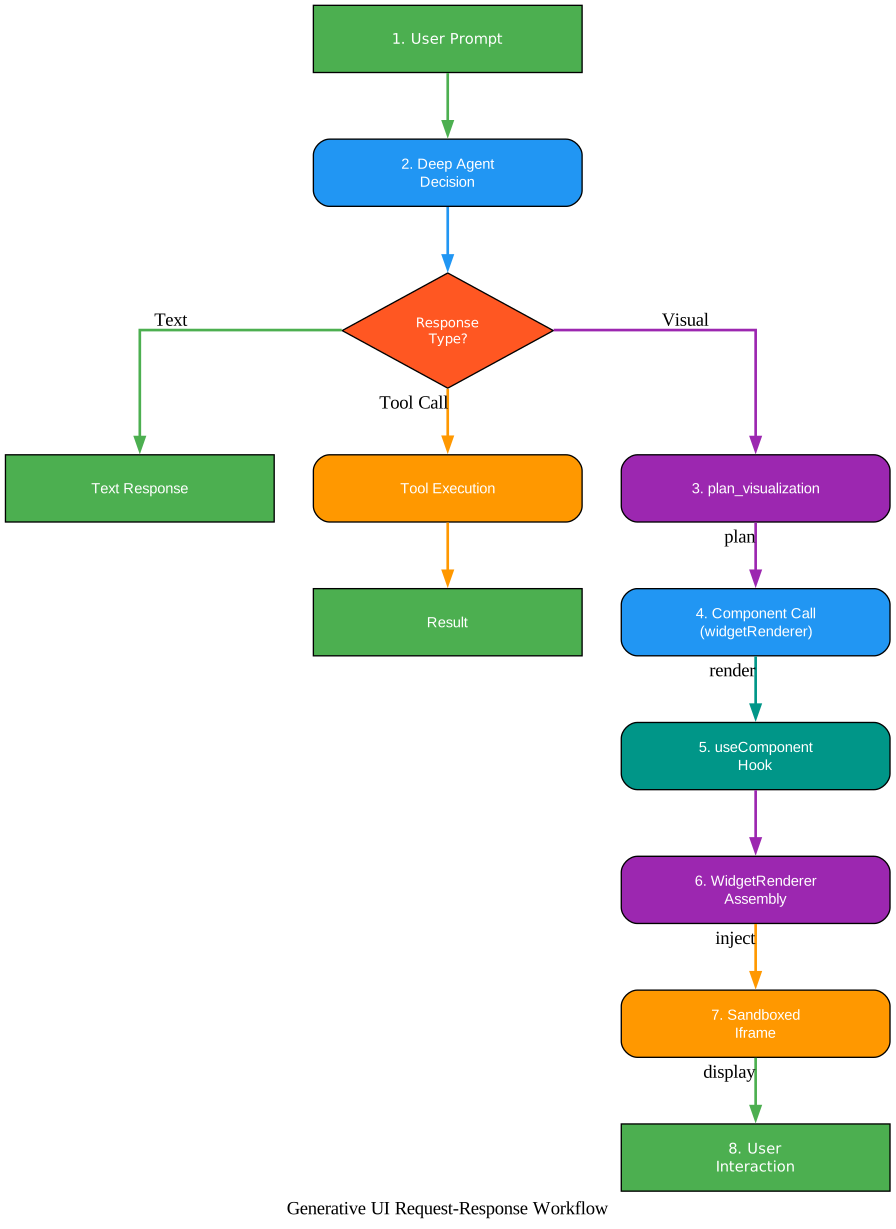
The workflow diagram above shows the end-to-end request flow. Starting from the user prompt (green), the request reaches the Deep Agent Decision point (blue). The agent evaluates the response type through a decision diamond (red). If the response is plain text, it goes directly to a text response. If it requires a tool call, the agent executes the tool and returns the result. For visual responses, the agent follows the generative UI path: it first calls plan_visualization (purple) to determine the approach and technology, then invokes the widgetRenderer component (blue), which triggers the useComponent hook (teal) on the frontend. The WidgetRenderer assembles the complete HTML document (purple) by injecting the six design system layers, renders it in a sandboxed iframe (orange), and the user can then interact with the visualization (green). Each step is labeled with its function in the pipeline.
Getting Started
Setting up CopilotKit OpenGenerativeUI requires Node.js for the frontend and Python 3.12+ for the agent. Clone the repository and run make setup to install all dependencies and create the .env template. Then add your OpenAI API key to apps/agent/.env:
git clone https://github.com/CopilotKit/OpenGenerativeUI.git
cd OpenGenerativeUI
make setup
# Edit apps/agent/.env with your OpenAI API key
make dev
The make dev command starts all services: the Next.js frontend at http://localhost:3000 and the LangGraph agent at http://localhost:8123. You can also start services individually with make dev-app, make dev-agent, or make dev-mcp.
Strong models are required for generative UI. The framework demands high-capability models that can produce complex, well-structured HTML and SVG in a single pass. The recommended models are gpt-5.4 or gpt-5.4-pro from OpenAI, claude-opus-4-6 from Anthropic, or gemini-3.1-pro from Google. Smaller or weaker models will produce broken layouts, missing interactivity, or incomplete visualizations. Set the LLM_MODEL environment variable to your chosen model.
Optional environment variables include RATE_LIMIT_ENABLED (default: false), RATE_LIMIT_WINDOW_MS (default: 60000), RATE_LIMIT_MAX (default: 40), and MCP_SERVER_URL for connecting the MCP server.
Bringing Generative UI to Your Own App
The OpenGenerativeUI documentation provides a clear eight-step integration path for adopting these patterns in your own application. The process separates core patterns from demo-specific code, so you only adopt what you need.
Step 1: Install frontend packages – Add @copilotkit/react-core, @copilotkit/runtime, and zod to your React application.
Step 2: Add the CopilotKit provider – Wrap your app with <CopilotKit runtimeUrl="/api/copilotkit"> in your root layout.
Step 3: Create the API route – Set up a Next.js API route at /api/copilotkit that creates a CopilotRuntime with a LangGraphHttpAgent pointing to your Python backend.
Step 4: Set up the Python agent – Install copilotkit, langgraph, langchain, langchain-openai, fastapi, uvicorn, ag-ui-langgraph, and deepagents. Create the agent using create_deep_agent() with CopilotKitMiddleware().
Step 5: Define your state – Create a TypedDict state schema that specifies what data flows between the frontend and agent.
Step 6: Create tools – Define Python functions decorated with @tool that can read and update agent state using Command(update={...}).
Step 7: Use agent state in React – Call useAgent() to read and write agent state from your React components, enabling real-time bidirectional sync.
Step 8: Add generative UI – Register useComponent, useFrontendTool, useHumanInTheLoop, and useDefaultRenderTool hooks to enable the agent to render interactive components in the chat.
The core patterns to keep are the CopilotKit provider and API route, the agent state schema with CopilotKitMiddleware, the tool pattern with Command(update={...}), and the useAgent() / useComponent() / useFrontendTool() / useHumanInTheLoop() hooks. The demo-specific elements you should replace are the todo state schema, demo gallery, widget renderer, sample data, skills documents, and animated background styling.
State Management: Bidirectional state sync means both the user and the agent can modify the same state. CopilotKit handles synchronization automatically – when the user checks a checkbox in the React UI, the agent sees the updated state, and when the agent modifies state through a tool call, the React UI re-renders immediately.
Design System and Quality
The WidgetRenderer’s design system ensures that agent-generated content looks polished and matches the host application’s visual style. The system is organized into six injection layers, each serving a specific purpose.
The CSS variable system provides automatic light and dark mode theming with over 30 variables covering backgrounds, text colors, borders, fonts, and border radii. In light mode, --color-text-primary resolves to #1a1a1a and --color-background-primary to #ffffff. In dark mode, they flip to #e8e6de and #1a1a18 respectively. The agent’s HTML can use these variables directly, ensuring visual consistency without any manual color management.
Typography follows a strict two-size, two-weight system. Body text uses 14px at weight 400, while secondary text uses 12px at weight 400. Headings use 14px at weight 500. This constraint keeps generated content visually consistent and prevents the “font soup” problem common in AI-generated UI.
The SVG color system provides nine semantic color sets, each with coordinated fill, stroke, and text colors for both light and dark modes. The classes follow a naming convention: .c-purple for structural elements, .c-teal for data highlights, .c-coral for warnings, .c-pink for emphasis, .c-gray for neutral elements, .c-blue for informational content, .c-green for success states, .c-amber for caution, and .c-red for errors.
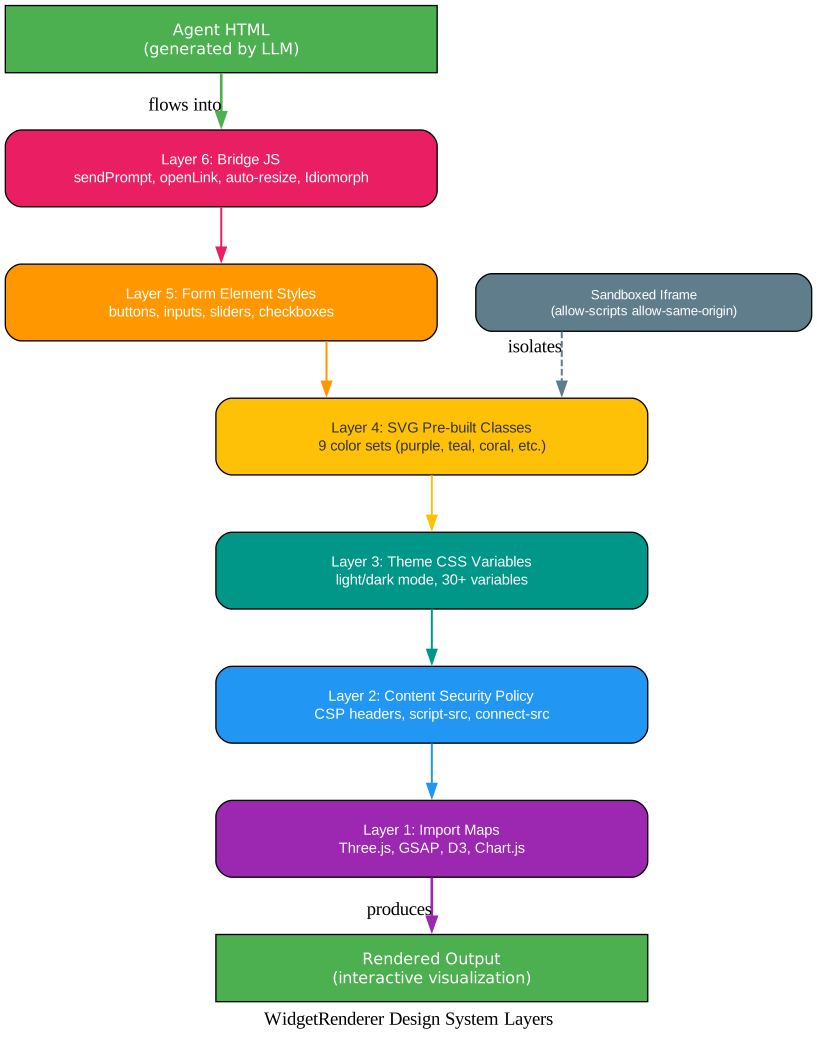
The design system layers diagram above shows how agent-generated HTML flows through six injection layers before producing the final rendered output. At the top, the agent’s HTML (green) enters Layer 6: Bridge JS (coral), which provides sendPrompt, openLink, auto-resize via ResizeObserver, and Idiomorph-based DOM diffing for streaming content updates. Layer 5: Form Element Styles (orange) pre-styles buttons, inputs, sliders, and checkboxes. Layer 4: SVG Pre-built Classes (amber) provides the nine semantic color sets. Layer 3: Theme CSS Variables (teal) injects the 30+ CSS custom properties for light/dark mode. Layer 2: Content Security Policy (blue) sets strict CSP headers. Layer 1: Import Maps (purple) resolves Three.js, GSAP, D3, and Chart.js bare imports. The sandboxed iframe (gray, dashed connection) isolates the entire rendering environment from the host application, providing security boundaries while allowing the content to communicate back through the bridge JS layer.
Conclusion
CopilotKit OpenGenerativeUI demonstrates a fundamental shift in how AI agents interact with users. Instead of being limited to text responses, agents can now produce fully interactive visualizations – algorithm animations, 3D scenes, data charts, and functional widgets – that render directly in the application. The combination of CopilotKit v2’s hook-based architecture, LangGraph’s deep agent system with progressive skill disclosure, and the WidgetRenderer’s six-layer design system creates a framework where generative UI is not an afterthought but a first-class output type. Whether you are building educational tools, data dashboards, or creative applications, OpenGenerativeUI provides the patterns and infrastructure to make AI-generated interfaces practical, secure, and visually consistent.
Links:
- GitHub: https://github.com/CopilotKit/OpenGenerativeUI
- CopilotKit Docs: https://docs.copilotkit.ai

Enjoyed this post? Never miss out on future posts by following us


