Introduction
Legacy system transformation for AI agents has long been a bottleneck in modernizing enterprise software. Most production systems carry years of accumulated knowledge: implicit business rules, undocumented architectural decisions, and critical logic buried in code nobody wants to touch. AI coding agents like Claude Code, Cursor, and GitHub Copilot are transformative for creating and evolving software, but they depend on specifications to operate safely. For new systems, you write the spec and the agent executes. For legacy systems, there is no spec – the agent has no way of knowing what it cannot break. Reversa addresses this challenge by automatically analyzing legacy codebases and generating structured, executable specifications that any AI coding agent can directly consume. Built in JavaScript and released under the MIT license with 650 stars and 243 forks on GitHub, Reversa provides a systematic pipeline that turns undocumented, monolithic systems into clear specifications – enabling AI agents to understand, modify, and extend legacy code with confidence.
How It Works: The 5-Phase Discovery Pipeline
Reversa operates through a 5-phase discovery pipeline that progressively transforms raw legacy code into structured, traceable specifications. Each phase is handled by a specialized agent with a distinct role, and the central Reversa orchestrator coordinates the entire sequence, saving checkpoints between phases so the analysis can be resumed if interrupted.
Phase 1: Reconnaissance is handled by the Scout agent, which maps the surface of the codebase – folder structure, languages, frameworks, dependencies, and entry points. This phase produces a high-level inventory that guides all subsequent analysis.
Phase 2: Excavation is driven by the Archaeologist agent, which performs deep module-by-module analysis covering algorithms, control flows, and data structures. This is where the internal mechanics of each component are documented.
Phase 3: Interpretation involves two agents working in tandem. The Detective extracts implicit business knowledge: rules, retroactive architectural decision records, state machines, and permissions. The Architect synthesizes everything into C4 diagrams, a full entity-relationship diagram, integration maps, and a technical debt assessment.
Phase 4: Generation is performed by the Writer agent, which produces specifications as operational contracts with code traceability. Each specification links back to the source files and lines that informed it.
Phase 5: Review is handled by the Reviewer agent, which reviews specs, finds inconsistencies, and validates gaps with the user before finalizing the output.
Understanding the Reversa Architecture
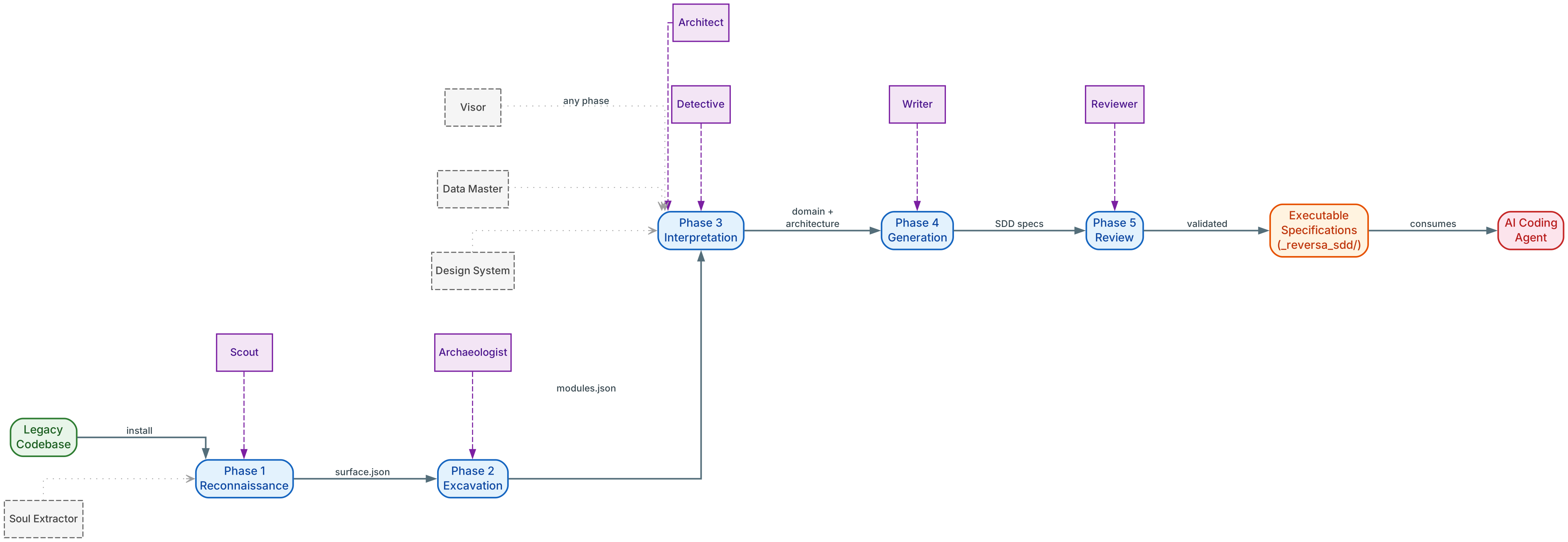
The architecture diagram above illustrates the complete 5-phase transformation pipeline that Reversa uses to convert legacy codebases into structured specifications.
Phase 1: Reconnaissance On the left, the Legacy Codebase (green) enters Phase 1: Reconnaissance, where the Scout agent maps the project surface – folder structure, languages, frameworks, and dependencies. This initial scan produces a high-level inventory that guides all subsequent analysis phases.
Phase 2: Excavation The output flows to Phase 2: Excavation (blue), where the Archaeologist performs deep module-by-module analysis of algorithms, control flows, and data structures. This is where the internal mechanics of each component are documented in detail.
Phase 3: Interpretation Phase 3: Interpretation (teal) splits into two parallel tracks. The Detective extracts implicit business rules, state machines, and permissions, while the Architect synthesizes C4 diagrams, ERD, and integration maps. This dual-track approach ensures both business logic and technical architecture are captured.
Phase 4-5: Generation and Review Phase 4: Generation (purple) is where the Writer assembles structured specifications as operational contracts with full code traceability. Phase 5: Review (orange) has the Reviewer validate consistency and flag gaps before finalizing.
Cross-Phase Agents Along the bottom, four independent agents operate across all phases: Visor documents interfaces from screenshots, Data Master analyzes databases, Design System extracts design tokens, and Soul Extractor produces an executive summary spec. The final output is the Executable Specification (coral) in the _reversa_sdd/ directory, which any AI Coding Agent can consume.
Key Insight: Reversa bridges the fundamental gap between legacy systems and AI agents by transforming opaque codebases into structured specifications. Without this transformation layer, AI coding agents operate blind – they cannot safely modify code they do not understand at the architectural level. Every statement in the generated specs is marked with a confidence indicator: confirmed (extracted directly from code), inferred (deduced from patterns), or gap (requires human validation).
Key Features and Agent Teams
Reversa organizes its capabilities into six specialized agent teams, each targeting a different workflow for working with legacy and new systems. The Discovery Team is always installed and runs the main /reversa pipeline. The remaining five teams are optional and pre-selected during installation.
| Team | Purpose | Entry Command |
|---|---|---|
| Discovery (Core) | Analyze existing legacy and produce specs | /reversa |
| Code New Project | Start a greenfield project from a one-line idea | /reversa-new |
| Code Forward | Evolve the system from specs to running code | /reversa-forward |
| Migration | Turn legacy specs into a rebuild plan for a modern stack | /reversa-migrate |
| Pricing and Size | Estimate effort, size, and pricing on top of specs | /reversa-pricing-* |
| Documentation | Render extracted knowledge as an HTML mini-site | /reversa-docs |
The Discovery Team includes six core agents (Reversa orchestrator, Scout, Archaeologist, Detective, Architect, Writer) and seven optional agents (Reviewer, Tracer, Visor, Data Master, Design System, Soul Extractor, Chronicler). The Code Forward Team provides a complete pipeline from requirements through coding, with agents for clarification, quality auditing, planning, action decomposition, and cross-checking. The Migration Team follows a Paradigm Advisor to Curator to Strategist to Designer to Inspector pipeline. The Documentation Team generates a self-contained HTML mini-site with 3D architecture visualizations, force-directed module graphs, Highcharts metrics, and navigable slide decks.

Understanding Reversa’s Agent Teams
The features diagram above shows Reversa at the center (blue hub) with six team branches radiating outward, each targeting a different workflow.
Discovery Branch (Core) The Discovery branch (green) includes the Scout, Archaeologist, Detective, Architect, and Writer agents that form the core analysis pipeline. This team is always installed and runs the main /reversa command.
Forward Branch The Forward branch (teal) contains the Requirements, Clarify, Quality, Plan, To-Do, Audit, and Coding agents that bridge specs to running code. This team enables iterative development from specifications.
Migration Branch The Migration branch (purple) provides the Paradigm Advisor, Curator, Strategist, Designer, and Inspector agents for stack rebuilds. This team transforms legacy specifications into a modernization plan.
New Project and Docs Branches The New Project branch (orange) includes the Ideator, Researcher, Drafter, and Spec SDD agents for greenfield development. The Docs branch (coral) contains the Mapper, Analyst, Storyteller, and Publisher agents that produce the HTML mini-site with 3D architecture visualizations.
Pricing Branch The Pricing branch (amber) provides the Profile, Size, and Estimate agents for effort estimation. Each branch connects back to the central Reversa orchestrator, which coordinates cross-team workflows and maintains shared state.
Amazing: Reversa supports 13 different AI coding engines out of the box – Claude Code, Codex, Cursor, Gemini CLI, Windsurf, Antigravity, Kiro, Opencode, Cline, Roo Code, GitHub Copilot, Aider, and Amazon Q Developer. A single
npx reversa installcommand detects which engines are present in your environment and configures the appropriate entry files and skill paths for each one automatically.
Installation and Setup
Installing Reversa requires Node.js 18 or later. Navigate to the root of your legacy project and run:
npx reversa install
The installer performs seven steps automatically. First, it detects the AI engines present in your environment (Claude Code, Codex, Cursor, and so on). Second, it asks which agents to install, with all teams selected by default. Third, it collects the project name, language, and preferences. Fourth, it copies agent skills to .agents/skills/ (and .claude/skills/ for Claude Code). Fifth, it creates the engine entry file (CLAUDE.md, AGENTS.md, .cursorrules, etc.) depending on which engines were detected. Sixth, it creates the .reversa/ structure with state, configuration, and plan files. Seventh, it generates a SHA-256 manifest for safe future updates.
Reversa never deletes or modifies existing files in your project. Agents write only to .reversa/ and the output folder (_reversa_sdd/ by default). This immutability guarantee means your legacy codebase remains untouched throughout the entire analysis process.
Additional CLI commands for managing the installation:
npx reversa status       # Show current analysis state
npx reversa update       # Update agents to the latest version
npx reversa add-agent    # Add an agent to the project
npx reversa add-engine   # Add support for a new engine
npx reversa uninstall    # Remove Reversa from the project
The update command detects files you modified via SHA-256 checksums and never overwrites customizations. The uninstall command removes only files created by Reversa – nothing from the legacy project is touched.
Usage and Workflow
After installation, open the project in your AI coding agent and activate Reversa with a slash command:
/reversa
For engines without slash command support (Codex, Aider, Opencode), use the plain command:
reversa
Reversa will introduce itself, create a personalized exploration plan, and coordinate the entire analysis. Progress is saved in .reversa/state.json at each checkpoint – if the session is interrupted, simply type the activation command again to resume where you left off.
Depending on your goal, different entry commands activate different workflows:
| Goal | Command |
|---|---|
| Analyze an existing legacy and produce specs | /reversa |
| Start a brand new project from a one-line idea | /reversa-new |
| Evolve the system one feature at a time, from spec to code | /reversa-forward |
| Rebuild the legacy on a modern stack | /reversa-migrate |
| Render the extracted knowledge as an HTML mini-site | /reversa-docs |
| Estimate effort and pricing on top of the specs | /reversa-pricing-profile, /reversa-pricing-size, /reversa-pricing-estimate |
Each orchestrator pauses between agents and asks for confirmation before advancing, so you stay in control of every step.
Understanding the Reversa Workflow
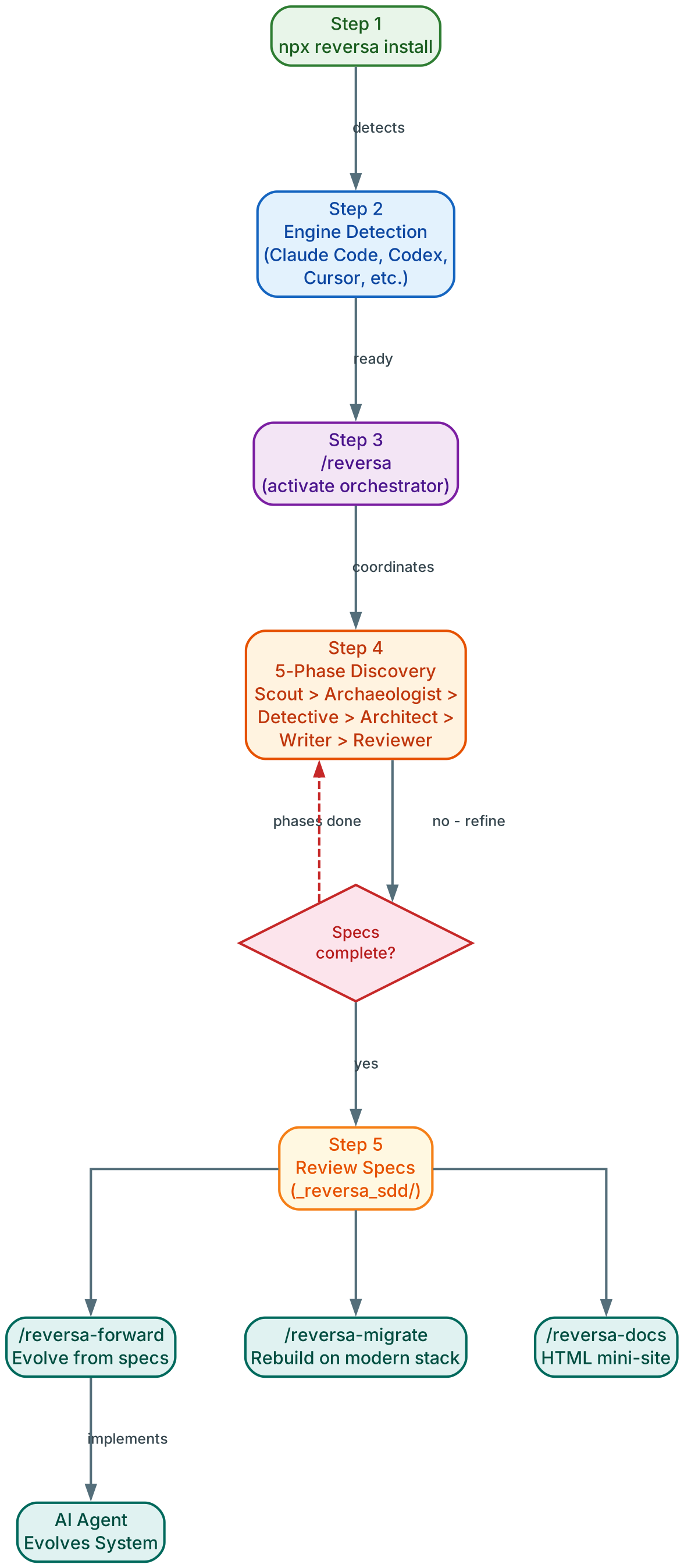
The workflow diagram above shows the step-by-step process from installation to AI-driven development with Reversa.
Step 1: Installation Step 1 (green) is installing Reversa with npx reversa install, which detects engines and configures the project. The installer performs seven automated steps including engine detection, agent selection, and SHA-256 manifest generation.
Step 2: Activation Step 2 (blue) is activating Reversa with the /reversa command in your AI agent. This launches the orchestrator which creates a personalized exploration plan for your codebase.
Step 3: Discovery Pipeline Step 3 (teal) runs the 5-phase discovery pipeline: Reconnaissance, Excavation, Interpretation, Generation, and Review. Progress is saved at each checkpoint so analysis can be resumed if interrupted.
Decision Point and Direction At the decision diamond (red), the workflow asks whether the specifications are complete. If not, the loop returns to the pipeline for refinement. If complete, Step 4 (purple) presents three directional choices: evolve the system with /reversa-forward, rebuild on a modern stack with /reversa-migrate, or generate documentation with /reversa-docs.
AI-Driven Development Cycle Step 5 (orange) shows the AI agent consuming the generated specifications to safely modify and extend the legacy system. Step 6 (coral) represents the ongoing cycle of AI-driven development, where the agent uses the operational contracts to evolve the codebase with fidelity to what already exists.
Takeaway: With a single command,
/reversa, you can launch a coordinated team of specialized AI agents that analyze your entire legacy codebase and generate complete, traceable specifications. These specifications become operational contracts that any supported AI coding agent can immediately consume – meaning your legacy system becomes accessible to Claude Code, Cursor, Copilot, and nine other engines without manual documentation effort.
What Is Generated
The primary output lands in the _reversa_sdd/ directory and includes a comprehensive set of specification documents:
| File | Content |
|---|---|
inventory.md | Project inventory |
dependencies.md | Dependencies with versions |
code-analysis.md | Technical analysis per module |
data-dictionary.md | Data dictionary |
domain.md | Glossary and business rules |
state-machines.md | State machines in Mermaid format |
permissions.md | Permission matrix |
architecture.md | Architectural overview |
c4-context.md | C4 Diagram: Context level |
c4-containers.md | C4 Diagram: Containers level |
c4-components.md | C4 Diagram: Components level |
erd-complete.md | Full entity-relationship diagram in Mermaid |
confidence-report.md | Confidence report with indicators |
gaps.md | Identified gaps requiring human validation |
questions.md | Questions for human validation |
Additionally, the sdd/ subdirectory contains one specification per component, while traceability/ provides a spec-impact matrix and a code-to-spec mapping that links every specification back to its source files.
Every statement in the generated specifications is marked with a confidence indicator. Confirmed statements (marked green) are extracted directly from code and can be cited with file and line. Inferred statements (marked yellow) are deduced from patterns and may be wrong. Gaps (marked red) cannot be determined from code and require human validation. This three-tier confidence scale ensures that AI agents know exactly which parts of the specification are reliable and which need verification.
Supported AI Engines
Reversa supports 13 AI coding engines, each with its own entry file and skill path configuration:
| Engine | Entry File | Activation |
|---|---|---|
| Claude Code | CLAUDE.md | /reversa |
| Codex | AGENTS.md | reversa |
| Cursor | .cursorrules | /reversa |
| Gemini CLI | GEMINI.md | /reversa |
| Windsurf | .windsurfrules | /reversa |
| Antigravity | AGENTS.md | /reversa |
| Kiro | (none) | /reversa |
| Opencode | AGENTS.md | reversa |
| Cline | .clinerules | /reversa |
| Roo Code | .roorules | /reversa |
| GitHub Copilot | .github/copilot-instructions.md | /reversa |
| Aider | CONVENTIONS.md | reversa |
| Amazon Q Developer | .amazonq/rules/reversa.md | /reversa |
Multiple engines can coexist in the same project. The installer detects all present engines and configures each one independently, so you can switch between Claude Code for deep analysis and Cursor for rapid iteration without reconfiguring.
Conclusion
Reversa solves a fundamental problem in AI-driven software development: how to give AI coding agents the context they need to safely modify legacy systems. By orchestrating a team of specialized agents through a 5-phase discovery pipeline, Reversa transforms years of accumulated, undocumented knowledge into structured, traceable specifications that serve as operational contracts. The confidence scale ensures transparency about what is known and what needs human validation. Support for 13 AI engines means the specifications work with whatever coding agent you prefer. And the immutability guarantee – Reversa never modifies or deletes existing project files – means the analysis process is completely safe for any codebase.
Important: The generated specifications are living documents – they should be version-controlled alongside your codebase and updated whenever the legacy system changes. Treating specifications as code ensures your AI agents always have an accurate mental model of the system they are modifying. Reversa provides the initial bridge, but maintaining that bridge is what keeps AI-driven development safe and effective over the long term.
Links:
- GitHub: https://github.com/sandeco/reversa
- Documentation: https://sandeco.github.io/reversa/

Enjoyed this post? Never miss out on future posts by following us


