What Is GTweak?
GTweak is a portable, open-source Windows optimization tool built with C# and WPF that consolidates over 100 system tweaks into a single, user-friendly interface. Unlike scattered PowerShell scripts or registry hacks, GTweak organizes its capabilities into nine clearly defined categories – from privacy hardening to hardware monitoring – all accessible through a modern Fluent Design interface with Mica backdrop support.
With 900+ stars on GitHub and rapid growth, GTweak has become the go-to solution for IT professionals, privacy advocates, and power users who want full control over their Windows installation without the complexity of manual registry editing or the risk of running unverified scripts.
Key Insight: GTweak operates as a single portable executable – no installation required. It embeds all dependencies via Costura.Fody, meaning you can carry it on a USB drive and apply your preferred configuration to any Windows 10+ machine in seconds.
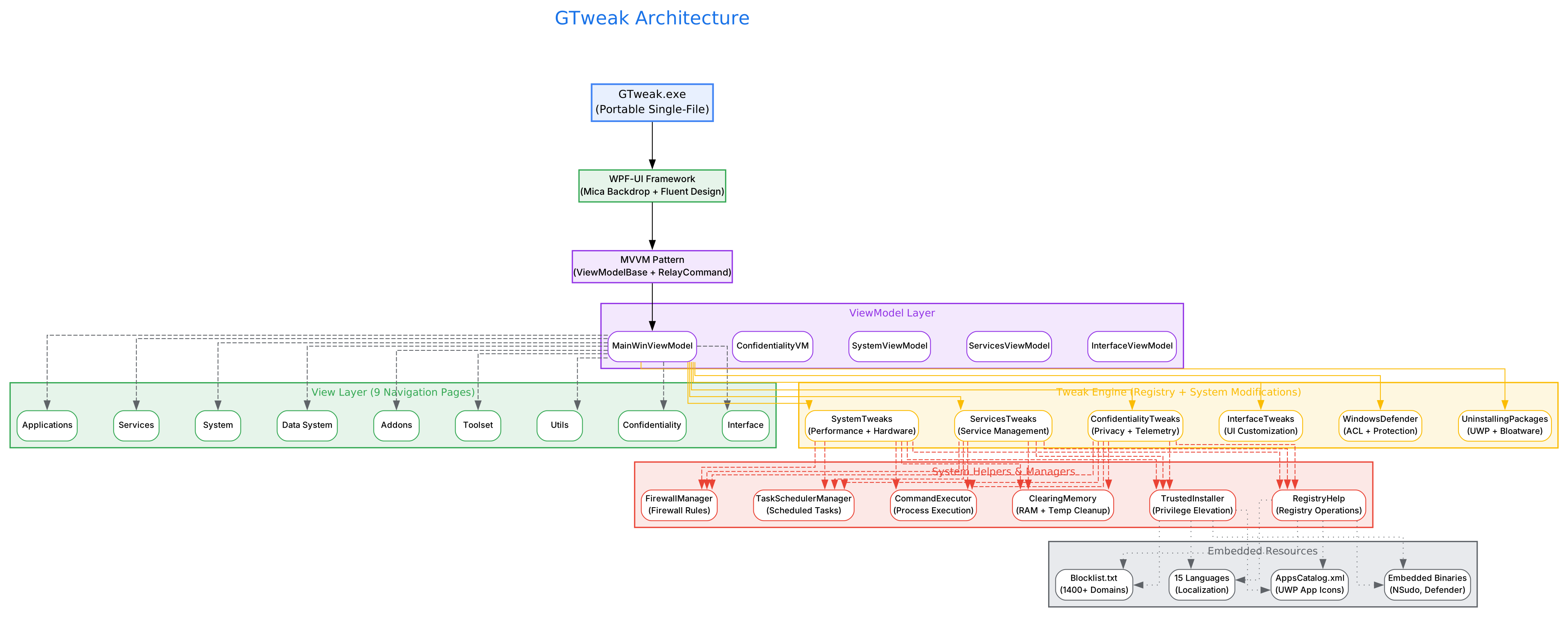
The architecture diagram above illustrates GTweak’s layered design. At the top sits the WPF-UI Fluent Design shell with Mica backdrop, which communicates through an MVVM pattern (ViewModelBase + RelayCommand) to the core ViewModel layer. Below that, the Tweak Engine handles all registry modifications, service management, and system changes through specialized classes like ConfidentialityTweaks, SystemTweaks, and ServicesTweaks. The bottom layer contains system helpers – TrustedInstaller for privilege elevation, RegistryHelp for safe registry operations, FirewallManager for network rules, and TaskSchedulerManager for scheduled task control. Embedded resources include the massive Blocklist.txt with 1400+ tracking domains, 15 language localizations, and compressed binaries for TrustedInstaller execution.
Core Feature Categories
GTweak organizes its functionality into nine distinct sections, each accessible from the left navigation panel:
| Category | Icon | Purpose | Key Actions |
|---|---|---|---|
| Utils | Toolbox | Quick utilities | RAM cleanup, temp file removal, Windows.old deletion |
| Confidentiality | PersonLock | Privacy protection | Disable telemetry, block tracking domains, disable keyloggers |
| Interface | Color | Visual customization | Themes, taskbar layout, window settings |
| Applications | Apps | Bloatware removal | Uninstall UWP apps, remove OneDrive/Edge, disable Copilot |
| Services | TaskListSquare | Service management | Disable unnecessary services, manage startup items |
| System | HardDrive | Performance tuning | Power plans, mouse/keyboard settings, VBS control |
| Data System | Desktop | Hardware monitoring | View hardware config, monitor system components |
| Addons | PuzzlePieceShield | Script execution | Run .ps1, .cmd, .bat, .reg scripts with TrustedInstaller |
| Toolset | WindowApps | External tools | Download CPU-Z, GPU-Z, Rufus, and other utilities |
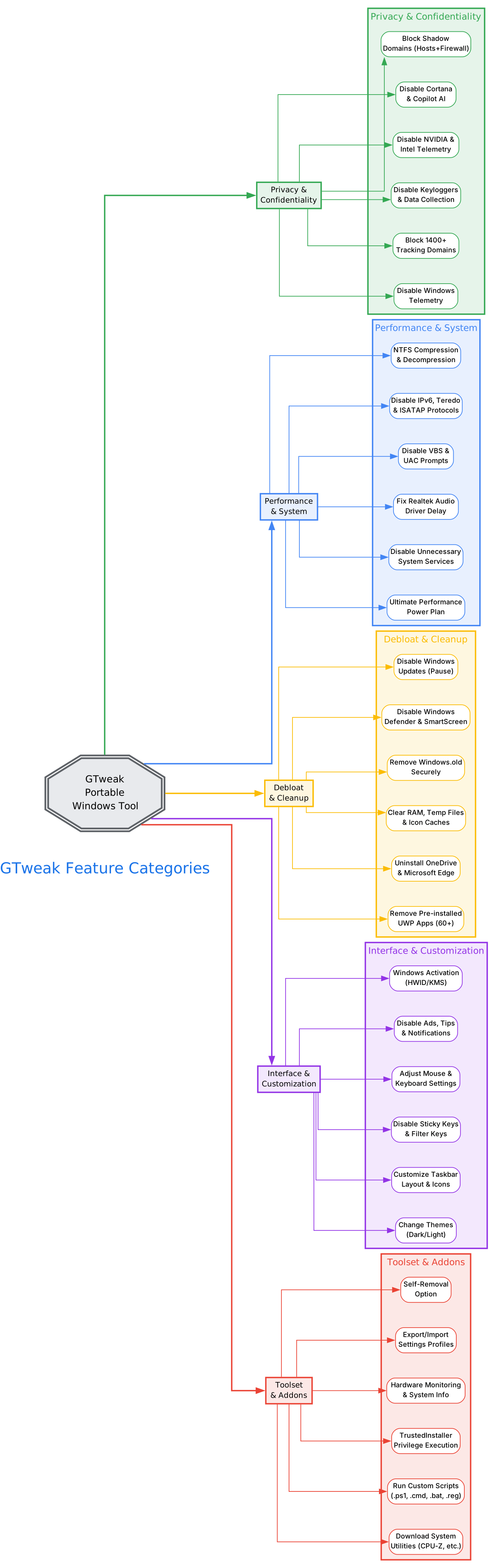
The features diagram above shows how GTweak’s capabilities branch into five major categories. Privacy and Confidentiality covers the most ground with six sub-features including the ability to block over 1,400 Microsoft tracking domains via both the hosts file and Windows Firewall rules. Performance and System handles hardware-level optimizations like applying the Ultimate Performance power plan and fixing Realtek audio driver delays. Debloat and Cleanup provides one-click removal of 60+ pre-installed UWP applications along with complete OneDrive and Microsoft Edge uninstallation. Interface and Customization lets you personalize every aspect of the Windows UI. Finally, Toolset and Addons enables running custom scripts with TrustedInstaller privileges and downloading essential system utilities.
Installation and Quick Start
Download
GTweak is distributed as a single portable executable. No installation wizard, no registry entries, no background services:
# Download the latest release directly
# Visit: https://github.com/Greedeks/GTweak/releases/latest
# Download: gtweak.exe (single file, approximately 15 MB)
Alternatively, clone and build from source:
git clone https://github.com/Greedeks/GTweak.git
cd GTweak
# Open GTweak.sln in Visual Studio 2019+
# Build in Release mode (x64)
# Requires .NET Framework 4.8 SDK
System Requirements
| Requirement | Minimum |
|---|---|
| Operating System | Windows 10 (build 18362.116) or later |
| Runtime | .NET Framework 4.8 (pre-installed on Windows 10 1903+) |
| Architecture | x64 recommended |
| Privileges | Administrator rights required for most operations |
Important: Before launching GTweak, you must disable your antivirus software or add the executable to its exclusion list. Windows Defender and other security tools may flag GTweak because it modifies system registry keys, disables services, and alters the hosts file – all actions that are intentional but appear suspicious to heuristic scanners.
First Run
- Right-click
gtweak.exeand select Run as Administrator - GTweak opens with the Utils page by default
- Navigate through the left sidebar to access each category
- Toggle switches to apply or revert tweaks instantly
- Use the Settings panel (gear icon) to configure notifications, language, and volume
Privacy and Confidentiality Deep Dive
GTweak’s Confidentiality section is its most comprehensive module, addressing Windows’ extensive data collection infrastructure at multiple levels:
Telemetry Disabling
The tool disables Windows telemetry through multiple registry keys that Microsoft uses to collect diagnostic data:
AllowTelemetryset to 0 in bothHKLM\SOFTWARE\Microsoft\Windows\CurrentVersion\Policies\DataCollectionandHKLM\SOFTWARE\Policies\Microsoft\Windows\DataCollection- DiagTrack service (Connected User Experiences and Telemetry) is disabled
- dmwappushservice is stopped and disabled
- Application Experience program inventory tasks are removed
Domain Blocking
GTweak ships with an embedded Blocklist.txt containing over 1,400 Microsoft tracking domains. These domains are blocked through two mechanisms:
- Hosts file modification – All domains are mapped to
0.0.0.0, preventing any outbound connections - Windows Firewall rules – Outbound rules are created to block each domain at the network level
The blocked domains include telemetry endpoints (telemetry.microsoft.com, vortex.data.microsoft.com), advertising networks (ads.microsoft.com, ads1.msads.net), and diagnostic services (watson.microsoft.com, diagnostics.office.com).
Additional Privacy Features
- Disable advertising ID and personalized ads
- Disable Windows feedback notifications and the Feedback Hub
- Disable location services and sensors
- Disable speech model updates
- Disable handwriting data sharing and error reporting
- Disable Connected Devices Platform (CDP) service
- Disable NVIDIA and Intel telemetry services
- Block Microsoft experiment and A/B testing features
Takeaway: GTweak’s privacy module goes far beyond simple registry toggles. The combination of hosts file blocking, firewall rules, service disabling, and scheduled task removal creates a multi-layered defense against Windows data collection that is significantly more thorough than most privacy tools.
Performance and System Optimization
Power Plans
GTweak can apply the hidden Ultimate Performance power plan, which is not visible in the standard Windows power settings. This plan disables power saving features that introduce latency:
# What GTweak does internally:
powercfg /duplicatescheme e9a42b02-d5df-448d-aa00-03f14749eb61
powercfg /setactive e9a42b02-d5df-448d-aa00-03f14749eb61
Hardware-Specific Fixes
One notable feature is the Realtek High Definition Audio driver fix. GTweak detects Realtek audio devices and modifies their power management settings in the registry to eliminate the common 2-3 second audio delay that occurs when the driver enters power-saving mode.
Service Management
The Services section provides granular control over Windows services. GTweak identifies and offers to disable services that are unnecessary for most users:
- Connected User Experiences and Telemetry (DiagTrack)
- Device Management Enrollment Service
- Downloaded Maps Manager
- Microsoft Account Sign-in Assistant
- Windows Error Reporting Service
- And many more
Network Protocol Control
GTweak can disable unnecessary network protocols that may pose security risks or cause connectivity issues:
- Teredo (IPv6 tunneling)
- ISATAP (Intra-Site Automatic Tunnel Addressing Protocol)
- IPv6 (when not needed)
Debloating and Cleanup
UWP Application Removal
GTweak includes a catalog of 60+ pre-installed UWP applications with icons for easy identification. The Applications section displays each app with its icon and allows one-click removal:
- Entertainment apps: Netflix, Spotify, TikTok, Disney+, Prime Video
- Social apps: Facebook, Instagram, LinkedIn, WhatsApp, Viber
- Microsoft bloat: Copilot, Cortana, Get Help, Get Started, Microsoft Teams
- System extras: Paint 3D, 3D Builder, Mixed Reality, Maps, People
System Cleanup
The Utils section provides several cleanup operations:
- RAM cleanup – Force garbage collection and free cached memory
- Temp file removal – Clear Windows and user temp directories
- Icon cache rebuild – Fix corrupted icon displays
- Windows.old removal – Securely delete old Windows installation folders
- NTFS compression – Compress or decompress files and directories to save disk space
Amazing: GTweak can completely uninstall Microsoft Edge including its WebView2 runtime and all associated data – something Microsoft has made increasingly difficult in recent Windows versions. The tool also removes OneDrive at the system level, including clearing all associated data and registry entries.
Advanced Features
TrustedInstaller Execution
One of GTweak’s most powerful capabilities is the ability to execute custom scripts with TrustedInstaller privileges. The TrustedInstaller account has higher permissions than even Administrator, allowing modifications to system files and registry keys that are normally protected.
The Addons section supports:
# Supported script types:
.ps1  # PowerShell scripts
.cmd  # Command prompt scripts
.bat  # Batch files
.reg  # Registry import files
GTweak embeds NSudo (a TrustedInstaller privilege escalation tool) as a compressed resource, extracting and executing it at runtime to achieve the necessary privilege level.
Settings Export and Import
The Settings panel provides export and import functionality, allowing you to:
- Export your current GTweak configuration to a file
- Import a previously saved configuration on another machine
- Self-removal – Completely uninstall GTweak and revert all changes
This is particularly useful for IT administrators who need to apply consistent configurations across multiple machines.
Windows Activation
GTweak includes Windows activation capabilities using HWID and KMS methods. The activation module is accessible from the Utils section and provides a streamlined interface for license management.
Multi-Language Support
GTweak supports 15 languages with community-contributed translations:
English, French, Hebrew, Hungarian, Italian, Korean, Polish, Portuguese (Brazil), Russian, Slovenian, Thai, Turkish, Ukrainian, Chinese (Simplified), and Chinese (Traditional).
Troubleshooting
Common Issues and Solutions
| Issue | Solution |
|---|---|
| Antivirus blocks GTweak | Add gtweak.exe to your antivirus exclusion list before running |
| Changes not applying | Ensure you run GTweak as Administrator (right-click > Run as Administrator) |
| Some toggles revert after reboot | Certain Windows updates reset registry keys; re-apply tweaks after major updates |
| GTweak crashes on startup | Verify .NET Framework 4.8 is installed; run sfc /scannow to repair system files |
| Windows Defender re-enables itself | Use GTweak’s Defender module to disable it through ACL permissions, not just the toggle |
| Network issues after blocking domains | Use the Import/Export feature to selectively enable domains you need |
| UWP apps reappear after Windows update | This is expected; re-run GTweak’s Applications section after feature updates |
Best Practices
- Create a restore point before applying tweaks – GTweak includes a System Restore integration
- Export your settings after configuration for easy restoration
- Apply privacy tweaks first, then performance, then debloating
- Re-run after major Windows updates – Microsoft often resets privacy settings
- Use the Toolset section to download diagnostic utilities like CPU-Z and GPU-Z for system verification
Important: GTweak is designed exclusively for official Windows images downloaded from trusted sources. If you are using a trimmed or modified Windows installation, some features may not work correctly, and you assume sole responsibility for any issues.
Technical Architecture
GTweak is built on a clean MVVM architecture using C# and WPF with the WPF-UI library for Fluent Design integration:
- UI Framework: WPF-UI 4.3.0 with Mica backdrop and Fluent Design controls
- Dependency Injection: Costura.Fody for embedding all dependencies into a single executable
- Task Scheduling: Microsoft.Win32.TaskScheduler for managing Windows scheduled tasks
- JSON Processing: Newtonsoft.Json for configuration serialization
- Dialog Handling: Ookii.Dialogs.Wpf for native Windows dialogs
- Firewall API: Direct COM interop with NetFwTypeLib for Windows Firewall management
- Privilege Elevation: Custom TrustedInstaller implementation using Windows API P/Invoke
The application uses a sophisticated privilege escalation system that starts the TrustedInstaller service, creates a process with its token, and executes commands at the highest possible permission level – enabling modifications that even Administrator cannot perform.
Comparison with Alternatives
| Feature | GTweak | O&O ShutUp10 | WPD | Windows Privacy Dashboard |
|---|---|---|---|---|
| Portable (no install) | Yes | Yes | Yes | No |
| Open Source | Yes (BSD-3) | No | Yes | No |
| UI Framework | WPF Fluent Design | Win32 | WPF | WinForms |
| Privacy Tweaks | 20+ | 50+ | 30+ | 20+ |
| Debloating | 60+ UWP apps | No | Limited | 30+ apps |
| Performance Tweaks | Yes | No | No | No |
| Custom Scripts | Yes (TrustedInstaller) | No | No | No |
| Hardware Monitoring | Yes | No | No | No |
| Multi-Language | 15 languages | 5 languages | English only | 3 languages |
| Windows Activation | Yes | No | No | No |
| Firewall Blocking | 1400+ domains | No | 200+ domains | No |
Conclusion
GTweak stands out in the crowded Windows optimization space by combining comprehensive privacy controls, performance tuning, debloating, and system management into a single portable executable with a modern interface. Its use of TrustedInstaller privileges for script execution, embedded domain blocklist with 1400+ entries, and support for 15 languages makes it a versatile tool for both individual power users and IT administrators managing multiple machines.
The project’s rapid growth – gaining over 900 stars with consistent daily increases – reflects the community’s appreciation for a tool that takes Windows optimization seriously without sacrificing usability. Whether you are setting up a fresh Windows installation, hardening a machine for privacy, or simply removing unwanted bloatware, GTweak provides a reliable, open-source solution that respects your control over your own system.
Repository: https://github.com/Greedeks/GTweak
License: BSD 3-Clause License Enjoyed this post? Never miss out on future posts by following us 


