Browser automation for AI agents has long relied on Node.js-based tools like Playwright and Puppeteer, requiring hundreds of megabytes of dependencies and runtime overhead that slows down agent workflows. Agent-Browser, from Vercel Labs, reimagines this entirely: a 100% native Rust CLI that communicates directly with Chrome via the Chrome DevTools Protocol, achieving a 99x smaller install at 7 MB, 18x less memory at 8 MB, and a 1.6x faster cold start at 617ms – all while providing 150+ commands, 8 browser providers, AI chat integration, React DevTools support, and an embedded observability dashboard, all open source under the Apache-2.0 license.
With 30,353 stars on GitHub, agent-browser has rapidly become the go-to browser automation tool for AI agents. The project evolved from a Node.js/Playwright-based architecture to a pure Rust implementation in v0.20.0, eliminating the Node.js runtime dependency entirely while maintaining full CDP compatibility and adding features specifically designed for AI agent workflows.
How It Works – Architecture
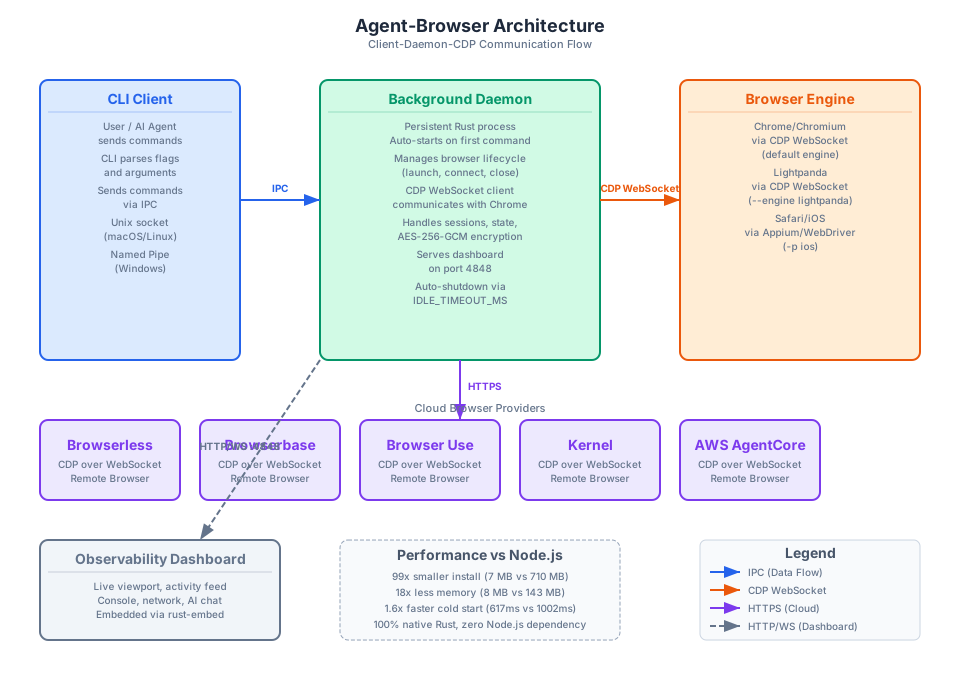
Agent-Browser uses a client-daemon architecture where the CLI sends commands to a persistent background daemon via IPC. On macOS and Linux, IPC uses Unix domain sockets; on Windows, it uses Named Pipes. The CLI is a thin client – it handles command parsing and routing, not browser control.
The background daemon is the core of the system. It is a persistent Rust process that auto-starts on the first command and stays alive between commands, avoiding per-command browser startup overhead. The daemon manages the entire browser lifecycle: launching Chrome instances, establishing CDP WebSocket connections, handling sessions, encrypting state with AES-256-GCM, and serving the observability dashboard on port 4848. It auto-shuts down after a configurable idle timeout via the AGENT_BROWSER_IDLE_TIMEOUT_MS environment variable.
On the right side of the architecture diagram, the Browser Engine layer shows the three local browser engines that agent-browser supports. Chrome/Chromium is the default, connected via CDP WebSocket with auto-discovery of running instances through DevToolsActivePort and auto-download of Chrome for Testing. Lightpanda is an alternative lightweight engine accessible via --engine lightpanda, and Safari/iOS testing is available through Appium/WebDriver integration via -p ios.
At the bottom, five cloud browser providers extend agent-browser to scalable, remote browser infrastructure. Each creates a remote CDP session using provider-specific API keys resolved from environment variables: BROWSERLESS_API_KEY, BROWSERBASE_API_KEY, BROWSER_USE_API_KEY, KERNEL_API_KEY, or AWS SigV4 authentication for AgentCore via AGENTCORE_REGION.
The Observability Dashboard, shown at the bottom-left, is compiled directly into the binary using rust-embed. It provides a web UI at port 4848 with live viewport streaming, activity feed, console output, network monitoring, storage inspection, and AI chat. No separate install step is needed – the dashboard is available as soon as the daemon starts.
Key Insight: Agent-Browser uses a client-daemon architecture where the CLI sends commands to a persistent background daemon via IPC (Unix socket on macOS/Linux, Named Pipe on Windows). The daemon communicates directly with Chrome through CDP WebSocket – no Node.js runtime is needed at all. This means the daemon stays alive between commands, avoiding per-command browser startup overhead, and auto-shuts down after a configurable idle timeout via
AGENT_BROWSER_IDLE_TIMEOUT_MS. The result is a browser automation tool that starts in 617ms and uses only 8 MB of memory.
Installation
Agent-Browser offers four installation methods:
# Install via npm
npm install -g agent-browser

# Install via Homebrew (macOS)
brew install agent-browser

# Install via Cargo (Rust)
cargo install agent-browser

# Build from source (requires Node.js 24+, pnpm 11+, Rust)
git clone https://github.com/vercel-labs/agent-browser.git
cd agent-browser
pnpm install
pnpm build
After installation, verify your setup with the built-in diagnostic command:
agent-browser doctor
The doctor command checks your Chrome installation, daemon health, configuration, security settings, and network connectivity. It can also auto-fix common issues with agent-browser doctor fix.
System requirements: macOS ARM64/x64, Linux ARM64/x64 (glibc and musl/Alpine), or Windows x64. Chrome/Chromium is auto-downloaded via agent-browser install if not already present.
Usage – Core Commands
Basic AI Agent Workflow
The primary interaction model uses accessibility tree snapshots with @eN refs for deterministic, AI-friendly element selection:
# Open a page
agent-browser open example.com

# Get interactive elements with accessibility tree refs
agent-browser snapshot -i --json

# Click by ref (deterministic, AI-friendly)
agent-browser click @e2

# Fill a form field by ref
agent-browser fill @e3 "input text"

# Take a screenshot
agent-browser screenshot page.png

# Close the browser
agent-browser close
AI Chat Mode
Natural language browser control via the Vercel AI Gateway:
# Single-shot natural language command
agent-browser chat "open google.com and search for cats"

# Use a different AI model
agent-browser --model openai/gpt-4o chat "take a screenshot"

# Interactive REPL mode
agent-browser chat
Batch Execution
Execute multiple commands in a single invocation:
# Execute multiple commands
agent-browser batch "open https://example.com" "snapshot -i" "screenshot"

# Or pipe JSON via stdin
echo '{"cmd":"open","url":"https://example.com"}' | agent-browser batch -
Session Persistence
Named sessions auto-save cookies and localStorage:
# Start a named session (auto-saves state)
agent-browser --session-name twitter open twitter.com

# Login once -- cookies and localStorage persist automatically
agent-browser --session-name twitter fill @e1 "username"
agent-browser --session-name twitter fill @e2 "password"
agent-browser --session-name twitter click @e3

# Resume the session later
agent-browser --session-name twitter open twitter.com
# Already logged in!
Cloud Provider Usage
Switch between local and cloud browsers with a single flag:
# Set API key for a cloud provider
export BROWSERLESS_API_KEY="your-key"

# Use Browserless cloud browser
agent-browser -p browserless open https://example.com

# Use Browserbase
export BROWSERBASE_API_KEY="your-key"
agent-browser -p browserbase open https://example.com

# Use AWS AgentCore
export AGENTCORE_REGION="us-east-1"
agent-browser -p agentcore open https://example.com
Key Features
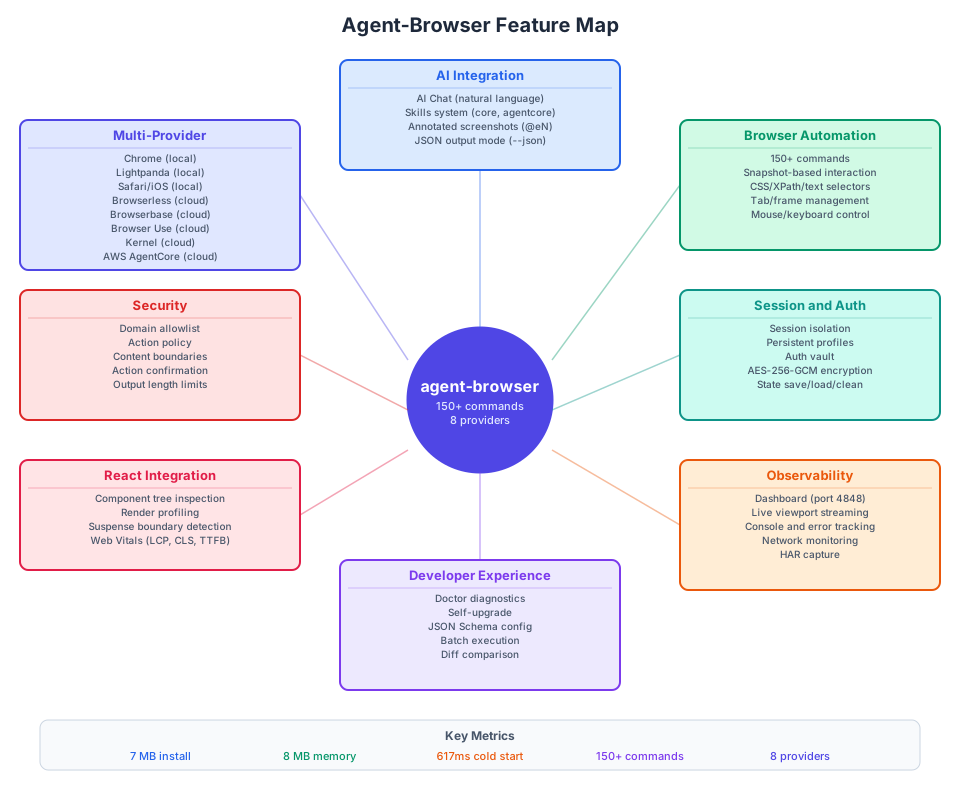
AI Integration is the centerpiece of agent-browser’s design. AI Chat mode allows natural language browser control via the Vercel AI Gateway (default model: anthropic/claude-sonnet-4.6). The Skills system provides version-matched usage guides (skills get core). Annotated screenshots with @eN refs from the accessibility tree provide deterministic, AI-friendly element selection. JSON output mode (--json) enables machine-readable responses for agent pipelines.
Browser Automation covers 150+ commands spanning navigation, element interaction, tab management, frames, dialogs, clipboard, mouse, keyboard, and more. The snapshot-based interaction model uses accessibility tree refs (@e1, @e2, etc.) instead of fragile CSS selectors, making automation deterministic and reliable.
Session and Auth provides multiple isolation levels: session IDs for parallel instances, session names for persistent state, Chrome profile reuse for zero-setup authentication, and an auth vault for encrypted credential storage. State files are encrypted with AES-256-GCM and auto-expire after 30 days by default.
Observability is built in through the embedded dashboard at port 4848, which provides real-time visibility into browser operations with live viewport streaming, activity feed, console output, network request tracking, and HAR capture. WebSocket streaming enables input injection for remote control.
Developer Experience includes the doctor command for diagnosing installation, Chrome, daemon, config, security, and network issues. Self-upgrade via upgrade command. JSON Schema for IDE autocomplete in config files. Batch execution for multi-command workflows. Diff comparison for snapshots, screenshots, and URLs.
React Integration offers first-class React support with component tree inspection, props/hooks/state viewing, render profiling (start/stop), Suspense boundary classification with root-cause grouping, and Web Vitals measurement (LCP, CLS, TTFB, FCP, INP).
Security features multiple opt-in protections: domain allowlist (AGENT_BROWSER_ALLOWED_DOMAINS), action policy file (AGENT_BROWSER_ACTION_POLICY), content boundary markers for LLM safety, action confirmation for destructive operations, and output length limits to prevent context flooding.
Multi-Provider support spans 8 browser providers (3 local, 5 cloud) accessible through a single CLI interface with simple flag-based switching.
Amazing: Agent-Browser provides 150+ commands covering every aspect of browser automation – from basic navigation and element interaction to advanced features like React DevTools component tree inspection, Web Vitals measurement (LCP, CLS, TTFB, FCP, INP), Suspense boundary detection, network request filtering, HAR capture, and AI chat mode powered by the Vercel AI Gateway. The accessibility tree snapshot system uses
@eNrefs that are deterministic and AI-friendly, eliminating the fragility of CSS selectors and XPath expressions that plague traditional browser automation tools.
Provider Ecosystem
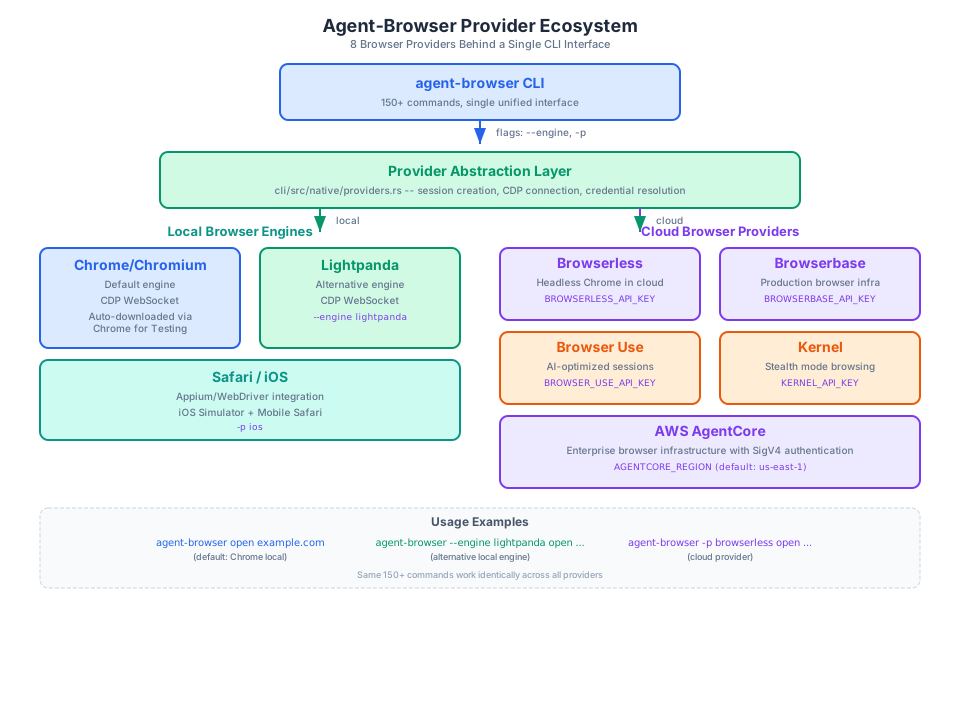
Agent-Browser abstracts 8 browser providers behind a single CLI interface. The provider abstraction layer, implemented in cli/src/native/providers.rs, handles session creation, CDP connection establishment, and credential resolution for each provider.
Local Engines provide three options for running browsers directly on your machine. Chrome/Chromium is the default engine, connected via CDP WebSocket with auto-discovery of running instances and auto-download of Chrome for Testing. Lightpanda is an alternative lightweight engine accessible via --engine lightpanda. Safari/iOS testing is available through Appium/WebDriver integration via -p ios, which launches an iOS Simulator and controls Mobile Safari.
Cloud Providers extend agent-browser to scalable, remote browser infrastructure. Browserless provides headless Chrome in the cloud via BROWSERLESS_API_KEY. Browserbase offers production-grade browser infrastructure via BROWSERBASE_API_KEY. Browser Use provides AI-optimized browser sessions via BROWSER_USE_API_KEY. Kernel offers stealth-mode browsing via KERNEL_API_KEY. AWS AgentCore provides enterprise browser infrastructure with SigV4 authentication via AGENTCORE_REGION.
Regardless of the provider, all 150+ commands work identically. Switching between local Chrome and a cloud provider requires only a flag change: agent-browser open example.com for local, agent-browser -p browserless open example.com for cloud. Credentials are resolved from environment variables, making it straightforward to integrate with CI/CD pipelines and production environments.
Takeaway: Agent-Browser abstracts 8 browser providers behind a single CLI interface. Whether you are running Chrome locally, testing on Safari via iOS Simulator, or scaling to cloud browsers on Browserless, Browserbase, Browser Use, Kernel, or AWS AgentCore, the same 150+ commands work identically. Credentials are resolved from environment variables, and switching providers is as simple as changing a flag:
agent-browser -p browserless open https://example.comfor cloud, oragent-browser --engine lightpanda open https://example.comfor an alternative local engine.
Conclusion
Agent-Browser represents a fundamental shift in browser automation for AI agents. By replacing the Node.js/Playwright runtime with a 100% native Rust implementation, it achieves dramatic performance improvements: 99x smaller install (7 MB vs 710 MB), 18x less memory (8 MB vs 143 MB), and 1.6x faster cold start (617ms vs 1002ms). The client-daemon architecture eliminates per-command browser startup overhead, while the accessibility tree snapshot system with @eN refs provides deterministic, AI-friendly element selection that eliminates the fragility of CSS selectors and XPath expressions.
The 8 browser providers (3 local, 5 cloud) accessible through a single CLI interface make agent-browser versatile enough for development, testing, and production use. The embedded observability dashboard, React DevTools integration, Web Vitals measurement, and comprehensive security features round out a tool that is not just a browser automation CLI – it is a complete browser operations platform designed from the ground up for AI agents.
Open source under the Apache-2.0 license and actively maintained by Vercel Labs, agent-browser is available on GitHub, npm, and crates.io.
Important: The evolution from Node.js/Playwright to 100% native Rust in v0.20.0 was a watershed moment for agent-browser. The install size dropped from 710 MB to 7 MB (99x smaller), memory usage from 143 MB to 8 MB (18x less), and cold start time from 1002ms to 617ms (1.6x faster). Combined with the embedded observability dashboard compiled into the binary via rust-embed, the doctor command for diagnostics, self-upgrade capability, and JSON Schema config validation, agent-browser is not just a browser automation tool – it is a complete browser operations platform designed from the ground up for AI agents.
Links:

Enjoyed this post? Never miss out on future posts by following us


